Tips to protect your blog
By HotBlogTips.com
First, A Couple Of Tips
 Backup your blog files and database before AND
after any major changes and WordPress or plugin
updates.
 Backup on a regular schedule. There are free
WordPress plugins that can help you with this.
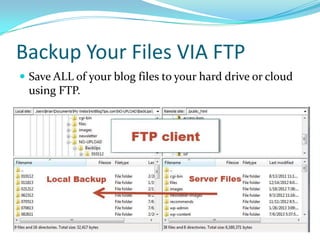
Backup Your Files VIA FTP
 Save ALL of your blog files to your hard drive or cloud
using FTP.
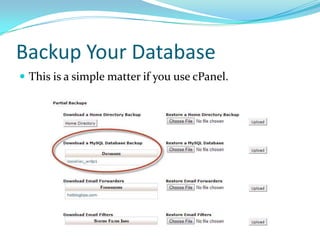
Backup Your Database
 This is a simple matter if you use cPanel.
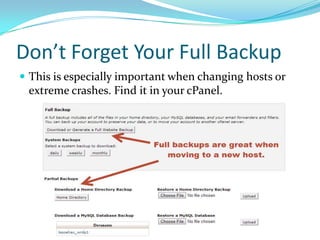
Don’t Forget Your Full Backup
 This is especially important when changing hosts or
extreme crashes. Find it in your cPanel.
Now, For The Recovery Tips…
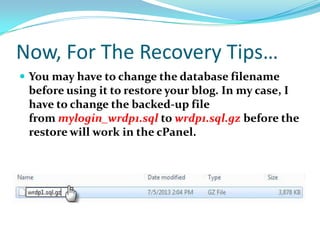
 You may have to change the database filename
before using it to restore your blog. In my case, I
have to change the backed-up file
from mylogin_wrdp1.sql to wrdp1.sql.gz before the
restore will work in the cPanel.
Don’t Just Write Over Or Delete
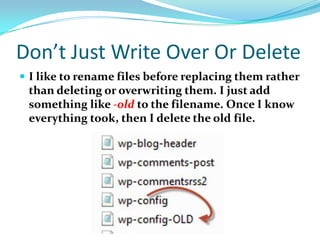
 I like to rename files before replacing them rather
than deleting or overwriting them. I just add
something like -old to the filename. Once I know
everything took, then I delete the old file.
Evaluate The Situation
 Step back and evaluate the situation before
attempting a database restoration You may only
need to replace a particular file, depending on
what caused the problem.
Don't Be Afraid To Seek Help.
 If you’re stumped, ask a friend, find help in
forums, Facebook or LinkedIn Groups or Google
Plus Communities. There are always someone
willing to offer a helping hand.
Understand Which File Is Corrupt
 If your blog can be fixed simply by replacing a
single file with one you have backed up using FTP,
be sure you know while file needs replaced.
 Did you know, for example, Genesis Child theme
has it's own Functions.php separate from the
main WordPress Functions.php?
Rest Easy And Enjoy Your Blog
 Knowing your blog is backed up and ready for
mistakes, crashes and hackers is a piece of mind
that’s well worth the few minutes it takes up.
 Now you are free to create content until your heart’s
content, because that’s what we bloggers do.
 Have fun and enjoy your blog – the smart way.

Blog backup & recovery

  • 1.
    Tips to protectyour blog By HotBlogTips.com
  • 2.
    First, A CoupleOf Tips  Backup your blog files and database before AND after any major changes and WordPress or plugin updates.  Backup on a regular schedule. There are free WordPress plugins that can help you with this.
  • 3.
    Backup Your FilesVIA FTP  Save ALL of your blog files to your hard drive or cloud using FTP.
  • 4.
    Backup Your Database This is a simple matter if you use cPanel.
  • 5.
    Don’t Forget YourFull Backup  This is especially important when changing hosts or extreme crashes. Find it in your cPanel.
  • 6.
    Now, For TheRecovery Tips…  You may have to change the database filename before using it to restore your blog. In my case, I have to change the backed-up file from mylogin_wrdp1.sql to wrdp1.sql.gz before the restore will work in the cPanel.
  • 7.
    Don’t Just WriteOver Or Delete  I like to rename files before replacing them rather than deleting or overwriting them. I just add something like -old to the filename. Once I know everything took, then I delete the old file.
  • 8.
    Evaluate The Situation Step back and evaluate the situation before attempting a database restoration You may only need to replace a particular file, depending on what caused the problem.
  • 9.
    Don't Be AfraidTo Seek Help.  If you’re stumped, ask a friend, find help in forums, Facebook or LinkedIn Groups or Google Plus Communities. There are always someone willing to offer a helping hand.
  • 10.
    Understand Which FileIs Corrupt  If your blog can be fixed simply by replacing a single file with one you have backed up using FTP, be sure you know while file needs replaced.  Did you know, for example, Genesis Child theme has it's own Functions.php separate from the main WordPress Functions.php?
  • 11.
    Rest Easy AndEnjoy Your Blog  Knowing your blog is backed up and ready for mistakes, crashes and hackers is a piece of mind that’s well worth the few minutes it takes up.  Now you are free to create content until your heart’s content, because that’s what we bloggers do.  Have fun and enjoy your blog – the smart way.