
ESB-DEMOS
ESB TOOLKIT HOW TO PLAY
DEMOS
• Simple one-way itinerary Routing
• Push data from ESB to DB by stored procedure
SIMPLE
ONE-WAY
ITINERARY
ROUTING
1. Create/Deploy Employee Schema
2. Create Receive[on Ramp]
3. Create dynamic Send port[Off Ramp]
4. Create New Itinerary
5. On Ramp Properties
6. Itinerary Service (Routing)
7. Itinerary Service File Resolver
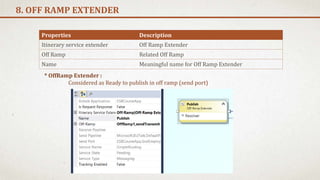
8. Off Ramp Extender
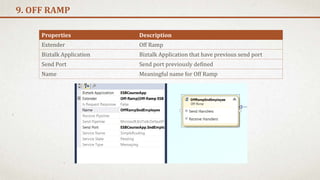
9. Off Ramp
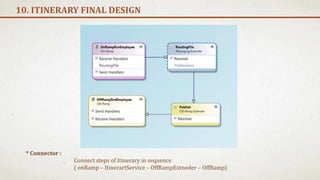
10. Itinerary Final Design
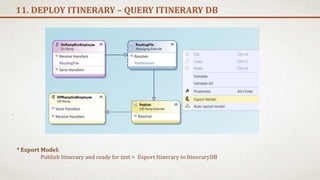
11. Deploy Itinerary – Query Itinerary DB
12. Test Rout
13. Export Binding for receive-send Ports
<< STEPS
DEMO 1
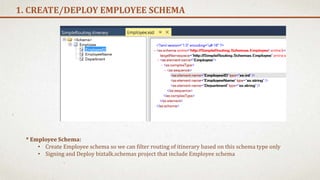
1. CREATE/DEPLOY EMPLOYEE SCHEMA
* Employee Schema:
• Create Employee schema so we can filter routing of itinerary based on this schema type only
• Signing and Deploy biztalk.schemas project that include Employee schema
1. Create one-way receive port
2. Create Receive location
3. Enable Receive location
2. RECEIVE PORT PROPERTIES
Properties Value
Name ESBCourseApp.RcvEmployee
Properties Value
Name ESBCourseApp.RcvEmployee.File
Adapter File
Receive Folder Full Path of folder Like : c:ProjectsTestIn
Receive Pipeline ItinerarySelectRecieveXml
ItineraryFactKey Resolver.Itinerary
ResolverCOnnectionString ITINERARY:name=SimpleRouting;
* Note : to see ESB pipelines you must add reference for
[Microsoft.Practices.ESB] Biztalk application
1. Create Dynamic one-way send port
2. Send Port Filters
3. Start send port
3. SEND PORT PROPERTIES
Properties Value
Name ESBCourseApp.SndEmployee.File
Properties Value
ServiceName SimpleRouting
ServiceState Pending
ServiceType Messaging
MessageType Filter Based on Schema (Filter Option way)
* Note : ServiceName , ServiceState , ServiceType is Mandatory
for Send Port so they can subscribe to itinerary
* Note : to see these filter properties you must add
reference for [Microsoft.Practices.ESB] Biztalk application
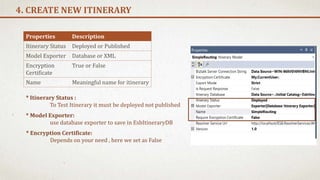
4. CREATE NEW ITINERARY
Properties Description
Itinerary Status Deployed or Published
Model Exporter Database or XML
Encryption
Certificate
True or False
Name Meaningful name for itinerary
* Itinerary Status :
To Test Itinerary it must be deployed not published
* Model Exporter:
use database exporter to save in EsbItineraryDB
* Encryption Certificate:
Depends on your need , here we set as False
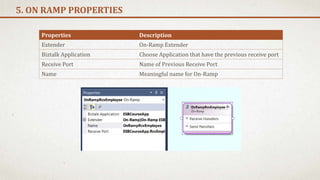
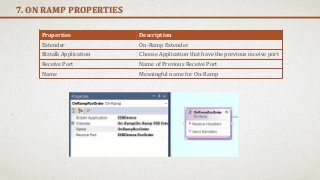
5. ON RAMP PROPERTIES
Properties Description
Extender On-Ramp Extender
Biztalk Application Choose Application that have the previous receive port
Receive Port Name of Previous Receive Port
Name Meaningful name for On-Ramp
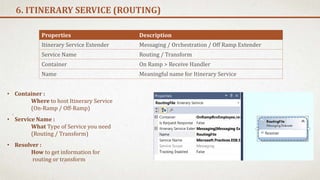
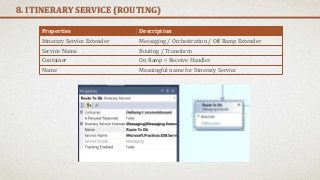
6. ITINERARY SERVICE (ROUTING)
Properties Description
Itinerary Service Extender Messaging / Orchestration / Off Ramp Extender
Service Name Routing / Transform
Container On Ramp > Receive Handler
Name Meaningful name for Itinerary Service
• Container :
Where to host Itinerary Service
(On-Ramp / Off-Ramp)
• Resolver :
How to get information for
routing or transform
• Service Name :
What Type of Service you need
(Routing / Transform)
7. ITINERARY SERVICE FILE RESOLVER
Properties Description
Resolver Implementation Types of where you Resolver received Message
like [Static / BRE / UDDI3 / MessageContext]
Transport Name How to Make Resolution Like [File / WCF / SMTP / FTP]
Transport Location Location where Resolution Execution
Like c:ProjectsTestOutOrder_%MessageIn%.xml
Name Meaningful name for Resolver
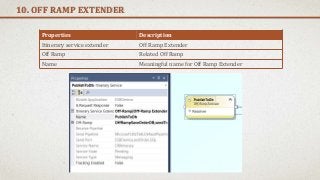
8. OFF RAMP EXTENDER
Properties Description
Itinerary service extender Off Ramp Extender
Off Ramp Related Off Ramp
Name Meaningful name for Off Ramp Extender
* OffRamp Extender :
Considered as Ready to publish in off ramp (send port)
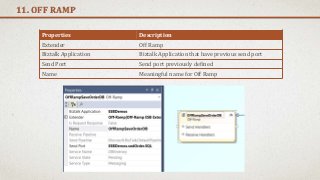
9. OFF RAMP
Properties Description
Extender Off Ramp
Biztalk Application Biztalk Application that have previous send port
Send Port Send port previously defined
Name Meaningful name for Off Ramp
10. ITINERARY FINAL DESIGN
* Connector :
Connect steps of Itinerary in sequence
( onRamp – ItinerartService – OffRampExtneder – OffRamp)
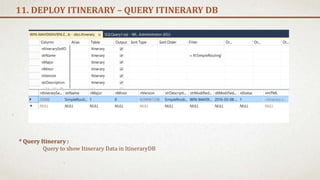
11. DEPLOY ITINERARY – QUERY ITINERARY DB
* Export Model:
Publish Itinerary and ready for test > Export Itinerary to ItineraryDB
11. DEPLOY ITINERARY – QUERY ITINERARY DB
* Query Itinerary :
Query to show Itinerary Data in ItineraryDB
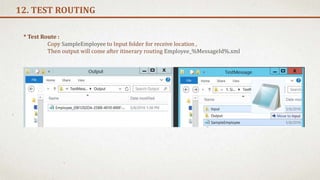
12. TEST ROUTING
* Test Route :
Copy SampleEmployee to Input folder for receive location ,
Then output will come after itinerary routing Employee_%MessageId%.xml
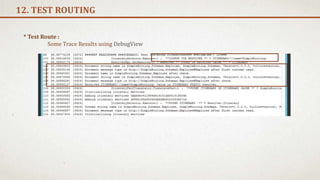
12. TEST ROUTING
* Test Route :
Some Trace Results using DebugView
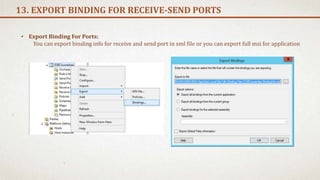
13. EXPORT BINDING FOR RECEIVE-SEND PORTS
• Export Binding For Ports:
You can export binding info for receive and send port in xml file or you can export full msi for application
PUSH DATA
FROM
ESB TO DB
BY
STORED
PROCEDURE
1. Install Biztalk adapters ( Line Of Business - pack)
2. Create stored procedure for insert into order table
3. Generate schema for SQL Stored Procedure
4. Create Receive[on Ramp]
5. Create dynamic Send port[Off Ramp]
6. Create New Itinerary
7. On Ramp Properties
8. Itinerary Service (Routing)
9. Itinerary Service WCF-Custom(SQL) Resolver
10. Off Ramp Extender
11. Off Ramp
12. Itinerary Final Design
13. Test Rout
<< STEPS
DEMO 2
1. INSTALL BIZTALK ADAPTERS ( LINE OF BUSINESS - PACK)
* BizTalk Adapter Pack can be divided into two broad categories:
LOB adapters : adapters provide service-oriented programming model to access LOB systems
for example, adapters for SAP or Siebel.
Data adapters : adapters provide service-oriented programming model to access databases
for example, adapters for the Oracle database or SQL Server.
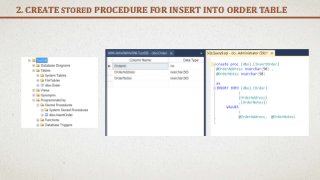
2. CREATE STORED PROCEDURE FOR INSERT INTO ORDER TABLE
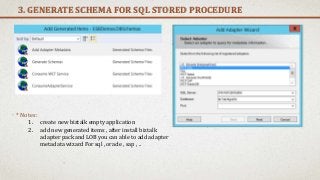
3. GENERATE SCHEMA FOR SQL STORED PROCEDURE
* Notes :
1. create new biztalk empty application
2. add new generated items , after install biztalk
adapter pack and LOB you can able to add adapter
metadata wizard For sql , oracle , sap , ..
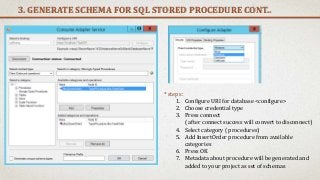
3. GENERATE SCHEMA FOR SQL STORED PROCEDURE CONT..
* steps :
1. Configure URI for database <configure>
2. Choose credential type
3. Press connect
( after connect success will convert to disconnect)
4. Select category ( procedures)
5. Add InsertOrder procedure from available
categories
6. Press OK
7. Metadata about procedure will be generated and
added to your project as set of schemas
4. CREATE RECEIVE[ON RAMP]
* Notes :
Same as Demo 1 , just change name of Itinerary in ResolverConnectionString
5. CREATE DYNAMIC SEND PORT[OFF RAMP]
• Notes :
Same as Demo 1 , for the 3 major filter properties to bind between itinerary and send port
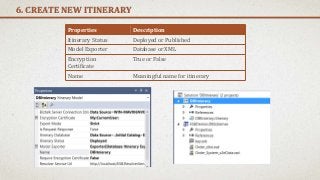
6. CREATE NEW ITINERARY
Properties Description
Itinerary Status Deployed or Published
Model Exporter Database or XML
Encryption
Certificate
True or False
Name Meaningful name for itinerary
7. ON RAMP PROPERTIES
Properties Description
Extender On-Ramp Extender
Biztalk Application Choose Application that have the previous receive port
Receive Port Name of Previous Receive Port
Name Meaningful name for On-Ramp
8. ITINERARY SERVICE (ROUTING)
Properties Description
Itinerary Service Extender Messaging / Orchestration / Off Ramp Extender
Service Name Routing / Transform
Container On Ramp > Receive Handler
Name Meaningful name for Itinerary Service
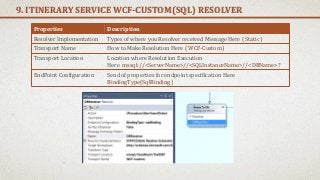
9. ITINERARY SERVICE WCF-CUSTOM(SQL) RESOLVER
Properties Description
Resolver Implementation Types of where you Resolver received Message Here ( Static)
Transport Name How to Make Resolution Here ( WCF-Custom)
Transport Location Location where Resolution Execution
Here mssql://<ServerName>//<SQLInstanceName>//<DBName>?
EndPoint Configuration Send of properties for endpoint specification Here
BindingType(SqlBinding )
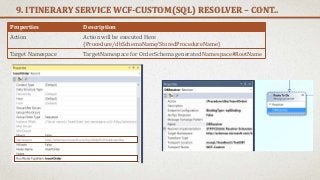
9. ITINERARY SERVICE WCF-CUSTOM(SQL) RESOLVER – CONT..
Properties Description
Action Action will be executed Here
{Procedure/dbSchemaName/StoredProcedureName}
Target Namespace TargetNamespace for OrderSchema generated Namespace#RootName
10. OFF RAMP EXTENDER
Properties Description
Itinerary service extender Off Ramp Extender
Off Ramp Related Off Ramp
Name Meaningful name for Off Ramp Extender
11. OFF RAMP
Properties Description
Extender Off Ramp
Biztalk Application Biztalk Application that have previous send port
Send Port Send port previously defined
Name Meaningful name for Off Ramp
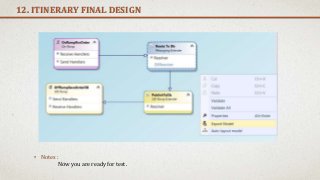
12. ITINERARY FINAL DESIGN
• Notes :
Now you are ready for test.
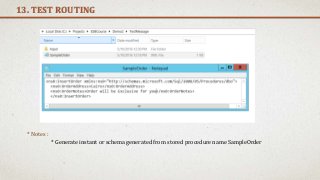
13. TEST ROUTING
* Notes :
* Generate instant or schema generated from stored procedure name SampleOrder
13. TEST ROUTING CONT..
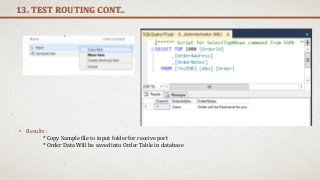
• Results :
* Copy Sample file to input folder for receive port
* Order Data Will be saved into Order Table in database
13. TEST ROUTING CONT..
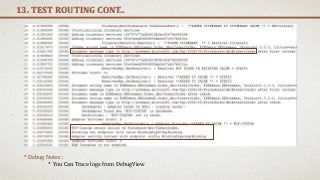
* Debug Notes :
* You Can Trace logs from DebugView
DEMO
TITLE
1. Step 1
<< STEPS
DEMO 3
THANKS
ENJOY ESB .. ELM

Biztalk ESB Toolkit Demos

  • 1.
  • 2.
    DEMOS • Simple one-wayitinerary Routing • Push data from ESB to DB by stored procedure
  • 3.
    SIMPLE ONE-WAY ITINERARY ROUTING 1. Create/Deploy EmployeeSchema 2. Create Receive[on Ramp] 3. Create dynamic Send port[Off Ramp] 4. Create New Itinerary 5. On Ramp Properties 6. Itinerary Service (Routing) 7. Itinerary Service File Resolver 8. Off Ramp Extender 9. Off Ramp 10. Itinerary Final Design 11. Deploy Itinerary – Query Itinerary DB 12. Test Rout 13. Export Binding for receive-send Ports << STEPS DEMO 1
  • 4.
    1. CREATE/DEPLOY EMPLOYEESCHEMA * Employee Schema: • Create Employee schema so we can filter routing of itinerary based on this schema type only • Signing and Deploy biztalk.schemas project that include Employee schema
  • 5.
    1. Create one-wayreceive port 2. Create Receive location 3. Enable Receive location 2. RECEIVE PORT PROPERTIES Properties Value Name ESBCourseApp.RcvEmployee Properties Value Name ESBCourseApp.RcvEmployee.File Adapter File Receive Folder Full Path of folder Like : c:ProjectsTestIn Receive Pipeline ItinerarySelectRecieveXml ItineraryFactKey Resolver.Itinerary ResolverCOnnectionString ITINERARY:name=SimpleRouting; * Note : to see ESB pipelines you must add reference for [Microsoft.Practices.ESB] Biztalk application
  • 6.
    1. Create Dynamicone-way send port 2. Send Port Filters 3. Start send port 3. SEND PORT PROPERTIES Properties Value Name ESBCourseApp.SndEmployee.File Properties Value ServiceName SimpleRouting ServiceState Pending ServiceType Messaging MessageType Filter Based on Schema (Filter Option way) * Note : ServiceName , ServiceState , ServiceType is Mandatory for Send Port so they can subscribe to itinerary * Note : to see these filter properties you must add reference for [Microsoft.Practices.ESB] Biztalk application
  • 7.
    4. CREATE NEWITINERARY Properties Description Itinerary Status Deployed or Published Model Exporter Database or XML Encryption Certificate True or False Name Meaningful name for itinerary * Itinerary Status : To Test Itinerary it must be deployed not published * Model Exporter: use database exporter to save in EsbItineraryDB * Encryption Certificate: Depends on your need , here we set as False
  • 8.
    5. ON RAMPPROPERTIES Properties Description Extender On-Ramp Extender Biztalk Application Choose Application that have the previous receive port Receive Port Name of Previous Receive Port Name Meaningful name for On-Ramp
  • 9.
    6. ITINERARY SERVICE(ROUTING) Properties Description Itinerary Service Extender Messaging / Orchestration / Off Ramp Extender Service Name Routing / Transform Container On Ramp > Receive Handler Name Meaningful name for Itinerary Service • Container : Where to host Itinerary Service (On-Ramp / Off-Ramp) • Resolver : How to get information for routing or transform • Service Name : What Type of Service you need (Routing / Transform)
  • 10.
    7. ITINERARY SERVICEFILE RESOLVER Properties Description Resolver Implementation Types of where you Resolver received Message like [Static / BRE / UDDI3 / MessageContext] Transport Name How to Make Resolution Like [File / WCF / SMTP / FTP] Transport Location Location where Resolution Execution Like c:ProjectsTestOutOrder_%MessageIn%.xml Name Meaningful name for Resolver
  • 11.
    8. OFF RAMPEXTENDER Properties Description Itinerary service extender Off Ramp Extender Off Ramp Related Off Ramp Name Meaningful name for Off Ramp Extender * OffRamp Extender : Considered as Ready to publish in off ramp (send port)
  • 12.
    9. OFF RAMP PropertiesDescription Extender Off Ramp Biztalk Application Biztalk Application that have previous send port Send Port Send port previously defined Name Meaningful name for Off Ramp
  • 13.
    10. ITINERARY FINALDESIGN * Connector : Connect steps of Itinerary in sequence ( onRamp – ItinerartService – OffRampExtneder – OffRamp)
  • 14.
    11. DEPLOY ITINERARY– QUERY ITINERARY DB * Export Model: Publish Itinerary and ready for test > Export Itinerary to ItineraryDB
  • 15.
    11. DEPLOY ITINERARY– QUERY ITINERARY DB * Query Itinerary : Query to show Itinerary Data in ItineraryDB
  • 16.
    12. TEST ROUTING *Test Route : Copy SampleEmployee to Input folder for receive location , Then output will come after itinerary routing Employee_%MessageId%.xml
  • 17.
    12. TEST ROUTING *Test Route : Some Trace Results using DebugView
  • 18.
    13. EXPORT BINDINGFOR RECEIVE-SEND PORTS • Export Binding For Ports: You can export binding info for receive and send port in xml file or you can export full msi for application
  • 19.
    PUSH DATA FROM ESB TODB BY STORED PROCEDURE 1. Install Biztalk adapters ( Line Of Business - pack) 2. Create stored procedure for insert into order table 3. Generate schema for SQL Stored Procedure 4. Create Receive[on Ramp] 5. Create dynamic Send port[Off Ramp] 6. Create New Itinerary 7. On Ramp Properties 8. Itinerary Service (Routing) 9. Itinerary Service WCF-Custom(SQL) Resolver 10. Off Ramp Extender 11. Off Ramp 12. Itinerary Final Design 13. Test Rout << STEPS DEMO 2
  • 20.
    1. INSTALL BIZTALKADAPTERS ( LINE OF BUSINESS - PACK) * BizTalk Adapter Pack can be divided into two broad categories: LOB adapters : adapters provide service-oriented programming model to access LOB systems for example, adapters for SAP or Siebel. Data adapters : adapters provide service-oriented programming model to access databases for example, adapters for the Oracle database or SQL Server.
  • 21.
    2. CREATE STOREDPROCEDURE FOR INSERT INTO ORDER TABLE
  • 22.
    3. GENERATE SCHEMAFOR SQL STORED PROCEDURE * Notes : 1. create new biztalk empty application 2. add new generated items , after install biztalk adapter pack and LOB you can able to add adapter metadata wizard For sql , oracle , sap , ..
  • 23.
    3. GENERATE SCHEMAFOR SQL STORED PROCEDURE CONT.. * steps : 1. Configure URI for database <configure> 2. Choose credential type 3. Press connect ( after connect success will convert to disconnect) 4. Select category ( procedures) 5. Add InsertOrder procedure from available categories 6. Press OK 7. Metadata about procedure will be generated and added to your project as set of schemas
  • 24.
    4. CREATE RECEIVE[ONRAMP] * Notes : Same as Demo 1 , just change name of Itinerary in ResolverConnectionString
  • 25.
    5. CREATE DYNAMICSEND PORT[OFF RAMP] • Notes : Same as Demo 1 , for the 3 major filter properties to bind between itinerary and send port
  • 26.
    6. CREATE NEWITINERARY Properties Description Itinerary Status Deployed or Published Model Exporter Database or XML Encryption Certificate True or False Name Meaningful name for itinerary
  • 27.
    7. ON RAMPPROPERTIES Properties Description Extender On-Ramp Extender Biztalk Application Choose Application that have the previous receive port Receive Port Name of Previous Receive Port Name Meaningful name for On-Ramp
  • 28.
    8. ITINERARY SERVICE(ROUTING) Properties Description Itinerary Service Extender Messaging / Orchestration / Off Ramp Extender Service Name Routing / Transform Container On Ramp > Receive Handler Name Meaningful name for Itinerary Service
  • 29.
    9. ITINERARY SERVICEWCF-CUSTOM(SQL) RESOLVER Properties Description Resolver Implementation Types of where you Resolver received Message Here ( Static) Transport Name How to Make Resolution Here ( WCF-Custom) Transport Location Location where Resolution Execution Here mssql://<ServerName>//<SQLInstanceName>//<DBName>? EndPoint Configuration Send of properties for endpoint specification Here BindingType(SqlBinding )
  • 30.
    9. ITINERARY SERVICEWCF-CUSTOM(SQL) RESOLVER – CONT.. Properties Description Action Action will be executed Here {Procedure/dbSchemaName/StoredProcedureName} Target Namespace TargetNamespace for OrderSchema generated Namespace#RootName
  • 31.
    10. OFF RAMPEXTENDER Properties Description Itinerary service extender Off Ramp Extender Off Ramp Related Off Ramp Name Meaningful name for Off Ramp Extender
  • 32.
    11. OFF RAMP PropertiesDescription Extender Off Ramp Biztalk Application Biztalk Application that have previous send port Send Port Send port previously defined Name Meaningful name for Off Ramp
  • 33.
    12. ITINERARY FINALDESIGN • Notes : Now you are ready for test.
  • 34.
    13. TEST ROUTING *Notes : * Generate instant or schema generated from stored procedure name SampleOrder
  • 35.
    13. TEST ROUTINGCONT.. • Results : * Copy Sample file to input folder for receive port * Order Data Will be saved into Order Table in database
  • 36.
    13. TEST ROUTINGCONT.. * Debug Notes : * You Can Trace logs from DebugView
  • 37.
  • 38.