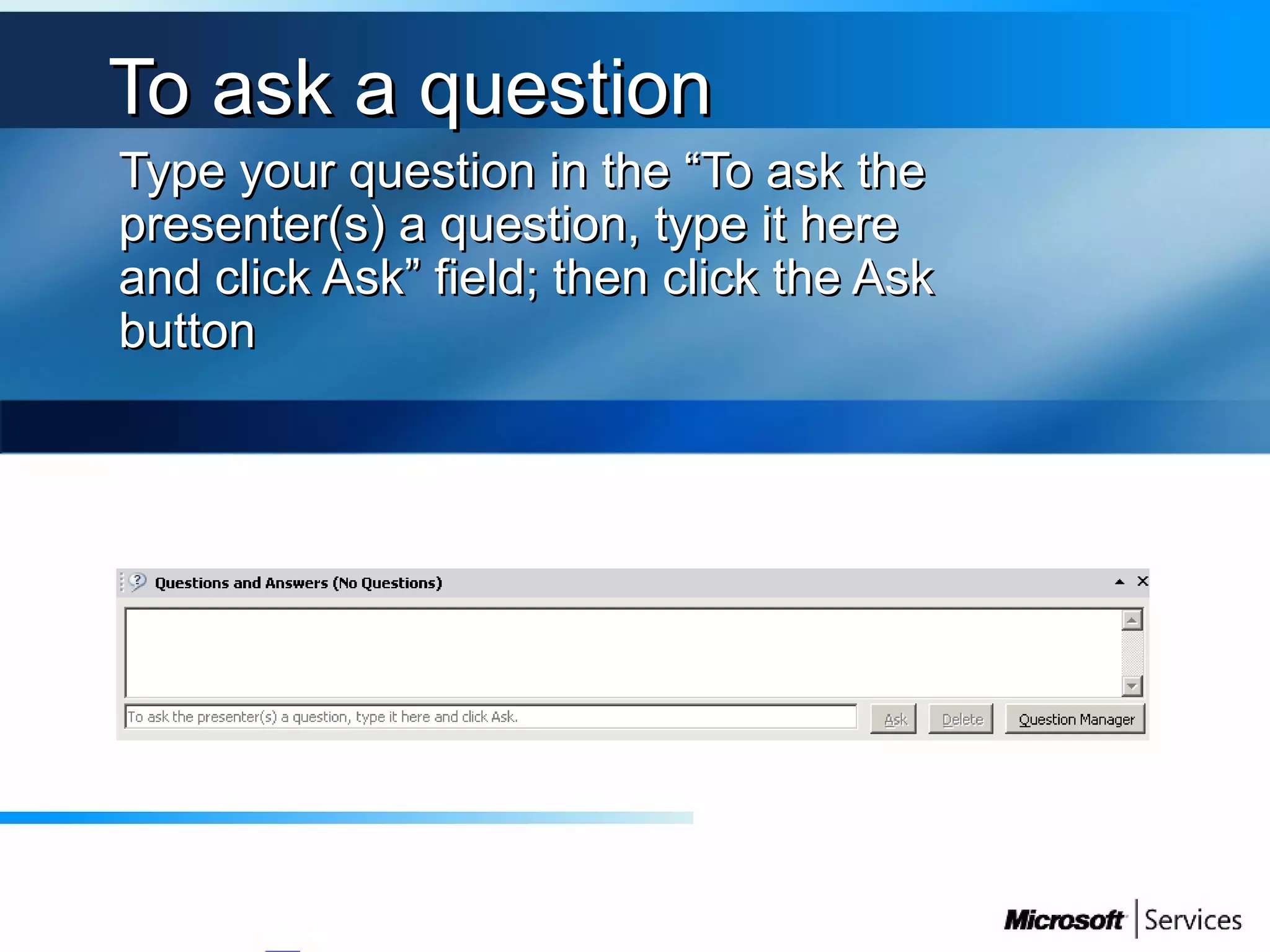


To ask a questionTo ask a question
Type your question in the “To ask theType your question in the “To ask the
presenter(s) a question, type it herepresenter(s) a question, type it here
and click Ask” field; then click the Askand click Ask” field; then click the Ask
buttonbutton
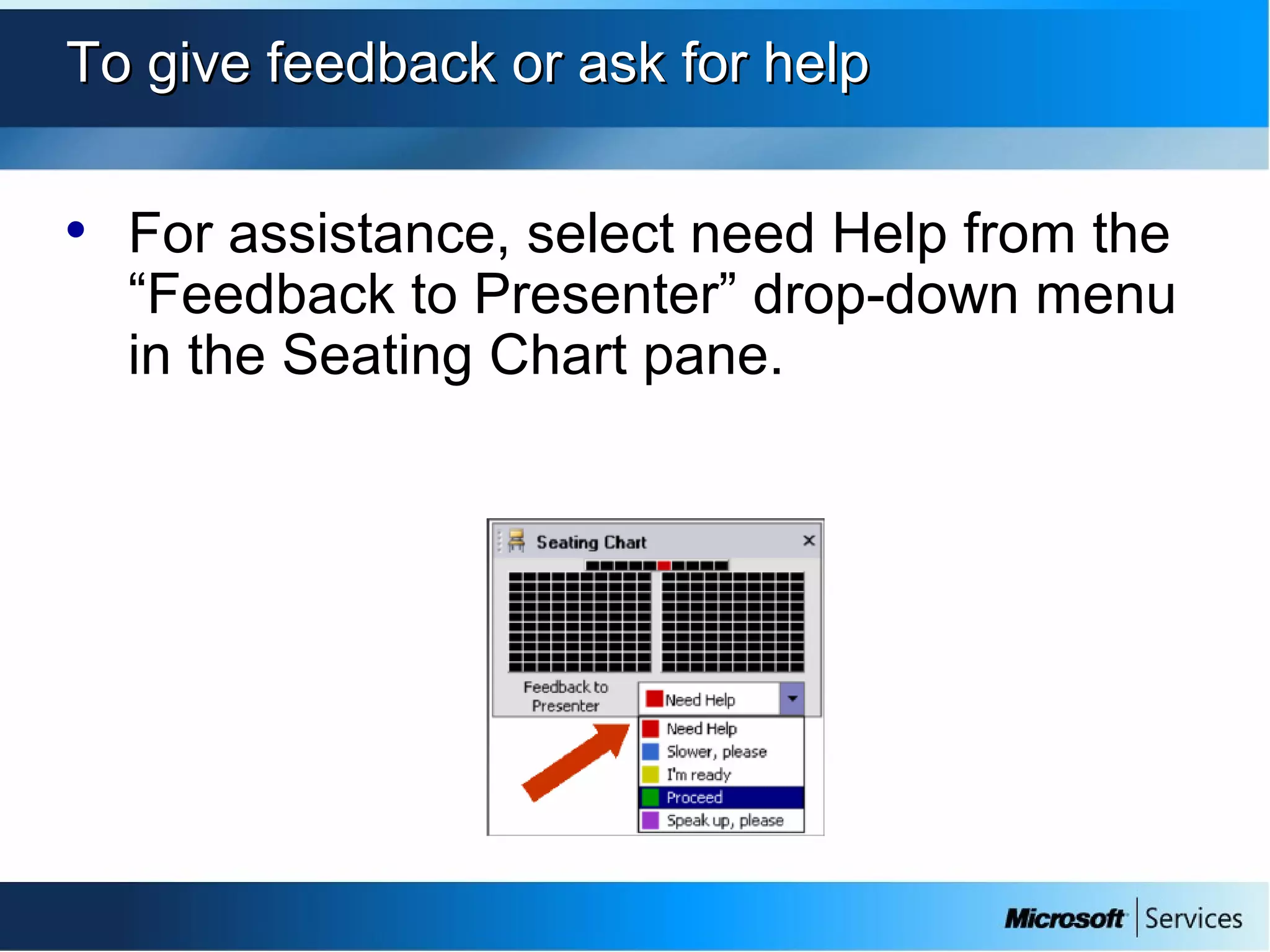
To give feedback or ask for helpTo give feedback or ask for help
• For assistance, select need Help from the
“Feedback to Presenter” drop-down menu
in the Seating Chart pane.
Introduction to BizTalk Server 2009Introduction to BizTalk Server 2009
OverviewOverview
• BizTalk and application integration
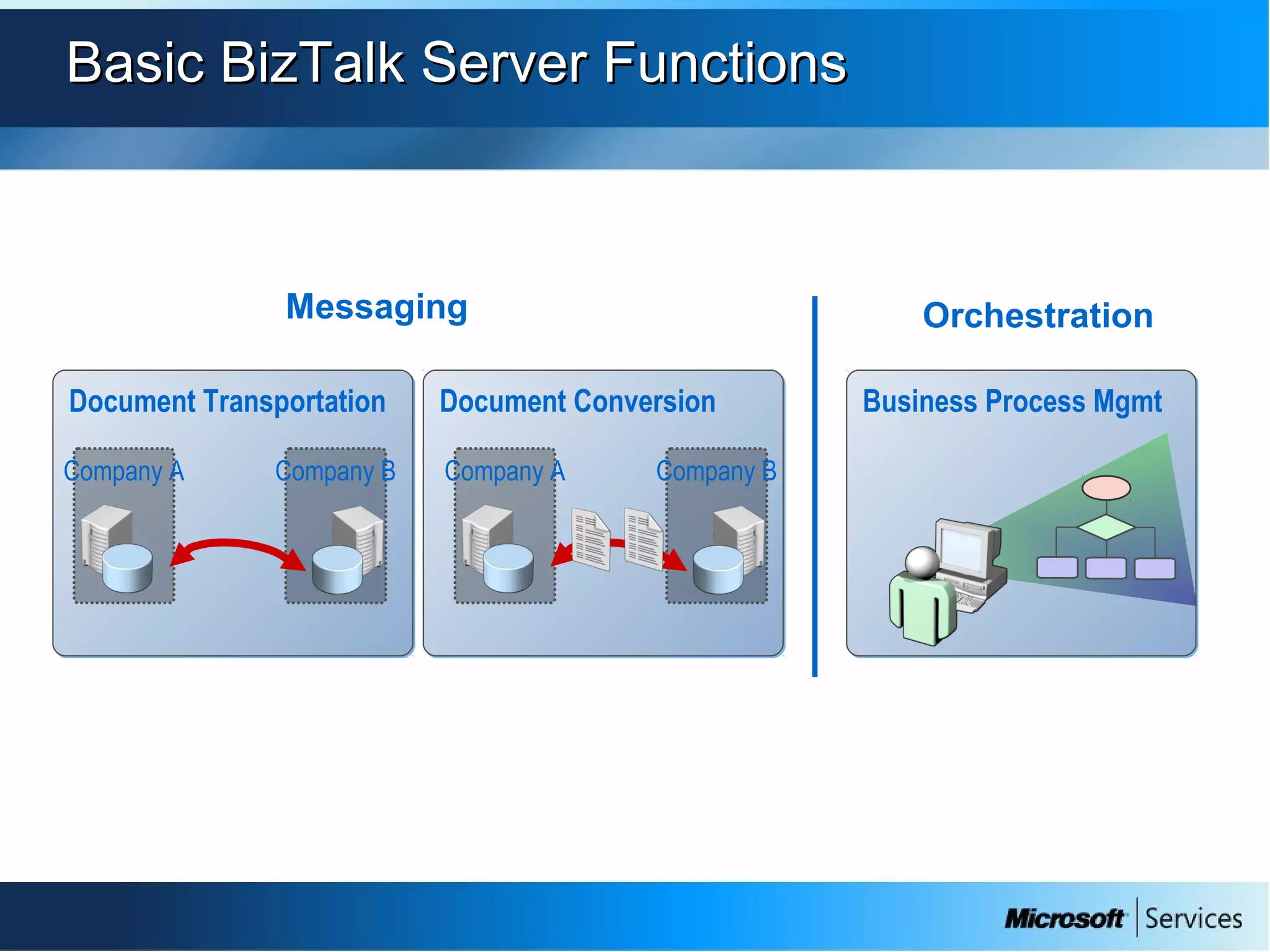
• Basic BizTalk Server functions
• BizTalk Server components
• Document transportation
• Document conversion
• Business process management
• How BizTalk Server processes messages
• Case study: an enterprise application
integration scenario
InternetInternet
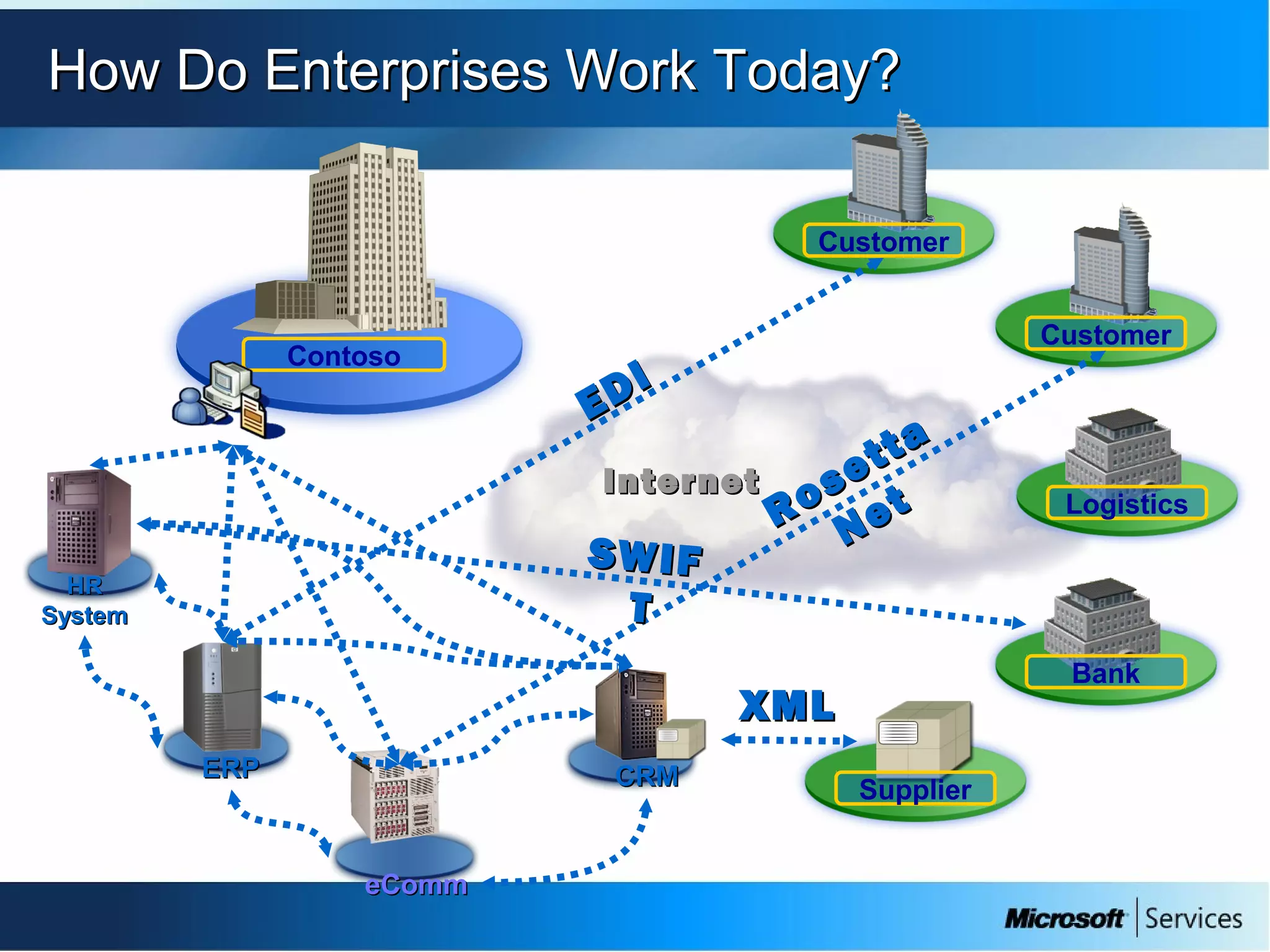
How Do Enterprises Work Today?How Do Enterprises Work Today?
Contoso
ERPERP
HRHR
SystemSystem
eCommeComm
CRMCRM
Logistics
Customer
Customer
Bank
Supplier
EDI
EDI
Rosetta
Rosetta
Net
Net
SWIFSWIF
TT
XMLXML
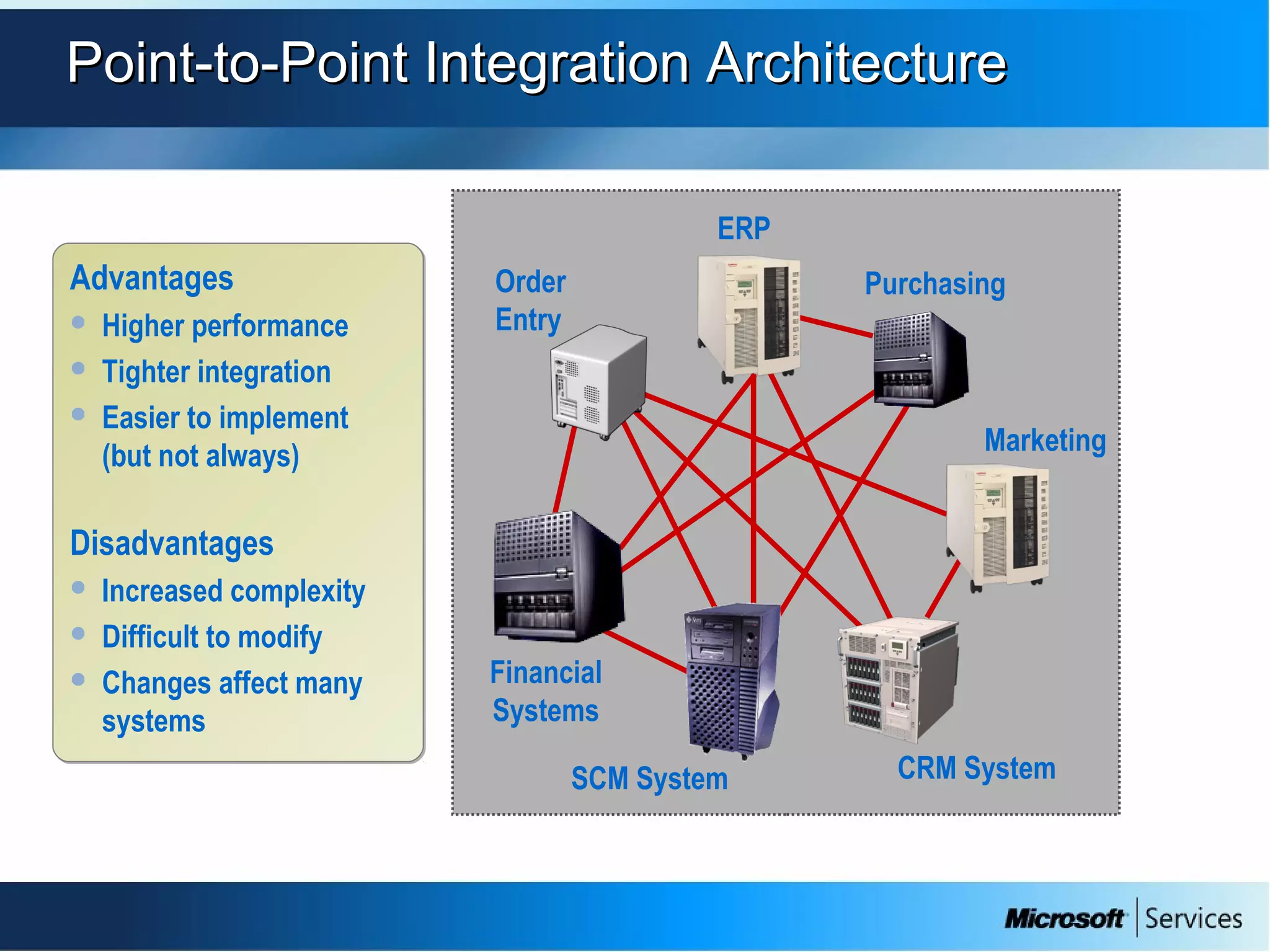
Point-to-Point Integration ArchitecturePoint-to-Point Integration Architecture
CRM System
Purchasing
SCM System
Order
Entry
ERP
Advantages
 Higher performance
 Tighter integration
 Easier to implement
(but not always)
Disadvantages
 Increased complexity
 Difficult to modify
 Changes affect many
systems
Advantages
 Higher performance
 Tighter integration
 Easier to implement
(but not always)
Disadvantages
 Increased complexity
 Difficult to modify
 Changes affect many
systems
Financial
Systems
Marketing
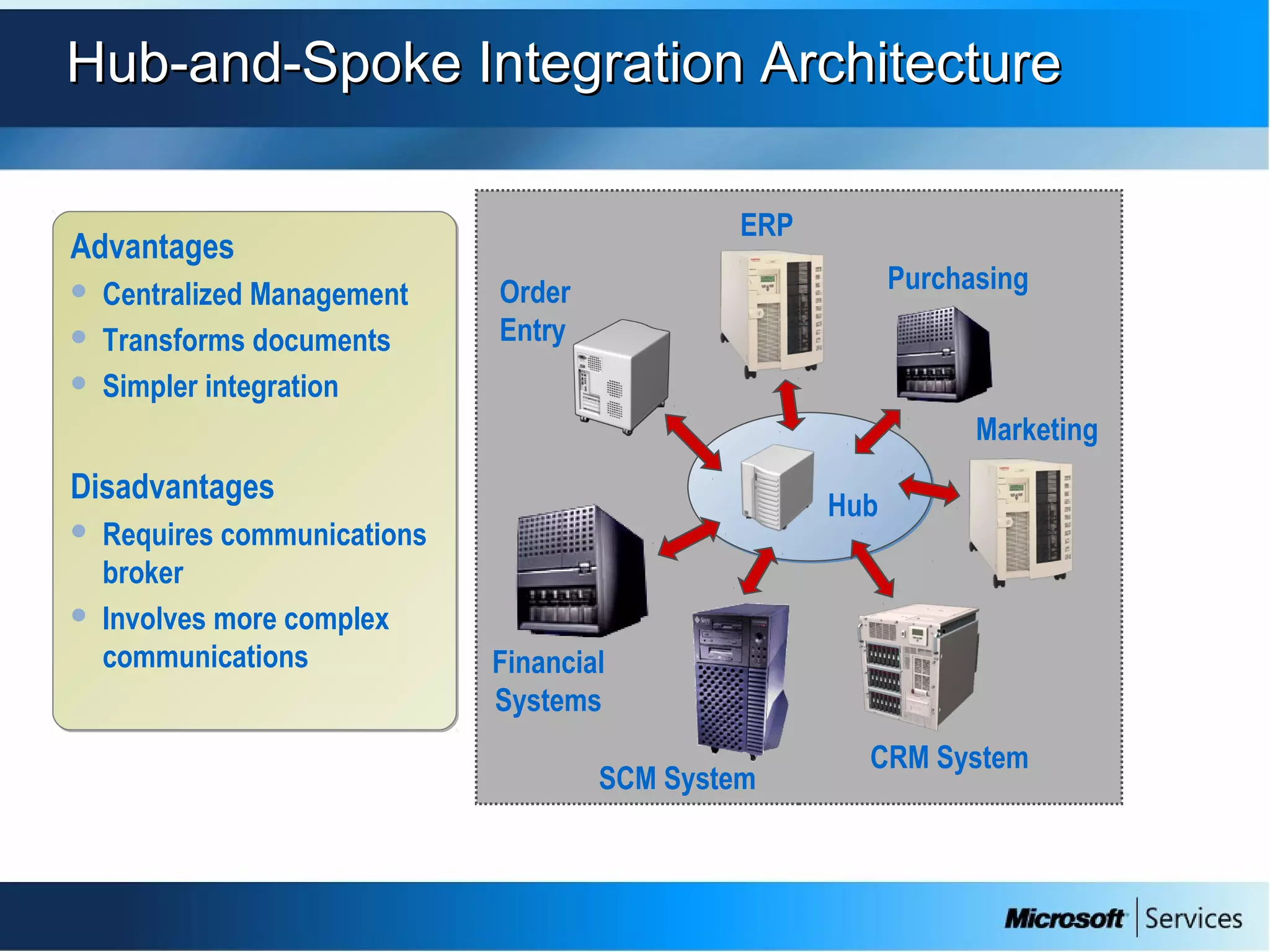
Hub-and-Spoke Integration ArchitectureHub-and-Spoke Integration Architecture
CRM System
Purchasing
SCM System
Order
Entry
ERP
Advantages
 Centralized Management
 Transforms documents
 Simpler integration
Disadvantages
 Requires communications
broker
 Involves more complex
communications
Advantages
 Centralized Management
 Transforms documents
 Simpler integration
Disadvantages
 Requires communications
broker
 Involves more complex
communications Financial
Systems
Marketing
Hub
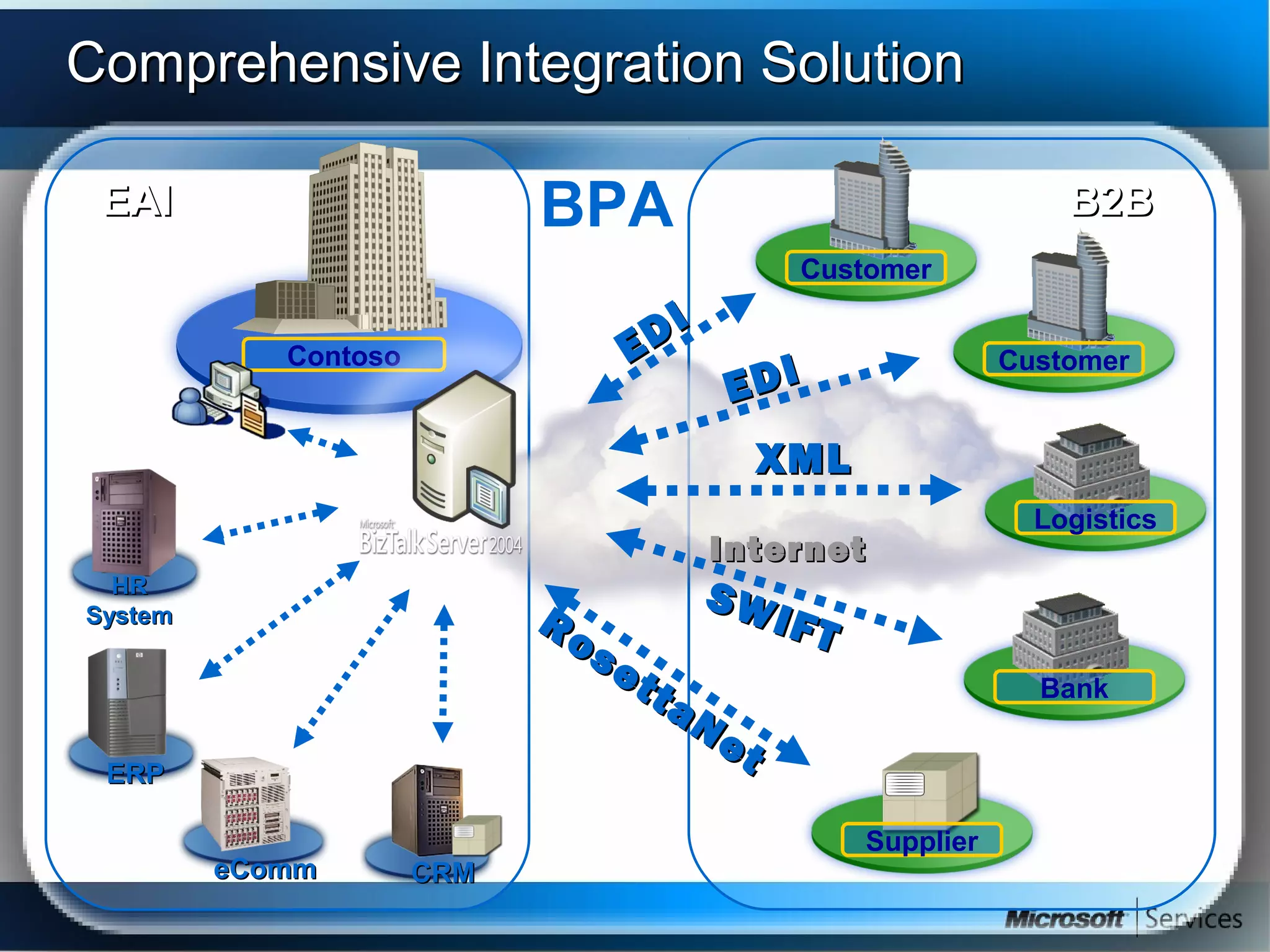
BPA B2BB2BEAIEAI
Contoso
InternetInternet
Logistics
Customer
Customer
ERPERP
HRHR
SystemSystem
eCommeComm CRMCRM
Bank
Supplier
Comprehensive Integration SolutionComprehensive Integration Solution
SWIFT
SWIFT
XMLXML
EDIEDIEDI
EDI
RosettaNet
RosettaNet
BizTalk ProvidesBizTalk Provides
• Integration development environment
• Integration runtime environment
• Integration framework
Basic BizTalk Server FunctionsBasic BizTalk Server Functions
Business Process MgmtBusiness Process MgmtDocument ConversionDocument Conversion
Company BCompany A
Document TransportationDocument Transportation
Company BCompany A
Messaging Orchestration
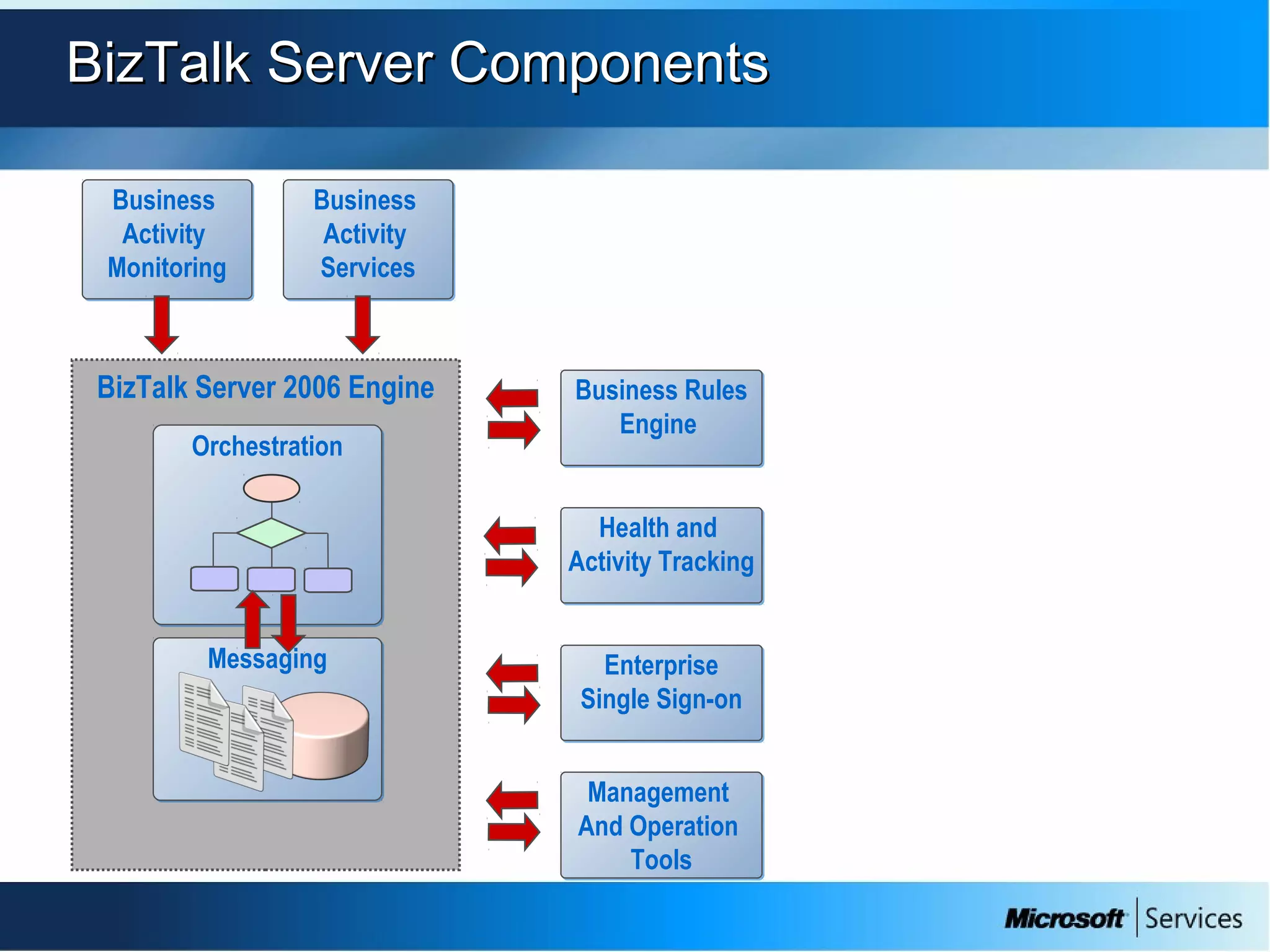
BizTalk Server ComponentsBizTalk Server Components
BizTalk Server 2006 Engine
OrchestrationOrchestration
MessagingMessaging
Business
Activity
Monitoring
Business
Activity
Monitoring
Business
Activity
Services
Business
Activity
Services
Business Rules
Engine
Business Rules
Engine
Health and
Activity Tracking
Health and
Activity Tracking
Enterprise
Single Sign-on
Enterprise
Single Sign-on
Management
And Operation
Tools
Management
And Operation
Tools
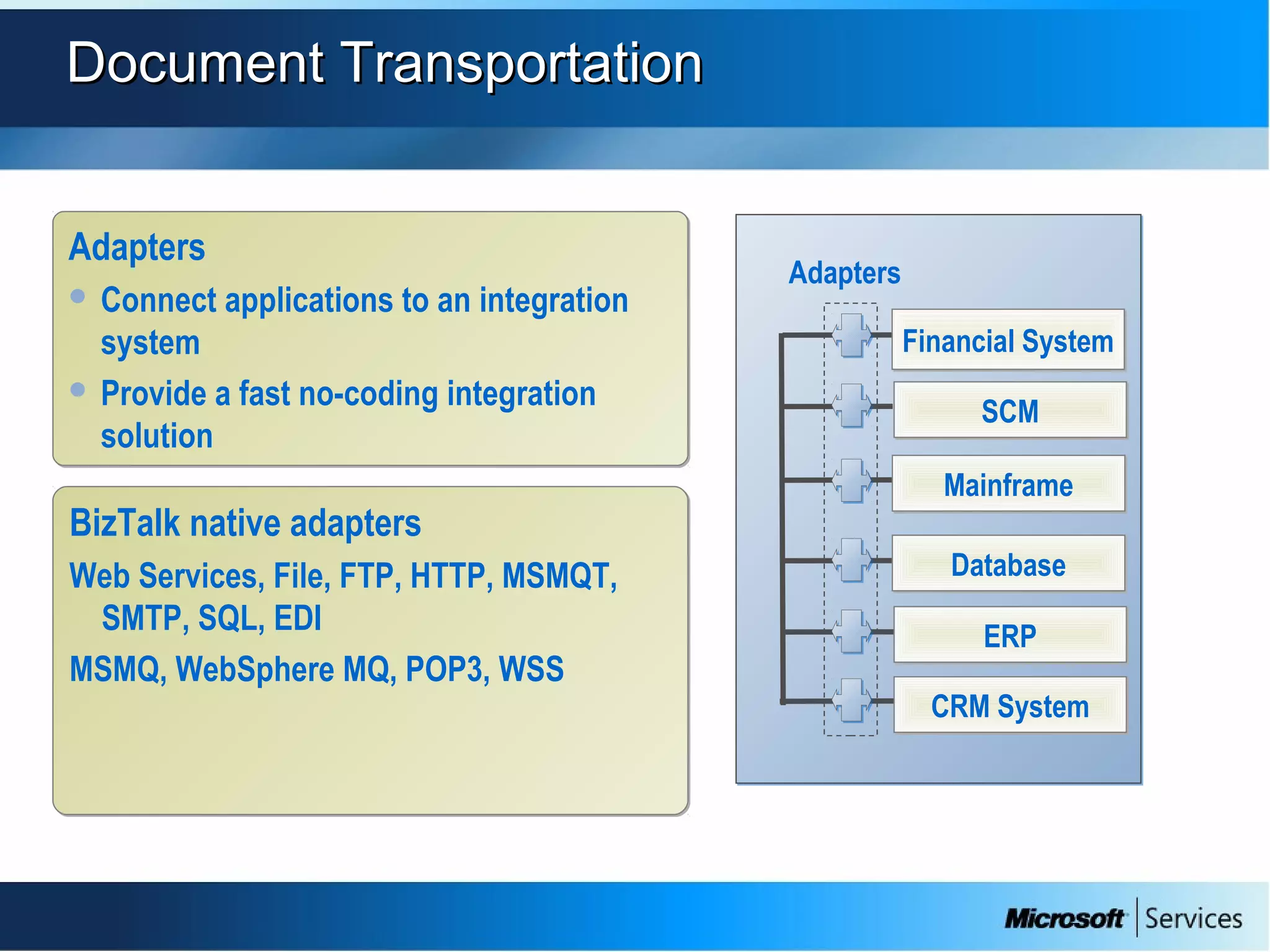
Document TransportationDocument Transportation
CRM SystemCRM System
ERPERP
DatabaseDatabase
SCMSCM
MainframeMainframe
Financial SystemFinancial System
Adapters
Adapters
 Connect applications to an integration
system
 Provide a fast no-coding integration
solution
Adapters
 Connect applications to an integration
system
 Provide a fast no-coding integration
solution
BizTalk native adapters
Web Services, File, FTP, HTTP, MSMQT,
SMTP, SQL, EDI
MSMQ, WebSphere MQ, POP3, WSS
BizTalk native adapters
Web Services, File, FTP, HTTP, MSMQT,
SMTP, SQL, EDI
MSMQ, WebSphere MQ, POP3, WSS
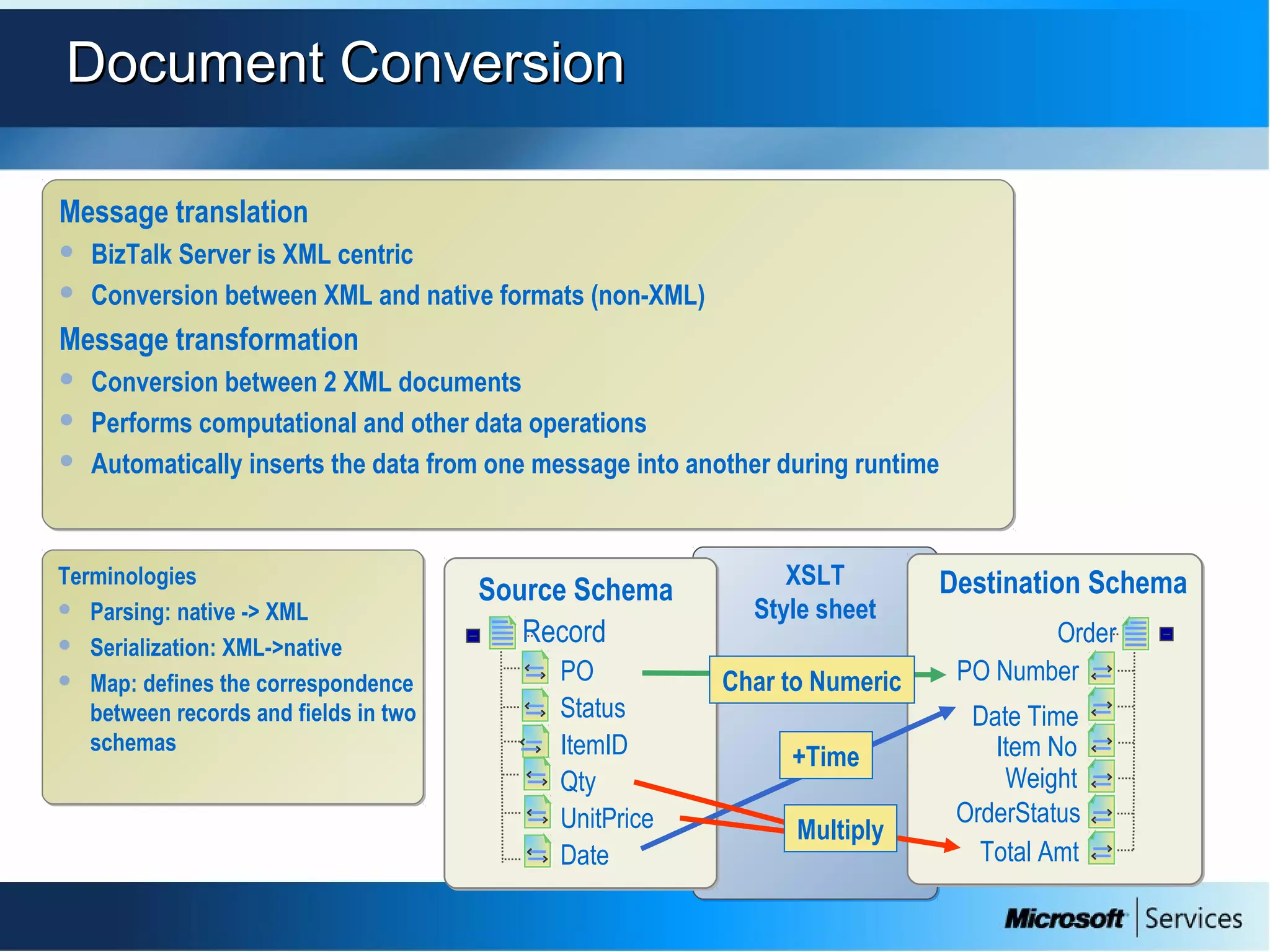
Document ConversionDocument Conversion
XSLT
Style sheet
XSLT
Style sheet
ItemID
UnitPrice
Record
PO
Status
Order
PO Number
Date Time
Item No
Weight
OrderStatus
Destination SchemaSource Schema
Date
Char to Numeric
Total Amt
Multiply
+Time
Qty
Message translation
 BizTalk Server is XML centric
 Conversion between XML and native formats (non-XML)
Message transformation
 Conversion between 2 XML documents
 Performs computational and other data operations
 Automatically inserts the data from one message into another during runtime
Message translation
 BizTalk Server is XML centric
 Conversion between XML and native formats (non-XML)
Message transformation
 Conversion between 2 XML documents
 Performs computational and other data operations
 Automatically inserts the data from one message into another during runtime
Terminologies
 Parsing: native -> XML
 Serialization: XML->native
 Map: defines the correspondence
between records and fields in two
schemas
Terminologies
 Parsing: native -> XML
 Serialization: XML->native
 Map: defines the correspondence
between records and fields in two
schemas
Business Process ManagementBusiness Process Management
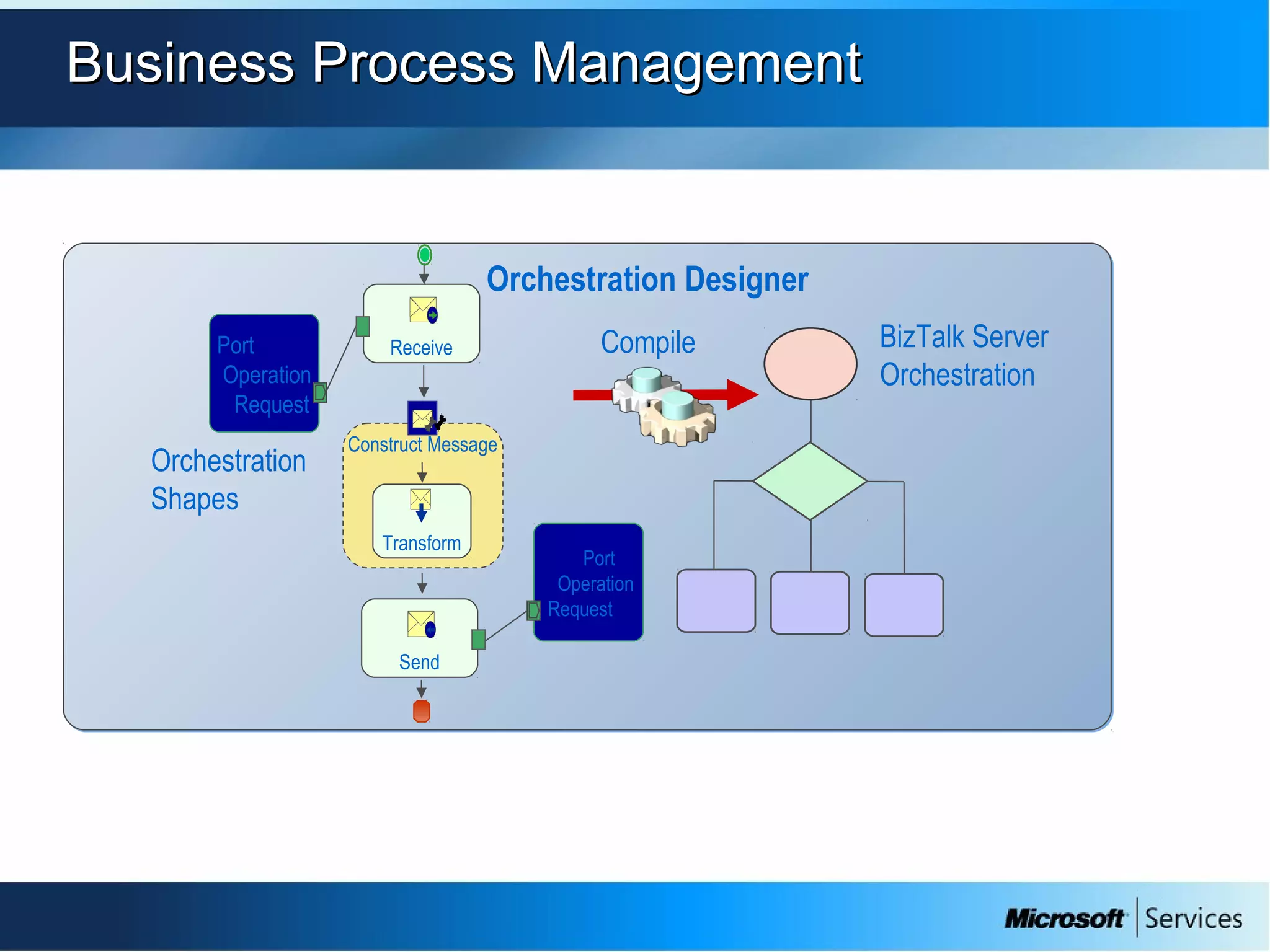
Orchestration DesignerOrchestration Designer
BizTalk Server
Orchestration
Orchestration
Shapes
CompilePort
Operation
Request
Receive
Construct Message
Transform
Send
Port
Operation
Request
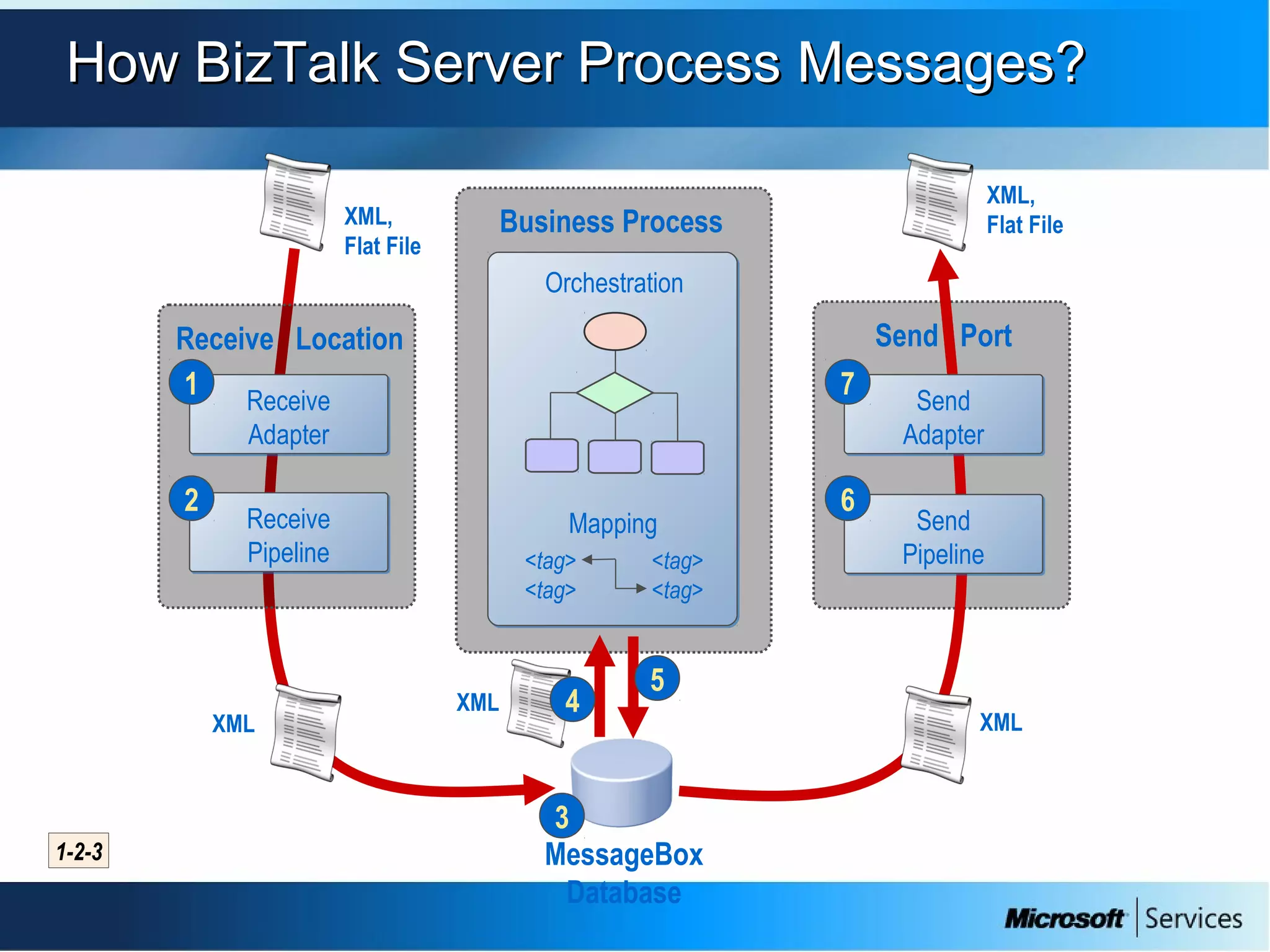
How BizTalk Server Process Messages?How BizTalk Server Process Messages?
MessageBox
Database
XML
XML,
Flat File
Receive
Adapter
Receive
Adapter
Receive
Pipeline
Receive
Pipeline
Receive Location
1
2
3
Business Process
Mapping
Orchestration
<tag> <tag>
<tag> <tag>
XML 4
1-2-3
5
XML,
Flat File
XML
Send
Pipeline
Send
Pipeline
Send
Adapter
Send
Adapter
Send Port
6
7
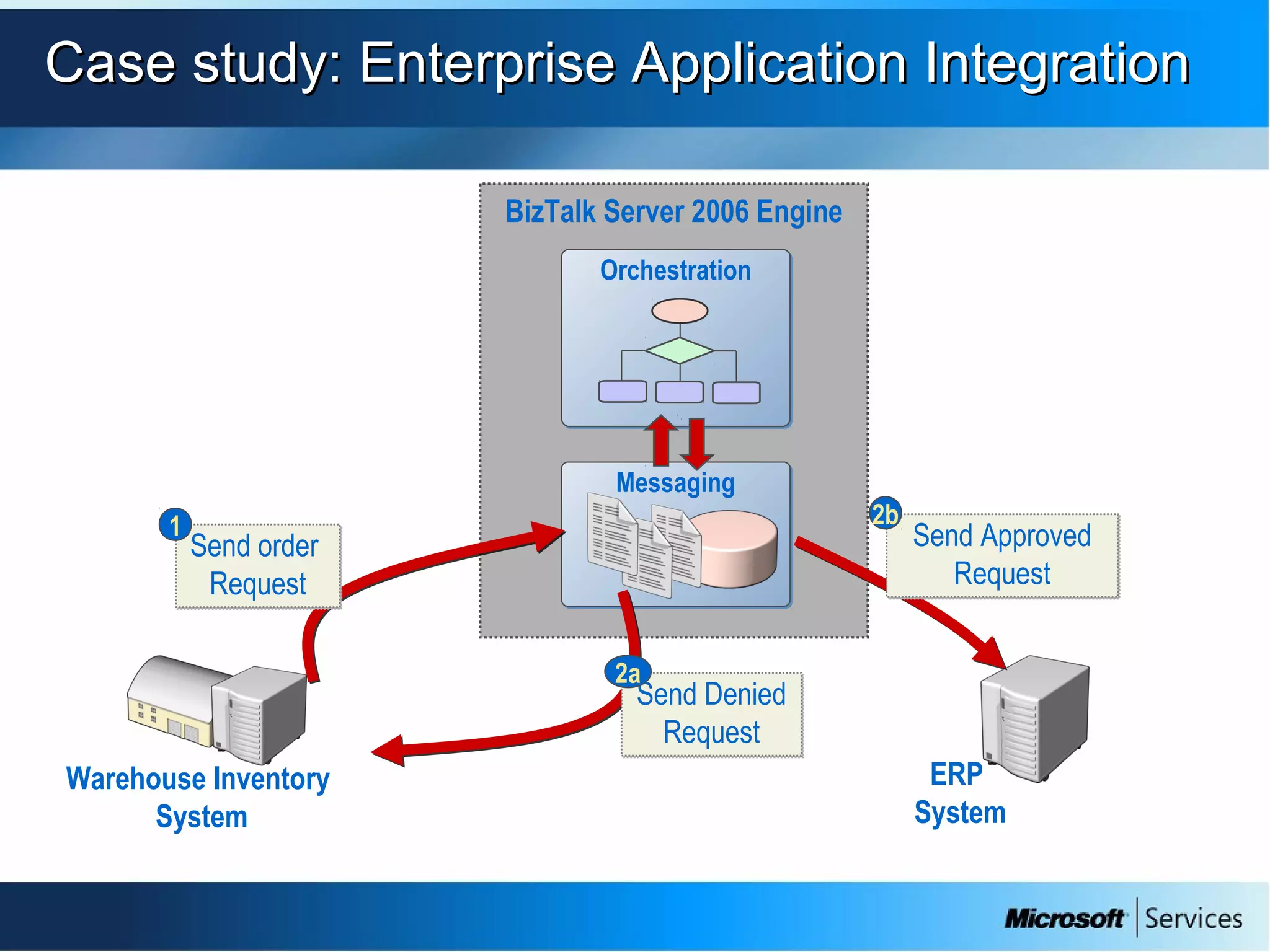
Case study: Enterprise Application IntegrationCase study: Enterprise Application Integration
BizTalk Server 2006 Engine
OrchestrationOrchestration
ERP
System
Send Approved
Request
Send Approved
Request
2b
MessagingMessaging
Send order
Request
Send order
Request
1
Warehouse Inventory
System
Send Denied
Request
Send Denied
Request
2a
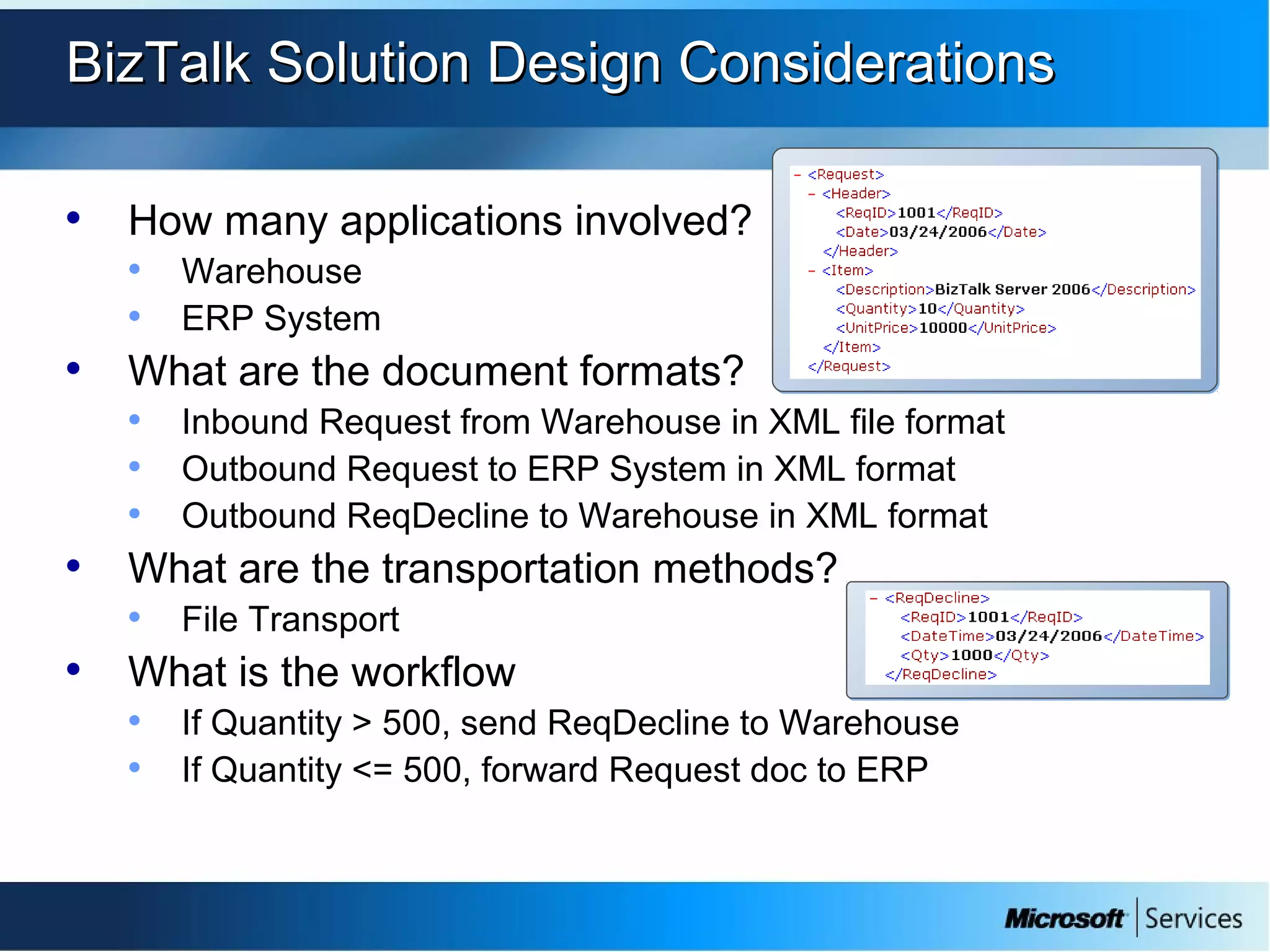
BizTalk Solution Design ConsiderationsBizTalk Solution Design Considerations
• How many applications involved?
• Warehouse
• ERP System
• What are the document formats?
• Inbound Request from Warehouse in XML file format
• Outbound Request to ERP System in XML format
• Outbound ReqDecline to Warehouse in XML format
• What are the transportation methods?
• File Transport
• What is the workflow
• If Quantity > 500, send ReqDecline to Warehouse
• If Quantity <= 500, forward Request doc to ERP
BizTalk Solution Development ProceduresBizTalk Solution Development Procedures
• Creating BizTalk projects
• Creating schemas, maps, orchestrations,
pipelines and other artifacts
• Compiling BizTalk projects
• Deploying BizTalk projects
• Testing BizTalk projects
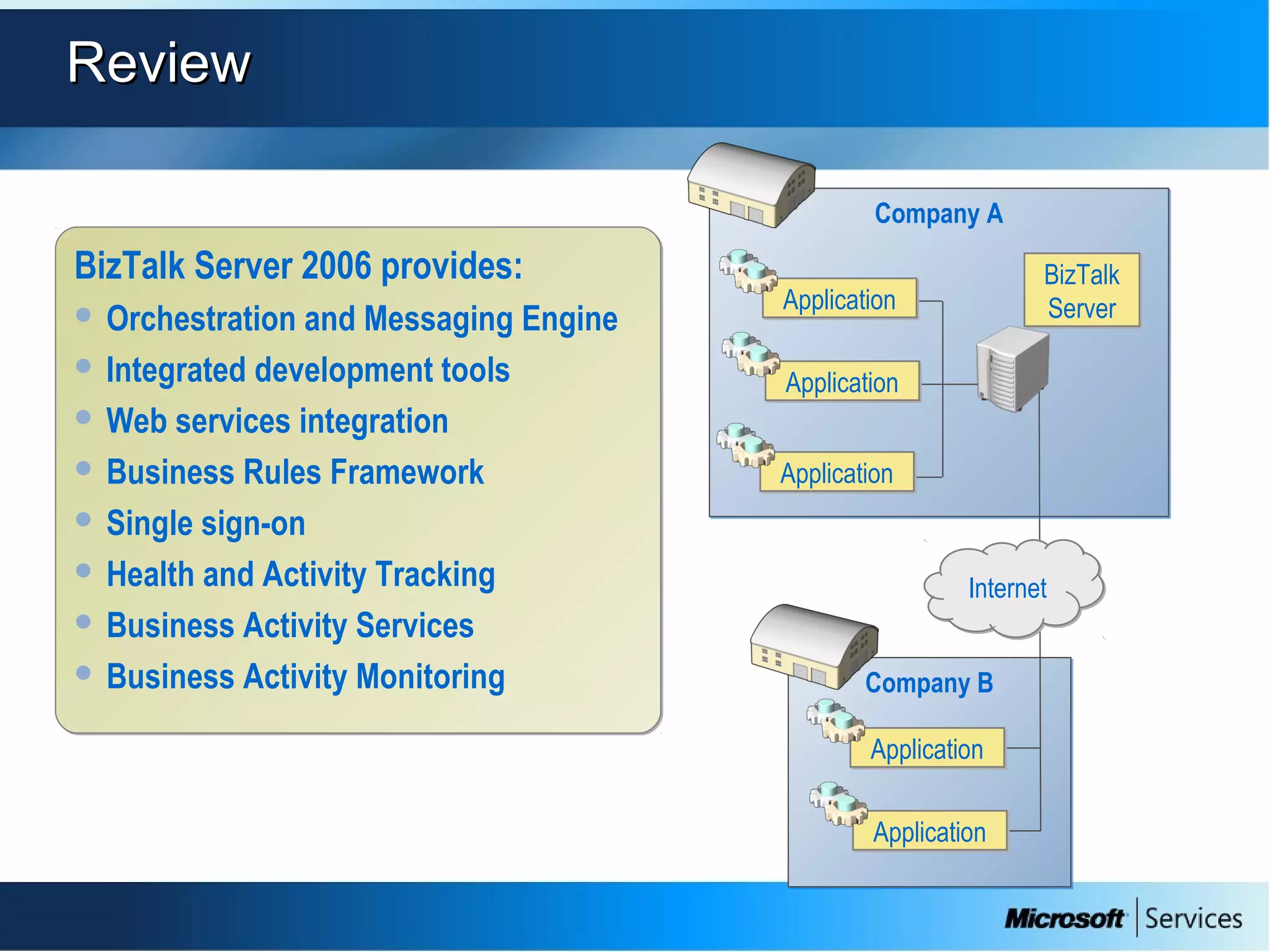
ReviewReview
Company BCompany B
Company ACompany A
InternetInternet
ApplicationApplication
BizTalk
Server
BizTalk
Server
BizTalk Server 2006 provides:
 Orchestration and Messaging Engine
 Integrated development tools
 Web services integration
 Business Rules Framework
 Single sign-on
 Health and Activity Tracking
 Business Activity Services
 Business Activity Monitoring
BizTalk Server 2006 provides:
 Orchestration and Messaging Engine
 Integrated development tools
 Web services integration
 Business Rules Framework
 Single sign-on
 Health and Activity Tracking
 Business Activity Services
 Business Activity Monitoring
Creating Schemas UsingCreating Schemas Using
BizTalk EditorBizTalk Editor
OverviewOverview
• Lesson 1: Introduction to BizTalk
schemas
• Lesson 2: Using BizTalk Editor
extensions (Optional)
Lesson 1: Introduction to BizTalk SchemasLesson 1: Introduction to BizTalk Schemas
• What is BizTalk schema?
• Uses of BizTalk schemas
• Understanding BizTalk Editor interface
• Creating XML schemas
• Inserting records and fields
• Promoting properties
• Demo: creating schemas
What is BizTalk Schema?What is BizTalk Schema?
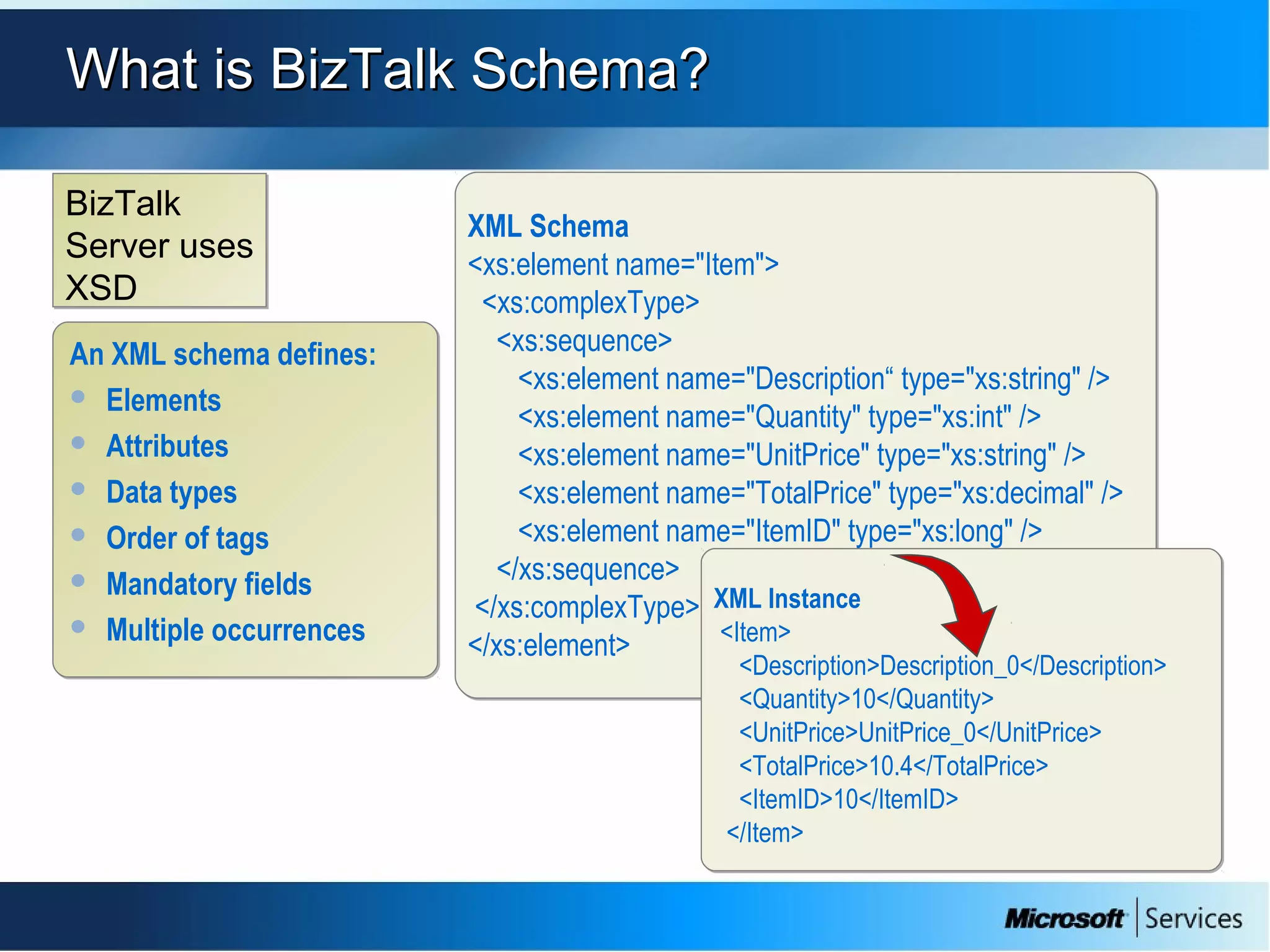
XML Schema
<xs:element name="Item">
<xs:complexType>
<xs:sequence>
<xs:element name="Description“ type="xs:string" />
<xs:element name="Quantity" type="xs:int" />
<xs:element name="UnitPrice" type="xs:string" />
<xs:element name="TotalPrice" type="xs:decimal" />
<xs:element name="ItemID" type="xs:long" />
</xs:sequence>
</xs:complexType>
</xs:element>
XML Instance
<Item>
<Description>Description_0</Description>
<Quantity>10</Quantity>
<UnitPrice>UnitPrice_0</UnitPrice>
<TotalPrice>10.4</TotalPrice>
<ItemID>10</ItemID>
</Item>
An XML schema defines:
 Elements
 Attributes
 Data types
 Order of tags
 Mandatory fields
 Multiple occurrences
An XML schema defines:
 Elements
 Attributes
 Data types
 Order of tags
 Mandatory fields
 Multiple occurrences
BizTalk
Server uses
XSD
BizTalk
Server uses
XSD
Uses of BizTalk SchemasUses of BizTalk Schemas
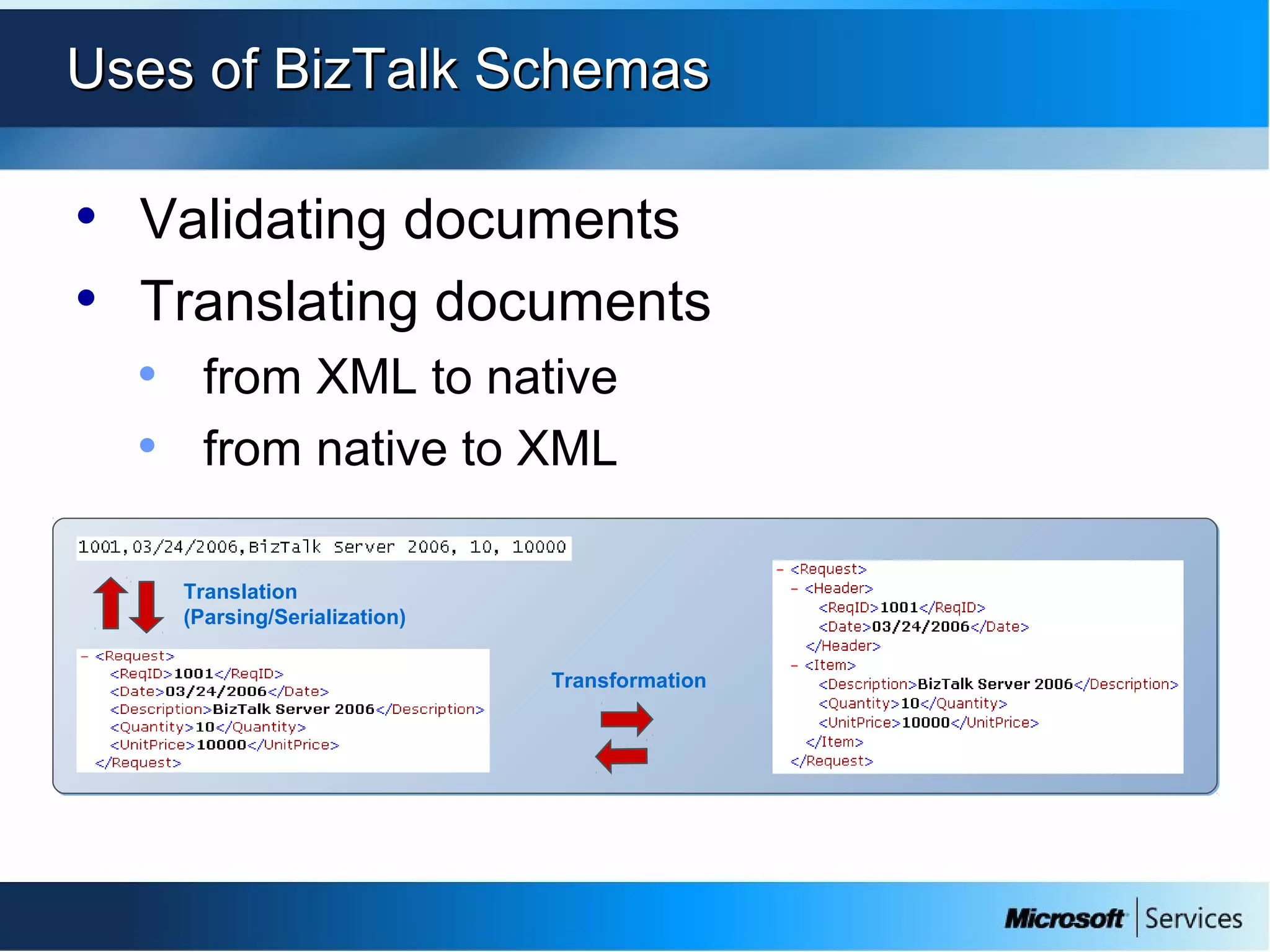
• Validating documents
• Translating documents
• from XML to native
• from native to XML
Translation
(Parsing/Serialization)
Transformation
Understanding BizTalk Editor InterfaceUnderstanding BizTalk Editor Interface
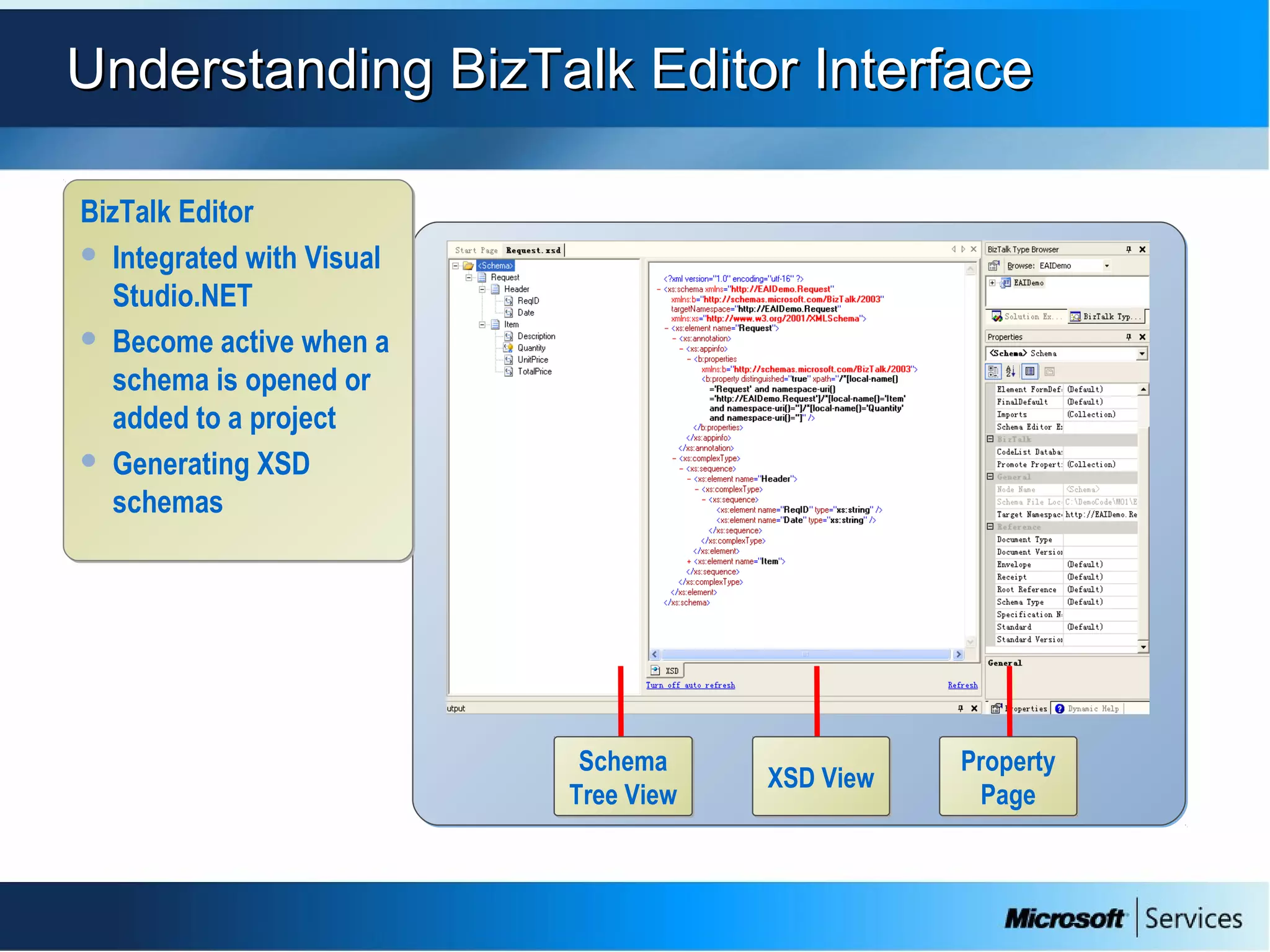
Schema
Tree View
Schema
Tree View
Property
Page
Property
Page
XSD ViewXSD View
BizTalk Editor
 Integrated with Visual
Studio.NET
 Become active when a
schema is opened or
added to a project
 Generating XSD
schemas
BizTalk Editor
 Integrated with Visual
Studio.NET
 Become active when a
schema is opened or
added to a project
 Generating XSD
schemas
Creating XML SchemasCreating XML Schemas
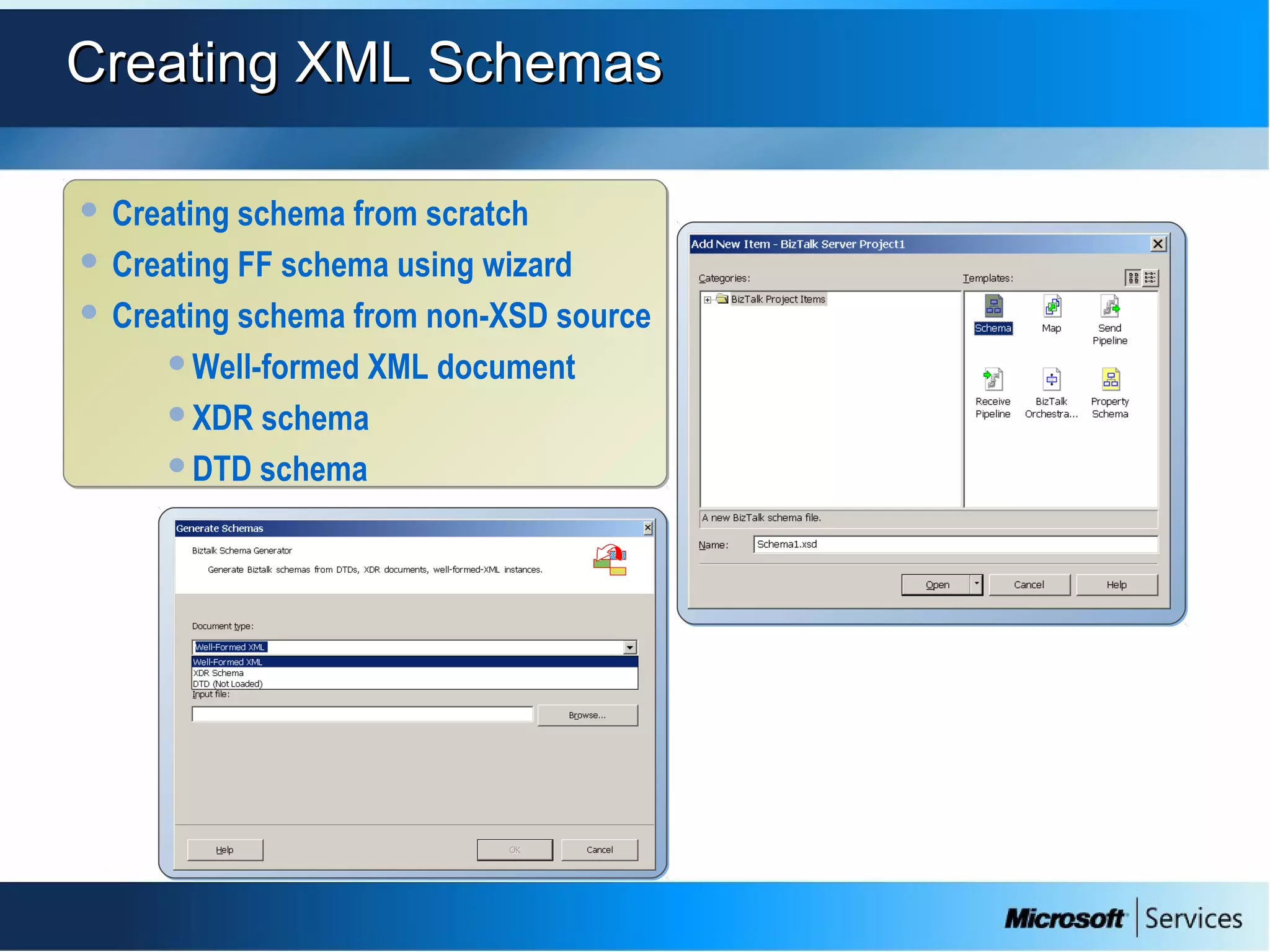
 Creating schema from scratch
 Creating FF schema using wizard
 Creating schema from non-XSD source
Well-formed XML document
XDR schema
DTD schema
 Creating schema from scratch
 Creating FF schema using wizard
 Creating schema from non-XSD source
Well-formed XML document
XDR schema
DTD schema
Inserting Records and FieldsInserting Records and Fields
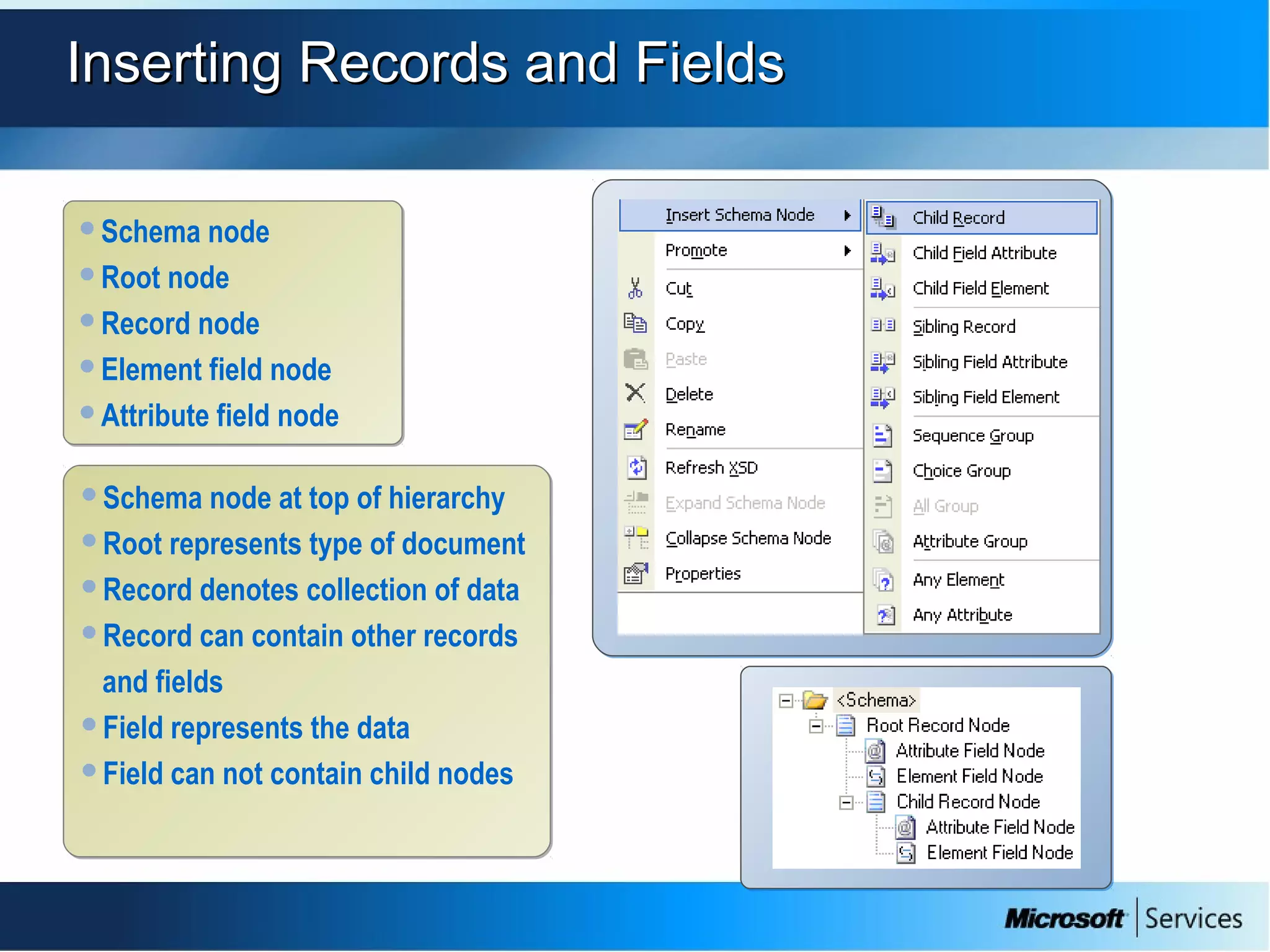
Schema node
Root node
Record node
Element field node
Attribute field node
Schema node
Root node
Record node
Element field node
Attribute field node
Schema node at top of hierarchy
Root represents type of document
Record denotes collection of data
Record can contain other records
and fields
Field represents the data
Field can not contain child nodes
Schema node at top of hierarchy
Root represents type of document
Record denotes collection of data
Record can contain other records
and fields
Field represents the data
Field can not contain child nodes
Demo: Creating SchemasDemo: Creating Schemas
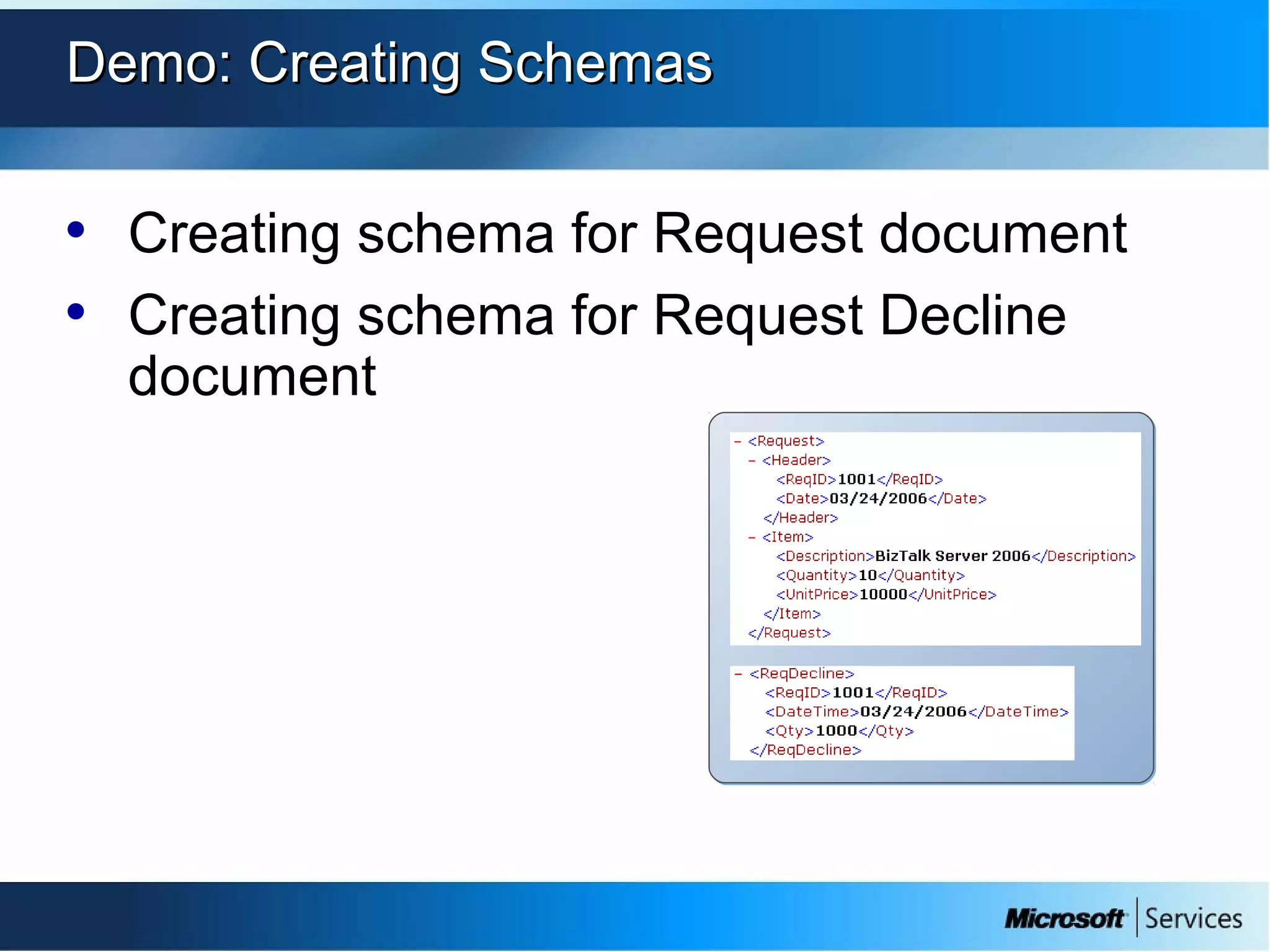
• Creating schema for Request document
• Creating schema for Request Decline
document
Lesson 2: Using BizTalk Editor ExtensionsLesson 2: Using BizTalk Editor Extensions
• BizTalk Editor Extensions
• Flat File Extension
• Creating a flat file schema
• Demo: creating a flat file schema
using the wizard
BizTalk Editor ExtensionsBizTalk Editor Extensions
• Flat file extension
• EDI extension
• Create custom extensions using
the
Microsoft.BizTalk.SchemaEditor.Ex
tensibility namespace
Flat File ExtensionFlat File Extension
• Supports positional and delimited flat files
• Flat file view
• Flat file specific properties
Creating a Flat File SchemaCreating a Flat File Schema
• Specify the Schema Editor Extensions
property for the schema as Flat File
Extension
• Delimited records
• Specify the Structure property Delimited or Positional
• Specify the Child Order, the Child Delimiter Type and
the Child Delimiter properties for the node containing
delimited child elements
• Positional Records
• Specify the Positional Offset and the Positional
Length for the child elements of a positional record
Using BizTalk Flat File Schema WizardUsing BizTalk Flat File Schema Wizard
• Using real flat file instances as input
• Visual design surface for working with
delimited and positional flat file schemas
• Preview capabilities for the file format
Demo: Creating a FF Schema Using WizardDemo: Creating a FF Schema Using Wizard
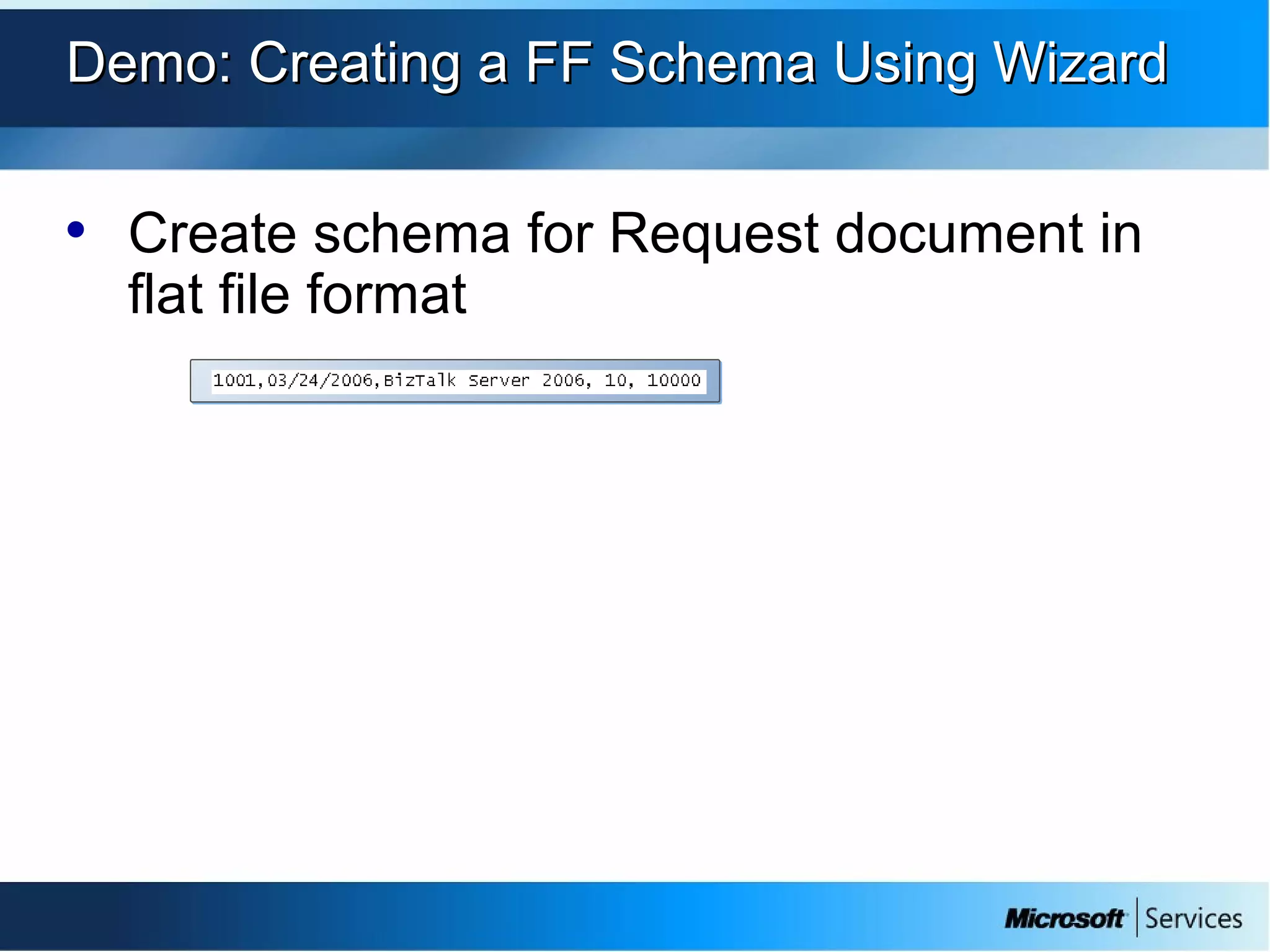
• Create schema for Request document in
flat file format
ReviewReview
• What is BizTalk Schema?
• What is the BizTalk tool for creating
schemas?
• How to create a schema for a flat file?
THANK YOU

Introduction to BizTalk Server 2009

  • 1.
    To ask aquestionTo ask a question Type your question in the “To ask theType your question in the “To ask the presenter(s) a question, type it herepresenter(s) a question, type it here and click Ask” field; then click the Askand click Ask” field; then click the Ask buttonbutton
  • 2.
    To give feedbackor ask for helpTo give feedback or ask for help • For assistance, select need Help from the “Feedback to Presenter” drop-down menu in the Seating Chart pane.
  • 3.
    Introduction to BizTalkServer 2009Introduction to BizTalk Server 2009
  • 4.
    OverviewOverview • BizTalk andapplication integration • Basic BizTalk Server functions • BizTalk Server components • Document transportation • Document conversion • Business process management • How BizTalk Server processes messages • Case study: an enterprise application integration scenario
  • 5.
    InternetInternet How Do EnterprisesWork Today?How Do Enterprises Work Today? Contoso ERPERP HRHR SystemSystem eCommeComm CRMCRM Logistics Customer Customer Bank Supplier EDI EDI Rosetta Rosetta Net Net SWIFSWIF TT XMLXML
  • 6.
    Point-to-Point Integration ArchitecturePoint-to-PointIntegration Architecture CRM System Purchasing SCM System Order Entry ERP Advantages  Higher performance  Tighter integration  Easier to implement (but not always) Disadvantages  Increased complexity  Difficult to modify  Changes affect many systems Advantages  Higher performance  Tighter integration  Easier to implement (but not always) Disadvantages  Increased complexity  Difficult to modify  Changes affect many systems Financial Systems Marketing
  • 7.
    Hub-and-Spoke Integration ArchitectureHub-and-SpokeIntegration Architecture CRM System Purchasing SCM System Order Entry ERP Advantages  Centralized Management  Transforms documents  Simpler integration Disadvantages  Requires communications broker  Involves more complex communications Advantages  Centralized Management  Transforms documents  Simpler integration Disadvantages  Requires communications broker  Involves more complex communications Financial Systems Marketing Hub
  • 8.
    BPA B2BB2BEAIEAI Contoso InternetInternet Logistics Customer Customer ERPERP HRHR SystemSystem eCommeComm CRMCRM Bank Supplier ComprehensiveIntegration SolutionComprehensive Integration Solution SWIFT SWIFT XMLXML EDIEDIEDI EDI RosettaNet RosettaNet
  • 9.
    BizTalk ProvidesBizTalk Provides •Integration development environment • Integration runtime environment • Integration framework
  • 10.
    Basic BizTalk ServerFunctionsBasic BizTalk Server Functions Business Process MgmtBusiness Process MgmtDocument ConversionDocument Conversion Company BCompany A Document TransportationDocument Transportation Company BCompany A Messaging Orchestration
  • 11.
    BizTalk Server ComponentsBizTalkServer Components BizTalk Server 2006 Engine OrchestrationOrchestration MessagingMessaging Business Activity Monitoring Business Activity Monitoring Business Activity Services Business Activity Services Business Rules Engine Business Rules Engine Health and Activity Tracking Health and Activity Tracking Enterprise Single Sign-on Enterprise Single Sign-on Management And Operation Tools Management And Operation Tools
  • 12.
    Document TransportationDocument Transportation CRMSystemCRM System ERPERP DatabaseDatabase SCMSCM MainframeMainframe Financial SystemFinancial System Adapters Adapters  Connect applications to an integration system  Provide a fast no-coding integration solution Adapters  Connect applications to an integration system  Provide a fast no-coding integration solution BizTalk native adapters Web Services, File, FTP, HTTP, MSMQT, SMTP, SQL, EDI MSMQ, WebSphere MQ, POP3, WSS BizTalk native adapters Web Services, File, FTP, HTTP, MSMQT, SMTP, SQL, EDI MSMQ, WebSphere MQ, POP3, WSS
  • 13.
    Document ConversionDocument Conversion XSLT Stylesheet XSLT Style sheet ItemID UnitPrice Record PO Status Order PO Number Date Time Item No Weight OrderStatus Destination SchemaSource Schema Date Char to Numeric Total Amt Multiply +Time Qty Message translation  BizTalk Server is XML centric  Conversion between XML and native formats (non-XML) Message transformation  Conversion between 2 XML documents  Performs computational and other data operations  Automatically inserts the data from one message into another during runtime Message translation  BizTalk Server is XML centric  Conversion between XML and native formats (non-XML) Message transformation  Conversion between 2 XML documents  Performs computational and other data operations  Automatically inserts the data from one message into another during runtime Terminologies  Parsing: native -> XML  Serialization: XML->native  Map: defines the correspondence between records and fields in two schemas Terminologies  Parsing: native -> XML  Serialization: XML->native  Map: defines the correspondence between records and fields in two schemas
  • 14.
    Business Process ManagementBusinessProcess Management Orchestration DesignerOrchestration Designer BizTalk Server Orchestration Orchestration Shapes CompilePort Operation Request Receive Construct Message Transform Send Port Operation Request
  • 15.
    How BizTalk ServerProcess Messages?How BizTalk Server Process Messages? MessageBox Database XML XML, Flat File Receive Adapter Receive Adapter Receive Pipeline Receive Pipeline Receive Location 1 2 3 Business Process Mapping Orchestration <tag> <tag> <tag> <tag> XML 4 1-2-3 5 XML, Flat File XML Send Pipeline Send Pipeline Send Adapter Send Adapter Send Port 6 7
  • 16.
    Case study: EnterpriseApplication IntegrationCase study: Enterprise Application Integration BizTalk Server 2006 Engine OrchestrationOrchestration ERP System Send Approved Request Send Approved Request 2b MessagingMessaging Send order Request Send order Request 1 Warehouse Inventory System Send Denied Request Send Denied Request 2a
  • 17.
    BizTalk Solution DesignConsiderationsBizTalk Solution Design Considerations • How many applications involved? • Warehouse • ERP System • What are the document formats? • Inbound Request from Warehouse in XML file format • Outbound Request to ERP System in XML format • Outbound ReqDecline to Warehouse in XML format • What are the transportation methods? • File Transport • What is the workflow • If Quantity > 500, send ReqDecline to Warehouse • If Quantity <= 500, forward Request doc to ERP
  • 18.
    BizTalk Solution DevelopmentProceduresBizTalk Solution Development Procedures • Creating BizTalk projects • Creating schemas, maps, orchestrations, pipelines and other artifacts • Compiling BizTalk projects • Deploying BizTalk projects • Testing BizTalk projects
  • 19.
    ReviewReview Company BCompany B CompanyACompany A InternetInternet ApplicationApplication ApplicationApplication ApplicationApplication ApplicationApplication ApplicationApplication BizTalk Server BizTalk Server BizTalk Server 2006 provides:  Orchestration and Messaging Engine  Integrated development tools  Web services integration  Business Rules Framework  Single sign-on  Health and Activity Tracking  Business Activity Services  Business Activity Monitoring BizTalk Server 2006 provides:  Orchestration and Messaging Engine  Integrated development tools  Web services integration  Business Rules Framework  Single sign-on  Health and Activity Tracking  Business Activity Services  Business Activity Monitoring
  • 20.
    Creating Schemas UsingCreatingSchemas Using BizTalk EditorBizTalk Editor
  • 21.
    OverviewOverview • Lesson 1:Introduction to BizTalk schemas • Lesson 2: Using BizTalk Editor extensions (Optional)
  • 22.
    Lesson 1: Introductionto BizTalk SchemasLesson 1: Introduction to BizTalk Schemas • What is BizTalk schema? • Uses of BizTalk schemas • Understanding BizTalk Editor interface • Creating XML schemas • Inserting records and fields • Promoting properties • Demo: creating schemas
  • 23.
    What is BizTalkSchema?What is BizTalk Schema? XML Schema <xs:element name="Item"> <xs:complexType> <xs:sequence> <xs:element name="Description“ type="xs:string" /> <xs:element name="Quantity" type="xs:int" /> <xs:element name="UnitPrice" type="xs:string" /> <xs:element name="TotalPrice" type="xs:decimal" /> <xs:element name="ItemID" type="xs:long" /> </xs:sequence> </xs:complexType> </xs:element> XML Instance <Item> <Description>Description_0</Description> <Quantity>10</Quantity> <UnitPrice>UnitPrice_0</UnitPrice> <TotalPrice>10.4</TotalPrice> <ItemID>10</ItemID> </Item> An XML schema defines:  Elements  Attributes  Data types  Order of tags  Mandatory fields  Multiple occurrences An XML schema defines:  Elements  Attributes  Data types  Order of tags  Mandatory fields  Multiple occurrences BizTalk Server uses XSD BizTalk Server uses XSD
  • 24.
    Uses of BizTalkSchemasUses of BizTalk Schemas • Validating documents • Translating documents • from XML to native • from native to XML Translation (Parsing/Serialization) Transformation
  • 25.
    Understanding BizTalk EditorInterfaceUnderstanding BizTalk Editor Interface Schema Tree View Schema Tree View Property Page Property Page XSD ViewXSD View BizTalk Editor  Integrated with Visual Studio.NET  Become active when a schema is opened or added to a project  Generating XSD schemas BizTalk Editor  Integrated with Visual Studio.NET  Become active when a schema is opened or added to a project  Generating XSD schemas
  • 26.
    Creating XML SchemasCreatingXML Schemas  Creating schema from scratch  Creating FF schema using wizard  Creating schema from non-XSD source Well-formed XML document XDR schema DTD schema  Creating schema from scratch  Creating FF schema using wizard  Creating schema from non-XSD source Well-formed XML document XDR schema DTD schema
  • 27.
    Inserting Records andFieldsInserting Records and Fields Schema node Root node Record node Element field node Attribute field node Schema node Root node Record node Element field node Attribute field node Schema node at top of hierarchy Root represents type of document Record denotes collection of data Record can contain other records and fields Field represents the data Field can not contain child nodes Schema node at top of hierarchy Root represents type of document Record denotes collection of data Record can contain other records and fields Field represents the data Field can not contain child nodes
  • 28.
    Demo: Creating SchemasDemo:Creating Schemas • Creating schema for Request document • Creating schema for Request Decline document
  • 29.
    Lesson 2: UsingBizTalk Editor ExtensionsLesson 2: Using BizTalk Editor Extensions • BizTalk Editor Extensions • Flat File Extension • Creating a flat file schema • Demo: creating a flat file schema using the wizard
  • 30.
    BizTalk Editor ExtensionsBizTalkEditor Extensions • Flat file extension • EDI extension • Create custom extensions using the Microsoft.BizTalk.SchemaEditor.Ex tensibility namespace
  • 31.
    Flat File ExtensionFlatFile Extension • Supports positional and delimited flat files • Flat file view • Flat file specific properties
  • 32.
    Creating a FlatFile SchemaCreating a Flat File Schema • Specify the Schema Editor Extensions property for the schema as Flat File Extension • Delimited records • Specify the Structure property Delimited or Positional • Specify the Child Order, the Child Delimiter Type and the Child Delimiter properties for the node containing delimited child elements • Positional Records • Specify the Positional Offset and the Positional Length for the child elements of a positional record
  • 33.
    Using BizTalk FlatFile Schema WizardUsing BizTalk Flat File Schema Wizard • Using real flat file instances as input • Visual design surface for working with delimited and positional flat file schemas • Preview capabilities for the file format
  • 34.
    Demo: Creating aFF Schema Using WizardDemo: Creating a FF Schema Using Wizard • Create schema for Request document in flat file format
  • 35.
    ReviewReview • What isBizTalk Schema? • What is the BizTalk tool for creating schemas? • How to create a schema for a flat file?
  • 36.

Editor's Notes

  • #5 Today we will look at BizTalk and application integration Basic BizTalk Server functions BizTalk Server components Document transportation Document conversion Business process management How BizTalk Server processes messages Case study: an enterprise application integration scenario
  • #6 So How do Enterprises Work Today? For example Company Contoso has multiple applications to serve their business needs. Hr System Erp System Ecommerse system An CRM application Each application requires data from every other application Each application has different data format The challenge is to integrate data in different format from Heterogeneous application. --------------- Further Contoso also deals with entities from external environment like Customers, Supplier , Banks, and Logistics. The data exchanged between the Customers can again be in different format like EDI, Xml SWIFT. ------------------- So this is the current scenario of How Enterprises Work Today.
  • #7 To address the Integration of different applications. One option is to have Point – to – point Integration Architecture. The Advantages as u can see on the sides is Higher performance Tighter integration Easier to implement (but not always) The Disadvantages Increased complexity (With increase in the no of application the complexity further increased) Difficult to modify if we make a change at one point the other peers also required a change as such one change affected many systems. In a small Organization with five applications , the number of possible ways to directly connect these applications with all the permutation combination be 10. This leads to the so called “spaghetti” Problem.
  • #8 To reduce the increasing complexity with increasing number of application an alternative was to use the Hub and spoke Integration Architecture. With a Hub at the center of the architecture this is a centralized processing machinery, the hub, accpept requests from multiple application, the spokes. Applications interact with the hub throuh adapters deployed on the hub, and as such, hub and spoke does not require any modification to the existing applications and supports a wide variety of transports. The major problem with this model was Central machine was a single point of failure. The scalability was limited to scalability of the central machine resource.
  • #9 The New BizTalk Server 2006 topology goes beyond traditional integration paradigms of hub and spoke and point to point message bus described earlier. Biztalk server provides a hybrid architecture that takes advantage of key aspects of both models, namely scale-out for throughput and centralized management. The key is that although Biztalk server includes hublike properties such as centralized management, its internal architecture is bus like.
  • #10 BizTalk Provides Integration development environment Integration runtime environment Integration framework
  • #11 The basic functions of BizTalk server include: Document Transportation: Connecting applications within an organization or between organizations. Document Conversion: Converting documents from one format to another format. Manage business process through Orchestration: The automation, management, and monitoring of end-to-end processes.
  • #12 These are the basic Biztalk server components that revolve around the Biztalk server 2006 engine. Information Worker services adds layers outside BizTalk server to provide extended functionalities. These services include Business Activity Services (BAS), Business Activity Monitoring (BAM) and Human Workflow Services (HWS). Enterprise single sign-on. Maintains user context and automatically sign on to receiving applications Business Rules Engine. Enabling developers to design BRE-enabled applications so that information workers can change policy without involving developers. Biztalk server Management and operation tools oversees business more effectively and forecasts improvements by continually analyzing process performance.
  • #13 Adapters are software components that connect application resources with an integration system so that the application resources can interoperate with other connected applications. Adapters offer a no-coding approach to integration by providing simple, automated mapping of third-party technologies and data formats. BizTalk Server includes native adapters by default Web Services, File, FTP, HTTP, MSMQT, SMTP, SQL, EDI MSMQ, WebSphere MQ, POP3, WSS.
  • #14 Document Conversion includes Message translation and Message transformation Message translation is the conversion between XML to and from native formats (non-XML) Message transformation is the conversion between 2 XML documents You can Performs computational and other data operations Automatically inserts the data from one message into another during runtime Some important Terminologies. Parsing: conversion from native to XML Serialization: conversion from XML to native Map: defines the correspondence between records and fields in two schemas
  • #15 BizTalk Server lets you orchestrate your business processes by combining a runtime engine with a design-time tool called Orchestration Designer. Rather than expressing the steps in a programming language, this tool connects a series of shapes in a logical way.
  • #16 A message is received through a receive adapter. The message is processed through a receive pipeline. This pipeline can contain components that perform tasks such as converting the message from its native format into an XML document. 3. The message is delivered to a database called Message Box database, which is implemented by using Microsoft SQL Server. 4.When a message arrives in the MessageBox database, that message is dispatched to its target orchestration, which takes whatever action the business process requires. 5. The result of this processing is typically another message, which is produced by the business process and saved in the MessageBox database. 6. The new message is processed by a send pipeline, which may convert it from the internal XML format used by BizTalk Server 2004 to the format required by its destination 7. The message is sent out through a send adapter, which uses an appropriate mechanism to communicate with the application for which this message is destined.
  • #17 The warehouse inventory system is a stand-alone system that operates separately from the ERP System. The inventory system notices that the stock of an item is low and so issues a request to order more of that item. Any inventory request that comes from the warehouse should be declined if it exceeds 500 items. A request declined document is sent back to the inventory system if the order doesn’t meet the requirements. Otherwise, the order request is forwarded to the ERP system to prepare a purchase order.