Making flow Mule
SAMPLE OF CONFIGURATION FLOW AND BUILD APPLICATION WITH
ANYPOINTSTUDIO.
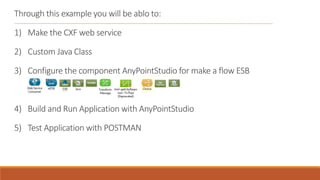
Through this example you will be ablo to:
1) Make the CXF web service
2) Custom Java Class
3) Configure the component AnyPointStudio for make a flow ESB
4) Build and Run Application with AnyPointStudio
5) Test Application with POSTMAN
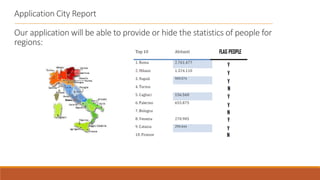
Application City Report
Our application will be able to provide or hide the statistics of people for
regions:
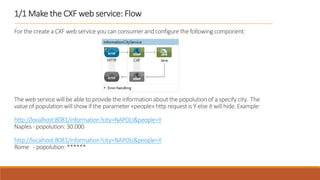
1/1 Make the CXF web service: Flow
For the create a CXF web service you can consumer and configure the following component:
The web service will be able to provide the informationabout the popolutionof a specify city. The
value of population will show if the parameter «people» http request is Y else it will hide.Example:
http://localhost:8081/information?city=NAPOLI&people=Y
Naples - popolution: 30.000
http://localhost:8081/information?city=NAPOLI&people=Y
Rome - popolution: ******
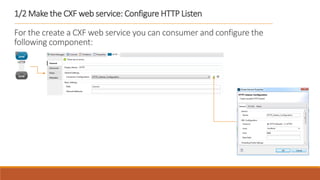
1/2 Make the CXF web service: Configure HTTP Listen
For the create a CXF web service you can consumer and configure the
following component:
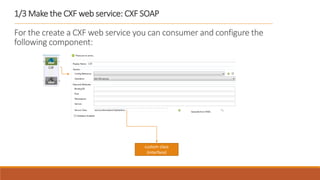
1/3 Make the CXF web service: CXF SOAP
For the create a CXF web service you can consumer and configure the
following component:
custom class
(interface)
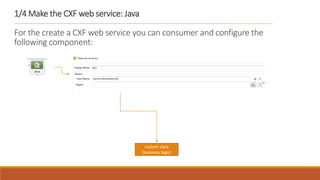
1/4 Make the CXF web service: Java
For the create a CXF web service you can consumer and configure the
following component:
custom class
(business logic)
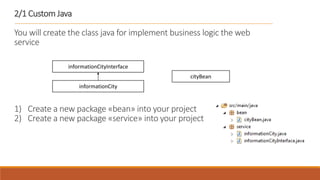
2/1 Custom Java
You will create the class java for implement business logic the web
service
1) Create a new package «bean» into your project
2) Create a new package «service» into your project
informationCityInterface
informationCity
cityBean
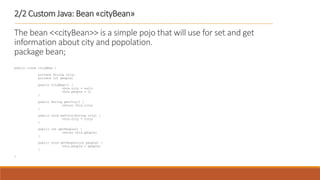
2/2 Custom Java: Bean «cityBean»
The bean <<cityBean>> is a simple pojo that will use for set and get
information about city and popolation.
package bean;
public class cityBean {
private String city;
private int people;
public cityBean() {
this.city = null;
this.people = 0;
}
public String getCity() {
return this.city;
}
public void setCity(String city) {
this.city = city;
}
public int getPeople() {
return this.people;
}
public void setPeople(int people) {
this.people = people;
}
}
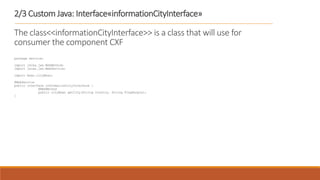
2/3 Custom Java: Interface«informationCityInterface»
The class<<informationCityInterface>> is a class that will use for
consumer the component CXF
package service;
import javax.jws.WebMethod;
import javax.jws.WebService;
import bean.cityBean;
@WebService
public interface informationCityInterface {
@WebMethod
public cityBean getCity(String Country, String FlagPeople);
}
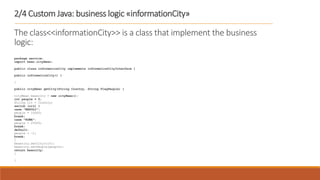
2/4 Custom Java: business logic «informationCity»
The class<<informationCity>> is a class that implement the business
logic:
package service;
import bean.cityBean;
public class informationCity implements informationCityInterface {
public informationCity() {
}
public cityBean getCity(String Country, String FlagPeople) {
cityBean beancity = new cityBean();
int people = 0;
String cit = Country;
switch (cit) {
case "NAPOLI":
people = 10000;
break;
case "ROMA":
people = 25000;
break;
default:
people = -1;
break;
}
beancity.setCity(cit);
beancity.setPeople(people);
return beancity;
}
}
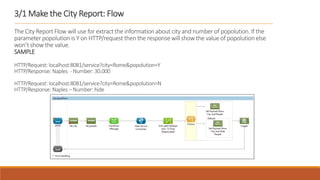
3/1 Make the City Report: Flow
The City Report Flow will use for extract the information about city and number of popolution. If the
parameter popolution is Y on HTTP/request then the response will show the value of popolution else
won’t show the value.
SAMPLE
HTTP/Request: localhost:8081/service?city=Rome&popolution=Y
HTTP/Response: Naples - Number: 30.000
HTTP/Request: localhost:8081/service?city=Rome&popolution=N
HTTP/Response: Naples – Number: hide
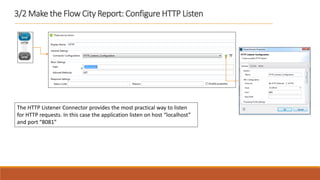
3/2 Make the Flow City Report: Configure HTTP Listen
The HTTP Listener Connector provides the most practical way to listen
for HTTP requests. In this case the application listen on host “localhost”
and port “8081”
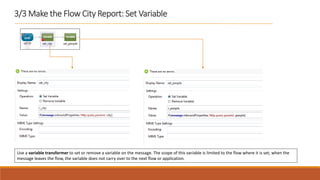
3/3 Make the Flow City Report: Set Variable
Use a variable transformer to set or remove a variable on the message. The scope of this variable is limited to the flow where it is set; when the
message leaves the flow, the variable does not carry over to the next flow or application.
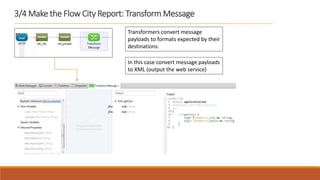
3/4 Make the Flow City Report: Transform Message
Transformers convert message
payloads to formats expected by their
destinations.
In this case convert message payloads
to XML (output the web service)
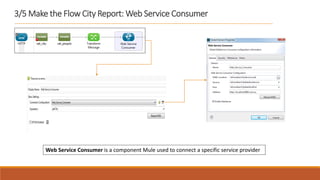
3/5 Make the Flow City Report: Web Service Consumer
Web Service Consumer is a component Mule used to connect a specific service provider
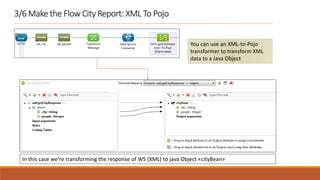
3/6 Make the Flow City Report: XML To Pojo
You can use an XML-to-Pojo
transformer to transform XML
data to a Java Object
In this case we’re transforming the response of WS (XML) to java Object «cityBean»
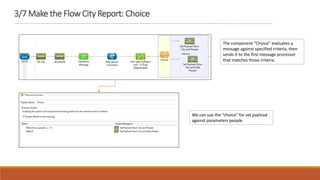
3/7 Make the Flow City Report: Choice
The component “Choice” evaluates a
message against specified criteria, then
sends it to the first message processor
that matches those criteria.
We can use the “choice” for set payload
against parameters people
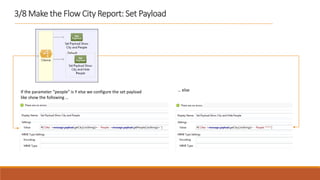
3/8 Make the Flow City Report: Set Payload
If the parameter “people” is Y else we configure the set payload
like show the following …
… else
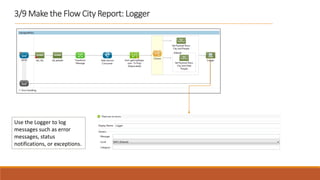
3/9 Make the Flow City Report: Logger
Use the Logger to log
messages such as error
messages, status
notifications, or exceptions.
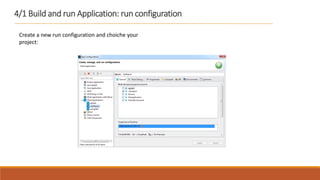
4/1 Build and run Application: run configuration
Create a new run configuration and choiche your
project:
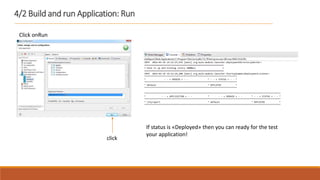
4/2 Build and run Application: Run
Click onRun
click
If status is «Deployed» then you can ready for the test
your application!
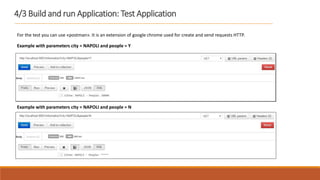
4/3 Build and run Application: Test Application
For the test you can use «postman». It is an extension of google chrome used for create and send requests HTTP.
Example with parameters city = NAPOLI and people = Y
Example with parameters city = NAPOLI and people = N

Making flow Mule

  • 1.
    Making flow Mule SAMPLEOF CONFIGURATION FLOW AND BUILD APPLICATION WITH ANYPOINTSTUDIO.
  • 2.
    Through this exampleyou will be ablo to: 1) Make the CXF web service 2) Custom Java Class 3) Configure the component AnyPointStudio for make a flow ESB 4) Build and Run Application with AnyPointStudio 5) Test Application with POSTMAN
  • 3.
    Application City Report Ourapplication will be able to provide or hide the statistics of people for regions:
  • 4.
    1/1 Make theCXF web service: Flow For the create a CXF web service you can consumer and configure the following component: The web service will be able to provide the informationabout the popolutionof a specify city. The value of population will show if the parameter «people» http request is Y else it will hide.Example: http://localhost:8081/information?city=NAPOLI&people=Y Naples - popolution: 30.000 http://localhost:8081/information?city=NAPOLI&people=Y Rome - popolution: ******
  • 5.
    1/2 Make theCXF web service: Configure HTTP Listen For the create a CXF web service you can consumer and configure the following component:
  • 6.
    1/3 Make theCXF web service: CXF SOAP For the create a CXF web service you can consumer and configure the following component: custom class (interface)
  • 7.
    1/4 Make theCXF web service: Java For the create a CXF web service you can consumer and configure the following component: custom class (business logic)
  • 8.
    2/1 Custom Java Youwill create the class java for implement business logic the web service 1) Create a new package «bean» into your project 2) Create a new package «service» into your project informationCityInterface informationCity cityBean
  • 9.
    2/2 Custom Java:Bean «cityBean» The bean <<cityBean>> is a simple pojo that will use for set and get information about city and popolation. package bean; public class cityBean { private String city; private int people; public cityBean() { this.city = null; this.people = 0; } public String getCity() { return this.city; } public void setCity(String city) { this.city = city; } public int getPeople() { return this.people; } public void setPeople(int people) { this.people = people; } }
  • 10.
    2/3 Custom Java:Interface«informationCityInterface» The class<<informationCityInterface>> is a class that will use for consumer the component CXF package service; import javax.jws.WebMethod; import javax.jws.WebService; import bean.cityBean; @WebService public interface informationCityInterface { @WebMethod public cityBean getCity(String Country, String FlagPeople); }
  • 11.
    2/4 Custom Java:business logic «informationCity» The class<<informationCity>> is a class that implement the business logic: package service; import bean.cityBean; public class informationCity implements informationCityInterface { public informationCity() { } public cityBean getCity(String Country, String FlagPeople) { cityBean beancity = new cityBean(); int people = 0; String cit = Country; switch (cit) { case "NAPOLI": people = 10000; break; case "ROMA": people = 25000; break; default: people = -1; break; } beancity.setCity(cit); beancity.setPeople(people); return beancity; } }
  • 12.
    3/1 Make theCity Report: Flow The City Report Flow will use for extract the information about city and number of popolution. If the parameter popolution is Y on HTTP/request then the response will show the value of popolution else won’t show the value. SAMPLE HTTP/Request: localhost:8081/service?city=Rome&popolution=Y HTTP/Response: Naples - Number: 30.000 HTTP/Request: localhost:8081/service?city=Rome&popolution=N HTTP/Response: Naples – Number: hide
  • 13.
    3/2 Make theFlow City Report: Configure HTTP Listen The HTTP Listener Connector provides the most practical way to listen for HTTP requests. In this case the application listen on host “localhost” and port “8081”
  • 14.
    3/3 Make theFlow City Report: Set Variable Use a variable transformer to set or remove a variable on the message. The scope of this variable is limited to the flow where it is set; when the message leaves the flow, the variable does not carry over to the next flow or application.
  • 15.
    3/4 Make theFlow City Report: Transform Message Transformers convert message payloads to formats expected by their destinations. In this case convert message payloads to XML (output the web service)
  • 16.
    3/5 Make theFlow City Report: Web Service Consumer Web Service Consumer is a component Mule used to connect a specific service provider
  • 17.
    3/6 Make theFlow City Report: XML To Pojo You can use an XML-to-Pojo transformer to transform XML data to a Java Object In this case we’re transforming the response of WS (XML) to java Object «cityBean»
  • 18.
    3/7 Make theFlow City Report: Choice The component “Choice” evaluates a message against specified criteria, then sends it to the first message processor that matches those criteria. We can use the “choice” for set payload against parameters people
  • 19.
    3/8 Make theFlow City Report: Set Payload If the parameter “people” is Y else we configure the set payload like show the following … … else
  • 20.
    3/9 Make theFlow City Report: Logger Use the Logger to log messages such as error messages, status notifications, or exceptions.
  • 21.
    4/1 Build andrun Application: run configuration Create a new run configuration and choiche your project:
  • 22.
    4/2 Build andrun Application: Run Click onRun click If status is «Deployed» then you can ready for the test your application!
  • 23.
    4/3 Build andrun Application: Test Application For the test you can use «postman». It is an extension of google chrome used for create and send requests HTTP. Example with parameters city = NAPOLI and people = Y Example with parameters city = NAPOLI and people = N