8 Tips & Tricks
                      for
Better BizTalk Programming

     Based on an MSDN article by
  Marty Wasznicky & Scott Zimmerman

             Daniel Toomey
               presenter
Credits
 Marty Wasznicky (MCSE, MCSD, MCDBA, MCTS) is the
  Regional Program Manager for BizTalk Server in the Microsoft
  Connected System Division. He helps customers and Microsoft
  Partners adopt and implement Microsoft solutions in this space.
  Currently, he is working on Software Oriented Architecture and
  Enterprise Service Bus technologies. He lives with his wife in
  Los Angeles.

 Scott Zimmerman (MCSD, MCTS) is a senior application
  development consultant with Microsoft specializing in BizTalk
  and .NET. He has won two awards for Web service design and
  the Overall World Frisbee Championship eight times. He lives
  with his wife Vera in Washington, D.C.
The Article

“8 Tips and Tricks for Better BizTalk Programming”

  http://msdn2.microsoft.com/en-gb/magazine/cc163423.aspx

Discusses:
 Multi-Part Messages
 Direct-Bound Ports
 Creating Web Services
 Debugging XSLT
The Tips
1.   Always use multi-part messages
2.   Always try to design orchestrations with direct-
     bound ports
3.   Always use separate internal and external schemas
4.   Never expose your internal schemas directly in
     WSDL
5.   Always optimise the BizTalk registry for Web
     Services
6.   Always set the assembly key file with a relative path
7.   Never overlook free sample code
8.   Debug XSLT in Visual Studio
#1 – Always Use Multi-Part Messages
       Most messages in BizTalk are schema-based
         What if the schema changes?
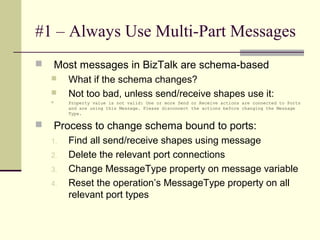
         Not too bad, unless send/receive shapes use it:
         Property value is not valid: One or more Send or Receive actions are connected to Ports
          and are using this Message. Please disconnect the actions before changing the Message
          Type.

       Process to change schema bound to ports:
    1.    Find all send/receive shapes using message
    2.    Delete the relevant port connections
    3.    Change MessageType property on message variable
    4.    Reset the operation’s MessageType property on all
          relevant port types
#1 – Always Use Multi-Part Messages
   Solved by a level of indirection
   Multi-Part message type can wrap the underlying
    schema
       Create a new Multi-Part Message type
       Set the message part to the original schema
       Name it appropriately (don’t use “body”!)
       Set the Message Body Part property = true
       Create messages based on this type
   Ports and send/receive shapes can now use multi-
    part message type
   Allows underlying schema changes (change the
    part definition) without breaking the port links
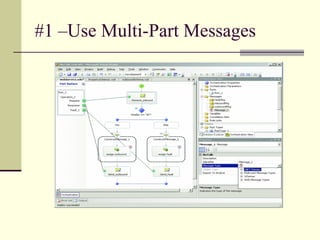
#1 –Use Multi-Part Messages
#2 – Use Direct-Bound Ports
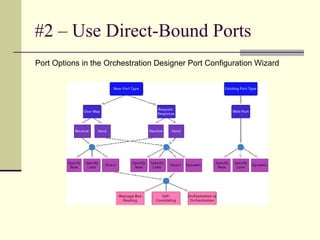
Port Options in the Orchestration Designer Port Configuration Wizard
#2 – Use Direct-Bound Ports
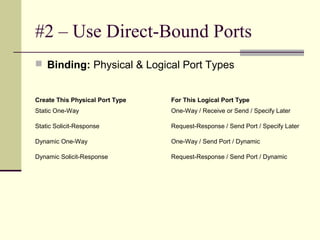
 Binding: Physical & Logical Port Types


Create This Physical Port Type   For This Logical Port Type
Static One-Way                   One-Way / Receive or Send / Specify Later

Static Solicit-Response          Request-Response / Send Port / Specify Later

Dynamic One-Way                  One-Way / Send Port / Dynamic

Dynamic Solicit-Response         Request-Response / Send Port / Dynamic
#2 – Use Direct-Bound Ports
 For BizTalk to BizTalk communication (not Web)
 No physical ports required
 3 Types to choose from:
      Message Box Routing
         By subscription (message type)

         Complete independence

             Watch out for infinite loops!
      Self-Correlating
         Share a port type between orchestrations (parameter)

         Not necessarily dependant on message type

          (can use message type of XmlDocument)
      Orchestration-to-Orchestration
         Wiring up two known solutions

         Not as loosely coupled as Message Box Routing
#2 – Use Direct-Bound Ports
 Avoiding Infinite Loops:
    Don’t send the same message type that your sending
     service is subscribing to!
    Copy message to a new type, or…
    Change value of a promoted property and use a filter:
       BTS.MessageType ==

        “http://MyInternalSchemas.MyProject#MyRo
        otNode” AND inbound_message(status) != 1
    …or, set operation-based subscription filter on receive
     shape (i.e. BTS.Operation != <one in orchestration>)
       Caveat: Operation property not set until message

        passes through at least one orchestration(?)
#3 – Always Use Separate
     Internal & External Schemas
 Canonical schemas provide flexibility
 Insulates against changes from a 3rd party
   Altering fields or properties used in routing
   Modifying promoted properties
 Separate assemblies for schemas & maps
  makes re-deployment easier
 Can reduce number of maps required
   Combine multiple inbound schemas to one
    canonical schema
   Map canonical schema to outbound schemas
#4 – Never Expose Your Internal
     Schemas in WSDL
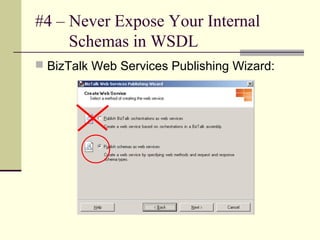
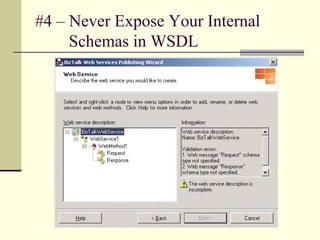
 BizTalk Web Services Publishing Wizard:
#4 – Never Expose Your Internal
     Schemas in WSDL
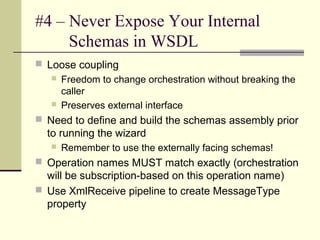
 Loose coupling
    Freedom to change orchestration without breaking the
     caller
    Preserves external interface

 Need to define and build the schemas assembly prior
  to running the wizard
      Remember to use the externally facing schemas!
 Operation names MUST match exactly (orchestration
  will be subscription-based on this operation name)
 Use XmlReceive pipeline to create MessageType
  property
#4 – Never Expose Your Internal
     Schemas in WSDL
#5 - Always Optimize the BizTalk
     Registry for Web Services
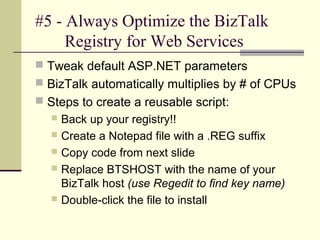
 Tweak default ASP.NET parameters
 BizTalk automatically multiplies by # of CPUs
 Steps to create a reusable script:
   Back up your registry!!
   Create a Notepad file with a .REG suffix
   Copy code from next slide
   Replace BTSHOST with the name of your
    BizTalk host (use Regedit to find key name)
   Double-click the file to install
#5 - Always Optimize the BizTalk
     Registry for Web Services
Windows Registry Editor version 5.00

[HKEY_LOCAL_MACHINESYSTEMCurrentControl
   SetServicesBTSSvc$BTSHOSTCLR
   Hosting]
“MaxIOThreads”=dword:00000064
“MaxWorkerThreads”=dword:00000064
“MinIOThreads”=dword:00000019
“MinWorkerThreads”=dword:00000019
#5 - Always Optimize the BizTalk
     Registry for Web Services
 Details about this and other optimisations:

  msdn2.microsoft.com/en-us/library/aa561380.aspx

 Performance tuning for low latency
  messaging:

  msdn2.microsoft.com/en-us/library/aa475435.aspx
#6 – Always Set the Assembly Key
     File with a Relative Path
 Sharing solution with source control is easier
 Recommendation:
      Place strong name key file in same directory as
       the VS solution file
      Create each VS project (by BizTalk artefact type)
       in a separate sub-folder
          Orchestrations

          Maps

          Pipelines

          Schemas

          Etc

      Set path for key file: "......Key.snk"
#6 – Always Set the Assembly Key
     File with a Relative Path
 Works differently for .NET components than for
  BizTalk projects
      May have to hack project (*.csproj) file
      Search for name of key file and apply relative path
       (usually only 1 parent hop)
 Don’t forget to add .NET assemblies to the GAC
    Use the following Post-Build step:
    “C:Program FilesMicrosoft Visual
     Studio 8SDKv2.0Bingacutil.exe” /i “$
     (TargetPath)” /F
#7 – Never Overlook Free Sample Code
 BizTalk Help file documents over 50 sample
  applications & scripts installed in the SDK
  directory:
       Program FilesMicrosoft BizTalk Server 2006SDKSamples
 30 more useful applications:
       msdn2.microsoft.com/en-us/biztalk/aa937647.aspx
 Blogger’s Guide to BizTalk (Alan Smith):
  http://www.codeplex.com/BloggersGuideBizTalk/Release/ProjectReleas
  es.aspx?ReleaseId=5353
 Your BrizTalk portal!!
       http://www.briztalk.org
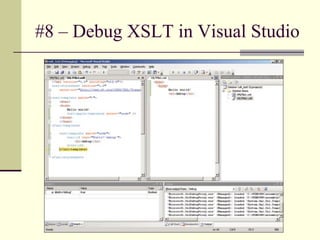
#8 – Debug XSLT in Visual Studio
 Doesn’t require BizTalk to be installed!
 Debug transforms at runtime:
   Set breakpoints
   Examine local variables
   Inspect the call stack
   Step into XLST script

 Right click in XSLT display screen (not the
  filename in Sol. Explorer!) to set the input
  document
#8 – Debug XSLT in Visual Studio
More Tips
 Avoid BizTalk Explorer in BizTalk Server
  2006
 Never click Deploy at the Project level in
  Visual Studio 2005 Solution Explorer
 Beware copying schemas from one project to
  another (must edit the namespaces)
 Never use “Quick Promote”
 Keep maps out of orchestrations wherever
  possible
Summary
 Think “Loose Coupling”
   Expose external schemas only
   Use multi-part messages
   Use Direct Bound ports

 Use all available resources
   Samples in SDK
   Blogs, etc
   VS debugging tools
References
   An XML Guru’s Guide to BizTalk Server 2004 (Aaron Skonnard)
    http://msdn2.microsoft.com/en-gb/magazine/cc163712.aspx (Part 1)
    http://msdn2.microsoft.com/en-gb/magazine/cc163695.aspx (Part 2)

   BizTalk Webcasts on MSDN
    http://msdn2.microsoft.com/en-us/biztalk/aa937645.aspx

   How Messages Work in BizTalk 2004 Orchestrations (Charles Young)
    http://geekswithblogs.net/cyoung/articles/4634.aspx

   The Seven Habits of Highly Effective BizTalkers (Alan Smith)
    http://geekswithblogs.com/asmith/articles/17333.aspx

   BizTalk Naming Conventions (Scott Colestock)
    http://traceofthought.net/misc/BizTalk%20Naming%20Conventions.htm

   A Messaging-Based State Machine Design Pattern (Brian Loesgen)
    http://geekswithblogs.net/bloesgen/archive/2005/10/27/58364.aspx

   Demystifying Direct Bound Ports (Kevin Lam)
    http://blogs.msdn.com/kevin_lam/archive/2006/04/18/578572.aspx
Questions?

8 Tips & Tricks for Better BizTalk Programming

  • 1.
    8 Tips &Tricks for Better BizTalk Programming Based on an MSDN article by Marty Wasznicky & Scott Zimmerman Daniel Toomey presenter
  • 2.
    Credits  Marty Wasznicky(MCSE, MCSD, MCDBA, MCTS) is the Regional Program Manager for BizTalk Server in the Microsoft Connected System Division. He helps customers and Microsoft Partners adopt and implement Microsoft solutions in this space. Currently, he is working on Software Oriented Architecture and Enterprise Service Bus technologies. He lives with his wife in Los Angeles.  Scott Zimmerman (MCSD, MCTS) is a senior application development consultant with Microsoft specializing in BizTalk and .NET. He has won two awards for Web service design and the Overall World Frisbee Championship eight times. He lives with his wife Vera in Washington, D.C.
  • 3.
    The Article “8 Tipsand Tricks for Better BizTalk Programming” http://msdn2.microsoft.com/en-gb/magazine/cc163423.aspx Discusses:  Multi-Part Messages  Direct-Bound Ports  Creating Web Services  Debugging XSLT
  • 4.
    The Tips 1. Always use multi-part messages 2. Always try to design orchestrations with direct- bound ports 3. Always use separate internal and external schemas 4. Never expose your internal schemas directly in WSDL 5. Always optimise the BizTalk registry for Web Services 6. Always set the assembly key file with a relative path 7. Never overlook free sample code 8. Debug XSLT in Visual Studio
  • 5.
    #1 – AlwaysUse Multi-Part Messages  Most messages in BizTalk are schema-based  What if the schema changes?  Not too bad, unless send/receive shapes use it:  Property value is not valid: One or more Send or Receive actions are connected to Ports and are using this Message. Please disconnect the actions before changing the Message Type.  Process to change schema bound to ports: 1. Find all send/receive shapes using message 2. Delete the relevant port connections 3. Change MessageType property on message variable 4. Reset the operation’s MessageType property on all relevant port types
  • 6.
    #1 – AlwaysUse Multi-Part Messages  Solved by a level of indirection  Multi-Part message type can wrap the underlying schema  Create a new Multi-Part Message type  Set the message part to the original schema  Name it appropriately (don’t use “body”!)  Set the Message Body Part property = true  Create messages based on this type  Ports and send/receive shapes can now use multi- part message type  Allows underlying schema changes (change the part definition) without breaking the port links
  • 7.
  • 8.
    #2 – UseDirect-Bound Ports Port Options in the Orchestration Designer Port Configuration Wizard
  • 9.
    #2 – UseDirect-Bound Ports  Binding: Physical & Logical Port Types Create This Physical Port Type For This Logical Port Type Static One-Way One-Way / Receive or Send / Specify Later Static Solicit-Response Request-Response / Send Port / Specify Later Dynamic One-Way One-Way / Send Port / Dynamic Dynamic Solicit-Response Request-Response / Send Port / Dynamic
  • 10.
    #2 – UseDirect-Bound Ports  For BizTalk to BizTalk communication (not Web)  No physical ports required  3 Types to choose from:  Message Box Routing  By subscription (message type)  Complete independence  Watch out for infinite loops!  Self-Correlating  Share a port type between orchestrations (parameter)  Not necessarily dependant on message type (can use message type of XmlDocument)  Orchestration-to-Orchestration  Wiring up two known solutions  Not as loosely coupled as Message Box Routing
  • 11.
    #2 – UseDirect-Bound Ports  Avoiding Infinite Loops:  Don’t send the same message type that your sending service is subscribing to!  Copy message to a new type, or…  Change value of a promoted property and use a filter:  BTS.MessageType == “http://MyInternalSchemas.MyProject#MyRo otNode” AND inbound_message(status) != 1  …or, set operation-based subscription filter on receive shape (i.e. BTS.Operation != <one in orchestration>)  Caveat: Operation property not set until message passes through at least one orchestration(?)
  • 12.
    #3 – AlwaysUse Separate Internal & External Schemas  Canonical schemas provide flexibility  Insulates against changes from a 3rd party  Altering fields or properties used in routing  Modifying promoted properties  Separate assemblies for schemas & maps makes re-deployment easier  Can reduce number of maps required  Combine multiple inbound schemas to one canonical schema  Map canonical schema to outbound schemas
  • 13.
    #4 – NeverExpose Your Internal Schemas in WSDL  BizTalk Web Services Publishing Wizard:
  • 14.
    #4 – NeverExpose Your Internal Schemas in WSDL  Loose coupling  Freedom to change orchestration without breaking the caller  Preserves external interface  Need to define and build the schemas assembly prior to running the wizard  Remember to use the externally facing schemas!  Operation names MUST match exactly (orchestration will be subscription-based on this operation name)  Use XmlReceive pipeline to create MessageType property
  • 15.
    #4 – NeverExpose Your Internal Schemas in WSDL
  • 16.
    #5 - AlwaysOptimize the BizTalk Registry for Web Services  Tweak default ASP.NET parameters  BizTalk automatically multiplies by # of CPUs  Steps to create a reusable script:  Back up your registry!!  Create a Notepad file with a .REG suffix  Copy code from next slide  Replace BTSHOST with the name of your BizTalk host (use Regedit to find key name)  Double-click the file to install
  • 17.
    #5 - AlwaysOptimize the BizTalk Registry for Web Services Windows Registry Editor version 5.00 [HKEY_LOCAL_MACHINESYSTEMCurrentControl SetServicesBTSSvc$BTSHOSTCLR Hosting] “MaxIOThreads”=dword:00000064 “MaxWorkerThreads”=dword:00000064 “MinIOThreads”=dword:00000019 “MinWorkerThreads”=dword:00000019
  • 18.
    #5 - AlwaysOptimize the BizTalk Registry for Web Services  Details about this and other optimisations: msdn2.microsoft.com/en-us/library/aa561380.aspx  Performance tuning for low latency messaging: msdn2.microsoft.com/en-us/library/aa475435.aspx
  • 19.
    #6 – AlwaysSet the Assembly Key File with a Relative Path  Sharing solution with source control is easier  Recommendation:  Place strong name key file in same directory as the VS solution file  Create each VS project (by BizTalk artefact type) in a separate sub-folder  Orchestrations  Maps  Pipelines  Schemas  Etc  Set path for key file: "......Key.snk"
  • 20.
    #6 – AlwaysSet the Assembly Key File with a Relative Path  Works differently for .NET components than for BizTalk projects  May have to hack project (*.csproj) file  Search for name of key file and apply relative path (usually only 1 parent hop)  Don’t forget to add .NET assemblies to the GAC  Use the following Post-Build step:  “C:Program FilesMicrosoft Visual Studio 8SDKv2.0Bingacutil.exe” /i “$ (TargetPath)” /F
  • 21.
    #7 – NeverOverlook Free Sample Code  BizTalk Help file documents over 50 sample applications & scripts installed in the SDK directory: Program FilesMicrosoft BizTalk Server 2006SDKSamples  30 more useful applications: msdn2.microsoft.com/en-us/biztalk/aa937647.aspx  Blogger’s Guide to BizTalk (Alan Smith): http://www.codeplex.com/BloggersGuideBizTalk/Release/ProjectReleas es.aspx?ReleaseId=5353  Your BrizTalk portal!! http://www.briztalk.org
  • 22.
    #8 – DebugXSLT in Visual Studio  Doesn’t require BizTalk to be installed!  Debug transforms at runtime:  Set breakpoints  Examine local variables  Inspect the call stack  Step into XLST script  Right click in XSLT display screen (not the filename in Sol. Explorer!) to set the input document
  • 23.
    #8 – DebugXSLT in Visual Studio
  • 24.
    More Tips  AvoidBizTalk Explorer in BizTalk Server 2006  Never click Deploy at the Project level in Visual Studio 2005 Solution Explorer  Beware copying schemas from one project to another (must edit the namespaces)  Never use “Quick Promote”  Keep maps out of orchestrations wherever possible
  • 25.
    Summary  Think “LooseCoupling”  Expose external schemas only  Use multi-part messages  Use Direct Bound ports  Use all available resources  Samples in SDK  Blogs, etc  VS debugging tools
  • 26.
    References  An XML Guru’s Guide to BizTalk Server 2004 (Aaron Skonnard) http://msdn2.microsoft.com/en-gb/magazine/cc163712.aspx (Part 1) http://msdn2.microsoft.com/en-gb/magazine/cc163695.aspx (Part 2)  BizTalk Webcasts on MSDN http://msdn2.microsoft.com/en-us/biztalk/aa937645.aspx  How Messages Work in BizTalk 2004 Orchestrations (Charles Young) http://geekswithblogs.net/cyoung/articles/4634.aspx  The Seven Habits of Highly Effective BizTalkers (Alan Smith) http://geekswithblogs.com/asmith/articles/17333.aspx  BizTalk Naming Conventions (Scott Colestock) http://traceofthought.net/misc/BizTalk%20Naming%20Conventions.htm  A Messaging-Based State Machine Design Pattern (Brian Loesgen) http://geekswithblogs.net/bloesgen/archive/2005/10/27/58364.aspx  Demystifying Direct Bound Ports (Kevin Lam) http://blogs.msdn.com/kevin_lam/archive/2006/04/18/578572.aspx
  • 27.

Editor's Notes

  • #3 -Walk away understanding what you need to do according to MS BP -Use referenced documentation from MS
  • #4 Clinical definition
  • #5 -Ensuring continuity of service despite outages, maintenance, etc
  • #6 Everything in BTS is done with messages Multi-part messages typically used for emails, web services, etc (Web Messages) Schema change that affects message type (namespace and/or root node name)
  • #7 - Multi-part message types can be re-used, even across multiple orchestrations within the same assembly
  • #9 Port Options in the Orchestration Designer Port Configuration Wizard Logical vs Physical Port Types Web Ports are more limited