Group Member:
Mohammad Sajid
Hamza Khan Abbasi
Topic
Binary Search Tree
Binary Search Tree:
• In a binary tree, every node can have maximum of
two children.
•All children to the left of a node have smaller values
than parent.
•All children to the right of a node have larger values.
Operations On Binary Search Tree:
•Search
•Insertion
•Deletion
Search Operation Algorithms in BST:
Step 1: Read the search element
Step 2: Compare, search element with the value of root node in the tree.
Step 3: If both are matching, then display "Given node found!!!" and
terminate the function
Step 4: If both are not matching, then check whether search element is
smaller or larger than that node value.
Step 5: If search element is smaller, then continue the search process in
left subtree.
Step 6: If search element is larger, then continue the search process in
right subtree.
Step 7: Repeat the same until we found exact element or we completed with a
leaf node
Step 8: If we reach to the node with search value, then display "Element is found"
and terminate the function.
Step 9: If we reach to a leaf node and it is also not matching, then display
"Element not found" and terminate the function.
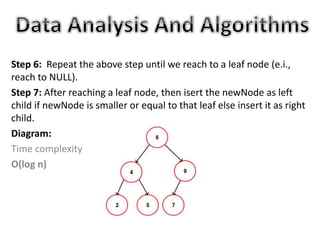
Diagram:
Time Complextiy
O(log n)
Insertion Operation in BST:
Step 1: Create a newNode with given value and set
its left and right to NULL.
Step 2: Check whether tree is Empty.
Step 3: If the tree is Empty, then set set root to newNode.
Step 4: If the tree is Not Empty, then check whether value of
newNode is smaller or larger than the node (here it is root node).
Step 5: If newNode is smaller than or equal to the node, then
move to its left child. If newNode is larger than the node, then
move to its right child.
Step 6: Repeat the above step until we reach to a leaf node (e.i.,
reach to NULL).
Step 7: After reaching a leaf node, then isert the newNode as left
child if newNode is smaller or equal to that leaf else insert it as right
child.
Diagram:
Time complexity
O(log n)
Deletion Operation in BST:
Deleting a node from Binary search tree has
follwing three cases is performed with O(log
n) time complexity.
Case 1: Deleting a Leaf node (A node with no children)
Case 2: Deleting a node with one child
Case 3: Deleting a node with two children
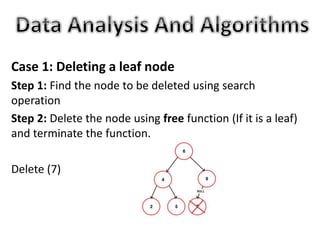
Case 1: Deleting a leaf node
Step 1: Find the node to be deleted using search
operation
Step 2: Delete the node using free function (If it is a leaf)
and terminate the function.
Delete (7)
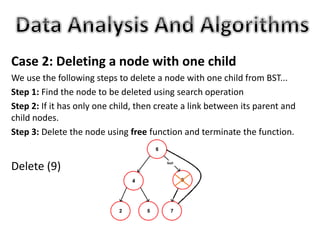
Case 2: Deleting a node with one child
We use the following steps to delete a node with one child from BST...
Step 1: Find the node to be deleted using search operation
Step 2: If it has only one child, then create a link between its parent and
child nodes.
Step 3: Delete the node using free function and terminate the function.
Delete (9)
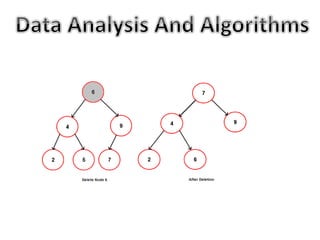
Case 3: Deleting a node with two children
We use the following steps to delete a node with two children from BST...
Step 1: Find the node to be deleted using search operation
Step 2: If it has two children, then find the largest node in its left
subtree (OR) the smallest node in its right subtree.
Step 3: Swap both deleting node and node which found in above step.
Step 4: Then, check whether deleting node came to case 1 or case 2 else
goto steps 2
Step 5: If it comes to case 1, then delete using case 1 logic.
Step 6: If it comes to case 2, then delete using case 2 logic.
Step 7: Repeat the same process until node is deleted from the tree.
Binary Search Tree (BST)

Binary Search Tree (BST)

  • 1.
    Group Member: Mohammad Sajid HamzaKhan Abbasi Topic Binary Search Tree
  • 2.
    Binary Search Tree: •In a binary tree, every node can have maximum of two children. •All children to the left of a node have smaller values than parent. •All children to the right of a node have larger values.
  • 4.
    Operations On BinarySearch Tree: •Search •Insertion •Deletion
  • 5.
    Search Operation Algorithmsin BST: Step 1: Read the search element Step 2: Compare, search element with the value of root node in the tree. Step 3: If both are matching, then display "Given node found!!!" and terminate the function Step 4: If both are not matching, then check whether search element is smaller or larger than that node value. Step 5: If search element is smaller, then continue the search process in left subtree. Step 6: If search element is larger, then continue the search process in right subtree.
  • 6.
    Step 7: Repeatthe same until we found exact element or we completed with a leaf node Step 8: If we reach to the node with search value, then display "Element is found" and terminate the function. Step 9: If we reach to a leaf node and it is also not matching, then display "Element not found" and terminate the function. Diagram: Time Complextiy O(log n)
  • 7.
    Insertion Operation inBST: Step 1: Create a newNode with given value and set its left and right to NULL. Step 2: Check whether tree is Empty. Step 3: If the tree is Empty, then set set root to newNode. Step 4: If the tree is Not Empty, then check whether value of newNode is smaller or larger than the node (here it is root node). Step 5: If newNode is smaller than or equal to the node, then move to its left child. If newNode is larger than the node, then move to its right child.
  • 8.
    Step 6: Repeatthe above step until we reach to a leaf node (e.i., reach to NULL). Step 7: After reaching a leaf node, then isert the newNode as left child if newNode is smaller or equal to that leaf else insert it as right child. Diagram: Time complexity O(log n)
  • 9.
    Deletion Operation inBST: Deleting a node from Binary search tree has follwing three cases is performed with O(log n) time complexity. Case 1: Deleting a Leaf node (A node with no children) Case 2: Deleting a node with one child Case 3: Deleting a node with two children
  • 10.
    Case 1: Deletinga leaf node Step 1: Find the node to be deleted using search operation Step 2: Delete the node using free function (If it is a leaf) and terminate the function. Delete (7)
  • 11.
    Case 2: Deletinga node with one child We use the following steps to delete a node with one child from BST... Step 1: Find the node to be deleted using search operation Step 2: If it has only one child, then create a link between its parent and child nodes. Step 3: Delete the node using free function and terminate the function. Delete (9)
  • 12.
    Case 3: Deletinga node with two children We use the following steps to delete a node with two children from BST... Step 1: Find the node to be deleted using search operation Step 2: If it has two children, then find the largest node in its left subtree (OR) the smallest node in its right subtree. Step 3: Swap both deleting node and node which found in above step. Step 4: Then, check whether deleting node came to case 1 or case 2 else goto steps 2 Step 5: If it comes to case 1, then delete using case 1 logic. Step 6: If it comes to case 2, then delete using case 2 logic. Step 7: Repeat the same process until node is deleted from the tree.