

BBEEMM MMEETTHHOODDOOLLOOGGYY
WHO AM I? 
ANDREW ROTA 
Interactive Developer at Sapient Global Markets 
I build HTML5 / JavaScript web applications 
I was a philosophy major 
I'm an avid sea kayaker
WHAT IS BEM? 
Block 
Element 
Modifier 
History 
tl;dr: Developed by Yandex, Russia's largest search engine 
company, in 2006/2007 to bring structure to web pages. 
Source: BEM
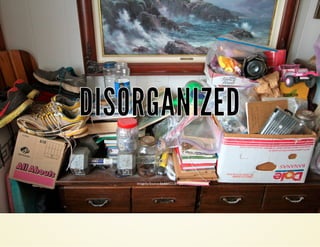
DDIISSOORRGGAANNIIZZEEDD 
Image by Source: davidd (CC BY 2.0
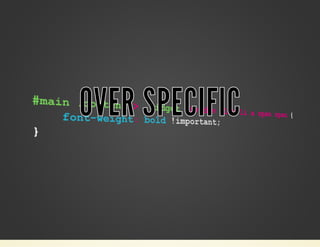
OOVVEERR SSPPEECCIIFFIICC
LLOOCCAATTIIOONN DDEEPPEENNDDEENNTT 
Image by Source: Guma89 (CC BY-SA 3.0)
ECOSYSTEM 
OOCSS 
.media {margin:10px;} 
.media, .bd {overflow:hidden; _overflow:visible; zoom:1;} 
.media .img {float:left; margin-right: 10px;} 
SMACSS 
.pod-callout { width: 200px; } 
.pod-callout input[type=text] { width: 180px; } 
Atomic CSS 
.M-1 {margin: 1px;} 
.M-2 {margin: 2px;} 
.M-4 {margin: 4px;}
BLOCK 
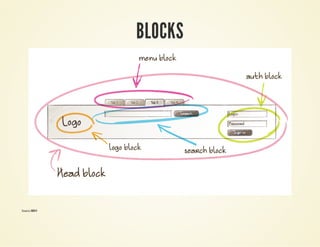
block /blɒk/ n : A block is an independent 
entity, a "building block" of an application. A 
block can be either simple or compound 
(containing other blocks). 
Source: BEM
BLOCKS 
Source: BEM
ELEMENT 
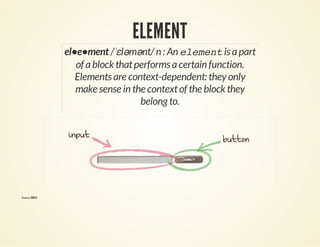
el•e•ment /ˈɛləmənt/ n : An element is a part 
of a block that performs a certain function. 
Elements are context-dependent: they only 
make sense in the context of the block they 
belong to. 
Source: BEM
MODIFIER 
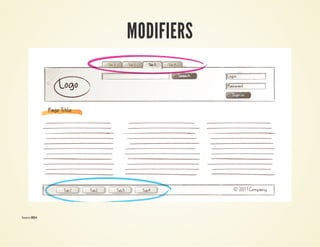
mod•i•fi•er /ˈmɒdəˌfaɪər/ n : A modifier is a 
property of a block or an element that alters its 
look or behavior. 
Source: BEM
MODIFIERS 
Source: BEM
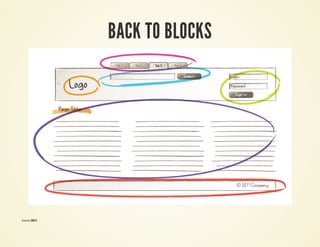
BACK TO BLOCKS 
Source: BEM
MMAAPPPPIINNGG TTHHEE UUII
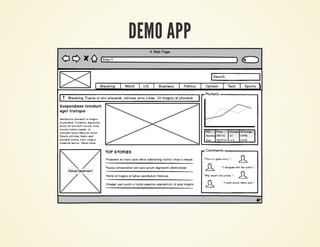
DEMO APP
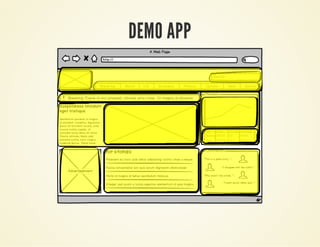
DEMO APP
CSS PRINCIPLES 
Avoid descendent or other cascading selectors 
Element selectors must not be used 
CSS ID selectors must not be used
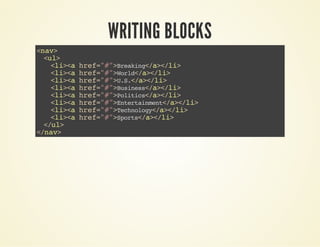
WRITING BLOCKS 
<nav> 
<ul> 
<li><a href="#">Breaking</a></li> 
<li><a href="#">World</a></li> 
<li><a href="#">U.S.</a></li> 
<li><a href="#">Business</a></li> 
<li><a href="#">Politics</a></li> 
<li><a href="#">Entertainment</a></li> 
<li><a href="#">Technology</a></li> 
<li><a href="#">Sports</a></li> 
</ul> 
</nav>
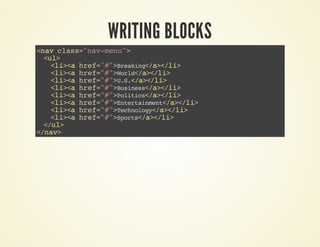
WRITING BLOCKS 
<nav class="nav-menu"> 
<ul> 
<li><a href="#">Breaking</a></li> 
<li><a href="#">World</a></li> 
<li><a href="#">U.S.</a></li> 
<li><a href="#">Business</a></li> 
<li><a href="#">Politics</a></li> 
<li><a href="#">Entertainment</a></li> 
<li><a href="#">Technology</a></li> 
<li><a href="#">Sports</a></li> 
</ul> 
</nav>
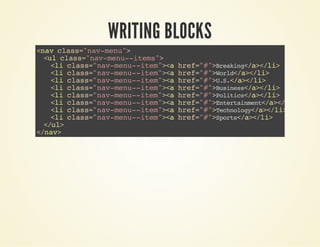
WRITING BLOCKS 
<nav class="nav-menu"> 
<ul class="nav-menu--items"> 
<li class="nav-menu--item"><a href="#">Breaking</a></li> 
<li class="nav-menu--item"><a href="#">World</a></li> 
<li class="nav-menu--item"><a href="#">U.S.</a></li> 
<li class="nav-menu--item"><a href="#">Business</a></li> 
<li class="nav-menu--item"><a href="#">Politics</a></li> 
<li class="nav-menu--item"><a href="#">Entertainment</a></li> 
<li class="nav-menu--item"><a href="#">Technology</a></li> 
<li class="nav-menu--item"><a href="#">Sports</a></li> 
</ul> 
</nav>
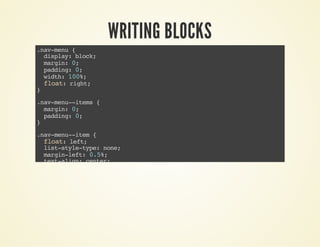
WRITING BLOCKS 
.nav-menu { 
display: block; 
margin: 0; 
padding: 0; 
width: 100%; 
float: right; 
} 
.nav-menu--items { 
margin: 0; 
padding: 0; 
} 
.nav-menu--item { 
float: left; 
list-style-type: none; 
margin-left: 0.5%; 
text-align: center; 
width: 12%; 
& > a { 
background: $primaryColor; 
color: white; 
display: block; 
font-size: .9em; 
line-height: 3.2; 
text-decoration: none; 
&:hover { 
background: $primaryColorLighter; 
-webkit-transform: rotate(10deg); 
transform: rotate(10deg);
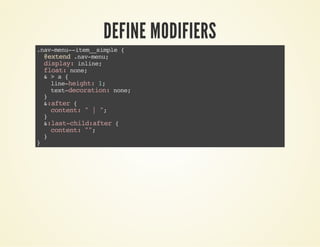
DEFINE MODIFIERS 
.nav-menu--item__simple { 
@extend .nav-menu; 
display: inline; 
float: none; 
& > a { 
line-height: 1; 
text-decoration: none; 
} 
&:after { 
content: " | "; 
} 
&:last-child:after { 
content: ""; 
} 
}
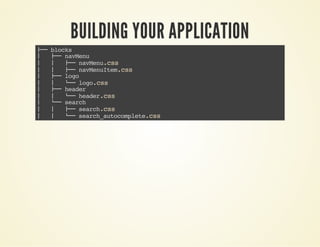
BUILDING YOUR APPLICATION 
├── blocks 
│ ├── navMenu 
│ │ ├── navMenu.css 
│ │ ├── navMenuItem.css 
│ ├── logo 
│ │ └── logo.css 
│ ├── header 
│ │ └── header.css 
│ └── search 
│ │ ├── search.css 
│ │ └── search_autocomplete.css
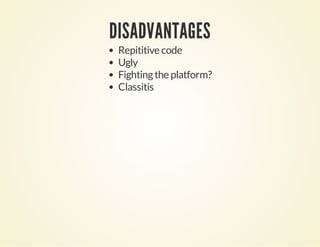
DISADVANTAGES 
Repititive code 
Ugly 
Fighting the platform? 
Classitis
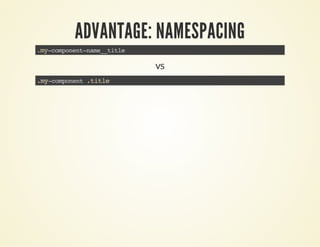
ADVANTAGE: NAMESPACING 
.my-component-name__title 
vs 
.my-component .title
OORRGGAANNIIZZAATTIIOONN 
Image by Stewart (CC BY 2.0)
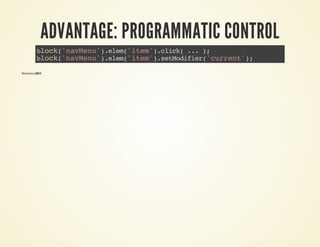
ADVANTAGE: PROGRAMMATIC CONTROL 
block('navMenu').elem('item').click( ... ); 
block('navMenu').elem('item').setModifier('current'); 
Reference: BEM
ADVANTAGE: SHARED UI LANGUAGE 
There are only two hard things in Computer 
Science: cache invalidation and naming things.
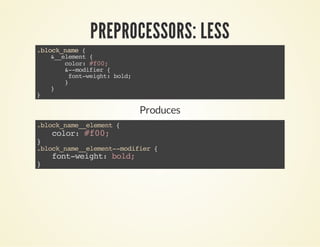
PREPROCESSORS: LESS 
.block_name { 
&__element { 
color: #f00; 
&--modifier { 
font-weight: bold; 
} 
} 
} 
Produces 
.block_name__element { 
color: #f00; 
} .block_name__element--modifier { 
font-weight: bold; 
}
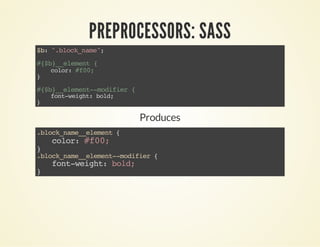
PREPROCESSORS: SASS 
$b: ".block_name"; 
#{$b}__element { 
color: #f00; 
} 
#{$b}__element--modifier { 
font-weight: bold; 
} 
Produces 
.block_name__element { 
color: #f00; 
} .block_name__element--modifier { 
font-weight: bold; 
}
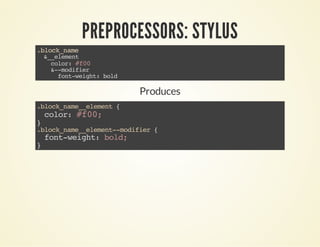
PREPROCESSORS: STYLUS 
.block_name 
&__element 
color: #f00 
&--modifier 
font-weight: bold 
Produces 
.block_name__element { 
color: #f00; 
} .block_name__element--modifier { 
font-weight: bold; 
}
TOOLS AND FRAMEWORKS: BEMHTML 
{ 
block: 'navigation', 
content: [ 
{ 
elem: 'item', 
content: 'News' 
} 
] 
}
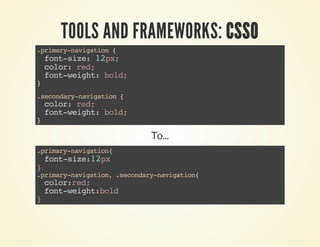
TOOLS AND FRAMEWORKS: CSSO 
.primary-navigation { 
font-size: 12px; 
color: red; 
font-weight: bold; 
} 
.secondary-navigation { 
color: red; 
font-weight: bold; 
} 
To... 
.primary-navigation{ 
font-size:12px 
} .primary-navigation, .secondary-navigation{ 
color:red; 
font-weight:bold 
}
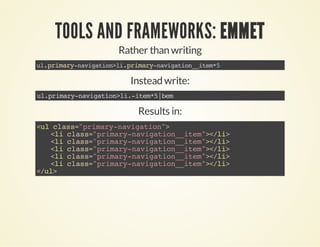
TOOLS AND FRAMEWORKS: EMMET 
Rather than writing 
ul.primary-navigation>li.primary-navigation__item*5 
Instead write: 
ul.primary-navigation>li.-item*5|bem 
Results in: 
<ul class="primary-navigation"> 
<li class="primary-navigation__item"></li> 
</ul>
TOOLS AND FRAMEWORKS: INUIT.CSS 
Example: 
.pagination { 
text-align:center; 
letter-spacing:-0.31em; 
word-spacing:-0.43em; 
} [...] 
.pagination__first a:before { 
content:"00AB" "00A0"; 
} .pagination__last a:after { 
content:"00A0" "00BB"; 
}
THE FUTURE (?) 
mm/dd/yyyy 
Image by Sam Howzit (CC BY 2.0)

Bem methodology

  • 1.
  • 2.
    WHO AM I? ANDREW ROTA Interactive Developer at Sapient Global Markets I build HTML5 / JavaScript web applications I was a philosophy major I'm an avid sea kayaker
  • 3.
    WHAT IS BEM? Block Element Modifier History tl;dr: Developed by Yandex, Russia's largest search engine company, in 2006/2007 to bring structure to web pages. Source: BEM
  • 5.
    DDIISSOORRGGAANNIIZZEEDD Image bySource: davidd (CC BY 2.0
  • 6.
  • 7.
    LLOOCCAATTIIOONN DDEEPPEENNDDEENNTT Imageby Source: Guma89 (CC BY-SA 3.0)
  • 8.
    ECOSYSTEM OOCSS .media{margin:10px;} .media, .bd {overflow:hidden; _overflow:visible; zoom:1;} .media .img {float:left; margin-right: 10px;} SMACSS .pod-callout { width: 200px; } .pod-callout input[type=text] { width: 180px; } Atomic CSS .M-1 {margin: 1px;} .M-2 {margin: 2px;} .M-4 {margin: 4px;}
  • 9.
    BLOCK block /blɒk/n : A block is an independent entity, a "building block" of an application. A block can be either simple or compound (containing other blocks). Source: BEM
  • 10.
  • 11.
    ELEMENT el•e•ment /ˈɛləmənt/n : An element is a part of a block that performs a certain function. Elements are context-dependent: they only make sense in the context of the block they belong to. Source: BEM
  • 12.
    MODIFIER mod•i•fi•er /ˈmɒdəˌfaɪər/n : A modifier is a property of a block or an element that alters its look or behavior. Source: BEM
  • 13.
  • 14.
    BACK TO BLOCKS Source: BEM
  • 15.
  • 16.
  • 17.
  • 18.
    CSS PRINCIPLES Avoiddescendent or other cascading selectors Element selectors must not be used CSS ID selectors must not be used
  • 19.
    WRITING BLOCKS <nav> <ul> <li><a href="#">Breaking</a></li> <li><a href="#">World</a></li> <li><a href="#">U.S.</a></li> <li><a href="#">Business</a></li> <li><a href="#">Politics</a></li> <li><a href="#">Entertainment</a></li> <li><a href="#">Technology</a></li> <li><a href="#">Sports</a></li> </ul> </nav>
  • 20.
    WRITING BLOCKS <navclass="nav-menu"> <ul> <li><a href="#">Breaking</a></li> <li><a href="#">World</a></li> <li><a href="#">U.S.</a></li> <li><a href="#">Business</a></li> <li><a href="#">Politics</a></li> <li><a href="#">Entertainment</a></li> <li><a href="#">Technology</a></li> <li><a href="#">Sports</a></li> </ul> </nav>
  • 21.
    WRITING BLOCKS <navclass="nav-menu"> <ul class="nav-menu--items"> <li class="nav-menu--item"><a href="#">Breaking</a></li> <li class="nav-menu--item"><a href="#">World</a></li> <li class="nav-menu--item"><a href="#">U.S.</a></li> <li class="nav-menu--item"><a href="#">Business</a></li> <li class="nav-menu--item"><a href="#">Politics</a></li> <li class="nav-menu--item"><a href="#">Entertainment</a></li> <li class="nav-menu--item"><a href="#">Technology</a></li> <li class="nav-menu--item"><a href="#">Sports</a></li> </ul> </nav>
  • 22.
    WRITING BLOCKS .nav-menu{ display: block; margin: 0; padding: 0; width: 100%; float: right; } .nav-menu--items { margin: 0; padding: 0; } .nav-menu--item { float: left; list-style-type: none; margin-left: 0.5%; text-align: center; width: 12%; & > a { background: $primaryColor; color: white; display: block; font-size: .9em; line-height: 3.2; text-decoration: none; &:hover { background: $primaryColorLighter; -webkit-transform: rotate(10deg); transform: rotate(10deg);
  • 23.
    DEFINE MODIFIERS .nav-menu--item__simple{ @extend .nav-menu; display: inline; float: none; & > a { line-height: 1; text-decoration: none; } &:after { content: " | "; } &:last-child:after { content: ""; } }
  • 24.
    BUILDING YOUR APPLICATION ├── blocks │ ├── navMenu │ │ ├── navMenu.css │ │ ├── navMenuItem.css │ ├── logo │ │ └── logo.css │ ├── header │ │ └── header.css │ └── search │ │ ├── search.css │ │ └── search_autocomplete.css
  • 25.
    DISADVANTAGES Repititive code Ugly Fighting the platform? Classitis
  • 26.
  • 27.
  • 28.
    ADVANTAGE: PROGRAMMATIC CONTROL block('navMenu').elem('item').click( ... ); block('navMenu').elem('item').setModifier('current'); Reference: BEM
  • 29.
    ADVANTAGE: SHARED UILANGUAGE There are only two hard things in Computer Science: cache invalidation and naming things.
  • 30.
    PREPROCESSORS: LESS .block_name{ &__element { color: #f00; &--modifier { font-weight: bold; } } } Produces .block_name__element { color: #f00; } .block_name__element--modifier { font-weight: bold; }
  • 31.
    PREPROCESSORS: SASS $b:".block_name"; #{$b}__element { color: #f00; } #{$b}__element--modifier { font-weight: bold; } Produces .block_name__element { color: #f00; } .block_name__element--modifier { font-weight: bold; }
  • 32.
    PREPROCESSORS: STYLUS .block_name &__element color: #f00 &--modifier font-weight: bold Produces .block_name__element { color: #f00; } .block_name__element--modifier { font-weight: bold; }
  • 33.
    TOOLS AND FRAMEWORKS:BEMHTML { block: 'navigation', content: [ { elem: 'item', content: 'News' } ] }
  • 34.
    TOOLS AND FRAMEWORKS:CSSO .primary-navigation { font-size: 12px; color: red; font-weight: bold; } .secondary-navigation { color: red; font-weight: bold; } To... .primary-navigation{ font-size:12px } .primary-navigation, .secondary-navigation{ color:red; font-weight:bold }
  • 35.
    TOOLS AND FRAMEWORKS:EMMET Rather than writing ul.primary-navigation>li.primary-navigation__item*5 Instead write: ul.primary-navigation>li.-item*5|bem Results in: <ul class="primary-navigation"> <li class="primary-navigation__item"></li> <li class="primary-navigation__item"></li> <li class="primary-navigation__item"></li> <li class="primary-navigation__item"></li> <li class="primary-navigation__item"></li> </ul>
  • 36.
    TOOLS AND FRAMEWORKS:INUIT.CSS Example: .pagination { text-align:center; letter-spacing:-0.31em; word-spacing:-0.43em; } [...] .pagination__first a:before { content:"00AB" "00A0"; } .pagination__last a:after { content:"00A0" "00BB"; }
  • 37.
    THE FUTURE (?) mm/dd/yyyy Image by Sam Howzit (CC BY 2.0)