

Keep it Pinteresting
Using Pinterest as a Course Collaboration Tool
Understanding Pinterest

 “Pinterest is an online pinboard. Organize and share
   things you love.” (Pinterest, 2012)
 Pinterest is a vision board-styled social photo
   sharing website and app where users can create
   and manage theme-based image collections. The
   site's mission statement is to "connect everyone in
   the world through the 'things' they find
   interesting." Pinterest is managed by Cold Brew
   Labs, a team based in Palo Alto, California
   (Wikipedia, 2012)
What is a pin board?

 A pin is an image added to Pinterest. A pin can be a
   dded from a website using the Pin It button, or you
   can upload images from your computer. Each pin
   added using the Pin It button links back to the site it
   came from.
 A board is a set of pins. A board can be created on
   any topic, such as Cool Posters, Recipes For Dinner,
   or Wishlist. You can add as many pins to a board as
   you want.
                              • (Pinterest, 2012)
How can I use Pinterest personally?

    Users are finding Pinterest’s ability to “visually
      bookmark” items from the internet (or their own
      computers) addicting. They then can referring back
      to those items when it’s time to plan that birthday
      party, make dinner or do some home decorating.
       Common pin boards include DIY Projects, Clothing,
          Quotes and Food.
Where do I find pins?

 Pins can be found in a variety of places
    By seeing them on other Pinterest boards, and
     “repinning” them to your own board
    By finding a webpage with a graphic and either
     copying the URL to the “pin it” dialogue box or
     clicking the “pin it” button on your shortcut toolbar
    By uploading a file from your computer
Pinterest “social component”

 Not only can users “pin” things but they can also
   comment on other pins, offering comments or
   suggestions. This brings to Pinterest another level
   of interactivity.
 In addition to pinning and repinning, users can
   “like” a pin
 Likes, comments and pins are then often pushed to
   users’ Facebook and Twitter feeds, which allow
   their networks to see and interact with their
   Pinterest activity
Using Pinterest as a collaboration tool

       Pinterest allows users to create boards that are
         collaborative. Multiple users can be added as
         “pinners” to a particular board

       To set up a collaborative board, users must be
         following each other
              (Pinterest says it can be done through email address
                but that does not seem to work)
Why use Pinterest in the classroom?
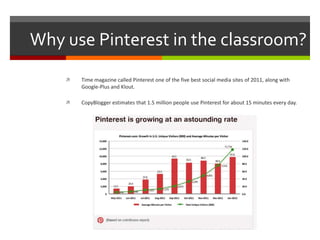
       Time magazine called Pinterest one of the five best social media sites of 2011, along with
        Google-Plus and Klout.

       CopyBlogger estimates that 1.5 million people use Pinterest for about 15 minutes every day.
Millenials as learners
   According to a 2000 study by psychologist Keith Anderson, at least 10 percent of
    college students used the Internet so much that it interfered with their grades,
    their health or their social lives. Fast-forward ten years and the use of the
    technology is so engrained in college students’ lives that they can’t imagine life
    without it.

   This generation is extremely technology-oriented and 88%of Millennials report
    sending text messages regurlarly. They are so phone-addicted that 83% sleep with
    their phones (Pew, 2010). In addition to cell phone usage, Millennials are hooked in
    to social networks more than any other generation. Three-quarters of Millennials
    have profiles on social networking sites (Pew, 2010).

   Most Millennials enter the classroom prepared to take advantage of the
    technologies and schools are ill-prepared to connect that knowledge to the
    classroom. Social networking sites such as YouTube and Facebook are often
    blocked, resulting in a failure to connect the world they live in with the classrooms
    they learn in (Considine, Horton & Moorman, 2009)

   Researchers argues that we need to teach students how to become effective
    learners and guide them in honing their critical thinking skills. Millennials want to
    learn collaboratively, in their own time and on their own terms. They appreciate
    activities that permit creativity and involve real-life issues (McGlynn, 2005).
Using Pinterest as a collaboration tool

       Once following each other, a board owner can add
         multiple people as collaborators on the board
         simply by typing in their username and clicking
         “add”.

       The board will immediately become visible within
         the collaborator’s account and will work identically
         to one of their own boards.
Using Pinterest for Course Collaboration

      At Point Park University’s School of Communication,
        we’re experimenting with using Pinterest for Course
        Collaboration. We’re doing that in a variety of ways.

      First, we set up a School Pinterest Account
         www.pinterest.com/PointParkSoC

      Then we set up boards for various classes

      And invited students to collaborate on those boards
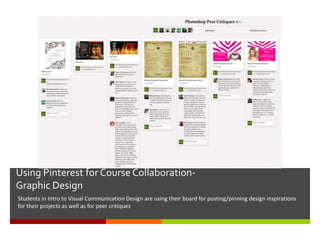
Using Pinterest for Course Collaboration-
Graphic Design
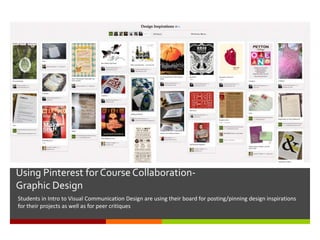
Students in Intro to Visual Communication Design are using their board for posting/pinning design inspirations
for their projects as well as for peer critiques
Using Pinterest for Course Collaboration-
Graphic Design
Students in Intro to Visual Communication Design are using their board for posting/pinning design inspirations
for their projects as well as for peer critiques
Social Media
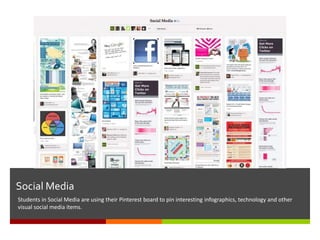
Students in Social Media are using their Pinterest board to pin interesting infographics, technology and other
visual social media items.
Using Pinterest for Course Collaboration-
Nature Photography
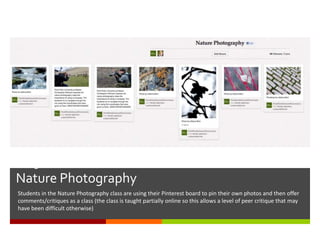
Students in the Nature Photography class are using their Pinterest board to pin their own photos and then offer
comments/critiques as a class (the class is taught partially online so this allows a level of peer critique that may
have been difficult otherwise)
Using Pinterest for Course Collaboration-
Video Production
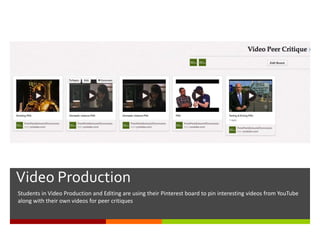
Students in Video Production and Editing are using their Pinterest board to pin interesting videos from YouTube
along with their own videos for peer critiques
Using Pinterest for Course Collaboration-
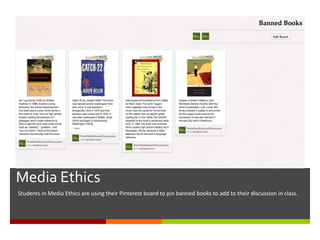
Media Ethics
Students in Media Ethics are using their Pinterest board to pin banned books to add to their discussion in class.

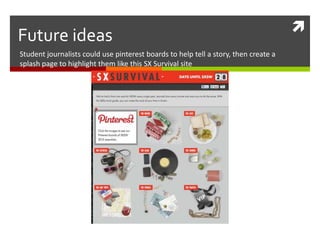
Future ideas
Student journalists could use pinterest boards to help tell a story, then create a
splash page to highlight them like this SX Survival site
Other Pinteresting ideas

 Student clubs could use Pinterest to pin ideas for
   travel to conferences, event planning, etc.
 Faculty and students could pin equipment
   needs/wish lists to dedicated boards
 Faculty and students could pin portfolios and other
   ideas from other Universities
 Photo students could pin their favorite paper and
   other supplies (an often-asked question)
 Departments could pin technology needs for
   incoming students (another often-asked ?)

BEA Ignite: Heather Fiedler

  • 1.
  • 2.
     Keep it Pinteresting UsingPinterest as a Course Collaboration Tool
  • 3.
    Understanding Pinterest  “Pinterestis an online pinboard. Organize and share things you love.” (Pinterest, 2012)  Pinterest is a vision board-styled social photo sharing website and app where users can create and manage theme-based image collections. The site's mission statement is to "connect everyone in the world through the 'things' they find interesting." Pinterest is managed by Cold Brew Labs, a team based in Palo Alto, California (Wikipedia, 2012)
  • 4.
    What is apin board?  A pin is an image added to Pinterest. A pin can be a dded from a website using the Pin It button, or you can upload images from your computer. Each pin added using the Pin It button links back to the site it came from.  A board is a set of pins. A board can be created on any topic, such as Cool Posters, Recipes For Dinner, or Wishlist. You can add as many pins to a board as you want. • (Pinterest, 2012)
  • 5.
    How can Iuse Pinterest personally?  Users are finding Pinterest’s ability to “visually bookmark” items from the internet (or their own computers) addicting. They then can referring back to those items when it’s time to plan that birthday party, make dinner or do some home decorating.  Common pin boards include DIY Projects, Clothing, Quotes and Food.
  • 6.
    Where do Ifind pins?  Pins can be found in a variety of places  By seeing them on other Pinterest boards, and “repinning” them to your own board  By finding a webpage with a graphic and either copying the URL to the “pin it” dialogue box or clicking the “pin it” button on your shortcut toolbar  By uploading a file from your computer
  • 7.
    Pinterest “social component” Not only can users “pin” things but they can also comment on other pins, offering comments or suggestions. This brings to Pinterest another level of interactivity.  In addition to pinning and repinning, users can “like” a pin  Likes, comments and pins are then often pushed to users’ Facebook and Twitter feeds, which allow their networks to see and interact with their Pinterest activity
  • 8.
    Using Pinterest asa collaboration tool  Pinterest allows users to create boards that are collaborative. Multiple users can be added as “pinners” to a particular board  To set up a collaborative board, users must be following each other  (Pinterest says it can be done through email address but that does not seem to work)
  • 9.
    Why use Pinterestin the classroom?  Time magazine called Pinterest one of the five best social media sites of 2011, along with Google-Plus and Klout.  CopyBlogger estimates that 1.5 million people use Pinterest for about 15 minutes every day.
  • 10.
    Millenials as learners  According to a 2000 study by psychologist Keith Anderson, at least 10 percent of college students used the Internet so much that it interfered with their grades, their health or their social lives. Fast-forward ten years and the use of the technology is so engrained in college students’ lives that they can’t imagine life without it.  This generation is extremely technology-oriented and 88%of Millennials report sending text messages regurlarly. They are so phone-addicted that 83% sleep with their phones (Pew, 2010). In addition to cell phone usage, Millennials are hooked in to social networks more than any other generation. Three-quarters of Millennials have profiles on social networking sites (Pew, 2010).  Most Millennials enter the classroom prepared to take advantage of the technologies and schools are ill-prepared to connect that knowledge to the classroom. Social networking sites such as YouTube and Facebook are often blocked, resulting in a failure to connect the world they live in with the classrooms they learn in (Considine, Horton & Moorman, 2009)  Researchers argues that we need to teach students how to become effective learners and guide them in honing their critical thinking skills. Millennials want to learn collaboratively, in their own time and on their own terms. They appreciate activities that permit creativity and involve real-life issues (McGlynn, 2005).
  • 11.
    Using Pinterest asa collaboration tool  Once following each other, a board owner can add multiple people as collaborators on the board simply by typing in their username and clicking “add”.  The board will immediately become visible within the collaborator’s account and will work identically to one of their own boards.
  • 12.
    Using Pinterest forCourse Collaboration  At Point Park University’s School of Communication, we’re experimenting with using Pinterest for Course Collaboration. We’re doing that in a variety of ways.  First, we set up a School Pinterest Account  www.pinterest.com/PointParkSoC  Then we set up boards for various classes  And invited students to collaborate on those boards
  • 13.
    Using Pinterest forCourse Collaboration- Graphic Design Students in Intro to Visual Communication Design are using their board for posting/pinning design inspirations for their projects as well as for peer critiques
  • 14.
    Using Pinterest forCourse Collaboration- Graphic Design Students in Intro to Visual Communication Design are using their board for posting/pinning design inspirations for their projects as well as for peer critiques
  • 15.
    Social Media Students inSocial Media are using their Pinterest board to pin interesting infographics, technology and other visual social media items.
  • 16.
    Using Pinterest forCourse Collaboration- Nature Photography Students in the Nature Photography class are using their Pinterest board to pin their own photos and then offer comments/critiques as a class (the class is taught partially online so this allows a level of peer critique that may have been difficult otherwise)
  • 17.
    Using Pinterest forCourse Collaboration- Video Production Students in Video Production and Editing are using their Pinterest board to pin interesting videos from YouTube along with their own videos for peer critiques
  • 18.
    Using Pinterest forCourse Collaboration- Media Ethics Students in Media Ethics are using their Pinterest board to pin banned books to add to their discussion in class.
  • 19.
     Future ideas Student journalistscould use pinterest boards to help tell a story, then create a splash page to highlight them like this SX Survival site
  • 20.
    Other Pinteresting ideas Student clubs could use Pinterest to pin ideas for travel to conferences, event planning, etc.  Faculty and students could pin equipment needs/wish lists to dedicated boards  Faculty and students could pin portfolios and other ideas from other Universities  Photo students could pin their favorite paper and other supplies (an often-asked question)  Departments could pin technology needs for incoming students (another often-asked ?)