Sri Lanka-German Training InstituteDepartment of Information and Communication Technology
National Diploma in Information and Communication Technology – Bridging
[BIT-FON] Fundamentals of Networking
Task 01: Introducing Basic Network Concepts
11/23/2018 Introducing Basic Network Concepts 1
Sri Lanka-German Training InstituteDepartment of Information and Communication Technology
INDEX
1. Definition & applications of computer network
2. Components of computer network
3. Network benefits
4. Disadvantages of computer network
5. Classification by their geographical area
6. Network classification by their component role
7. Types of servers
11/23/2018 Introducing Basic Network Concepts 2
Sri Lanka-German Training InstituteDepartment of Information and Communication Technology
DEFINTION
A computer network is defined as the
interconnection of two or more computers. It is
done to enable the computers to communicate and
share available resources.
11/23/2018 Introducing Basic Network Concepts 3
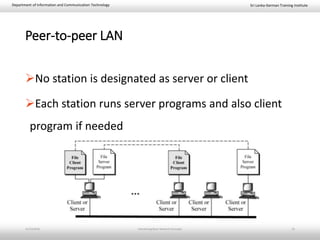
Sri Lanka-German Training InstituteDepartment of Information and Communication Technology
DEFINTION
A computer network or data network is a
telecommunications network which allows nodes to
share resources. In computer networks, networked
computing devices exchange data with each other using
a data link. The connections between nodes are
established using either cable media or wireless media.
The best-known computer network is the Internet. –
Wikipedia
11/23/2018 Introducing Basic Network Concepts 4
Sri Lanka-German Training InstituteDepartment of Information and Communication Technology
APPLICATIONS
1. Sharing of resources such as printers
2. Sharing of expensive software's and database
3. Communication from one computer to another computer
4. Exchange of data and information among users via
network
5. Sharing of information over geographically wide areas.
11/23/2018 Introducing Basic Network Concepts 5
Sri Lanka-German Training InstituteDepartment of Information and Communication Technology
COMPONENTS OF COMPUTER NETWORK
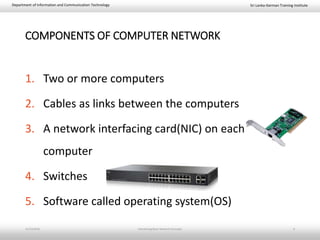
1. Two or more computers
2. Cables as links between the computers
3. A network interfacing card(NIC) on each
computer
4. Switches
5. Software called operating system(OS)
11/23/2018 Introducing Basic Network Concepts 6
Sri Lanka-German Training InstituteDepartment of Information and Communication Technology
NETWORK BENEFITS
The network provided to the users can be divided
into two categories:
i. Sharing
ii. Connectivity
11/23/2018 Introducing Basic Network Concepts 7
Sri Lanka-German Training InstituteDepartment of Information and Communication Technology
SHARING RESOURCES
Types of resources are:
1. Hardware: A network allows users to share many
hardware devices such as printers , modems, fax
machines, CD ROM, players, etc.
2. Software: sharing software resources reduces the cost
of software installation, saves space on hard disk.
11/23/2018 Introducing Basic Network Concepts 8
Sri Lanka-German Training InstituteDepartment of Information and Communication Technology
OTHER BENEFITS OF COMPUTER NETWORK
1. Increased speed
2. Reduced cost
3. Improved security
4. Centralized software managements
5. Electronic mail
6. Flexible access
11/23/2018 Introducing Basic Network Concepts 9
Sri Lanka-German Training InstituteDepartment of Information and Communication Technology
DISDAVATAGES OF NETWORKS
1. High cost of installation
2. Requires time for administration
3. Failure of server
4. Cable faults
5. Security Difficulties
6. Presence of Computer Viruses and Other Malwares
11/23/2018 Introducing Basic Network Concepts 10
Sri Lanka-German Training InstituteDepartment of Information and Communication Technology
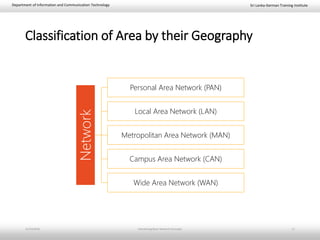
Classification of Area by their Geography
Network Personal Area Network (PAN)
Local Area Network (LAN)
Metropolitan Area Network (MAN)
Campus Area Network (CAN)
Wide Area Network (WAN)
11/23/2018 Introducing Basic Network Concepts 11
Sri Lanka-German Training InstituteDepartment of Information and Communication Technology
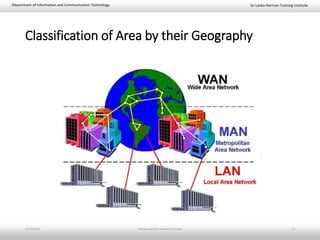
Classification of Area by their Geography
11/23/2018 Introducing Basic Network Concepts 12
Sri Lanka-German Training InstituteDepartment of Information and Communication Technology
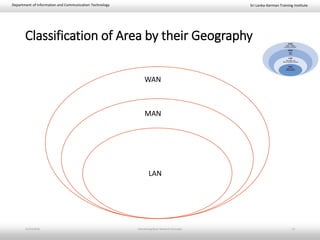
Classification of Area by their Geography
11/23/2018 Introducing Basic Network Concepts 13
LAN
MAN
WAN
Sri Lanka-German Training InstituteDepartment of Information and Communication Technology
Personal Area Network (PAN)
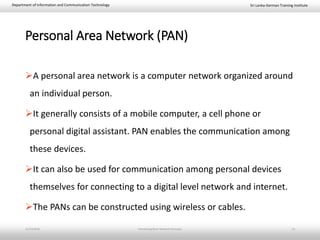
A personal area network is a computer network organized around
an individual person.
It generally consists of a mobile computer, a cell phone or
personal digital assistant. PAN enables the communication among
these devices.
It can also be used for communication among personal devices
themselves for connecting to a digital level network and internet.
The PANs can be constructed using wireless or cables.
11/23/2018 Introducing Basic Network Concepts 14
Sri Lanka-German Training InstituteDepartment of Information and Communication Technology
Local Area Network (LAN)
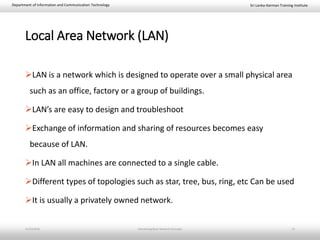
LAN is a network which is designed to operate over a small physical area
such as an office, factory or a group of buildings.
LAN’s are easy to design and troubleshoot
Exchange of information and sharing of resources becomes easy
because of LAN.
In LAN all machines are connected to a single cable.
Different types of topologies such as star, tree, bus, ring, etc Can be used
It is usually a privately owned network.
11/23/2018 Introducing Basic Network Concepts 15
Sri Lanka-German Training InstituteDepartment of Information and Communication Technology
Campus Area Network(CAN)
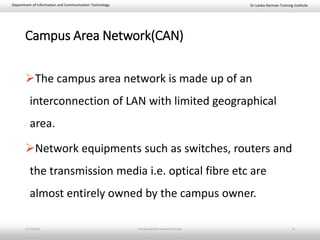
The campus area network is made up of an
interconnection of LAN with limited geographical
area.
Network equipments such as switches, routers and
the transmission media i.e. optical fibre etc are
almost entirely owned by the campus owner.
11/23/2018 Introducing Basic Network Concepts 16
Sri Lanka-German Training InstituteDepartment of Information and Communication Technology
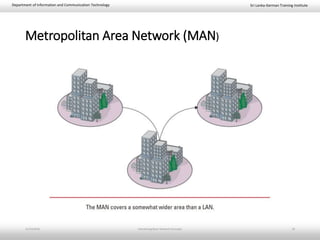
Metropolitan Area Network (MAN)
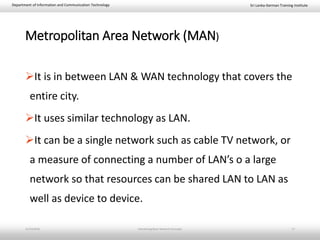
It is in between LAN & WAN technology that covers the
entire city.
It uses similar technology as LAN.
It can be a single network such as cable TV network, or
a measure of connecting a number of LAN’s o a large
network so that resources can be shared LAN to LAN as
well as device to device.
11/23/2018 Introducing Basic Network Concepts 17
Sri Lanka-German Training InstituteDepartment of Information and Communication Technology
Metropolitan Area Network (MAN)
11/23/2018 Introducing Basic Network Concepts 18
Sri Lanka-German Training InstituteDepartment of Information and Communication Technology
Wide Area Network (WAN)
When network spans over a large distance or when the computers to be
connected to each other are at widely separated locations a local area
network cannot be used. A wide area network(WAN) is installed.
The communication between different users of WAN is established using
leased telephone lines, satellite links and similar channels.
It is cheaper and more efficient to use the phone network for the link.
Most WAN networks are used to transfer large blocks of data between
its users.
11/23/2018 Introducing Basic Network Concepts 19
Sri Lanka-German Training InstituteDepartment of Information and Communication Technology
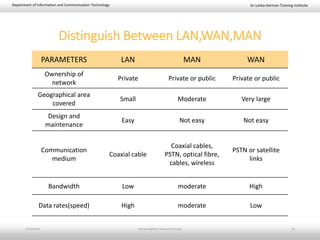
PARAMETERS LAN MAN WAN
Ownership of
network
Private Private or public Private or public
Geographical area
covered
Small Moderate Very large
Design and
maintenance
Easy Not easy Not easy
Communication
medium
Coaxial cable
Coaxial cables,
PSTN, optical fibre,
cables, wireless
PSTN or satellite
links
Bandwidth Low moderate High
Data rates(speed) High moderate Low
Distinguish Between LAN,WAN,MAN
11/23/2018 Introducing Basic Network Concepts 20
Sri Lanka-German Training InstituteDepartment of Information and Communication Technology
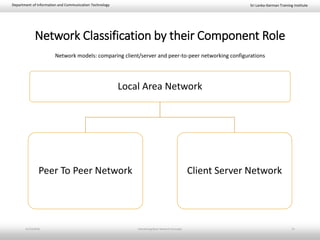
Network Classification by their Component Role
Local Area Network
Peer To Peer Network Client Server Network
Network models: comparing client/server and peer-to-peer networking configurations
11/23/2018 Introducing Basic Network Concepts 21
Sri Lanka-German Training InstituteDepartment of Information and Communication Technology
Peer-to-peer LAN
No station is designated as server or client
Each station runs server programs and also client
program if needed
11/23/2018 Introducing Basic Network Concepts 22
Sri Lanka-German Training InstituteDepartment of Information and Communication Technology
Peer To Peer Network
In peer to peer network each computer is responsible for making its own
resources available to other computers on the network.
Each computer is responsible for setting up and maintaining its own security for
these resources.
Also each computer is responsible for accessing the required network resources
from peer to peer relationships.
11/23/2018 Introducing Basic Network Concepts 23
Sri Lanka-German Training InstituteDepartment of Information and Communication Technology
Peer To Peer Network
Peer to peer network is useful for a small network containing less than 10
computers on a single LAN .
In peer to peer network each computer can function as both client and server.
Peer to peer networks do not have a central control system. There are no servers
in peer networks.
Peer networks are amplified into home group.
11/23/2018 Introducing Basic Network Concepts 24
Sri Lanka-German Training InstituteDepartment of Information and Communication Technology
Advantages & Disadvantages of Peer to Peer
Network
Advantages:
1. Use less expensive computer
hardware
2. Easy to administer
3. More built in redundancy
4. Easy setup & low cost
Disadvantages:
1. Not very secure
2. No central point of storage or
file archiving
3. Additional load on computer
because of resource sharing
4. Hard to maintain version
control
11/23/2018 Introducing Basic Network Concepts 25
Sri Lanka-German Training InstituteDepartment of Information and Communication Technology
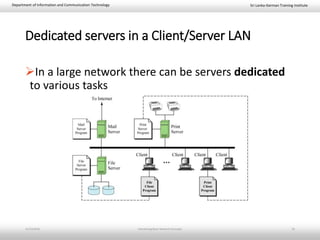
Dedicated servers in a Client/Server LAN
In a large network there can be servers dedicated
to various tasks
11/23/2018 Introducing Basic Network Concepts 26
Sri Lanka-German Training InstituteDepartment of Information and Communication Technology
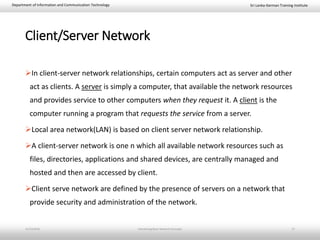
Client/Server Network
In client-server network relationships, certain computers act as server and other
act as clients. A server is simply a computer, that available the network resources
and provides service to other computers when they request it. A client is the
computer running a program that requests the service from a server.
Local area network(LAN) is based on client server network relationship.
A client-server network is one n which all available network resources such as
files, directories, applications and shared devices, are centrally managed and
hosted and then are accessed by client.
Client serve network are defined by the presence of servers on a network that
provide security and administration of the network.
11/23/2018 Introducing Basic Network Concepts 27
Sri Lanka-German Training InstituteDepartment of Information and Communication Technology
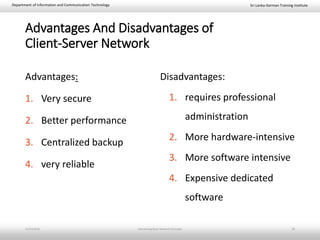
Advantages And Disadvantages of
Client-Server Network
Advantages:
1. Very secure
2. Better performance
3. Centralized backup
4. very reliable
Disadvantages:
1. requires professional
administration
2. More hardware-intensive
3. More software intensive
4. Expensive dedicated
software
11/23/2018 Introducing Basic Network Concepts 28
Sri Lanka-German Training InstituteDepartment of Information and Communication Technology
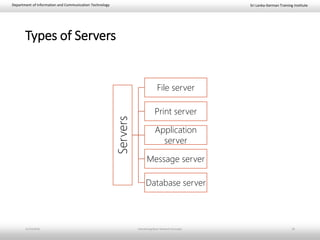
Types of Servers
Servers
File server
Print server
Application
server
Message server
Database server
11/23/2018 Introducing Basic Network Concepts 29
Sri Lanka-German Training InstituteDepartment of Information and Communication Technology
Types of Servers
1. File server: These servers provide the services for storing, retrieving and
moving the data. A user can read, write, exchange and manage the files with
the help of file servers.
2. Printer server: The printer server is used for controlling and managing printing
on the network. It also offers the fax service to the network users.
11/23/2018 Introducing Basic Network Concepts 30
Sri Lanka-German Training InstituteDepartment of Information and Communication Technology
Types of Servers
3. Application server: The expensive software and additional computing power
can be shared by the computers in a network with he help of application
servers.
4. Message server: It is used to co-ordinate the interaction between users,
documents and applications. The data can be used in the for of audio, video,
binary, text or graphics.
5. Database server: It is a type of application server. It allows the uses to access
the centralised strong database.
11/23/2018 Introducing Basic Network Concepts 31

basic network concepts

  • 1.
    Sri Lanka-German TrainingInstituteDepartment of Information and Communication Technology National Diploma in Information and Communication Technology – Bridging [BIT-FON] Fundamentals of Networking Task 01: Introducing Basic Network Concepts 11/23/2018 Introducing Basic Network Concepts 1
  • 2.
    Sri Lanka-German TrainingInstituteDepartment of Information and Communication Technology INDEX 1. Definition & applications of computer network 2. Components of computer network 3. Network benefits 4. Disadvantages of computer network 5. Classification by their geographical area 6. Network classification by their component role 7. Types of servers 11/23/2018 Introducing Basic Network Concepts 2
  • 3.
    Sri Lanka-German TrainingInstituteDepartment of Information and Communication Technology DEFINTION A computer network is defined as the interconnection of two or more computers. It is done to enable the computers to communicate and share available resources. 11/23/2018 Introducing Basic Network Concepts 3
  • 4.
    Sri Lanka-German TrainingInstituteDepartment of Information and Communication Technology DEFINTION A computer network or data network is a telecommunications network which allows nodes to share resources. In computer networks, networked computing devices exchange data with each other using a data link. The connections between nodes are established using either cable media or wireless media. The best-known computer network is the Internet. – Wikipedia 11/23/2018 Introducing Basic Network Concepts 4
  • 5.
    Sri Lanka-German TrainingInstituteDepartment of Information and Communication Technology APPLICATIONS 1. Sharing of resources such as printers 2. Sharing of expensive software's and database 3. Communication from one computer to another computer 4. Exchange of data and information among users via network 5. Sharing of information over geographically wide areas. 11/23/2018 Introducing Basic Network Concepts 5
  • 6.
    Sri Lanka-German TrainingInstituteDepartment of Information and Communication Technology COMPONENTS OF COMPUTER NETWORK 1. Two or more computers 2. Cables as links between the computers 3. A network interfacing card(NIC) on each computer 4. Switches 5. Software called operating system(OS) 11/23/2018 Introducing Basic Network Concepts 6
  • 7.
    Sri Lanka-German TrainingInstituteDepartment of Information and Communication Technology NETWORK BENEFITS The network provided to the users can be divided into two categories: i. Sharing ii. Connectivity 11/23/2018 Introducing Basic Network Concepts 7
  • 8.
    Sri Lanka-German TrainingInstituteDepartment of Information and Communication Technology SHARING RESOURCES Types of resources are: 1. Hardware: A network allows users to share many hardware devices such as printers , modems, fax machines, CD ROM, players, etc. 2. Software: sharing software resources reduces the cost of software installation, saves space on hard disk. 11/23/2018 Introducing Basic Network Concepts 8
  • 9.
    Sri Lanka-German TrainingInstituteDepartment of Information and Communication Technology OTHER BENEFITS OF COMPUTER NETWORK 1. Increased speed 2. Reduced cost 3. Improved security 4. Centralized software managements 5. Electronic mail 6. Flexible access 11/23/2018 Introducing Basic Network Concepts 9
  • 10.
    Sri Lanka-German TrainingInstituteDepartment of Information and Communication Technology DISDAVATAGES OF NETWORKS 1. High cost of installation 2. Requires time for administration 3. Failure of server 4. Cable faults 5. Security Difficulties 6. Presence of Computer Viruses and Other Malwares 11/23/2018 Introducing Basic Network Concepts 10
  • 11.
    Sri Lanka-German TrainingInstituteDepartment of Information and Communication Technology Classification of Area by their Geography Network Personal Area Network (PAN) Local Area Network (LAN) Metropolitan Area Network (MAN) Campus Area Network (CAN) Wide Area Network (WAN) 11/23/2018 Introducing Basic Network Concepts 11
  • 12.
    Sri Lanka-German TrainingInstituteDepartment of Information and Communication Technology Classification of Area by their Geography 11/23/2018 Introducing Basic Network Concepts 12
  • 13.
    Sri Lanka-German TrainingInstituteDepartment of Information and Communication Technology Classification of Area by their Geography 11/23/2018 Introducing Basic Network Concepts 13 LAN MAN WAN
  • 14.
    Sri Lanka-German TrainingInstituteDepartment of Information and Communication Technology Personal Area Network (PAN) A personal area network is a computer network organized around an individual person. It generally consists of a mobile computer, a cell phone or personal digital assistant. PAN enables the communication among these devices. It can also be used for communication among personal devices themselves for connecting to a digital level network and internet. The PANs can be constructed using wireless or cables. 11/23/2018 Introducing Basic Network Concepts 14
  • 15.
    Sri Lanka-German TrainingInstituteDepartment of Information and Communication Technology Local Area Network (LAN) LAN is a network which is designed to operate over a small physical area such as an office, factory or a group of buildings. LAN’s are easy to design and troubleshoot Exchange of information and sharing of resources becomes easy because of LAN. In LAN all machines are connected to a single cable. Different types of topologies such as star, tree, bus, ring, etc Can be used It is usually a privately owned network. 11/23/2018 Introducing Basic Network Concepts 15
  • 16.
    Sri Lanka-German TrainingInstituteDepartment of Information and Communication Technology Campus Area Network(CAN) The campus area network is made up of an interconnection of LAN with limited geographical area. Network equipments such as switches, routers and the transmission media i.e. optical fibre etc are almost entirely owned by the campus owner. 11/23/2018 Introducing Basic Network Concepts 16
  • 17.
    Sri Lanka-German TrainingInstituteDepartment of Information and Communication Technology Metropolitan Area Network (MAN) It is in between LAN & WAN technology that covers the entire city. It uses similar technology as LAN. It can be a single network such as cable TV network, or a measure of connecting a number of LAN’s o a large network so that resources can be shared LAN to LAN as well as device to device. 11/23/2018 Introducing Basic Network Concepts 17
  • 18.
    Sri Lanka-German TrainingInstituteDepartment of Information and Communication Technology Metropolitan Area Network (MAN) 11/23/2018 Introducing Basic Network Concepts 18
  • 19.
    Sri Lanka-German TrainingInstituteDepartment of Information and Communication Technology Wide Area Network (WAN) When network spans over a large distance or when the computers to be connected to each other are at widely separated locations a local area network cannot be used. A wide area network(WAN) is installed. The communication between different users of WAN is established using leased telephone lines, satellite links and similar channels. It is cheaper and more efficient to use the phone network for the link. Most WAN networks are used to transfer large blocks of data between its users. 11/23/2018 Introducing Basic Network Concepts 19
  • 20.
    Sri Lanka-German TrainingInstituteDepartment of Information and Communication Technology PARAMETERS LAN MAN WAN Ownership of network Private Private or public Private or public Geographical area covered Small Moderate Very large Design and maintenance Easy Not easy Not easy Communication medium Coaxial cable Coaxial cables, PSTN, optical fibre, cables, wireless PSTN or satellite links Bandwidth Low moderate High Data rates(speed) High moderate Low Distinguish Between LAN,WAN,MAN 11/23/2018 Introducing Basic Network Concepts 20
  • 21.
    Sri Lanka-German TrainingInstituteDepartment of Information and Communication Technology Network Classification by their Component Role Local Area Network Peer To Peer Network Client Server Network Network models: comparing client/server and peer-to-peer networking configurations 11/23/2018 Introducing Basic Network Concepts 21
  • 22.
    Sri Lanka-German TrainingInstituteDepartment of Information and Communication Technology Peer-to-peer LAN No station is designated as server or client Each station runs server programs and also client program if needed 11/23/2018 Introducing Basic Network Concepts 22
  • 23.
    Sri Lanka-German TrainingInstituteDepartment of Information and Communication Technology Peer To Peer Network In peer to peer network each computer is responsible for making its own resources available to other computers on the network. Each computer is responsible for setting up and maintaining its own security for these resources. Also each computer is responsible for accessing the required network resources from peer to peer relationships. 11/23/2018 Introducing Basic Network Concepts 23
  • 24.
    Sri Lanka-German TrainingInstituteDepartment of Information and Communication Technology Peer To Peer Network Peer to peer network is useful for a small network containing less than 10 computers on a single LAN . In peer to peer network each computer can function as both client and server. Peer to peer networks do not have a central control system. There are no servers in peer networks. Peer networks are amplified into home group. 11/23/2018 Introducing Basic Network Concepts 24
  • 25.
    Sri Lanka-German TrainingInstituteDepartment of Information and Communication Technology Advantages & Disadvantages of Peer to Peer Network Advantages: 1. Use less expensive computer hardware 2. Easy to administer 3. More built in redundancy 4. Easy setup & low cost Disadvantages: 1. Not very secure 2. No central point of storage or file archiving 3. Additional load on computer because of resource sharing 4. Hard to maintain version control 11/23/2018 Introducing Basic Network Concepts 25
  • 26.
    Sri Lanka-German TrainingInstituteDepartment of Information and Communication Technology Dedicated servers in a Client/Server LAN In a large network there can be servers dedicated to various tasks 11/23/2018 Introducing Basic Network Concepts 26
  • 27.
    Sri Lanka-German TrainingInstituteDepartment of Information and Communication Technology Client/Server Network In client-server network relationships, certain computers act as server and other act as clients. A server is simply a computer, that available the network resources and provides service to other computers when they request it. A client is the computer running a program that requests the service from a server. Local area network(LAN) is based on client server network relationship. A client-server network is one n which all available network resources such as files, directories, applications and shared devices, are centrally managed and hosted and then are accessed by client. Client serve network are defined by the presence of servers on a network that provide security and administration of the network. 11/23/2018 Introducing Basic Network Concepts 27
  • 28.
    Sri Lanka-German TrainingInstituteDepartment of Information and Communication Technology Advantages And Disadvantages of Client-Server Network Advantages: 1. Very secure 2. Better performance 3. Centralized backup 4. very reliable Disadvantages: 1. requires professional administration 2. More hardware-intensive 3. More software intensive 4. Expensive dedicated software 11/23/2018 Introducing Basic Network Concepts 28
  • 29.
    Sri Lanka-German TrainingInstituteDepartment of Information and Communication Technology Types of Servers Servers File server Print server Application server Message server Database server 11/23/2018 Introducing Basic Network Concepts 29
  • 30.
    Sri Lanka-German TrainingInstituteDepartment of Information and Communication Technology Types of Servers 1. File server: These servers provide the services for storing, retrieving and moving the data. A user can read, write, exchange and manage the files with the help of file servers. 2. Printer server: The printer server is used for controlling and managing printing on the network. It also offers the fax service to the network users. 11/23/2018 Introducing Basic Network Concepts 30
  • 31.
    Sri Lanka-German TrainingInstituteDepartment of Information and Communication Technology Types of Servers 3. Application server: The expensive software and additional computing power can be shared by the computers in a network with he help of application servers. 4. Message server: It is used to co-ordinate the interaction between users, documents and applications. The data can be used in the for of audio, video, binary, text or graphics. 5. Database server: It is a type of application server. It allows the uses to access the centralised strong database. 11/23/2018 Introducing Basic Network Concepts 31

Editor's Notes

  • #2 Partial map of the Internet based on the January 15, 2005 data found on opte.org. Each line is drawn between two nodes, representing two IP addresses. The length of the lines are indicative of the delay between those two nodes. This graph represents less than 30% of the Class C networks reachable by the data collection program in early 2005. Lines are color-coded according to their corresponding RFC 1918 allocation as follows: Dark blue: net, ca, us Green: com, org Red: mil, gov, edu Yellow: jp, cn, tw, au, de Magenta: uk, it, pl, fr Gold: br, kr, nl White: unknown
  • #15 A wireless personal area network (WPAN) is a low-powered PAN carried over a short-distance wireless network technology such as: INSTEON - Insteon is a home automatio IrDA - Short for Infrared Data Association Wireless USB Bluetooth Z-Wave- home automation ZigBee
  • #21 public switched telephone network (PSTN Bandwidth is also defined as the amount of data that can be transmitted in a fixed amount of time. For digital devices, the bandwidth is usually expressed in bits per second(bps) or bytes per second. For analog devices, the bandwidth is expressed in cycles per second, or Hertz (Hz).