• CPU
• Concept of Register
• Cache Memory
• Hard Disk
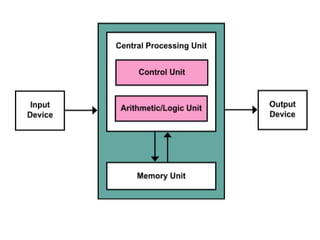
• Central processing unit (CPU) is the central
component of the Computer System. Sometimes
it is called as microprocessor or processor. It is
the brain that runs the show inside the
Computer.
• CPU is consist of transistors, that receives inputs
and produces output. Transistors perform logical
operations which is called processing
Central processing unit (CPU)
Types of Computer CPU :-
• Single Core CPUs
• Dual Core CPUs
• Quad Core CPUs
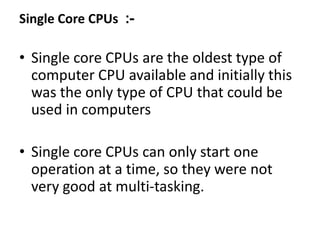
Single Core CPUs :-
• Single core CPUs are the oldest type of
computer CPU available and initially this
was the only type of CPU that could be
used in computers
• Single core CPUs can only start one
operation at a time, so they were not
very good at multi-tasking.
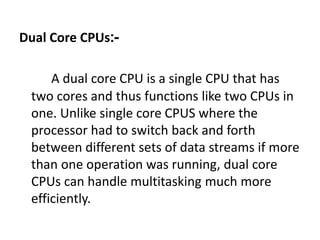
Dual Core CPUs:-
A dual core CPU is a single CPU that has
two cores and thus functions like two CPUs in
one. Unlike single core CPUS where the
processor had to switch back and forth
between different sets of data streams if more
than one operation was running, dual core
CPUs can handle multitasking much more
efficiently.
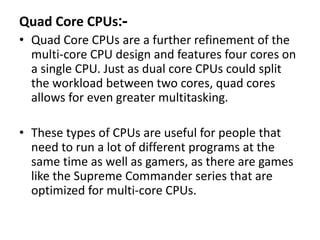
Quad Core CPUs:-
• Quad Core CPUs are a further refinement of the
multi-core CPU design and features four cores on
a single CPU. Just as dual core CPUs could split
the workload between two cores, quad cores
allows for even greater multitasking.
• These types of CPUs are useful for people that
need to run a lot of different programs at the
same time as well as gamers, as there are games
like the Supreme Commander series that are
optimized for multi-core CPUs.
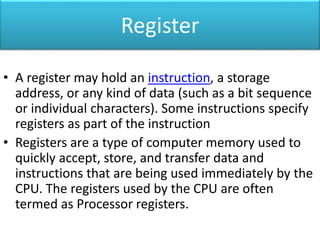
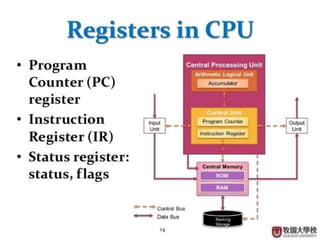
Register
• A register may hold an instruction, a storage
address, or any kind of data (such as a bit sequence
or individual characters). Some instructions specify
registers as part of the instruction
• Registers are a type of computer memory used to
quickly accept, store, and transfer data and
instructions that are being used immediately by the
CPU. The registers used by the CPU are often
termed as Processor registers.
Cache Memory is a special very high-speed memory.
It is used to speed up and synchronizing with high-
speed CPU.
Cache Memory (Pronounced as "cash") is the
volatile computer memory which is very nearest to
the CPU so also called CPU memory, all the Recent
Instructions are Stored into the Cache Memory.
There are three types of cache
memory found in a CPU:-
• 1. L1 Cache
• 2. L2 Cache
• 3. L3 Cache
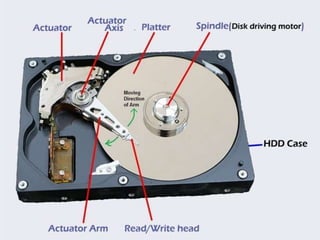
Hard disk
• In 1953, IBM engineers created the first hard disk,
which was the size of two refrigerators.
• Ttypically it spins at 5,400 to 15,000 RPM
• The arm writes new data to the platters and reads
new data from them.
• When you save data or install programs on your
computer, the information is typically written to
your hard disk. The hard disk is a spindle of
magnetic disks, called platters, that record and store
information
Hard Drive Types
• Parallel Advanced Technology Attachment (PATA)
• Serial ATA (SATA)
• Small Computer System Interface (SCSI)
• Solid State Drives (SSD)
Functions of a Hard Drive
The Hard Drive as Storage:-
– As you use your computer, you create documents and
other bits of information to be stored. The saves these
items, alongside the software and files that allow you to
easily use and interact with your computer, including the
operating system.
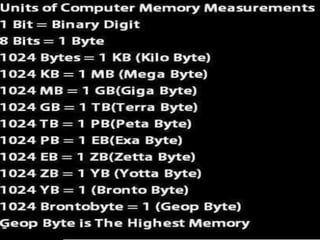
Measuring Hard Drive Storage:-
-Hard drives come in a variety of storage sizes. As of
publication, hard drives are typically measured in
gigabytes and terabytes, which are units of
measurement for a hard drive's storage capacity. For
example, 500GB hard drives are common in many
modern computer

Basic computer architecture

  • 1.
    • CPU • Conceptof Register • Cache Memory • Hard Disk
  • 2.
    • Central processingunit (CPU) is the central component of the Computer System. Sometimes it is called as microprocessor or processor. It is the brain that runs the show inside the Computer. • CPU is consist of transistors, that receives inputs and produces output. Transistors perform logical operations which is called processing Central processing unit (CPU)
  • 4.
    Types of ComputerCPU :- • Single Core CPUs • Dual Core CPUs • Quad Core CPUs
  • 5.
    Single Core CPUs:- • Single core CPUs are the oldest type of computer CPU available and initially this was the only type of CPU that could be used in computers • Single core CPUs can only start one operation at a time, so they were not very good at multi-tasking.
  • 6.
    Dual Core CPUs:- Adual core CPU is a single CPU that has two cores and thus functions like two CPUs in one. Unlike single core CPUS where the processor had to switch back and forth between different sets of data streams if more than one operation was running, dual core CPUs can handle multitasking much more efficiently.
  • 7.
    Quad Core CPUs:- •Quad Core CPUs are a further refinement of the multi-core CPU design and features four cores on a single CPU. Just as dual core CPUs could split the workload between two cores, quad cores allows for even greater multitasking. • These types of CPUs are useful for people that need to run a lot of different programs at the same time as well as gamers, as there are games like the Supreme Commander series that are optimized for multi-core CPUs.
  • 8.
    Register • A registermay hold an instruction, a storage address, or any kind of data (such as a bit sequence or individual characters). Some instructions specify registers as part of the instruction • Registers are a type of computer memory used to quickly accept, store, and transfer data and instructions that are being used immediately by the CPU. The registers used by the CPU are often termed as Processor registers.
  • 10.
    Cache Memory isa special very high-speed memory. It is used to speed up and synchronizing with high- speed CPU. Cache Memory (Pronounced as "cash") is the volatile computer memory which is very nearest to the CPU so also called CPU memory, all the Recent Instructions are Stored into the Cache Memory.
  • 11.
    There are threetypes of cache memory found in a CPU:- • 1. L1 Cache • 2. L2 Cache • 3. L3 Cache
  • 13.
    Hard disk • In1953, IBM engineers created the first hard disk, which was the size of two refrigerators. • Ttypically it spins at 5,400 to 15,000 RPM • The arm writes new data to the platters and reads new data from them. • When you save data or install programs on your computer, the information is typically written to your hard disk. The hard disk is a spindle of magnetic disks, called platters, that record and store information
  • 15.
    Hard Drive Types •Parallel Advanced Technology Attachment (PATA) • Serial ATA (SATA) • Small Computer System Interface (SCSI) • Solid State Drives (SSD)
  • 16.
    Functions of aHard Drive The Hard Drive as Storage:- – As you use your computer, you create documents and other bits of information to be stored. The saves these items, alongside the software and files that allow you to easily use and interact with your computer, including the operating system. Measuring Hard Drive Storage:- -Hard drives come in a variety of storage sizes. As of publication, hard drives are typically measured in gigabytes and terabytes, which are units of measurement for a hard drive's storage capacity. For example, 500GB hard drives are common in many modern computer