BASIC ADWORDS TERMS

-ByM.Janaradhan
SEM/PPC Expert
ADWORDS


Google's online advertising program. Through
AdWords, you can create online ads to reach
people exactly when they're interested in the
products and services that you offer.
Google AdWords is a product that you can use to
promote your business
(Text Ad, Settings, Bid, Budget)
 AdWords accounts are managed online
 There's no minimum spending commitment, and you set
and control your own budget.

CAMPAIGN


A set of ad groups (ads, keywords, and bids) that
share a budget, location targeting, and other
settings. Your AdWords account can have one or
many ad campaigns running.
Each campaign consists of one or more ad groups, a
budget, language and location settings, distribution
settings for the Google Network, and other settings.
 Campaigns are often used to organize categories of
products or services that you offer.

DAILY BUDGET


An amount that you set for each ad campaign to
specify how much, on average, you'd like to spend
each day.
You set an average daily budget for each AdWords
campaign, and then the system will aim to show your
ads as much as possible until your budget is met
 When your budget is reached, your ads will typically
stop showing for that day
 It's possible that you'll be charged less or sometimes
slightly more than your average daily budget amount on
a given day.
 you can receive up to 20% more in costs than your daily
budget.

AD GROUP


A set of keywords, ads, and bids that is a key part
of how your account is organized. Each ad
campaign is made up of one or more ad groups
An ad group consists of one or more
ads, keywords, placements, or other targeting methods.
You also set a default bid for each ad group
 We recommend that you create a separate ad group for
each theme such as for each product you offer (like
wedding catering and party catering)

KEYWORDS


Words or phrases describing your product or
service that you choose to help determine when
and where your ad can appear.
The keywords you choose are used to show your ads to
people
 When someone searches on Google, your ad could be
eligible to appear based on the similarity of your
keywords to the person's search terms.
 A great keyword list can help improve the performance
of your ads and help you to avoid higher prices
 You can add match types to your keywords to help
control which searches your ad can be matched with.

GOOGLE BIDDING OPTIONS


CPC (Cost Per Click)



CPM (Cost Per Mille)/(Cost per thousand imp.)
MAXIMUM CPC BID


A bid that you set to determine the highest amount
that you're willing to pay for a click on your ad.
If someone clicks your ad, that click won't cost you more
than the maximum cost-per-click bid (or "max CPC")
that you set.
 You'll choose between manual bidding (you choose
your bid amounts) and automatic bidding (Google
chooses bids amount within your budget).

MAXIMUM CPM BID


A bid that you set to determine the highest amount
that you're willing to pay for 1,000 impressions
(times your ads are shown).
CPM stands for cost-per-thousand impressions, so you
pay for each set of a thousand showings of your ad
rather than paying for the number of clicks that you
receive.
 CPM bidding is best suited for advertisers who are
focused on brand awareness rather than sales or
website traffic.

AVERAGE COST-PER-CLICK (AVG. CPC)


The average amount that you've been charged for a
click on your ad. Average CPC is calculated by
dividing the total cost of your clicks by the total
number of clicks.


For example, if your ad receives two clicks, one costing
$0.20 and one costing $0.40, your average CPC for
those clicks is $0.30.



To see your average CPC amounts, look at the "Avg.
CPC" column in one of the tables within your
Campaigns tab.
IMPRESSIONS


How often your ad is shown. An impression is
counted each time your ad is shown on a search
result page or other site on the Google Network.
Each time your ad appears on Google or the Google
Network, it's counted as one impression
 You'll sometimes see the abbreviation "Impr" in your
account showing the number of impressions for your ad.

CLICK


A click is when a user interacts with your ad by
clicking on it, typically showing an intention to visit
your website and learn more about what you offer.


A click is counted when a person attempts to reach your
site by clicking your ad
LANDING PAGE


The webpage where customers end up after they
click your ad. This page is usually the same as your
ad's destination URL.




For each ad, you specify a destination URL to
determine where people are taken when they click your
ad

Destination URL


The URL address for the page in your website where
you'd like people to be sent after they click your ad.
DISPLAY URL


The webpage address that appears with your
ad, typically shown in green text.



For each ad, you'll specify a display URL that's
shown to customers and adestination URL that's
used to determine where people are taken when
they click your ad.
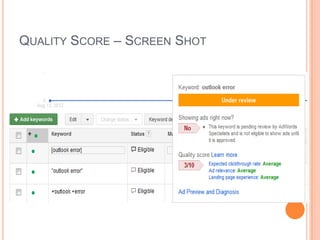
QUALITY SCORE


A
measurement
of
how
relevant
your
ads, keywords, and landing page are to a person
seeing your ad. Higher Quality Scores can lead to
lower prices and better ad positions.



Factors
CTR
 Landing Page
 Ad Relevance

QUALITY SCORE – SCREEN SHOT
RELEVANCE


How closely the elements of your ad campaign
match what a person seems to be looking for.
Your ads and keywords should directly relate to the
content on your website, especially the ad's landing
page. When people see your ad, they should be able to
understand what kind of product, service, or other
content they'll find on your site.
 Relevance is part of your Quality Score, a formula that
Google uses to measure how useful your
ad, keyword, and website are to a customer. Relevant
ads tend to get higher Quality Scores.

ANY QUERY ? ? ?

IF NO

THANK YOU
Basic Google Adwords Terms

Basic Google Adwords Terms

  • 1.
  • 2.
    ADWORDS  Google's online advertisingprogram. Through AdWords, you can create online ads to reach people exactly when they're interested in the products and services that you offer. Google AdWords is a product that you can use to promote your business (Text Ad, Settings, Bid, Budget)  AdWords accounts are managed online  There's no minimum spending commitment, and you set and control your own budget. 
  • 3.
    CAMPAIGN  A set ofad groups (ads, keywords, and bids) that share a budget, location targeting, and other settings. Your AdWords account can have one or many ad campaigns running. Each campaign consists of one or more ad groups, a budget, language and location settings, distribution settings for the Google Network, and other settings.  Campaigns are often used to organize categories of products or services that you offer. 
  • 4.
    DAILY BUDGET  An amountthat you set for each ad campaign to specify how much, on average, you'd like to spend each day. You set an average daily budget for each AdWords campaign, and then the system will aim to show your ads as much as possible until your budget is met  When your budget is reached, your ads will typically stop showing for that day  It's possible that you'll be charged less or sometimes slightly more than your average daily budget amount on a given day.  you can receive up to 20% more in costs than your daily budget. 
  • 5.
    AD GROUP  A setof keywords, ads, and bids that is a key part of how your account is organized. Each ad campaign is made up of one or more ad groups An ad group consists of one or more ads, keywords, placements, or other targeting methods. You also set a default bid for each ad group  We recommend that you create a separate ad group for each theme such as for each product you offer (like wedding catering and party catering) 
  • 6.
    KEYWORDS  Words or phrasesdescribing your product or service that you choose to help determine when and where your ad can appear. The keywords you choose are used to show your ads to people  When someone searches on Google, your ad could be eligible to appear based on the similarity of your keywords to the person's search terms.  A great keyword list can help improve the performance of your ads and help you to avoid higher prices  You can add match types to your keywords to help control which searches your ad can be matched with. 
  • 7.
    GOOGLE BIDDING OPTIONS  CPC(Cost Per Click)  CPM (Cost Per Mille)/(Cost per thousand imp.)
  • 8.
    MAXIMUM CPC BID  Abid that you set to determine the highest amount that you're willing to pay for a click on your ad. If someone clicks your ad, that click won't cost you more than the maximum cost-per-click bid (or "max CPC") that you set.  You'll choose between manual bidding (you choose your bid amounts) and automatic bidding (Google chooses bids amount within your budget). 
  • 9.
    MAXIMUM CPM BID  Abid that you set to determine the highest amount that you're willing to pay for 1,000 impressions (times your ads are shown). CPM stands for cost-per-thousand impressions, so you pay for each set of a thousand showings of your ad rather than paying for the number of clicks that you receive.  CPM bidding is best suited for advertisers who are focused on brand awareness rather than sales or website traffic. 
  • 10.
    AVERAGE COST-PER-CLICK (AVG.CPC)  The average amount that you've been charged for a click on your ad. Average CPC is calculated by dividing the total cost of your clicks by the total number of clicks.  For example, if your ad receives two clicks, one costing $0.20 and one costing $0.40, your average CPC for those clicks is $0.30.  To see your average CPC amounts, look at the "Avg. CPC" column in one of the tables within your Campaigns tab.
  • 11.
    IMPRESSIONS  How often yourad is shown. An impression is counted each time your ad is shown on a search result page or other site on the Google Network. Each time your ad appears on Google or the Google Network, it's counted as one impression  You'll sometimes see the abbreviation "Impr" in your account showing the number of impressions for your ad. 
  • 12.
    CLICK  A click iswhen a user interacts with your ad by clicking on it, typically showing an intention to visit your website and learn more about what you offer.  A click is counted when a person attempts to reach your site by clicking your ad
  • 13.
    LANDING PAGE  The webpagewhere customers end up after they click your ad. This page is usually the same as your ad's destination URL.   For each ad, you specify a destination URL to determine where people are taken when they click your ad Destination URL  The URL address for the page in your website where you'd like people to be sent after they click your ad.
  • 14.
    DISPLAY URL  The webpageaddress that appears with your ad, typically shown in green text.  For each ad, you'll specify a display URL that's shown to customers and adestination URL that's used to determine where people are taken when they click your ad.
  • 15.
    QUALITY SCORE  A measurement of how relevant your ads, keywords,and landing page are to a person seeing your ad. Higher Quality Scores can lead to lower prices and better ad positions.  Factors CTR  Landing Page  Ad Relevance 
  • 16.
    QUALITY SCORE –SCREEN SHOT
  • 17.
    RELEVANCE  How closely theelements of your ad campaign match what a person seems to be looking for. Your ads and keywords should directly relate to the content on your website, especially the ad's landing page. When people see your ad, they should be able to understand what kind of product, service, or other content they'll find on your site.  Relevance is part of your Quality Score, a formula that Google uses to measure how useful your ad, keyword, and website are to a customer. Relevant ads tend to get higher Quality Scores. 
  • 18.
    ANY QUERY ?? ? IF NO THANK YOU