Play the video…
Play the video…
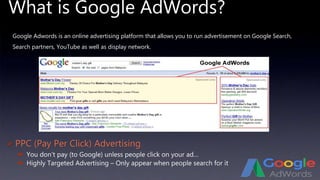
What is Google AdWords?
 PPC (Pay Per Click) Advertising
 You don’t pay (to Google) unless people click on your ad…
 Highly Targeted Advertising – Only appear when people search for it
Google Adwords is an online advertising platform that allows you to run advertisement on Google Search,
Search partners, YouTube as well as display network.
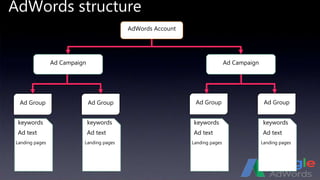
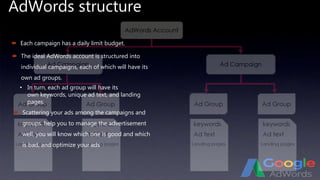
AdWords structure
Ad Group Ad Group Ad Group Ad Group
AdWords Account
Ad CampaignAd Campaign
keywords keywords keywords keywords
Ad text Ad text Ad text Ad text
Landing pages Landing pages Landing pages Landing pages
AdWords structure
 Each campaign has a daily limit budget.
 The ideal AdWords account is structured into
individual campaigns, each of which will have its
own ad groups.
 Scattering your ads among the campaigns and
groups, help you to manage the advertisement
well, you will know which one is good and which
is bad, and optimize your ads
• In turn, each ad group will have its
own keywords, unique ad text, and landing
pages.
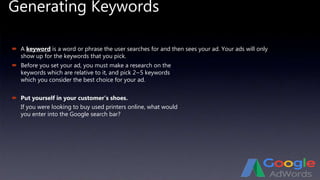
Generating Keywords
 A keyword is a word or phrase the user searches for and then sees your ad. Your ads will only
show up for the keywords that you pick.
 Put yourself in your customer’s shoes.
If you were looking to buy used printers online, what would
you enter into the Google search bar?
 Before you set your ad, you must make a research on the
keywords which are relative to it, and pick 2~5 keywords
which you consider the best choice for your ad.
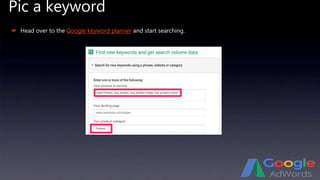
Pic a keyword
 Head over to the Google keyword planner and start searching.
Pic a keyword
Put yourself in your customer’s shoes.
 Head over to the Google keyword planner and start searching.
Pic a keyword
If you were looking to buy used printers online, what would you enter into the Google search bar?Put yourself in your customer’s shoes.
 Head over to the Google keyword planner and start searching.
Pic a keyword
Type in exactly that.If you were looking to buy used printers online, what would you enter into the Google search bar?
 Head over to the Google keyword planner and start searching.
Pic a keyword
Type in exactly that.
 Head over to the Google keyword planner and start searching.
Pic a keyword
Type in exactly that.
 Head over to the Google keyword planner and start searching.
Pic a keyword
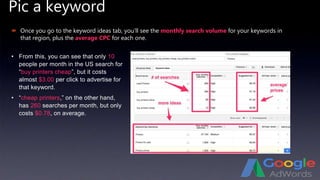
 Once you go to the keyword ideas tab, you’ll see the monthly search volume for your keywords in
that region, plus the average CPC for each one.
• From this, you can see that only 10
people per month in the US search for
“buy printers cheap”, but it costs
almost $3.00 per click to advertise for
that keyword.
• “cheap printers,” on the other hand,
has 260 searches per month, but only
costs $0.78, on average.
Pic a keyword
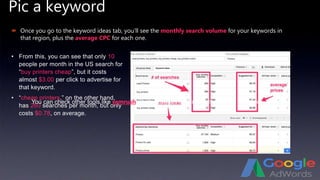
 Once you go to the keyword ideas tab, you’ll see the monthly search volume for your keywords in
that region, plus the average CPC for each one.
• From this, you can see that only 10
people per month in the US search for
“buy printers cheap”, but it costs
almost $3.00 per click to advertise for
that keyword.
• “cheap printers,” on the other hand,
has 260 searches per month, but only
costs $0.78, on average.
You can check other tools like semrush which provides the competition of the keywords…
Pic a keyword
You can check other tools like semrush which provides the competition of the keywords…
Check the Competition
 Peeking over into your competitor’s business will help you to determine if it’s easy or not to outrank
them.
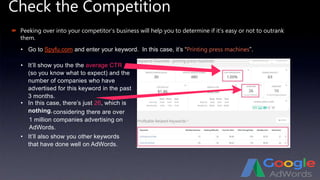
• Go to Spyfu.com and enter your keyword. In this case, it’s “Printing press machines”.
• It’ll show you the the average CTR
(so you know what to expect) and the
number of companies who have
advertised for this keyword in the past
3 months.
• In this case, there’s just 26, which is
nothing,
• It’ll also show you other keywords
that have done well on AdWords.
considering there are over
1 million companies advertising on
AdWords.
Check the Competition
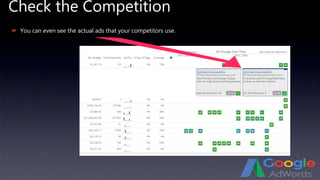
 You can even see the actual ads that your competitors use.
Check the Competition
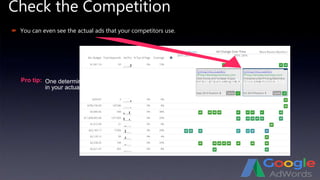
 You can even see the actual ads that your competitors use.
Pro tip: One determinant of relevancy, for Google’s quality score, is whether the keyword shows up
in your actual ad.
Check the Competition
Pro tip: One determinant of relevancy, for Google’s quality score, is whether the keyword shows up
in your actual ad.
AdWords Terminology
 Impressions:
 Click-through-rate, (CTR):
 Bid:
• And determining your cost-per-clicks CPCs.
If your maximum bid is $2, Google will only show your ad to people if other aren’t bidding more, on
average.However, if people are bidding less for the keyword that you want your ad to show up for,
Google won’t spend your maximum bid. It optimizes impressions and bids. Therefore, you might
actually end up paying less than $2 per click.
 Quality score:
• This is important, because CTR tells you which ads are working well and which aren’t.
 Cost per click, or CPC:
• Different keywords cost different amounts, depending on competition.
which is simply the number that tells us how often our ad has already been shown when
users searched for that keyword.
This is just the percentage of users who land on your advertised page because
they clicked on your ad. The higher the CTR, The more effective google considers the ad.
sets the maximum you are willing to pay for each click.
the amount an advertiser is charged for a single click.
This is a metric based on the experience that the user has on your landing page, the
relevancy of your website, the quality of your keyword and your actual ad.
AdWords Terminology
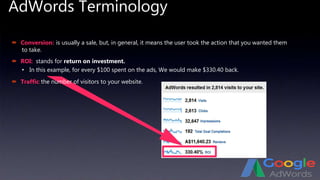
 Conversion:
 ROI:
 Traffic:
• In this example, for every $100 spent on the ads, We would make $330.40 back.
is usually a sale, but, in general, it means the user took the action that you wanted them
to take.
stands for return on investment.
the number of visitors to your website.
AdWords Terminology
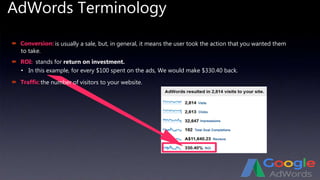
 Conversion:
 ROI:
 Traffic:
• In this example, for every $100 spent on the ads, We would make $330.40 back.
is usually a sale, but, in general, it means the user took the action that you wanted them
to take.
stands for return on investment.
the number of visitors to your website.
Setting up AdWords campaign
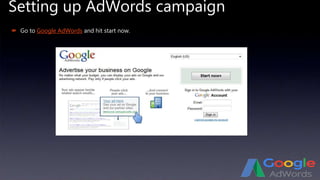
 Go to Google AdWords and hit start now.
Setting up AdWords campaign
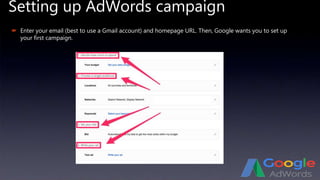
 Enter your email (best to use a Gmail account) and homepage URL. Then, Google wants you to set up
your first campaign.
Setting up AdWords campaign
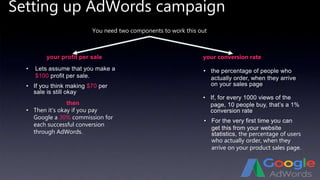
You need two components to work this out
your profit per sale your conversion rate
• Lets assume that you make a
$100 profit per sale.
• the percentage of people who
actually order, when they arrive
on your sales page
• If, for every 1000 views of the
page, 10 people buy, that’s a 1%
conversion rate
then
• If you think making $70 per
sale is still okay
• Then it’s okay if you pay
Google a 30% commission for
each successful conversion
through AdWords.
• For the very first time you can
get this from your website
statistics, the percentage of users
who actually order, when they
arrive on your product sales page.
Setting up AdWords campaign
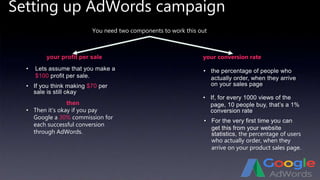
You need two components to work this out
your profit per sale your conversion rate
• Lets assume that you make a
$100 profit per sale.
• the percentage of people who
actually order, when they arrive
on your sales page
• If, for every 1000 views of the
page, 10 people buy, that’s a 1%
conversion rate
then
• If you think making $70 per
sale is still okay
• Then it’s okay if you pay
Google a 30% commission for
each successful conversion
through AdWords.
• For the very first time you can
get this from your website
statistics, the percentage of users
who actually order, when they
arrive on your product sales page.
Setting up AdWords campaign
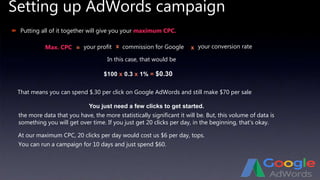
 Putting all of it together will give you your maximum CPC.
your conversion rate
In this case, that would be
$100 x 0.3 x 1% = $0.30
That means you can spend $.30 per click on Google AdWords and still make $70 per sale
At our maximum CPC, 20 clicks per day would cost us $6 per day, tops.
You can run a campaign for 10 days and just spend $60.
You just need a few clicks to get started.
the more data that you have, the more statistically significant it will be. But, this volume of data is
something you will get over time. If you just get 20 clicks per day, in the beginning, that’s okay.
Max. CPC = your profit x commission for Google x
Setting up AdWords campaign
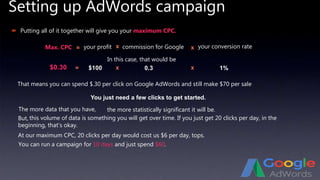
 Putting all of it together will give you your maximum CPC.
your conversion rate
In this case, that would be
$0.30
That means you can spend $.30 per click on Google AdWords and still make $70 per sale
At our maximum CPC, 20 clicks per day would cost us $6 per day, tops.
You can run a campaign for 10 days and just spend $60.
You just need a few clicks to get started.
The more data that you have,
Max. CPC = your profit x commission for Google x
$100 x 0.3 x 1%=
the more statistically significant it will be.
But, this volume of data is something you will get over time. If you just get 20 clicks per day, in the
beginning, that’s okay.
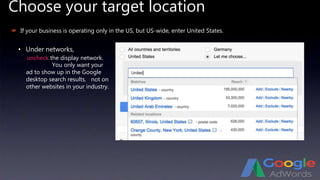
Choose your target location
 If your business is operating only in the US, but US-wide, enter United States.
• Under networks,
uncheck the display network.
You only want your
ad to show up in the Google
desktop search results, not on
other websites in your industry.
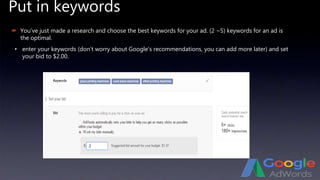
Put in keywords
 You’ve just made a research and choose the best keywords for your ad. (2 ~5) keywords for an ad is
the optimal.
• enter your keywords (don’t worry about Google’s recommendations, you can add more later) and set
your bid to $2.00.
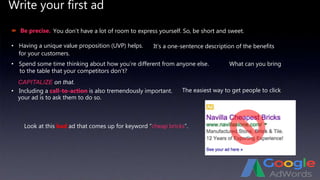
Write your first ad
 Be precise.
• Having a unique value proposition (UVP) helps.
• Spend some time thinking about how you’re different from anyone else.
CAPITALIZE on that.
• Including a call-to-action is also tremendously important.
Look at this bad ad that comes up for keyword “cheap bricks”.
You don’t have a lot of room to express yourself. So, be short and sweet.
It’s a one-sentence description of the benefits
for your customers.
What can you bring
to the table that your competitors don’t?
The easiest way to get people to click
your ad is to ask them to do so.
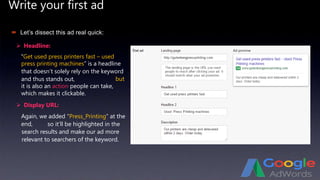
Write your first ad
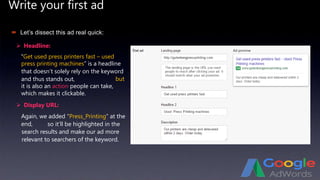
 Headline:
 Let’s dissect this ad real quick:
“Get used press printers fast – used
press printing machines” is a headline
that doesn’t solely rely on the keyword
and thus stands out,
 Display URL:
Again, we added “Press_Printing” at the
end,
but
it is also an action people can take,
which makes it clickable.
so it’ll be highlighted in the
search results and make our ad more
relevant to searchers of the keyword.
Write your first ad
 Headline:
 Let’s dissect this ad real quick:
“Get used press printers fast – used
press printing machines” is a headline
that doesn’t solely rely on the keyword
and thus stands out,
 Display URL:
Again, we added “Press_Printing” at the
end,
but
it is also an action people can take,
which makes it clickable.
so it’ll be highlighted in the
search results and make our ad more
relevant to searchers of the keyword.
Write your first ad
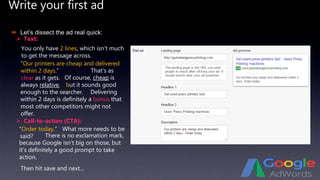
 Text:
 Let’s dissect the ad real quick:
You only have 2 lines, which isn’t much
to get the message across.
 Call-to-action (CTA):
“Order today.”
Then hit save and next...
“Our printers are cheap and delivered
within 2 days.” That’s as
clear as it gets. Of course, cheap is
always relative, but it sounds good
enough to the searcher. Delivering
within 2 days is definitely a bonus that
most other competitors might not
offer.
What more needs to be
said? There is no exclamation mark,
because Google isn’t big on those, but
it’s definitely a good prompt to take
action.
Write your first ad
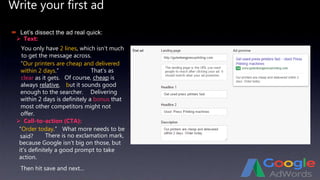
 Text:
 Let’s dissect the ad real quick:
You only have 2 lines, which isn’t much
to get the message across.
 Call-to-action (CTA):
“Order today.”
Then hit save and next...
“Our printers are cheap and delivered
within 2 days.” That’s as
clear as it gets. Of course, cheap is
always relative, but it sounds good
enough to the searcher. Delivering
within 2 days is definitely a bonus that
most other competitors might not
offer.
What more needs to be
said? There is no exclamation mark,
because Google isn’t big on those, but
it’s definitely a good prompt to take
action.
Payment Information
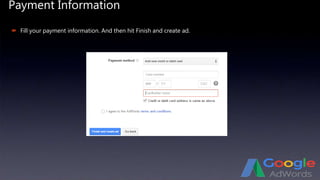
 Fill your payment information. And then hit Finish and create ad.
Fix details
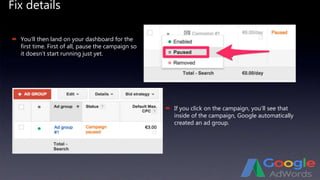
 You’ll then land on your dashboard for the
first time. First of all, pause the campaign so
it doesn’t start running just yet.
 If you click on the campaign, you’ll see that
inside of the campaign, Google automatically
created an ad group.
Fix details
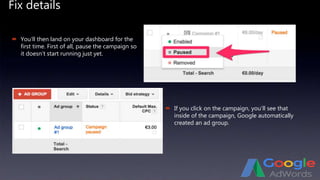
 You’ll then land on your dashboard for the
first time. First of all, pause the campaign so
it doesn’t start running just yet.
 If you click on the campaign, you’ll see that
inside of the campaign, Google automatically
created an ad group.
Fix details
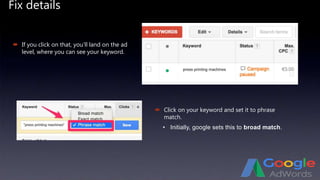
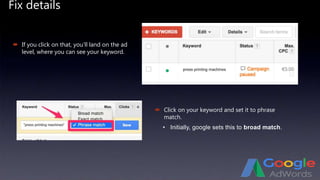
 If you click on that, you’ll land on the ad
level, where you can see your keyword.
 Click on your keyword and set it to phrase
match.
• Initially, google sets this to broad match.
Fix details
 If you click on that, you’ll land on the ad
level, where you can see your keyword.
 Click on your keyword and set it to phrase
match.
• Initially, google sets this to broad match.
Understand Different Matching Options
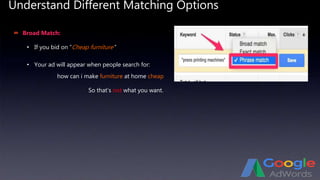
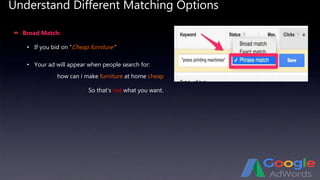
 Broad Match:
• If you bid on “Cheap furniture”
• Your ad will appear when people search for:
how can i make furniture at home cheap
So that’s not what you want.
Understand Different Matching Options
 Broad Match:
• If you bid on “Cheap furniture”
• Your ad will appear when people search for:
how can i make furniture at home cheap
So that’s not what you want.
Understand Different Matching Options
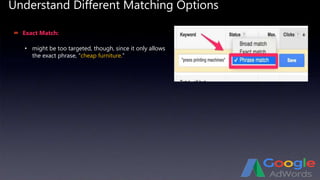
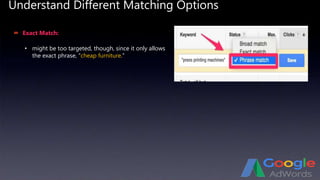
 Exact Match:
• might be too targeted, though, since it only allows
the exact phrase, “cheap furniture.”
Understand Different Matching Options
 Exact Match:
• might be too targeted, though, since it only allows
the exact phrase, “cheap furniture.”
Understand Different Matching Options
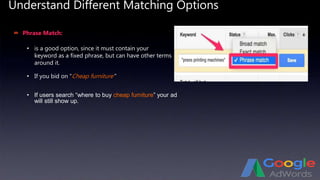
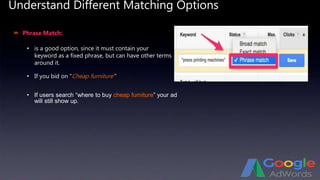
 Phrase Match:
• If you bid on “Cheap furniture”
• is a good option, since it must contain your
keyword as a fixed phrase, but can have other terms
around it.
• If users search “where to buy cheap furniture” your ad
will still show up.
Understand Different Matching Options
 Phrase Match:
• If you bid on “Cheap furniture”
• is a good option, since it must contain your
keyword as a fixed phrase, but can have other terms
around it.
• If users search “where to buy cheap furniture” your ad
will still show up.
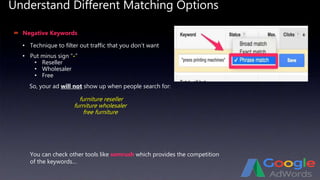
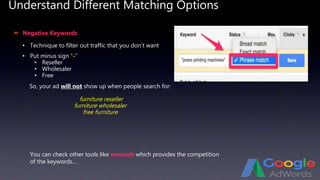
Understand Different Matching Options
 Negative Keywords
• Put minus sign “-”
• Reseller
• Wholesaler
• Free
• Technique to filter out traffic that you don’t want
So, your ad will not show up when people search for:
furniture reseller
furniture wholesaler
free furniture
You can check other tools like semrush which provides the competition
of the keywords…
Understand Different Matching Options
 Negative Keywords
• Put minus sign “-”
• Reseller
• Wholesaler
• Free
• Technique to filter out traffic that you don’t want
So, your ad will not show up when people search for:
furniture reseller
furniture wholesaler
free furniture
You can check other tools like semrush which provides the competition
of the keywords…
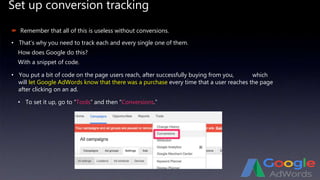
Set up conversion tracking
 Remember that all of this is useless without conversions.
• That’s why you need to track each and every single one of them.
How does Google do this?
With a snippet of code.
• You put a bit of code on the page users reach, after successfully buying from you,
• To set it up, go to “Tools” and then “Conversions.”
which
will let Google AdWords know that there was a purchase every time that a user reaches the page
after clicking on an ad.
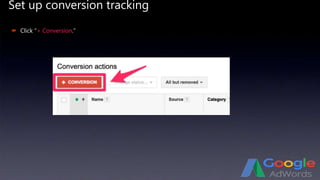
Set up conversion tracking
 Click “+ Conversion.”
Set up conversion tracking
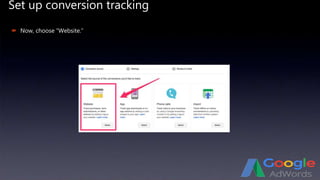
 Now, choose “Website.”
Set up conversion tracking
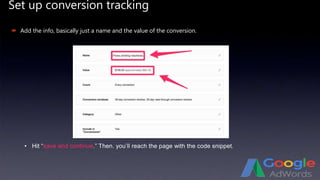
 Add the info, basically just a name and the value of the conversion.
• Hit “save and continue.” Then. you’ll reach the page with the code snippet.
Set up conversion tracking
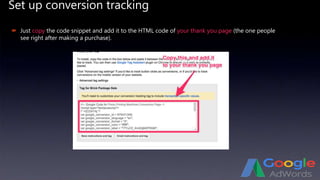
 Just copy the code snippet and add it to the HTML code of your thank you page (the one people
see right after making a purchase).
Set up conversion tracking
 It’ll say unverified in your dashboard, at first, but that will change after a few hours or a day.
Once you’ve set this up, go to the Campaigns tab and let the campaign run.
CONGRATS!
You just set up your first AdWords campaign!
What happens now?
Not much.
What happens now?
Not much.
 Google will first review your ad, before it starts showing it to people.
That’s why it doesn’t make a lot of sense to create lots of ads right away.
Once you go into your account the next day and see that your ad has been approved (you’ll also
receive an email from Google), you can start creating more ads by copying your
original ad.
That way, you can avoid going through the approval process all over again.
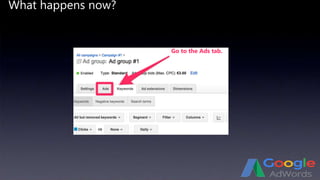
What happens now?
Go to the Ads tab.
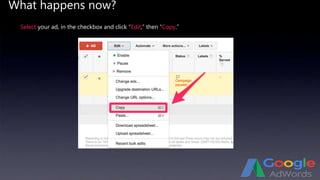
What happens now?
Select your ad, in the checkbox and click “Edit,” then “Copy.”
What happens now?
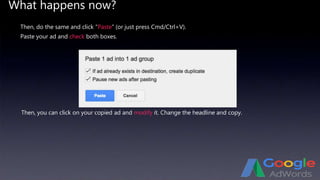
Then, do the same and click “Paste” (or just press Cmd/Ctrl+V).
Then, you can click on your copied ad and modify it. Change the headline and copy.
Paste your ad and check both boxes.
What happens now?
In order to get results on
AdWords,
 If you only run one ad and you get crappy results,you can’t possibly know what would have been
better, because you can’t compare it to anything.
 That’s why you should create at least a second ad on your second day, once the first has been
approved.
 you always need to test different ads against each other.
the END
Damascus on November, 8th 2016

Google ad words

  • 2.
  • 3.
  • 4.
    What is GoogleAdWords?  PPC (Pay Per Click) Advertising  You don’t pay (to Google) unless people click on your ad…  Highly Targeted Advertising – Only appear when people search for it Google Adwords is an online advertising platform that allows you to run advertisement on Google Search, Search partners, YouTube as well as display network.
  • 5.
    AdWords structure Ad GroupAd Group Ad Group Ad Group AdWords Account Ad CampaignAd Campaign keywords keywords keywords keywords Ad text Ad text Ad text Ad text Landing pages Landing pages Landing pages Landing pages
  • 6.
    AdWords structure  Eachcampaign has a daily limit budget.  The ideal AdWords account is structured into individual campaigns, each of which will have its own ad groups.  Scattering your ads among the campaigns and groups, help you to manage the advertisement well, you will know which one is good and which is bad, and optimize your ads • In turn, each ad group will have its own keywords, unique ad text, and landing pages.
  • 7.
    Generating Keywords  Akeyword is a word or phrase the user searches for and then sees your ad. Your ads will only show up for the keywords that you pick.  Put yourself in your customer’s shoes. If you were looking to buy used printers online, what would you enter into the Google search bar?  Before you set your ad, you must make a research on the keywords which are relative to it, and pick 2~5 keywords which you consider the best choice for your ad.
  • 8.
    Pic a keyword Head over to the Google keyword planner and start searching.
  • 9.
    Pic a keyword Putyourself in your customer’s shoes.  Head over to the Google keyword planner and start searching.
  • 10.
    Pic a keyword Ifyou were looking to buy used printers online, what would you enter into the Google search bar?Put yourself in your customer’s shoes.  Head over to the Google keyword planner and start searching.
  • 11.
    Pic a keyword Typein exactly that.If you were looking to buy used printers online, what would you enter into the Google search bar?  Head over to the Google keyword planner and start searching.
  • 12.
    Pic a keyword Typein exactly that.  Head over to the Google keyword planner and start searching.
  • 13.
    Pic a keyword Typein exactly that.  Head over to the Google keyword planner and start searching.
  • 14.
    Pic a keyword Once you go to the keyword ideas tab, you’ll see the monthly search volume for your keywords in that region, plus the average CPC for each one. • From this, you can see that only 10 people per month in the US search for “buy printers cheap”, but it costs almost $3.00 per click to advertise for that keyword. • “cheap printers,” on the other hand, has 260 searches per month, but only costs $0.78, on average.
  • 15.
    Pic a keyword Once you go to the keyword ideas tab, you’ll see the monthly search volume for your keywords in that region, plus the average CPC for each one. • From this, you can see that only 10 people per month in the US search for “buy printers cheap”, but it costs almost $3.00 per click to advertise for that keyword. • “cheap printers,” on the other hand, has 260 searches per month, but only costs $0.78, on average. You can check other tools like semrush which provides the competition of the keywords…
  • 16.
    Pic a keyword Youcan check other tools like semrush which provides the competition of the keywords…
  • 17.
    Check the Competition Peeking over into your competitor’s business will help you to determine if it’s easy or not to outrank them. • Go to Spyfu.com and enter your keyword. In this case, it’s “Printing press machines”. • It’ll show you the the average CTR (so you know what to expect) and the number of companies who have advertised for this keyword in the past 3 months. • In this case, there’s just 26, which is nothing, • It’ll also show you other keywords that have done well on AdWords. considering there are over 1 million companies advertising on AdWords.
  • 18.
    Check the Competition You can even see the actual ads that your competitors use.
  • 19.
    Check the Competition You can even see the actual ads that your competitors use. Pro tip: One determinant of relevancy, for Google’s quality score, is whether the keyword shows up in your actual ad.
  • 20.
    Check the Competition Protip: One determinant of relevancy, for Google’s quality score, is whether the keyword shows up in your actual ad.
  • 21.
    AdWords Terminology  Impressions: Click-through-rate, (CTR):  Bid: • And determining your cost-per-clicks CPCs. If your maximum bid is $2, Google will only show your ad to people if other aren’t bidding more, on average.However, if people are bidding less for the keyword that you want your ad to show up for, Google won’t spend your maximum bid. It optimizes impressions and bids. Therefore, you might actually end up paying less than $2 per click.  Quality score: • This is important, because CTR tells you which ads are working well and which aren’t.  Cost per click, or CPC: • Different keywords cost different amounts, depending on competition. which is simply the number that tells us how often our ad has already been shown when users searched for that keyword. This is just the percentage of users who land on your advertised page because they clicked on your ad. The higher the CTR, The more effective google considers the ad. sets the maximum you are willing to pay for each click. the amount an advertiser is charged for a single click. This is a metric based on the experience that the user has on your landing page, the relevancy of your website, the quality of your keyword and your actual ad.
  • 22.
    AdWords Terminology  Conversion: ROI:  Traffic: • In this example, for every $100 spent on the ads, We would make $330.40 back. is usually a sale, but, in general, it means the user took the action that you wanted them to take. stands for return on investment. the number of visitors to your website.
  • 23.
    AdWords Terminology  Conversion: ROI:  Traffic: • In this example, for every $100 spent on the ads, We would make $330.40 back. is usually a sale, but, in general, it means the user took the action that you wanted them to take. stands for return on investment. the number of visitors to your website.
  • 24.
    Setting up AdWordscampaign  Go to Google AdWords and hit start now.
  • 25.
    Setting up AdWordscampaign  Enter your email (best to use a Gmail account) and homepage URL. Then, Google wants you to set up your first campaign.
  • 26.
    Setting up AdWordscampaign You need two components to work this out your profit per sale your conversion rate • Lets assume that you make a $100 profit per sale. • the percentage of people who actually order, when they arrive on your sales page • If, for every 1000 views of the page, 10 people buy, that’s a 1% conversion rate then • If you think making $70 per sale is still okay • Then it’s okay if you pay Google a 30% commission for each successful conversion through AdWords. • For the very first time you can get this from your website statistics, the percentage of users who actually order, when they arrive on your product sales page.
  • 27.
    Setting up AdWordscampaign You need two components to work this out your profit per sale your conversion rate • Lets assume that you make a $100 profit per sale. • the percentage of people who actually order, when they arrive on your sales page • If, for every 1000 views of the page, 10 people buy, that’s a 1% conversion rate then • If you think making $70 per sale is still okay • Then it’s okay if you pay Google a 30% commission for each successful conversion through AdWords. • For the very first time you can get this from your website statistics, the percentage of users who actually order, when they arrive on your product sales page.
  • 28.
    Setting up AdWordscampaign  Putting all of it together will give you your maximum CPC. your conversion rate In this case, that would be $100 x 0.3 x 1% = $0.30 That means you can spend $.30 per click on Google AdWords and still make $70 per sale At our maximum CPC, 20 clicks per day would cost us $6 per day, tops. You can run a campaign for 10 days and just spend $60. You just need a few clicks to get started. the more data that you have, the more statistically significant it will be. But, this volume of data is something you will get over time. If you just get 20 clicks per day, in the beginning, that’s okay. Max. CPC = your profit x commission for Google x
  • 29.
    Setting up AdWordscampaign  Putting all of it together will give you your maximum CPC. your conversion rate In this case, that would be $0.30 That means you can spend $.30 per click on Google AdWords and still make $70 per sale At our maximum CPC, 20 clicks per day would cost us $6 per day, tops. You can run a campaign for 10 days and just spend $60. You just need a few clicks to get started. The more data that you have, Max. CPC = your profit x commission for Google x $100 x 0.3 x 1%= the more statistically significant it will be. But, this volume of data is something you will get over time. If you just get 20 clicks per day, in the beginning, that’s okay.
  • 30.
    Choose your targetlocation  If your business is operating only in the US, but US-wide, enter United States. • Under networks, uncheck the display network. You only want your ad to show up in the Google desktop search results, not on other websites in your industry.
  • 31.
    Put in keywords You’ve just made a research and choose the best keywords for your ad. (2 ~5) keywords for an ad is the optimal. • enter your keywords (don’t worry about Google’s recommendations, you can add more later) and set your bid to $2.00.
  • 32.
    Write your firstad  Be precise. • Having a unique value proposition (UVP) helps. • Spend some time thinking about how you’re different from anyone else. CAPITALIZE on that. • Including a call-to-action is also tremendously important. Look at this bad ad that comes up for keyword “cheap bricks”. You don’t have a lot of room to express yourself. So, be short and sweet. It’s a one-sentence description of the benefits for your customers. What can you bring to the table that your competitors don’t? The easiest way to get people to click your ad is to ask them to do so.
  • 33.
    Write your firstad  Headline:  Let’s dissect this ad real quick: “Get used press printers fast – used press printing machines” is a headline that doesn’t solely rely on the keyword and thus stands out,  Display URL: Again, we added “Press_Printing” at the end, but it is also an action people can take, which makes it clickable. so it’ll be highlighted in the search results and make our ad more relevant to searchers of the keyword.
  • 34.
    Write your firstad  Headline:  Let’s dissect this ad real quick: “Get used press printers fast – used press printing machines” is a headline that doesn’t solely rely on the keyword and thus stands out,  Display URL: Again, we added “Press_Printing” at the end, but it is also an action people can take, which makes it clickable. so it’ll be highlighted in the search results and make our ad more relevant to searchers of the keyword.
  • 35.
    Write your firstad  Text:  Let’s dissect the ad real quick: You only have 2 lines, which isn’t much to get the message across.  Call-to-action (CTA): “Order today.” Then hit save and next... “Our printers are cheap and delivered within 2 days.” That’s as clear as it gets. Of course, cheap is always relative, but it sounds good enough to the searcher. Delivering within 2 days is definitely a bonus that most other competitors might not offer. What more needs to be said? There is no exclamation mark, because Google isn’t big on those, but it’s definitely a good prompt to take action.
  • 36.
    Write your firstad  Text:  Let’s dissect the ad real quick: You only have 2 lines, which isn’t much to get the message across.  Call-to-action (CTA): “Order today.” Then hit save and next... “Our printers are cheap and delivered within 2 days.” That’s as clear as it gets. Of course, cheap is always relative, but it sounds good enough to the searcher. Delivering within 2 days is definitely a bonus that most other competitors might not offer. What more needs to be said? There is no exclamation mark, because Google isn’t big on those, but it’s definitely a good prompt to take action.
  • 37.
    Payment Information  Fillyour payment information. And then hit Finish and create ad.
  • 38.
    Fix details  You’llthen land on your dashboard for the first time. First of all, pause the campaign so it doesn’t start running just yet.  If you click on the campaign, you’ll see that inside of the campaign, Google automatically created an ad group.
  • 39.
    Fix details  You’llthen land on your dashboard for the first time. First of all, pause the campaign so it doesn’t start running just yet.  If you click on the campaign, you’ll see that inside of the campaign, Google automatically created an ad group.
  • 40.
    Fix details  Ifyou click on that, you’ll land on the ad level, where you can see your keyword.  Click on your keyword and set it to phrase match. • Initially, google sets this to broad match.
  • 41.
    Fix details  Ifyou click on that, you’ll land on the ad level, where you can see your keyword.  Click on your keyword and set it to phrase match. • Initially, google sets this to broad match.
  • 42.
    Understand Different MatchingOptions  Broad Match: • If you bid on “Cheap furniture” • Your ad will appear when people search for: how can i make furniture at home cheap So that’s not what you want.
  • 43.
    Understand Different MatchingOptions  Broad Match: • If you bid on “Cheap furniture” • Your ad will appear when people search for: how can i make furniture at home cheap So that’s not what you want.
  • 44.
    Understand Different MatchingOptions  Exact Match: • might be too targeted, though, since it only allows the exact phrase, “cheap furniture.”
  • 45.
    Understand Different MatchingOptions  Exact Match: • might be too targeted, though, since it only allows the exact phrase, “cheap furniture.”
  • 46.
    Understand Different MatchingOptions  Phrase Match: • If you bid on “Cheap furniture” • is a good option, since it must contain your keyword as a fixed phrase, but can have other terms around it. • If users search “where to buy cheap furniture” your ad will still show up.
  • 47.
    Understand Different MatchingOptions  Phrase Match: • If you bid on “Cheap furniture” • is a good option, since it must contain your keyword as a fixed phrase, but can have other terms around it. • If users search “where to buy cheap furniture” your ad will still show up.
  • 48.
    Understand Different MatchingOptions  Negative Keywords • Put minus sign “-” • Reseller • Wholesaler • Free • Technique to filter out traffic that you don’t want So, your ad will not show up when people search for: furniture reseller furniture wholesaler free furniture You can check other tools like semrush which provides the competition of the keywords…
  • 49.
    Understand Different MatchingOptions  Negative Keywords • Put minus sign “-” • Reseller • Wholesaler • Free • Technique to filter out traffic that you don’t want So, your ad will not show up when people search for: furniture reseller furniture wholesaler free furniture You can check other tools like semrush which provides the competition of the keywords…
  • 50.
    Set up conversiontracking  Remember that all of this is useless without conversions. • That’s why you need to track each and every single one of them. How does Google do this? With a snippet of code. • You put a bit of code on the page users reach, after successfully buying from you, • To set it up, go to “Tools” and then “Conversions.” which will let Google AdWords know that there was a purchase every time that a user reaches the page after clicking on an ad.
  • 51.
    Set up conversiontracking  Click “+ Conversion.”
  • 52.
    Set up conversiontracking  Now, choose “Website.”
  • 53.
    Set up conversiontracking  Add the info, basically just a name and the value of the conversion. • Hit “save and continue.” Then. you’ll reach the page with the code snippet.
  • 54.
    Set up conversiontracking  Just copy the code snippet and add it to the HTML code of your thank you page (the one people see right after making a purchase).
  • 55.
    Set up conversiontracking  It’ll say unverified in your dashboard, at first, but that will change after a few hours or a day. Once you’ve set this up, go to the Campaigns tab and let the campaign run. CONGRATS! You just set up your first AdWords campaign!
  • 56.
  • 57.
    What happens now? Notmuch.  Google will first review your ad, before it starts showing it to people. That’s why it doesn’t make a lot of sense to create lots of ads right away. Once you go into your account the next day and see that your ad has been approved (you’ll also receive an email from Google), you can start creating more ads by copying your original ad. That way, you can avoid going through the approval process all over again.
  • 58.
    What happens now? Goto the Ads tab.
  • 59.
    What happens now? Selectyour ad, in the checkbox and click “Edit,” then “Copy.”
  • 60.
    What happens now? Then,do the same and click “Paste” (or just press Cmd/Ctrl+V). Then, you can click on your copied ad and modify it. Change the headline and copy. Paste your ad and check both boxes.
  • 61.
    What happens now? Inorder to get results on AdWords,  If you only run one ad and you get crappy results,you can’t possibly know what would have been better, because you can’t compare it to anything.  That’s why you should create at least a second ad on your second day, once the first has been approved.  you always need to test different ads against each other.
  • 63.
    the END Damascus onNovember, 8th 2016