De-centralise and
     Conquer

Masterless Puppet in a Dynamic
         Environment

  Sam Bashton, Bashton Ltd
Who am I?
● Linux guy since Slackware, floppy disks and
  root + boot
● Using Puppet since 2007
● Run a company Manchester, North West
  England
Our Environments
● We provide outsourced ops for other
  companies
● High traffic environments
● Most are now on Amazon Web Services


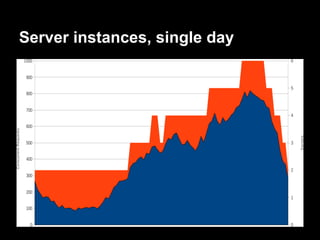
● #1 reason for moving to AWS? The ability to
  scale on demand
Server instances, single day
How we use Puppet
● No Puppetmaster
● Puppet manifests and modules distributed to
  all machines
What's wrong with standard Puppet?
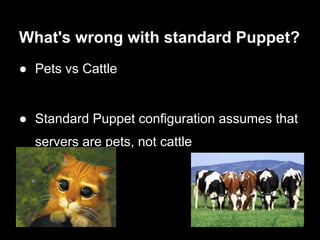
● Pets vs Cattle


● Standard Puppet configuration assumes that
  servers are pets, not cattle
What's wrong with standard Puppet?
● Standard Puppetmaster/Puppet Client
  configuration makes assumptions about
  environments
  ○ Machine creation is a manual operation
     ■ Sign certs
  ○ No in-built mechanism to automatically clean up old
    machines
What's wrong with standard Puppet?
● Puppetmaster is a single point of failure
● When servers are pets, this isn't too much of
  a problem
   ○ Existing servers continue to work, but not any
      updates
What's wrong with standard Puppet?
● When servers are auto-scaling cattle, new
  instances can appear at any time
● New instances require config to become
  operational
● Configuration requires Puppet
What's wrong with standard Puppet?
● Our environments span multiple data centres
  ('availability zones')
● Imagine a data centre fails
● New instances get auto-provisioned to
  replace missing capacity
● But these instances need the Puppetmaster
● ..which was in the failed AZ
What's wrong with standard Puppet?
● Resource contention
● Even when Puppetmaster isn't in the failed
  zone, multiple concurrent connections slow
  things down
What's wrong with standard Puppet?
● None of these problems are insurmountable
● We could have configured a Puppetmaster a
  cluster of Puppetmasters for our needs
  ○ With autosign
  ○ and some sort of certificate distribution mechanism
  ○ uuid certificate names
  ○ And a mechanism for cleaning up old machines
Meanwhile, on the other side of the
room...
● Another team was evaluating Pulp
● Provides yum repository management
● To be used for managing security updates
  and deploying application code


  http://pulpproject.org/
Pulp
● Allows cloning of repos, copying packages
  between repos
● Allows us to push packages to clients
   ○ Uses qpid message queue
● Has 'content distribution servers' for easy
  replication + clustering
How we deploy code
● Everything managed via the Jenkins
  continuous integration server
● Jenkins uses Pulp to install code on remote
  machines
How we deploy code
● Jenkins fetches code from source control
  (git)
● An RPM is built
● Tests are run
● The RPM is added to the relevant Pulp
  repository
● RPM installed on the target machine(s)
How we deploy code
● Jenkins also manages deployment lifecycle
● 'Promoted Builds' plugin used to install
  previously built RPMs on staging
● Promoted Builds plugin then used to install
  the same RPMs on live once testing is
  complete
Deploying configuration as code
● Idea: Why not just build an RPM of our
  Puppet manifests + modules?
● Have puppet apply as part of the %
  postinst
Deploying configuration as code
● Allowed us to reuse our existing code
  deployment infrastructure
● Manage configuration deployment from
  Jenkins
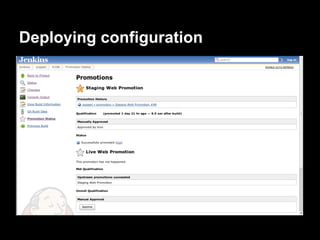
How we deploy configuration
● Puppet manifests and modules are checked
  into git
● Jenkins builds configuration into an RPM
● Jenkins promoted builds plugin applies the
  updates to environments via Pulp
Our system architecture
● Quite AWS specific
● Concepts could be applied to other clouds
  ○ Once they catch up in terms of toolsets..
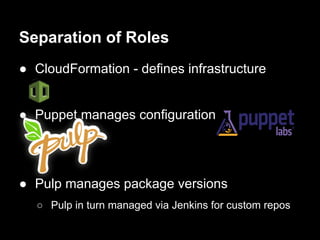
Separation of Roles
● CloudFormation - defines infrastructure


● Puppet manages configuration


● Pulp manages package versions
  ○ Pulp in turn managed via Jenkins for custom repos
Instance Provisioning
● Minimal images used
● cloud-init the only addition beyond standard
  CentOS install
● cloud-init allows us to specify script to be run
  at boot
Puppet bootstrap
● cloud-init script adds local Puppet yum repo
  and installs the Puppet configuration RPM
● Installing the RPM installs Puppet and
  applies the configuration
Machine metadata
● cloud-init also sets some variables in
  /etc/environment
● $HOST_TYPE - the type of machine this is, eg

  web, cache
Machine metadata
● Also set facts to be used by facter, eg RDS
  database hostname
  ○ Values from CloudFormation
● $FACTER_DBHOST    set via cloud-init too, eg /root/.my.cnf
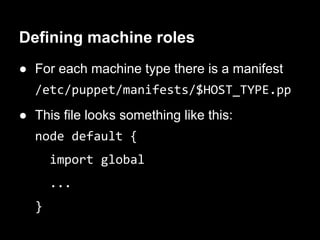
Defining machine roles
● For each machine type there is a manifest
  /etc/puppet/manifests/$HOST_TYPE.pp
● This file looks something like this:
  node default {
      import global
      ...
  }
Building the RPM
● Puppet manifests and modules are all
  packed into an RPM
● Owner set to root, mode 600
● %postinst creates an at job set for now + 1
  minute to run puppet apply
Deploying configuration
Free wins!
Free wins
● Greater control over the timing of Puppet
  runs
● Improved visibility - for ops and devs
● Configuration changes now have to be
  deployed to testing/staging first
More free wins
● Puppet configs now have a version
● Easy to find config version on the machine
  itself
● Config changelogs accessible on every
  machine
  ○ (Git changelog added to RPM)
Cheap wins
Cheap wins
● Jenkins performs syntax checks with
  puppet parser validate
● Jenkins also runs puppet-lint on

  manifests
Cheap wins
● Config change required for new code?
  ○ Make the Puppet RPM version a dependency
The downsides
● Puppet manifests and modules on all
  machines
  ○ Potentially a security issue?
● No reporting*
Alternative implementations
● Don't want to use Pulp?
● Could do basically the same thing with yum
  s3 plugin
  https://github.com/jbraeuer/yum-s3-plugin
Questions? Comments?

          Sam Bashton
        sam@bashton.com
        Twitter: @bashtoni

De-centralise and Conquer: Masterless Puppet in a Dynamic Environment

  • 1.
    De-centralise and Conquer Masterless Puppet in a Dynamic Environment Sam Bashton, Bashton Ltd
  • 2.
    Who am I? ●Linux guy since Slackware, floppy disks and root + boot ● Using Puppet since 2007 ● Run a company Manchester, North West England
  • 3.
    Our Environments ● Weprovide outsourced ops for other companies ● High traffic environments ● Most are now on Amazon Web Services ● #1 reason for moving to AWS? The ability to scale on demand
  • 4.
  • 5.
    How we usePuppet ● No Puppetmaster ● Puppet manifests and modules distributed to all machines
  • 6.
    What's wrong withstandard Puppet? ● Pets vs Cattle ● Standard Puppet configuration assumes that servers are pets, not cattle
  • 7.
    What's wrong withstandard Puppet? ● Standard Puppetmaster/Puppet Client configuration makes assumptions about environments ○ Machine creation is a manual operation ■ Sign certs ○ No in-built mechanism to automatically clean up old machines
  • 8.
    What's wrong withstandard Puppet? ● Puppetmaster is a single point of failure ● When servers are pets, this isn't too much of a problem ○ Existing servers continue to work, but not any updates
  • 9.
    What's wrong withstandard Puppet? ● When servers are auto-scaling cattle, new instances can appear at any time ● New instances require config to become operational ● Configuration requires Puppet
  • 10.
    What's wrong withstandard Puppet? ● Our environments span multiple data centres ('availability zones') ● Imagine a data centre fails ● New instances get auto-provisioned to replace missing capacity ● But these instances need the Puppetmaster ● ..which was in the failed AZ
  • 11.
    What's wrong withstandard Puppet? ● Resource contention ● Even when Puppetmaster isn't in the failed zone, multiple concurrent connections slow things down
  • 12.
    What's wrong withstandard Puppet? ● None of these problems are insurmountable ● We could have configured a Puppetmaster a cluster of Puppetmasters for our needs ○ With autosign ○ and some sort of certificate distribution mechanism ○ uuid certificate names ○ And a mechanism for cleaning up old machines
  • 13.
    Meanwhile, on theother side of the room... ● Another team was evaluating Pulp ● Provides yum repository management ● To be used for managing security updates and deploying application code http://pulpproject.org/
  • 14.
    Pulp ● Allows cloningof repos, copying packages between repos ● Allows us to push packages to clients ○ Uses qpid message queue ● Has 'content distribution servers' for easy replication + clustering
  • 15.
    How we deploycode ● Everything managed via the Jenkins continuous integration server ● Jenkins uses Pulp to install code on remote machines
  • 16.
    How we deploycode ● Jenkins fetches code from source control (git) ● An RPM is built ● Tests are run ● The RPM is added to the relevant Pulp repository ● RPM installed on the target machine(s)
  • 17.
    How we deploycode ● Jenkins also manages deployment lifecycle ● 'Promoted Builds' plugin used to install previously built RPMs on staging ● Promoted Builds plugin then used to install the same RPMs on live once testing is complete
  • 18.
    Deploying configuration ascode ● Idea: Why not just build an RPM of our Puppet manifests + modules? ● Have puppet apply as part of the % postinst
  • 19.
    Deploying configuration ascode ● Allowed us to reuse our existing code deployment infrastructure ● Manage configuration deployment from Jenkins
  • 20.
    How we deployconfiguration ● Puppet manifests and modules are checked into git ● Jenkins builds configuration into an RPM ● Jenkins promoted builds plugin applies the updates to environments via Pulp
  • 21.
    Our system architecture ●Quite AWS specific ● Concepts could be applied to other clouds ○ Once they catch up in terms of toolsets..
  • 22.
    Separation of Roles ●CloudFormation - defines infrastructure ● Puppet manages configuration ● Pulp manages package versions ○ Pulp in turn managed via Jenkins for custom repos
  • 23.
    Instance Provisioning ● Minimalimages used ● cloud-init the only addition beyond standard CentOS install ● cloud-init allows us to specify script to be run at boot
  • 24.
    Puppet bootstrap ● cloud-initscript adds local Puppet yum repo and installs the Puppet configuration RPM ● Installing the RPM installs Puppet and applies the configuration
  • 25.
    Machine metadata ● cloud-initalso sets some variables in /etc/environment ● $HOST_TYPE - the type of machine this is, eg web, cache
  • 26.
    Machine metadata ● Alsoset facts to be used by facter, eg RDS database hostname ○ Values from CloudFormation ● $FACTER_DBHOST set via cloud-init too, eg /root/.my.cnf
  • 27.
    Defining machine roles ●For each machine type there is a manifest /etc/puppet/manifests/$HOST_TYPE.pp ● This file looks something like this: node default { import global ... }
  • 28.
    Building the RPM ●Puppet manifests and modules are all packed into an RPM ● Owner set to root, mode 600 ● %postinst creates an at job set for now + 1 minute to run puppet apply
  • 29.
  • 30.
  • 31.
    Free wins ● Greatercontrol over the timing of Puppet runs ● Improved visibility - for ops and devs ● Configuration changes now have to be deployed to testing/staging first
  • 32.
    More free wins ●Puppet configs now have a version ● Easy to find config version on the machine itself ● Config changelogs accessible on every machine ○ (Git changelog added to RPM)
  • 33.
  • 34.
    Cheap wins ● Jenkinsperforms syntax checks with puppet parser validate ● Jenkins also runs puppet-lint on manifests
  • 35.
    Cheap wins ● Configchange required for new code? ○ Make the Puppet RPM version a dependency
  • 36.
    The downsides ● Puppetmanifests and modules on all machines ○ Potentially a security issue? ● No reporting*
  • 37.
    Alternative implementations ● Don'twant to use Pulp? ● Could do basically the same thing with yum s3 plugin https://github.com/jbraeuer/yum-s3-plugin
  • 38.
    Questions? Comments? Sam Bashton sam@bashton.com Twitter: @bashtoni