Topic 3


        INTERNET TECHNOLOGY
3.2 The Internet
  3.2.2 World Wide Web
     3.2.2.4 Information Searching

                                     1
Learning Outcome


At the end of this topic, students should be able to:

  • Explain different ways of information
    searching.
    1. search engine
    2. subject directory


                                                   2
Information Searching
 Searching the Web:
   • A primary reason that people use the Web is to
     search for specific information, including
     text, pictures, music, and video.

   • A search tool is used to locate the information. Eg:
     Google. AOL Search, Dogpile, HotBot.


                                                            3
Information Searching
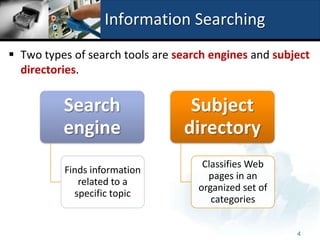
 Two types of search tools are search engines and subject
  directories.


          Search                  Subject
          engine                 directory
                                     Classifies Web
          Finds information
                                      pages in an
             related to a
                                    organized set of
            specific topic
                                       categories


                                                       4
Information Searching
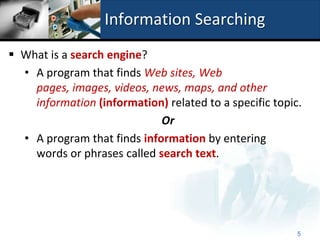
 What is a search engine?
  • A program that finds Web sites, Web
    pages, images, videos, news, maps, and other
    information (information) related to a specific topic.
                             Or
  • A program that finds information by entering
    words or phrases called search text.


                                                         5
Information Searching
 Searching information using search engine:
 Search engines  program used to find Web sites and
  Web pages by entering words or phrases called search
  text(also called keyword)
   • Search engines require that you enter a word or phrase, called
     search text or search query.
   • Each word in the search text is known as a keyword.
   • The results of the search, called hits. (any Web site name that
     listed as the result or a search)
   • Result from the search engine can be in the form of:
       • Images, videos, audio, publications, maps, people or
          businesses, blogs.
                                                                 6
Information Searching
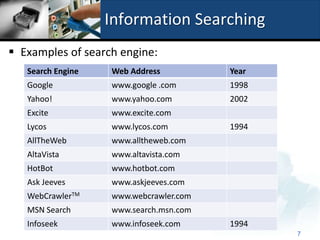
 Examples of search engine:
   Search Engine   Web Address          Year
   Google          www.google .com      1998
   Yahoo!          www.yahoo.com        2002
   Excite          www.excite.com
   Lycos           www.lycos.com        1994
   AllTheWeb       www.alltheweb.com
   AltaVista       www.altavista.com
   HotBot          www.hotbot.com
   Ask Jeeves      www.askjeeves.com
   WebCrawlerTM    www.webcrawler.com
   MSN Search      www.search.msn.com
   Infoseek        www.infoseek.com     1994
                                               7
Information Searching


                        8
Information Searching
 Search operators can help to refine your search:


                                                     9
Information Searching
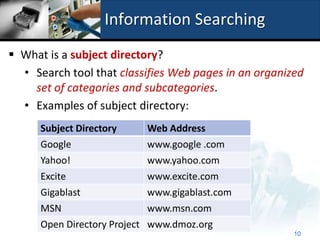
 What is a subject directory?
  • Search tool that classifies Web pages in an organized
    set of categories and subcategories.
  • Examples of subject directory:
      Subject Directory     Web Address
      Google                www.google .com
      Yahoo!                www.yahoo.com
      Excite                www.excite.com
      Gigablast              www.gigablast.com
      MSN                    www.msn.com
      Open Directory Project www.dmoz.org
                                                       10
Information Searching


                        11
Information Searching
 A subject directory provides categorized lists of links
  arranged by subject.

 When click on the category link, the subject directory
  displays a list of subcategory links.

 The disadvantage:
   • Users have difficulty deciding which categories to
     choose from the menus of links presented.


                                                            12
Information Searching
 Example of subject directory:


                                           13
Summary
 There are two different ways of information searching:
   1. Search engine:
      • Finds information related to a specific topic.

   2. Subject directory:
      • Classifies Web pages in an organized set of
        categories such as sport, shopping or other related
        subcategories.


                                                       14

2.2.2.4 Information Searching

  • 1.
    Topic 3 INTERNET TECHNOLOGY 3.2 The Internet 3.2.2 World Wide Web 3.2.2.4 Information Searching 1
  • 2.
    Learning Outcome At theend of this topic, students should be able to: • Explain different ways of information searching. 1. search engine 2. subject directory 2
  • 3.
    Information Searching  Searchingthe Web: • A primary reason that people use the Web is to search for specific information, including text, pictures, music, and video. • A search tool is used to locate the information. Eg: Google. AOL Search, Dogpile, HotBot. 3
  • 4.
    Information Searching  Twotypes of search tools are search engines and subject directories. Search Subject engine directory Classifies Web Finds information pages in an related to a organized set of specific topic categories 4
  • 5.
    Information Searching  Whatis a search engine? • A program that finds Web sites, Web pages, images, videos, news, maps, and other information (information) related to a specific topic. Or • A program that finds information by entering words or phrases called search text. 5
  • 6.
    Information Searching  Searchinginformation using search engine:  Search engines  program used to find Web sites and Web pages by entering words or phrases called search text(also called keyword) • Search engines require that you enter a word or phrase, called search text or search query. • Each word in the search text is known as a keyword. • The results of the search, called hits. (any Web site name that listed as the result or a search) • Result from the search engine can be in the form of: • Images, videos, audio, publications, maps, people or businesses, blogs. 6
  • 7.
    Information Searching  Examplesof search engine: Search Engine Web Address Year Google www.google .com 1998 Yahoo! www.yahoo.com 2002 Excite www.excite.com Lycos www.lycos.com 1994 AllTheWeb www.alltheweb.com AltaVista www.altavista.com HotBot www.hotbot.com Ask Jeeves www.askjeeves.com WebCrawlerTM www.webcrawler.com MSN Search www.search.msn.com Infoseek www.infoseek.com 1994 7
  • 8.
  • 9.
    Information Searching  Searchoperators can help to refine your search: 9
  • 10.
    Information Searching  Whatis a subject directory? • Search tool that classifies Web pages in an organized set of categories and subcategories. • Examples of subject directory: Subject Directory Web Address Google www.google .com Yahoo! www.yahoo.com Excite www.excite.com Gigablast www.gigablast.com MSN www.msn.com Open Directory Project www.dmoz.org 10
  • 11.
  • 12.
    Information Searching  Asubject directory provides categorized lists of links arranged by subject.  When click on the category link, the subject directory displays a list of subcategory links.  The disadvantage: • Users have difficulty deciding which categories to choose from the menus of links presented. 12
  • 13.
    Information Searching  Exampleof subject directory: 13
  • 14.
    Summary  There aretwo different ways of information searching: 1. Search engine: • Finds information related to a specific topic. 2. Subject directory: • Classifies Web pages in an organized set of categories such as sport, shopping or other related subcategories. 14