Azure 仮想マシンで
Active Directoryドメインサービス
~ AD DS を Azureで動かすときの勘所 ~
Copyright 2016 ITdesign Corporation , All Rights Reserved
1
アイティデザイン株式会社
代表取締役社長 知北直宏
‘16/04/09
@ ふくあず
ライトニングトーク
2.
はじめに
• Active Directoryドメインサービス( AD DS )を、
Microsoft Azure の仮想マシンで実装するときの勘所を紹介
しています。
• 本資料の内容は2016年4月ごろの仕様に基づいています。
(あっという間に情報が古くなる可能性があります。ご注意を。)
次へ
Copyright 2016 ITdesign Corporation , All Rights Reserved
2
3.
自己紹介
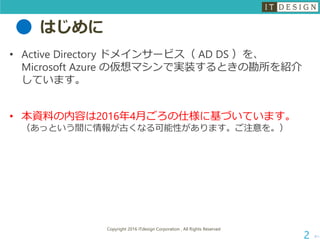
知北直宏(ちきたなおひろ)Twitter: @wanto1101
アイティデザイン株式会社 代表取締役者社長
福岡で、ITPro、SIerとして、ActiveDirectory、Hyper-V など、
マイクロソフトのサーバー製品の提案・構築・移行・サポートなど担当。
大手、地場インテグレーターさんの後方支援など。
Microsoft MVP (Cloud and Datacenter Management)
マイクロソフトのホワイトペーパー執筆、イベントスピーカー
コラム執筆「Windows Server 活用のススメ」
http://www.bit-drive.ne.jp/wm2003/index.html?mk_type=18
書籍執筆
「標準テキスト Windows Server 2012 R2
構築・運用・管理パーフェクトガイド」
「標準テキスト Windows Server 2008 R2
構築・運用・管理パーフェクトガイド」その他
次へ
Copyright 2016 ITdesign Corporation , All Rights Reserved
3
2016 年
3月に第4版
発売!!
4.
Active Directory ドメインサービスとは?
次へ
Copyright 2016 ITdesign Corporation , All Rights Reserved
4
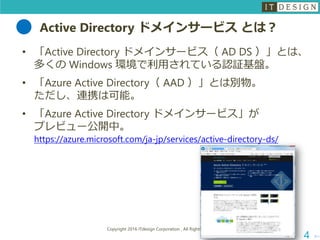
• 「Active Directory ドメインサービス( AD DS )」とは、
多くの Windows 環境で利用されている認証基盤。
• 「Azure Active Directory( AAD )」とは別物。
ただし、連携は可能。
• 「Azure Active Directory ドメインサービス」が
プレビュー公開中。
https://azure.microsoft.com/ja-jp/services/active-directory-ds/
5.
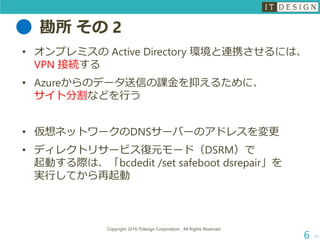
勘所 その 1
次へ
Copyright2016 ITdesign Corporation , All Rights Reserved
5
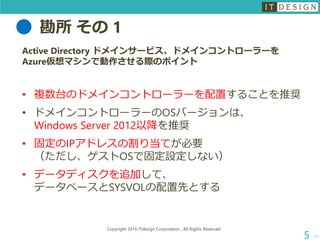
Active Directory ドメインサービス、ドメインコントローラーを
Azure仮想マシンで動作させる際のポイント
• 複数台のドメインコントローラーを配置することを推奨
• ドメインコントローラーのOSバージョンは、
Windows Server 2012以降を推奨
• 固定のIPアドレスの割り当てが必要
(ただし、ゲストOSで固定設定しない)
• データディスクを追加して、
データベースとSYSVOLの配置先とする
勘所 その 3
次へ
Copyright2016 ITdesign Corporation , All Rights Reserved
7
「シャットダウン」に関する注意事項
ゲスト オペレーティング システム内でドメイン コントローラー ロー
ルを実行する VM を、Azure の管理ポータルでの [シャットダウン] オ
プションを使用せずに、シャットダウンし、再起動する必要があります。
現在のところ、管理ポータルを使用して VM をシャットダウンすると、
VM の割り当ては解除されます。割り当てが解除された VM では料金が
発生しないという利点がありますが、VM-GenerationID がリセットされ
ます。これは DC に対しては望ましくありません。VM-GenerationID が
リセットされると、AD DS データベースの invocationID もリセットさ
れ、RID プールは破棄され、SYSVOL は権限がないとマークされます。
「Azure の仮想マシンでの Windows Server Active Directory のデプロイ ガイドライン」より
https://msdn.microsoft.com/ja-jp/library/azure/jj156090.aspx
8.
参考情報
次へ
Copyright 2016 ITdesignCorporation , All Rights Reserved
8
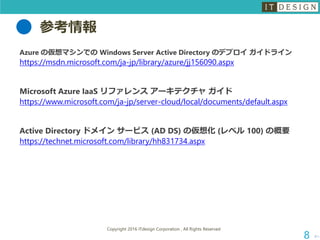
Azure の仮想マシンでの Windows Server Active Directory のデプロイ ガイドライン
https://msdn.microsoft.com/ja-jp/library/azure/jj156090.aspx
Microsoft Azure IaaS リファレンス アーキテクチャ ガイド
https://www.microsoft.com/ja-jp/server-cloud/local/documents/default.aspx
Active Directory ドメイン サービス (AD DS) の仮想化 (レベル 100) の概要
https://technet.microsoft.com/library/hh831734.aspx
9.
おまけ( Azure の評価や開発)
次へ
Copyright2016 ITdesign Corporation , All Rights Reserved
9
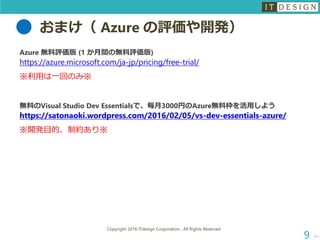
Azure 無料評価版 (1 か月間の無料評価版)
https://azure.microsoft.com/ja-jp/pricing/free-trial/
※利用は一回のみ※
無料のVisual Studio Dev Essentialsで、毎月3000円のAzure無料枠を活用しよう
https://satonaoki.wordpress.com/2016/02/05/vs-dev-essentials-azure/
※開発目的、制約あり※
![勘所 その 3
次へ
Copyright 2016 ITdesign Corporation , All Rights Reserved
7
「シャットダウン」に関する注意事項
ゲスト オペレーティング システム内でドメイン コントローラー ロー
ルを実行する VM を、Azure の管理ポータルでの [シャットダウン] オ
プションを使用せずに、シャットダウンし、再起動する必要があります。
現在のところ、管理ポータルを使用して VM をシャットダウンすると、
VM の割り当ては解除されます。割り当てが解除された VM では料金が
発生しないという利点がありますが、VM-GenerationID がリセットされ
ます。これは DC に対しては望ましくありません。VM-GenerationID が
リセットされると、AD DS データベースの invocationID もリセットさ
れ、RID プールは破棄され、SYSVOL は権限がないとマークされます。
「Azure の仮想マシンでの Windows Server Active Directory のデプロイ ガイドライン」より
https://msdn.microsoft.com/ja-jp/library/azure/jj156090.aspx](https://image.slidesharecdn.com/addsonazuvevm160409-160409082558/85/Azure-Active-Directory-7-320.jpg)


![[簡易提案書] Windows Server2019](https://cdn.slidesharecdn.com/ss_thumbnails/booklet-windowsserver2019-v1-181017145219-thumbnail.jpg?width=640&height=640&fit=bounds)


