Azure Static Web Apps
Udaiappa Ramachandran ( Udai )
https://udai.io
About me
• Udaiappa Ramachandran ( Udai )
• CTO-Akumina, Inc.
• Cloud Expert
• Microsoft Azure, Amazon Web Services, and Google
• New Hampshire Cloud User Group (http://www.meetup.com/nashuaug )
• https://udai.io
Agenda
• Introduction
• Key features
• API Support
• Configuration
• Security
• Demo…Demo…Demo…
Key features
• Web hosting
• Integrated API
• GitHub and Azure DevOps integration
• Globally distributed
• Free SSL certificates
• Custom domains
• Seamless security model
• Authentication provider integrations
• Customizable authorization role definition and assignments
• Back-end routing rules
• Generated staging versions
API Support
• Integrated security
• Seamless routing
• Managed functions
• Bring your own functions
API Support
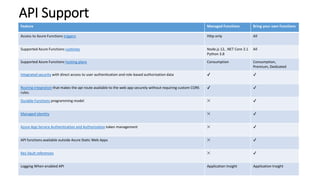
Feature Managed Functions Bring your own Functions
Access to Azure Functions triggers Http only All
Supported Azure Functions runtimes Node.js 12, .NET Core 3.1
Python 3.8
All
Supported Azure Functions hosting plans Consumption Consumption,
Premium, Dedicated
Integrated security with direct access to user authentication and role-based authorization data ✔ ✔
Routing integration that makes the api route available to the web app securely without requiring custom CORS
rules.
✔ ✔
Durable Functions programming model ✕ ✔
Managed identity ✕ ✔
Azure App Service Authentication and Authorization token management ✕ ✔
API functions available outside Azure Static Web Apps ✕ ✔
Key Vault references ✕ ✔
Logging When enabled API Application Insight Application Insight
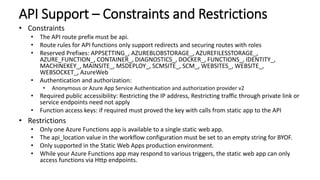
API Support – Constraints and Restrictions
• Constraints
• The API route prefix must be api.
• Route rules for API functions only support redirects and securing routes with roles
• Reserved Prefixes: APPSETTING_, AZUREBLOBSTORAGE_, AZUREFILESSTORAGE_,
AZURE_FUNCTION_, CONTAINER_, DIAGNOSTICS_, DOCKER_, FUNCTIONS_, IDENTITY_,
MACHINEKEY_, MAINSITE_, MSDEPLOY_, SCMSITE_, SCM_, WEBSITES_, WEBSITE_,
WEBSOCKET_, AzureWeb
• Authentication and authorization:
• Anonymous or Azure App Service Authentication and authorization provider v2
• Required public accessibility: Restricting the IP address, Restricting traffic through private link or
service endpoints need not apply
• Function access keys: if required must proved the key with calls from static app to the API
• Restrictions
• Only one Azure Functions app is available to a single static web app.
• The api_location value in the workflow configuration must be set to an empty string for BYOF.
• Only supported in the Static Web Apps production environment.
• While your Azure Functions app may respond to various triggers, the static web app can only
access functions via Http endpoints.
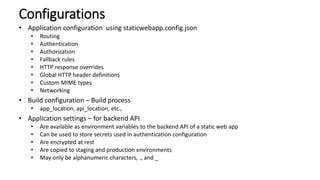
Configurations
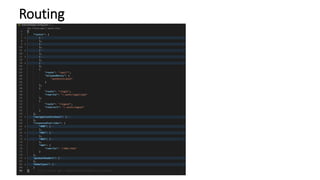
• Application configuration using staticwebapp.config.json
• Routing
• Authentication
• Authorization
• Fallback rules
• HTTP response overrides
• Global HTTP header definitions
• Custom MIME types
• Networking
• Build configuration – Build process
• app_location, api_location, etc.,
• Application settings – for backend API
• Are available as environment variables to the backend API of a static web app
• Can be used to store secrets used in authentication configuration
• Are encrypted at rest
• Are copied to staging and production environments
• May only be alphanumeric characters, ., and _
Routing
Security
• Any user can authenticate with an enabled provider.
• Once logged in, users belong to the anonymous and authenticated roles by default.
• Authorized users gain access to restricted routes by rules defined in the
staticwebapp.config.json file.
• Users are assigned custom roles using the built-in invitations system.
• Users can be programmatically assigned custom roles at login by an API function.
• All authentication providers are enabled by default.
• To restrict an authentication provider, block access with a custom route rule.
• Pre-configured providers include:
• Azure Active Directory
• GitHub
• Twitter
• Custom Authentication provider
• Private Endpoint
• Key vault support
Demo
• Environment Setup
• Pre-Requisites, Tools
• App with API (Managed Function App)
• Deploy to Azure
• Monitoring
• Custom Domains
• Front Door integration
• Staging a site using Pull Request
• Routes
• Authentication/Authorization
• Bring Your Own Function App
• Updating Secret tokens
Local Debug:
npm install -g @azure/static-web-apps-cli
npm install -g azure-functions-core-tools@3
swa start src --api-location api
OR
User Live Server Addin
Reference
• Azure Static Web Apps: https://docs.microsoft.com/en-us/azure/static-web-apps/

Azure staticwebapps

  • 1.
    Azure Static WebApps Udaiappa Ramachandran ( Udai ) https://udai.io
  • 2.
    About me • UdaiappaRamachandran ( Udai ) • CTO-Akumina, Inc. • Cloud Expert • Microsoft Azure, Amazon Web Services, and Google • New Hampshire Cloud User Group (http://www.meetup.com/nashuaug ) • https://udai.io
  • 3.
    Agenda • Introduction • Keyfeatures • API Support • Configuration • Security • Demo…Demo…Demo…
  • 4.
    Key features • Webhosting • Integrated API • GitHub and Azure DevOps integration • Globally distributed • Free SSL certificates • Custom domains • Seamless security model • Authentication provider integrations • Customizable authorization role definition and assignments • Back-end routing rules • Generated staging versions
  • 5.
    API Support • Integratedsecurity • Seamless routing • Managed functions • Bring your own functions
  • 6.
    API Support Feature ManagedFunctions Bring your own Functions Access to Azure Functions triggers Http only All Supported Azure Functions runtimes Node.js 12, .NET Core 3.1 Python 3.8 All Supported Azure Functions hosting plans Consumption Consumption, Premium, Dedicated Integrated security with direct access to user authentication and role-based authorization data ✔ ✔ Routing integration that makes the api route available to the web app securely without requiring custom CORS rules. ✔ ✔ Durable Functions programming model ✕ ✔ Managed identity ✕ ✔ Azure App Service Authentication and Authorization token management ✕ ✔ API functions available outside Azure Static Web Apps ✕ ✔ Key Vault references ✕ ✔ Logging When enabled API Application Insight Application Insight
  • 7.
    API Support –Constraints and Restrictions • Constraints • The API route prefix must be api. • Route rules for API functions only support redirects and securing routes with roles • Reserved Prefixes: APPSETTING_, AZUREBLOBSTORAGE_, AZUREFILESSTORAGE_, AZURE_FUNCTION_, CONTAINER_, DIAGNOSTICS_, DOCKER_, FUNCTIONS_, IDENTITY_, MACHINEKEY_, MAINSITE_, MSDEPLOY_, SCMSITE_, SCM_, WEBSITES_, WEBSITE_, WEBSOCKET_, AzureWeb • Authentication and authorization: • Anonymous or Azure App Service Authentication and authorization provider v2 • Required public accessibility: Restricting the IP address, Restricting traffic through private link or service endpoints need not apply • Function access keys: if required must proved the key with calls from static app to the API • Restrictions • Only one Azure Functions app is available to a single static web app. • The api_location value in the workflow configuration must be set to an empty string for BYOF. • Only supported in the Static Web Apps production environment. • While your Azure Functions app may respond to various triggers, the static web app can only access functions via Http endpoints.
  • 8.
    Configurations • Application configurationusing staticwebapp.config.json • Routing • Authentication • Authorization • Fallback rules • HTTP response overrides • Global HTTP header definitions • Custom MIME types • Networking • Build configuration – Build process • app_location, api_location, etc., • Application settings – for backend API • Are available as environment variables to the backend API of a static web app • Can be used to store secrets used in authentication configuration • Are encrypted at rest • Are copied to staging and production environments • May only be alphanumeric characters, ., and _
  • 9.
  • 10.
    Security • Any usercan authenticate with an enabled provider. • Once logged in, users belong to the anonymous and authenticated roles by default. • Authorized users gain access to restricted routes by rules defined in the staticwebapp.config.json file. • Users are assigned custom roles using the built-in invitations system. • Users can be programmatically assigned custom roles at login by an API function. • All authentication providers are enabled by default. • To restrict an authentication provider, block access with a custom route rule. • Pre-configured providers include: • Azure Active Directory • GitHub • Twitter • Custom Authentication provider • Private Endpoint • Key vault support
  • 11.
    Demo • Environment Setup •Pre-Requisites, Tools • App with API (Managed Function App) • Deploy to Azure • Monitoring • Custom Domains • Front Door integration • Staging a site using Pull Request • Routes • Authentication/Authorization • Bring Your Own Function App • Updating Secret tokens Local Debug: npm install -g @azure/static-web-apps-cli npm install -g azure-functions-core-tools@3 swa start src --api-location api OR User Live Server Addin
  • 12.
    Reference • Azure StaticWeb Apps: https://docs.microsoft.com/en-us/azure/static-web-apps/

Editor's Notes

  • #5 Web hosting for static content like HTML, CSS, JavaScript, and images. Integrated API support provided by Azure Functions with the option to link an existing Azure Functions app using a standard account. First-class GitHub and Azure DevOps integration where repository changes trigger builds and deployments. Globally distributed static content, putting content closer to your users. Free SSL certificates, which are automatically renewed. Custom domains to provide branded customizations to your app. Seamless security model with a reverse-proxy when calling APIs, which requires no CORS configuration. Authentication provider integrations with Azure Active Directory, GitHub, and Twitter. Customizable authorization role definition and assignments. Back-end routing rules enabling full control over the content and routes you serve. Generated staging versions powered by pull requests enabling preview versions of your site before publishing.
  • #6 Integrated security with direct access to user authentication and role-based authorization data. Seamless routing that makes the api route available to the web app securely without requiring custom CORS rules. Managed functions: By default, the API of a static web app is an Azure Functions application managed and deployed by Azure Static Web Apps associated with some restrictions. Bring your own functions: Optionally, you can provide an existing Azure Functions application of any plan type, which is accompanied by all the features of Azure Functions. With this configuration, you're responsible to handle a separate deployment for the Functions app.
  • #7 Configuration Managed functions: While the api route is fixed, you have control over the source code folder location of the managed functions app. You can change this location by editing the workflow YAML file located in your repository's .github/workflows folder. Bring your own functions: Requests to the api route are sent to your existing Azure Functions app. Constraints The API route prefix must be api. Route rules for API functions only support redirects and securing routes with roles. Deployments Managed functions: APPSETTING_, AZUREBLOBSTORAGE_, AZUREFILESSTORAGE_, AZURE_FUNCTION_, CONTAINER_, DIAGNOSTICS_, DOCKER_, FUNCTIONS_, IDENTITY_, MACHINEKEY_, MAINSITE_, MSDEPLOY_, SCMSITE_, SCM_, WEBSITES_, WEBSITE_, WEBSOCKET_, AzureWeb Bring your own functions: You are responsible to manage the Functions app deployment.
  • #9 Application configuration: Define rules in the staticwebapp.config.json file to control application behavior and features. Use this file to define route and security rules, custom headers, and networking settings. Build configuration: Define settings that control the build process. Application settings: Set application-level settings and environment variables that can be used by backend APIs.
  • #10 Application configuration: Define rules in the staticwebapp.config.json file to control application behavior and features. Use this file to define route and security rules, custom headers, and networking settings. Build configuration: Define settings that control the build process. Application settings: Set application-level settings and environment variables that can be used by backend APIs.
  • #11 Controlled in routes config
  • #12 F1Settings Open with live server If error occurred, make sure to set “Use Local IP as Host” to true https://github.com/login?return_to=/staticwebdev/vanilla-basic/generate npm install -g @azure/static-web-apps-cli npm install -g azure-functions-core-tools@3 swa start src --api-location api local.settings.json file and name it local.settings.properties.json.