Azure Messaging Services #2
RIYADH 8
27 April 2019
Microsoft Riyadh
Amr Badawy
Technical Consultant
Agenda
 Messaging #1 Recap
 Azure Service Bus
 Queue
 Topic / Subscription
 Advanced Features
 A lot of Demos 
3
4
Messaging #1 Recap
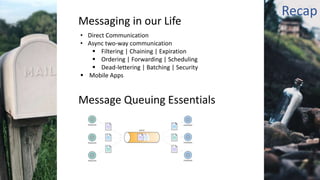
Messaging in our Life
• Direct Communication
• Async two-way communication
 Filtering | Chaining | Expiration
 Ordering | Forwarding | Scheduling
 Dead-lettering | Batching | Security
 Mobile Apps
5
Message Queuing Essentials
Recap
6
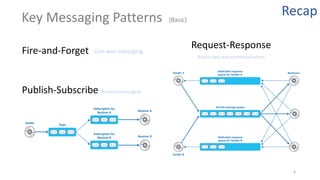
Key Messaging Patterns (Basic)
One-way messagingFire-and-Forget Async two-way communication
Publish-Subscribe Broadcast messaging
Request-Response
Recap
7
Asyn Messaging | Scenarios
• Decoupling workloads » decouple the logic that generates work from that logic that performs the work.
• Temporal decoupling » sender and receiver do not have to be running at the same time.
• Load balancing » distribute processing across servers and improve throughput
• Senders may post a large number of requests to a queue that is serviced by many receivers.
• Receivers can run on different servers to spread the load.
• Receivers can be added/removed dynamically to scale out/in (autoscaling) » Improve Scalability
• Load leveling » [Queue-Based Load Leveling pattern]
• Heavy load from senders >> increasing receivers to handle this work could overwhelm the system.
• acts as a buffer, and receivers work without stressing the system.
• minimize the impact of peaks
• Cross-platform integration » senders and receivers agree on a common format for messages and their contents.
• Deferred processing »
• Reliable messaging »
• The sender is not blocked unless it loses connectivity with the queue.
• message can wait until a destination component is ready to process
Recap
Misc.| Messaging
Terms
• Publisher / Sender / Producer » push / send
• Subscriber / Receiver / Consumer / Listener » pull /receive / retrieve
• MoM - Message-oriented Middleware / Message Queuing / Messaging
8
Examples
• Book a ticket ( Booking Service )
1. Change state in DB
2. Notify Event Owner
3. Create an invoice a PDF
4. Send a confirmation email (invoice attached)
• Picture Resize
• Pushing a tweet :: How twitter write new tweet for followers
• Notification Service >> send many emails
• Logging service >> keep in buffer and then write to DB
• RFID Reader
9
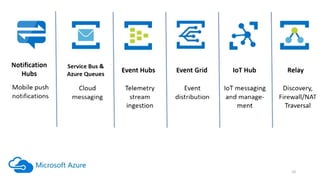
Azure Messaging Services
10
11
Azure Service Bus
Multi-tenant cloud messaging service & simple hybrid integration
Fully managed enterprise integration Message Broker
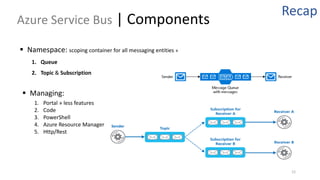
Azure Service Bus | Components
12
 Namespace: scoping container for all messaging entities »
1. Queue
2. Topic & Subscription
Recap
 Managing:
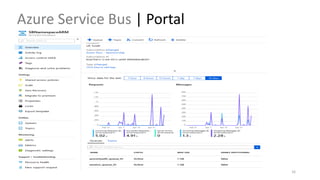
1. Portal » less features
2. Code
3. PowerShell
4. Azure Resource Manager
5. Http/Rest
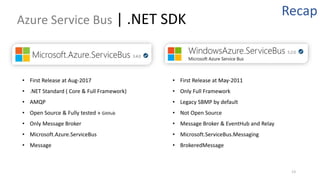
Azure Service Bus | .NET SDK
13
• First Release at Aug-2017
• .NET Standard ( Core & Full Framework)
• AMQP
• Open Source & Fully tested » GitHub
• Only Message Broker
• Microsoft.Azure.ServiceBus
• Message
Recap
• First Release at May-2011
• Only Full Framework
• Legacy SBMP by default
• Not Open Source
• Message Broker & EventHub and Relay
• Microsoft.ServiceBus.Messaging
• BrokeredMessage
14
Service Bus | Queue
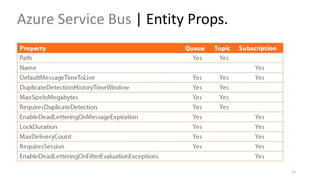
Azure Service Bus | Entity Props.
15
Azure Service Bus | Portal
16
Azure Service Bus | Explorer
17
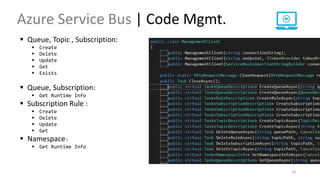
Azure Service Bus | Code Mgmt.
18
 Queue, Topic , Subscription:
 Create
 Delete
 Update
 Get
 Exists
 Queue, Subscription:
 Get Runtime Info
 Subscription Rule :
 Create
 Delete
 Update
 Get
 Namespace:
 Get Runtime Info
Azure Service Bus | Message
19
 Most messaging systems divide the message data into a header and a body.
The header contains fields that are used by the messaging infrastructure to
manage the flow of messages.
 Body = Payload
 Binary » Serialized Object
 Size = 256KB >> 1MB
 Header
 Built-in Properties : MessageId, Label, CorrelationId
 System Properties : Readonly & Set by service bus
• SequenceNumber
• EnqueuedTimeUtc
• DeliveryCount
• LockToken
 User Properties: custom message metadata
 Header Size = 64 KB
SB | Code | Send & Receive Message
20
 Options to SEND a message :
 Send One
 Send List
 Schedule » specific datetime
 Cancel scheduled message » Sequence Number
 Register/Unregister Plugins
 Options to RECEIVE a message :
 Receive (One/List) » [PeekLock | ReceiveAndDelete]
 Receive Deferred (One/List)
 Peek (One/List | start from Sequence Number)
 Peek Lock ( Abandon, Complete, Deadletter, Defer, Renew Lock )
 Message Pump :: RegisterMessageHandler
 Register/Unregister Plugins
Demo : Queue & Message
• Create Queue
• Create and send Message
• Receive and process message
• Receive Modes
• Receive Batch
21
SB | Code | SEND Considerations
22
 Can’t reach Message Broker! » Communication Issues
 Retry if Exception is Transient >> ServiceBusException.IsTransient
 ServerBusyException
 MessagingCommunicationException
 User local messaging {MSMQ}.
 Cancel Operation.
 Exceptions :
 MessagingEntityNotFoundException
 MessagingEntityDisabledException
 MessageSizeExceededException
SB | Code | SEND Considerations
23
 Repeated messages » Duplicate Message Detection
 Entity.RequiresDuplicateDetection
 Entity.DuplicateDetectionHistoryTimeWindow
 Default = 1 min
 From (20 Seconds) To (7 days)
 Keep track of [Message.MessageId] not [Message.Body]
 You can't enable/disable duplicate detection after the queue is created
 Handling Large Messages »
 claim-check pattern
24
• Transaction-based Delivery
• Timeout-based Delivery
• Timeout-based Message Processor
SB | Code | Receive Considerations
25
• Priority Queue pattern
• Message Grouping » Message Session
• Idempotency » https://blog.jonathanoliver.com/idempotency-patterns/
• Handling Failures »
• Poison messages » it is necessary to be able to detect and discard them
• Message expiration » message might have a limited lifetime
• Retry Policy
SB | Code | Dead-letter Queue
26
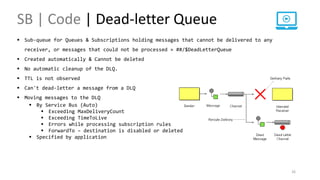
 Sub-queue for Queues & Subscriptions holding messages that cannot be delivered to any
receiver, or messages that could not be processed » ##/$DeadLetterQueue
 Created automatically & Cannot be deleted
 No automatic cleanup of the DLQ.
 TTL is not observed
 Can't dead-letter a message from a DLQ
 Moving messages to the DLQ
 By Service Bus (Auto)
 Exceeding MaxDeliveryCount
 Exceeding TimeToLive
 Errors while processing subscription rules
 ForwardTo – destination is disabled or deleted
 Specified by application
SB | Topic / Subscription
27
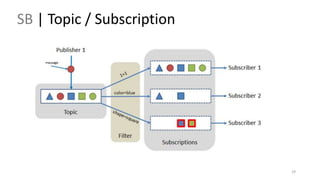
 Publish-Subscribe pattern (broadcast)
 provide a one-to-many form of communication, in a
publish/subscribe pattern.
 Each published message is made available to each subscription
registered with the topic.
 Messages are sent to a topic and delivered to one or more
associated subscriptions, depending on filter rules.
 Messages are sent to a topic in the same way they are sent to a
queue, but messages are not received from the topic directly.
Instead, they are received from subscriptions.
SB | Topic / Subscription
28
 Subscription Rules (Filters & Actions)
 Ex : order organized by region
 Filters
 user-defined properties and system properties
 cannot evaluate the message body
 SQL Filter : SQL-like conditional expression
 NOT - AND - { = | <> | != | > | >= | < | <= }
• IS [NOT] NULL - [NOT] IN () - [NOT] LIKE
• sys.Label LIKE '%bus%'` OR `user.tag IN ('queue', 'topic', 'subscription’)
• sys.Label = 'important'
 Correlation Filter : equal only
 Actions :
 With SQL filter conditions, you can define an action for adding, removing, or replacing
properties and their values.
SB | Topic / Subscription
29
Demo : Topic & Subscription
• Create Topic & Subscription
• Send & Receive Message
• Add Subscription Rule
• Group Chat App
30
SB | Sessions
31
 It’s about grouping message
 Enitity.RequireSession
 Set Message.SessionId property (group-id)
 Receive by MessageSession : When the
MessageSession object is accepted and
while it is held by a client, that client holds
an exclusive lock on all messages with that
session's SessionId that exist in the queue
or subscription, and also on all messages
with that SessionId that still arrive while
the session is held.
Demo : Correlation & Session
• Create Topic & Subscription
• Send & Receive Message
• Add Subscription Rule
• Group Chat App
32
Azure Service Bus | Advanced features
33
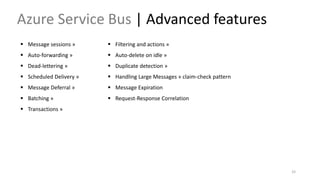
 Message sessions »
 Auto-forwarding »
 Dead-lettering »
 Scheduled Delivery »
 Message Deferral »
 Batching »
 Transactions »
 Filtering and actions »
 Auto-delete on idle »
 Duplicate detection »
 Handling Large Messages » claim-check pattern
 Message Expiration
 Request-Response Correlation
Misc. • Messaging Protocols :
• AMQP
• MQTT
• Messaging vs Events
• SDK for Service Bus (2)
• https://www.nuget.org/profiles/nugetservicebus
• Azure Messaging by the numbers (2017)
• 700B msg ops on ASB / month
• 100K DA SB Namespace
• 5.1T request per week in Event Hub
34
35
36
Messaging
Is how different application components in a loosely-coupled
microservice architecture can communicate with each other
37
Questions
Thanks 

Azure Messaging Services 2

  • 1.
    Azure Messaging Services#2 RIYADH 8 27 April 2019 Microsoft Riyadh
  • 2.
  • 3.
    Agenda  Messaging #1Recap  Azure Service Bus  Queue  Topic / Subscription  Advanced Features  A lot of Demos  3
  • 4.
  • 5.
    Messaging in ourLife • Direct Communication • Async two-way communication  Filtering | Chaining | Expiration  Ordering | Forwarding | Scheduling  Dead-lettering | Batching | Security  Mobile Apps 5 Message Queuing Essentials Recap
  • 6.
    6 Key Messaging Patterns(Basic) One-way messagingFire-and-Forget Async two-way communication Publish-Subscribe Broadcast messaging Request-Response Recap
  • 7.
    7 Asyn Messaging |Scenarios • Decoupling workloads » decouple the logic that generates work from that logic that performs the work. • Temporal decoupling » sender and receiver do not have to be running at the same time. • Load balancing » distribute processing across servers and improve throughput • Senders may post a large number of requests to a queue that is serviced by many receivers. • Receivers can run on different servers to spread the load. • Receivers can be added/removed dynamically to scale out/in (autoscaling) » Improve Scalability • Load leveling » [Queue-Based Load Leveling pattern] • Heavy load from senders >> increasing receivers to handle this work could overwhelm the system. • acts as a buffer, and receivers work without stressing the system. • minimize the impact of peaks • Cross-platform integration » senders and receivers agree on a common format for messages and their contents. • Deferred processing » • Reliable messaging » • The sender is not blocked unless it loses connectivity with the queue. • message can wait until a destination component is ready to process Recap
  • 8.
    Misc.| Messaging Terms • Publisher/ Sender / Producer » push / send • Subscriber / Receiver / Consumer / Listener » pull /receive / retrieve • MoM - Message-oriented Middleware / Message Queuing / Messaging 8 Examples • Book a ticket ( Booking Service ) 1. Change state in DB 2. Notify Event Owner 3. Create an invoice a PDF 4. Send a confirmation email (invoice attached) • Picture Resize • Pushing a tweet :: How twitter write new tweet for followers • Notification Service >> send many emails • Logging service >> keep in buffer and then write to DB • RFID Reader
  • 9.
  • 10.
  • 11.
    11 Azure Service Bus Multi-tenantcloud messaging service & simple hybrid integration Fully managed enterprise integration Message Broker
  • 12.
    Azure Service Bus| Components 12  Namespace: scoping container for all messaging entities » 1. Queue 2. Topic & Subscription Recap  Managing: 1. Portal » less features 2. Code 3. PowerShell 4. Azure Resource Manager 5. Http/Rest
  • 13.
    Azure Service Bus| .NET SDK 13 • First Release at Aug-2017 • .NET Standard ( Core & Full Framework) • AMQP • Open Source & Fully tested » GitHub • Only Message Broker • Microsoft.Azure.ServiceBus • Message Recap • First Release at May-2011 • Only Full Framework • Legacy SBMP by default • Not Open Source • Message Broker & EventHub and Relay • Microsoft.ServiceBus.Messaging • BrokeredMessage
  • 14.
  • 15.
    Azure Service Bus| Entity Props. 15
  • 16.
    Azure Service Bus| Portal 16
  • 17.
    Azure Service Bus| Explorer 17
  • 18.
    Azure Service Bus| Code Mgmt. 18  Queue, Topic , Subscription:  Create  Delete  Update  Get  Exists  Queue, Subscription:  Get Runtime Info  Subscription Rule :  Create  Delete  Update  Get  Namespace:  Get Runtime Info
  • 19.
    Azure Service Bus| Message 19  Most messaging systems divide the message data into a header and a body. The header contains fields that are used by the messaging infrastructure to manage the flow of messages.  Body = Payload  Binary » Serialized Object  Size = 256KB >> 1MB  Header  Built-in Properties : MessageId, Label, CorrelationId  System Properties : Readonly & Set by service bus • SequenceNumber • EnqueuedTimeUtc • DeliveryCount • LockToken  User Properties: custom message metadata  Header Size = 64 KB
  • 20.
    SB | Code| Send & Receive Message 20  Options to SEND a message :  Send One  Send List  Schedule » specific datetime  Cancel scheduled message » Sequence Number  Register/Unregister Plugins  Options to RECEIVE a message :  Receive (One/List) » [PeekLock | ReceiveAndDelete]  Receive Deferred (One/List)  Peek (One/List | start from Sequence Number)  Peek Lock ( Abandon, Complete, Deadletter, Defer, Renew Lock )  Message Pump :: RegisterMessageHandler  Register/Unregister Plugins
  • 21.
    Demo : Queue& Message • Create Queue • Create and send Message • Receive and process message • Receive Modes • Receive Batch 21
  • 22.
    SB | Code| SEND Considerations 22  Can’t reach Message Broker! » Communication Issues  Retry if Exception is Transient >> ServiceBusException.IsTransient  ServerBusyException  MessagingCommunicationException  User local messaging {MSMQ}.  Cancel Operation.  Exceptions :  MessagingEntityNotFoundException  MessagingEntityDisabledException  MessageSizeExceededException
  • 23.
    SB | Code| SEND Considerations 23  Repeated messages » Duplicate Message Detection  Entity.RequiresDuplicateDetection  Entity.DuplicateDetectionHistoryTimeWindow  Default = 1 min  From (20 Seconds) To (7 days)  Keep track of [Message.MessageId] not [Message.Body]  You can't enable/disable duplicate detection after the queue is created  Handling Large Messages »  claim-check pattern
  • 24.
    24 • Transaction-based Delivery •Timeout-based Delivery • Timeout-based Message Processor SB | Code | Receive Considerations
  • 25.
    SB | Code| Receive Considerations 25 • Priority Queue pattern • Message Grouping » Message Session • Idempotency » https://blog.jonathanoliver.com/idempotency-patterns/ • Handling Failures » • Poison messages » it is necessary to be able to detect and discard them • Message expiration » message might have a limited lifetime • Retry Policy
  • 26.
    SB | Code| Dead-letter Queue 26  Sub-queue for Queues & Subscriptions holding messages that cannot be delivered to any receiver, or messages that could not be processed » ##/$DeadLetterQueue  Created automatically & Cannot be deleted  No automatic cleanup of the DLQ.  TTL is not observed  Can't dead-letter a message from a DLQ  Moving messages to the DLQ  By Service Bus (Auto)  Exceeding MaxDeliveryCount  Exceeding TimeToLive  Errors while processing subscription rules  ForwardTo – destination is disabled or deleted  Specified by application
  • 27.
    SB | Topic/ Subscription 27  Publish-Subscribe pattern (broadcast)  provide a one-to-many form of communication, in a publish/subscribe pattern.  Each published message is made available to each subscription registered with the topic.  Messages are sent to a topic and delivered to one or more associated subscriptions, depending on filter rules.  Messages are sent to a topic in the same way they are sent to a queue, but messages are not received from the topic directly. Instead, they are received from subscriptions.
  • 28.
    SB | Topic/ Subscription 28  Subscription Rules (Filters & Actions)  Ex : order organized by region  Filters  user-defined properties and system properties  cannot evaluate the message body  SQL Filter : SQL-like conditional expression  NOT - AND - { = | <> | != | > | >= | < | <= } • IS [NOT] NULL - [NOT] IN () - [NOT] LIKE • sys.Label LIKE '%bus%'` OR `user.tag IN ('queue', 'topic', 'subscription’) • sys.Label = 'important'  Correlation Filter : equal only  Actions :  With SQL filter conditions, you can define an action for adding, removing, or replacing properties and their values.
  • 29.
    SB | Topic/ Subscription 29
  • 30.
    Demo : Topic& Subscription • Create Topic & Subscription • Send & Receive Message • Add Subscription Rule • Group Chat App 30
  • 31.
    SB | Sessions 31 It’s about grouping message  Enitity.RequireSession  Set Message.SessionId property (group-id)  Receive by MessageSession : When the MessageSession object is accepted and while it is held by a client, that client holds an exclusive lock on all messages with that session's SessionId that exist in the queue or subscription, and also on all messages with that SessionId that still arrive while the session is held.
  • 32.
    Demo : Correlation& Session • Create Topic & Subscription • Send & Receive Message • Add Subscription Rule • Group Chat App 32
  • 33.
    Azure Service Bus| Advanced features 33  Message sessions »  Auto-forwarding »  Dead-lettering »  Scheduled Delivery »  Message Deferral »  Batching »  Transactions »  Filtering and actions »  Auto-delete on idle »  Duplicate detection »  Handling Large Messages » claim-check pattern  Message Expiration  Request-Response Correlation
  • 34.
    Misc. • MessagingProtocols : • AMQP • MQTT • Messaging vs Events • SDK for Service Bus (2) • https://www.nuget.org/profiles/nugetservicebus • Azure Messaging by the numbers (2017) • 700B msg ops on ASB / month • 100K DA SB Namespace • 5.1T request per week in Event Hub 34
  • 35.
  • 36.
    36 Messaging Is how differentapplication components in a loosely-coupled microservice architecture can communicate with each other
  • 37.
  • 38.

Editor's Notes

  • #6 In modern architecture, applications are decoupled into smaller, independent building blocks that are easier to develop, deploy and maintain. Message Queues Provide Async communication for distributed system (Key) Temporary Storage Location for messages pending delivery to a destination component. Buffer between producer & consumer Regardless of the technology, most Message Queues support three fundamental operations: Sender can post a message to the queue. Receiver can retrieve a message from the queue (the message is removed from the queue). Receiver can examine (or peek) the next available message in the queue and decide whether to removes it or leave it for another receiver to handle.
  • #7 Advanced Patterns Scatter-gather : send multiple requests to different parties and wait to collect all or most of responses (Pub/Sub + R/R)
  • #8 Messaging use cases : - Microservices - Internet of Things (IoT) - Inter-Application communications
  • #10 Background Task / Async Task / Task Queue >> Retry Policy
  • #12 Service Bus is a multi-tenant cloud messaging service you can use to send information between applications and services. The asynchronous operations give you flexible, brokered messaging, along with structured first-in, first-out (FIFO) messaging, and publish/subscribe capabilities. Fully managed enterprise integration message broker. Service Bus is most commonly used to decouple applications and services from each other, and is a reliable and secure platform for asynchronous data and state transfer. Data is transferred between different applications and services using messages. A message is in binary format, which can contain JSON, XML, or just text.
  • #19 Calc message size https://weblogs.asp.net/sfeldman/asb-batching-brokered-messages
  • #20 Calc message size https://weblogs.asp.net/sfeldman/asb-batching-brokered-messages
  • #23 https://docs.microsoft.com/en-us/azure/architecture/best-practices/retry-service-specific#service-bus
  • #24 https://docs.microsoft.com/en-us/azure/architecture/best-practices/retry-service-specific#service-bus
  • #29 https://codehollow.com/2016/03/azure-servicebus-filters/
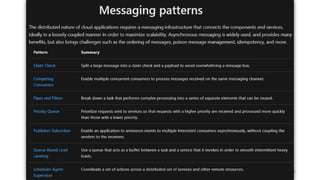
  • #36 https://docs.microsoft.com/en-us/azure/architecture/patterns/category/messaging