

Building AI-Driven Apps using
Semantic Kernel
Udaiappa Ramachandran ( Udai )
https://udai.io
Boston Code Camp 36 - Thanks to our Sponsors!
• Platinum
• Gold
• Silver
• In-Kind Donations
About me
• Udaiappa Ramachandran ( Udai )
• CTO/CSO-Akumina, Inc.
• Microsoft Azure MVP
• Cloud Expert
• Microsoft Azure, Amazon Web Services, and Google
• New Hampshire Cloud User Group (http://www.meetup.com/nashuaug )
• https://udai.io
Agenda
• Introduction to Semantic Kernel
• Getting Started
• Plugins
• Planner
• Persona
• Demo…Demo…Demo…
Building AI Applications
• Azure AI Studio with Prompt flow
• Co-Pilot studio
• Semantic Kernel
AI Application Terminology
• Plugins
• Skills
• Planner
• Persona
• Co-Pilot
• Agent
• Vector Embedding
• Prompt Engineering
• Semantic Kernel
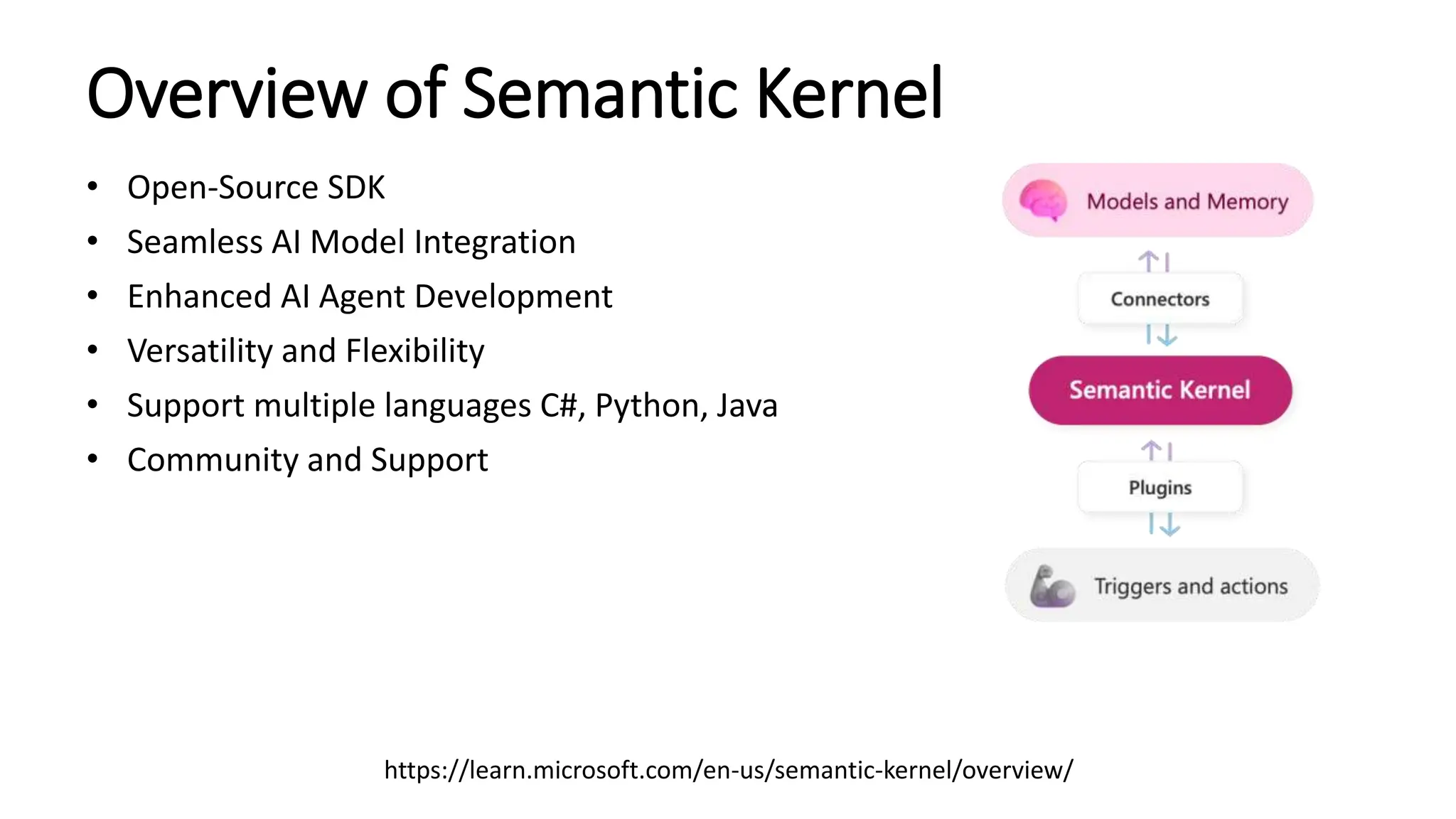
Overview of Semantic Kernel
• Open-Source SDK
• Seamless AI Model Integration
• Enhanced AI Agent Development
• Versatility and Flexibility
• Support multiple languages C#, Python, Java
• Community and Support
https://learn.microsoft.com/en-us/semantic-kernel/overview/
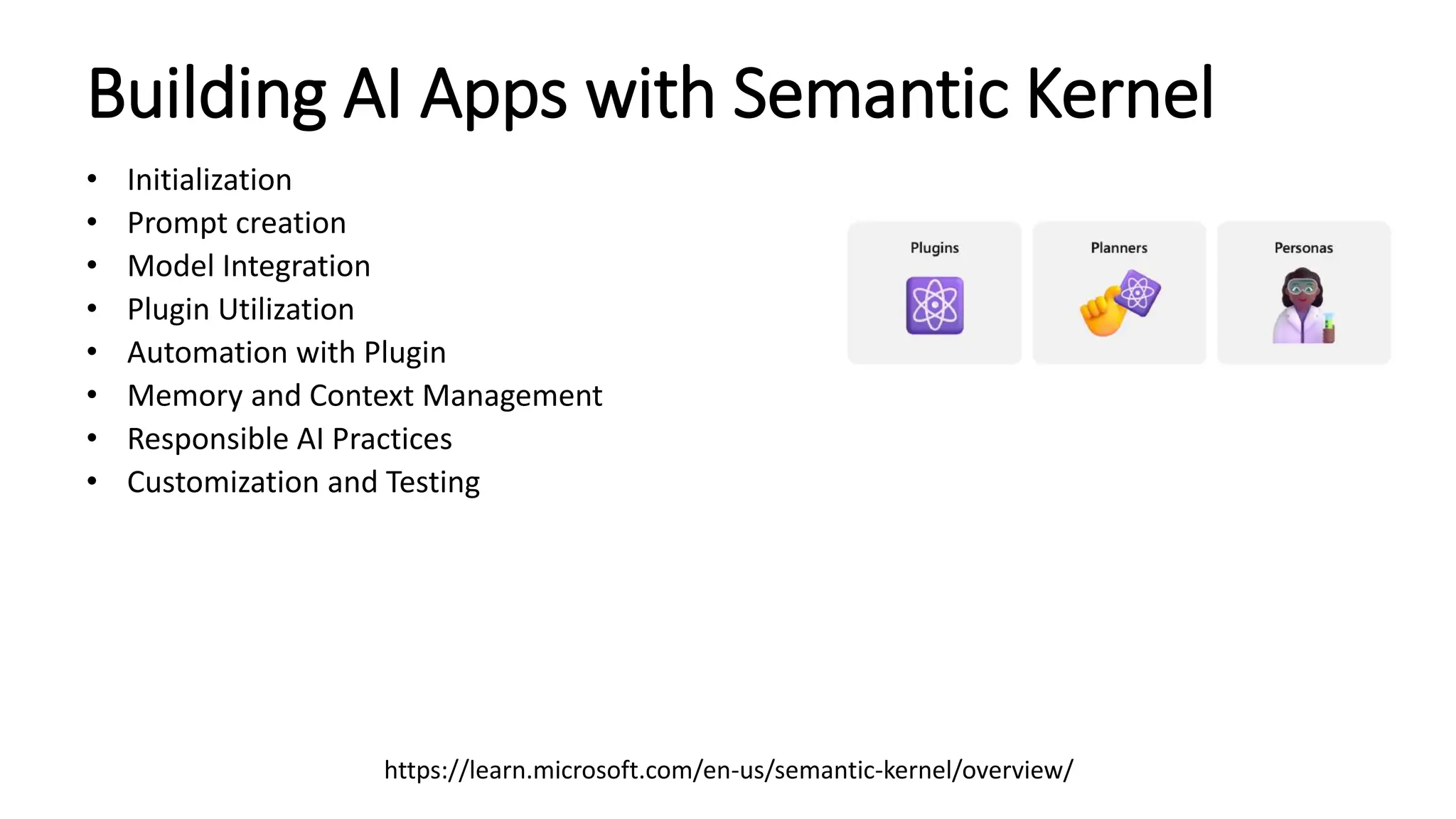
Building AI Apps with Semantic Kernel
• Initialization
• Prompt creation
• Model Integration
• Plugin Utilization
• Automation with Plugin
• Memory and Context Management
• Responsible AI Practices
• Customization and Testing
https://learn.microsoft.com/en-us/semantic-kernel/overview/
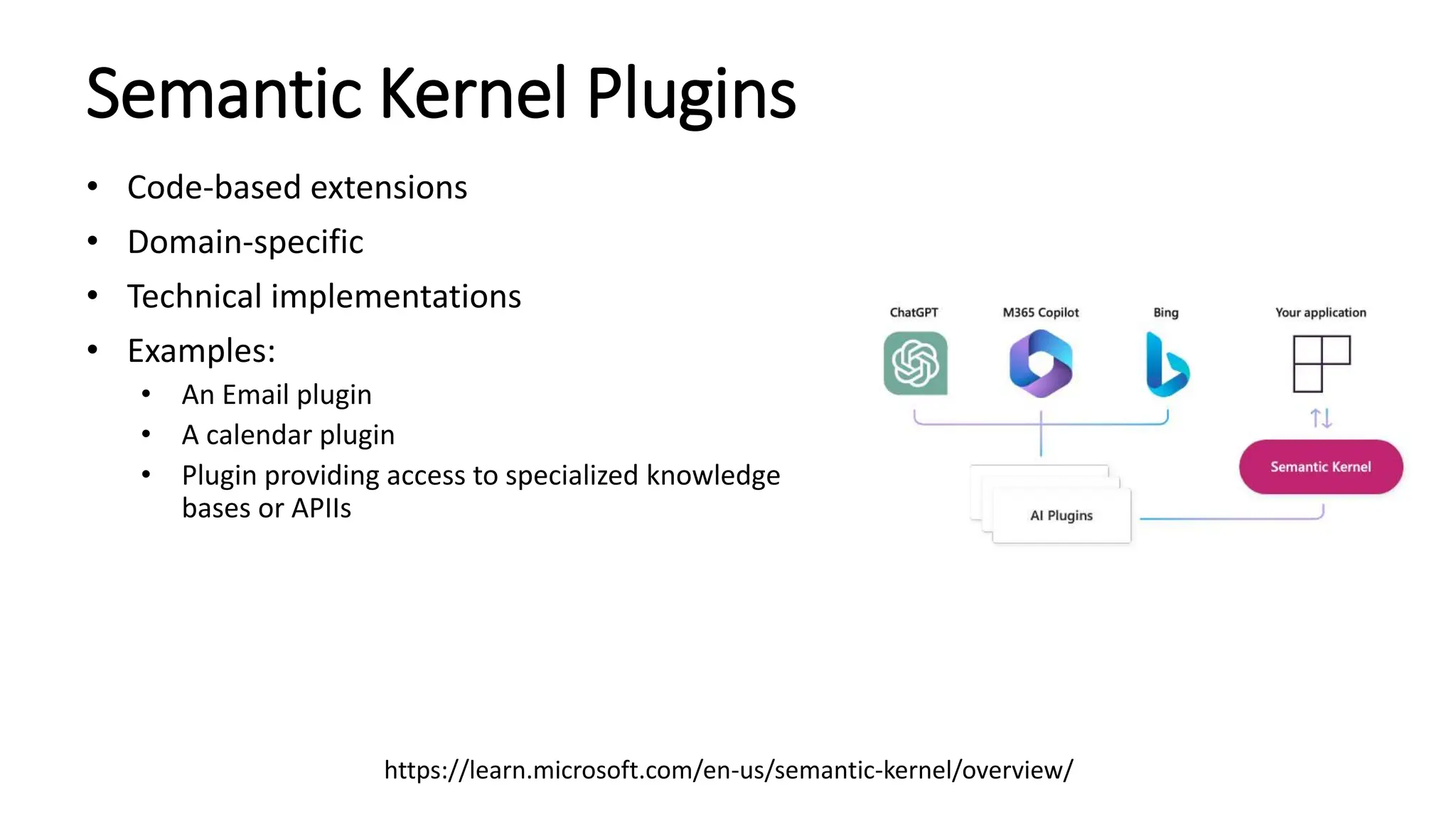
Semantic Kernel Plugins
• Code-based extensions
• Domain-specific
• Technical implementations
• Examples:
• An Email plugin
• A calendar plugin
• Plugin providing access to specialized knowledge
bases or APIIs
https://learn.microsoft.com/en-us/semantic-kernel/overview/
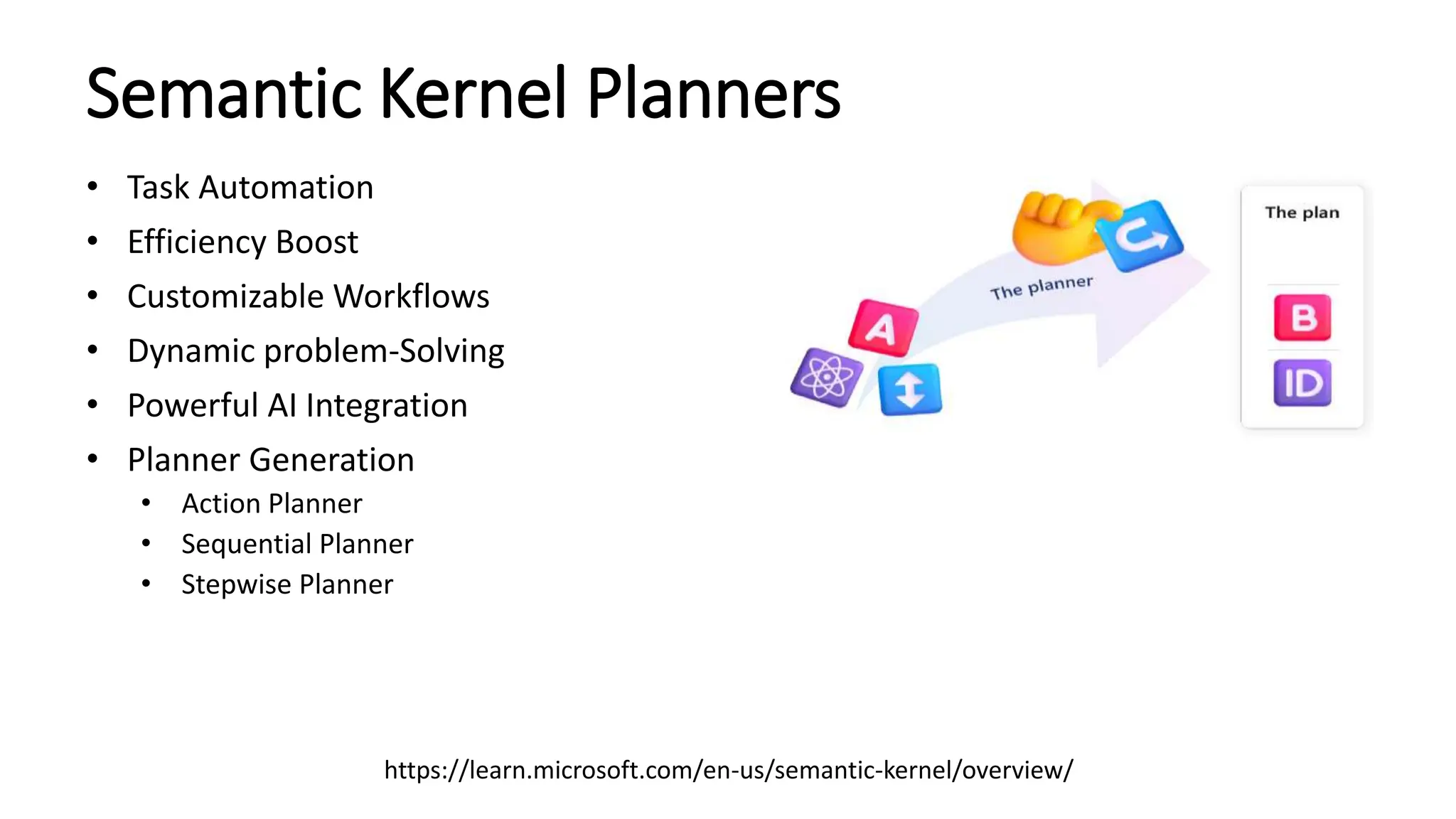
Semantic Kernel Planners
• Task Automation
• Efficiency Boost
• Customizable Workflows
• Dynamic problem-Solving
• Powerful AI Integration
• Planner Generation
• Action Planner
• Sequential Planner
• Stepwise Planner
https://learn.microsoft.com/en-us/semantic-kernel/overview/
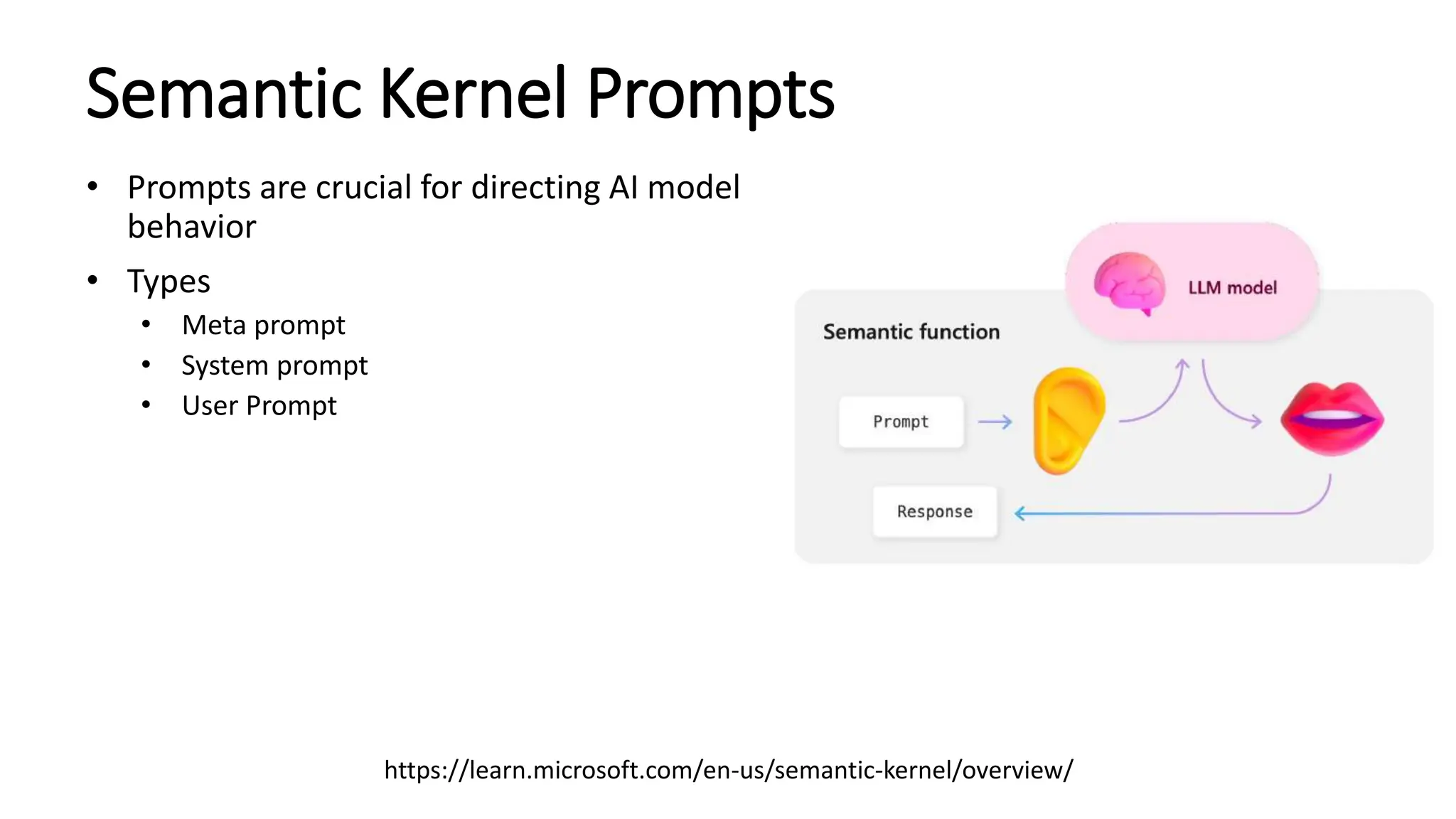
Semantic Kernel Prompts
• Prompts are crucial for directing AI model
behavior
• Types
• Meta prompt
• System prompt
• User Prompt
https://learn.microsoft.com/en-us/semantic-kernel/overview/
Semantic Kernel Memory and Embeddings
• Context Retention
• Embedding Storage
• Improved Understanding
• Dynamic Learning
• Enhanced Performance
Copilot feature in Semantic Kernel
• Real-time Assistance
• Customization
• Enhanced User Interaction
• Seamless Integration
• User Feedback Incorporation
Plugin/Planner/Agent/Co-Pilot
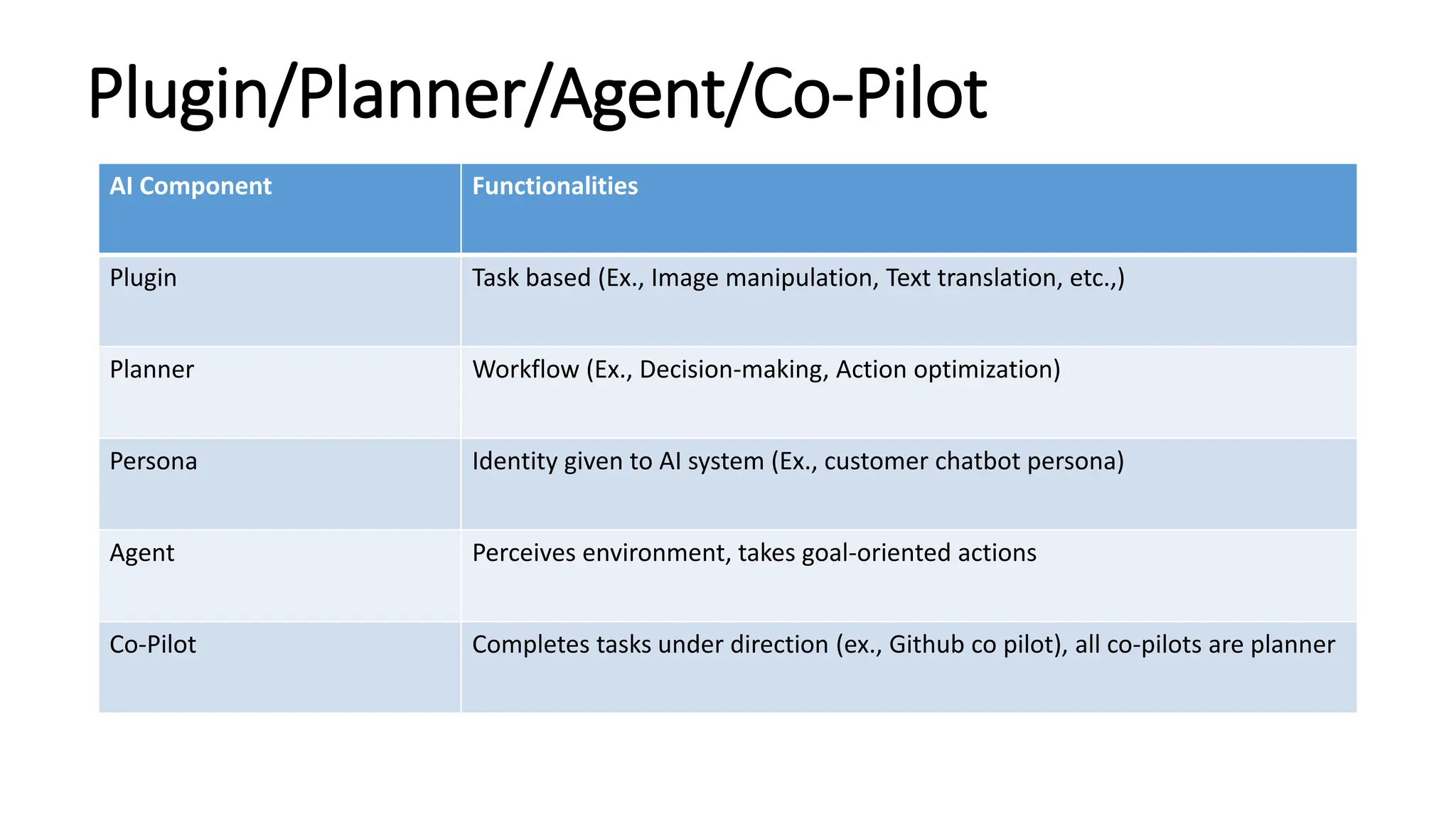
AI Component Functionalities
Plugin Task based (Ex., Image manipulation, Text translation, etc.,)
Planner Workflow (Ex., Decision-making, Action optimization)
Persona Identity given to AI system (Ex., customer chatbot persona)
Agent Perceives environment, takes goal-oriented actions
Co-Pilot Completes tasks under direction (ex., Github co pilot), all co-pilots are planner
Plugin/Planner/Agent/Co-Pilot
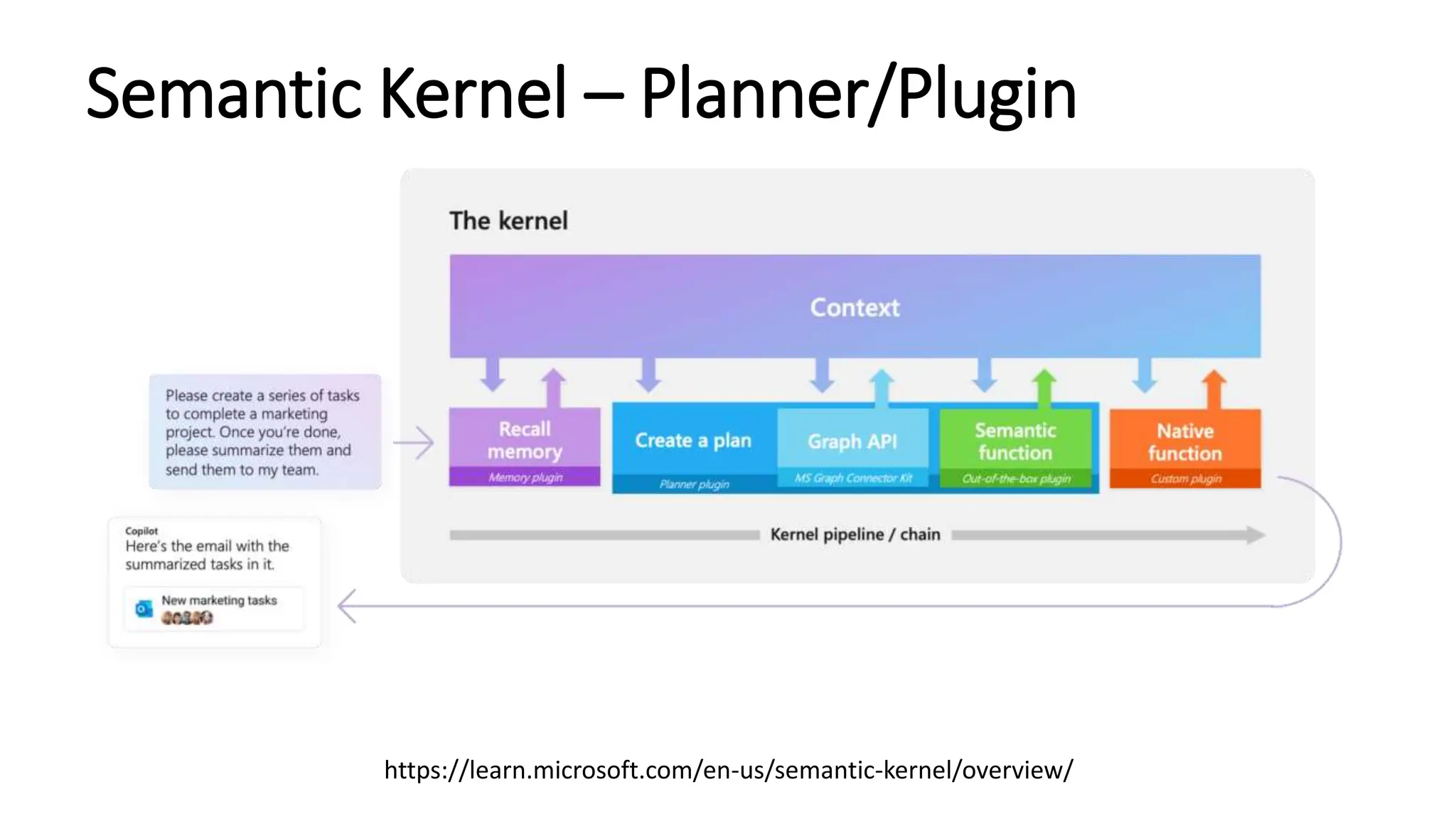
Semantic Kernel – Planner/Plugin
https://learn.microsoft.com/en-us/semantic-kernel/overview/
Getting Started
• Semantic Kernel Supported Language: C#, Python and Java
• Semantic Kernel SDK is available in C#, Python, and Java
• Semantic Kernel : https://github.com/microsoft/semantic-kernel
• Semantic Kernel Starters: https://github.com/microsoft/semantic-kernel-starters
• Semantic Kernel in C#
• https://github.com/microsoft/semantic-kernel/blob/main/dotnet/README.md
• Using Semantic Kernel in Python
• https://github.com/microsoft/semantic-kernel/blob/main/python/README.md
• Using Semantic Kernel in Java
• https://github.com/microsoft/semantic-kernel/blob/main/java/README.md
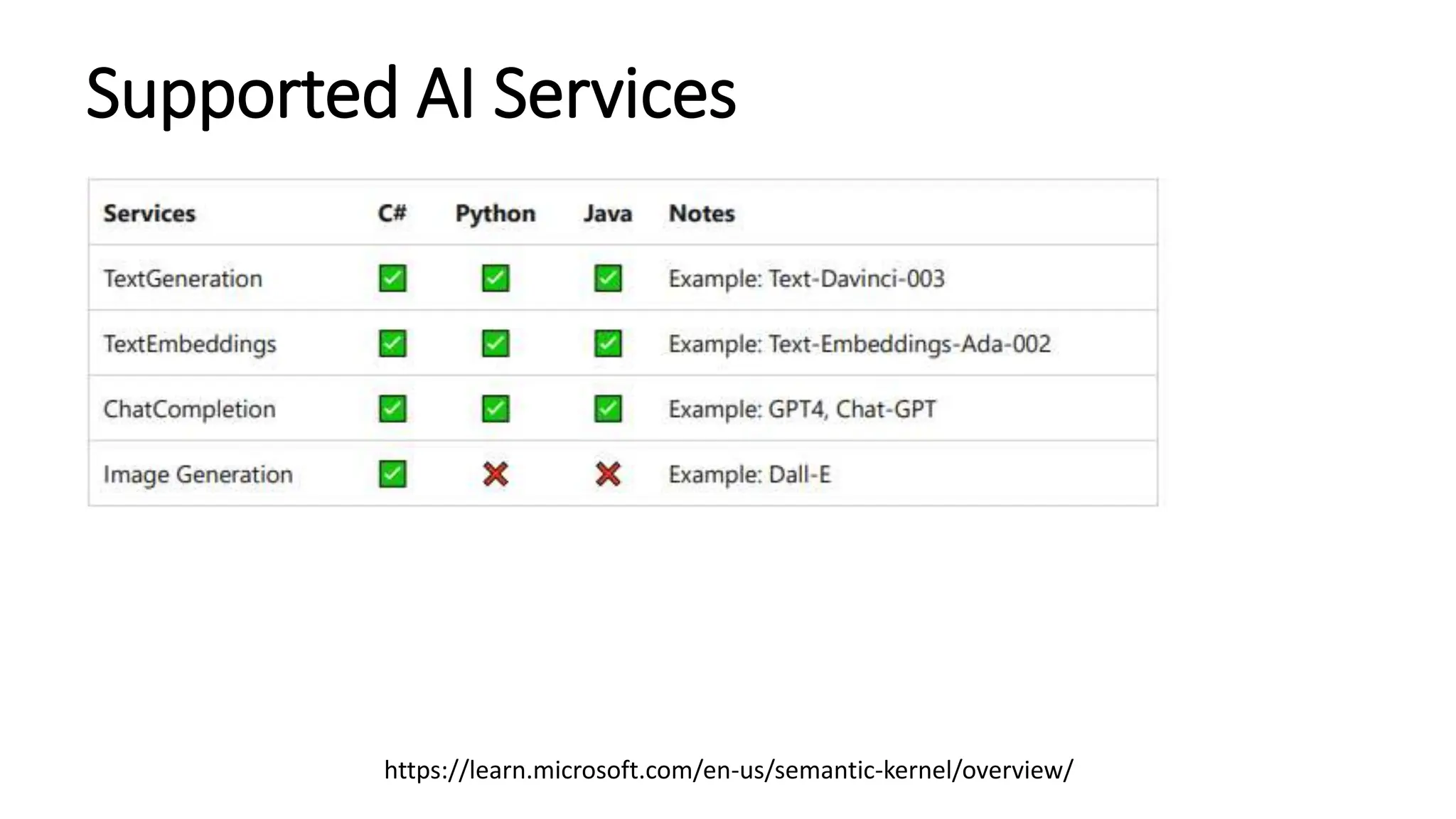
Supported AI Services
https://learn.microsoft.com/en-us/semantic-kernel/overview/
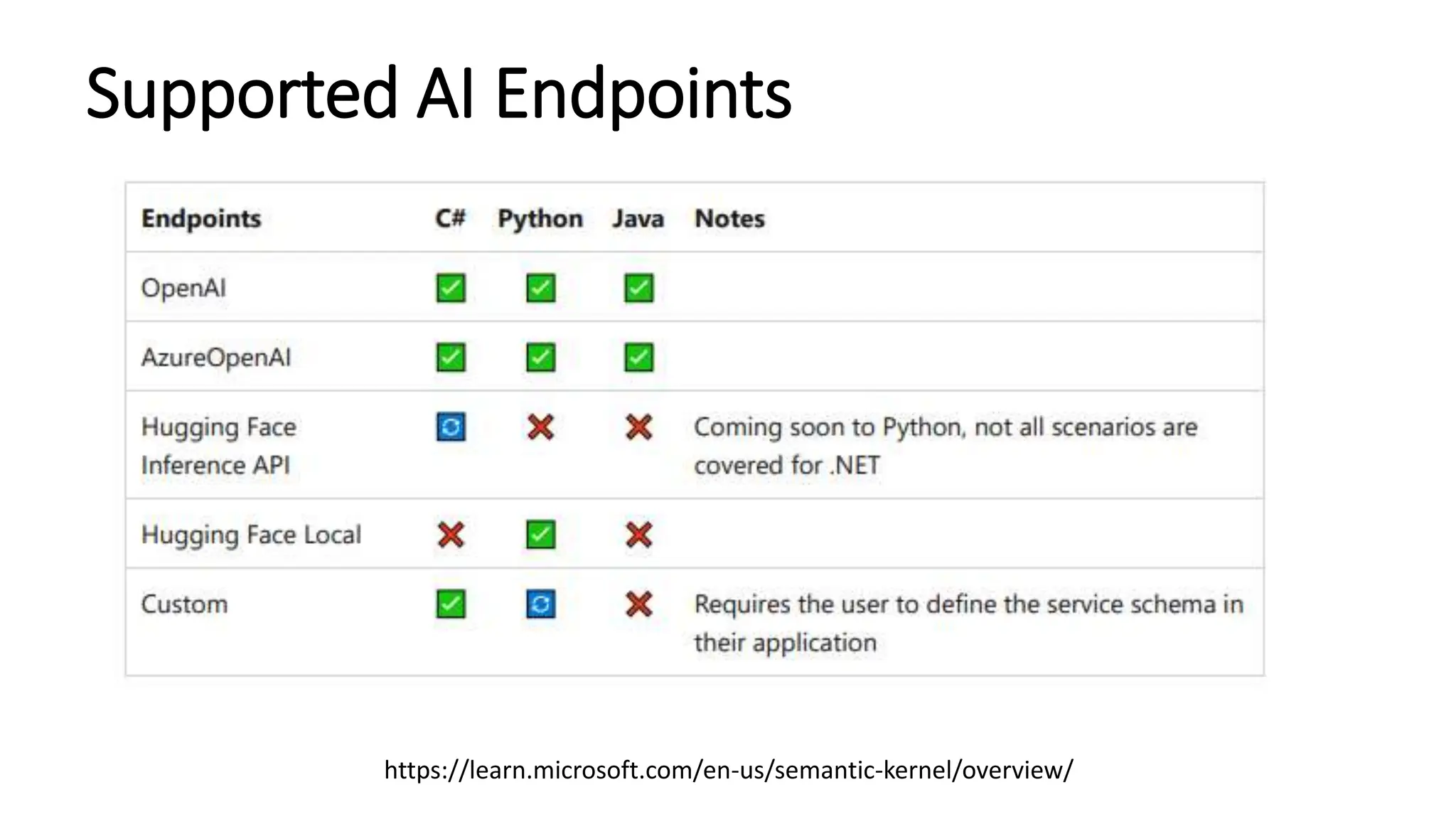
Supported AI Endpoints
https://learn.microsoft.com/en-us/semantic-kernel/overview/
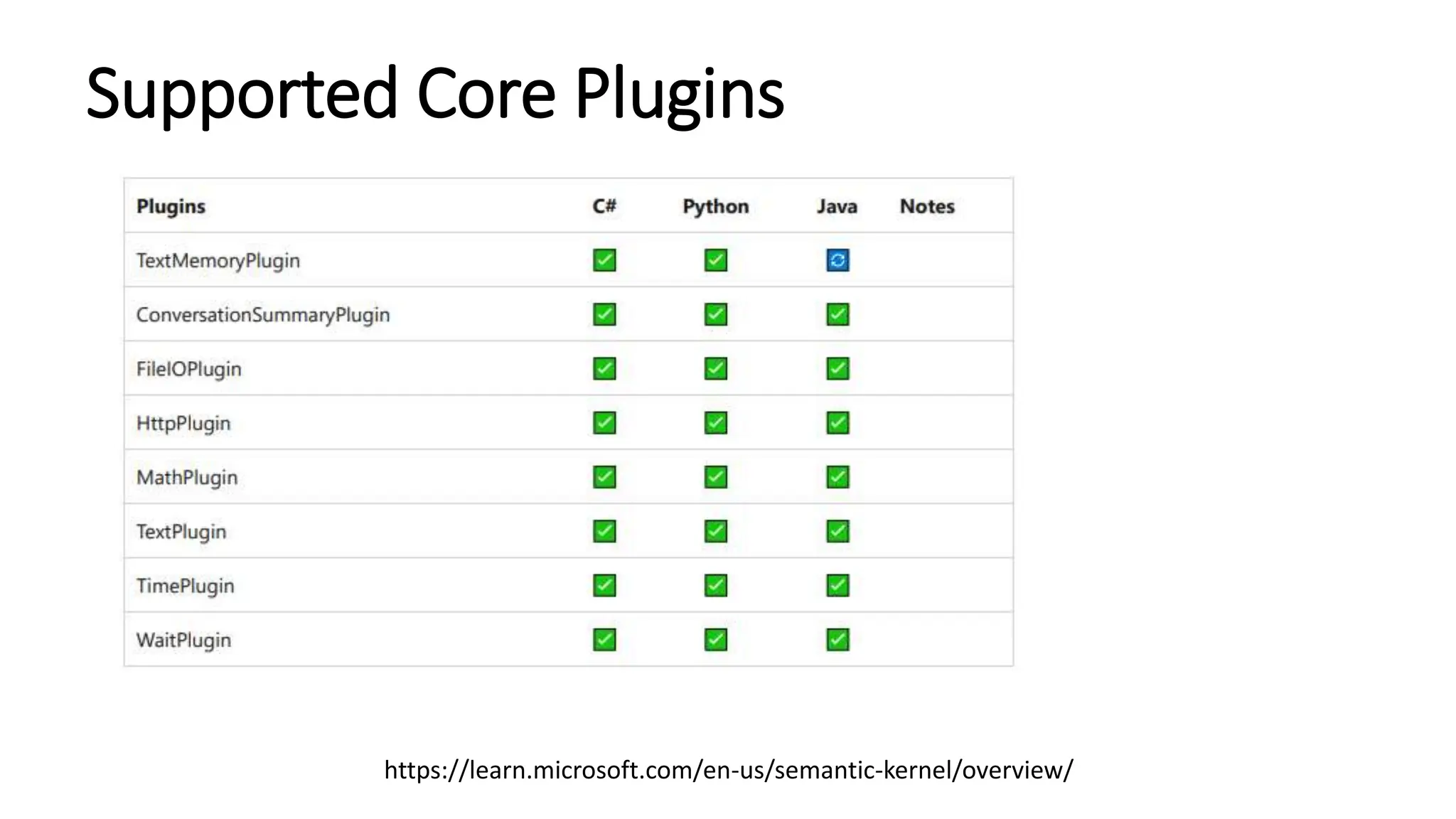
Supported Core Plugins
https://learn.microsoft.com/en-us/semantic-kernel/overview/
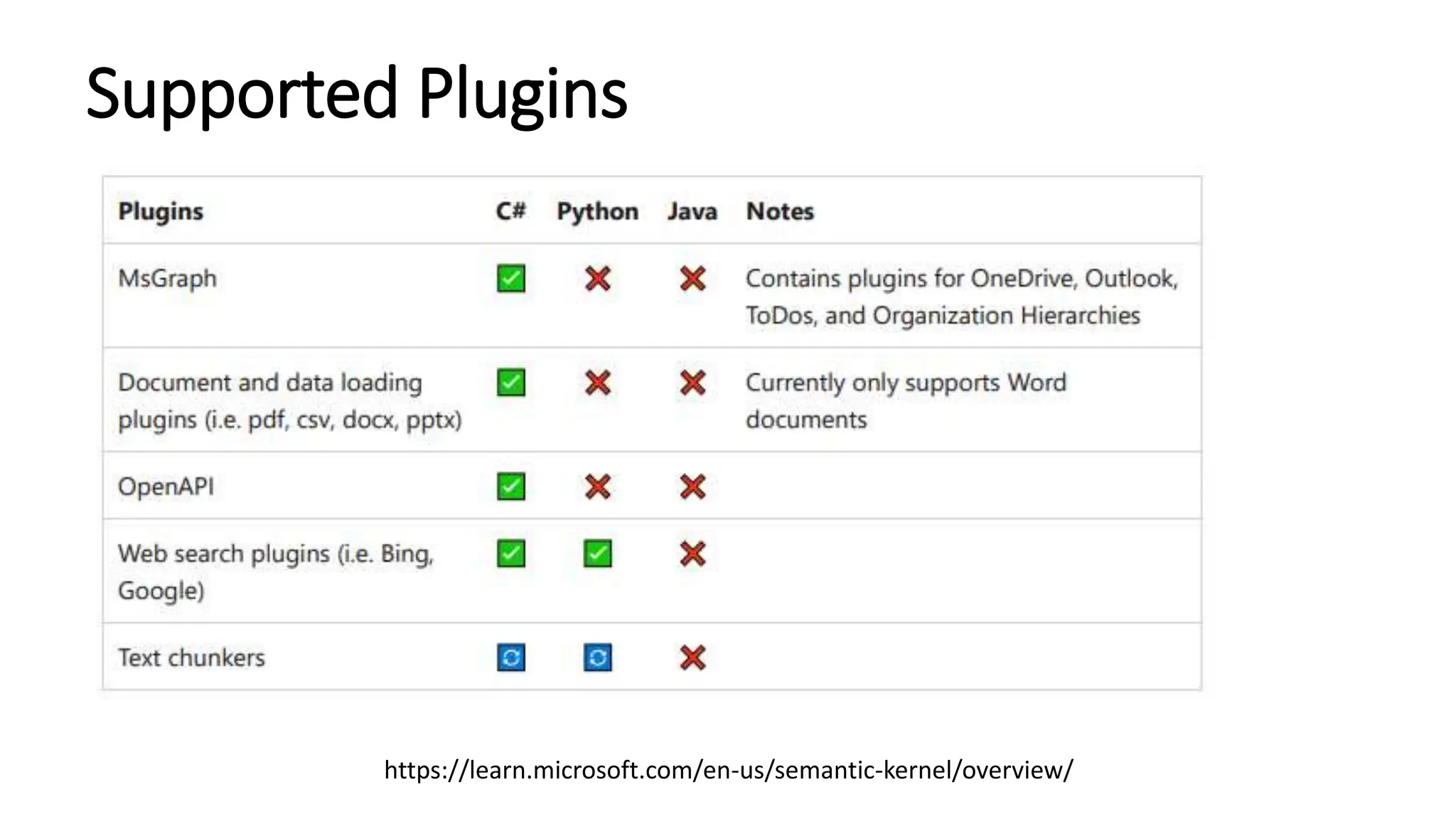
Supported Plugins
https://learn.microsoft.com/en-us/semantic-kernel/overview/
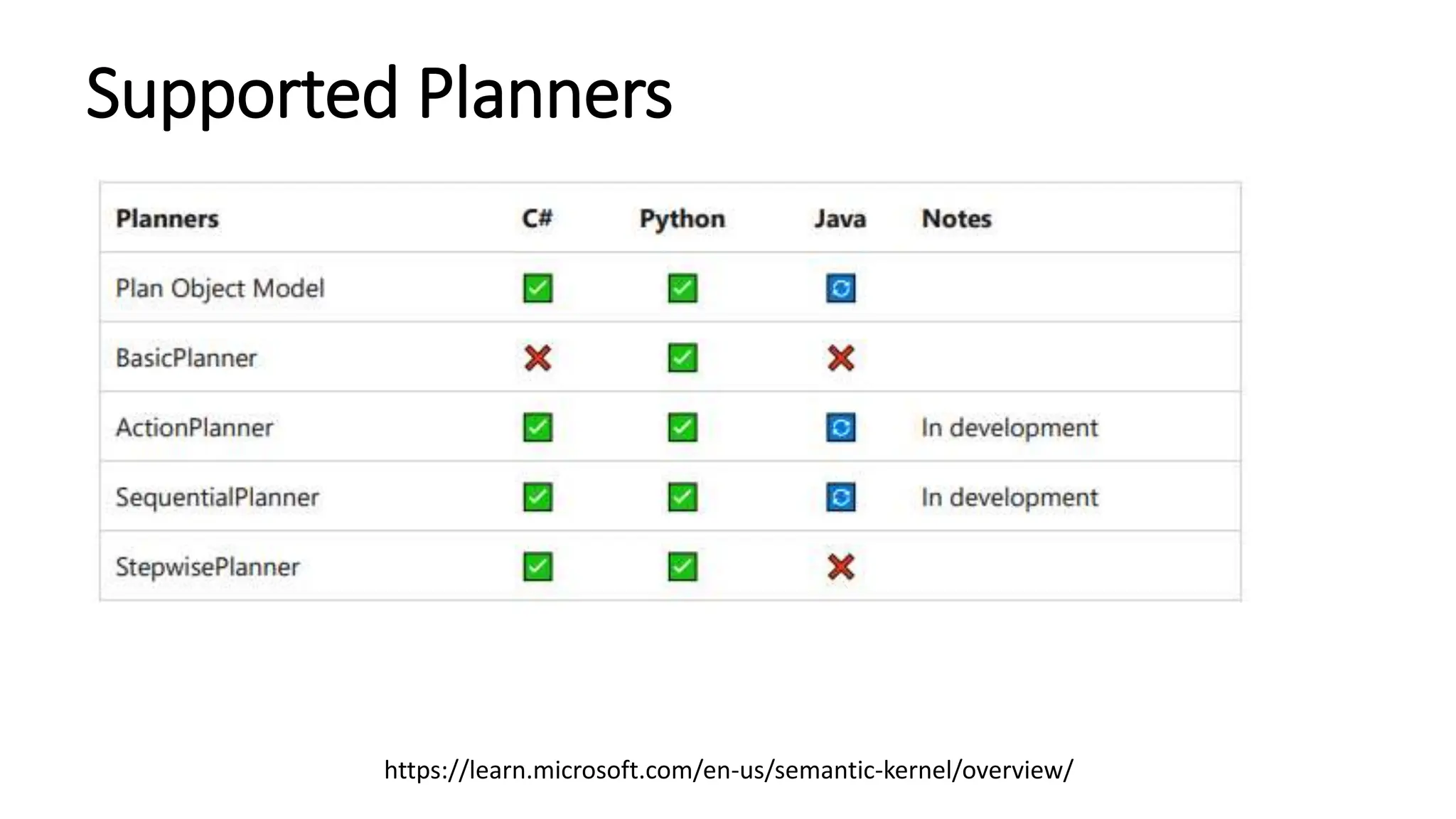
Supported Planners
https://learn.microsoft.com/en-us/semantic-kernel/overview/
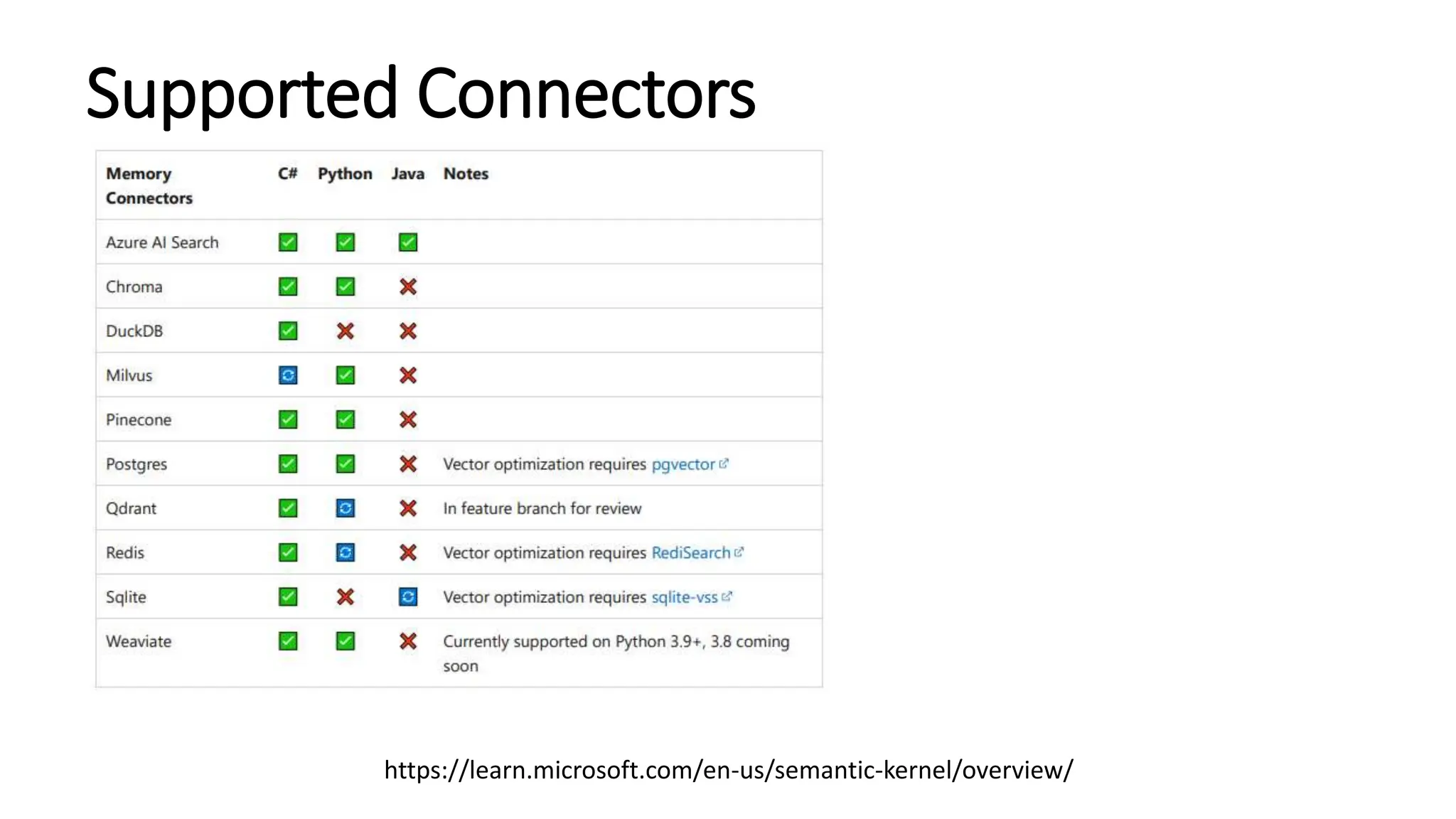
Supported Connectors
https://learn.microsoft.com/en-us/semantic-kernel/overview/
Demo
• Semantic Kernel
Reference
• https://learn.microsoft.com/en-us/semantic-kernel/
• Semantic Kernel Starters: https://github.com/microsoft/semantic-kernel-starters
• Chat Application
• https://github.com/microsoft/chat-copilot
• Semantic Kernel in C#
• https://github.com/microsoft/semantic-kernel/blob/main/dotnet/README.md
• Using Semantic Kernel in Python
• https://github.com/microsoft/semantic-kernel/blob/main/python/README.md
• Using Semantic Kernel in Java
• https://github.com/microsoft/semantic-kernel/blob/main/java/README.md
Thanks for your time and trust!
Boston Code Camp (BCC36)

Building AI-Driven Apps Using Semantic Kernel.pptx

Editor's Notes

  • #5 how it actually work? planners --the magic that combines plugins together to accoplish a user's goal with planner you can build your own AI app apps (plugin extensibility | copilots) -- AI orchestration -- Foundation models | AI infrastructure At the core of every copilot is a planner -- planner tell a copilot what it should do next with the tools it has, SK has 3 OOTB planners => Action Planner (one action), Sequential planner (several action), Stepwise planner (multiple actions)
  • #7 how it actually work? planners --the magic that combines plugins together to accoplish a user's goal with planner you can build your own AI app apps (plugin extensibility | copilots) -- AI orchestration -- Foundation models | AI infrastructure At the core of every copilot is a planner -- planner tell a copilot what it should do next with the tools it has, SK has 3 OOTB planners => Action Planner (one action), Sequential planner (several action), Stepwise planner (multiple actions)
  • #8 Open-Source SDK: Semantic Kernel is an open-source Software Development Kit designed to streamline the integration and orchestration of various AI models. AI Model Integration: It enables seamless integration with AI models from prominent platforms like OpenAI, Azure OpenAI, and Hugging Face. Enhanced AI Agent Development: The SDK focuses on facilitating the development of sophisticated AI agents, providing tools and frameworks for effective implementation. Versatility and Flexibility: Semantic Kernel is designed to be versatile, catering to a wide range of applications and user requirements in AI development. Community and Support: It offers robust community support, including tutorials, forums, and resources for developers to collaborate and enhance their AI projects..
  • #9 Initialization: Start by initializing Semantic Kernel, setting up the basic framework for the AI agent. Model Integration: Integrate various AI models from platforms like OpenAI and Hugging Face, customizing the agent to specific tasks. Plugin Utilization: Enhance the agent's capabilities by incorporating plugins that offer additional functionalities and integrations. Memory and Context Management: Implement AI memory features for context retention, ensuring the agent maintains a coherent conversation history or task memory. Customization and Testing: Customize the AI agent based on specific use cases and perform thorough testing to ensure optimal performance and reliability.
  • #10 Skills: Modularized Knowledge and Behavior: Skills represent self-contained units of functionality that are accessible to the AI. Think of them as pre-packed abilities or knowledge modules. Conversational Emphasis: Skills frequently focus on enabling more natural and engaging conversations. They can introduce personality, dialogue variations, or the ability to handle specific conversation topics Less Technical (Often): Developing skills can sometimes be done using no-code tools or simplified scripting languages, lowering the barrier or less technical users Examples: A “joke telling” skill providing the AI with the ability to tell jokes. A “movie trivia” skill containing knowledge about movies and handling relevant questions. A skill providing conversational templates for handling small talk Plugins often expand technical capabilities; Skills often expand conversational abilities.
  • #11 Task Automation: Planners in Semantic Kernel automate complex tasks, streamlining workflows and reducing manual intervention. Efficiency Improvement: They enhance efficiency by orchestrating various components and processes within the AI agent. Customizable Workflows: Planners allow for the customization of workflows to suit specific automation needs. Adaptability: They are adaptable to different scenarios, ensuring optimal task execution under varying conditions. Integration of AI Models: Planners effectively integrate different AI models to handle complex decision-making processes.
  • #12 Importance of Prompts: Prompts are crucial for directing AI model behavior, serving as inputs or queries that elicit specific responses. Prompt Engineering: This emerging field requires creativity and attention to detail in selecting words, phrases, and formats to guide AI model output generation. Experimentation with Prompts: The document emphasizes experimenting with different prompts and parameters to achieve desired outcomes. Examples of Prompts: It includes examples showing how varying prompt structures lead to different AI responses. Tips for Effective Prompt Engineering: The document provides tips and strategies for mastering prompt engineering, highlighting its significance in AI model manipulation. Metaprompts are instructions that guide AI models on how to effectively interpret, generate, and refine prompts for optimal task completion. System prompts provide an AI model with specific instructions, context, and desired output format for a particular task. A user prompt is a direct query or input provided by a user to an AI model, designed to elicit a specific response or action.
  • #13 Context Retention AI Memory in Semantic Kernel is crucial for maintaining conversation context, enhancing the continuity and relevance of interactions. Embedding Storage The system stores embeddings, which are numerical representations of data, to facilitate quick and accurate retrieval of information. Improved Understanding These embeddings help in better understanding and processing of user queries and interactions. Dynamic Learning AI Memory enables dynamic learning from interactions, adapting to new information and user preferences. Enhanced Performance The combination of AI Memory and embeddings significantly enhances the overall performance and responsiveness of AI agents.
  • #14 Real-time Assistance: Chat Copilot provides real-time assistance by integrating AI-driven responses into conversations. Customization: It offers extensive customization options to tailor the AI's responses according to specific user needs or scenarios. Enhanced User Interaction: This feature enhances user interactions, making them more engaging and informative. Seamless Integration: Chat Copilot seamlessly integrates with existing systems, ensuring a smooth user experience. User Feedback Incorporation: It has capabilities to learn from user feedback, continually improving the relevance and accuracy of its responses.
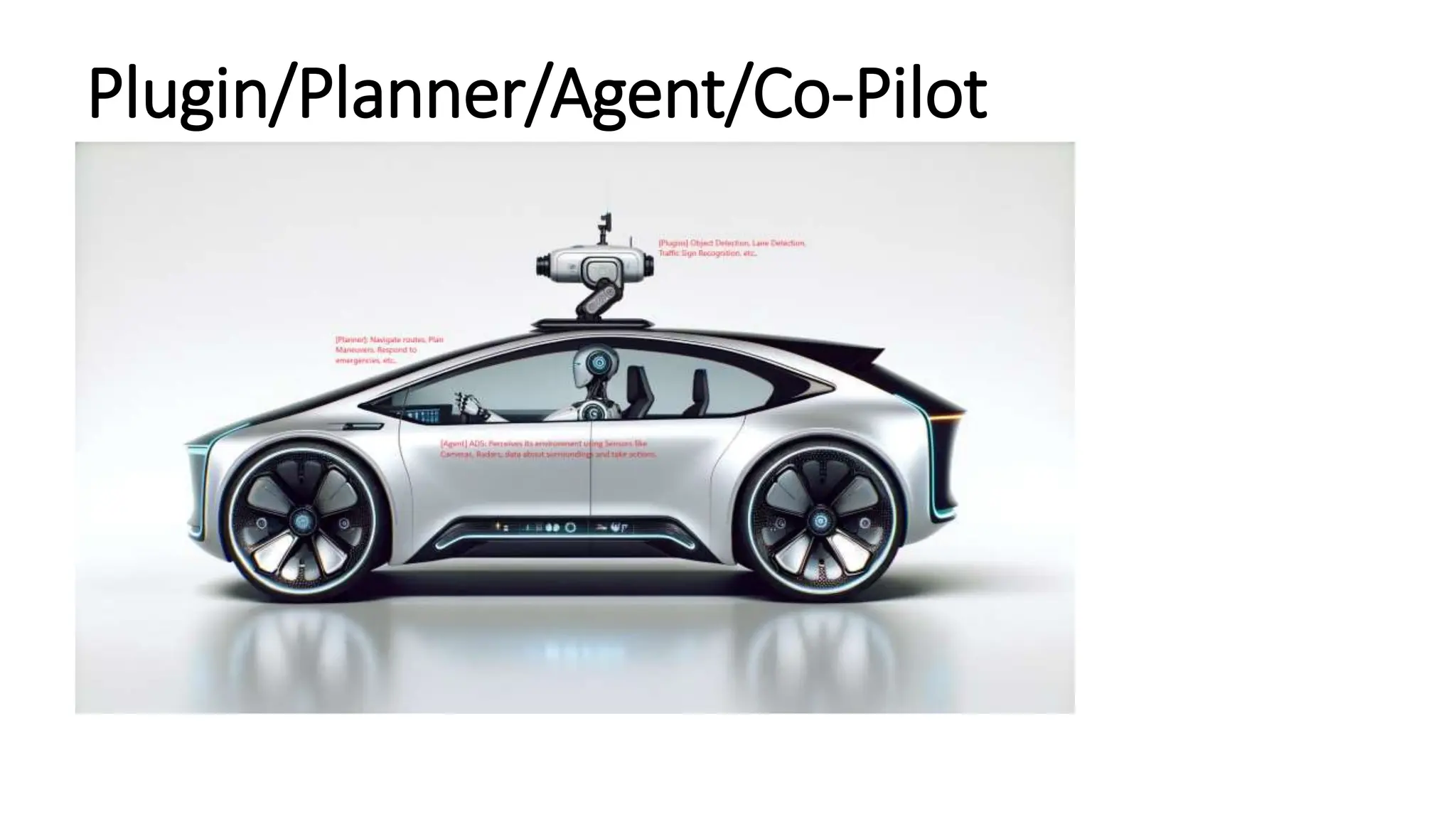
  • #15 AGENT: Automated Driving System (ADS) as an Agent Perceives its environment using sensors like cameras, radars, constantly gathers data about its surroundings (vechicle, pedestrians, traffic, lights, etc.,) Take Actions (steering, acceleration, breaking ) to maintain a safe tracectory Learns from experience: advanced ADS may collect and analyze data over time to improve its decision-making capabilities Plugin: Object Detection Lane Detection Traffic Sign Recognition Planner: Navigate Routes: the planner uses a map database and real-time traffic information to determine the optimal route to the destination. Plan Maneuvers: the planner calculates safe and efficient maneuvers (lane changes, overtaking, merging) based on the perceived environment Respond to Emergencies: The planner can activate emergency breaking or evasive maneuvers in response to sudden obstacles
  • #16 AGENT: Automated Driving System (ADS) as an Agent Perceives its environment using sensors like cameras, radars, constantly gathers data about its surroundings (vechicle, pedestrians, traffic, lights, etc.,) Take Actions (steering, acceleration, breaking ) to maintain a safe tracectory Learns from experience: advanced ADS may collect and analyze data over time to improve its decision-making capabilities Plugin: Object Detection Lane Detection Traffic Sign Recognition Planner: Navigate Routes: the planner uses a map database and real-time traffic information to determine the optimal route to the destination. Plan Maneuvers: the planner calculates safe and efficient maneuvers (lane changes, overtaking, merging) based on the perceived environment Respond to Emergencies: The planner can activate emergency breaking or evasive maneuvers in response to sudden obstacles ADS: Perceives its environment using Sensors like Cameras, Radars, data about surroundings and take actions