
Semantic Kernel
Udaiappa Ramachandran ( Udai )
https://udai.io
About me
• Udaiappa Ramachandran ( Udai )
• CTO/CSO-Akumina, Inc.
• Microsoft Azure MVP
• Cloud Expert
• Microsoft Azure, Amazon Web Services, and Google
• New Hampshire Cloud User Group (http://www.meetup.com/nashuaug )
• https://udai.io
Agenda
• Introduction to Semantic Kernel
• Getting Started
• Plugins
• Planner
• Persona
• Co-Pilot
• Demo…Demo…Demo…
AI Application Terminology
• Plugins
• Planner
• Persona
• Co-Pilot
• Vector Embedding
• Prompt Engineering
• Semantic Kernel
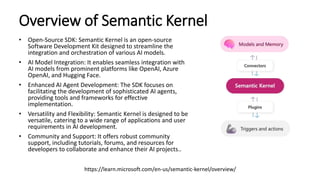
Overview of Semantic Kernel
• Open-Source SDK: Semantic Kernel is an open-source
Software Development Kit designed to streamline the
integration and orchestration of various AI models.
• AI Model Integration: It enables seamless integration with
AI models from prominent platforms like OpenAI, Azure
OpenAI, and Hugging Face.
• Enhanced AI Agent Development: The SDK focuses on
facilitating the development of sophisticated AI agents,
providing tools and frameworks for effective
implementation.
• Versatility and Flexibility: Semantic Kernel is designed to be
versatile, catering to a wide range of applications and user
requirements in AI development.
• Community and Support: It offers robust community
support, including tutorials, forums, and resources for
developers to collaborate and enhance their AI projects..
https://learn.microsoft.com/en-us/semantic-kernel/overview/
Key Features of Semantic Kernel
• AI Agent Creation: Guidelines for developing AI agents tailored to specific needs.
• Prompt Engineering: Techniques for effective AI interaction prompts.
• AI Services Integration: Utilizing various AI services and plugins for enhanced
functionality.
• Automation with Planners: Leveraging planners for improved automation
capabilities.
• AI Memories Management: Utilizing vector databases for contextual information
storage.
• Responsible AI Practices: Adherence to ethical standards in AI development.
https://learn.microsoft.com/en-us/semantic-kernel/overview/
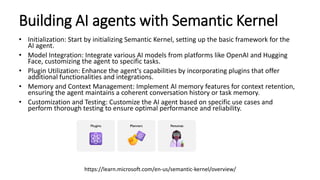
Building AI agents with Semantic Kernel
• Initialization: Start by initializing Semantic Kernel, setting up the basic framework for the
AI agent.
• Model Integration: Integrate various AI models from platforms like OpenAI and Hugging
Face, customizing the agent to specific tasks.
• Plugin Utilization: Enhance the agent's capabilities by incorporating plugins that offer
additional functionalities and integrations.
• Memory and Context Management: Implement AI memory features for context retention,
ensuring the agent maintains a coherent conversation history or task memory.
• Customization and Testing: Customize the AI agent based on specific use cases and
perform thorough testing to ensure optimal performance and reliability.
https://learn.microsoft.com/en-us/semantic-kernel/overview/
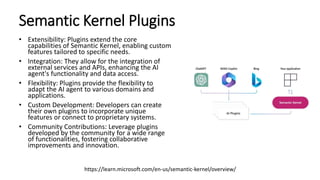
Semantic Kernel Plugins
• Extensibility: Plugins extend the core
capabilities of Semantic Kernel, enabling custom
features tailored to specific needs.
• Integration: They allow for the integration of
external services and APIs, enhancing the AI
agent's functionality and data access.
• Flexibility: Plugins provide the flexibility to
adapt the AI agent to various domains and
applications.
• Custom Development: Developers can create
their own plugins to incorporate unique
features or connect to proprietary systems.
• Community Contributions: Leverage plugins
developed by the community for a wide range
of functionalities, fostering collaborative
improvements and innovation.
https://learn.microsoft.com/en-us/semantic-kernel/overview/
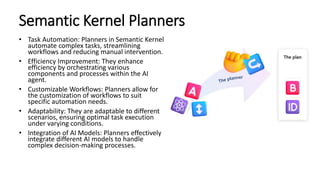
Semantic Kernel Planners
• Task Automation: Planners in Semantic Kernel
automate complex tasks, streamlining
workflows and reducing manual intervention.
• Efficiency Improvement: They enhance
efficiency by orchestrating various
components and processes within the AI
agent.
• Customizable Workflows: Planners allow for
the customization of workflows to suit
specific automation needs.
• Adaptability: They are adaptable to different
scenarios, ensuring optimal task execution
under varying conditions.
• Integration of AI Models: Planners effectively
integrate different AI models to handle
complex decision-making processes.
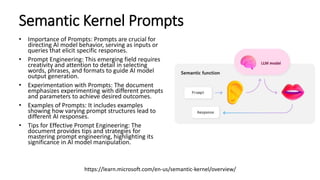
Semantic Kernel Prompts
• Importance of Prompts: Prompts are crucial for
directing AI model behavior, serving as inputs or
queries that elicit specific responses.
• Prompt Engineering: This emerging field requires
creativity and attention to detail in selecting
words, phrases, and formats to guide AI model
output generation.
• Experimentation with Prompts: The document
emphasizes experimenting with different prompts
and parameters to achieve desired outcomes.
• Examples of Prompts: It includes examples
showing how varying prompt structures lead to
different AI responses.
• Tips for Effective Prompt Engineering: The
document provides tips and strategies for
mastering prompt engineering, highlighting its
significance in AI model manipulation.
https://learn.microsoft.com/en-us/semantic-kernel/overview/
Semantic Kernel Memory and Embeddings
• Context Retention: AI Memory in Semantic Kernel is crucial for maintaining
conversation context, enhancing the continuity and relevance of interactions.
• Embedding Storage: The system stores embeddings, which are numerical
representations of data, to facilitate quick and accurate retrieval of information.
• Improved Understanding: These embeddings help in better understanding and
processing of user queries and interactions.
• Dynamic Learning: AI Memory enables dynamic learning from interactions,
adapting to new information and user preferences.
• Enhanced Performance: The combination of AI Memory and embeddings
significantly enhances the overall performance and responsiveness of AI agents.
https://learn.microsoft.com/en-us/semantic-kernel/overview/
Copilot feature in Semantic Kernel
• Real-time Assistance: Chat Copilot provides real-time assistance by integrating AI-
driven responses into conversations.
• Customization: It offers extensive customization options to tailor the AI's responses
according to specific user needs or scenarios.
• Enhanced User Interaction: This feature enhances user interactions, making them
more engaging and informative.
• Seamless Integration: Chat Copilot seamlessly integrates with existing systems,
ensuring a smooth user experience.
• User Feedback Incorporation: It has capabilities to learn from user feedback,
continually improving the relevance and accuracy of its responses.
https://learn.microsoft.com/en-us/semantic-kernel/overview/
Semantic Kernel – Planner/Plugin
https://learn.microsoft.com/en-us/semantic-kernel/overview/
Getting Started
• Semantic Kernel Supported Language: C#, Python and Java
• Semantic Kernel SDK is available in C#, Python, and Java
• Semantic Kernel : https://github.com/microsoft/semantic-kernel
• Semantic Kernel Starters: https://github.com/microsoft/semantic-kernel-starters
• Semantic Kernel in C#
• https://github.com/microsoft/semantic-kernel/blob/main/dotnet/README.md
• Using Semantic Kernel in Python
• https://github.com/microsoft/semantic-kernel/blob/main/python/README.md
• Using Semantic Kernel in Java
• https://github.com/microsoft/semantic-kernel/blob/main/java/README.md
Supported AI Services
https://learn.microsoft.com/en-us/semantic-kernel/overview/
Supported AI Endpoints
https://learn.microsoft.com/en-us/semantic-kernel/overview/
Supported Core Plugins
https://learn.microsoft.com/en-us/semantic-kernel/overview/
Supported Plugins
https://learn.microsoft.com/en-us/semantic-kernel/overview/
Supported Planners
https://learn.microsoft.com/en-us/semantic-kernel/overview/
Supported Connectors
https://learn.microsoft.com/en-us/semantic-kernel/overview/
Demo
• Semantic Kernel
Reference
• https://learn.microsoft.com/en-us/semantic-kernel/
• Semantic Kernel Starters: https://github.com/microsoft/semantic-kernel-starters
• Semantic Kernel in C#
• https://github.com/microsoft/semantic-kernel/blob/main/dotnet/README.md
• Using Semantic Kernel in Python
• https://github.com/microsoft/semantic-kernel/blob/main/python/README.md
• Using Semantic Kernel in Java
• https://github.com/microsoft/semantic-kernel/blob/main/java/README.md
Thanks for your time and trust!
Boston Code Camp (BCC35)

AI-Plugins-Planners-Persona-SemanticKernel.pptx

  • 1.
    Semantic Kernel Udaiappa Ramachandran( Udai ) https://udai.io
  • 2.
    About me • UdaiappaRamachandran ( Udai ) • CTO/CSO-Akumina, Inc. • Microsoft Azure MVP • Cloud Expert • Microsoft Azure, Amazon Web Services, and Google • New Hampshire Cloud User Group (http://www.meetup.com/nashuaug ) • https://udai.io
  • 3.
    Agenda • Introduction toSemantic Kernel • Getting Started • Plugins • Planner • Persona • Co-Pilot • Demo…Demo…Demo…
  • 4.
    AI Application Terminology •Plugins • Planner • Persona • Co-Pilot • Vector Embedding • Prompt Engineering • Semantic Kernel
  • 5.
    Overview of SemanticKernel • Open-Source SDK: Semantic Kernel is an open-source Software Development Kit designed to streamline the integration and orchestration of various AI models. • AI Model Integration: It enables seamless integration with AI models from prominent platforms like OpenAI, Azure OpenAI, and Hugging Face. • Enhanced AI Agent Development: The SDK focuses on facilitating the development of sophisticated AI agents, providing tools and frameworks for effective implementation. • Versatility and Flexibility: Semantic Kernel is designed to be versatile, catering to a wide range of applications and user requirements in AI development. • Community and Support: It offers robust community support, including tutorials, forums, and resources for developers to collaborate and enhance their AI projects.. https://learn.microsoft.com/en-us/semantic-kernel/overview/
  • 6.
    Key Features ofSemantic Kernel • AI Agent Creation: Guidelines for developing AI agents tailored to specific needs. • Prompt Engineering: Techniques for effective AI interaction prompts. • AI Services Integration: Utilizing various AI services and plugins for enhanced functionality. • Automation with Planners: Leveraging planners for improved automation capabilities. • AI Memories Management: Utilizing vector databases for contextual information storage. • Responsible AI Practices: Adherence to ethical standards in AI development. https://learn.microsoft.com/en-us/semantic-kernel/overview/
  • 7.
    Building AI agentswith Semantic Kernel • Initialization: Start by initializing Semantic Kernel, setting up the basic framework for the AI agent. • Model Integration: Integrate various AI models from platforms like OpenAI and Hugging Face, customizing the agent to specific tasks. • Plugin Utilization: Enhance the agent's capabilities by incorporating plugins that offer additional functionalities and integrations. • Memory and Context Management: Implement AI memory features for context retention, ensuring the agent maintains a coherent conversation history or task memory. • Customization and Testing: Customize the AI agent based on specific use cases and perform thorough testing to ensure optimal performance and reliability. https://learn.microsoft.com/en-us/semantic-kernel/overview/
  • 8.
    Semantic Kernel Plugins •Extensibility: Plugins extend the core capabilities of Semantic Kernel, enabling custom features tailored to specific needs. • Integration: They allow for the integration of external services and APIs, enhancing the AI agent's functionality and data access. • Flexibility: Plugins provide the flexibility to adapt the AI agent to various domains and applications. • Custom Development: Developers can create their own plugins to incorporate unique features or connect to proprietary systems. • Community Contributions: Leverage plugins developed by the community for a wide range of functionalities, fostering collaborative improvements and innovation. https://learn.microsoft.com/en-us/semantic-kernel/overview/
  • 9.
    Semantic Kernel Planners •Task Automation: Planners in Semantic Kernel automate complex tasks, streamlining workflows and reducing manual intervention. • Efficiency Improvement: They enhance efficiency by orchestrating various components and processes within the AI agent. • Customizable Workflows: Planners allow for the customization of workflows to suit specific automation needs. • Adaptability: They are adaptable to different scenarios, ensuring optimal task execution under varying conditions. • Integration of AI Models: Planners effectively integrate different AI models to handle complex decision-making processes.
  • 10.
    Semantic Kernel Prompts •Importance of Prompts: Prompts are crucial for directing AI model behavior, serving as inputs or queries that elicit specific responses. • Prompt Engineering: This emerging field requires creativity and attention to detail in selecting words, phrases, and formats to guide AI model output generation. • Experimentation with Prompts: The document emphasizes experimenting with different prompts and parameters to achieve desired outcomes. • Examples of Prompts: It includes examples showing how varying prompt structures lead to different AI responses. • Tips for Effective Prompt Engineering: The document provides tips and strategies for mastering prompt engineering, highlighting its significance in AI model manipulation. https://learn.microsoft.com/en-us/semantic-kernel/overview/
  • 11.
    Semantic Kernel Memoryand Embeddings • Context Retention: AI Memory in Semantic Kernel is crucial for maintaining conversation context, enhancing the continuity and relevance of interactions. • Embedding Storage: The system stores embeddings, which are numerical representations of data, to facilitate quick and accurate retrieval of information. • Improved Understanding: These embeddings help in better understanding and processing of user queries and interactions. • Dynamic Learning: AI Memory enables dynamic learning from interactions, adapting to new information and user preferences. • Enhanced Performance: The combination of AI Memory and embeddings significantly enhances the overall performance and responsiveness of AI agents. https://learn.microsoft.com/en-us/semantic-kernel/overview/
  • 12.
    Copilot feature inSemantic Kernel • Real-time Assistance: Chat Copilot provides real-time assistance by integrating AI- driven responses into conversations. • Customization: It offers extensive customization options to tailor the AI's responses according to specific user needs or scenarios. • Enhanced User Interaction: This feature enhances user interactions, making them more engaging and informative. • Seamless Integration: Chat Copilot seamlessly integrates with existing systems, ensuring a smooth user experience. • User Feedback Incorporation: It has capabilities to learn from user feedback, continually improving the relevance and accuracy of its responses. https://learn.microsoft.com/en-us/semantic-kernel/overview/
  • 13.
    Semantic Kernel –Planner/Plugin https://learn.microsoft.com/en-us/semantic-kernel/overview/
  • 14.
    Getting Started • SemanticKernel Supported Language: C#, Python and Java • Semantic Kernel SDK is available in C#, Python, and Java • Semantic Kernel : https://github.com/microsoft/semantic-kernel • Semantic Kernel Starters: https://github.com/microsoft/semantic-kernel-starters • Semantic Kernel in C# • https://github.com/microsoft/semantic-kernel/blob/main/dotnet/README.md • Using Semantic Kernel in Python • https://github.com/microsoft/semantic-kernel/blob/main/python/README.md • Using Semantic Kernel in Java • https://github.com/microsoft/semantic-kernel/blob/main/java/README.md
  • 15.
  • 16.
  • 17.
  • 18.
  • 19.
  • 20.
  • 21.
  • 22.
    Reference • https://learn.microsoft.com/en-us/semantic-kernel/ • SemanticKernel Starters: https://github.com/microsoft/semantic-kernel-starters • Semantic Kernel in C# • https://github.com/microsoft/semantic-kernel/blob/main/dotnet/README.md • Using Semantic Kernel in Python • https://github.com/microsoft/semantic-kernel/blob/main/python/README.md • Using Semantic Kernel in Java • https://github.com/microsoft/semantic-kernel/blob/main/java/README.md
  • 23.
    Thanks for yourtime and trust! Boston Code Camp (BCC35)

Editor's Notes

  • #4 how it actually work? planners --the magic that combines plugins together to accoplish a user's goal with planner you can build your own AI app apps (plugin extensibility | copilots) -- AI orchestration -- Foundation models | AI infrastructure At the core of every copilot is a planner -- planner tell a copilot what it should do next with the tools it has, SK has 3 OOTB planners => Action Planner (one action), Sequential planner (several action), Stepwise planner (multiple actions)
  • #5 how it actually work? planners --the magic that combines plugins together to accoplish a user's goal with planner you can build your own AI app apps (plugin extensibility | copilots) -- AI orchestration -- Foundation models | AI infrastructure At the core of every copilot is a planner -- planner tell a copilot what it should do next with the tools it has, SK has 3 OOTB planners => Action Planner (one action), Sequential planner (several action), Stepwise planner (multiple actions)