Service Endpoints vs.
Private Endpoints
Securing Azure services & reducing the risk of data exfiltration
February 2021, Matthias Güntert
Introduction
What you can expect
 You’ll learn what service endpoints (SE) are
 You’ll learn what private endpoints (PE) are
 You’ll learn the differences between both
 You’ll learn when to use one or the other
What I assume
 Basic understanding of Virtual Networks, DNS and routing
Matthias Güntert
Günni, who?
 I am a father of two kids, digital
photographer, supermoto rider &
Husaberg fan
 I am an Azure Solution Architect,
tech enthusiast, .NET developer and
blogger (www.azureblue.io)
 I work for Solveva, a company
focusing on software solutions in the
insurance sector
 I support insurance companies in
their move to the public cloud
Service Endpoints
Direct and secure connectivity to Azure services
Content
Service Endpoints
 Overview of Service Endpoints are
 Routing without Service Endpoints
 Azure System Default Routes
 Azure Route Selection
 How Service Endpoints work
 What Service Endpoint Policies are
 Demo
 Key Benefits & Limitations
Overview
Service Endpoints
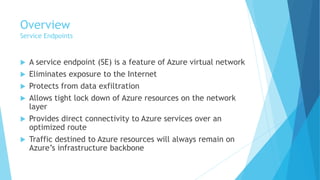
 A service endpoint (SE) is a feature of Azure virtual network
 Eliminates exposure to the Internet
 Protects from data exfiltration
 Allows tight lock down of Azure resources on the network
layer
 Provides direct connectivity to Azure services over an
optimized route
 Traffic destined to Azure resources will always remain on
Azure’s infrastructure backbone
Azure System Default Routes
Service Endpoints
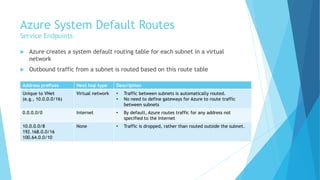
 Azure creates a system default routing table for each subnet in a virtual
network
 Outbound traffic from a subnet is routed based on this route table
Address prefixes Next hop type Description
Unique to VNet
(e.g., 10.0.0.0/16)
Virtual network • Traffic between subnets is automatically routed.
• No need to define gateways for Azure to route traffic
between subnets
0.0.0.0/0 Internet • By default, Azure routes traffic for any address not
specified to the Internet
10.0.0.0/8
192.168.0.0/16
100.64.0.0/10
None • Traffic is dropped, rather than routed outside the subnet.
Azure Route Selection
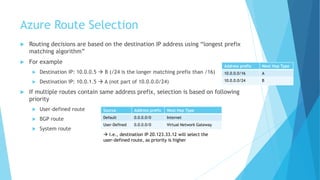
 Routing decisions are based on the destination IP address using “longest prefix
matching algorithm”
 For example
 Destination IP: 10.0.0.5 → B (/24 is the longer matching prefix than /16)
 Destination IP: 10.0.1.5 → A (not part of 10.0.0.0/24)
 If multiple routes contain same address prefix, selection is based on following
priority
 User-defined route
 BGP route
 System route
Address prefix Next Hop Type
10.0.0.0/16 A
10.0.0.0/24 B
Source Address prefix Next Hop Type
Default 0.0.0.0/0 Internet
User-Defined 0.0.0.0/0 Virtual Network Gateway
→ I.e., destination IP 20.123.33.12 will select the
user-defined route, as priority is higher
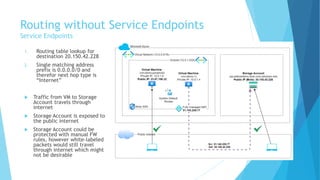
Routing without Service Endpoints
Service Endpoints
1. Routing table lookup for
destination 20.150.42.228
2. Single matching address
prefix is 0.0.0.0/0 and
therefor next hop type is
“Internet”
 Traffic from VM to Storage
Account travels through
internet
 Storage Account is exposed to
the public internet
 Storage Account could be
protected with manual FW
rules, however white-labeled
packets would still travel
through internet which might
not be desirable
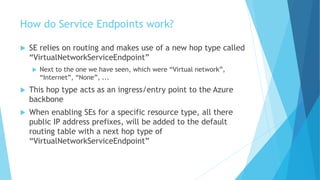
How do Service Endpoints work?
 SE relies on routing and makes use of a new hop type called
“VirtualNetworkServiceEndpoint”
 Next to the one we have seen, which were “Virtual network”,
“Internet”, “None”, ...
 This hop type acts as an ingress/entry point to the Azure
backbone
 When enabling SEs for a specific resource type, all there
public IP address prefixes, will be added to the default
routing table with a next hop type of
“VirtualNetworkServiceEndpoint”
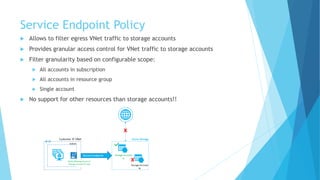
Service Endpoint Policy
 Allows to filter egress VNet traffic to storage accounts
 Provides granular access control for VNet traffic to storage accounts
 Filter granularity based on configurable scope:
 All accounts in subscription
 All accounts in resource group
 Single account
 No support for other resources than storage accounts!!
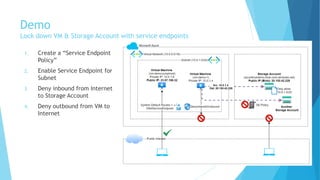
Demo
Lock down VM & Storage Account with service endpoints
1. Create a “Service Endpoint
Policy”
2. Enable Service Endpoint for
Subnet
3. Deny inbound from Internet
to Storage Account
4. Deny outbound from VM to
Internet
Key Benefits - 1
Service Endpoints
 Traffic remains on Azure backbone
 Enhanced network performance (high bandwidth, low latency)
 Enhanced security
 Optimal routing
 Even with user-defined routes pointing to on-premises, traffic will still
take service endpoint as next hop
 Service endpoint routes override any BGP or UDR routes for address
prefix match!
 Allows tight lock down of Azure resources on the network layer
 Not possible without service endpoints
 Storage Account access can be further restricted with “SE Policies”
 No additional charge for using Service Endpoints
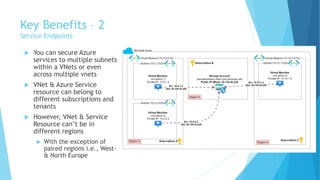
Key Benefits – 2
Service Endpoints
 You can secure Azure
services to multiple subnets
within a VNets or even
across multiple vnets
 VNet & Azure Service
resource can belong to
different subscriptions and
tenants
 However, VNet & Service
Resource can’t be in
different regions
 With the exception of
paired regions i.e., West-
& North Europe
Limitations
Service Endpoints
 Feature only available to virtual networks deployed through Azure
Resource Manager (no classic deployment)
 Can't be used for traffic coming from on-premises & peered network
 Not every Azure resource type is supported, although many core
resources are
 Azure Storage
 SQL Database, PostgreSQL, MySQL, MariaDB, Cosmos DB,
 Key Vault, Service Bus, Event Hubs, App Service, Cognitive Services, Container
Registry (public preview)
 Data Lake Store Gen 1, Synapse Analytics
 SE Policies can only be used for storage accounts!
 And you can’t distinguish between blob, queue, file or table
 SE Policies can’t be “shared” across subscriptions
 ... like other resources
Private Endpoints
Creating private PaaS solutions with “Private Links”
Content
Private Endpoints
 Overview of Private Endpoints and Private Link Service
 Private Endpoint DNS Integration
 DNS Query from the Internet
 DNS Query from the VNet
 Approval Workflow
 Demo
 Key Benefits & Limitations
Overview
Private Endpoints
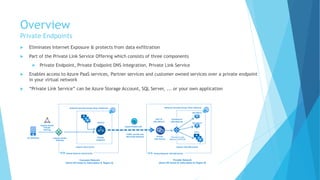
 Eliminates Internet Exposure & protects from data exfiltration
 Part of the Private Link Service Offering which consists of three components
 Private Endpoint, Private Endpoint DNS Integration, Private Link Service
 Enables access to Azure PaaS services, Partner services and customer owned services over a private endpoint
in your virtual network
 “Private Link Service” can be Azure Storage Account, SQL Server, ... or your own application
Overview
Private Endpoints
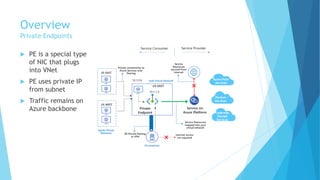
 PE is a special type
of NIC that plugs
into VNet
 PE uses private IP
from subnet
 Traffic remains on
Azure backbone
Private Endpoint DNS Integration
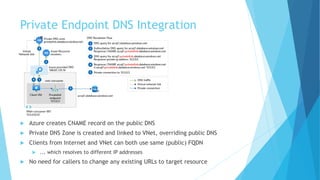
 Azure creates CNAME record on the public DNS
 Private DNS Zone is created and linked to VNet, overriding public DNS
 Clients from Internet and VNet can both use same (public) FQDN
 ... which resolves to different IP addresses
 No need for callers to change any existing URLs to target resource
DNS Query from the Internet
Private Endpoint DNS Integration
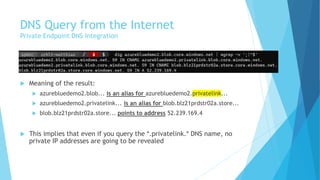
 Meaning of the result:
 azurebluedemo2.blob... is an alias for azurebluedemo2.privatelink...
 azurebluedemo2.privatelink... is an alias for blob.blz21prdstr02a.store...
 blob.blz21prdstr02a.store... points to address 52.239.169.4
 This implies that even if you query the *.privatelink.* DNS name, no
private IP addresses are going to be revealed
DNS Query from the Internet
Private Endpoint DNS Integration
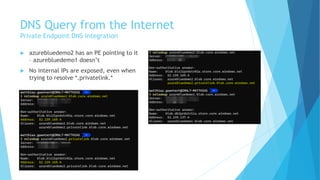
 azurebluedemo2 has an PE pointing to it
– azurebluedemo1 doesn’t
 No internal IPs are exposed, even when
trying to resolve *.privatelink.*
DNS Query from Virtual Network
Private Endpoint DNS Integration
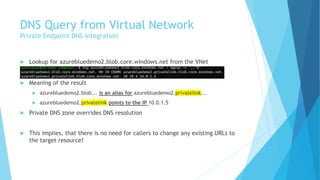
 Lookup for azurebluedemo2.blob.core.windows.net from the VNet
 Meaning of the result
 azurebluedemo2.blob... is an alias for azurebluedemo2.privatelink...
 azurebluedemo2.privatelink points to the IP 10.0.1.5
 Private DNS zone overrides DNS resolution
 This implies, that there is no need for callers to change any existing URLs to
the target resource!
Private Endpoint DNS Integration
Hub & Spoke
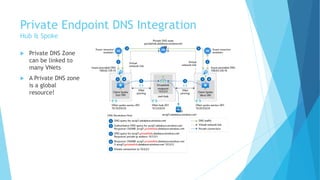
 Private DNS Zone
can be linked to
many VNets
 A Private DNS zone
is a global
resource!
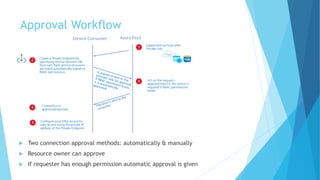
Approval Workflow
 Two connection approval methods: automatically & manually
 Resource owner can approve
 If requester has enough permission automatic approval is given
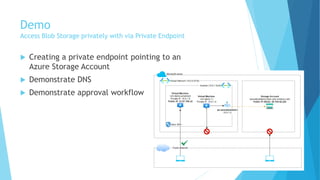
Demo
Access Blob Storage privately with via Private Endpoint
 Creating a private endpoint pointing to an
Azure Storage Account
 Demonstrate DNS
 Demonstrate approval workflow
Key Benefits
Private Endpoints
 Eliminates exposure to the Internet
 Can be consumed by services outside the VNet
 Like on-premises
 Can be used to connect to resources across regions
 Supports approval workflow & a lot more Azure resources than service
endpoints
Limitations
Private Endpoints
 Private Endpoints can’t be associated with NSGs
 User-defined routes don’t apply to private endpoints
 Private Endpoint must be in the same region as your virtual network
 Alternatively create PE in a Hub VNet and use (global) peering
Comparison
Side-by-Side comparison & which to pick?
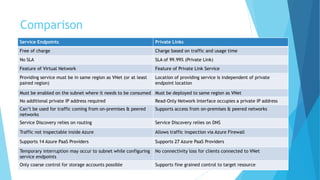
Comparison
Service Endpoints Private Links
Free of charge Charge based on traffic and usage time
No SLA SLA of 99.99% (Private Link)
Feature of Virtual Network Feature of Private Link Service
Providing service must be in same region as VNet (or at least
paired region)
Location of providing service is independent of private
endpoint location
Must be enabled on the subnet where it needs to be consumed Must be deployed to same region as VNet
No additional private IP address required Read-Only Network Interface occupies a private IP address
Can’t be used for traffic coming from on-premises & peered
networks
Supports access from on-premises & peered networks
Service Discovery relies on routing Service Discovery relies on DNS
Traffic not inspectable inside Azure Allows traffic inspection via Azure Firewall
Supports 14 Azure PaaS Providers Supports 27 Azure PaaS Providers
Temporary interruption may occur to subnet while configuring
service endpoints
No connectivity loss for clients connected to VNet
Only coarse control for storage accounts possible Supports fine grained control to target resource
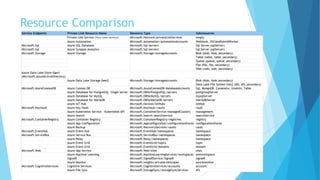
Resource Comparison
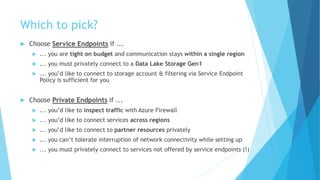
Which to pick?
 Choose Service Endpoints if ...
 ... you are tight on budget and communication stays within a single region
 ... you must privately connect to a Data Lake Storage Gen1
 ... you’d like to connect to storage account & filtering via Service Endpoint
Policy is sufficient for you
 Choose Private Endpoints if ...
 ... you’d like to inspect traffic with Azure Firewall
 ... you’d like to connect services across regions
 ... you’d like to connect to partner resources privately
 ... you can’t tolerate interruption of network connectivity while setting up
 ... you must privately connect to services not offered by service endpoints (!)
Thanks for your
attention!
-
Stay save & healthy

Azure Service Endpoints vs. Private Links

  • 1.
    Service Endpoints vs. PrivateEndpoints Securing Azure services & reducing the risk of data exfiltration February 2021, Matthias Güntert
  • 2.
    Introduction What you canexpect  You’ll learn what service endpoints (SE) are  You’ll learn what private endpoints (PE) are  You’ll learn the differences between both  You’ll learn when to use one or the other What I assume  Basic understanding of Virtual Networks, DNS and routing
  • 3.
    Matthias Güntert Günni, who? I am a father of two kids, digital photographer, supermoto rider & Husaberg fan  I am an Azure Solution Architect, tech enthusiast, .NET developer and blogger (www.azureblue.io)  I work for Solveva, a company focusing on software solutions in the insurance sector  I support insurance companies in their move to the public cloud
  • 4.
    Service Endpoints Direct andsecure connectivity to Azure services
  • 5.
    Content Service Endpoints  Overviewof Service Endpoints are  Routing without Service Endpoints  Azure System Default Routes  Azure Route Selection  How Service Endpoints work  What Service Endpoint Policies are  Demo  Key Benefits & Limitations
  • 6.
    Overview Service Endpoints  Aservice endpoint (SE) is a feature of Azure virtual network  Eliminates exposure to the Internet  Protects from data exfiltration  Allows tight lock down of Azure resources on the network layer  Provides direct connectivity to Azure services over an optimized route  Traffic destined to Azure resources will always remain on Azure’s infrastructure backbone
  • 7.
    Azure System DefaultRoutes Service Endpoints  Azure creates a system default routing table for each subnet in a virtual network  Outbound traffic from a subnet is routed based on this route table Address prefixes Next hop type Description Unique to VNet (e.g., 10.0.0.0/16) Virtual network • Traffic between subnets is automatically routed. • No need to define gateways for Azure to route traffic between subnets 0.0.0.0/0 Internet • By default, Azure routes traffic for any address not specified to the Internet 10.0.0.0/8 192.168.0.0/16 100.64.0.0/10 None • Traffic is dropped, rather than routed outside the subnet.
  • 8.
    Azure Route Selection Routing decisions are based on the destination IP address using “longest prefix matching algorithm”  For example  Destination IP: 10.0.0.5 → B (/24 is the longer matching prefix than /16)  Destination IP: 10.0.1.5 → A (not part of 10.0.0.0/24)  If multiple routes contain same address prefix, selection is based on following priority  User-defined route  BGP route  System route Address prefix Next Hop Type 10.0.0.0/16 A 10.0.0.0/24 B Source Address prefix Next Hop Type Default 0.0.0.0/0 Internet User-Defined 0.0.0.0/0 Virtual Network Gateway → I.e., destination IP 20.123.33.12 will select the user-defined route, as priority is higher
  • 9.
    Routing without ServiceEndpoints Service Endpoints 1. Routing table lookup for destination 20.150.42.228 2. Single matching address prefix is 0.0.0.0/0 and therefor next hop type is “Internet”  Traffic from VM to Storage Account travels through internet  Storage Account is exposed to the public internet  Storage Account could be protected with manual FW rules, however white-labeled packets would still travel through internet which might not be desirable
  • 10.
    How do ServiceEndpoints work?  SE relies on routing and makes use of a new hop type called “VirtualNetworkServiceEndpoint”  Next to the one we have seen, which were “Virtual network”, “Internet”, “None”, ...  This hop type acts as an ingress/entry point to the Azure backbone  When enabling SEs for a specific resource type, all there public IP address prefixes, will be added to the default routing table with a next hop type of “VirtualNetworkServiceEndpoint”
  • 11.
    Service Endpoint Policy Allows to filter egress VNet traffic to storage accounts  Provides granular access control for VNet traffic to storage accounts  Filter granularity based on configurable scope:  All accounts in subscription  All accounts in resource group  Single account  No support for other resources than storage accounts!!
  • 12.
    Demo Lock down VM& Storage Account with service endpoints 1. Create a “Service Endpoint Policy” 2. Enable Service Endpoint for Subnet 3. Deny inbound from Internet to Storage Account 4. Deny outbound from VM to Internet
  • 13.
    Key Benefits -1 Service Endpoints  Traffic remains on Azure backbone  Enhanced network performance (high bandwidth, low latency)  Enhanced security  Optimal routing  Even with user-defined routes pointing to on-premises, traffic will still take service endpoint as next hop  Service endpoint routes override any BGP or UDR routes for address prefix match!  Allows tight lock down of Azure resources on the network layer  Not possible without service endpoints  Storage Account access can be further restricted with “SE Policies”  No additional charge for using Service Endpoints
  • 14.
    Key Benefits –2 Service Endpoints  You can secure Azure services to multiple subnets within a VNets or even across multiple vnets  VNet & Azure Service resource can belong to different subscriptions and tenants  However, VNet & Service Resource can’t be in different regions  With the exception of paired regions i.e., West- & North Europe
  • 15.
    Limitations Service Endpoints  Featureonly available to virtual networks deployed through Azure Resource Manager (no classic deployment)  Can't be used for traffic coming from on-premises & peered network  Not every Azure resource type is supported, although many core resources are  Azure Storage  SQL Database, PostgreSQL, MySQL, MariaDB, Cosmos DB,  Key Vault, Service Bus, Event Hubs, App Service, Cognitive Services, Container Registry (public preview)  Data Lake Store Gen 1, Synapse Analytics  SE Policies can only be used for storage accounts!  And you can’t distinguish between blob, queue, file or table  SE Policies can’t be “shared” across subscriptions  ... like other resources
  • 16.
    Private Endpoints Creating privatePaaS solutions with “Private Links”
  • 17.
    Content Private Endpoints  Overviewof Private Endpoints and Private Link Service  Private Endpoint DNS Integration  DNS Query from the Internet  DNS Query from the VNet  Approval Workflow  Demo  Key Benefits & Limitations
  • 18.
    Overview Private Endpoints  EliminatesInternet Exposure & protects from data exfiltration  Part of the Private Link Service Offering which consists of three components  Private Endpoint, Private Endpoint DNS Integration, Private Link Service  Enables access to Azure PaaS services, Partner services and customer owned services over a private endpoint in your virtual network  “Private Link Service” can be Azure Storage Account, SQL Server, ... or your own application
  • 19.
    Overview Private Endpoints  PEis a special type of NIC that plugs into VNet  PE uses private IP from subnet  Traffic remains on Azure backbone
  • 20.
    Private Endpoint DNSIntegration  Azure creates CNAME record on the public DNS  Private DNS Zone is created and linked to VNet, overriding public DNS  Clients from Internet and VNet can both use same (public) FQDN  ... which resolves to different IP addresses  No need for callers to change any existing URLs to target resource
  • 21.
    DNS Query fromthe Internet Private Endpoint DNS Integration  Meaning of the result:  azurebluedemo2.blob... is an alias for azurebluedemo2.privatelink...  azurebluedemo2.privatelink... is an alias for blob.blz21prdstr02a.store...  blob.blz21prdstr02a.store... points to address 52.239.169.4  This implies that even if you query the *.privatelink.* DNS name, no private IP addresses are going to be revealed
  • 22.
    DNS Query fromthe Internet Private Endpoint DNS Integration  azurebluedemo2 has an PE pointing to it – azurebluedemo1 doesn’t  No internal IPs are exposed, even when trying to resolve *.privatelink.*
  • 23.
    DNS Query fromVirtual Network Private Endpoint DNS Integration  Lookup for azurebluedemo2.blob.core.windows.net from the VNet  Meaning of the result  azurebluedemo2.blob... is an alias for azurebluedemo2.privatelink...  azurebluedemo2.privatelink points to the IP 10.0.1.5  Private DNS zone overrides DNS resolution  This implies, that there is no need for callers to change any existing URLs to the target resource!
  • 24.
    Private Endpoint DNSIntegration Hub & Spoke  Private DNS Zone can be linked to many VNets  A Private DNS zone is a global resource!
  • 25.
    Approval Workflow  Twoconnection approval methods: automatically & manually  Resource owner can approve  If requester has enough permission automatic approval is given
  • 26.
    Demo Access Blob Storageprivately with via Private Endpoint  Creating a private endpoint pointing to an Azure Storage Account  Demonstrate DNS  Demonstrate approval workflow
  • 27.
    Key Benefits Private Endpoints Eliminates exposure to the Internet  Can be consumed by services outside the VNet  Like on-premises  Can be used to connect to resources across regions  Supports approval workflow & a lot more Azure resources than service endpoints
  • 28.
    Limitations Private Endpoints  PrivateEndpoints can’t be associated with NSGs  User-defined routes don’t apply to private endpoints  Private Endpoint must be in the same region as your virtual network  Alternatively create PE in a Hub VNet and use (global) peering
  • 29.
  • 30.
    Comparison Service Endpoints PrivateLinks Free of charge Charge based on traffic and usage time No SLA SLA of 99.99% (Private Link) Feature of Virtual Network Feature of Private Link Service Providing service must be in same region as VNet (or at least paired region) Location of providing service is independent of private endpoint location Must be enabled on the subnet where it needs to be consumed Must be deployed to same region as VNet No additional private IP address required Read-Only Network Interface occupies a private IP address Can’t be used for traffic coming from on-premises & peered networks Supports access from on-premises & peered networks Service Discovery relies on routing Service Discovery relies on DNS Traffic not inspectable inside Azure Allows traffic inspection via Azure Firewall Supports 14 Azure PaaS Providers Supports 27 Azure PaaS Providers Temporary interruption may occur to subnet while configuring service endpoints No connectivity loss for clients connected to VNet Only coarse control for storage accounts possible Supports fine grained control to target resource
  • 31.
  • 32.
    Which to pick? Choose Service Endpoints if ...  ... you are tight on budget and communication stays within a single region  ... you must privately connect to a Data Lake Storage Gen1  ... you’d like to connect to storage account & filtering via Service Endpoint Policy is sufficient for you  Choose Private Endpoints if ...  ... you’d like to inspect traffic with Azure Firewall  ... you’d like to connect services across regions  ... you’d like to connect to partner resources privately  ... you can’t tolerate interruption of network connectivity while setting up  ... you must privately connect to services not offered by service endpoints (!)
  • 33.