Azure Automation and Update
Management
Udaiappa Ramachandran ( Udai )
https://udai.io
About me
• Udaiappa Ramachandran ( Udai )
• CTO-Akumina, Inc.
• Cloud Expert
• Microsoft Azure, Amazon Web Services, and Google
• New Hampshire Cloud User Group (http://www.meetup.com/nashuaug )
• https://udai.io
Agenda
• Automation
• Authentication
• Certificate Creation
• PowerShell Workflow
• PowerShell DSC
• Update Management
• Source control integration
• Windows Admin Center
• Demo…Demo…Demo…
Introduction
• What is Azure Automation?
• Automation Features
• Process automation
• Configuration management
• Change Tracking and Inventory
• Azure Automation State Configuration
• Update management
• Shared capabilities
• Shared resources
• Role-based access control
• Source control integration
• Heterogeneous features.
• Windows and Linux
• Azure and Non-Azure
Common Scenarios
• Schedule tasks
• Write runbooks
• Build and deploy resources
• Configure VMs
• Share knowledge
• Retrieve inventory
• Find changes
• Periodic maintenance
• Respond to alerts
• Hybrid automation
• Azure resource lifecycle management
• Dev/test automation scenarios
• Governance related automation
• Azure Site Recovery
• Windows Virtual Desktop
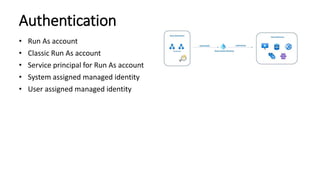
Authentication
• Run As account
• Classic Run As account
• Service principal for Run As account
• System assigned managed identity
• User assigned managed identity
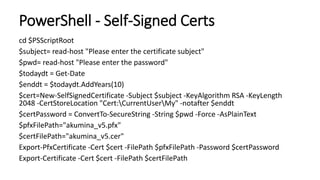
PowerShell - Self-Signed Certs
cd $PSScriptRoot
$subject= read-host "Please enter the certificate subject"
$pwd= read-host "Please enter the password"
$todaydt = Get-Date
$enddt = $todaydt.AddYears(10)
$cert=New-SelfSignedCertificate -Subject $subject -KeyAlgorithm RSA -KeyLength
2048 -CertStoreLocation "Cert:CurrentUserMy" -notafter $enddt
$certPassword = ConvertTo-SecureString -String $pwd -Force -AsPlainText
$pfxFilePath="akumina_v5.pfx"
$certFilePath="akumina_v5.cer"
Export-PfxCertificate -Cert $cert -FilePath $pfxFilePath -Password $certPassword
Export-Certificate -Cert $cert -FilePath $certFilePath
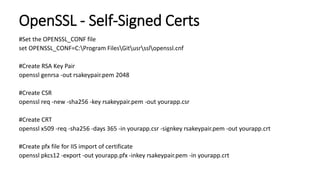
OpenSSL - Self-Signed Certs
#Set the OPENSSL_CONF file
set OPENSSL_CONF=C:Program FilesGitusrsslopenssl.cnf
#Create RSA Key Pair
openssl genrsa -out rsakeypair.pem 2048
#Create CSR
openssl req -new -sha256 -key rsakeypair.pem -out yourapp.csr
#Create CRT
openssl x509 -req -sha256 -days 365 -in yourapp.csr -signkey rsakeypair.pem -out yourapp.crt
#Create pfx file for IIS import of certificate
openssl pkcs12 -export -out yourapp.pfx -inkey rsakeypair.pem -in yourapp.crt
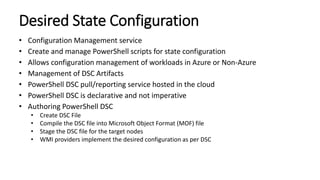
Desired State Configuration
• Configuration Management service
• Create and manage PowerShell scripts for state configuration
• Allows configuration management of workloads in Azure or Non-Azure
• Management of DSC Artifacts
• PowerShell DSC pull/reporting service hosted in the cloud
• PowerShell DSC is declarative and not imperative
• Authoring PowerShell DSC
• Create DSC File
• Compile the DSC file into Microsoft Object Format (MOF) file
• Stage the DSC file for the target nodes
• WMI providers implement the desired configuration as per DSC
UpdateManagement
• Updates received thru Log Analytics workspace
• Schedule updates for Windows/Linux VMs
Windows Admin Center
• Manage Virtual machines from Azure Portal
Source control integration
• Single direction synchronization from your repository to cloud
• Easy to promote development environment to production automation account
• Integration enabled through Managed Identity (System or User) and RunAs account
• User Managed Identity using Automation Variable
(AUTOMATION_SC_USER_ASSIGNED_IDENTITY_ID =<CLIENTID>)
• RunAs Account using Automation variable (AUTOMATION_SC_USE_RUNAS =true)
• Enable Source control integration using Azure Portal or PowerShell
Demo…
• Azure Automation Creation and Overview
• Authentication Types
• Running Runbooks
• Scheduling
• Running PowerShell DSC
• Inventory and Change Tracking
• Update Management
• Version Control
Reference
• Azure Automation: https://docs.microsoft.com/en-us/azure/automation/
• Azure Update Management: https://docs.microsoft.com/en-
us/azure/automation/update-management/overview
• WSUS: https://docs.microsoft.com/en-us/azure/architecture/example-
scenario/wsus/
• WSUS Package Publisher:
https://github.com/DCourtel/Wsus_Package_Publisher
• Preview: Patch Management: https://docs.microsoft.com/en-us/azure/virtual-
machines/automatic-vm-guest-patching

Azure Automation and Update Management

  • 1.
    Azure Automation andUpdate Management Udaiappa Ramachandran ( Udai ) https://udai.io
  • 2.
    About me • UdaiappaRamachandran ( Udai ) • CTO-Akumina, Inc. • Cloud Expert • Microsoft Azure, Amazon Web Services, and Google • New Hampshire Cloud User Group (http://www.meetup.com/nashuaug ) • https://udai.io
  • 3.
    Agenda • Automation • Authentication •Certificate Creation • PowerShell Workflow • PowerShell DSC • Update Management • Source control integration • Windows Admin Center • Demo…Demo…Demo…
  • 4.
    Introduction • What isAzure Automation? • Automation Features • Process automation • Configuration management • Change Tracking and Inventory • Azure Automation State Configuration • Update management • Shared capabilities • Shared resources • Role-based access control • Source control integration • Heterogeneous features. • Windows and Linux • Azure and Non-Azure
  • 5.
    Common Scenarios • Scheduletasks • Write runbooks • Build and deploy resources • Configure VMs • Share knowledge • Retrieve inventory • Find changes • Periodic maintenance • Respond to alerts • Hybrid automation • Azure resource lifecycle management • Dev/test automation scenarios • Governance related automation • Azure Site Recovery • Windows Virtual Desktop
  • 6.
    Authentication • Run Asaccount • Classic Run As account • Service principal for Run As account • System assigned managed identity • User assigned managed identity
  • 7.
    PowerShell - Self-SignedCerts cd $PSScriptRoot $subject= read-host "Please enter the certificate subject" $pwd= read-host "Please enter the password" $todaydt = Get-Date $enddt = $todaydt.AddYears(10) $cert=New-SelfSignedCertificate -Subject $subject -KeyAlgorithm RSA -KeyLength 2048 -CertStoreLocation "Cert:CurrentUserMy" -notafter $enddt $certPassword = ConvertTo-SecureString -String $pwd -Force -AsPlainText $pfxFilePath="akumina_v5.pfx" $certFilePath="akumina_v5.cer" Export-PfxCertificate -Cert $cert -FilePath $pfxFilePath -Password $certPassword Export-Certificate -Cert $cert -FilePath $certFilePath
  • 8.
    OpenSSL - Self-SignedCerts #Set the OPENSSL_CONF file set OPENSSL_CONF=C:Program FilesGitusrsslopenssl.cnf #Create RSA Key Pair openssl genrsa -out rsakeypair.pem 2048 #Create CSR openssl req -new -sha256 -key rsakeypair.pem -out yourapp.csr #Create CRT openssl x509 -req -sha256 -days 365 -in yourapp.csr -signkey rsakeypair.pem -out yourapp.crt #Create pfx file for IIS import of certificate openssl pkcs12 -export -out yourapp.pfx -inkey rsakeypair.pem -in yourapp.crt
  • 9.
    Desired State Configuration •Configuration Management service • Create and manage PowerShell scripts for state configuration • Allows configuration management of workloads in Azure or Non-Azure • Management of DSC Artifacts • PowerShell DSC pull/reporting service hosted in the cloud • PowerShell DSC is declarative and not imperative • Authoring PowerShell DSC • Create DSC File • Compile the DSC file into Microsoft Object Format (MOF) file • Stage the DSC file for the target nodes • WMI providers implement the desired configuration as per DSC
  • 10.
    UpdateManagement • Updates receivedthru Log Analytics workspace • Schedule updates for Windows/Linux VMs
  • 11.
    Windows Admin Center •Manage Virtual machines from Azure Portal
  • 12.
    Source control integration •Single direction synchronization from your repository to cloud • Easy to promote development environment to production automation account • Integration enabled through Managed Identity (System or User) and RunAs account • User Managed Identity using Automation Variable (AUTOMATION_SC_USER_ASSIGNED_IDENTITY_ID =<CLIENTID>) • RunAs Account using Automation variable (AUTOMATION_SC_USE_RUNAS =true) • Enable Source control integration using Azure Portal or PowerShell
  • 13.
    Demo… • Azure AutomationCreation and Overview • Authentication Types • Running Runbooks • Scheduling • Running PowerShell DSC • Inventory and Change Tracking • Update Management • Version Control
  • 14.
    Reference • Azure Automation:https://docs.microsoft.com/en-us/azure/automation/ • Azure Update Management: https://docs.microsoft.com/en- us/azure/automation/update-management/overview • WSUS: https://docs.microsoft.com/en-us/azure/architecture/example- scenario/wsus/ • WSUS Package Publisher: https://github.com/DCourtel/Wsus_Package_Publisher • Preview: Patch Management: https://docs.microsoft.com/en-us/azure/virtual- machines/automatic-vm-guest-patching

Editor's Notes

  • #5 What is Azure Automation? Azure automation delivers a cloud-based automation and configuration service that provides consistent management across your Azure and non-Azure environments Common Scenarios Process Automation – Orchestrate processes using graphical, powershell and Python runbooks Configuration Management – Collect inventory, Track changes, Configure desired state Update Management-Assess compliance, Schedule update installation Shared Capabilities- Role based access control, Secure, global store for variables, credentials, certificates, connections, flexible scheduling, shared modules, source control support , auditing, tags
  • #6 Schedule tasks - stop VMs or services at night and turn on during the day, weekly or monthly recurring maintenance workflows. Write runbooks - Author PowerShell, PowerShell Workflow, graphical, Python 2 and 3, and DSC runbooks in common languages. Build and deploy resources - Deploy virtual machines across a hybrid environment using runbooks and Azure Resource Manager templates. Integrate into development tools, such as Jenkins and Azure DevOps. Configure VMs - Assess and configure Windows and Linux machines with configurations for the infrastructure and application. Share knowledge - Transfer knowledge into the system on how your organization delivers and maintains workloads. Retrieve inventory - Get a complete inventory of deployed resources for targeting, reporting, and compliance. Find changes - Identify and isolate machine changes that can cause misconfiguration and improve operational compliance. Remediate or escalate them to management systems. Periodic maintenance - to execute tasks that need to be performed at set timed intervals like purging stale or old data, or reindex a SQL database. Respond to alerts - Orchestrate a response when cost-based, system-based, service-based, and/or resource utilization alerts are generated. Hybrid automation - Manage or automate on-premises servers and services like SQL Server, Active Directory, SharePoint Server, etc. Azure resource lifecycle management - for IaaS and PaaS services. Dev/test automation scenarios - Start and start resources, scale resources, etc. Governance related automation - Automatically apply or update tags, locks, etc. Azure Site Recovery - orchestrate pre/post scripts defined in a Site Recovery DR workflow. Windows Virtual Desktop - orchestrate scaling of VMs or start/stop VMs based on utilization.
  • #8 #TO READ CONTENT OF PFX FILE $outFile="akumina_v5.txt" $clearBytes = get-content $pfxFilePath -Encoding Byte [System.Convert]::ToBase64String($clearBytes)| Out-File $outFile http://kaushikghosh12.blogspot.com/2016/08/self-signed-certificates-with-microsoft.html
  • #9 RSA=Rivest-Shamir-Adleman CSR=Certificate Signing Request file PEM=Privacy-Enhanced Mail (de facto file format for storing and sending ryptographic keys, certificates and other data) PFX=Personal Information Exchange http://kaushikghosh12.blogspot.com/2016/08/self-signed-certificates-with-microsoft.html Difference between makecert and openssl is that makecert does not create CSP of 24 (The value remains 1) where as openssl does when used pvk2pfx with switch –sy 24
  • #10 Can be used as a report-only endpoint WMI=Windows Management Instrumentation Push Mode=Configurations are applied via the Start-DSCConfiguration PowerShell command PullMode=Configurations are stored centrally, and the nodes are configured to pole and pull the configurations from the central location
  • #15 WSUS-Windows Server Update Service