@salerno_rafael
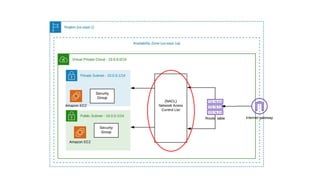
Components
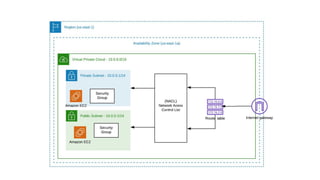
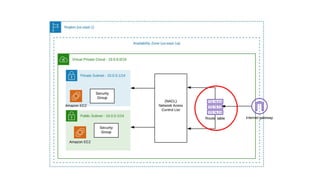
● Region ( us-east-1/sa-east-1)
● Availability Zone (us-east-1a,us-east-1b,us-east-1c)
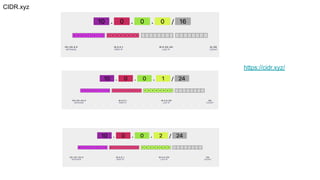
● VPC (10.0.0.0/16)
● NACL (Network Access Control List)
● Route Table
● Internet Gateway
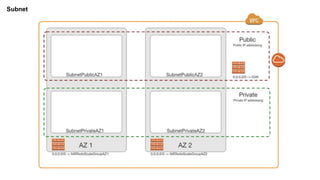
● Subnet (10.0.0.1/24) (10.0.0.2/24)
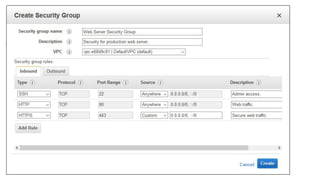
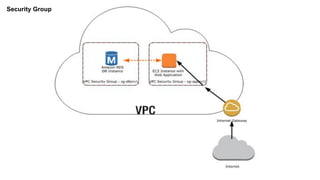
● Security Group
What is a VPC?
● Virtual Private Cloud.
● Think of VPC as a Virtual Data Center in Cloud
● First network segment to be create at aws
● If not created, the default VPC will be used.
● In VPC it is possible to create public and private subnets
● Every EC2 that was released on the default VPC has public and private IP
● A subnet is a range of IP addresses in your VPC.
CIDR.xyz
https://cidr.xyz/
● 20.0.0.0: Network address.
● 20.0.0.1: Reserved by AWS for the VPC router.
● 20.0.0.2: Reserved by AWS. The IP address of the DNS server is always the base of the
VPC network range plus two.
● 20.0.0.3: Reserved by AWS for future use.
● 20.0.0.255: Network broadcast address. We do not support broadcast in a VPC, therefore we
reserve this address.
IP address reserved
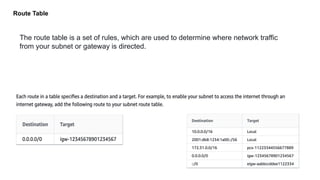
Route Table
The route table is a set of rules, which are used to determine where network traffic
from your subnet or gateway is directed.
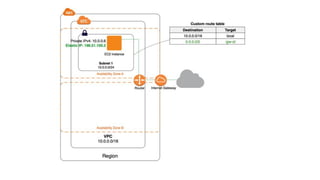
Internet Gateway
● Provide a destination in the VPC route tables for routable Internet traffic.
● Network address translation (NAT) for instances that have been assigned
public IPv4 addresses
NAT Instance/Nat Gateway
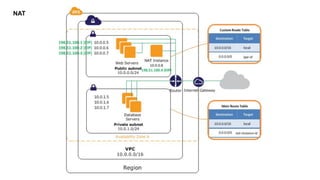
● The Network address translation (NAT) instance on a public subnet on your
VPC to allow instances on the private subnet to initiate outbound IPv4 traffic
to the Internet or other AWS services, but prevent instances from receiving
initiated inbound traffic by someone on the Internet.
● Ec2 vs Saas
NAT
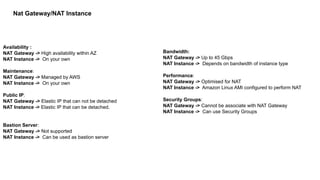
Availability :
NAT Gateway -> High availability within AZ
NAT Instance -> On your own
Maintenance:
NAT Gateway -> Managed by AWS
NAT Instance -> On your own
Public IP:
NAT Gateway -> Elastic IP that can not be detached
NAT Instance -> Elastic IP that can be detached.
Bastion Server:
NAT Gateway -> Not supported
NAT Instance -> Can be used as bastion server
Bandwidth:
NAT Gateway -> Up to 45 Gbps
NAT Instance -> Depends on bandwidth of instance type
Performance:
NAT Gateway -> Optimised for NAT
NAT Instance -> Amazon Linux AMI configured to perform NAT
Security Groups:
NAT Gateway -> Cannot be associate with NAT Gateway
NAT Instance -> Can use Security Groups
Nat Gateway/NAT Instance
NACL - Network Access Control List
● Network Access Control List (NACL) is an optional layer of security for your
VPC that acts as a firewall to control incoming and outgoing traffic from
one or more subnets.
● You can configure NACLs with rules similar to your security groups to add an
additional layer of security to your VPC.
● Only network segment that can Deny a Rule
NACL Rules
● Rule number. The rules are evaluated using the lowest numbered rule.
● Type: SSH, HTTP
● Protocol. ICMP, TCP, UDP
● Port range. The listening port or port range for the traffic. For example, 80 for HTTP traffic.
● Source. [Inbound rules only] The source of the traffic (CIDR range).
● Destination. [Outbound rules only] The destination for the traffic (CIDR range).
● Allow/Deny. Whether to allow or deny the specified traffic.
Subnet
Security Group
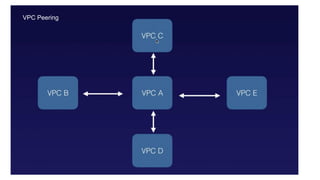
VPC Peering
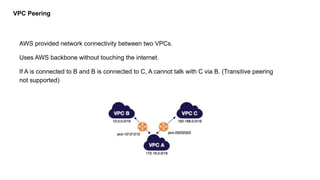
AWS provided network connectivity between two VPCs.
Uses AWS backbone without touching the internet.
If A is connected to B and B is connected to C, A cannot talk with C via B. (Transitive peering
not supported)
VPC Peering
Aws Network Introduction

Aws Network Introduction

  • 1.
  • 5.
    Components ● Region (us-east-1/sa-east-1) ● Availability Zone (us-east-1a,us-east-1b,us-east-1c) ● VPC (10.0.0.0/16) ● NACL (Network Access Control List) ● Route Table ● Internet Gateway ● Subnet (10.0.0.1/24) (10.0.0.2/24) ● Security Group
  • 6.
    What is aVPC? ● Virtual Private Cloud. ● Think of VPC as a Virtual Data Center in Cloud ● First network segment to be create at aws ● If not created, the default VPC will be used. ● In VPC it is possible to create public and private subnets ● Every EC2 that was released on the default VPC has public and private IP ● A subnet is a range of IP addresses in your VPC.
  • 7.
  • 8.
    ● 20.0.0.0: Networkaddress. ● 20.0.0.1: Reserved by AWS for the VPC router. ● 20.0.0.2: Reserved by AWS. The IP address of the DNS server is always the base of the VPC network range plus two. ● 20.0.0.3: Reserved by AWS for future use. ● 20.0.0.255: Network broadcast address. We do not support broadcast in a VPC, therefore we reserve this address. IP address reserved
  • 10.
    Route Table The routetable is a set of rules, which are used to determine where network traffic from your subnet or gateway is directed.
  • 11.
    Internet Gateway ● Providea destination in the VPC route tables for routable Internet traffic. ● Network address translation (NAT) for instances that have been assigned public IPv4 addresses
  • 13.
    NAT Instance/Nat Gateway ●The Network address translation (NAT) instance on a public subnet on your VPC to allow instances on the private subnet to initiate outbound IPv4 traffic to the Internet or other AWS services, but prevent instances from receiving initiated inbound traffic by someone on the Internet. ● Ec2 vs Saas
  • 14.
  • 15.
    Availability : NAT Gateway-> High availability within AZ NAT Instance -> On your own Maintenance: NAT Gateway -> Managed by AWS NAT Instance -> On your own Public IP: NAT Gateway -> Elastic IP that can not be detached NAT Instance -> Elastic IP that can be detached. Bastion Server: NAT Gateway -> Not supported NAT Instance -> Can be used as bastion server Bandwidth: NAT Gateway -> Up to 45 Gbps NAT Instance -> Depends on bandwidth of instance type Performance: NAT Gateway -> Optimised for NAT NAT Instance -> Amazon Linux AMI configured to perform NAT Security Groups: NAT Gateway -> Cannot be associate with NAT Gateway NAT Instance -> Can use Security Groups Nat Gateway/NAT Instance
  • 16.
    NACL - NetworkAccess Control List ● Network Access Control List (NACL) is an optional layer of security for your VPC that acts as a firewall to control incoming and outgoing traffic from one or more subnets. ● You can configure NACLs with rules similar to your security groups to add an additional layer of security to your VPC. ● Only network segment that can Deny a Rule
  • 18.
    NACL Rules ● Rulenumber. The rules are evaluated using the lowest numbered rule. ● Type: SSH, HTTP ● Protocol. ICMP, TCP, UDP ● Port range. The listening port or port range for the traffic. For example, 80 for HTTP traffic. ● Source. [Inbound rules only] The source of the traffic (CIDR range). ● Destination. [Outbound rules only] The destination for the traffic (CIDR range). ● Allow/Deny. Whether to allow or deny the specified traffic.
  • 19.
  • 21.
  • 22.
    VPC Peering AWS providednetwork connectivity between two VPCs. Uses AWS backbone without touching the internet. If A is connected to B and B is connected to C, A cannot talk with C via B. (Transitive peering not supported)
  • 23.