Fuzzing and You: Automating Whitebox Testing

Mike Anderson
Intro

• Senior Security Consultant
  ‒ 4 years of pentesting
  ‒ Presentations at DefCON, BASC, OWASP
  ‒ Goon at ThotCON and DefCON
What is fuzzing?

• Automated testing procedure
  ‒ Protocol Fuzzing vs Application Fuzzing
  ‒ Heavily customized per application
  ‒ Multiple approaches
    •   Whitebox vs Blackbox
    •   Totally random < Mutation
    •   Educated guesses
Fuzzability

• Fuzzing can:
  ‒ Enumerate many issues in a large,
    complicated application
  ‒ Find issues purely manual testing or
    automated scanners might not find
  ‒ Help demonstrate how issues found by static
    analysis can be leveraged
  ‒ Be very thorough
  ‒ Cause availability problems
Infuzzability

• Fuzzing won’t:
  ‒ Find vulnerabilities
     •   Requires analysis
  ‒ Light your server on fire
  ‒ Fix issues
Know your goals

• Static analysis
  ‒ Great for finding code issues
  ‒ Bad at risk
  ‒ Bad at configuration
  ‒ Bad at business logic
• Fuzzing
  ‒ Accounts for configs
  ‒ Can be tailored for business logic
  ‒ Requires time
  ‒ Does not locate remediation point
How does I fuzzed?

• Fuzzing can be super easy
  ‒ Automated tools like taof
• More hands on approaches will deliver
  better results
  ‒ Favorite tools:
     •   BURP Suite (web applications)
     •   Sulley (for pretty much whatever)
Handcrafting with love

• Design tests
  ‒ What application are you testing?
     •   This determines what tools you may need to
         use
  ‒ What are you looking for?
     •   Buffer overflows, Authorization Bypass,
         General error handling?, SQL injection (sqlmap
         does this)
     •   This determines payloads
  ‒ Iterative process
Analysis and Remediation

• Issues aren’t always clear cut
  ‒ Location in code can be confused
  ‒ Work with developers
  ‒ Less errors != less issues
• Use metrics to refine tests
  ‒ Use code mapping
     •   Percentage coverage
     •   Tools will vary by technology
  ‒ Bugs detected
  ‒ Length of fuzzing
  ‒ Crashes caused
Use Cases

• Authorization bypass
  ‒ Directory traversal (../)
  ‒ Delimiters (depends on protocol)
  ‒ ID names or numbers
• Buffer overflow
  ‒ Length of parameters
• Injection
  ‒ Sql injection
  ‒ LDAP injection
• Many tools will have libraries that can check
  for these
BURP Suite

• Fuzzes HTTP
• More manual than something like
  WebInspect
• Lacks insight into server state
  ‒ Crashes and network disruptions will hurt
    data
• Potential attackers will likely use a tool like
  this
• Lacks some versatility
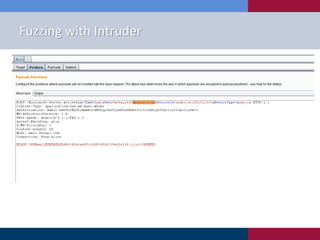
Fuzzing with Intruder
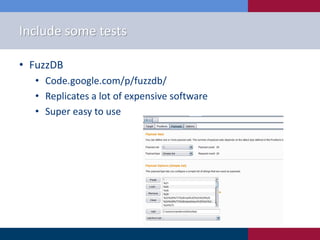
Include some tests

• FuzzDB
  • Code.google.com/p/fuzzdb/
  • Replicates a lot of expensive software
  • Super easy to use
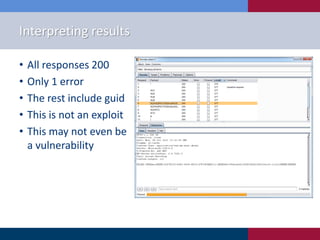
Interpreting results

•   All responses 200
•   Only 1 error
•   The rest include guid
•   This is not an exploit
•   This may not even be
    a vulnerability
Missing Pieces

• BURP is really difficult to use to fuzz things
  like wbxml
  ‒ Could write a plugin
• BURP is really bad at finding things like
  buffer overflows
  ‒ High manual cost
• We’ll need another tool…
Sulley

•   Flexibility
•   Grammar-based
•   Requires knowledge of the protocol in use
•   Requires access to set up some tools on the
    server
    ‒ Procmon, netmon, VM monitoring
• Availability problems? I feel bad for you son
Building a Sulley Grammar

• s_initialize
  ‒ Starts a section of your request
• s_static, s_delim
  ‒ Doesn’t get fuzzed
• s_string, s_binary
  ‒ This is a parameter you want to fuzz!
• This is where spending time with the
  application will be very useful
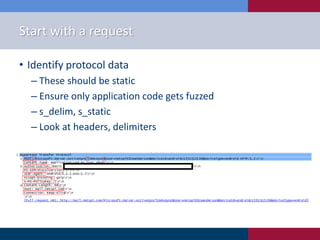
Start with a request

• Identify protocol data
  ‒ These should be static
  ‒ Ensure only application code gets fuzzed
  ‒ s_delim, s_static
  ‒ Look at headers, delimiters
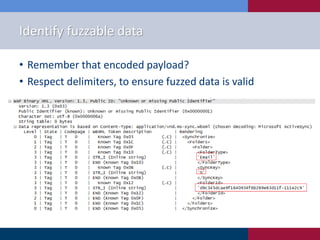
Identify fuzzable data

• Remember that encoded payload?
• Respect delimiters, to ensure fuzzed data is valid
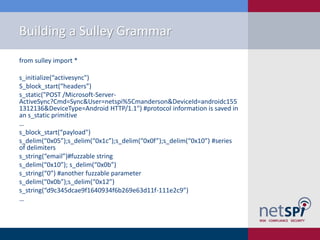
Building a Sulley Grammar
from sulley import *

s_initialize(“activesync")
S_block_start(“headers”)
s_static("POST /Microsoft-Server-
ActiveSync?Cmd=Sync&User=netspi%5Cmanderson&DeviceId=androidc155
1312136&DeviceType=Android HTTP/1.1") #protocol information is saved in
an s_static primitive
…
s_block_start(“payload")
s_delim(“0x05”);s_delim(“0x1c”);s_delim(“0x0f”);s_delim(“0x10”) #series
of delimiters
s_string(“email”)#fuzzable string
s_delim(“0x10”); s_delim(“0x0b”)
s_string(“0”) #another fuzzable parameter
s_delim(“0x0b”);s_delim(“0x12”)
s_string(“d9c345dcae9f1640934f6b269e63d11f-111e2c9”)
…
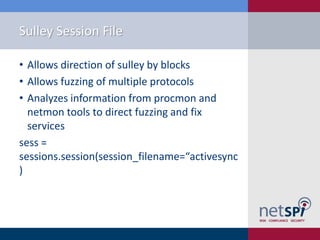
Sulley Session File

• Allows direction of sulley by blocks
• Allows fuzzing of multiple protocols
• Analyzes information from procmon and
  netmon tools to direct fuzzing and fix
  services
sess =
sessions.session(session_filename=“activesync
)
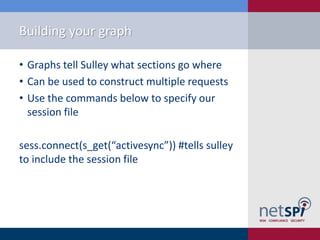
Building your graph

• Graphs tell Sulley what sections go where
• Can be used to construct multiple requests
• Use the commands below to specify our
  session file

sess.connect(s_get(“activesync”)) #tells sulley
to include the session file
Session targets

• Identify target protocol, and
  procmon/netmon ports
Activesync_target=sessions.target(“ip.ip.ip.ip”, port)
Activesync_target.netmon=pedrpc.client(“ip.ip.ip.ip”,port) #these
are chosen when you run the netmon binary on the target
Activesync_target.procmon=pedrpc.client(“ip.ip.ip.ip”,port)
Activesync_target.procmon_options =
{“proc_name”: “process_name”,
“stop_commands”: [‘cmd_to_stop_service’],
“start_commands”: [‘cmd_to_start_again’]}
• Run the procmon and netmon binaries
  before you begin fuzzing
   ‒ install sulley on the target
FINALLY

• Add target, and run fuzzer
Sess.add_target(activesync_target)
Sess.fuzz()

• Then, invoke your python file from command
  line
  ‒ Make sure you import the libraries you’ll need
$./myfuzzer.py
Analysis

• Sulley has built in tools to help with analysis
  ‒ Use pcap_cleaner.py to filter any normal
    responses
  ‒ Crashbin_explorer helps understand crashes
• Make sure to turn off netmon and procmon
  after fuzzing is complete
• Seriously, even if its non-prod
Conclusion

• Choose the right tool for your goal
    ‒ Not always fuzzing
•   Choose the right parameters to fuzz
•   Design the tests
•   Run the tests, analyze results
•   Refine tests, or exploit
Questions or comments?

Michael Anderson
Senior Security Consultant
NetSPI Inc.
612-859-6825
Michael.anderson@netspi.com
Thank You
NetSPI
800 Washington Avenue North
Minneapolis, MN 55401
612-465-8880

Fuzzing and You: Automating Whitebox Testing

  • 1.
    Fuzzing and You:Automating Whitebox Testing Mike Anderson
  • 2.
    Intro • Senior SecurityConsultant ‒ 4 years of pentesting ‒ Presentations at DefCON, BASC, OWASP ‒ Goon at ThotCON and DefCON
  • 3.
    What is fuzzing? •Automated testing procedure ‒ Protocol Fuzzing vs Application Fuzzing ‒ Heavily customized per application ‒ Multiple approaches • Whitebox vs Blackbox • Totally random < Mutation • Educated guesses
  • 4.
    Fuzzability • Fuzzing can: ‒ Enumerate many issues in a large, complicated application ‒ Find issues purely manual testing or automated scanners might not find ‒ Help demonstrate how issues found by static analysis can be leveraged ‒ Be very thorough ‒ Cause availability problems
  • 5.
    Infuzzability • Fuzzing won’t: ‒ Find vulnerabilities • Requires analysis ‒ Light your server on fire ‒ Fix issues
  • 6.
    Know your goals •Static analysis ‒ Great for finding code issues ‒ Bad at risk ‒ Bad at configuration ‒ Bad at business logic • Fuzzing ‒ Accounts for configs ‒ Can be tailored for business logic ‒ Requires time ‒ Does not locate remediation point
  • 7.
    How does Ifuzzed? • Fuzzing can be super easy ‒ Automated tools like taof • More hands on approaches will deliver better results ‒ Favorite tools: • BURP Suite (web applications) • Sulley (for pretty much whatever)
  • 8.
    Handcrafting with love •Design tests ‒ What application are you testing? • This determines what tools you may need to use ‒ What are you looking for? • Buffer overflows, Authorization Bypass, General error handling?, SQL injection (sqlmap does this) • This determines payloads ‒ Iterative process
  • 9.
    Analysis and Remediation •Issues aren’t always clear cut ‒ Location in code can be confused ‒ Work with developers ‒ Less errors != less issues • Use metrics to refine tests ‒ Use code mapping • Percentage coverage • Tools will vary by technology ‒ Bugs detected ‒ Length of fuzzing ‒ Crashes caused
  • 10.
    Use Cases • Authorizationbypass ‒ Directory traversal (../) ‒ Delimiters (depends on protocol) ‒ ID names or numbers • Buffer overflow ‒ Length of parameters • Injection ‒ Sql injection ‒ LDAP injection • Many tools will have libraries that can check for these
  • 11.
    BURP Suite • FuzzesHTTP • More manual than something like WebInspect • Lacks insight into server state ‒ Crashes and network disruptions will hurt data • Potential attackers will likely use a tool like this • Lacks some versatility
  • 12.
  • 13.
    Include some tests •FuzzDB • Code.google.com/p/fuzzdb/ • Replicates a lot of expensive software • Super easy to use
  • 14.
    Interpreting results • All responses 200 • Only 1 error • The rest include guid • This is not an exploit • This may not even be a vulnerability
  • 15.
    Missing Pieces • BURPis really difficult to use to fuzz things like wbxml ‒ Could write a plugin • BURP is really bad at finding things like buffer overflows ‒ High manual cost • We’ll need another tool…
  • 16.
    Sulley • Flexibility • Grammar-based • Requires knowledge of the protocol in use • Requires access to set up some tools on the server ‒ Procmon, netmon, VM monitoring • Availability problems? I feel bad for you son
  • 17.
    Building a SulleyGrammar • s_initialize ‒ Starts a section of your request • s_static, s_delim ‒ Doesn’t get fuzzed • s_string, s_binary ‒ This is a parameter you want to fuzz! • This is where spending time with the application will be very useful
  • 18.
    Start with arequest • Identify protocol data ‒ These should be static ‒ Ensure only application code gets fuzzed ‒ s_delim, s_static ‒ Look at headers, delimiters
  • 19.
    Identify fuzzable data •Remember that encoded payload? • Respect delimiters, to ensure fuzzed data is valid
  • 20.
    Building a SulleyGrammar from sulley import * s_initialize(“activesync") S_block_start(“headers”) s_static("POST /Microsoft-Server- ActiveSync?Cmd=Sync&User=netspi%5Cmanderson&DeviceId=androidc155 1312136&DeviceType=Android HTTP/1.1") #protocol information is saved in an s_static primitive … s_block_start(“payload") s_delim(“0x05”);s_delim(“0x1c”);s_delim(“0x0f”);s_delim(“0x10”) #series of delimiters s_string(“email”)#fuzzable string s_delim(“0x10”); s_delim(“0x0b”) s_string(“0”) #another fuzzable parameter s_delim(“0x0b”);s_delim(“0x12”) s_string(“d9c345dcae9f1640934f6b269e63d11f-111e2c9”) …
  • 21.
    Sulley Session File •Allows direction of sulley by blocks • Allows fuzzing of multiple protocols • Analyzes information from procmon and netmon tools to direct fuzzing and fix services sess = sessions.session(session_filename=“activesync )
  • 22.
    Building your graph •Graphs tell Sulley what sections go where • Can be used to construct multiple requests • Use the commands below to specify our session file sess.connect(s_get(“activesync”)) #tells sulley to include the session file
  • 23.
    Session targets • Identifytarget protocol, and procmon/netmon ports Activesync_target=sessions.target(“ip.ip.ip.ip”, port) Activesync_target.netmon=pedrpc.client(“ip.ip.ip.ip”,port) #these are chosen when you run the netmon binary on the target Activesync_target.procmon=pedrpc.client(“ip.ip.ip.ip”,port) Activesync_target.procmon_options = {“proc_name”: “process_name”, “stop_commands”: [‘cmd_to_stop_service’], “start_commands”: [‘cmd_to_start_again’]} • Run the procmon and netmon binaries before you begin fuzzing ‒ install sulley on the target
  • 24.
    FINALLY • Add target,and run fuzzer Sess.add_target(activesync_target) Sess.fuzz() • Then, invoke your python file from command line ‒ Make sure you import the libraries you’ll need $./myfuzzer.py
  • 25.
    Analysis • Sulley hasbuilt in tools to help with analysis ‒ Use pcap_cleaner.py to filter any normal responses ‒ Crashbin_explorer helps understand crashes • Make sure to turn off netmon and procmon after fuzzing is complete • Seriously, even if its non-prod
  • 26.
    Conclusion • Choose theright tool for your goal ‒ Not always fuzzing • Choose the right parameters to fuzz • Design the tests • Run the tests, analyze results • Refine tests, or exploit
  • 27.
    Questions or comments? MichaelAnderson Senior Security Consultant NetSPI Inc. 612-859-6825 Michael.anderson@netspi.com
  • 28.
    Thank You NetSPI 800 WashingtonAvenue North Minneapolis, MN 55401 612-465-8880