Our Gold Sponsors:
Managing Exchange Online using
PowerShell, Tips & Tricks
Michel de Rooij
Consultant
@mderooij
Our Gold Sponsors:
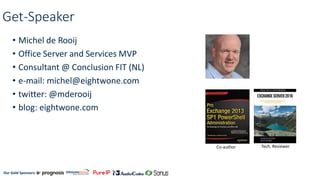
Get-Speaker
• Michel de Rooij
• Office Server and Services MVP
• Consultant @ Conclusion FIT (NL)
• e-mail: michel@eightwone.com
• twitter: @mderooij
• blog: eightwone.com
Co-author Tech. Reviewer
Our Gold Sponsors:
Topics
• Introduction
• Connecting
• Management
• Optimizations
• Reporting
• Demo
Our Gold Sponsors:
Why use PowerShell?
• Some things cannot be done in the EAC
• e.g. Mailbox Plans, Group addresses
• 'Which mailboxes does user X have FMA access to?'
• Allows for automation
• Admin UI may change
• Offers PowerShell functionality
• e.g. Export, Import, Transcript
Our Gold Sponsors:
Automate
• Repetitive, Bulk, Scheduled
• Be sensible
• One-Liners, Scripts
• Examples:
• User (de)provisioning (licenses)
• User/Mailbox Management (addresses, settings)
• Group Management
• Policy management
• (Post)migration tasks
• Reporting
Our Gold Sponsors:
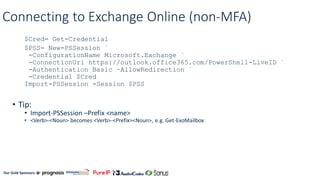
Connecting to Exchange Online (non-MFA)
$Cred= Get-Credential
$PSS= New-PSSession `
-ConfigurationName Microsoft.Exchange `
-ConnectionUri https://outlook.office365.com/PowerShell-LiveID `
-Authentication Basic –AllowRedirection `
-Credential $Cred
Import-PSSession -Session $PSS
• Tip:
• Import-PSSession –Prefix <name>
• <Verb>-<Noun> becomes <Verb>-<Prefix><Noun>, e.g. Get-ExoMailbox
Our Gold Sponsors:
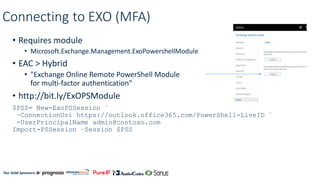
Connecting to EXO (MFA)
• Requires module
• Microsoft.Exchange.Management.ExoPowershellModule
• EAC > Hybrid
• "Exchange Online Remote PowerShell Module
for multi-factor authentication"
• http://bit.ly/ExOPSModule
$PSS= New-ExoPSSession `
–ConnectionUri https://outlook.office365.com/PowerShell-LiveID `
-UserPrincipalName admin@contoso.com
Import-PSSession –Session $PSS
Our Gold Sponsors:
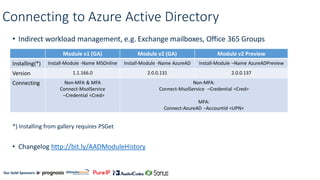
Connecting to Azure Active Directory
• Indirect workload management, e.g. Exchange mailboxes, Office 365 Groups
*) Installing from gallery requires PSGet
• Changelog http://bit.ly/AADModuleHistory
Module v1 (GA) Module v2 (GA) Module v2 Preview
Installing(*) Install-Module -Name MSOnline Install-Module -Name AzureAD Install-Module –Name AzureADPreview
Version 1.1.166.0 2.0.0.131 2.0.0.137
Connecting Non-MFA & MFA
Connect-MsolService
–Credential <Cred>
Non-MFA:
Connect-MsolService –Credential <Cred>
MFA:
Connect-AzureAD –AccountId <UPN>
Our Gold Sponsors:
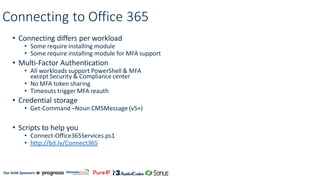
Connecting to Office 365
• Connecting differs per workload
• Some require installing module
• Some require installing module for MFA support
• Multi-Factor Authentication
• All workloads support PowerShell & MFA
except Security & Compliance center
• No MFA token sharing
• Timeouts trigger MFA reauth
• Credential storage
• Get-Command –Noun CMSMessage (v5+)
• Scripts to help you
• Connect-Office365Services.ps1
• http://bit.ly/Connect365
Our Gold Sponsors:
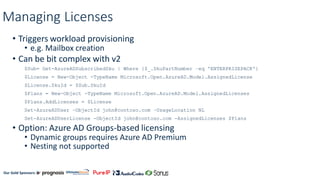
Managing Licenses
• Triggers workload provisioning
• e.g. Mailbox creation
• Can be bit complex with v2
$Sub= Get-AzureADSubscribedSku | Where {$_.SkuPartNumber –eq 'ENTERPRISEPACK'}
$License = New-Object -TypeName Microsoft.Open.AzureAD.Model.AssignedLicense
$License.SkuId = $Sub.SkuId
$Plans = New-Object -TypeName Microsoft.Open.AzureAD.Model.AssignedLicenses
$Plans.AddLicenses = $License
Set-AzureADUser –ObjectId john@contoso.com –UsageLocation NL
Set-AzureADUserLicense -ObjectId john@contoso.com -AssignedLicenses $Plans
• Option: Azure AD Groups-based licensing
• Dynamic groups requires Azure AD Premium
• Nesting not supported
Our Gold Sponsors:
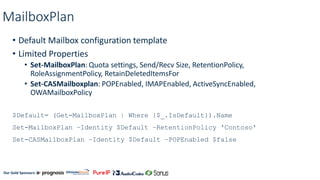
MailboxPlan
• Default Mailbox configuration template
• Limited Properties
• Set-MailboxPlan: Quota settings, Send/Recv Size, RetentionPolicy,
RoleAssignmentPolicy, RetainDeletedItemsFor
• Set-CASMailboxplan: POPEnabled, IMAPEnabled, ActiveSyncEnabled,
OWAMailboxPolicy
$Default= (Get-MailboxPlan | Where {$_.IsDefault}).Name
Set-MailboxPlan –Identity $Default –RetentionPolicy 'Contoso'
Set-CASMailboxPlan –Identity $Default –POPEnabled $false
Our Gold Sponsors:
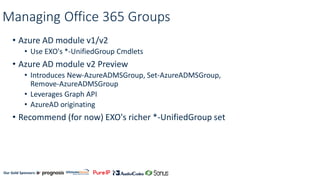
Managing Office 365 Groups
• Azure AD module v1/v2
• Use EXO's *-UnifiedGroup Cmdlets
• Azure AD module v2 Preview
• Introduces New-AzureADMSGroup, Set-AzureADMSGroup,
Remove-AzureADMSGroup
• Leverages Graph API
• AzureAD originating
• Recommend (for now) EXO's richer *-UnifiedGroup set
Our Gold Sponsors:
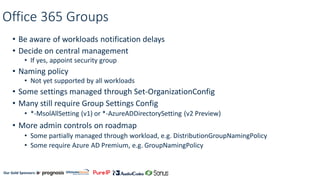
Office 365 Groups
• Be aware of workloads notification delays
• Decide on central management
• If yes, appoint security group
• Naming policy
• Not yet supported by all workloads
• Some settings managed through Set-OrganizationConfig
• Many still require Group Settings Config
• *-MsolAllSetting (v1) or *-AzureADDirectorySetting (v2 Preview)
• More admin controls on roadmap
• Some partially managed through workload, e.g. DistributionGroupNamingPolicy
• Some require Azure AD Premium, e.g. GroupNamingPolicy
Our Gold Sponsors:
Creating Office 365 Groups Settings
$Template = Get-AzureADDirectorySettingTemplate | `
where {$_.DisplayName -eq 'Group.Unified'}
$Setting = $Template.CreateDirectorySetting()
$Settings['EnableGroupCreation'] = 'false'
New-AzureADDirectorySetting -DirectorySetting $Settings
Our Gold Sponsors:
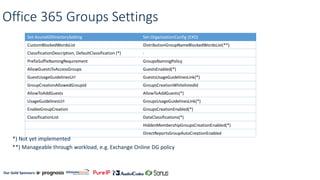
Office 365 Groups Settings
*) Not yet implemented
**) Manageable through workload, e.g. Exchange Online DG policy
Set-AzureADDirectorySetting Set-OrganizationConfig (EXO)
CustomBlockedWordsList DistributionGroupNameBlockedWordsList(**)
ClassificationDescription, DefaultClassification (*) -
PrefixSuffixNamingRequirement GroupsNamingPolicy
AllowGuestsToAccessGroups GuestsEnabled(*)
GuestUsageGuidelinesUrl GuestsUsageGuidelinesLink(*)
GroupCreationAllowedGroupId GroupsCreationWhitelistedId
AllowToAddGuests AllowToAddGuests(*)
UsageGuidelinesUrl GroupsUsageGuidelinesLink(*)
EnableGroupCreation GroupsCreationEnabled(*)
ClassificationList DataClassifications(*)
HiddenMembershipGroupsCreationEnabled(*)
DirectReportsGroupAutoCreationEnabled
Our Gold Sponsors:
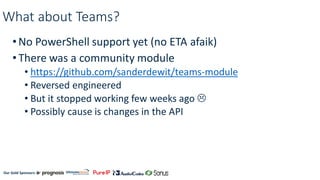
What about Teams?
•No PowerShell support yet (no ETA afaik)
•There was a community module
• https://github.com/sanderdewit/teams-module
• Reversed engineered
• But it stopped working few weeks ago 
• Possibly cause is changes in the API
Our Gold Sponsors:
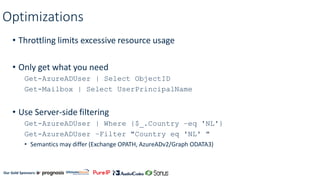
Optimizations
• Throttling limits excessive resource usage
• Only get what you need
Get-AzureADUser | Select ObjectID
Get-Mailbox | Select UserPrincipalName
• Use Server-side filtering
Get-AzureADUser | Where {$_.Country –eq 'NL'}
Get-AzureADUser –Filter "Country eq 'NL' "
• Semantics may differ (Exchange OPATH, AzureADv2/Graph ODATA3)
Our Gold Sponsors:
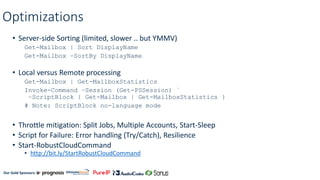
Optimizations
• Server-side Sorting (limited, slower .. but YMMV)
Get-Mailbox | Sort DisplayName
Get-Mailbox –SortBy DisplayName
• Local versus Remote processing
Get-Mailbox | Get-MailboxStatistics
Invoke-Command –Session (Get-PSSession) `
–ScriptBlock { Get-Mailbox | Get-MailboxStatistics }
# Note: ScriptBlock no-language mode
• Throttle mitigation: Split Jobs, Multiple Accounts, Start-Sleep
• Script for Failure: Error handling (Try/Catch), Resilience
• Start-RobustCloudCommand
• http://bit.ly/StartRobustCloudCommand
Our Gold Sponsors:
'Exchange Size data type'
• No Exchange Management Tools
• [Microsoft.Exchange.Data.ByteQuantifiedSize]::Parse( .. )
Get-Mailbox | Get-MailboxStatistics | Select TotalItemSize
'1124 MB (1,150,976 bytes)'
• Deserialization to basic type, i.e. string
Function ConvertBQS-ToUint64 {
param( [string]$size, [int]$units)
return [uint64]([uint64]($size –replace '^.+(([d,]+).+$','$1')/$units)
}
Get-Mailbox | Get-MailboxStatistics | Select `
@{n='Size (MB)';e={ConvertBQS-ToUint64 $_.TotalItemSize.Value) 1MB}
Our Gold Sponsors:
Reporting
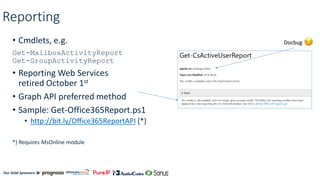
• Cmdlets, e.g.
Get-MailboxActivityReport
Get-GroupActivityReport
• Reporting Web Services
retired October 1st
• Graph API preferred method
• Sample: Get-Office365Report.ps1
• http://bit.ly/Office365ReportAPI (*)
*) Requires MsOnline module
Docbug
Our Gold Sponsors:
When Cmdlets won't suffice
• Graph API
• Single Endpoint, workload independent
• OAuth2
• Exchange REST API (Mail, Calendar, Contacts, ..)
• Exchange Web Services
• Around since Exchange 2007
• Still supported, fills Graph gaps
• Access to Mailbox contents, Free/Busy, Settings, a.o.
• EWS Managed API
• http://gsexdev.blogspot.com
Our Gold Sponsors:
Our Gold Sponsors:
Takeaways
• Automate
• Investment, be sensible
• Explore communities
• There is a lot already out there
• As template or learn by example
• Scripts feedback appreciated ☺
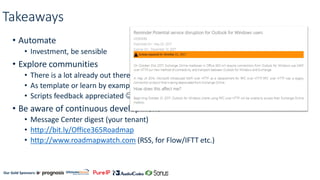
• Be aware of continuous development
• Message Center digest (your tenant)
• http://bit.ly/Office365Roadmap
• http://www.roadmapwatch.com (RSS, for Flow/IFTT etc.)
Our Gold Sponsors:
Resources
• Connect-Office365Services.ps1
• http://bit.ly/Connect365
• Get-Office365Report.ps1
• http://bit.ly/Office365ReportAPI
• Migrate DL to Office 365 Groups scripts (Admin controlled)
• http://bit.ly/DLtoO365GroupsScripts
• Groups Report
• http://bit.ly/Get-O365GroupReport
• Admin Group Reporting
• http://bit.ly/Get-O365AdminGroupsReport
• Graph Explorer
• https://developer.microsoft.com/en-us/graph/graph-explorer
Our Gold Sponsors:
Questions? | Thank You!
Michel de Rooij
michel@eightwone.com
We’d like to know what you think!
Please fill out the evaluation form you
received at the registration desk for this
session
Session recordings and materials:
Materials will be available on
Office365Engage.com soon
Our Gold Sponsors:
Sponsors
Gold
Silver
Bronze
Tech

Managing Exchange Online using PowerShell, Tips & Tricks

  • 1.
    Our Gold Sponsors: ManagingExchange Online using PowerShell, Tips & Tricks Michel de Rooij Consultant @mderooij
  • 2.
    Our Gold Sponsors: Get-Speaker •Michel de Rooij • Office Server and Services MVP • Consultant @ Conclusion FIT (NL) • e-mail: michel@eightwone.com • twitter: @mderooij • blog: eightwone.com Co-author Tech. Reviewer
  • 3.
    Our Gold Sponsors: Topics •Introduction • Connecting • Management • Optimizations • Reporting • Demo
  • 4.
    Our Gold Sponsors: Whyuse PowerShell? • Some things cannot be done in the EAC • e.g. Mailbox Plans, Group addresses • 'Which mailboxes does user X have FMA access to?' • Allows for automation • Admin UI may change • Offers PowerShell functionality • e.g. Export, Import, Transcript
  • 5.
    Our Gold Sponsors: Automate •Repetitive, Bulk, Scheduled • Be sensible • One-Liners, Scripts • Examples: • User (de)provisioning (licenses) • User/Mailbox Management (addresses, settings) • Group Management • Policy management • (Post)migration tasks • Reporting
  • 6.
    Our Gold Sponsors: Connectingto Exchange Online (non-MFA) $Cred= Get-Credential $PSS= New-PSSession ` -ConfigurationName Microsoft.Exchange ` -ConnectionUri https://outlook.office365.com/PowerShell-LiveID ` -Authentication Basic –AllowRedirection ` -Credential $Cred Import-PSSession -Session $PSS • Tip: • Import-PSSession –Prefix <name> • <Verb>-<Noun> becomes <Verb>-<Prefix><Noun>, e.g. Get-ExoMailbox
  • 7.
    Our Gold Sponsors: Connectingto EXO (MFA) • Requires module • Microsoft.Exchange.Management.ExoPowershellModule • EAC > Hybrid • "Exchange Online Remote PowerShell Module for multi-factor authentication" • http://bit.ly/ExOPSModule $PSS= New-ExoPSSession ` –ConnectionUri https://outlook.office365.com/PowerShell-LiveID ` -UserPrincipalName admin@contoso.com Import-PSSession –Session $PSS
  • 8.
    Our Gold Sponsors: Connectingto Azure Active Directory • Indirect workload management, e.g. Exchange mailboxes, Office 365 Groups *) Installing from gallery requires PSGet • Changelog http://bit.ly/AADModuleHistory Module v1 (GA) Module v2 (GA) Module v2 Preview Installing(*) Install-Module -Name MSOnline Install-Module -Name AzureAD Install-Module –Name AzureADPreview Version 1.1.166.0 2.0.0.131 2.0.0.137 Connecting Non-MFA & MFA Connect-MsolService –Credential <Cred> Non-MFA: Connect-MsolService –Credential <Cred> MFA: Connect-AzureAD –AccountId <UPN>
  • 9.
    Our Gold Sponsors: Connectingto Office 365 • Connecting differs per workload • Some require installing module • Some require installing module for MFA support • Multi-Factor Authentication • All workloads support PowerShell & MFA except Security & Compliance center • No MFA token sharing • Timeouts trigger MFA reauth • Credential storage • Get-Command –Noun CMSMessage (v5+) • Scripts to help you • Connect-Office365Services.ps1 • http://bit.ly/Connect365
  • 10.
    Our Gold Sponsors: ManagingLicenses • Triggers workload provisioning • e.g. Mailbox creation • Can be bit complex with v2 $Sub= Get-AzureADSubscribedSku | Where {$_.SkuPartNumber –eq 'ENTERPRISEPACK'} $License = New-Object -TypeName Microsoft.Open.AzureAD.Model.AssignedLicense $License.SkuId = $Sub.SkuId $Plans = New-Object -TypeName Microsoft.Open.AzureAD.Model.AssignedLicenses $Plans.AddLicenses = $License Set-AzureADUser –ObjectId john@contoso.com –UsageLocation NL Set-AzureADUserLicense -ObjectId john@contoso.com -AssignedLicenses $Plans • Option: Azure AD Groups-based licensing • Dynamic groups requires Azure AD Premium • Nesting not supported
  • 11.
    Our Gold Sponsors: MailboxPlan •Default Mailbox configuration template • Limited Properties • Set-MailboxPlan: Quota settings, Send/Recv Size, RetentionPolicy, RoleAssignmentPolicy, RetainDeletedItemsFor • Set-CASMailboxplan: POPEnabled, IMAPEnabled, ActiveSyncEnabled, OWAMailboxPolicy $Default= (Get-MailboxPlan | Where {$_.IsDefault}).Name Set-MailboxPlan –Identity $Default –RetentionPolicy 'Contoso' Set-CASMailboxPlan –Identity $Default –POPEnabled $false
  • 12.
    Our Gold Sponsors: ManagingOffice 365 Groups • Azure AD module v1/v2 • Use EXO's *-UnifiedGroup Cmdlets • Azure AD module v2 Preview • Introduces New-AzureADMSGroup, Set-AzureADMSGroup, Remove-AzureADMSGroup • Leverages Graph API • AzureAD originating • Recommend (for now) EXO's richer *-UnifiedGroup set
  • 13.
    Our Gold Sponsors: Office365 Groups • Be aware of workloads notification delays • Decide on central management • If yes, appoint security group • Naming policy • Not yet supported by all workloads • Some settings managed through Set-OrganizationConfig • Many still require Group Settings Config • *-MsolAllSetting (v1) or *-AzureADDirectorySetting (v2 Preview) • More admin controls on roadmap • Some partially managed through workload, e.g. DistributionGroupNamingPolicy • Some require Azure AD Premium, e.g. GroupNamingPolicy
  • 14.
    Our Gold Sponsors: CreatingOffice 365 Groups Settings $Template = Get-AzureADDirectorySettingTemplate | ` where {$_.DisplayName -eq 'Group.Unified'} $Setting = $Template.CreateDirectorySetting() $Settings['EnableGroupCreation'] = 'false' New-AzureADDirectorySetting -DirectorySetting $Settings
  • 15.
    Our Gold Sponsors: Office365 Groups Settings *) Not yet implemented **) Manageable through workload, e.g. Exchange Online DG policy Set-AzureADDirectorySetting Set-OrganizationConfig (EXO) CustomBlockedWordsList DistributionGroupNameBlockedWordsList(**) ClassificationDescription, DefaultClassification (*) - PrefixSuffixNamingRequirement GroupsNamingPolicy AllowGuestsToAccessGroups GuestsEnabled(*) GuestUsageGuidelinesUrl GuestsUsageGuidelinesLink(*) GroupCreationAllowedGroupId GroupsCreationWhitelistedId AllowToAddGuests AllowToAddGuests(*) UsageGuidelinesUrl GroupsUsageGuidelinesLink(*) EnableGroupCreation GroupsCreationEnabled(*) ClassificationList DataClassifications(*) HiddenMembershipGroupsCreationEnabled(*) DirectReportsGroupAutoCreationEnabled
  • 16.
    Our Gold Sponsors: Whatabout Teams? •No PowerShell support yet (no ETA afaik) •There was a community module • https://github.com/sanderdewit/teams-module • Reversed engineered • But it stopped working few weeks ago  • Possibly cause is changes in the API
  • 17.
    Our Gold Sponsors: Optimizations •Throttling limits excessive resource usage • Only get what you need Get-AzureADUser | Select ObjectID Get-Mailbox | Select UserPrincipalName • Use Server-side filtering Get-AzureADUser | Where {$_.Country –eq 'NL'} Get-AzureADUser –Filter "Country eq 'NL' " • Semantics may differ (Exchange OPATH, AzureADv2/Graph ODATA3)
  • 18.
    Our Gold Sponsors: Optimizations •Server-side Sorting (limited, slower .. but YMMV) Get-Mailbox | Sort DisplayName Get-Mailbox –SortBy DisplayName • Local versus Remote processing Get-Mailbox | Get-MailboxStatistics Invoke-Command –Session (Get-PSSession) ` –ScriptBlock { Get-Mailbox | Get-MailboxStatistics } # Note: ScriptBlock no-language mode • Throttle mitigation: Split Jobs, Multiple Accounts, Start-Sleep • Script for Failure: Error handling (Try/Catch), Resilience • Start-RobustCloudCommand • http://bit.ly/StartRobustCloudCommand
  • 19.
    Our Gold Sponsors: 'ExchangeSize data type' • No Exchange Management Tools • [Microsoft.Exchange.Data.ByteQuantifiedSize]::Parse( .. ) Get-Mailbox | Get-MailboxStatistics | Select TotalItemSize '1124 MB (1,150,976 bytes)' • Deserialization to basic type, i.e. string Function ConvertBQS-ToUint64 { param( [string]$size, [int]$units) return [uint64]([uint64]($size –replace '^.+(([d,]+).+$','$1')/$units) } Get-Mailbox | Get-MailboxStatistics | Select ` @{n='Size (MB)';e={ConvertBQS-ToUint64 $_.TotalItemSize.Value) 1MB}
  • 20.
    Our Gold Sponsors: Reporting •Cmdlets, e.g. Get-MailboxActivityReport Get-GroupActivityReport • Reporting Web Services retired October 1st • Graph API preferred method • Sample: Get-Office365Report.ps1 • http://bit.ly/Office365ReportAPI (*) *) Requires MsOnline module Docbug
  • 21.
    Our Gold Sponsors: WhenCmdlets won't suffice • Graph API • Single Endpoint, workload independent • OAuth2 • Exchange REST API (Mail, Calendar, Contacts, ..) • Exchange Web Services • Around since Exchange 2007 • Still supported, fills Graph gaps • Access to Mailbox contents, Free/Busy, Settings, a.o. • EWS Managed API • http://gsexdev.blogspot.com
  • 22.
  • 23.
    Our Gold Sponsors: Takeaways •Automate • Investment, be sensible • Explore communities • There is a lot already out there • As template or learn by example • Scripts feedback appreciated ☺ • Be aware of continuous development • Message Center digest (your tenant) • http://bit.ly/Office365Roadmap • http://www.roadmapwatch.com (RSS, for Flow/IFTT etc.)
  • 24.
    Our Gold Sponsors: Resources •Connect-Office365Services.ps1 • http://bit.ly/Connect365 • Get-Office365Report.ps1 • http://bit.ly/Office365ReportAPI • Migrate DL to Office 365 Groups scripts (Admin controlled) • http://bit.ly/DLtoO365GroupsScripts • Groups Report • http://bit.ly/Get-O365GroupReport • Admin Group Reporting • http://bit.ly/Get-O365AdminGroupsReport • Graph Explorer • https://developer.microsoft.com/en-us/graph/graph-explorer
  • 25.
    Our Gold Sponsors: Questions?| Thank You! Michel de Rooij michel@eightwone.com We’d like to know what you think! Please fill out the evaluation form you received at the registration desk for this session Session recordings and materials: Materials will be available on Office365Engage.com soon
  • 26.