Mickaël QUESNOT https://www.linkedin.com/in/mickaelquesnot/
Twitter @mistersharesap
1 | P a g e
Your 5 Steps Guide to Use Automatic Accounting in SAP
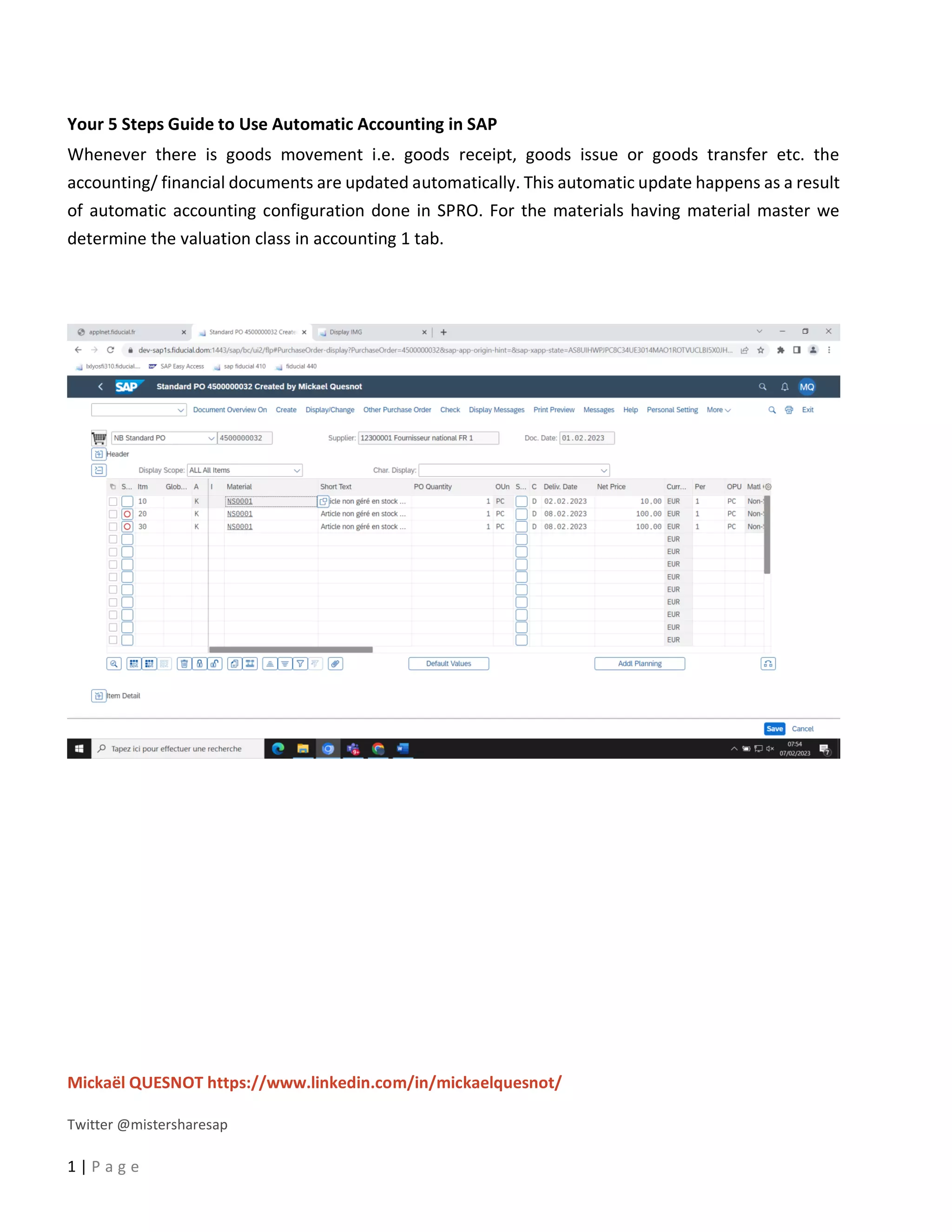
Whenever there is goods movement i.e. goods receipt, goods issue or goods transfer etc. the
accounting/ financial documents are updated automatically. This automatic update happens as a result
of automatic accounting configuration done in SPRO. For the materials having material master we
determine the valuation class in accounting 1 tab.
Mickaël QUESNOT https://www.linkedin.com/in/mickaelquesnot/
Twitter @mistersharesap
2 | P a g e
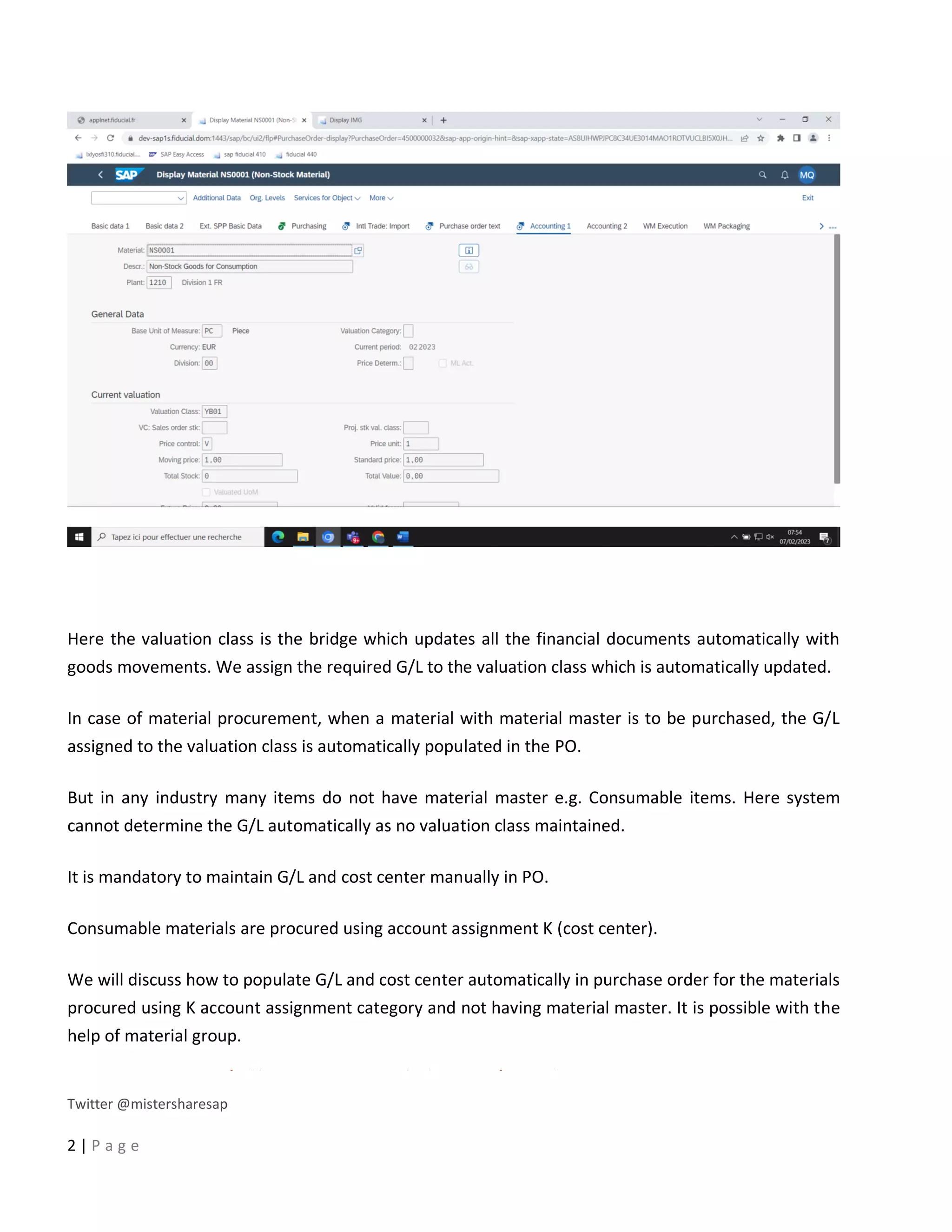
Here the valuation class is the bridge which updates all the financial documents automatically with
goods movements. We assign the required G/L to the valuation class which is automatically updated.
In case of material procurement, when a material with material master is to be purchased, the G/L
assigned to the valuation class is automatically populated in the PO.
But in any industry many items do not have material master e.g. Consumable items. Here system
cannot determine the G/L automatically as no valuation class maintained.
It is mandatory to maintain G/L and cost center manually in PO.
Consumable materials are procured using account assignment K (cost center).
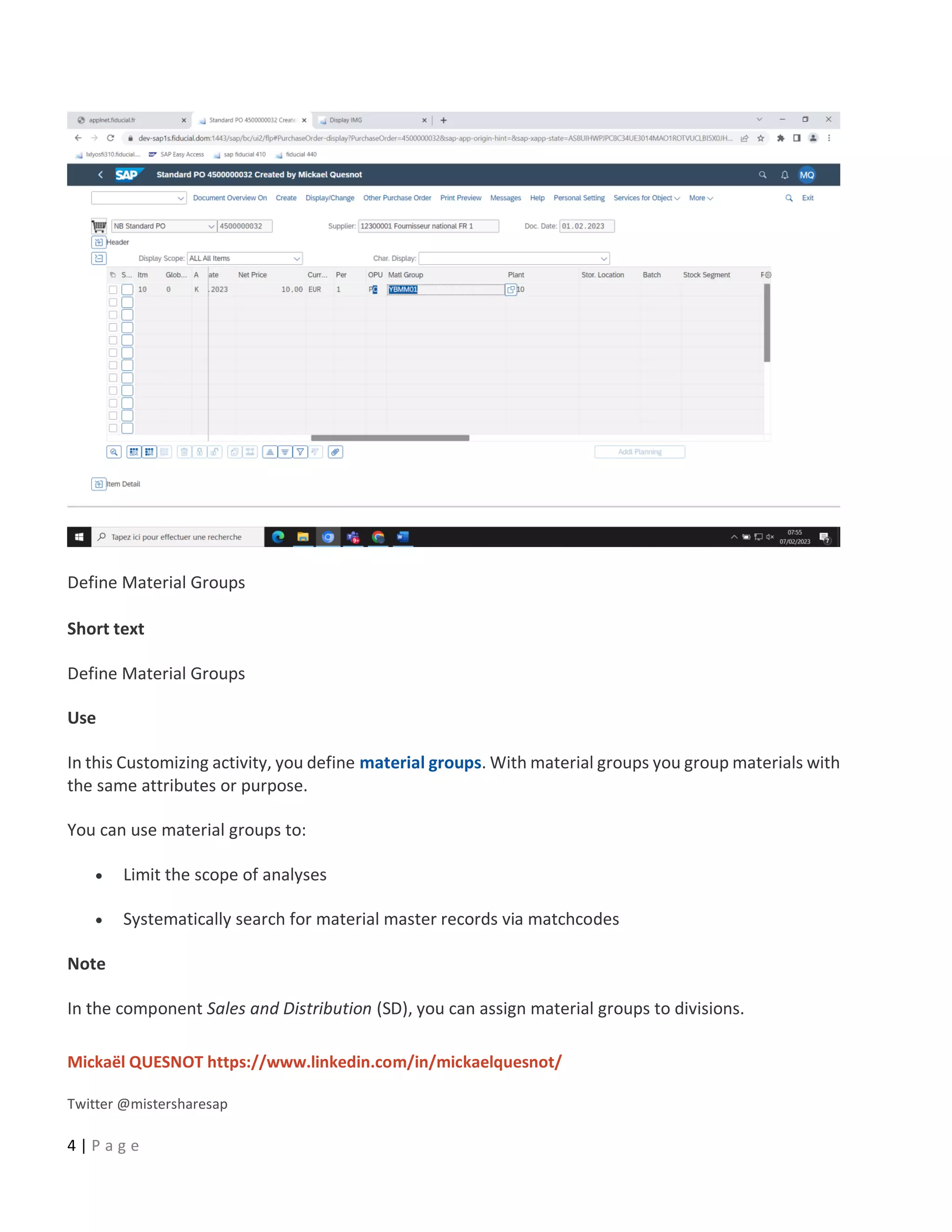
We will discuss how to populate G/L and cost center automatically in purchase order for the materials
procured using K account assignment category and not having material master. It is possible with the
help of material group.
Mickaël QUESNOT https://www.linkedin.com/in/mickaelquesnot/
Twitter @mistersharesap
3 | P a g e
Material group is a group of materials having same attributes like rubber, glass, metal etc.
We will create a new material group which will be used to procure materials with K account assignment
category.
Step 1) Create material group
Material Group
Number and description of the material group.
A material group comprises several materials or services having the same attributes.
Use
If you enter parts of the description or the number of the material group, the system finds the relevant
group or suggests several for you to choose from.
Example
You have created the following material groups:
Material group Description
011 Office materials
112 PC monitors
113 PC hard disks
911 Advertising and promotional gifts
If you enter PC, the system will suggest the material groups '112' and '113' for you to choose from,
because their descriptions contain the character string 'PC'.
Path: SPRO –> IMG –> Logistics-General –> Material Master –> Settings for Key Field –> Define
Material groups
Mickaël QUESNOT https://www.linkedin.com/in/mickaelquesnot/
Twitter @mistersharesap
4 | P a g e
Define Material Groups
Short text
Define Material Groups
Use
In this Customizing activity, you define material groups. With material groups you group materials with
the same attributes or purpose.
You can use material groups to:
• Limit the scope of analyses
• Systematically search for material master records via matchcodes
Note
In the component Sales and Distribution (SD), you can assign material groups to divisions.
Mickaël QUESNOT https://www.linkedin.com/in/mickaelquesnot/
Twitter @mistersharesap
5 | P a g e
Actions
1. Define your material groups.
2. Assign each material to a material group.
Mickaël QUESNOT https://www.linkedin.com/in/mickaelquesnot/
Twitter @mistersharesap
6 | P a g e
Step 2) Create new valuation class
We will be creating a new valuation class for this purpose which will be assigned to the material group.
Transaction code to create valuation class – OMSK
Define Valuation Classes
Short text
Define valuation class for products and configure related attributes
Use
You can define which valuation classes are allowed for a material type.
If a user creates a material, he must enter the material's valuation class in the accounting data. The
system uses your default settings to check whether the valuation class is allowed for the material type.
Mickaël QUESNOT https://www.linkedin.com/in/mickaelquesnot/
Twitter @mistersharesap
7 | P a g e
The valuation class is a group of materials with the same account determination. If a transaction is to
be posted to different accounts depending on the valuation class, create an account determination for
each valuation class in the step Create automatic postings.
The valuation classes allowed depend on the material type. Several valuation classes are generally
allowed for one material type. A valuation class can also be allowed for several material types.
The link between the valuation classes and the material types is set up via the account category
reference.
The account category reference is a combination of valuation classes. Precisely one account category
reference is assigned to a material type.
Example
Requirements
• You must have defined your material types.
• You must have defined the chart of accounts.
• You must have agreed with Financial Accounting which materials are assigned to which
accounts.
Default settings
In the standard system, an account category reference is created for each material type. The account
category reference is, in turn, assigned to precisely one valuation class. This means that each material
type has its own valuation class.
Recommendation
We recommend that you create the account groups of your chart of accounts as an account category
reference.
Example GKR:
• 3000 for raw materials
• 3030 for accessory materials
• 7900 for finished products
Mickaël QUESNOT https://www.linkedin.com/in/mickaelquesnot/
Twitter @mistersharesap
8 | P a g e
• and so on
Activities
1. Create account category references under account category reference
2. Under valuation class, define the valuation classes for each account category reference.
3. Under Material type/account category reference, assign an account category reference to
each material type.
Mickaël QUESNOT https://www.linkedin.com/in/mickaelquesnot/
Twitter @mistersharesap
9 | P a g e
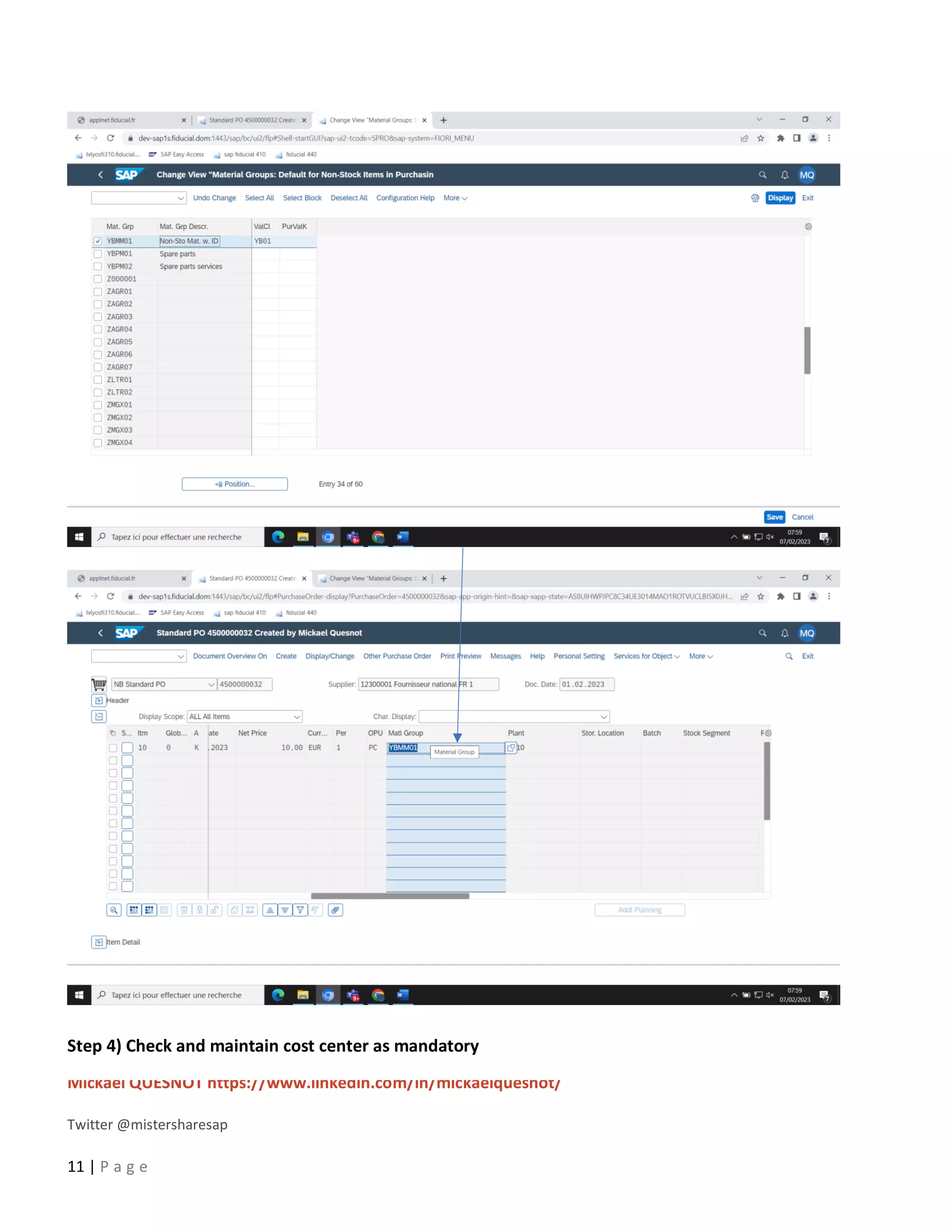
Step 3) Assign this valuation class to the material group
Mickaël QUESNOT https://www.linkedin.com/in/mickaelquesnot/
Twitter @mistersharesap
10 | P a g e
Path: SPRO –> IMG –> Purchasing –> Material Master –> Entry Aid for Items without Material Master
Entry Aids for Items Without a Material Master
Short text
Allows you to assign a purchasing value key and a valuation class to a material group.
Use
In this customizing activity, you can assign a purchasing value key that provides you with default values
for remaining levels in purchase order items, without material master records and info records.
Additionally, you can assign a valuation class to a material group that enables the system to establish
different accounts for the individual material groups.
Mickaël QUESNOT https://www.linkedin.com/in/mickaelquesnot/
Twitter @mistersharesap
11 | P a g e
Step 4) Check and maintain cost center as mandatory
Mickaël QUESNOT https://www.linkedin.com/in/mickaelquesnot/
Twitter @mistersharesap
12 | P a g e
Transaction code – OME9
Maintain Account Assignment Categories
Short text
Maintain the values of account assignment categories for purchasing documents.
Use
You can verify the values of the account assignment categories. Additionally, based on your
requirements, you can maintain the account assignment categories.
Mickaël QUESNOT https://www.linkedin.com/in/mickaelquesnot/
Twitter @mistersharesap
13 | P a g e
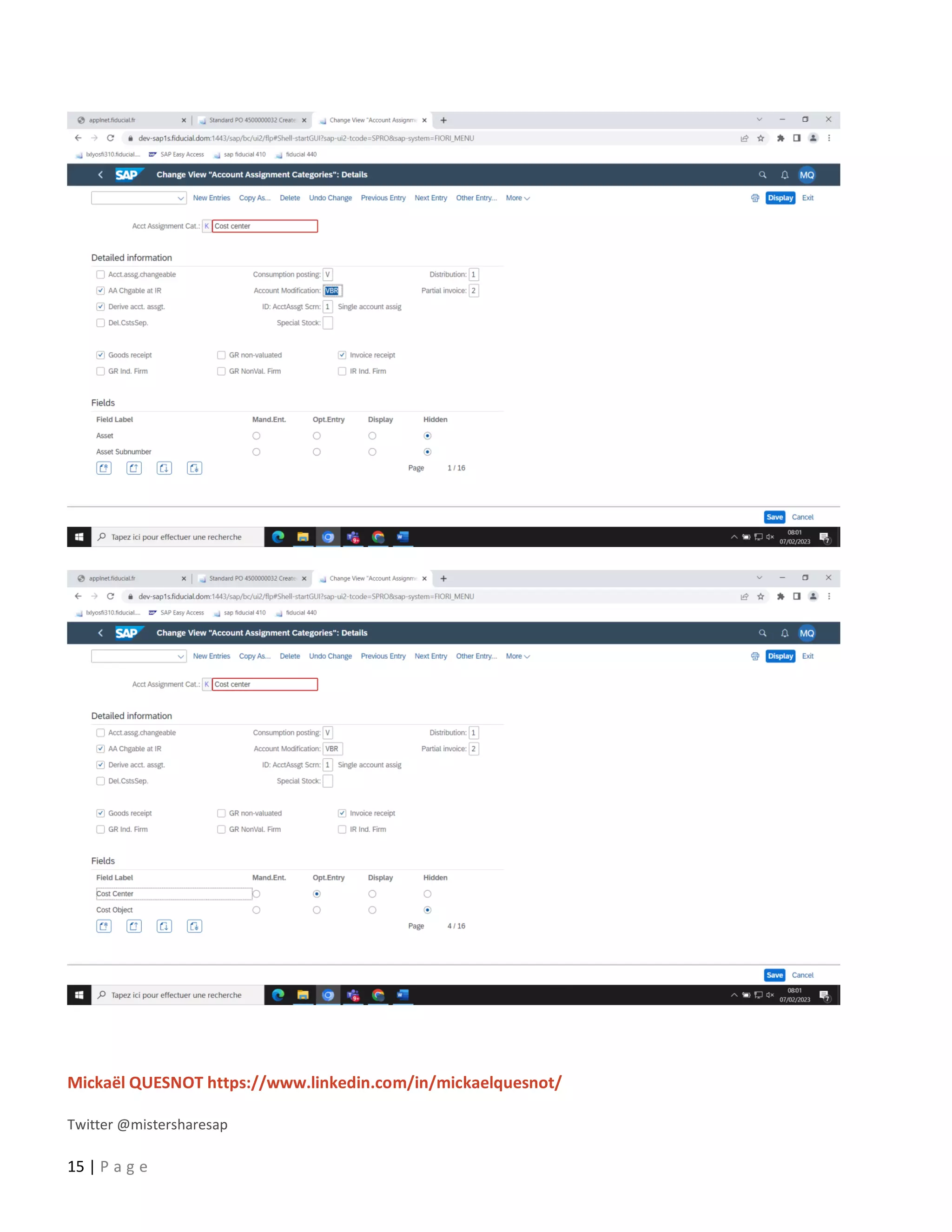
And go to details tab
Account Modification
Key which has a different meaning depending on the procedure. It is used to differentiate account
determination. The key's meaning is predefined in the SAP system and cannot be changed.
Example
For tax postings, you can enter a tax code as the key.
For tax clearing entries for down payments, you enter the modification key defined for down
payments. This key was determined based on account type, special G/L indicator, and reconciliation
account.
For statistical offsetting entries, you enter a two-character identification code. The first character is the
account type. The second character is the respective special G/L indicator.
Mickaël QUESNOT https://www.linkedin.com/in/mickaelquesnot/
Twitter @mistersharesap
14 | P a g e
For offsetting entries for inventory postings, you enter the key which is assigned to the movement type
and posting string.
Derive preliminary account assignment from G/L account
Indicates that the preliminary account assignment is to be derived from the G/L account.
Changes in procedure
If you have set the indicator and the account determination facility supplies a G/L account, the
preliminary account assignment is determined automatically.
This means that the system assigns the relevant item to a cost center, an order or a profit center.
The assignment can be carried out at the following organizational levels:
• Company code
• Valuation area
• Plant
If Inventory Management is not active in your system, you must specify (enter) the preliminary account
assignments for all the items manually. Setting this indicator enables you to by-pass this step. You will
then no longer get the dialog box for the entry of a preliminary account assignment.
You maintain the automatic account assignment specification facility using the Customizing
functionality of Financial Accounting under Maintain automatic account determination.
Mickaël QUESNOT https://www.linkedin.com/in/mickaelquesnot/
Twitter @mistersharesap
15 | P a g e
Mickaël QUESNOT https://www.linkedin.com/in/mickaelquesnot/
Twitter @mistersharesap
16 | P a g e
Here check the Acct modification, activate Derive Acct. Assignment and make sure that cost center field
is a mandatory field.
Step 5) Maintain G/L for valuation class
Configure Automatic Postings
In this step, you enter the system settings for Inventory Management and Invoice Verification
transactions for automatic postings to G/L accounts.
You can then check your settings using a simulation function.
Under Further information there is a list of transactions in Materials Management and their
definitions.
What are automatic postings?
Postings are made to G/L accounts automatically in the case of Invoice Verification and Inventory
Management transactions relevant to Financial and Cost Accounting.
Example:
Posting lines are created in the following accounts in the case of a goods issue for a cost center:
• Stock account
• Consumption account
How does the system find the relevant accounts?
When entering the goods movement, the user does not have to enter a G/L account, since the system
automatically finds the accounts to which postings are to be made using the following data:
• Chart of accounts of the company code
If the user enters a company code or a plant when entering a transaction, the system
determines the chart of accounts which is valid for the company code.
You must define the automatic account determination individually for each chart of accounts.
• Valuation grouping code of the valuation area
Mickaël QUESNOT https://www.linkedin.com/in/mickaelquesnot/
Twitter @mistersharesap
17 | P a g e
If the automatic account determination within a chart of accounts is to run differently for
certain company codes or plants (valuation areas), assign different valuation grouping codes to
these valuation areas.
You must define the automatic account determination individually for every valuation grouping
code within a chart of accounts. It applies to all valuation areas which are assigned to this
valuation grouping code.
If the user enters a company code or a plant when entering a transaction, the system
determines the valuation area and the valuation grouping code.
• Transaction/event key (internal processing key)
Posting transactions are predefined for those inventory management and invoice verification
transactions relevant to accounting. Posting records, which are generalized in the value string,
are assigned to each relevant movement type in inventory management and each transaction
in invoice verification. These contain keys for the relevant posting transaction (for example,
inventory posting and consumption posting) instead of actual G/L account numbers.
You do not have to define these transaction keys, they are determined automatically from the
transaction (invoice verification) or the movement type (inventory management). All you have
to do is assign the relevant G/L account to each posting transaction.
• Account grouping (only for offsetting entries, consignment liabilities, and price differences)
Since the posting transaction "Offsetting entry for inventory posting" is used for different
transactions (for example, goods issue, scrapping, physical inventory), which are assigned to
different accounts (for example, consumption account, scrapping, expense/income from
inventory differences), it is necessary to divide the posting transaction according to a further
key: account grouping code.
An account grouping is assigned to each movement type in inventory management which uses
the posting transaction "Offsetting entry for inventory posting".
Under the posting transaction "Offsetting entry for inventory posting", you must assign G/L
accounts for every account grouping, that is, assign G/L accounts.
If you wish to post price differences to different price difference accounts in the case of goods
receipts for purchase orders, goods receipts for orders, or other movements, you can define
different account grouping codes for the transaction key.
Using the account grouping, you can also have different accounts for consignment liabilities and
pipeline liabilities.
Mickaël QUESNOT https://www.linkedin.com/in/mickaelquesnot/
Twitter @mistersharesap
18 | P a g e
• Valuation class of material or (in case of split valuation) the valuation type
The valuation class allows you to define automatic account determination that is dependent on
the material. for example: you post a goods receipt of a raw material to a different stock account
than if the goods receipt were for trading goods, even though the user enters the same
transaction for both materials.
You can achieve this by assigning different valuation classes to the materials and by assigning
different G/L accounts to the posting transaction for every valuation class.
If you do not want to differentiate according to valuation classes you do not have to maintain a
valuation class for a transaction.
Requirements
Before you maintain automatic postings, you must obtain the following information:
1. Valuation level ( plant or company code)
Establish whether the materials are valuated at plant or at company code level
When valuation is at plant level, the valuation area corresponds to a plant.
When valuation is at company code level, the valuation area corresponds to a company code.
Define valuation level
2. Chart of accounts and valuation grouping code per valuation area
Find out whether the valuation grouping code is active.
Activate split valuation
If it is not active, determine the chart of accounts assigned to each valuation area (via the
company code).
If it is active, determine the chart of accounts and the valuation grouping code assigned to each
valuation area.
Group valuation areas
You must define a separate account determination process for chart of accounts and each
valuation grouping code.
3. Valuation class per material type
Mickaël QUESNOT https://www.linkedin.com/in/mickaelquesnot/
Twitter @mistersharesap
19 | P a g e
If you wish to differentiate the account determination process for specific transactions
according to valuation classes, find out which valuation classes are possible for each material
type.
Define valuation classes
4. Account grouping for offsetting entries to stock accounts
Under Define account grouping for movement types, determine for which movement types an
account grouping is defined for the transaction/event keys GGB (offsetting entry to stock
posting), KON (consignment liabilities) and PRD (price differences).
Default settings
G/L account assignments for the charts of accounts INT and the valuation grouping code 0001 are SAP
standard.
Activities
1. Create account keys for each chart of accounts and each valuation grouping code for the
individual posting transactions. To do so, proceed as follows:
a) Call up the activity Configure Automatic Postings.
The system first checks whether the valuation areas are correctly maintained. If, for
example, a plant is not assigned to a company code, a dialog box and an error message
appear.
From this box, choose Continue (next entry) to continue the check.
Choose Cancel to end the check.
The configuration menu Automatic postings appears.
b) Choose Goto -> Account assignment.
A list of posting transactions in Materials Management appears. For further details of
the individual transactions, see Further information.
The Account determination indicator shows whether automatic account determination
is defined for a transaction.
c) Choose a posting transaction.
A box appears for the first posting transaction. Here you can enter a chart of accounts.
You can enter the following data for each transaction:
Mickaël QUESNOT https://www.linkedin.com/in/mickaelquesnot/
Twitter @mistersharesap
20 | P a g e
o Rules for account number assignments
With Goto -> Rules you can enter the factors on which the account number assignments
depend:
- debit/credit indicator
- general grouping (= account grouping)
- valuation grouping
- valuation class
o Posting keys for the posting lines
Normally you do not have to change the posting keys. If you wish to use new posting
keys, you have to define them in the Customizing system of Financial Accounting.
o Account number assignments
You must assign G/L accounts for each transaction/event key (except KBS). You can
assign these accounts manually or copy them from another chart of accounts via Edit ->
Copy.
If you want to differentiate posting transactions (e.g. inventory postings) according to
valuation classes, you must make an account assignment for each valuation class.
Using the posting transaction "Offsetting entry for inventory posting", you have to make
an account assignment for each account grouping
If the transaction PRD (price differences) is also dependent on the account grouping,
you must create three account assignments:
- an account assignment without account grouping
- an account assignment with account grouping PRF
- an account assignment with account grouping PRA
If the transaction KON (consignment and pipeline liabilities) is also dependent on the
account grouping, you must create two account assignments:
- an account assignment without account grouping (consignment)
- an account assignment with account grouping (pipeline)
Mickaël QUESNOT https://www.linkedin.com/in/mickaelquesnot/
Twitter @mistersharesap
21 | P a g e
d) Save your settings.
2. Then check your settings with the simulation function.
With the simulation function, you can simulate the following:
o Inventory Management transactions
o Invoice Verification transactions
When you enter a material or valuation class, the system determines the G/L accounts which
are assigned to the corresponding posting transactions. Depending on the configuration, the
SAP system checks whether the G/L account exists
In the simulation you can compare the field selection of the movement type with that of the
individual accounts and make any corrections.
If you want to print the simulation, choose Simulation -> Report.
To carry out the simulation, proceed as follows:
a) Choose Settings to check the simulation defaults for
- the application area (Invoice Verification or Inventory Management)
- the input mode (material or valuation class)
- account assignment
Instructions
b) Choose Goto -> Simulation.
The screen for entering simulation data appears.
c) Depending on the valuation level, enter a plant or a company code on the screen.
d) When you simulate Inventory Management transactions, goods movements are
simulated. The system suggests the first movement type for simulation. If several
movements are possible with this movement type, you can select a line.
When you simulate Invoice Verification transactions, a list appears on the screen of the
possible transaction types. Select a line.
e) Then choose Goto -> Account assignments.
A list appears of the posting lines which can be created by the selected transaction. For
each posting line, the G/L account for the debit posting as well as the G/L account for
the credit posting are displayed.
Mickaël QUESNOT https://www.linkedin.com/in/mickaelquesnot/
Twitter @mistersharesap
22 | P a g e
f) From this screen, choose Goto -> Movement+ to get a list of the posting lines for the
next movement type or transaction type.
If you work with valuation classes, choose Goto -> Valuation class+ to receive the
simulation for the next valuation class. This function is not possible when simulating
with material numbers.
Choose Goto -> Check screen layout to compare the movement type with the G/L
accounts determined by the system and make any necessary corrections.
Note
The simulation function does NOT obviate the need for a trial posting!
Further notes
The following list shows the individual transactions with examples of how they are used. The
transaction/event key is specified in brackets.
• Agency business: income (AG1)
This transaction can be used in agency business for income deriving from commission (e.g. del
credere commission). The account key is used in the calculation schemas for agency business
to determine the associated revenue accounts.
• Agency business: turnover (AG2)
This transaction can be used in agency business if turnover (business volume) postings are
activated in Customizing for the payment types. The account key is specified in Customizing for
the billing type.
• Agency business: expense (AG3)
This transaction can be used in agency business for commission expenses. The account key is
used in the calculation schemas for agency business to determine the associated expense
accounts.
• Expense/revenue from consumption of consignment material (AKO)
Mickaël QUESNOT https://www.linkedin.com/in/mickaelquesnot/
Twitter @mistersharesap
23 | P a g e
This transaction is used in Inventory Management in the case of withdrawals from consignment
stock or when consignment stock is transferred to own stock if the material is subject to
standard price control and the consignment price differs from the standard price.
• Expenditure/income from transfer posting (AUM)
This transaction is used for transfer postings from one material to another if the complete value
of the issuing material cannot be posted to the value of the receiving material. This applies both
to materials with standard price control and to materials with moving average price control.
Price differences can arise for materials with moving average price if stock levels are negative
and the stock value becomes unrealistic as a result of the posting. Transaction AUM can be used
irrespective of whether the transfer posting involves a transfer between plants. The
expenditure/income is added to the receiving material.
• Provisions for subsequent (end-of-period rebate) settlement (BO1)
If you use the "subsequent settlement" function with regard to conditions (e.g. for period-end
volume-based rebates), provisions for accrued income are set up when goods receipts are
recorded against purchase orders if this is defined for the condition type.
• Income from subsequent settlement (BO2)
The rebate income generated in the course of "subsequent settlement" (end-of-period rebate
settlement) is posted via this transaction.
• Income from subsequent settlement after actual settlement (BO3)
If a goods receipt occurs after settlement accounting has been effected for a rebate
arrangement, no further provisions for accrued rebate income can be managed by the
"subsequent settlement" facility. No postings should be made to the account normally used for
such provisions. As an alternative, you can use this transaction to post provisions for accrued
rebate income to a separate account in cases such as the one described.
• Supplementary entry for stock (BSD)
This account is posted when closing entries are made for a cumulation run. This account is a
supplementary account to the stock account; that is, the stock account is added to it to
determine the stock value that was calculated via the cumulation. In the process, the various
valuation areas (for example, commercial, tax), that are used in the balance sheet are taxed
separately.
Mickaël QUESNOT https://www.linkedin.com/in/mickaelquesnot/
Twitter @mistersharesap
24 | P a g e
• Change in stock (BSV)
Changes in stocks are posted in Inventory Management at the time goods receipts are recorded
or subsequent adjustments made with regard to subcontract orders.
If the account assigned here is defined as a cost element, you must specify a preliminary account
assignment for the account in the table of automatic account assignment specification
(Customizing for Controlling) in order to be able to post goods receipts against subcontract
orders. In the standard system, cost center SC-1 is defined for this purpose.
• Stock posting (BSX)
This transaction is used for all postings to stock accounts. Such postings are effected, for
example:
o In inventory management in the case of goods receipts to own stock and goods issues
from own stock
o In invoice verification, if price differences occur in connection with incoming invoices for
materials valuated at moving average price and there is adequate stock coverage
o In order settlement, if the order is assigned to a material with moving average price and
the actual costs at the time of settlement vary from the actual costs at the time of goods
receipt
Because this transaction is dependent on the valuation class, it is possible to manage materials
with different valuation classes in separate stock accounts.
Caution
Take care to ensure that:
o A stock account is not used for any transaction other than BSX
o Postings are not made to the account manually
o The account is not changed in the productive system before all stock has been booked
out of it
Otherwise differences would arise between the total stock value of the material master records
and the balance on the stock account.
Account determination of valuated sales order stock and project stock
Mickaël QUESNOT https://www.linkedin.com/in/mickaelquesnot/
Twitter @mistersharesap
25 | P a g e
Note that for valuated sales order stock and project stock (special stock E and Q) and for the
transaction/event keys BSX and GBB, you must maintain an account determination to avoid
receiving warning messages when entering data (purchase order or transfer posting) for
valuated stock.
During data entry, the system attempts to execute a provisional account determination for GBB
for valuated stock. The system will only replace the provisional account determination for GBB
with the correct account determination for the stock account (BSX), in the background, if you
enter the data for valuated stock at a later point in time.
• Revaluation of other consumption (COC)
This transaction/event key is required for the revaluation of consumption in Actual
Costing/Material Ledger.
Revaluation of consumption valuates single-level consumption using the actual prices
determined in the Actual Costing/Material Ledger application. This revaluation can either take
place in the account where the original postings were made, or in a header account.
The header account is determined using the transaction/event key COC.
• Del credere (DEL)
Transaction/event key for the payment/invoice list documents in Purchasing. The account key
is needed in the calculation schema for payment/settlement processing to determine the
associated revenue accounts.
• Small differences, Materials Management (DIF)
This transaction is used in Invoice Verification if you define a tolerance for minor differences
and the balance of an invoice does not exceed the tolerance.
• Purchase account(EIN), purchase offsetting account (EKG), freight purchase account (FRE)
These transactions are used only if Purchase Account Management is active in the company
code.
Note
Due to special legal requirements, this function was developed specially for certain countries
(Belgium, Spain, Portugal, France, Italy, and Finland).
Before you use this function, check whether you need to use it in your country.
Mickaël QUESNOT https://www.linkedin.com/in/mickaelquesnot/
Twitter @mistersharesap
26 | P a g e
• Freight clearing (FR1), provision for freight charges (FR2), customs duty clearing (FR3),
provision for customs duty (FR4)
These transactions are used to post delivery costs (incidental procurement costs) in the case of
goods receipts against purchase orders and incoming invoices. Which transaction is used for
which delivery costs depends on the condition types defined in the purchase order.
You can also enter your own transactions for delivery costs in condition types.
• External service (FRL)
The transaction is used for goods and invoice receipts in connection with subcontract orders.
If the account assigned here is defined as a cost element, you must specify a preliminary account
assignment for the account in the table of automatic account assignment specification
(Customizing for Controlling) in order to be able to post goods receipts against subcontract
orders. In the standard system, cost center SC-1 is defined for this purpose.
• External service, delivery costs (FRN)
This transaction is used for delivery costs (incidental costs of procurement) in connection with
subcontract orders.
If the account assigned here is defined as a cost element, you must specify a preliminary account
assignment for the account in the table of automatic account assignment specification
(Customizing for Controlling) in order to be able to post goods receipts against subcontract
orders. In the standard system, cost center SC-1 is defined for this purpose.
• Offsetting entry for stock posting (GBB)
Offsetting entries for stock postings are used in Inventory Management. They are dependent
on the account grouping to which each movement type is assigned. The following account
groupings are defined in the standard system:
o AUA: for order settlement
o AUF: for goods receipts for orders (without account assignment)
and for order settlement if AUA is not maintained
o AUI: Subsequent adjustment of actual price from cost center directly
to material (with account assignment)
o BSA: for initial entry of stock balances
Mickaël QUESNOT https://www.linkedin.com/in/mickaelquesnot/
Twitter @mistersharesap
27 | P a g e
o INV: for expenditure/income from inventory differences
o VAX: for goods issues for sales orders without
account assignment object (the account is not a cost element)
o VAY: for goods issues for sales orders with
account assignment object (account is a cost element)
o VBO: for consumption from stock of material provided to vendor
o VBR: for internal goods issues (for example, for cost center)
o VKA: for sales order account assignment
(for example, for individual purchase order)
o VKP: for project account assignment (for example, for individual PO)
o VNG: for scrapping/destruction
o VQP: for sample withdrawals without account assignment
o VQY: for sample withdrawals with account assignment
o ZOB: for goods receipts without purchase orders (mvt type 501)
o ZOF: for goods receipts without production orders
(mvt types 521 and 531)
You can also define your own account groupings. If you intend to post goods issues for cost
centers (mvt type 201) and goods issues for orders (mvt type 261) to separate consumption
accounts, you can assign the account grouping ZZZ to movement type 201 and account grouping
YYY to movement type 261.
Caution
If you use goods receipts without a purchase order in your system (movement type 501), you
have to check to which accounts the account groupings are assigned ZOB
If you expect invoices for the goods receipts, and these invoices can only be posted in
Accounting, you can enter a clearing account (similar to a GR/IR clearing account though
without open item management), which is cleared in Accounting when you post the vendor
invoice.
Mickaël QUESNOT https://www.linkedin.com/in/mickaelquesnot/
Twitter @mistersharesap
28 | P a g e
Note that the goods movement is valuated with the valuation price of the material if no external
amount has been entered.
As no account assignment has been entered in the standard system, the assigned account is not
defined as a cost element. If you assign a cost element, you have to enter an account assignment
via the field selection or maintain an automatic account assignment for the cost element.
Account determination of valuated sales order stock and project stock
Note that for valuated sales order stock and project stock (special stock E and Q) and for the
transaction/event keys BSX and GBB, you must maintain an account determination to avoid
receiving warning messages when entering data (purchase order or transfer posting) for
valuated stock.
During data entry, the system attempts to execute a provisional account determination for GBB
for valuated stock. The system will only replace the provisional account determination for GBB
with the correct account determination for the stock account (BSX), in the background, if you
enter the data for valuated stock at a later point in time.
• Purchase order with account assignment (KBS)
You cannot assign this transaction/event key to an account. It means that the account
assignment is adopted from the purchase order and is used for the purpose of determining the
posting keys for the goods receipt.
• Exchange Rate Differences Materials Management(AVR) (KDG)
When you carry out a revaluation of single-level consumption in the material ledger for an
alternative valuation run, the exchange rate difference accounts of the materials are credited
with the exchange rate differences that are to be assigned to the consumption.
• Exchange rate differences in the case of open items (KDM)
Exchange rate differences in the case of open items arise when an invoice relating to a purchase
order is posted with a different exchange rate to that of the goods receipt and the material
cannot be debited or credited due to standard price control or stock undercoverage/shortage.
• Differences due to exchange rate rounding, Materials Management (KDR)
An exchange rate rounding difference can arise in the case of an invoice made out in a foreign
currency. If a difference arises when the posting lines are translated into local currency (as a
Mickaël QUESNOT https://www.linkedin.com/in/mickaelquesnot/
Twitter @mistersharesap
29 | P a g e
result of rounding), the system automatically generates a posting line for this rounding
difference.
• Exchange Rate Differences from Lower Levels (KDV)
This transaction/event key is no longer used.
In multi-level periodic settlement in the material ledger, some of the exchange rate differences
that have been posted during the period in respect of the raw materials, semifinished products
and cost centers performing the activity used in the manufacture of a semifinished or finished
product are debited or credited to that semifinished or finished product.
• Consignment liabilities (KON)
Consignment liabilities arise in the case of withdrawals from consignment stock or from a
pipeline or when consignment stock is transferred to own stock.
Depending on the settings for the posting rules for the transaction/event key KON, it is possible
to work with or without account modification. If you work with account modification, the
following modifications are available in the standard system:
o None for consignment liabilities
o PIP for pipeline liabilities
• Offsetting entry for price differences in cost object hierarchies (KTR)
The contra entry for price difference postings (transaction PRK) arising through settlement via
material account determination is carried out with transaction KTR.
• Accruals and deferrals account (material ledger) (LKW)
If the process of material price determination in the material ledger is not accompanied by
revaluation of closing stock, the price and exchange rate differences that should actually be
applied to the stock value are contra-posted to accounts with the transaction/event key LKW.
If, on the other hand, price determination in the material ledger is accompanied by revaluation
of the closing stock, the price and exchange rate differences are posted to the stock account
(i.e. the stock is revalued).
• Price Difference from Exploded WIP (Lar.) (PRA)
Mickaël QUESNOT https://www.linkedin.com/in/mickaelquesnot/
Twitter @mistersharesap
30 | P a g e
If you use the WIP revaluation of the material ledger, the price variances of the exploded WIP
stock of an activity type or a business process are posted to the price differences account with
transaction/event key PRA.
• Differences (AVR Price) (PRC)
In the alternative valuation run in the material ledger, some of the variances that accrue interest
in the cost centers, are transfer posted to the semifinished or finished product.
• Price differences (PRD)
Price differences arise for materials valuated at standard price in the case of all movements and
invoices with a value that differs from the standard price. Examples: goods receipts against
purchase orders (if the PO price differs from the standard pricedardpreis), goods issues in
respect of which an external amount is entered, invoices (if the invoice price differs from the
PO price and the standard price).
Price differences can also arise in the case of materials with moving average price if there is not
enough stock to cover the invoiced quantity. In the case of goods movements in the negative
range, the moving average price is not changed. Instead, any price differences arising are posted
to a price difference account.
Depending on the settings for the posting rules for transaction/event key PRD, it is possible to
work with or without account modification. If you use account modification, the following
modifications are available in the standard system:
o None for goods and invoice receipts against purchase orders
o PRF for goods receipts against production orders and
order settlement
o PRA for goods issues and other movements
o PRU for transfer postings (price differences in the case
of external amounts)
• Price Differences (Material Ledger, AVR) (PRG)
When you carry out a revaluation of single-level consumption in the material ledger during the
alternative valuation run, the price difference accounts of the materials are credited with the
price differences that are to be assigned to the consumption.
Mickaël QUESNOT https://www.linkedin.com/in/mickaelquesnot/
Twitter @mistersharesap
31 | P a g e
• Price differences in cost object hierarchies (PRK)
In cost object hierarchies, price differences occur both for the assigned materials with standard
price and for the accounts of the cost object hierarchy. In the course of settlement for cost
object hierarchies after settlement via material account determination, the price differences
are posted via the transaction PRK.
• Price Difference from Exploded WIP (Mat.) (PRM)
If you use the WIP revaluation of the material ledger, the price and exchange rate differences
of the exploded WIP stock of a material are posted to the price difference account with
transaction/event key PRM.
• Price differences, product cost collector (PRP)
During settlement accounting with regard to a product cost collector in repetitive
manufacturing, price differences are posted with the transaction PRP in the case of the valuated
sales order stock.
This transaction is currently used in the following instances only:
- Production cost collector in Release 4.0
- Product cost collector in IS Automotive Release 2.0 (product cost collector in connection with
APO)
• Offsetting entry: price differences, product cost collector (PRQ)
The offsetting (contra) entry to price difference postings (transaction PRP) in the course of
settlement accounting with respect to a product cost collector in repetitive manufacturing in
the case of the valuated sales order stock is carried out via transaction PRQ.
This transaction is currently used in the following instances only:
- Production cost collector in Release 4.0
- Product cost collector in IS Automotive Release 2.0 (product cost collector in connection with
APO)
• Price Differences from Lower Levels (PRV)
This transaction/event key is no longer used.
In multi-level periodic settlement in the material ledger, some of the price differences posted
during the period in respect of the raw materials, semifinished products, and cost centers
Mickaël QUESNOT https://www.linkedin.com/in/mickaelquesnot/
Twitter @mistersharesap
32 | P a g e
performing the activity used in a semifinished or finished product, are transfer posted to that
semifinished or finished product.
• Price differences for material ledger (PRY)
In the course of settlement in the material ledger, price differences from the material ledger
are posted with the transaction PRY.
• Expense and revenue from revaluation (retroactive pricing, RAP)
This transaction/event key is used in Invoice Verification within the framework of the
revaluation of goods and services supplied for which settlement has already taken place. Any
difference amounts determined are posted to the accounts assigned to the transaction/event
key RAP (retroactive pricing) as expense or revenue.
At the time of the revaluation, the amounts determined or portions thereof) are posted neither
to material stock accounts nor to price difference accounts. The full amount is always posted to
the "Expense from Revaluation" or "Revenue from Revaluation" account. The offsetting (contra)
entry is made to the relevant vendor account.
• Invoice reductions in Logistics Invoice Verification (RKA)
This transaction/event key is used in Logistics Invoice Verification for the interim posting of price
differences in the case of invoice reductions.
If a vendor invoice is reduced, two accounting documents are automatically created for the
invoice document. With the first accounting document, the amount invoiced is posted in the
vendor line. An additional line is generated on the invoice reduction account to partially offset
this amount. With the second accounting document, the invoice reduction is posted in the form
of a credit memo from the vendor. The offsetting entry to the vendor line is the invoice
reduction account. Hence the invoice reduction account is always balanced off by two
accounting documents within one transaction.
• Provision for delivery costs (RUE)
Provisions are created for accrued delivery costs if a condition type for provisions is entered in
the purchase order. They must be cleared manually at the time of invoice verification.
• Taxes in case of transfer posting GI/GR (TXO)
This transaction/event key is only relevant to Brazil (nota fiscal).
Mickaël QUESNOT https://www.linkedin.com/in/mickaelquesnot/
Twitter @mistersharesap
33 | P a g e
• Revenue/expense from revaluation (UMB)
This transaction/event key is used both in Inventory Management and in Invoice Verification if
the standard price of a material has been changed and a movement or an invoice is posted to
the previous period (at the previous price).
• Expenditure/income from revaluation (UMD)
This account is the offsetting account for the BSD account. It is posted during the closing entries
for the cumulation run of the material ledger and has to be defined for the same valuation
areas.
• Unplanned delivery costs (UPF)
Unplanned delivery costs are delivery costs (incidental procurement costs) that were not
planned in a purchase order (e.g. freight, customs duty). In the SAP posting transaction in
Logistics Invoice Verification, instead of distributing these unplanned delivery costs among all
invoice items as hitherto, you have the option of posting them to a special account. A separate
tax code can be used for this account.
• Input tax, Purchasing (VST)
Transaction/event key for tax account determination within the "subsequent settlement"
facility for debit-side settlement types. The key is needed in the settlement schema for tax
conditions.
• Inflation posting (WGB)
Transaction/event key that posts inflation postings to a different account, within the handling
of inflation process for the period-end closing.
• Goods issue, revaluation (inflation) (WGI)
This transaction/event key is used if already-posted goods issues have to be revaluated
following the determination of a new market price within the framework of inflation handling.
• Goods receipt, revaluation (inflation) (WGR)
This transaction/event key is used if already-effected transfer postings have to be revaluated
following the determination of a new market price within the framework of inflation handling.
Mickaël QUESNOT https://www.linkedin.com/in/mickaelquesnot/
Twitter @mistersharesap
34 | P a g e
This transaction is used for the receiving plant, whereas transaction WGI (goods receipt,
revaluation (inflation)) is used for the plant at which the goods are issued.
• WIP from Price Differences (Internal Activity) (WPA)
When you use the WIP revaluation of the material ledger, the price variances from the actual
price calculation that are to be assigned to the WIP stock, an activity type or a business process
are posted to the WIP account for activities.
• WIP from Price Differences (Material) (WPM)
When you use the WIP revaluation of the material ledger, the price and exchange rate
differences that are to be assigned to the WIP stock of a material are posted to the WIP account
for material.
• GR/IR clearing (WRX)
Postings to the GR/IR clearing account occur in the case of goods and invoice receipts against
purchase orders.
Caution
You must set the Balances in local currency only indicator for the GR/IR clearing account to
enable the open items to be cleared. For more on this topic, see the field documentation.
• GR/IR clearing for material ledger (WRY)
This transaction/event key is not used from Release 4.0 onwards.
Prior to 4.0, it was used for postings to the GR/IR clearing account if the material ledger was
active. As of Release 4.0, the transaction is no longer necessary, since postings to the GR/IR
account in parallel currencies are possible.
Customers who used the transaction WRY prior to Release 4.0 must make a transfer posting
from the WRY account to the WRX account in order to ensure that the final balance on the WRY
account is zero.
• Activity Price Differences (PRL)
Price differences for activity types or business processes. During settlement in the material
ledger, these price differences are posted from cost centers (Transaction/Account Modification
Mickaël QUESNOT https://www.linkedin.com/in/mickaelquesnot/
Twitter @mistersharesap
35 | P a g e
GBB/AUI) to the material ledger (transaction PRL) and then further allocated to the receivers
(finished products/WIP).
Mickaël QUESNOT https://www.linkedin.com/in/mickaelquesnot/
Twitter @mistersharesap
36 | P a g e
Offsetting entry for inventory posting
Mickaël QUESNOT https://www.linkedin.com/in/mickaelquesnot/
Twitter @mistersharesap
37 | P a g e
Mickaël QUESNOT https://www.linkedin.com/in/mickaelquesnot/
Twitter @mistersharesap
38 | P a g e
Transaction code – OBYC
Here maintain the valuation class in GBB – VBR yb01 along with G/L.
In our case we maintained the G/L as 51600000.
Below is a purchase order which is created before configuration settings.
Mickaël QUESNOT https://www.linkedin.com/in/mickaelquesnot/
Twitter @mistersharesap
39 | P a g e
In above purchase order, system is asking for a G/L to be entered manually as it’s unable to pull the
G/L automatically due to missing material master.
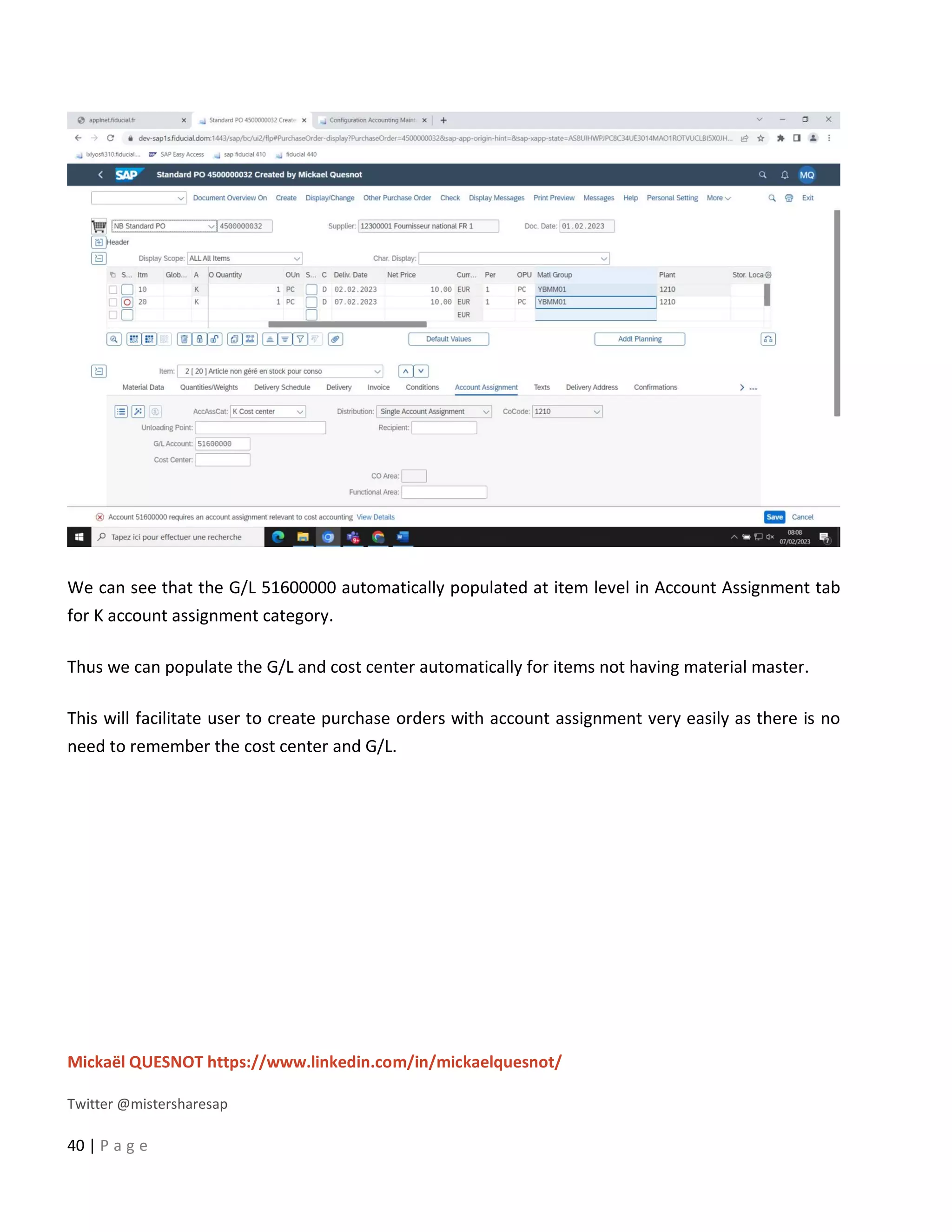
Now we will create a new purchase order after configuration
Mickaël QUESNOT https://www.linkedin.com/in/mickaelquesnot/
Twitter @mistersharesap
40 | P a g e
We can see that the G/L 51600000 automatically populated at item level in Account Assignment tab
for K account assignment category.
Thus we can populate the G/L and cost center automatically for items not having material master.
This will facilitate user to create purchase orders with account assignment very easily as there is no
need to remember the cost center and G/L.

Automatic Accounting in SAP.pdf

  • 1.
    Mickaël QUESNOT https://www.linkedin.com/in/mickaelquesnot/ Twitter@mistersharesap 1 | P a g e Your 5 Steps Guide to Use Automatic Accounting in SAP Whenever there is goods movement i.e. goods receipt, goods issue or goods transfer etc. the accounting/ financial documents are updated automatically. This automatic update happens as a result of automatic accounting configuration done in SPRO. For the materials having material master we determine the valuation class in accounting 1 tab.
  • 2.
    Mickaël QUESNOT https://www.linkedin.com/in/mickaelquesnot/ Twitter@mistersharesap 2 | P a g e Here the valuation class is the bridge which updates all the financial documents automatically with goods movements. We assign the required G/L to the valuation class which is automatically updated. In case of material procurement, when a material with material master is to be purchased, the G/L assigned to the valuation class is automatically populated in the PO. But in any industry many items do not have material master e.g. Consumable items. Here system cannot determine the G/L automatically as no valuation class maintained. It is mandatory to maintain G/L and cost center manually in PO. Consumable materials are procured using account assignment K (cost center). We will discuss how to populate G/L and cost center automatically in purchase order for the materials procured using K account assignment category and not having material master. It is possible with the help of material group.
  • 3.
    Mickaël QUESNOT https://www.linkedin.com/in/mickaelquesnot/ Twitter@mistersharesap 3 | P a g e Material group is a group of materials having same attributes like rubber, glass, metal etc. We will create a new material group which will be used to procure materials with K account assignment category. Step 1) Create material group Material Group Number and description of the material group. A material group comprises several materials or services having the same attributes. Use If you enter parts of the description or the number of the material group, the system finds the relevant group or suggests several for you to choose from. Example You have created the following material groups: Material group Description 011 Office materials 112 PC monitors 113 PC hard disks 911 Advertising and promotional gifts If you enter PC, the system will suggest the material groups '112' and '113' for you to choose from, because their descriptions contain the character string 'PC'. Path: SPRO –> IMG –> Logistics-General –> Material Master –> Settings for Key Field –> Define Material groups
  • 4.
    Mickaël QUESNOT https://www.linkedin.com/in/mickaelquesnot/ Twitter@mistersharesap 4 | P a g e Define Material Groups Short text Define Material Groups Use In this Customizing activity, you define material groups. With material groups you group materials with the same attributes or purpose. You can use material groups to: • Limit the scope of analyses • Systematically search for material master records via matchcodes Note In the component Sales and Distribution (SD), you can assign material groups to divisions.
  • 5.
    Mickaël QUESNOT https://www.linkedin.com/in/mickaelquesnot/ Twitter@mistersharesap 5 | P a g e Actions 1. Define your material groups. 2. Assign each material to a material group.
  • 6.
    Mickaël QUESNOT https://www.linkedin.com/in/mickaelquesnot/ Twitter@mistersharesap 6 | P a g e Step 2) Create new valuation class We will be creating a new valuation class for this purpose which will be assigned to the material group. Transaction code to create valuation class – OMSK Define Valuation Classes Short text Define valuation class for products and configure related attributes Use You can define which valuation classes are allowed for a material type. If a user creates a material, he must enter the material's valuation class in the accounting data. The system uses your default settings to check whether the valuation class is allowed for the material type.
  • 7.
    Mickaël QUESNOT https://www.linkedin.com/in/mickaelquesnot/ Twitter@mistersharesap 7 | P a g e The valuation class is a group of materials with the same account determination. If a transaction is to be posted to different accounts depending on the valuation class, create an account determination for each valuation class in the step Create automatic postings. The valuation classes allowed depend on the material type. Several valuation classes are generally allowed for one material type. A valuation class can also be allowed for several material types. The link between the valuation classes and the material types is set up via the account category reference. The account category reference is a combination of valuation classes. Precisely one account category reference is assigned to a material type. Example Requirements • You must have defined your material types. • You must have defined the chart of accounts. • You must have agreed with Financial Accounting which materials are assigned to which accounts. Default settings In the standard system, an account category reference is created for each material type. The account category reference is, in turn, assigned to precisely one valuation class. This means that each material type has its own valuation class. Recommendation We recommend that you create the account groups of your chart of accounts as an account category reference. Example GKR: • 3000 for raw materials • 3030 for accessory materials • 7900 for finished products
  • 8.
    Mickaël QUESNOT https://www.linkedin.com/in/mickaelquesnot/ Twitter@mistersharesap 8 | P a g e • and so on Activities 1. Create account category references under account category reference 2. Under valuation class, define the valuation classes for each account category reference. 3. Under Material type/account category reference, assign an account category reference to each material type.
  • 9.
    Mickaël QUESNOT https://www.linkedin.com/in/mickaelquesnot/ Twitter@mistersharesap 9 | P a g e Step 3) Assign this valuation class to the material group
  • 10.
    Mickaël QUESNOT https://www.linkedin.com/in/mickaelquesnot/ Twitter@mistersharesap 10 | P a g e Path: SPRO –> IMG –> Purchasing –> Material Master –> Entry Aid for Items without Material Master Entry Aids for Items Without a Material Master Short text Allows you to assign a purchasing value key and a valuation class to a material group. Use In this customizing activity, you can assign a purchasing value key that provides you with default values for remaining levels in purchase order items, without material master records and info records. Additionally, you can assign a valuation class to a material group that enables the system to establish different accounts for the individual material groups.
  • 11.
    Mickaël QUESNOT https://www.linkedin.com/in/mickaelquesnot/ Twitter@mistersharesap 11 | P a g e Step 4) Check and maintain cost center as mandatory
  • 12.
    Mickaël QUESNOT https://www.linkedin.com/in/mickaelquesnot/ Twitter@mistersharesap 12 | P a g e Transaction code – OME9 Maintain Account Assignment Categories Short text Maintain the values of account assignment categories for purchasing documents. Use You can verify the values of the account assignment categories. Additionally, based on your requirements, you can maintain the account assignment categories.
  • 13.
    Mickaël QUESNOT https://www.linkedin.com/in/mickaelquesnot/ Twitter@mistersharesap 13 | P a g e And go to details tab Account Modification Key which has a different meaning depending on the procedure. It is used to differentiate account determination. The key's meaning is predefined in the SAP system and cannot be changed. Example For tax postings, you can enter a tax code as the key. For tax clearing entries for down payments, you enter the modification key defined for down payments. This key was determined based on account type, special G/L indicator, and reconciliation account. For statistical offsetting entries, you enter a two-character identification code. The first character is the account type. The second character is the respective special G/L indicator.
  • 14.
    Mickaël QUESNOT https://www.linkedin.com/in/mickaelquesnot/ Twitter@mistersharesap 14 | P a g e For offsetting entries for inventory postings, you enter the key which is assigned to the movement type and posting string. Derive preliminary account assignment from G/L account Indicates that the preliminary account assignment is to be derived from the G/L account. Changes in procedure If you have set the indicator and the account determination facility supplies a G/L account, the preliminary account assignment is determined automatically. This means that the system assigns the relevant item to a cost center, an order or a profit center. The assignment can be carried out at the following organizational levels: • Company code • Valuation area • Plant If Inventory Management is not active in your system, you must specify (enter) the preliminary account assignments for all the items manually. Setting this indicator enables you to by-pass this step. You will then no longer get the dialog box for the entry of a preliminary account assignment. You maintain the automatic account assignment specification facility using the Customizing functionality of Financial Accounting under Maintain automatic account determination.
  • 15.
  • 16.
    Mickaël QUESNOT https://www.linkedin.com/in/mickaelquesnot/ Twitter@mistersharesap 16 | P a g e Here check the Acct modification, activate Derive Acct. Assignment and make sure that cost center field is a mandatory field. Step 5) Maintain G/L for valuation class Configure Automatic Postings In this step, you enter the system settings for Inventory Management and Invoice Verification transactions for automatic postings to G/L accounts. You can then check your settings using a simulation function. Under Further information there is a list of transactions in Materials Management and their definitions. What are automatic postings? Postings are made to G/L accounts automatically in the case of Invoice Verification and Inventory Management transactions relevant to Financial and Cost Accounting. Example: Posting lines are created in the following accounts in the case of a goods issue for a cost center: • Stock account • Consumption account How does the system find the relevant accounts? When entering the goods movement, the user does not have to enter a G/L account, since the system automatically finds the accounts to which postings are to be made using the following data: • Chart of accounts of the company code If the user enters a company code or a plant when entering a transaction, the system determines the chart of accounts which is valid for the company code. You must define the automatic account determination individually for each chart of accounts. • Valuation grouping code of the valuation area
  • 17.
    Mickaël QUESNOT https://www.linkedin.com/in/mickaelquesnot/ Twitter@mistersharesap 17 | P a g e If the automatic account determination within a chart of accounts is to run differently for certain company codes or plants (valuation areas), assign different valuation grouping codes to these valuation areas. You must define the automatic account determination individually for every valuation grouping code within a chart of accounts. It applies to all valuation areas which are assigned to this valuation grouping code. If the user enters a company code or a plant when entering a transaction, the system determines the valuation area and the valuation grouping code. • Transaction/event key (internal processing key) Posting transactions are predefined for those inventory management and invoice verification transactions relevant to accounting. Posting records, which are generalized in the value string, are assigned to each relevant movement type in inventory management and each transaction in invoice verification. These contain keys for the relevant posting transaction (for example, inventory posting and consumption posting) instead of actual G/L account numbers. You do not have to define these transaction keys, they are determined automatically from the transaction (invoice verification) or the movement type (inventory management). All you have to do is assign the relevant G/L account to each posting transaction. • Account grouping (only for offsetting entries, consignment liabilities, and price differences) Since the posting transaction "Offsetting entry for inventory posting" is used for different transactions (for example, goods issue, scrapping, physical inventory), which are assigned to different accounts (for example, consumption account, scrapping, expense/income from inventory differences), it is necessary to divide the posting transaction according to a further key: account grouping code. An account grouping is assigned to each movement type in inventory management which uses the posting transaction "Offsetting entry for inventory posting". Under the posting transaction "Offsetting entry for inventory posting", you must assign G/L accounts for every account grouping, that is, assign G/L accounts. If you wish to post price differences to different price difference accounts in the case of goods receipts for purchase orders, goods receipts for orders, or other movements, you can define different account grouping codes for the transaction key. Using the account grouping, you can also have different accounts for consignment liabilities and pipeline liabilities.
  • 18.
    Mickaël QUESNOT https://www.linkedin.com/in/mickaelquesnot/ Twitter@mistersharesap 18 | P a g e • Valuation class of material or (in case of split valuation) the valuation type The valuation class allows you to define automatic account determination that is dependent on the material. for example: you post a goods receipt of a raw material to a different stock account than if the goods receipt were for trading goods, even though the user enters the same transaction for both materials. You can achieve this by assigning different valuation classes to the materials and by assigning different G/L accounts to the posting transaction for every valuation class. If you do not want to differentiate according to valuation classes you do not have to maintain a valuation class for a transaction. Requirements Before you maintain automatic postings, you must obtain the following information: 1. Valuation level ( plant or company code) Establish whether the materials are valuated at plant or at company code level When valuation is at plant level, the valuation area corresponds to a plant. When valuation is at company code level, the valuation area corresponds to a company code. Define valuation level 2. Chart of accounts and valuation grouping code per valuation area Find out whether the valuation grouping code is active. Activate split valuation If it is not active, determine the chart of accounts assigned to each valuation area (via the company code). If it is active, determine the chart of accounts and the valuation grouping code assigned to each valuation area. Group valuation areas You must define a separate account determination process for chart of accounts and each valuation grouping code. 3. Valuation class per material type
  • 19.
    Mickaël QUESNOT https://www.linkedin.com/in/mickaelquesnot/ Twitter@mistersharesap 19 | P a g e If you wish to differentiate the account determination process for specific transactions according to valuation classes, find out which valuation classes are possible for each material type. Define valuation classes 4. Account grouping for offsetting entries to stock accounts Under Define account grouping for movement types, determine for which movement types an account grouping is defined for the transaction/event keys GGB (offsetting entry to stock posting), KON (consignment liabilities) and PRD (price differences). Default settings G/L account assignments for the charts of accounts INT and the valuation grouping code 0001 are SAP standard. Activities 1. Create account keys for each chart of accounts and each valuation grouping code for the individual posting transactions. To do so, proceed as follows: a) Call up the activity Configure Automatic Postings. The system first checks whether the valuation areas are correctly maintained. If, for example, a plant is not assigned to a company code, a dialog box and an error message appear. From this box, choose Continue (next entry) to continue the check. Choose Cancel to end the check. The configuration menu Automatic postings appears. b) Choose Goto -> Account assignment. A list of posting transactions in Materials Management appears. For further details of the individual transactions, see Further information. The Account determination indicator shows whether automatic account determination is defined for a transaction. c) Choose a posting transaction. A box appears for the first posting transaction. Here you can enter a chart of accounts. You can enter the following data for each transaction:
  • 20.
    Mickaël QUESNOT https://www.linkedin.com/in/mickaelquesnot/ Twitter@mistersharesap 20 | P a g e o Rules for account number assignments With Goto -> Rules you can enter the factors on which the account number assignments depend: - debit/credit indicator - general grouping (= account grouping) - valuation grouping - valuation class o Posting keys for the posting lines Normally you do not have to change the posting keys. If you wish to use new posting keys, you have to define them in the Customizing system of Financial Accounting. o Account number assignments You must assign G/L accounts for each transaction/event key (except KBS). You can assign these accounts manually or copy them from another chart of accounts via Edit -> Copy. If you want to differentiate posting transactions (e.g. inventory postings) according to valuation classes, you must make an account assignment for each valuation class. Using the posting transaction "Offsetting entry for inventory posting", you have to make an account assignment for each account grouping If the transaction PRD (price differences) is also dependent on the account grouping, you must create three account assignments: - an account assignment without account grouping - an account assignment with account grouping PRF - an account assignment with account grouping PRA If the transaction KON (consignment and pipeline liabilities) is also dependent on the account grouping, you must create two account assignments: - an account assignment without account grouping (consignment) - an account assignment with account grouping (pipeline)
  • 21.
    Mickaël QUESNOT https://www.linkedin.com/in/mickaelquesnot/ Twitter@mistersharesap 21 | P a g e d) Save your settings. 2. Then check your settings with the simulation function. With the simulation function, you can simulate the following: o Inventory Management transactions o Invoice Verification transactions When you enter a material or valuation class, the system determines the G/L accounts which are assigned to the corresponding posting transactions. Depending on the configuration, the SAP system checks whether the G/L account exists In the simulation you can compare the field selection of the movement type with that of the individual accounts and make any corrections. If you want to print the simulation, choose Simulation -> Report. To carry out the simulation, proceed as follows: a) Choose Settings to check the simulation defaults for - the application area (Invoice Verification or Inventory Management) - the input mode (material or valuation class) - account assignment Instructions b) Choose Goto -> Simulation. The screen for entering simulation data appears. c) Depending on the valuation level, enter a plant or a company code on the screen. d) When you simulate Inventory Management transactions, goods movements are simulated. The system suggests the first movement type for simulation. If several movements are possible with this movement type, you can select a line. When you simulate Invoice Verification transactions, a list appears on the screen of the possible transaction types. Select a line. e) Then choose Goto -> Account assignments. A list appears of the posting lines which can be created by the selected transaction. For each posting line, the G/L account for the debit posting as well as the G/L account for the credit posting are displayed.
  • 22.
    Mickaël QUESNOT https://www.linkedin.com/in/mickaelquesnot/ Twitter@mistersharesap 22 | P a g e f) From this screen, choose Goto -> Movement+ to get a list of the posting lines for the next movement type or transaction type. If you work with valuation classes, choose Goto -> Valuation class+ to receive the simulation for the next valuation class. This function is not possible when simulating with material numbers. Choose Goto -> Check screen layout to compare the movement type with the G/L accounts determined by the system and make any necessary corrections. Note The simulation function does NOT obviate the need for a trial posting! Further notes The following list shows the individual transactions with examples of how they are used. The transaction/event key is specified in brackets. • Agency business: income (AG1) This transaction can be used in agency business for income deriving from commission (e.g. del credere commission). The account key is used in the calculation schemas for agency business to determine the associated revenue accounts. • Agency business: turnover (AG2) This transaction can be used in agency business if turnover (business volume) postings are activated in Customizing for the payment types. The account key is specified in Customizing for the billing type. • Agency business: expense (AG3) This transaction can be used in agency business for commission expenses. The account key is used in the calculation schemas for agency business to determine the associated expense accounts. • Expense/revenue from consumption of consignment material (AKO)
  • 23.
    Mickaël QUESNOT https://www.linkedin.com/in/mickaelquesnot/ Twitter@mistersharesap 23 | P a g e This transaction is used in Inventory Management in the case of withdrawals from consignment stock or when consignment stock is transferred to own stock if the material is subject to standard price control and the consignment price differs from the standard price. • Expenditure/income from transfer posting (AUM) This transaction is used for transfer postings from one material to another if the complete value of the issuing material cannot be posted to the value of the receiving material. This applies both to materials with standard price control and to materials with moving average price control. Price differences can arise for materials with moving average price if stock levels are negative and the stock value becomes unrealistic as a result of the posting. Transaction AUM can be used irrespective of whether the transfer posting involves a transfer between plants. The expenditure/income is added to the receiving material. • Provisions for subsequent (end-of-period rebate) settlement (BO1) If you use the "subsequent settlement" function with regard to conditions (e.g. for period-end volume-based rebates), provisions for accrued income are set up when goods receipts are recorded against purchase orders if this is defined for the condition type. • Income from subsequent settlement (BO2) The rebate income generated in the course of "subsequent settlement" (end-of-period rebate settlement) is posted via this transaction. • Income from subsequent settlement after actual settlement (BO3) If a goods receipt occurs after settlement accounting has been effected for a rebate arrangement, no further provisions for accrued rebate income can be managed by the "subsequent settlement" facility. No postings should be made to the account normally used for such provisions. As an alternative, you can use this transaction to post provisions for accrued rebate income to a separate account in cases such as the one described. • Supplementary entry for stock (BSD) This account is posted when closing entries are made for a cumulation run. This account is a supplementary account to the stock account; that is, the stock account is added to it to determine the stock value that was calculated via the cumulation. In the process, the various valuation areas (for example, commercial, tax), that are used in the balance sheet are taxed separately.
  • 24.
    Mickaël QUESNOT https://www.linkedin.com/in/mickaelquesnot/ Twitter@mistersharesap 24 | P a g e • Change in stock (BSV) Changes in stocks are posted in Inventory Management at the time goods receipts are recorded or subsequent adjustments made with regard to subcontract orders. If the account assigned here is defined as a cost element, you must specify a preliminary account assignment for the account in the table of automatic account assignment specification (Customizing for Controlling) in order to be able to post goods receipts against subcontract orders. In the standard system, cost center SC-1 is defined for this purpose. • Stock posting (BSX) This transaction is used for all postings to stock accounts. Such postings are effected, for example: o In inventory management in the case of goods receipts to own stock and goods issues from own stock o In invoice verification, if price differences occur in connection with incoming invoices for materials valuated at moving average price and there is adequate stock coverage o In order settlement, if the order is assigned to a material with moving average price and the actual costs at the time of settlement vary from the actual costs at the time of goods receipt Because this transaction is dependent on the valuation class, it is possible to manage materials with different valuation classes in separate stock accounts. Caution Take care to ensure that: o A stock account is not used for any transaction other than BSX o Postings are not made to the account manually o The account is not changed in the productive system before all stock has been booked out of it Otherwise differences would arise between the total stock value of the material master records and the balance on the stock account. Account determination of valuated sales order stock and project stock
  • 25.
    Mickaël QUESNOT https://www.linkedin.com/in/mickaelquesnot/ Twitter@mistersharesap 25 | P a g e Note that for valuated sales order stock and project stock (special stock E and Q) and for the transaction/event keys BSX and GBB, you must maintain an account determination to avoid receiving warning messages when entering data (purchase order or transfer posting) for valuated stock. During data entry, the system attempts to execute a provisional account determination for GBB for valuated stock. The system will only replace the provisional account determination for GBB with the correct account determination for the stock account (BSX), in the background, if you enter the data for valuated stock at a later point in time. • Revaluation of other consumption (COC) This transaction/event key is required for the revaluation of consumption in Actual Costing/Material Ledger. Revaluation of consumption valuates single-level consumption using the actual prices determined in the Actual Costing/Material Ledger application. This revaluation can either take place in the account where the original postings were made, or in a header account. The header account is determined using the transaction/event key COC. • Del credere (DEL) Transaction/event key for the payment/invoice list documents in Purchasing. The account key is needed in the calculation schema for payment/settlement processing to determine the associated revenue accounts. • Small differences, Materials Management (DIF) This transaction is used in Invoice Verification if you define a tolerance for minor differences and the balance of an invoice does not exceed the tolerance. • Purchase account(EIN), purchase offsetting account (EKG), freight purchase account (FRE) These transactions are used only if Purchase Account Management is active in the company code. Note Due to special legal requirements, this function was developed specially for certain countries (Belgium, Spain, Portugal, France, Italy, and Finland). Before you use this function, check whether you need to use it in your country.
  • 26.
    Mickaël QUESNOT https://www.linkedin.com/in/mickaelquesnot/ Twitter@mistersharesap 26 | P a g e • Freight clearing (FR1), provision for freight charges (FR2), customs duty clearing (FR3), provision for customs duty (FR4) These transactions are used to post delivery costs (incidental procurement costs) in the case of goods receipts against purchase orders and incoming invoices. Which transaction is used for which delivery costs depends on the condition types defined in the purchase order. You can also enter your own transactions for delivery costs in condition types. • External service (FRL) The transaction is used for goods and invoice receipts in connection with subcontract orders. If the account assigned here is defined as a cost element, you must specify a preliminary account assignment for the account in the table of automatic account assignment specification (Customizing for Controlling) in order to be able to post goods receipts against subcontract orders. In the standard system, cost center SC-1 is defined for this purpose. • External service, delivery costs (FRN) This transaction is used for delivery costs (incidental costs of procurement) in connection with subcontract orders. If the account assigned here is defined as a cost element, you must specify a preliminary account assignment for the account in the table of automatic account assignment specification (Customizing for Controlling) in order to be able to post goods receipts against subcontract orders. In the standard system, cost center SC-1 is defined for this purpose. • Offsetting entry for stock posting (GBB) Offsetting entries for stock postings are used in Inventory Management. They are dependent on the account grouping to which each movement type is assigned. The following account groupings are defined in the standard system: o AUA: for order settlement o AUF: for goods receipts for orders (without account assignment) and for order settlement if AUA is not maintained o AUI: Subsequent adjustment of actual price from cost center directly to material (with account assignment) o BSA: for initial entry of stock balances
  • 27.
    Mickaël QUESNOT https://www.linkedin.com/in/mickaelquesnot/ Twitter@mistersharesap 27 | P a g e o INV: for expenditure/income from inventory differences o VAX: for goods issues for sales orders without account assignment object (the account is not a cost element) o VAY: for goods issues for sales orders with account assignment object (account is a cost element) o VBO: for consumption from stock of material provided to vendor o VBR: for internal goods issues (for example, for cost center) o VKA: for sales order account assignment (for example, for individual purchase order) o VKP: for project account assignment (for example, for individual PO) o VNG: for scrapping/destruction o VQP: for sample withdrawals without account assignment o VQY: for sample withdrawals with account assignment o ZOB: for goods receipts without purchase orders (mvt type 501) o ZOF: for goods receipts without production orders (mvt types 521 and 531) You can also define your own account groupings. If you intend to post goods issues for cost centers (mvt type 201) and goods issues for orders (mvt type 261) to separate consumption accounts, you can assign the account grouping ZZZ to movement type 201 and account grouping YYY to movement type 261. Caution If you use goods receipts without a purchase order in your system (movement type 501), you have to check to which accounts the account groupings are assigned ZOB If you expect invoices for the goods receipts, and these invoices can only be posted in Accounting, you can enter a clearing account (similar to a GR/IR clearing account though without open item management), which is cleared in Accounting when you post the vendor invoice.
  • 28.
    Mickaël QUESNOT https://www.linkedin.com/in/mickaelquesnot/ Twitter@mistersharesap 28 | P a g e Note that the goods movement is valuated with the valuation price of the material if no external amount has been entered. As no account assignment has been entered in the standard system, the assigned account is not defined as a cost element. If you assign a cost element, you have to enter an account assignment via the field selection or maintain an automatic account assignment for the cost element. Account determination of valuated sales order stock and project stock Note that for valuated sales order stock and project stock (special stock E and Q) and for the transaction/event keys BSX and GBB, you must maintain an account determination to avoid receiving warning messages when entering data (purchase order or transfer posting) for valuated stock. During data entry, the system attempts to execute a provisional account determination for GBB for valuated stock. The system will only replace the provisional account determination for GBB with the correct account determination for the stock account (BSX), in the background, if you enter the data for valuated stock at a later point in time. • Purchase order with account assignment (KBS) You cannot assign this transaction/event key to an account. It means that the account assignment is adopted from the purchase order and is used for the purpose of determining the posting keys for the goods receipt. • Exchange Rate Differences Materials Management(AVR) (KDG) When you carry out a revaluation of single-level consumption in the material ledger for an alternative valuation run, the exchange rate difference accounts of the materials are credited with the exchange rate differences that are to be assigned to the consumption. • Exchange rate differences in the case of open items (KDM) Exchange rate differences in the case of open items arise when an invoice relating to a purchase order is posted with a different exchange rate to that of the goods receipt and the material cannot be debited or credited due to standard price control or stock undercoverage/shortage. • Differences due to exchange rate rounding, Materials Management (KDR) An exchange rate rounding difference can arise in the case of an invoice made out in a foreign currency. If a difference arises when the posting lines are translated into local currency (as a
  • 29.
    Mickaël QUESNOT https://www.linkedin.com/in/mickaelquesnot/ Twitter@mistersharesap 29 | P a g e result of rounding), the system automatically generates a posting line for this rounding difference. • Exchange Rate Differences from Lower Levels (KDV) This transaction/event key is no longer used. In multi-level periodic settlement in the material ledger, some of the exchange rate differences that have been posted during the period in respect of the raw materials, semifinished products and cost centers performing the activity used in the manufacture of a semifinished or finished product are debited or credited to that semifinished or finished product. • Consignment liabilities (KON) Consignment liabilities arise in the case of withdrawals from consignment stock or from a pipeline or when consignment stock is transferred to own stock. Depending on the settings for the posting rules for the transaction/event key KON, it is possible to work with or without account modification. If you work with account modification, the following modifications are available in the standard system: o None for consignment liabilities o PIP for pipeline liabilities • Offsetting entry for price differences in cost object hierarchies (KTR) The contra entry for price difference postings (transaction PRK) arising through settlement via material account determination is carried out with transaction KTR. • Accruals and deferrals account (material ledger) (LKW) If the process of material price determination in the material ledger is not accompanied by revaluation of closing stock, the price and exchange rate differences that should actually be applied to the stock value are contra-posted to accounts with the transaction/event key LKW. If, on the other hand, price determination in the material ledger is accompanied by revaluation of the closing stock, the price and exchange rate differences are posted to the stock account (i.e. the stock is revalued). • Price Difference from Exploded WIP (Lar.) (PRA)
  • 30.
    Mickaël QUESNOT https://www.linkedin.com/in/mickaelquesnot/ Twitter@mistersharesap 30 | P a g e If you use the WIP revaluation of the material ledger, the price variances of the exploded WIP stock of an activity type or a business process are posted to the price differences account with transaction/event key PRA. • Differences (AVR Price) (PRC) In the alternative valuation run in the material ledger, some of the variances that accrue interest in the cost centers, are transfer posted to the semifinished or finished product. • Price differences (PRD) Price differences arise for materials valuated at standard price in the case of all movements and invoices with a value that differs from the standard price. Examples: goods receipts against purchase orders (if the PO price differs from the standard pricedardpreis), goods issues in respect of which an external amount is entered, invoices (if the invoice price differs from the PO price and the standard price). Price differences can also arise in the case of materials with moving average price if there is not enough stock to cover the invoiced quantity. In the case of goods movements in the negative range, the moving average price is not changed. Instead, any price differences arising are posted to a price difference account. Depending on the settings for the posting rules for transaction/event key PRD, it is possible to work with or without account modification. If you use account modification, the following modifications are available in the standard system: o None for goods and invoice receipts against purchase orders o PRF for goods receipts against production orders and order settlement o PRA for goods issues and other movements o PRU for transfer postings (price differences in the case of external amounts) • Price Differences (Material Ledger, AVR) (PRG) When you carry out a revaluation of single-level consumption in the material ledger during the alternative valuation run, the price difference accounts of the materials are credited with the price differences that are to be assigned to the consumption.
  • 31.
    Mickaël QUESNOT https://www.linkedin.com/in/mickaelquesnot/ Twitter@mistersharesap 31 | P a g e • Price differences in cost object hierarchies (PRK) In cost object hierarchies, price differences occur both for the assigned materials with standard price and for the accounts of the cost object hierarchy. In the course of settlement for cost object hierarchies after settlement via material account determination, the price differences are posted via the transaction PRK. • Price Difference from Exploded WIP (Mat.) (PRM) If you use the WIP revaluation of the material ledger, the price and exchange rate differences of the exploded WIP stock of a material are posted to the price difference account with transaction/event key PRM. • Price differences, product cost collector (PRP) During settlement accounting with regard to a product cost collector in repetitive manufacturing, price differences are posted with the transaction PRP in the case of the valuated sales order stock. This transaction is currently used in the following instances only: - Production cost collector in Release 4.0 - Product cost collector in IS Automotive Release 2.0 (product cost collector in connection with APO) • Offsetting entry: price differences, product cost collector (PRQ) The offsetting (contra) entry to price difference postings (transaction PRP) in the course of settlement accounting with respect to a product cost collector in repetitive manufacturing in the case of the valuated sales order stock is carried out via transaction PRQ. This transaction is currently used in the following instances only: - Production cost collector in Release 4.0 - Product cost collector in IS Automotive Release 2.0 (product cost collector in connection with APO) • Price Differences from Lower Levels (PRV) This transaction/event key is no longer used. In multi-level periodic settlement in the material ledger, some of the price differences posted during the period in respect of the raw materials, semifinished products, and cost centers
  • 32.
    Mickaël QUESNOT https://www.linkedin.com/in/mickaelquesnot/ Twitter@mistersharesap 32 | P a g e performing the activity used in a semifinished or finished product, are transfer posted to that semifinished or finished product. • Price differences for material ledger (PRY) In the course of settlement in the material ledger, price differences from the material ledger are posted with the transaction PRY. • Expense and revenue from revaluation (retroactive pricing, RAP) This transaction/event key is used in Invoice Verification within the framework of the revaluation of goods and services supplied for which settlement has already taken place. Any difference amounts determined are posted to the accounts assigned to the transaction/event key RAP (retroactive pricing) as expense or revenue. At the time of the revaluation, the amounts determined or portions thereof) are posted neither to material stock accounts nor to price difference accounts. The full amount is always posted to the "Expense from Revaluation" or "Revenue from Revaluation" account. The offsetting (contra) entry is made to the relevant vendor account. • Invoice reductions in Logistics Invoice Verification (RKA) This transaction/event key is used in Logistics Invoice Verification for the interim posting of price differences in the case of invoice reductions. If a vendor invoice is reduced, two accounting documents are automatically created for the invoice document. With the first accounting document, the amount invoiced is posted in the vendor line. An additional line is generated on the invoice reduction account to partially offset this amount. With the second accounting document, the invoice reduction is posted in the form of a credit memo from the vendor. The offsetting entry to the vendor line is the invoice reduction account. Hence the invoice reduction account is always balanced off by two accounting documents within one transaction. • Provision for delivery costs (RUE) Provisions are created for accrued delivery costs if a condition type for provisions is entered in the purchase order. They must be cleared manually at the time of invoice verification. • Taxes in case of transfer posting GI/GR (TXO) This transaction/event key is only relevant to Brazil (nota fiscal).
  • 33.
    Mickaël QUESNOT https://www.linkedin.com/in/mickaelquesnot/ Twitter@mistersharesap 33 | P a g e • Revenue/expense from revaluation (UMB) This transaction/event key is used both in Inventory Management and in Invoice Verification if the standard price of a material has been changed and a movement or an invoice is posted to the previous period (at the previous price). • Expenditure/income from revaluation (UMD) This account is the offsetting account for the BSD account. It is posted during the closing entries for the cumulation run of the material ledger and has to be defined for the same valuation areas. • Unplanned delivery costs (UPF) Unplanned delivery costs are delivery costs (incidental procurement costs) that were not planned in a purchase order (e.g. freight, customs duty). In the SAP posting transaction in Logistics Invoice Verification, instead of distributing these unplanned delivery costs among all invoice items as hitherto, you have the option of posting them to a special account. A separate tax code can be used for this account. • Input tax, Purchasing (VST) Transaction/event key for tax account determination within the "subsequent settlement" facility for debit-side settlement types. The key is needed in the settlement schema for tax conditions. • Inflation posting (WGB) Transaction/event key that posts inflation postings to a different account, within the handling of inflation process for the period-end closing. • Goods issue, revaluation (inflation) (WGI) This transaction/event key is used if already-posted goods issues have to be revaluated following the determination of a new market price within the framework of inflation handling. • Goods receipt, revaluation (inflation) (WGR) This transaction/event key is used if already-effected transfer postings have to be revaluated following the determination of a new market price within the framework of inflation handling.
  • 34.
    Mickaël QUESNOT https://www.linkedin.com/in/mickaelquesnot/ Twitter@mistersharesap 34 | P a g e This transaction is used for the receiving plant, whereas transaction WGI (goods receipt, revaluation (inflation)) is used for the plant at which the goods are issued. • WIP from Price Differences (Internal Activity) (WPA) When you use the WIP revaluation of the material ledger, the price variances from the actual price calculation that are to be assigned to the WIP stock, an activity type or a business process are posted to the WIP account for activities. • WIP from Price Differences (Material) (WPM) When you use the WIP revaluation of the material ledger, the price and exchange rate differences that are to be assigned to the WIP stock of a material are posted to the WIP account for material. • GR/IR clearing (WRX) Postings to the GR/IR clearing account occur in the case of goods and invoice receipts against purchase orders. Caution You must set the Balances in local currency only indicator for the GR/IR clearing account to enable the open items to be cleared. For more on this topic, see the field documentation. • GR/IR clearing for material ledger (WRY) This transaction/event key is not used from Release 4.0 onwards. Prior to 4.0, it was used for postings to the GR/IR clearing account if the material ledger was active. As of Release 4.0, the transaction is no longer necessary, since postings to the GR/IR account in parallel currencies are possible. Customers who used the transaction WRY prior to Release 4.0 must make a transfer posting from the WRY account to the WRX account in order to ensure that the final balance on the WRY account is zero. • Activity Price Differences (PRL) Price differences for activity types or business processes. During settlement in the material ledger, these price differences are posted from cost centers (Transaction/Account Modification
  • 35.
    Mickaël QUESNOT https://www.linkedin.com/in/mickaelquesnot/ Twitter@mistersharesap 35 | P a g e GBB/AUI) to the material ledger (transaction PRL) and then further allocated to the receivers (finished products/WIP).
  • 36.
    Mickaël QUESNOT https://www.linkedin.com/in/mickaelquesnot/ Twitter@mistersharesap 36 | P a g e Offsetting entry for inventory posting
  • 37.
  • 38.
    Mickaël QUESNOT https://www.linkedin.com/in/mickaelquesnot/ Twitter@mistersharesap 38 | P a g e Transaction code – OBYC Here maintain the valuation class in GBB – VBR yb01 along with G/L. In our case we maintained the G/L as 51600000. Below is a purchase order which is created before configuration settings.
  • 39.
    Mickaël QUESNOT https://www.linkedin.com/in/mickaelquesnot/ Twitter@mistersharesap 39 | P a g e In above purchase order, system is asking for a G/L to be entered manually as it’s unable to pull the G/L automatically due to missing material master. Now we will create a new purchase order after configuration
  • 40.
    Mickaël QUESNOT https://www.linkedin.com/in/mickaelquesnot/ Twitter@mistersharesap 40 | P a g e We can see that the G/L 51600000 automatically populated at item level in Account Assignment tab for K account assignment category. Thus we can populate the G/L and cost center automatically for items not having material master. This will facilitate user to create purchase orders with account assignment very easily as there is no need to remember the cost center and G/L.