Archana Patel
Customer Success Architect
MuleSoft
CI/CD- Automate Mule Deployments with
Github Actions/Travis CI
2
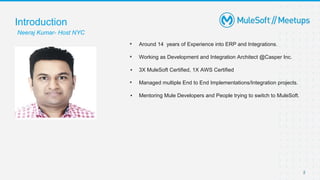
▪ Around 14 years of Experience into ERP and Integrations.
▪ Working as Development and Integration Architect @Casper Inc.
▪ 3X MuleSoft Certified, 1X AWS Certified
▪ Managed multiple End to End Implementations/Integration projects.
▪ Mentoring Mule Developers and People trying to switch to MuleSoft.
Introduction
Neeraj Kumar- Host NYC
Safe Harbor Statement
•Both the speaker and host are organizing this meet up in individual capacity only.
We are not representing our companies here.
•This presentation is strictly for learning purpose only. Organizer/Presenter do not
hold any responsibility that same solution will work for your business
requirements also.
•This presentation is not meant for any promotional activities.
4
▪ 7+ years of Mule Development Experience
▪ Joined MuleSoft as a Customer Success Architect
in 2020
▪ Wellington, New Zealand Meetup Leader
Introduction
Archana Patel
https://www.linkedin.com/in/archana-patel
Agenda
● Deployment Steps
● Demo
● Considerations
● Q&A
Deployment Steps
1. Configure a Mule App to deploy to CloudHub.
2. Set up a CI/CD workflow to build and deploy a Mule App.
3. Set up nexus repository access for build dependencies.
4. Configure secrets for credentials used in the deployment.
5. Run MUnit tests and coverage reports.
6. Build and deployment Notifications via Slack
6
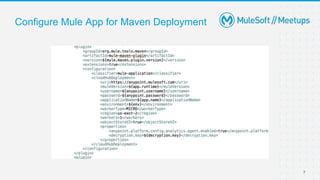
Configure Mule App for Maven Deployment
7
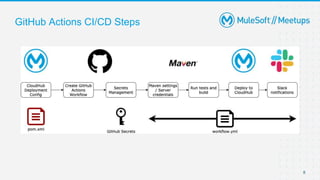
GitHub Actions CI/CD Steps
8
Demo
Deploy Mule application to CloudHub with Github Actions
Github Actions - Gotchas
● Secrets - can’t have dot(.) in the secrets name or key, can’t use the reserved
words such as ‘token’
● Nexus credentials - build step needs to download the mule runtime from the
enterprise repo and it took me some time to set the server credentials up correctly
Github Actions - Considerations
● Lots of Actions available in the marketplace from GitHub and other authors
● Re-run of individual jobs is not possible - all or nothing
● Secrets can defined at repo level or organisation level
● Manual build trigger has to be configured in the workflow
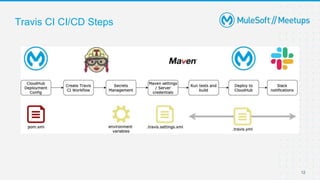
Travis CI CI/CD Steps
12
Demo
Deploy Mule application to CloudHub with Travis CI
Travis CI - Gotchas
● User vs Org plan - Build wouldn’t start on push and no error shown, found out it
was because my Travis CI plan was for the USER whereas the repo was under
an ORG - moved repo from org to user and it worked
● Environment variables - can’t have dot(.) in the env variable name, some special
characters have to be escaped in the variable value
● For slack integration, follow instructions on the Slack website (when setting up the
integration, click on Expand button)
● CLI client is needed for encrypting config values
Travis CI - Considerations
● Great for OS/VM customisations
● Documentation is lacking
● Quick build times
● Allows to rerun individual jobs
● Manual build trigger is available by default
● Secrets can only be defined at repo level
● Extensive list of notifications / build status integrations
Q&A
Quiz Time
Get ready to WIN a Special Gift from MuleSoft Community
Question 1
1) What 2 platforms did I cover in today’s demo?
a) Jenkins and Travis CI
a) Github Actions and CircleCI
a) Github Actions and Travis CI
19
Question 2
2) What did we add to the build artifact names to identify them easily?
a) App version
a) Commit hash
a) Timestamp
20
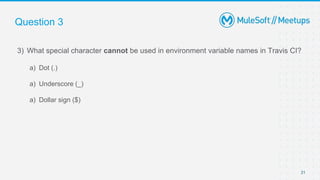
Question 3
3) What special character cannot be used in environment variable names in Travis CI?
a) Dot (.)
a) Underscore (_)
a) Dollar sign ($)
21
Upcoming Meetups
● Topic: Power of SalesForce Lightning WC and Mule along with Platform Events.
Date: Saturday, July 24th 2021, 11AM EDT
Speaker: Amit Singh, India
https://meetups.mulesoft.com/events/details/mulesoft-new-york-city-presents-power-of-salesforce-lightning-web-components-
and-mule-along-with-platform-events/
Thank you

Automate mule deployments with github actions and travis ci

  • 1.
    Archana Patel Customer SuccessArchitect MuleSoft CI/CD- Automate Mule Deployments with Github Actions/Travis CI
  • 2.
    2 ▪ Around 14years of Experience into ERP and Integrations. ▪ Working as Development and Integration Architect @Casper Inc. ▪ 3X MuleSoft Certified, 1X AWS Certified ▪ Managed multiple End to End Implementations/Integration projects. ▪ Mentoring Mule Developers and People trying to switch to MuleSoft. Introduction Neeraj Kumar- Host NYC
  • 3.
    Safe Harbor Statement •Boththe speaker and host are organizing this meet up in individual capacity only. We are not representing our companies here. •This presentation is strictly for learning purpose only. Organizer/Presenter do not hold any responsibility that same solution will work for your business requirements also. •This presentation is not meant for any promotional activities.
  • 4.
    4 ▪ 7+ yearsof Mule Development Experience ▪ Joined MuleSoft as a Customer Success Architect in 2020 ▪ Wellington, New Zealand Meetup Leader Introduction Archana Patel https://www.linkedin.com/in/archana-patel
  • 5.
    Agenda ● Deployment Steps ●Demo ● Considerations ● Q&A
  • 6.
    Deployment Steps 1. Configurea Mule App to deploy to CloudHub. 2. Set up a CI/CD workflow to build and deploy a Mule App. 3. Set up nexus repository access for build dependencies. 4. Configure secrets for credentials used in the deployment. 5. Run MUnit tests and coverage reports. 6. Build and deployment Notifications via Slack 6
  • 7.
    Configure Mule Appfor Maven Deployment 7
  • 8.
  • 9.
    Demo Deploy Mule applicationto CloudHub with Github Actions
  • 10.
    Github Actions -Gotchas ● Secrets - can’t have dot(.) in the secrets name or key, can’t use the reserved words such as ‘token’ ● Nexus credentials - build step needs to download the mule runtime from the enterprise repo and it took me some time to set the server credentials up correctly
  • 11.
    Github Actions -Considerations ● Lots of Actions available in the marketplace from GitHub and other authors ● Re-run of individual jobs is not possible - all or nothing ● Secrets can defined at repo level or organisation level ● Manual build trigger has to be configured in the workflow
  • 12.
  • 13.
    Demo Deploy Mule applicationto CloudHub with Travis CI
  • 14.
    Travis CI -Gotchas ● User vs Org plan - Build wouldn’t start on push and no error shown, found out it was because my Travis CI plan was for the USER whereas the repo was under an ORG - moved repo from org to user and it worked ● Environment variables - can’t have dot(.) in the env variable name, some special characters have to be escaped in the variable value ● For slack integration, follow instructions on the Slack website (when setting up the integration, click on Expand button) ● CLI client is needed for encrypting config values
  • 15.
    Travis CI -Considerations ● Great for OS/VM customisations ● Documentation is lacking ● Quick build times ● Allows to rerun individual jobs ● Manual build trigger is available by default ● Secrets can only be defined at repo level ● Extensive list of notifications / build status integrations
  • 16.
  • 18.
    Quiz Time Get readyto WIN a Special Gift from MuleSoft Community
  • 19.
    Question 1 1) What2 platforms did I cover in today’s demo? a) Jenkins and Travis CI a) Github Actions and CircleCI a) Github Actions and Travis CI 19
  • 20.
    Question 2 2) Whatdid we add to the build artifact names to identify them easily? a) App version a) Commit hash a) Timestamp 20
  • 21.
    Question 3 3) Whatspecial character cannot be used in environment variable names in Travis CI? a) Dot (.) a) Underscore (_) a) Dollar sign ($) 21
  • 22.
    Upcoming Meetups ● Topic:Power of SalesForce Lightning WC and Mule along with Platform Events. Date: Saturday, July 24th 2021, 11AM EDT Speaker: Amit Singh, India https://meetups.mulesoft.com/events/details/mulesoft-new-york-city-presents-power-of-salesforce-lightning-web-components- and-mule-along-with-platform-events/
  • 23.