15 Apr 2023
NYC MuleSoft Meetup Group
Liquibase Integration with MuleSoft
Safe Harbour Statement
● Both the speaker and the host are organizing this meet-up in individual capacity only. We are
not representing our companies here.
● This presentation is strictly for learning purposes only. Organizer/Presenter do not hold any
responsibility that same solution will work for your business requirements.
● This presentation is not meant for any promotional activities.
2
A recording of this meetup will be uploaded to events page within 24 hours.
Questions can be submitted/asked at any time in the Chat/Questions & Answers Tab.
Make it more Interactive!!!
Give us feedback! Rate this meetup session by filling feedback form at the end of the day.
We Love Feedbacks!!! Its Bread & Butter for Meetup.
Housekeeping
3
Organizers
● Around 15+ years of experience into ERP and integrations
● Working as principal architect at Slalom LLC
● 3X MuleSoft Certified, 1X AWS Certified
● Managed multiple end to end implementation/integrations
projects
● MuleSoft Ambassador
● Mentoring Mule Developers and People trying to switch to
MuleSoft
Neeraj Kumar
5
About the Speaker
● Working as a Senior Principal Engineer at Tricon Infotech
Private Limited.
● 13+ years of Total Experience.
● 5+ years experience in Mulesoft.
● Certified MuleSoft Developer and Architect.
● MuleSoft Mentor and Leader
● Top contributors of MuleSoft Help Forum
● Founder of DataWeave Fun
Shyam Raj Prasad
6
● Introductions
● Liquibase
❑ Introduction
❑ Major Concepts
❑ Liquibase Integration with MuleSoft
● Demo
● Wrap-Up
Agenda
Liquibase
Database Change Management
● Liquibase is an open-source solution
● It is for managing revisions of database schema scripts
● It works across various types of databases
● Supports various file formats for defining the DB structure
What is Liquibase
8
9
• We used to maintain DB scripts (text based) and add them manually to
DB
• But there are more issues
○ Easy to lost sync between code and DB state
○ Hard to find out state of particular DB environment
○ Often require to re-create DB from scratch during development
○ Hard to recover from error during development
(Ex: In case of applying wrong statement to DB)
• For these issues, Liquibase is a good solution
Why Liquibase ?
10
• Flyway
• mybatis
• c5-db-migration
• dbdeploy
• MIGRATEdb
• migrate4j
• dbmaintain
• AutoPatch
What are the other similar tools?
11
• Easy setup
• Extensibility
• Database diff report
• Supports for many database types
• Rollback database changes feature
• Database independent migration support
• Java based and easy to manage with java project
• Support for different changelog format
○ build-in: XML, YAML, JSON and SQL
How Liquibase is differ from others?
• Compatibility with a broad range of databases such as Oracle, SQL Server, MariaDB
& PostgreSQL.
• Liquibase also works with:
o DB2 on Z.
o Apache Derby and SQLite.
o Oracle ATP, H2 databases & Informix.
• For a complete list of native and community-supported databases, see Liquibase
Getting Started.
• A flexible extension framework that allows for seamless additions of newly released
platforms and integrations.
• Full control of when, where, and how database changes are deployed.
12
Major Features of Liquibase
• Ability to merge changes from multiple developers.
• Code branches.
• Multiple databases.
• Cluster-safe database upgrades.
• Generation of starting changelogs from existing databases.
• Generation of database change documentation.
• Automated updates or generation of SQL.
13
Liquibase Supports
There are two main mechanisms, or concepts, that are the foundation of Liquibase.
These two concepts are:
• Schema Changes which consist of changelogs, changesets & Change Types.
• Tracking tables that record database changes.
14
How Liquibase Works
• Schema changes are the fundamental unit of change in Liquibase.
• In SQL, schema changes are written using SQL statements that create, modify or drop
database objects.
• Examples of typical schema changes are create table, add index and drop column.
• In XML, YAML or JSON the same schema changes are modelled as Liquibase Change Types.
▪ One or more schema changes (Change Types) are grouped into a changeset. The best practice is to
limit each changeset to only one Change Type.
▪ One or more changesets are contained in a changelog.
▪ Changelogs are text files containing schema changes. They should be stored and versioned in your
preferred source control tool.
In addition to containing schema changes, a changelog can include other changelogs. This allows
multiple teams to each work on their own changelogs so they can work independently.
15
Schema Changes
Tracking tables are used to track, version, and deploy database schema changes. If your
database does not contain a tracking table, Liquibase will create one for you.
Liquibase uses two types of tables to track successful schema change deployments:
• DATABASECHANGELOG
• DATABASECHANGELOGLOCK
16
Tracking Tables
The DATABASECHANGELOG table is created and used by Liquibase to track which
changesets have already been run.
It does this by tracking each changeset as a row identified by a combination of ID, author,
and filename specified in the changelog. It is required to make each changeset ID unique in
one changelog file. The author will likely remain the same in every changeset in a changelog,
but if working in a team, it could differ per changeset.
17
DATABASECHANGELOG
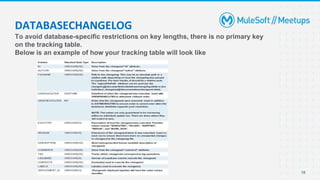
To avoid database-specific restrictions on key lengths, there is no primary key
on the tracking table.
Below is an example of how your tracking table will look like
18
DATABASECHANGELOG
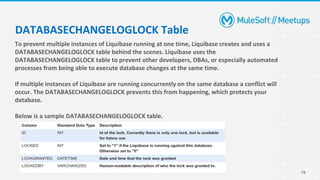
To prevent multiple instances of Liquibase running at one time, Liquibase creates and uses a
DATABASECHANGELOGLOCK table behind the scenes. Liquibase uses the
DATABASECHANGELOGLOCK table to prevent other developers, DBAs, or especially automated
processes from being able to execute database changes at the same time.
If multiple instances of Liquibase are running concurrently on the same database a conflict will
occur. The DATABASECHANGELOGLOCK prevents this from happening, which protects your
database.
Below is a sample DATABASECHANGELOGLOCK table.
19
DATABASECHANGELOGLOCK Table
20
• Changelog file
• Changeset
• Changes
• Preconditions
• Contexts
Major Concepts
21
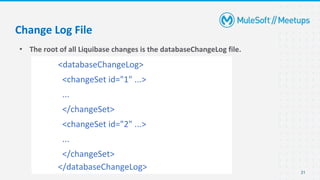
• The root of all Liquibase changes is the databaseChangeLog file.
Change Log File
<databaseChangeLog>
<changeSet id="1" ...>
...
</changeSet>
<changeSet id="2" ...>
...
</changeSet>
</databaseChangeLog>
22
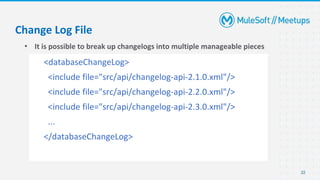
• It is possible to break up changelogs into multiple manageable pieces
Change Log File
<databaseChangeLog>
<include file="src/api/changelog-api-2.1.0.xml"/>
<include file="src/api/changelog-api-2.2.0.xml"/>
<include file="src/api/changelog-api-2.3.0.xml"/>
...
</databaseChangeLog>
23
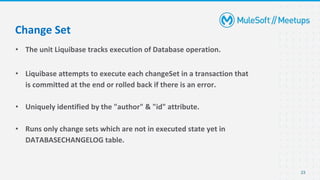
• The unit Liquibase tracks execution of Database operation.
• Liquibase attempts to execute each changeSet in a transaction that
is committed at the end or rolled back if there is an error.
• Uniquely identified by the "author" & "id" attribute.
• Runs only change sets which are not in executed state yet in
DATABASECHANGELOG table.
Change Set
24
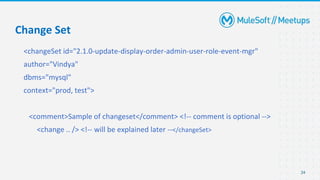
<changeSet id="2.1.0-update-display-order-admin-user-role-event-mgr"
author="Vindya"
dbms="mysql"
context="prod, test">
<comment>Sample of changeset</comment> <!-- comment is optional -->
<change .. /> <!-- will be explained later --</changeSet>
Change Set
25
• Each changeset contains a change which describes the
change/refactoring to apply to the database.
• One change per changeset.
Change
26
• Structural Refactorings
o Add Column
o Rename Column
o Modify Column
o Drop Column
o Alter Sequence
o Create Table
o Rename Table
o Drop Table
o Create View
o Rename View
o Drop View
o Merge Columns
o Create Stored Procedure
Change
27
• Data Quality Refactorings
○ Add Lookup Table
○ Add Not-Null Constraint
○ Remove Not-Null Constraint
○ Add Unique Constraint
○ Drop Unique Constraint
○ Create Sequence
○ Drop Sequence
○ Add Auto-Increment
○ Add Default Value
○ Drop Default Value
Change
28
• Referential Integrity Refactorings
○ Add Foreign Key Constraint
○ Drop Foreign Key Constraint
○ Drop All Foreign Key Constraints
○ Add Primary Key Constraint
○ Drop Primary Key Constraint
• Non-Refactoring Transformations
○ Insert Data
○ Load Data
○ Load Update Data
○ Update Data
○ Delete Data
Change
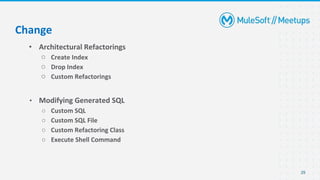
29
• Architectural Refactorings
○ Create Index
○ Drop Index
○ Custom Refactorings
• Modifying Generated SQL
○ Custom SQL
○ Custom SQL File
○ Custom Refactoring Class
○ Execute Shell Command
Change
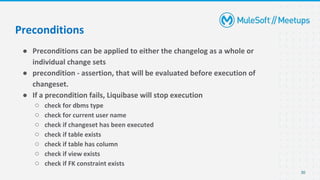
30
● Preconditions can be applied to either the changelog as a whole or
individual change sets
● precondition - assertion, that will be evaluated before execution of
changeset.
● If a precondition fails, Liquibase will stop execution
○ check for dbms type
○ check for current user name
○ check if changeset has been executed
○ check if table exists
○ check if table has column
○ check if view exists
○ check if FK constraint exists
Preconditions
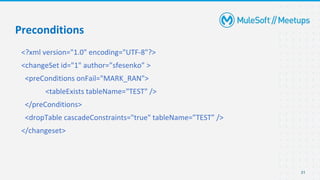
<?xml version="1.0" encoding="UTF-8"?>
<changeSet id="1" author=”sfesenko” >
<preConditions onFail="MARK_RAN">
<tableExists tableName="TEST" />
</preConditions>
<dropTable cascadeConstraints="true" tableName=”TEST” />
</changeset>
31
Preconditions
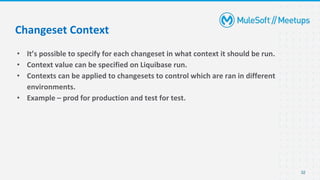
• It’s possible to specify for each changeset in what context it should be run.
• Context value can be specified on Liquibase run.
• Contexts can be applied to changesets to control which are ran in different
environments.
• Example – prod for production and test for test.
32
Changeset Context
• On Demand
o Command Line
o Ant
o Maven
• Automated
o Servlet Listener
o Spring Listener
o JEE CDI Listener
• Java APIs
o Liquibase can easily be embedded and executed through its Java APIs.
33
How to Run?
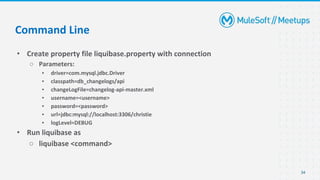
• Create property file liquibase.property with connection
○ Parameters:
▪ driver=com.mysql.jdbc.Driver
▪ classpath=db_changelogs/api
▪ changeLogFile=changelog-api-master.xml
▪ username=<username>
▪ password=<password>
▪ url=jdbc:mysql://localhost:3306/christie
▪ logLevel=DEBUG
• Run liquibase as
○ liquibase <command>
34
Command Line
• update - applies to all unrun changes.
• rollback - reverts (rolls back) changes you have made to your database.
• snapshot - used when you want to quickly compare changes in your database or
keep a record of your current database state.
• dbDoc - generates database change documentation.
• diff - allows you to compare two databases of the same type or different types to
one another.
35
Liquibase Common Commands
• diffChangeLog - used when you want to create a deployable changelog to
synchronize multiple databases.
• generateChangeLog - creates a changelog file that has a sequence of changesets
which describes how to re-create the current state of the database.
• history - a helper command that lists out all your deploymentIds and all
changesets associated with each deploymentId.
36
Liquibase Common Commands
• Use one file per changeset (greatly simplified merges)
• Use convention for file names
• Use “run on change” attribute for stored procedures, views, triggers, etc
• Decide early if rollback feature will be used
• Test both incremental and full update
• Do not change “wrong” changeset - just add new one with fix
• Consider possibility of “compressing” changesets when full update became
slow
37
Tips & Tricks
Demo
Q&A
Take a stand !
40
● Nominate yourself for the next meetup speaker and suggest a topic as well.
41
● Upcoming Meetup:
○ Advance Integrations ChatGPT <> MuleSoft by Mr. Shubham Chaurasia (May 13th )
(https://meetups.mulesoft.com/events/details/mulesoft-new-york-city-presents-first-chapter-
advanced-integrations-with-chatgpt)
● Share:
○ Tweet using the hashtag #MuleSoftMeetups
○ Invite your network to join: https://meetups.mulesoft.com/new-york-city/
● Feedback:
○ Fill out the survey feedback and suggest topics for upcoming events
○ Contact MuleSoft at meetups@mulesoft.com for ways to improve the program
What’s next?
Thank you

Liquibase Integration with MuleSoft

  • 1.
    15 Apr 2023 NYCMuleSoft Meetup Group Liquibase Integration with MuleSoft
  • 2.
    Safe Harbour Statement ●Both the speaker and the host are organizing this meet-up in individual capacity only. We are not representing our companies here. ● This presentation is strictly for learning purposes only. Organizer/Presenter do not hold any responsibility that same solution will work for your business requirements. ● This presentation is not meant for any promotional activities. 2
  • 3.
    A recording ofthis meetup will be uploaded to events page within 24 hours. Questions can be submitted/asked at any time in the Chat/Questions & Answers Tab. Make it more Interactive!!! Give us feedback! Rate this meetup session by filling feedback form at the end of the day. We Love Feedbacks!!! Its Bread & Butter for Meetup. Housekeeping 3
  • 4.
    Organizers ● Around 15+years of experience into ERP and integrations ● Working as principal architect at Slalom LLC ● 3X MuleSoft Certified, 1X AWS Certified ● Managed multiple end to end implementation/integrations projects ● MuleSoft Ambassador ● Mentoring Mule Developers and People trying to switch to MuleSoft Neeraj Kumar
  • 5.
    5 About the Speaker ●Working as a Senior Principal Engineer at Tricon Infotech Private Limited. ● 13+ years of Total Experience. ● 5+ years experience in Mulesoft. ● Certified MuleSoft Developer and Architect. ● MuleSoft Mentor and Leader ● Top contributors of MuleSoft Help Forum ● Founder of DataWeave Fun Shyam Raj Prasad
  • 6.
    6 ● Introductions ● Liquibase ❑Introduction ❑ Major Concepts ❑ Liquibase Integration with MuleSoft ● Demo ● Wrap-Up Agenda
  • 7.
  • 8.
    ● Liquibase isan open-source solution ● It is for managing revisions of database schema scripts ● It works across various types of databases ● Supports various file formats for defining the DB structure What is Liquibase 8
  • 9.
    9 • We usedto maintain DB scripts (text based) and add them manually to DB • But there are more issues ○ Easy to lost sync between code and DB state ○ Hard to find out state of particular DB environment ○ Often require to re-create DB from scratch during development ○ Hard to recover from error during development (Ex: In case of applying wrong statement to DB) • For these issues, Liquibase is a good solution Why Liquibase ?
  • 10.
    10 • Flyway • mybatis •c5-db-migration • dbdeploy • MIGRATEdb • migrate4j • dbmaintain • AutoPatch What are the other similar tools?
  • 11.
    11 • Easy setup •Extensibility • Database diff report • Supports for many database types • Rollback database changes feature • Database independent migration support • Java based and easy to manage with java project • Support for different changelog format ○ build-in: XML, YAML, JSON and SQL How Liquibase is differ from others?
  • 12.
    • Compatibility witha broad range of databases such as Oracle, SQL Server, MariaDB & PostgreSQL. • Liquibase also works with: o DB2 on Z. o Apache Derby and SQLite. o Oracle ATP, H2 databases & Informix. • For a complete list of native and community-supported databases, see Liquibase Getting Started. • A flexible extension framework that allows for seamless additions of newly released platforms and integrations. • Full control of when, where, and how database changes are deployed. 12 Major Features of Liquibase
  • 13.
    • Ability tomerge changes from multiple developers. • Code branches. • Multiple databases. • Cluster-safe database upgrades. • Generation of starting changelogs from existing databases. • Generation of database change documentation. • Automated updates or generation of SQL. 13 Liquibase Supports
  • 14.
    There are twomain mechanisms, or concepts, that are the foundation of Liquibase. These two concepts are: • Schema Changes which consist of changelogs, changesets & Change Types. • Tracking tables that record database changes. 14 How Liquibase Works
  • 15.
    • Schema changesare the fundamental unit of change in Liquibase. • In SQL, schema changes are written using SQL statements that create, modify or drop database objects. • Examples of typical schema changes are create table, add index and drop column. • In XML, YAML or JSON the same schema changes are modelled as Liquibase Change Types. ▪ One or more schema changes (Change Types) are grouped into a changeset. The best practice is to limit each changeset to only one Change Type. ▪ One or more changesets are contained in a changelog. ▪ Changelogs are text files containing schema changes. They should be stored and versioned in your preferred source control tool. In addition to containing schema changes, a changelog can include other changelogs. This allows multiple teams to each work on their own changelogs so they can work independently. 15 Schema Changes
  • 16.
    Tracking tables areused to track, version, and deploy database schema changes. If your database does not contain a tracking table, Liquibase will create one for you. Liquibase uses two types of tables to track successful schema change deployments: • DATABASECHANGELOG • DATABASECHANGELOGLOCK 16 Tracking Tables
  • 17.
    The DATABASECHANGELOG tableis created and used by Liquibase to track which changesets have already been run. It does this by tracking each changeset as a row identified by a combination of ID, author, and filename specified in the changelog. It is required to make each changeset ID unique in one changelog file. The author will likely remain the same in every changeset in a changelog, but if working in a team, it could differ per changeset. 17 DATABASECHANGELOG
  • 18.
    To avoid database-specificrestrictions on key lengths, there is no primary key on the tracking table. Below is an example of how your tracking table will look like 18 DATABASECHANGELOG
  • 19.
    To prevent multipleinstances of Liquibase running at one time, Liquibase creates and uses a DATABASECHANGELOGLOCK table behind the scenes. Liquibase uses the DATABASECHANGELOGLOCK table to prevent other developers, DBAs, or especially automated processes from being able to execute database changes at the same time. If multiple instances of Liquibase are running concurrently on the same database a conflict will occur. The DATABASECHANGELOGLOCK prevents this from happening, which protects your database. Below is a sample DATABASECHANGELOGLOCK table. 19 DATABASECHANGELOGLOCK Table
  • 20.
    20 • Changelog file •Changeset • Changes • Preconditions • Contexts Major Concepts
  • 21.
    21 • The rootof all Liquibase changes is the databaseChangeLog file. Change Log File <databaseChangeLog> <changeSet id="1" ...> ... </changeSet> <changeSet id="2" ...> ... </changeSet> </databaseChangeLog>
  • 22.
    22 • It ispossible to break up changelogs into multiple manageable pieces Change Log File <databaseChangeLog> <include file="src/api/changelog-api-2.1.0.xml"/> <include file="src/api/changelog-api-2.2.0.xml"/> <include file="src/api/changelog-api-2.3.0.xml"/> ... </databaseChangeLog>
  • 23.
    23 • The unitLiquibase tracks execution of Database operation. • Liquibase attempts to execute each changeSet in a transaction that is committed at the end or rolled back if there is an error. • Uniquely identified by the "author" & "id" attribute. • Runs only change sets which are not in executed state yet in DATABASECHANGELOG table. Change Set
  • 24.
    24 <changeSet id="2.1.0-update-display-order-admin-user-role-event-mgr" author="Vindya" dbms="mysql" context="prod, test"> <comment>Sampleof changeset</comment> <!-- comment is optional --> <change .. /> <!-- will be explained later --</changeSet> Change Set
  • 25.
    25 • Each changesetcontains a change which describes the change/refactoring to apply to the database. • One change per changeset. Change
  • 26.
    26 • Structural Refactorings oAdd Column o Rename Column o Modify Column o Drop Column o Alter Sequence o Create Table o Rename Table o Drop Table o Create View o Rename View o Drop View o Merge Columns o Create Stored Procedure Change
  • 27.
    27 • Data QualityRefactorings ○ Add Lookup Table ○ Add Not-Null Constraint ○ Remove Not-Null Constraint ○ Add Unique Constraint ○ Drop Unique Constraint ○ Create Sequence ○ Drop Sequence ○ Add Auto-Increment ○ Add Default Value ○ Drop Default Value Change
  • 28.
    28 • Referential IntegrityRefactorings ○ Add Foreign Key Constraint ○ Drop Foreign Key Constraint ○ Drop All Foreign Key Constraints ○ Add Primary Key Constraint ○ Drop Primary Key Constraint • Non-Refactoring Transformations ○ Insert Data ○ Load Data ○ Load Update Data ○ Update Data ○ Delete Data Change
  • 29.
    29 • Architectural Refactorings ○Create Index ○ Drop Index ○ Custom Refactorings • Modifying Generated SQL ○ Custom SQL ○ Custom SQL File ○ Custom Refactoring Class ○ Execute Shell Command Change
  • 30.
    30 ● Preconditions canbe applied to either the changelog as a whole or individual change sets ● precondition - assertion, that will be evaluated before execution of changeset. ● If a precondition fails, Liquibase will stop execution ○ check for dbms type ○ check for current user name ○ check if changeset has been executed ○ check if table exists ○ check if table has column ○ check if view exists ○ check if FK constraint exists Preconditions
  • 31.
    <?xml version="1.0" encoding="UTF-8"?> <changeSetid="1" author=”sfesenko” > <preConditions onFail="MARK_RAN"> <tableExists tableName="TEST" /> </preConditions> <dropTable cascadeConstraints="true" tableName=”TEST” /> </changeset> 31 Preconditions
  • 32.
    • It’s possibleto specify for each changeset in what context it should be run. • Context value can be specified on Liquibase run. • Contexts can be applied to changesets to control which are ran in different environments. • Example – prod for production and test for test. 32 Changeset Context
  • 33.
    • On Demand oCommand Line o Ant o Maven • Automated o Servlet Listener o Spring Listener o JEE CDI Listener • Java APIs o Liquibase can easily be embedded and executed through its Java APIs. 33 How to Run?
  • 34.
    • Create propertyfile liquibase.property with connection ○ Parameters: ▪ driver=com.mysql.jdbc.Driver ▪ classpath=db_changelogs/api ▪ changeLogFile=changelog-api-master.xml ▪ username=<username> ▪ password=<password> ▪ url=jdbc:mysql://localhost:3306/christie ▪ logLevel=DEBUG • Run liquibase as ○ liquibase <command> 34 Command Line
  • 35.
    • update -applies to all unrun changes. • rollback - reverts (rolls back) changes you have made to your database. • snapshot - used when you want to quickly compare changes in your database or keep a record of your current database state. • dbDoc - generates database change documentation. • diff - allows you to compare two databases of the same type or different types to one another. 35 Liquibase Common Commands
  • 36.
    • diffChangeLog -used when you want to create a deployable changelog to synchronize multiple databases. • generateChangeLog - creates a changelog file that has a sequence of changesets which describes how to re-create the current state of the database. • history - a helper command that lists out all your deploymentIds and all changesets associated with each deploymentId. 36 Liquibase Common Commands
  • 37.
    • Use onefile per changeset (greatly simplified merges) • Use convention for file names • Use “run on change” attribute for stored procedures, views, triggers, etc • Decide early if rollback feature will be used • Test both incremental and full update • Do not change “wrong” changeset - just add new one with fix • Consider possibility of “compressing” changesets when full update became slow 37 Tips & Tricks
  • 38.
  • 39.
  • 40.
    Take a stand! 40 ● Nominate yourself for the next meetup speaker and suggest a topic as well.
  • 41.
    41 ● Upcoming Meetup: ○Advance Integrations ChatGPT <> MuleSoft by Mr. Shubham Chaurasia (May 13th ) (https://meetups.mulesoft.com/events/details/mulesoft-new-york-city-presents-first-chapter- advanced-integrations-with-chatgpt) ● Share: ○ Tweet using the hashtag #MuleSoftMeetups ○ Invite your network to join: https://meetups.mulesoft.com/new-york-city/ ● Feedback: ○ Fill out the survey feedback and suggest topics for upcoming events ○ Contact MuleSoft at meetups@mulesoft.com for ways to improve the program What’s next?
  • 42.