Augmented Reality 4.0: Opportunities and Challenges for Smart Factories
Gülay EKREN, Sinop University Birgit OBERER, Sakarya University Alptekin ERKOLLAR, Sakarya University
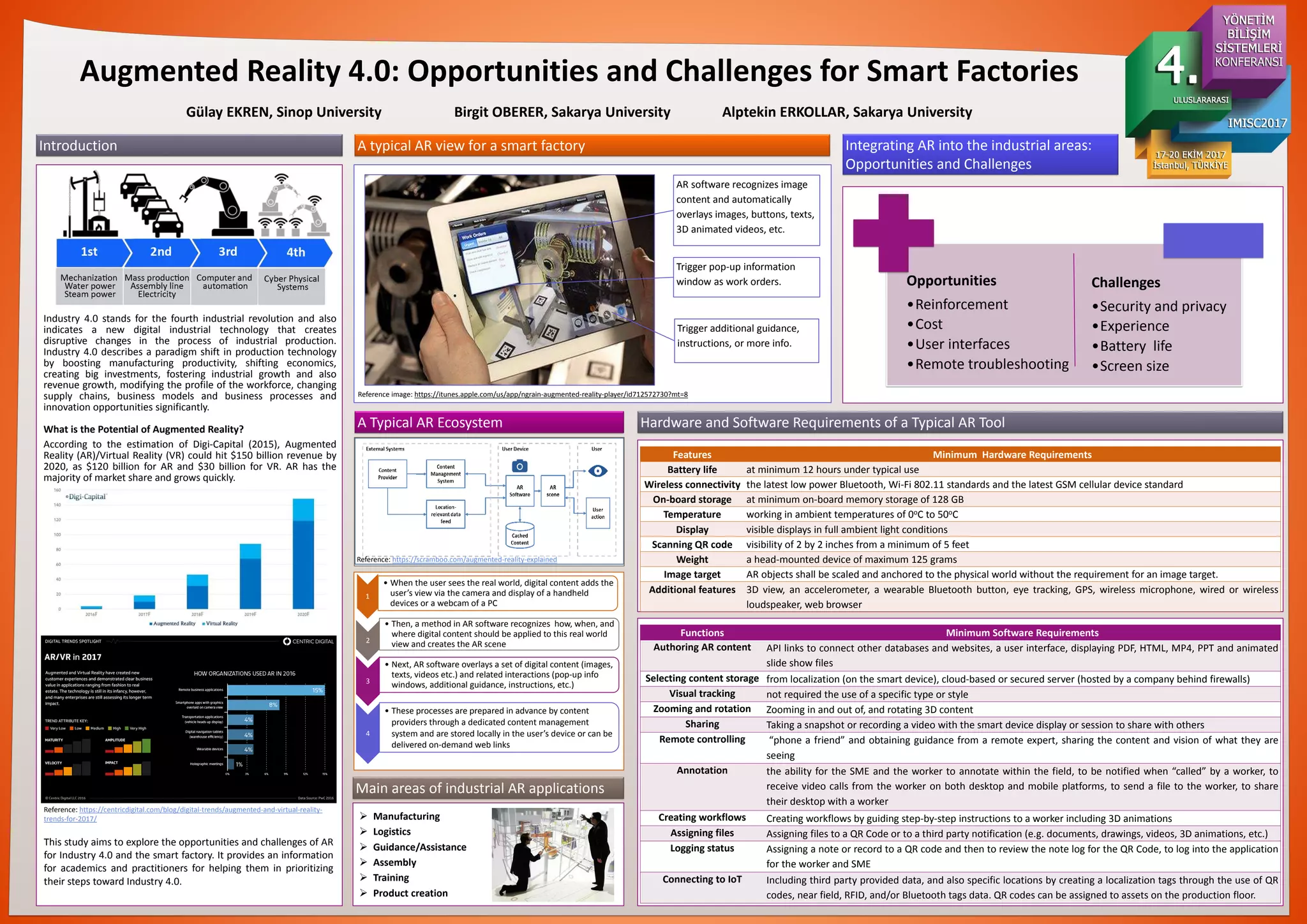
Industry 4.0 stands for the fourth industrial revolution and also
indicates a new digital industrial technology that creates
disruptive changes in the process of industrial production.
Industry 4.0 describes a paradigm shift in production technology
by boosting manufacturing productivity, shifting economics,
creating big investments, fostering industrial growth and also
revenue growth, modifying the profile of the workforce, changing
supply chains, business models and business processes and
innovation opportunities significantly.
What is the Potential of Augmented Reality?
According to the estimation of Digi-Capital (2015), Augmented
Reality (AR)/Virtual Reality (VR) could hit $150 billion revenue by
2020, as $120 billion for AR and $30 billion for VR. AR has the
majority of market share and grows quickly.
Introduction
A Typical AR Ecosystem
Reference: https://scramboo.com/augmented-reality-explained
Trigger pop-up information
window as work orders.
AR software recognizes image
content and automatically
overlays images, buttons, texts,
3D animated videos, etc.
Trigger additional guidance,
instructions, or more info.
A typical AR view for a smart factory
Reference image: https://itunes.apple.com/us/app/ngrain-augmented-reality-player/id712572730?mt=8
Main areas of industrial AR applications
 Manufacturing
 Logistics
 Guidance/Assistance
 Assembly
 Training
 Product creation
Integrating AR into the industrial areas:
Opportunities and Challenges
Hardware and Software Requirements of a Typical AR Tool
This study aims to explore the opportunities and challenges of AR
for Industry 4.0 and the smart factory. It provides an information
for academics and practitioners for helping them in prioritizing
their steps toward Industry 4.0.
Reference: https://centricdigital.com/blog/digital-trends/augmented-and-virtual-reality-
trends-for-2017/
Features Minimum Hardware Requirements
Battery life at minimum 12 hours under typical use
Wireless connectivity the latest low power Bluetooth, Wi-Fi 802.11 standards and the latest GSM cellular device standard
On-board storage at minimum on-board memory storage of 128 GB
Temperature working in ambient temperatures of 0oC to 50oC
Display visible displays in full ambient light conditions
Scanning QR code visibility of 2 by 2 inches from a minimum of 5 feet
Weight a head-mounted device of maximum 125 grams
Image target AR objects shall be scaled and anchored to the physical world without the requirement for an image target.
Additional features 3D view, an accelerometer, a wearable Bluetooth button, eye tracking, GPS, wireless microphone, wired or wireless
loudspeaker, web browser
Functions Minimum Software Requirements
Authoring AR content API links to connect other databases and websites, a user interface, displaying PDF, HTML, MP4, PPT and animated
slide show files
Selecting content storage from localization (on the smart device), cloud-based or secured server (hosted by a company behind firewalls)
Visual tracking not required the use of a specific type or style
Zooming and rotation Zooming in and out of, and rotating 3D content
Sharing Taking a snapshot or recording a video with the smart device display or session to share with others
Remote controlling “phone a friend” and obtaining guidance from a remote expert, sharing the content and vision of what they are
seeing
Annotation the ability for the SME and the worker to annotate within the field, to be notified when “called” by a worker, to
receive video calls from the worker on both desktop and mobile platforms, to send a file to the worker, to share
their desktop with a worker
Creating workflows Creating workflows by guiding step-by-step instructions to a worker including 3D animations
Assigning files Assigning files to a QR Code or to a third party notification (e.g. documents, drawings, videos, 3D animations, etc.)
Logging status Assigning a note or record to a QR code and then to review the note log for the QR Code, to log into the application
for the worker and SME
Connecting to IoT Including third party provided data, and also specific locations by creating a localization tags through the use of QR
codes, near field, RFID, and/or Bluetooth tags data. QR codes can be assigned to assets on the production floor.
1
• When the user sees the real world, digital content adds the
user’s view via the camera and display of a handheld
devices or a webcam of a PC
2
• Then, a method in AR software recognizes how, when, and
where digital content should be applied to this real world
view and creates the AR scene
3
• Next, AR software overlays a set of digital content (images,
texts, videos etc.) and related interactions (pop-up info
windows, additional guidance, instructions, etc.)
4
• These processes are prepared in advance by content
providers through a dedicated content management
system and are stored locally in the user’s device or can be
delivered on-demand web links
Opportunities
•Reinforcement
•Cost
•User interfaces
•Remote troubleshooting
Challenges
•Security and privacy
•Experience
•Battery life
•Screen size

Augmented Reality 4.0

  • 1.
    Augmented Reality 4.0:Opportunities and Challenges for Smart Factories Gülay EKREN, Sinop University Birgit OBERER, Sakarya University Alptekin ERKOLLAR, Sakarya University Industry 4.0 stands for the fourth industrial revolution and also indicates a new digital industrial technology that creates disruptive changes in the process of industrial production. Industry 4.0 describes a paradigm shift in production technology by boosting manufacturing productivity, shifting economics, creating big investments, fostering industrial growth and also revenue growth, modifying the profile of the workforce, changing supply chains, business models and business processes and innovation opportunities significantly. What is the Potential of Augmented Reality? According to the estimation of Digi-Capital (2015), Augmented Reality (AR)/Virtual Reality (VR) could hit $150 billion revenue by 2020, as $120 billion for AR and $30 billion for VR. AR has the majority of market share and grows quickly. Introduction A Typical AR Ecosystem Reference: https://scramboo.com/augmented-reality-explained Trigger pop-up information window as work orders. AR software recognizes image content and automatically overlays images, buttons, texts, 3D animated videos, etc. Trigger additional guidance, instructions, or more info. A typical AR view for a smart factory Reference image: https://itunes.apple.com/us/app/ngrain-augmented-reality-player/id712572730?mt=8 Main areas of industrial AR applications  Manufacturing  Logistics  Guidance/Assistance  Assembly  Training  Product creation Integrating AR into the industrial areas: Opportunities and Challenges Hardware and Software Requirements of a Typical AR Tool This study aims to explore the opportunities and challenges of AR for Industry 4.0 and the smart factory. It provides an information for academics and practitioners for helping them in prioritizing their steps toward Industry 4.0. Reference: https://centricdigital.com/blog/digital-trends/augmented-and-virtual-reality- trends-for-2017/ Features Minimum Hardware Requirements Battery life at minimum 12 hours under typical use Wireless connectivity the latest low power Bluetooth, Wi-Fi 802.11 standards and the latest GSM cellular device standard On-board storage at minimum on-board memory storage of 128 GB Temperature working in ambient temperatures of 0oC to 50oC Display visible displays in full ambient light conditions Scanning QR code visibility of 2 by 2 inches from a minimum of 5 feet Weight a head-mounted device of maximum 125 grams Image target AR objects shall be scaled and anchored to the physical world without the requirement for an image target. Additional features 3D view, an accelerometer, a wearable Bluetooth button, eye tracking, GPS, wireless microphone, wired or wireless loudspeaker, web browser Functions Minimum Software Requirements Authoring AR content API links to connect other databases and websites, a user interface, displaying PDF, HTML, MP4, PPT and animated slide show files Selecting content storage from localization (on the smart device), cloud-based or secured server (hosted by a company behind firewalls) Visual tracking not required the use of a specific type or style Zooming and rotation Zooming in and out of, and rotating 3D content Sharing Taking a snapshot or recording a video with the smart device display or session to share with others Remote controlling “phone a friend” and obtaining guidance from a remote expert, sharing the content and vision of what they are seeing Annotation the ability for the SME and the worker to annotate within the field, to be notified when “called” by a worker, to receive video calls from the worker on both desktop and mobile platforms, to send a file to the worker, to share their desktop with a worker Creating workflows Creating workflows by guiding step-by-step instructions to a worker including 3D animations Assigning files Assigning files to a QR Code or to a third party notification (e.g. documents, drawings, videos, 3D animations, etc.) Logging status Assigning a note or record to a QR code and then to review the note log for the QR Code, to log into the application for the worker and SME Connecting to IoT Including third party provided data, and also specific locations by creating a localization tags through the use of QR codes, near field, RFID, and/or Bluetooth tags data. QR codes can be assigned to assets on the production floor. 1 • When the user sees the real world, digital content adds the user’s view via the camera and display of a handheld devices or a webcam of a PC 2 • Then, a method in AR software recognizes how, when, and where digital content should be applied to this real world view and creates the AR scene 3 • Next, AR software overlays a set of digital content (images, texts, videos etc.) and related interactions (pop-up info windows, additional guidance, instructions, etc.) 4 • These processes are prepared in advance by content providers through a dedicated content management system and are stored locally in the user’s device or can be delivered on-demand web links Opportunities •Reinforcement •Cost •User interfaces •Remote troubleshooting Challenges •Security and privacy •Experience •Battery life •Screen size