Augmented Reality
Presented by Supervised by
Rumana Afrose Mr. Avijit Hira
ID-1408016 Assistant Professor,
Dept of ETE,CUETChittagong University of Engineering & Technology
Contents
• Augmented Reality
• AR vs VR
• Virtual Reality
• AR Components
• AR Devices
• AR in application
• Failures in AR
• Future of AR
10/30/2018 2
Reality
Reality is defined to be something
• constitutes a real or actual thing as distinguished
• from something that is merely apparent
• exists independently of ideas conceiving it
10/30/2018 3
What is Augmented Reality?
• Augmented reality (AR) is a field of computer
research which deals with the combination of real-
world and computer-generated data.
• Augmented reality, in which virtual content is
seamlessly integrated with displays of real-world
scenes, is a growing area of interactive design
• The overlay of computer graphics on the real world
10/30/2018 4
Defining AR
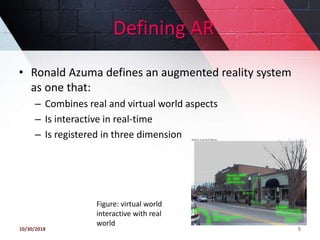
• Ronald Azuma defines an augmented reality system
as one that:
– Combines real and virtual world aspects
– Is interactive in real-time
– Is registered in three dimension
10/30/2018 5
Figure: virtual world
interactive with real
world
How it starts
• Augmented reality technology has its roots in the
field of computer science interface research
• iLamps(2005) ~ An enhanced projector that can
determine and respond to the geometry of the
display surface to create a self-configuring display
10/30/2018 6
Figure: enhaanced
projector
AR & VR
the user must still be
aware that he or she
is present in the “real
world.”
10/30/2018 7
Figure: AR & VR
AR vs VR
Augmented Reality
• System augments the
real world scene
• User maintains a sense
of presence in real
world
• Needs a mechanism to
combine virtual and real
worlds
• Hard to register real and
virtual
Virtual Reality
•Totally immersive
environment
•Senses are under control of
system
•Need a mechanism to feed
virtual world to user
•Hard to make VR world
interesting
10/30/2018 8
Virtual Reality
computer generated 3D environments that allow the
• user to enter and interact with synthetic
environments
• users are able to “immerse” themselves to varying
degrees in the computers artificial world
• a simulation of some form of reality (physically walk
around objects and touch those objects as if they)
were real
• or the simulation of a complex phenomenon [stimuli
(as sights and sounds) provided by a computer ]
10/30/2018 9
How does AR Work?
• The basic idea of augmented reality is to
superimpose graphics, audio and other sense
enhancements over a real-world environment in real-
time.
• The graphics will then change to accommodate the
user’s eye or head movements
10/30/2018 10
Figure: Simulated augmented reality
medical image
What is needed?
• Scene Generator
• Tracking System
• Display
10/30/2018
11
Scene Generator and Tracking
scene generator
• the device or software
• responsible for rendering the scene
• Create completely computer-generated scenes.
The tracking system
• is one of the most important problems on AR systems mostly
because of the registration problem .
• The objects in the real and virtual worlds must be properly
aligned with respect to each other, or
• the illusion that the two worlds coexist will be compromised.
For the industry, many applications demand accurate
registration, specially on medical systems
10/30/2018 12
Display
• Most of the Displays devices for AR are HMD (Head
Mounted Display)
• combining the real and virtual world
• optical and video technology-tradeoffs depending on
factors like resolution , flexibility, field-of-view,
registration strategies , among other
• continues to be a limiting factor in the development of
AR systems
• Lack of sufficient brightness, resolution, field of view, and
contrast to seamlessly blend a wide range of real and
virtual imagery
10/30/2018 13
AR Devices
Four major classes of AR can be distinguished by their
display type:
• Optical See-Through,
• Virtual Retinal Systems,
• Video See-Through,
• Monitor Based AR and Projector Based AR.
10/30/2018 14
Optical See-Through
• transparent Head Mounted Display ,show virtual
environment directly over the real world
• place optical combiners in front of the user’s eyes.
• combiners are partially transmissive
look directly the real world.
• partially reflective, user sees virtual
images bounced off the combiners from
head-mounted monitors
10/30/2018 15
Figure: optice see
through HMD
Optical See-Through
10/30/2018 16
Recent Optical See-Through HMD’s are being
built for well-known companies like Sony
and Olympus and have support for occlusion,
varying accommodation (process of focusing
the eyes on objects at a particular distance).
Figure 4: Eyeglass
display with
holographic
element
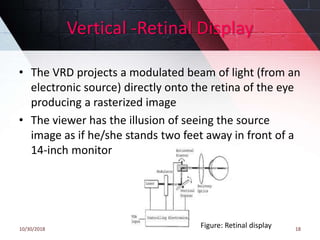
Virtual Retinal Systems
aim was to produce
• a full color, wide field-of-view, high resolution, high
brightness, low cost virtual display.
10/30/2018 17
Figure: Retinal display
Vertical -Retinal Display
10/30/2018 18
• The VRD projects a modulated beam of light (from an
electronic source) directly onto the retina of the eye
producing a rasterized image
• The viewer has the illusion of seeing the source
image as if he/she stands two feet away in front of a
14-inch monitor
Figure: Retinal display
Video See-Through HMD
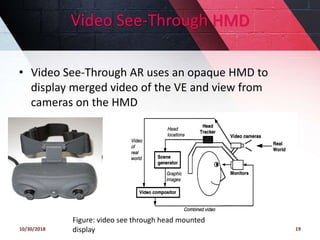
• Video See-Through AR uses an opaque HMD to
display merged video of the VE and view from
cameras on the HMD
10/30/2018 19
Figure: video see through head mounted
display
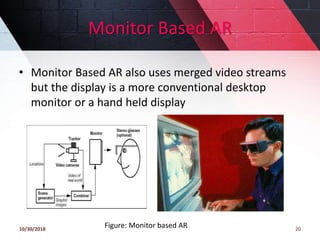
Monitor Based AR
• Monitor Based AR also uses merged video streams
but the display is a more conventional desktop
monitor or a hand held display
10/30/2018 20
Figure: Monitor based AR
Projector Based AR
10/30/2018 21
Figure: projector based AR
Something New
Contact Lenses
• Contain the elements for display
embedded into the lens including
• integrated circuitry, LEDs and an
antenna for wireless communication.
• Under development
10/30/2018 22
Figure: AR in lens
pinching gesture
• used to grab a virtual object, and provides
• reliable ,low-cost method of recognizing
natural gestures
• Digital cameras ,optical sensors,
accelerometers, GPS, gyroscopes,
solid state compasses, RFID and wireless
sensors are used as tracking devices for positioning
and orientating of the user's head
• varying levels of accuracy and precision
10/30/2018 23
Figure: pinch glove
AR in Medical Science
10/30/2018 24
Figure: AR in health care
Future of AR in Medical Science
• Most of the medical applications deal with image
guided Pre-operative imaging studies of the patient,
such as CT (Computed Tomography) or MRI
– Superimpose an image from an MRI onto a
patient’s body.
– This might allow surgeons to
pinpoint a tumor
to remove
10/30/2018 25
Figure: AR in med
AR in Everywhere
• Military e.g. used in military to provide locations of
enemy positions
• Education e.g. to explore the aspects of an ancient
civilization as part of a history lesson
• Marketing and Commercial e.g. can be used to
promote a new product
• Industry e.g. helping with prototyping (engineering)
• Safety e.g. used as part of a road safety campaign
• Art and Architecture e.g. as part of a mixed media
artwork
10/30/2018 26
AR in Broadcasting & Advertisement
• Yellow first down line used on TV broadcasts of football
games:
– Real world elements: football field and players
– Virtual element: the yellow line drawn over the image by
computers in real-time
10/30/2018 27
Figure: AR in showing Yellow line
AR in Google map
The AR functionality uses the camera on your smart
phone to tell you which direction to walk
10/30/2018 28
Figure: augmenting Google map
AR in Engineering
10/30/2018 29
Figure: AR in Engineering

AR in Gaming
10/30/2018 30
Figure: AR in Pokémon GO
Temple Treasure Hunt
Zombie GO Clandestine: Anomaly
Failures in Registration
Failures in registration due to:
– Noise
• Position and pose of camera with respect to the real
scene
– Image distortions
– Time delays
• In calculating the camera position
10/30/2018 31
Future Work
• photorealistic presentation of complex 3D models ,
because of hardware limitations and complexity of
calculations performed so that it could work
• HMDs are still too clumsy and have limited field of
vision, contrast and resolution HMDs
• and other wearable equipments, such as data-gloves
and data suits, is a limitation for the user
• All wearable equipments need be developed to be
lighter, smaller and easier to work
• other challenges such as response time delays,
hardware or software failures from AR systems
10/30/2018 32
Topics
• Image Noise removal using Fuzzy Logic based Filter.
• Reducing Self-Interference in full duplex for 5G.
10/30/2018 33
END
THANK YOU
10/30/2018 34
ANY QUESTION?
10/30/2018
35

Augmented Reality

  • 1.
    Augmented Reality Presented bySupervised by Rumana Afrose Mr. Avijit Hira ID-1408016 Assistant Professor, Dept of ETE,CUETChittagong University of Engineering & Technology
  • 2.
    Contents • Augmented Reality •AR vs VR • Virtual Reality • AR Components • AR Devices • AR in application • Failures in AR • Future of AR 10/30/2018 2
  • 3.
    Reality Reality is definedto be something • constitutes a real or actual thing as distinguished • from something that is merely apparent • exists independently of ideas conceiving it 10/30/2018 3
  • 4.
    What is AugmentedReality? • Augmented reality (AR) is a field of computer research which deals with the combination of real- world and computer-generated data. • Augmented reality, in which virtual content is seamlessly integrated with displays of real-world scenes, is a growing area of interactive design • The overlay of computer graphics on the real world 10/30/2018 4
  • 5.
    Defining AR • RonaldAzuma defines an augmented reality system as one that: – Combines real and virtual world aspects – Is interactive in real-time – Is registered in three dimension 10/30/2018 5 Figure: virtual world interactive with real world
  • 6.
    How it starts •Augmented reality technology has its roots in the field of computer science interface research • iLamps(2005) ~ An enhanced projector that can determine and respond to the geometry of the display surface to create a self-configuring display 10/30/2018 6 Figure: enhaanced projector
  • 7.
    AR & VR theuser must still be aware that he or she is present in the “real world.” 10/30/2018 7 Figure: AR & VR
  • 8.
    AR vs VR AugmentedReality • System augments the real world scene • User maintains a sense of presence in real world • Needs a mechanism to combine virtual and real worlds • Hard to register real and virtual Virtual Reality •Totally immersive environment •Senses are under control of system •Need a mechanism to feed virtual world to user •Hard to make VR world interesting 10/30/2018 8
  • 9.
    Virtual Reality computer generated3D environments that allow the • user to enter and interact with synthetic environments • users are able to “immerse” themselves to varying degrees in the computers artificial world • a simulation of some form of reality (physically walk around objects and touch those objects as if they) were real • or the simulation of a complex phenomenon [stimuli (as sights and sounds) provided by a computer ] 10/30/2018 9
  • 10.
    How does ARWork? • The basic idea of augmented reality is to superimpose graphics, audio and other sense enhancements over a real-world environment in real- time. • The graphics will then change to accommodate the user’s eye or head movements 10/30/2018 10 Figure: Simulated augmented reality medical image
  • 11.
    What is needed? •Scene Generator • Tracking System • Display 10/30/2018 11
  • 12.
    Scene Generator andTracking scene generator • the device or software • responsible for rendering the scene • Create completely computer-generated scenes. The tracking system • is one of the most important problems on AR systems mostly because of the registration problem . • The objects in the real and virtual worlds must be properly aligned with respect to each other, or • the illusion that the two worlds coexist will be compromised. For the industry, many applications demand accurate registration, specially on medical systems 10/30/2018 12
  • 13.
    Display • Most ofthe Displays devices for AR are HMD (Head Mounted Display) • combining the real and virtual world • optical and video technology-tradeoffs depending on factors like resolution , flexibility, field-of-view, registration strategies , among other • continues to be a limiting factor in the development of AR systems • Lack of sufficient brightness, resolution, field of view, and contrast to seamlessly blend a wide range of real and virtual imagery 10/30/2018 13
  • 14.
    AR Devices Four majorclasses of AR can be distinguished by their display type: • Optical See-Through, • Virtual Retinal Systems, • Video See-Through, • Monitor Based AR and Projector Based AR. 10/30/2018 14
  • 15.
    Optical See-Through • transparentHead Mounted Display ,show virtual environment directly over the real world • place optical combiners in front of the user’s eyes. • combiners are partially transmissive look directly the real world. • partially reflective, user sees virtual images bounced off the combiners from head-mounted monitors 10/30/2018 15 Figure: optice see through HMD
  • 16.
    Optical See-Through 10/30/2018 16 RecentOptical See-Through HMD’s are being built for well-known companies like Sony and Olympus and have support for occlusion, varying accommodation (process of focusing the eyes on objects at a particular distance). Figure 4: Eyeglass display with holographic element
  • 17.
    Virtual Retinal Systems aimwas to produce • a full color, wide field-of-view, high resolution, high brightness, low cost virtual display. 10/30/2018 17 Figure: Retinal display
  • 18.
    Vertical -Retinal Display 10/30/201818 • The VRD projects a modulated beam of light (from an electronic source) directly onto the retina of the eye producing a rasterized image • The viewer has the illusion of seeing the source image as if he/she stands two feet away in front of a 14-inch monitor Figure: Retinal display
  • 19.
    Video See-Through HMD •Video See-Through AR uses an opaque HMD to display merged video of the VE and view from cameras on the HMD 10/30/2018 19 Figure: video see through head mounted display
  • 20.
    Monitor Based AR •Monitor Based AR also uses merged video streams but the display is a more conventional desktop monitor or a hand held display 10/30/2018 20 Figure: Monitor based AR
  • 21.
    Projector Based AR 10/30/201821 Figure: projector based AR
  • 22.
    Something New Contact Lenses •Contain the elements for display embedded into the lens including • integrated circuitry, LEDs and an antenna for wireless communication. • Under development 10/30/2018 22 Figure: AR in lens
  • 23.
    pinching gesture • usedto grab a virtual object, and provides • reliable ,low-cost method of recognizing natural gestures • Digital cameras ,optical sensors, accelerometers, GPS, gyroscopes, solid state compasses, RFID and wireless sensors are used as tracking devices for positioning and orientating of the user's head • varying levels of accuracy and precision 10/30/2018 23 Figure: pinch glove
  • 24.
    AR in MedicalScience 10/30/2018 24 Figure: AR in health care
  • 25.
    Future of ARin Medical Science • Most of the medical applications deal with image guided Pre-operative imaging studies of the patient, such as CT (Computed Tomography) or MRI – Superimpose an image from an MRI onto a patient’s body. – This might allow surgeons to pinpoint a tumor to remove 10/30/2018 25 Figure: AR in med
  • 26.
    AR in Everywhere •Military e.g. used in military to provide locations of enemy positions • Education e.g. to explore the aspects of an ancient civilization as part of a history lesson • Marketing and Commercial e.g. can be used to promote a new product • Industry e.g. helping with prototyping (engineering) • Safety e.g. used as part of a road safety campaign • Art and Architecture e.g. as part of a mixed media artwork 10/30/2018 26
  • 27.
    AR in Broadcasting& Advertisement • Yellow first down line used on TV broadcasts of football games: – Real world elements: football field and players – Virtual element: the yellow line drawn over the image by computers in real-time 10/30/2018 27 Figure: AR in showing Yellow line
  • 28.
    AR in Googlemap The AR functionality uses the camera on your smart phone to tell you which direction to walk 10/30/2018 28 Figure: augmenting Google map
  • 29.
    AR in Engineering 10/30/201829 Figure: AR in Engineering 
  • 30.
    AR in Gaming 10/30/201830 Figure: AR in Pokémon GO Temple Treasure Hunt Zombie GO Clandestine: Anomaly
  • 31.
    Failures in Registration Failuresin registration due to: – Noise • Position and pose of camera with respect to the real scene – Image distortions – Time delays • In calculating the camera position 10/30/2018 31
  • 32.
    Future Work • photorealisticpresentation of complex 3D models , because of hardware limitations and complexity of calculations performed so that it could work • HMDs are still too clumsy and have limited field of vision, contrast and resolution HMDs • and other wearable equipments, such as data-gloves and data suits, is a limitation for the user • All wearable equipments need be developed to be lighter, smaller and easier to work • other challenges such as response time delays, hardware or software failures from AR systems 10/30/2018 32
  • 33.
    Topics • Image Noiseremoval using Fuzzy Logic based Filter. • Reducing Self-Interference in full duplex for 5G. 10/30/2018 33
  • 34.
  • 35.

Editor's Notes

  • #16 Works by placing optical combiners in front of the user’s eyes. Combiners are partially transmissive - so user can look directly through them and see the real world. Combiners are partially reflective - so user can also see virtual images bounced off the combiners from head-mounted monitors. Similar to Head-Up Displays (HUDs) commonly used in military aircraft. Can see through the display even if the power is turned off.
  • #20 Works by combining a closed-view HMD with one or two head-mounted video cameras Video cameras provide the user’s view of the real world. Video from cameras is combined with graphics images by the scene generator to blend the two worlds. Result is sent to the monitors in from on the user’s eyes in the closed-view HMD. User has no direct view of the real world. If power is off, the user is “blind.”