Anirudh Modi
10/3/2000
5:00 PM
What is AR?What is AR?
MotivationMotivation
ApplicationsApplications
CharacteristicsCharacteristics
RegistrationRegistration
ConclusionConclusion
Questions?Questions?
OUTLINE
What is AR?
Augmented Reality (AR) is a variation of VE/VR.
VR technologies completely immerse a user inside
a synthetic environment. While immersed, the user
cannot see the real world around him.
In contrast, AR allows the user to see the real
world, with virtual objects superimposed upon or
composited with the real world.
AR supplements reality, rather than completely
replacing it. It creates the illusion that the virtual and
real objects coexisted in the same space.
AR can be thought of as the "middle ground“ between
VE (completely synthetic) and telepresence
(completely real)
What is AR?
e.g., Real desk with virtual lampe.g., Real desk with virtual lamp
and two virtual chairsand two virtual chairs
(ECRC)(ECRC)
What is AR?
AR systems have the following three characteristics:
 Combines real and virtual
 Interactive in real time
 Registered in 3-D
This definition allows other technologies besides Head
Mounted Displays (HMDs) while retaining the essential
components of AR.
Does not includeDoes not include film or 2-D overlays like "Jurassic Park"
featuring photorealistic virtual objects seamlessly blended
with a real environment in 3-D, as they are not interactive.
2-D virtual overlays on top of live video can be done at
interactive rates, but the overlays are not combined with the
real world in 3-D. Hence, they are not AR.
Motivation
AR enhances a user’s perception of interaction with
the real world.
The virtual objects display information that the user
cannot directly detect with his own senses.
The information conveyed by the virtual objects helps
a user perform real-world tasks.
AR is a specific example of what is known as
Intelligence Amplification (IA):Intelligence Amplification (IA): using the computer
as a tool to make a task easier for a human to
perform.
Applications
Main classes of applications:
1. Medical
2. Manufacturing and repair
3. Annotation and visualization
4. Robot path planning
5. Entertainment
6. Military aircraft
There are several miscellaneous applications.
Applications: Medical
Real-time stereo HMD displayReal-time stereo HMD display
with ultrasound volumewith ultrasound volume
display of needle inserted intodisplay of needle inserted into
the breastthe breast
(Andrei State, UNC)(Andrei State, UNC)
Surgeon X-ray vision:Surgeon X-ray vision:
Minimally-invasive brainMinimally-invasive brain
surgerysurgery
(AI Lab, MIT)(AI Lab, MIT)
Applications: Manuf & Repair
VR HUDset used in the wireVR HUDset used in the wire
shop to connect the wires byshop to connect the wires by
showing an image of theshowing an image of the
circuit and information aboutcircuit and information about
type of wire to be usedtype of wire to be used
(Boeing, US)(Boeing, US)
Augmented view of RiverAugmented view of River
Wear in Sunderland,Wear in Sunderland,
Newcastle (U.K.) with aNewcastle (U.K.) with a
planned footbridgeplanned footbridge
(UK)(UK)
Applications: Annotation
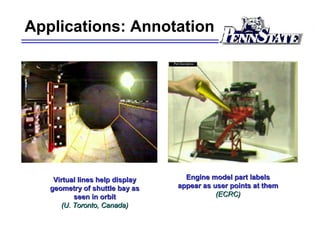
Engine model part labelsEngine model part labels
appear as user points at themappear as user points at them
(ECRC)(ECRC)
Virtual lines help displayVirtual lines help display
geometry of shuttle bay asgeometry of shuttle bay as
seen in orbitseen in orbit
(U. Toronto, Canada)(U. Toronto, Canada)
Applications: Robot path planning
Virtual lines show planned motion of a robot armVirtual lines show planned motion of a robot arm
(U. Toronto, Canada)(U. Toronto, Canada)
Applications: Entertainment
Screenshot from the movie“Who Framed Roger Rabbit?” blendingScreenshot from the movie“Who Framed Roger Rabbit?” blending
the real character and background with computer generatedthe real character and background with computer generated
cartoon characterscartoon characters
Entertainment: Virtual actors
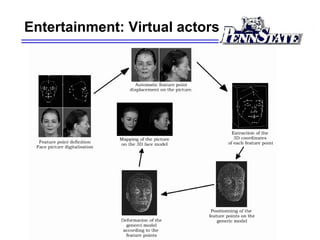
Real-time facial expression recognition and animation of the clone’s faceReal-time facial expression recognition and animation of the clone’s face
(MIRALab, University of Geneva)(MIRALab, University of Geneva)
Applications: Aircraft
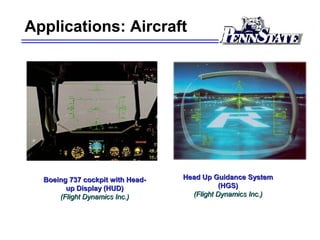
Head Up Guidance SystemHead Up Guidance System
(HGS)(HGS)
(Flight Dynamics Inc.)(Flight Dynamics Inc.)
Boeing 737 cockpit with Head-Boeing 737 cockpit with Head-
up Display (HUD)up Display (HUD)
(Flight Dynamics Inc.)(Flight Dynamics Inc.)
Applications: Nightvision
Nightvision system in the 2000 Cadillac DeVilleNightvision system in the 2000 Cadillac DeVille
(Cadillac.com.)(Cadillac.com.)
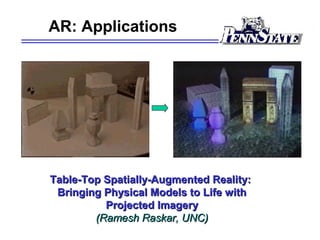
AR: Applications
Table-Top Spatially-Augmented Reality:Table-Top Spatially-Augmented Reality:
Bringing Physical Models to Life withBringing Physical Models to Life with
Projected ImageryProjected Imagery
(Ramesh Raskar, UNC)(Ramesh Raskar, UNC)
Characteristics
Discussion on the characteristics of AR systems and
design issues encountered when building an AR
system.
Two ways to accomplish this augmentation: optical or
video technologies.
Blending the real and virtual poses problems with
focus and contrast and some applications require
portable AR systems to be truly effective.
Characteristics: Augmentation
Besides adding objects to a real environment, AR also
has the potential to remove them.
Graphic overlays might be used to remove or hide parts of the
real environment from a user. e.g., to remove a desk in the
real environment, draw a representation of the real walls and
floors behind the desk and "paint" that over the real desk,
effectively removing it from the user's sight.
Has been done in movies. Doing this interactively in an
AR system will be much harder, but this removal may
not need to be photorealistic to be effective.
Blending the real and virtual poses problems with
focus and contrast and some applications require
portable AR systems to be truly effective.
Characteristics: Augmentation
AR might apply to all senses, not just sight.
AR could be extended to include sound.
 The user would wear headphones equipped with microphones
on the outside. The headphones would add synthetic,
directional 3D sound, while the external microphones would
detect incoming sounds from the environment. Thus, one can
cancel selected real incoming sounds and add others to the
system. This is not easy, but possible.
Another example is haptics.
 Gloves with devices that provide tactile feedback might
augment real forces in the environment. For example, a user
might run his hand over the surface of a real desk which can
augment the feel of the desk, perhaps making it feel rough in
certain spots.
Characteristics: Optical vs Video
Optical see-through HMDOptical see-through HMD
conceptual diagramconceptual diagram
Characteristics: Focus & Contrast
Focus can be a problem for both optical and video components. Ideally
the virtual should match the real.
 Depending on video camera’s depth-of-field (DOF) and focus
settings, parts of the real world may not be in focus.
 In computer graphics, everything is rendered with a pinhole model,
so regardless of distance, everything is in focus.
 To overcome this, graphics can be rendered to simulate a limited
DOF, and the video camera can have autofocus lens.
Contrast is a big issue owing to its large dynamic range in real
environments.
 The eye is a logarithmic detector simultaneously handling contrasts
varying by 6 orders! Most display devices do not even come close.
 Thus optical devices are usually made dark-tinted to reduce this
range. For video, everything must be clipped or compressed into the
monitor’s dynamic range.
Characteristics: Portability
In most VR systems, the user is not encouraged to walk around much.
 Instead, the user navigates by "flying" through the environment,
walking on a treadmill, or driving some mockup of a vehicle, etc.
 Whatever the technology, the result is that the user stays in one
place in the real world.
Some AR applications, however, need support for a user who will walk
around a large environment (usually move to the place where the tasktask is
to take place).
 "Flying,” as performed in a VR system, is no longer an option. If a
mechanic needs to go to the other side of a jet engine, she must
physically move herself and the display devices she wears.
 Therefore, AR systems will place a premium on portability, especially
the ability to walk around outdoors, away from controlled
environments. The scene generator, the HMD, and the tracking
system must all be self-contained and capable of surviving exposure
to the environment.
Registration
One of the most basic problems in AR.
Objects in the real and virtual worlds have to be
properly aligned with respect to each other.
Some applications demand accurate registrationaccurate registration., e.g.,
virtual surgery where error can be fatal!!
Registration errors can also cause motion-sickness.
AR requires much more accurate registration than VR.
Even tiny offsets in the real and virtual images is
usually easy to detect.
Errors are difficult to control. StaticStatic errors are not a
big-issue, but dynamicdynamic errors for devices like the HMD
is a major source of problems.
Conclusion
AR is a relatively new field (since 1993) and is far behind VR in
maturity.
 Several vendors sell complete, turnkey VR systems.
 No commercial vendor currently (??) sells an HMD-based AR
system.
First deployed HMD-based AR system will probably be in the
application of aircraft manufacturing (Boeing is currently exploring
this technology extensively).
A breakthrough is required in real-time HMD tracking in the
outdoors at the accuracy required by AR for this technology to
move ahead rapidly.
AR has a great future as it promises better navigation and
interaction with real and virtual world in ways which has
previously been unimaginable.

Augmented reality

  • 1.
  • 2.
    What is AR?Whatis AR? MotivationMotivation ApplicationsApplications CharacteristicsCharacteristics RegistrationRegistration ConclusionConclusion Questions?Questions? OUTLINE
  • 3.
    What is AR? AugmentedReality (AR) is a variation of VE/VR. VR technologies completely immerse a user inside a synthetic environment. While immersed, the user cannot see the real world around him. In contrast, AR allows the user to see the real world, with virtual objects superimposed upon or composited with the real world. AR supplements reality, rather than completely replacing it. It creates the illusion that the virtual and real objects coexisted in the same space. AR can be thought of as the "middle ground“ between VE (completely synthetic) and telepresence (completely real)
  • 4.
    What is AR? e.g.,Real desk with virtual lampe.g., Real desk with virtual lamp and two virtual chairsand two virtual chairs (ECRC)(ECRC)
  • 5.
    What is AR? ARsystems have the following three characteristics:  Combines real and virtual  Interactive in real time  Registered in 3-D This definition allows other technologies besides Head Mounted Displays (HMDs) while retaining the essential components of AR. Does not includeDoes not include film or 2-D overlays like "Jurassic Park" featuring photorealistic virtual objects seamlessly blended with a real environment in 3-D, as they are not interactive. 2-D virtual overlays on top of live video can be done at interactive rates, but the overlays are not combined with the real world in 3-D. Hence, they are not AR.
  • 6.
    Motivation AR enhances auser’s perception of interaction with the real world. The virtual objects display information that the user cannot directly detect with his own senses. The information conveyed by the virtual objects helps a user perform real-world tasks. AR is a specific example of what is known as Intelligence Amplification (IA):Intelligence Amplification (IA): using the computer as a tool to make a task easier for a human to perform.
  • 7.
    Applications Main classes ofapplications: 1. Medical 2. Manufacturing and repair 3. Annotation and visualization 4. Robot path planning 5. Entertainment 6. Military aircraft There are several miscellaneous applications.
  • 8.
    Applications: Medical Real-time stereoHMD displayReal-time stereo HMD display with ultrasound volumewith ultrasound volume display of needle inserted intodisplay of needle inserted into the breastthe breast (Andrei State, UNC)(Andrei State, UNC) Surgeon X-ray vision:Surgeon X-ray vision: Minimally-invasive brainMinimally-invasive brain surgerysurgery (AI Lab, MIT)(AI Lab, MIT)
  • 9.
    Applications: Manuf &Repair VR HUDset used in the wireVR HUDset used in the wire shop to connect the wires byshop to connect the wires by showing an image of theshowing an image of the circuit and information aboutcircuit and information about type of wire to be usedtype of wire to be used (Boeing, US)(Boeing, US) Augmented view of RiverAugmented view of River Wear in Sunderland,Wear in Sunderland, Newcastle (U.K.) with aNewcastle (U.K.) with a planned footbridgeplanned footbridge (UK)(UK)
  • 10.
    Applications: Annotation Engine modelpart labelsEngine model part labels appear as user points at themappear as user points at them (ECRC)(ECRC) Virtual lines help displayVirtual lines help display geometry of shuttle bay asgeometry of shuttle bay as seen in orbitseen in orbit (U. Toronto, Canada)(U. Toronto, Canada)
  • 11.
    Applications: Robot pathplanning Virtual lines show planned motion of a robot armVirtual lines show planned motion of a robot arm (U. Toronto, Canada)(U. Toronto, Canada)
  • 12.
    Applications: Entertainment Screenshot fromthe movie“Who Framed Roger Rabbit?” blendingScreenshot from the movie“Who Framed Roger Rabbit?” blending the real character and background with computer generatedthe real character and background with computer generated cartoon characterscartoon characters
  • 13.
  • 14.
    Entertainment: Virtual actors Real-timefacial expression recognition and animation of the clone’s faceReal-time facial expression recognition and animation of the clone’s face (MIRALab, University of Geneva)(MIRALab, University of Geneva)
  • 15.
    Applications: Aircraft Head UpGuidance SystemHead Up Guidance System (HGS)(HGS) (Flight Dynamics Inc.)(Flight Dynamics Inc.) Boeing 737 cockpit with Head-Boeing 737 cockpit with Head- up Display (HUD)up Display (HUD) (Flight Dynamics Inc.)(Flight Dynamics Inc.)
  • 16.
    Applications: Nightvision Nightvision systemin the 2000 Cadillac DeVilleNightvision system in the 2000 Cadillac DeVille (Cadillac.com.)(Cadillac.com.)
  • 17.
    AR: Applications Table-Top Spatially-AugmentedReality:Table-Top Spatially-Augmented Reality: Bringing Physical Models to Life withBringing Physical Models to Life with Projected ImageryProjected Imagery (Ramesh Raskar, UNC)(Ramesh Raskar, UNC)
  • 18.
    Characteristics Discussion on thecharacteristics of AR systems and design issues encountered when building an AR system. Two ways to accomplish this augmentation: optical or video technologies. Blending the real and virtual poses problems with focus and contrast and some applications require portable AR systems to be truly effective.
  • 19.
    Characteristics: Augmentation Besides addingobjects to a real environment, AR also has the potential to remove them. Graphic overlays might be used to remove or hide parts of the real environment from a user. e.g., to remove a desk in the real environment, draw a representation of the real walls and floors behind the desk and "paint" that over the real desk, effectively removing it from the user's sight. Has been done in movies. Doing this interactively in an AR system will be much harder, but this removal may not need to be photorealistic to be effective. Blending the real and virtual poses problems with focus and contrast and some applications require portable AR systems to be truly effective.
  • 20.
    Characteristics: Augmentation AR mightapply to all senses, not just sight. AR could be extended to include sound.  The user would wear headphones equipped with microphones on the outside. The headphones would add synthetic, directional 3D sound, while the external microphones would detect incoming sounds from the environment. Thus, one can cancel selected real incoming sounds and add others to the system. This is not easy, but possible. Another example is haptics.  Gloves with devices that provide tactile feedback might augment real forces in the environment. For example, a user might run his hand over the surface of a real desk which can augment the feel of the desk, perhaps making it feel rough in certain spots.
  • 21.
    Characteristics: Optical vsVideo Optical see-through HMDOptical see-through HMD conceptual diagramconceptual diagram
  • 22.
    Characteristics: Focus &Contrast Focus can be a problem for both optical and video components. Ideally the virtual should match the real.  Depending on video camera’s depth-of-field (DOF) and focus settings, parts of the real world may not be in focus.  In computer graphics, everything is rendered with a pinhole model, so regardless of distance, everything is in focus.  To overcome this, graphics can be rendered to simulate a limited DOF, and the video camera can have autofocus lens. Contrast is a big issue owing to its large dynamic range in real environments.  The eye is a logarithmic detector simultaneously handling contrasts varying by 6 orders! Most display devices do not even come close.  Thus optical devices are usually made dark-tinted to reduce this range. For video, everything must be clipped or compressed into the monitor’s dynamic range.
  • 23.
    Characteristics: Portability In mostVR systems, the user is not encouraged to walk around much.  Instead, the user navigates by "flying" through the environment, walking on a treadmill, or driving some mockup of a vehicle, etc.  Whatever the technology, the result is that the user stays in one place in the real world. Some AR applications, however, need support for a user who will walk around a large environment (usually move to the place where the tasktask is to take place).  "Flying,” as performed in a VR system, is no longer an option. If a mechanic needs to go to the other side of a jet engine, she must physically move herself and the display devices she wears.  Therefore, AR systems will place a premium on portability, especially the ability to walk around outdoors, away from controlled environments. The scene generator, the HMD, and the tracking system must all be self-contained and capable of surviving exposure to the environment.
  • 24.
    Registration One of themost basic problems in AR. Objects in the real and virtual worlds have to be properly aligned with respect to each other. Some applications demand accurate registrationaccurate registration., e.g., virtual surgery where error can be fatal!! Registration errors can also cause motion-sickness. AR requires much more accurate registration than VR. Even tiny offsets in the real and virtual images is usually easy to detect. Errors are difficult to control. StaticStatic errors are not a big-issue, but dynamicdynamic errors for devices like the HMD is a major source of problems.
  • 25.
    Conclusion AR is arelatively new field (since 1993) and is far behind VR in maturity.  Several vendors sell complete, turnkey VR systems.  No commercial vendor currently (??) sells an HMD-based AR system. First deployed HMD-based AR system will probably be in the application of aircraft manufacturing (Boeing is currently exploring this technology extensively). A breakthrough is required in real-time HMD tracking in the outdoors at the accuracy required by AR for this technology to move ahead rapidly. AR has a great future as it promises better navigation and interaction with real and virtual world in ways which has previously been unimaginable.