SPIN PUNE
KANBAN – ANSWERING THE 3 W’S:
WHAT, WHY, WHERE?
Archana Joshi
Sr. Manager - Cognizant
archana.p.joshi@gmail.com
http://in.linkedin.com/in/arcjoshi
Aug 1, 2013
1
Agenda
a) What is Kanban:
Kanban Basics – Push Vs Pull
Difference between Scrum & Kanban
b) Why Kanban:
Industry benefits seen by applying Kanban
Pitfalls to avoid when implementing Kanban
c) Where Kanban:
Type of projects where Kanban is applicable
Electronic tracking tools for Kanban
2
Kanban Basics
• Kanban mean ‘signal’ in Japanese
• Used by Toyota to limit the WIP
inventory on a manufacturing floor
• In Lean terms, its a way to achieve
‘Pull’ - The customer pulls what is
needed through the system
3
How does it apply in Software?
• In software projects, Kanban signifies an item of value -
• A feature / change request / requirement / user story that goes
through various phases before reaching the customer
• Signal from a downstream process to its upstream
process to produce something only when needed
4
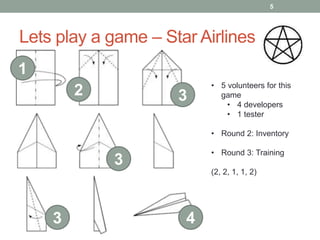
Lets play a game – Star Airlines
1
2 3
3
3 4
• 5 volunteers for this
game
• 4 developers
• 1 tester
• Round 2: Inventory
• Round 3: Training
(2, 2, 1, 1, 2)
5
Why to apply Kanban
• Short time-boxes give more frequent opportunity to measure progress
and inspect software but force development items to be smaller
• Smaller development items are often too small to be valuable and
difficult to identify & breakdown
• Quality of requirements suffers as analysts rush to prepare for
upcoming cycles
• Quality of current development suffers when busy analysts are unable
to inspect software or answer questions during development
• Quality often suffers as testers race to complete work late in the
development time-box
• Cannot be applied to projects where there is frequent change in
priorities e.g. support
Source: Jeff Patton http://www.agileproductdesign.com/
6
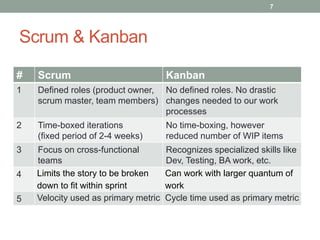
Scrum & Kanban
# Scrum Kanban
1 Defined roles (product owner,
scrum master, team members)
No defined roles. No drastic
changes needed to our work
processes
2 Time-boxed iterations
(fixed period of 2-4 weeks)
No time-boxing, however
reduced number of WIP items
3 Focus on cross-functional
teams
Recognizes specialized skills like
Dev, Testing, BA work, etc.
4 Limits the story to be broken
down to fit within sprint
Can work with larger quantum of
work
5 Velocity used as primary metric Cycle time used as primary metric
7
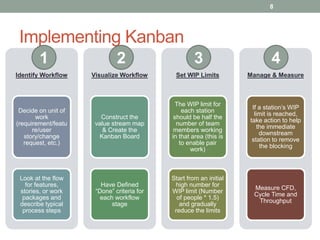
Implementing Kanban
Identify Workflow
Decide on unit of
work
(requirement/featu
re/user
story/change
request, etc.)
Look at the flow
for features,
stories, or work
packages and
describe typical
process steps
Visualize Workflow
Construct the
value stream map
& Create the
Kanban Board
Have Defined
“Done” criteria for
each workflow
stage
Set WIP Limits
The WIP limit for
each station
should be half the
number of team
members working
in that area (this is
to enable pair
work)
Start from an initial
high number for
WIP limit (Number
of people * 1.5)
and gradually
reduce the limits
Manage & Measure
If a station’s WIP
limit is reached,
take action to help
the immediate
downstream
station to remove
the blocking
Measure CFD,
Cycle Time and
Throughput
1 2 43
8
Pitfalls to avoid
1. Discipline is needed while implementing Kanban
2. Be cautious while visualizing your workflow
3. Kanban does not reduce inventory. It provide a simple and effective way
to manage it.
4. Don’t stick with the same WIP Limits. Revise the WIP limits based on the
demand and the team composition
9
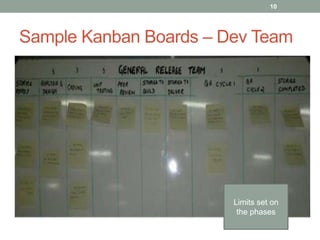
Sample Kanban Boards – Dev Team
Limits set on
the phases
10
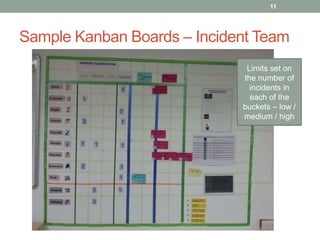
Sample Kanban Boards – Incident Team
Limits set on
the number of
incidents in
each of the
buckets – low /
medium / high
11
Kanban Electronic Tracking Tools
All the major Agile ALM solutions offer Kanban plug-ins.
Other online Kanban tools include
www.personalkanban.com
www.kanbantool.com
www.simple-kanban.com
www.kanbanize.com
12
Benefits from Kanban
• Doesn’t build features that nobody needs right now
• Doesn’t start to build features that can’t be completed
• Allows visual tracking of workflow from start to finish
• Tracks completion time of each work item
• Allows to change priorities
• Adaptive in nature without sacrificing governing principles
13
THANK YOU
Archana Joshi
archana.p.joshi@gmail.com
http://in.linkedin.com/in/arcjoshi
14

Archana Joshi Aug 2013 Kanban Spin Pune

  • 1.
    SPIN PUNE KANBAN –ANSWERING THE 3 W’S: WHAT, WHY, WHERE? Archana Joshi Sr. Manager - Cognizant archana.p.joshi@gmail.com http://in.linkedin.com/in/arcjoshi Aug 1, 2013 1
  • 2.
    Agenda a) What isKanban: Kanban Basics – Push Vs Pull Difference between Scrum & Kanban b) Why Kanban: Industry benefits seen by applying Kanban Pitfalls to avoid when implementing Kanban c) Where Kanban: Type of projects where Kanban is applicable Electronic tracking tools for Kanban 2
  • 3.
    Kanban Basics • Kanbanmean ‘signal’ in Japanese • Used by Toyota to limit the WIP inventory on a manufacturing floor • In Lean terms, its a way to achieve ‘Pull’ - The customer pulls what is needed through the system 3
  • 4.
    How does itapply in Software? • In software projects, Kanban signifies an item of value - • A feature / change request / requirement / user story that goes through various phases before reaching the customer • Signal from a downstream process to its upstream process to produce something only when needed 4
  • 5.
    Lets play agame – Star Airlines 1 2 3 3 3 4 • 5 volunteers for this game • 4 developers • 1 tester • Round 2: Inventory • Round 3: Training (2, 2, 1, 1, 2) 5
  • 6.
    Why to applyKanban • Short time-boxes give more frequent opportunity to measure progress and inspect software but force development items to be smaller • Smaller development items are often too small to be valuable and difficult to identify & breakdown • Quality of requirements suffers as analysts rush to prepare for upcoming cycles • Quality of current development suffers when busy analysts are unable to inspect software or answer questions during development • Quality often suffers as testers race to complete work late in the development time-box • Cannot be applied to projects where there is frequent change in priorities e.g. support Source: Jeff Patton http://www.agileproductdesign.com/ 6
  • 7.
    Scrum & Kanban #Scrum Kanban 1 Defined roles (product owner, scrum master, team members) No defined roles. No drastic changes needed to our work processes 2 Time-boxed iterations (fixed period of 2-4 weeks) No time-boxing, however reduced number of WIP items 3 Focus on cross-functional teams Recognizes specialized skills like Dev, Testing, BA work, etc. 4 Limits the story to be broken down to fit within sprint Can work with larger quantum of work 5 Velocity used as primary metric Cycle time used as primary metric 7
  • 8.
    Implementing Kanban Identify Workflow Decideon unit of work (requirement/featu re/user story/change request, etc.) Look at the flow for features, stories, or work packages and describe typical process steps Visualize Workflow Construct the value stream map & Create the Kanban Board Have Defined “Done” criteria for each workflow stage Set WIP Limits The WIP limit for each station should be half the number of team members working in that area (this is to enable pair work) Start from an initial high number for WIP limit (Number of people * 1.5) and gradually reduce the limits Manage & Measure If a station’s WIP limit is reached, take action to help the immediate downstream station to remove the blocking Measure CFD, Cycle Time and Throughput 1 2 43 8
  • 9.
    Pitfalls to avoid 1.Discipline is needed while implementing Kanban 2. Be cautious while visualizing your workflow 3. Kanban does not reduce inventory. It provide a simple and effective way to manage it. 4. Don’t stick with the same WIP Limits. Revise the WIP limits based on the demand and the team composition 9
  • 10.
    Sample Kanban Boards– Dev Team Limits set on the phases 10
  • 11.
    Sample Kanban Boards– Incident Team Limits set on the number of incidents in each of the buckets – low / medium / high 11
  • 12.
    Kanban Electronic TrackingTools All the major Agile ALM solutions offer Kanban plug-ins. Other online Kanban tools include www.personalkanban.com www.kanbantool.com www.simple-kanban.com www.kanbanize.com 12
  • 13.
    Benefits from Kanban •Doesn’t build features that nobody needs right now • Doesn’t start to build features that can’t be completed • Allows visual tracking of workflow from start to finish • Tracks completion time of each work item • Allows to change priorities • Adaptive in nature without sacrificing governing principles 13
  • 14.