Downloaded 63 times






![{ "apiVersion": "2015-05-01-preview",
"type": "Microsoft.Compute/virtualMachines",
"name": "[concat(parameters('vmNamePrefix'), copyindex())]",
"location": "[parameters('location')]",
"copy": {
"name": "virtualMachineLoop",
"count": "[parameters('numberOfInstances')]"
},
"dependsOn": [
"[concat('Microsoft.Network/networkInterfaces/', 'nic', copyindex())]"
],
"properties": {
"hardwareProfile": {
"vmSize": "[parameters('vmSize')]"
},
"osProfile": {
"computername": "[concat('vm', copyIndex())]",
"adminUsername": "[parameters('adminUsername')]",
"adminPassword": "[parameters('adminPassword')]"
},
"storageProfile": {
"osDisk": {
"name": "[concat(parameters('vmNamePrefix'),'-osDisk',copyindex())]",
"osType": "[parameters('osType')]",
"caching": "ReadWrite",
"image": {
"uri": "[variables('userImageName')]"
},
"vhd": {
"uri":
"[concat(variables('osDiskVhdContainer'),parameters('vmNamePrefix'),copyindex(),'osDisk.
vhd')]"
}
](https://image.slidesharecdn.com/architectingworldclassazureresourcemanagertemplates-150921152729-lva1-app6892/85/Architecting-world-class-azure-resource-manager-templates-15-320.jpg)
![
{ "name": "cluster-nodes",
"type": "Microsoft.Resources/deployments",
"apiVersion": "2015-01-01",
"dependsOn": [
"[concat('Microsoft.Resources/deployments/',
'shared')]"
],
"properties": {
"mode": "Incremental",
"templateLink": {
"uri": "[variables('clusterNodesTemplateUrl')]",
"contentVersion": "1.0.0.0"
},](https://image.slidesharecdn.com/architectingworldclassazureresourcemanagertemplates-150921152729-lva1-app6892/85/Architecting-world-class-azure-resource-manager-templates-16-320.jpg)


![
"networkSettings": {
"vnetName": "[parameters('virtualNetworkName')]",
"addressPrefix": "10.0.0.0/16",
"subnets": {
"dmz": {
"name": "dmz",
"prefix": "10.0.0.0/24",
"vnet": "[parameters('virtualNetworkName')]"
},
"data": {
"name": "data",
"prefix": "10.0.1.0/24",
"vnet": "[parameters('virtualNetworkName')]"
}
"osSettings": {
"imageReference": {
"publisher": "Canonical",
"offer": "UbuntuServer",
"sku": "14.04.2-LTS",
"version": "latest"
}
"tshirtSizeSmall": {
"vmSize": "Standard_A1",
"diskSize": 1023,
"vmTemplate": "[concat(variables('templateBaseUrl'),
'database-2disk-resources.json')]",
"vmCount": 2,
"storage": {
"name": "[parameters('storageAccountNamePrefix')]",
"count": 1,
"pool": "db",
"map": [0,0],
"jumpbox": 0
}
},
"availabilitySetSettings": {
"name": "pgsqlAvailabilitySet",
"fdCount": 3,
"udCount": 5
}](https://image.slidesharecdn.com/architectingworldclassazureresourcemanagertemplates-150921152729-lva1-app6892/85/Architecting-world-class-azure-resource-manager-templates-19-320.jpg)
![
"outputs": {
"masterip": {
"value":
"[reference(concat(variables('nicName'),0)).ipConfigurations[0].properties.privateIPAddress]",
"type":"string"
}}
"masterIpAddress": {
"value":
"[reference('master-node').outputs.masterip.value]"
} }](https://image.slidesharecdn.com/architectingworldclassazureresourcemanagertemplates-150921152729-lva1-app6892/85/Architecting-world-class-azure-resource-manager-templates-20-320.jpg)

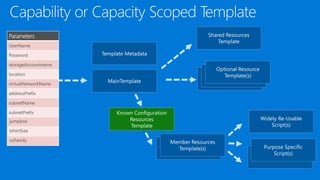
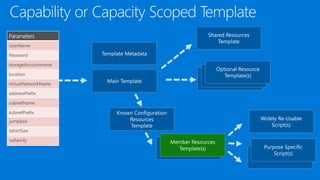
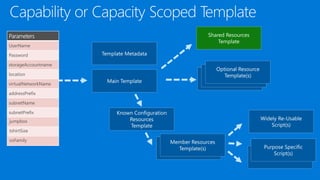
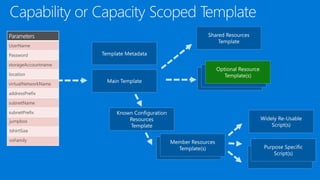





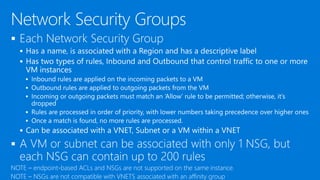
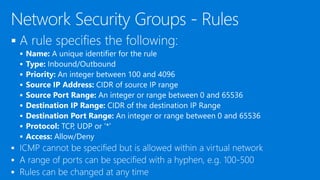

![{
"apiVersion": "2015-05-01-preview",
"type": "Microsoft.Network/networkSecurityGroups",
"name": "[parameters('FENSGName')]",
"location": "[parameters('location')]",
"properties":
{
"securityRules": [
{
"name": "rdp_rule",
"properties":
{
"description": "Allow RDP",
"protocol": "Tcp",
"sourcePortRange": "*",
"destinationPortRange": "3389",
"sourceAddressPrefix": "Internet",
"destinationAddressPrefix": "*",
"access": "Allow",
"priority": 100,
"direction": "Inbound"
}
},
{
"name": "web_rule",
"properties": {
"description": "Allow WEB",
"protocol": "Tcp",
"sourcePortRange": "*",
"destinationPortRange": "80",
"sourceAddressPrefix": "Internet",
"destinationAddressPrefix": "*",
"access": "Allow",
"priority": 101,
"direction": "Inbound"
}
}
]
}
}
{
"apiVersion": "2015-05-01-preview",
"type": "Microsoft.Network/networkSecurityGroups",
"name": "[parameters('AppNSGName')]",
"location": "[parameters('location')]",
"properties": {
"securityRules": [{
"name": "Allow_FE",
"properties": {
"description": "Allow FE Subnet",
"protocol": "Tcp",
"sourcePortRange": "*",
"destinationPortRange": "443",
"sourceAddressPrefix": "10.0.0.0/24",
"destinationAddressPrefix": "*",
"access": "Allow",
"priority": 100,
"direction": "Inbound"
}
},
{
"name": "Block_RDP_Internet",
"properties": {
"description": "Block RDP",
"protocol": "tcp",
"sourcePortRange": "*",
"destinationPortRange": "3389",
"sourceAddressPrefix": "Internet",
"destinationAddressPrefix": "*",
"access": "Deny",
"priority": 101,
"direction": "Inbound"
}
},
{
"name": "Block_Internet_Outbound",
"properties": {
"description": "Block Internet",
"protocol": "*",
"sourcePortRange": "*",](https://image.slidesharecdn.com/architectingworldclassazureresourcemanagertemplates-150921152729-lva1-app6892/85/Architecting-world-class-azure-resource-manager-templates-45-320.jpg)


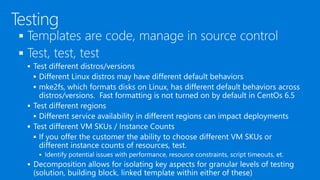
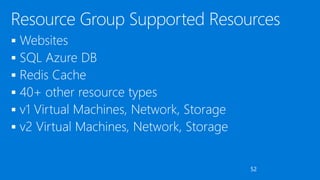
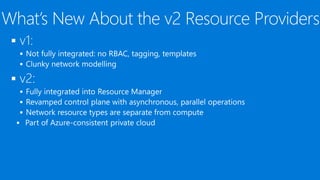



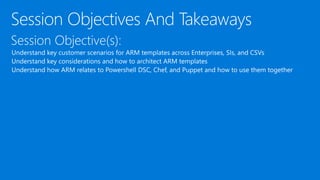
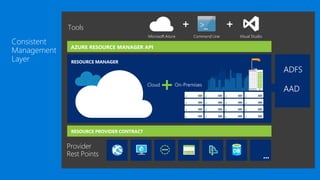
The document describes the Azure Resource Manager (ARM) API, detailing how it serves as a container for multiple resources within resource groups that can span regions and services. It provides technical specifications for deploying virtual machines, managing network settings, and security rules, along with parameters for customization. Additionally, it outlines concepts of role definitions and assignments for managing access and permissions at various levels within Azure resources.


