1 |
Copyright © dotnetpiper.com
AZURE INFRA STRUCTURE AS CODE(IAC)
 Sachin Kalia
 @dotnetpiper
2 |
Copyright © dotnetpiper.com
AZURE ARM
Agenda
1. What is Azure Resource Manager
2. Understanding ARM Templates
3. Deploying simple PaaS based ARM Templates
4. Nested Templates
5. Templates Scopes
6. Activity Alerts enabling through ARM
7. Demonstration
3 |
Copyright © dotnetpiper.com
AZURE INFRASTRUCTURE AS CODE
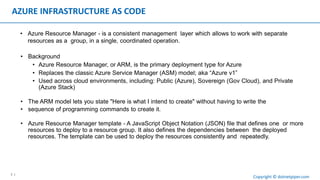
• Azure Resource Manager - is a consistent management layer which allows to work with separate
resources as a group, in a single, coordinated operation.
• Background
• Azure Resource Manager, or ARM, is the primary deployment type for Azure
• Replaces the classic Azure Service Manager (ASM) model; aka “Azure v1”
• Used across cloud environments, including: Public (Azure), Sovereign (Gov Cloud), and Private
(Azure Stack)
• The ARM model lets you state "Here is what I intend to create" without having to write the
• sequence of programming commands to create it.
• Azure Resource Manager template - A JavaScript Object Notation (JSON) file that defines one or more
resources to deploy to a resource group. It also defines the dependencies between the deployed
resources. The template can be used to deploy the resources consistently and repeatedly.
4 |
Copyright © dotnetpiper.com
AZURE ARM
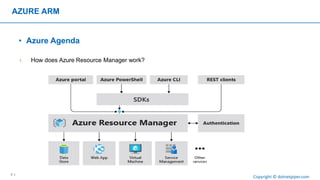
• Azure Agenda
1. How does Azure Resource Manager work?
5 |
Copyright © dotnetpiper.com
AZURE INFRASTRUCTURE AS CODE (IAC)
• Understanding ARM Template
6 |
Copyright © dotnetpiper.com
ARM TEMPLATE TOOLS WE CAN USE
• Visual Studio
• Visual Studio Code
• Terraform, Azure Building Blocks, Ansible, etc.
• Configuration via Azure Automation DSC (aka PowerShell DSC), IaaS VM Custom
Script Extension, Puppet, Chef, Salt Stack
• Visualize with ARMViz
• NotePad ++
7 |
Copyright © dotnetpiper.com
ARM TEMPLATE CORE STRUCTURE
{
"$schema": "https://schema.management.azure.com/schemas/2015-01-01/deploymentTemplate.json#",
"contentVersion": " 1 . 0 . 0 . 0 " ,
"parameters": { } ,
"variables" : { } ,
"resources": [ ] ,
"outputs": { }
}
8 |
Copyright © dotnetpiper.com
ARM TEMPLATE CORE STRUCTURE
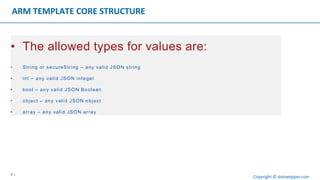
• The allowed types for values are:
• String or secureString – any valid JSON string
• int – any valid JSON integer
• bool – any valid JSON Boolean
• object – any valid JSON object
• array – any valid JSON array
9 |
Copyright © dotnetpiper.com
ARM TEMPLATE PARAMETERS
"parameters": {
"storageAccountType": {
" t yp e " : " s t r i n g " , "defaultValue":
"Standard_LRS", "allowedValues": [
" Standard_LRS" ,
"Standard_GRS",
" Standard_ZRS" ,
"Premium_LRS"
] ,
"metadata": {
"description" : "Storage Account type"
}
} ,
"storageAccountName": {
" t yp e " : " s t r i n g " ,
"defaultValue": "azureglobalbootcamp2018",
"maxlength": 24,
"metadata": {
"description":"The nameof the Storage Account"
}
}
In the parameters section of the template, you specify which values you can input
when deploying the resources
10 |
Copyright © dotnetpiper.com
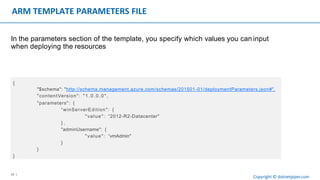
ARM TEMPLATE PARAMETERS FILE
{
"$schema": "http://schema.management.azure.com/schemas/201501-01/deploymentParameters.json#",
"contentVersion": "1.0.0.0",
"parameters": {
“winServerEdition": {
"value": “2012-R2-Datacenter"
} ,
"adminUsername": {
"value": “vmAdmin"
}
}
}
In the parameters section of the template, you specify which values you can input
when deploying the resources
11 |
Copyright © dotnetpiper.com
ARM TEMPLATE VARIABLE
"variables": {
"storageName":"[concat(toLower(parameters(‘prefix’)), resourceGroup().id)]“,
"environmentSettings": {
" t e s t " : {
"instanceSize": "Small",
"instanceCount": 1
} ,
"prod": {
"instanceSize": "Large",
"instanceCount": 4
}
}
}
In the variables section, you construct values that can be used throughout your
template.
12 |
Copyright © dotnetpiper.com
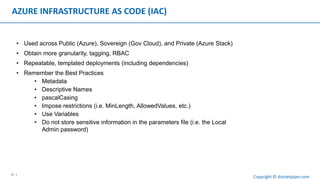
AZURE INFRASTRUCTURE AS CODE (IAC)
• Used across Public (Azure), Sovereign (Gov Cloud), and Private (Azure Stack)
• Obtain more granularity, tagging, RBAC
• Repeatable, templated deployments (including dependencies)
• Remember the Best Practices
• Metadata
• Descriptive Names
• pascalCasing
• Impose restrictions (i.e. MinLength, AllowedValues, etc.)
• Use Variables
• Do not store sensitive information in the parameters file (i.e. the Local
Admin password)
13 |
Copyright © dotnetpiper.com
DEMOS
• Simple ARM template deployment with PowerShell
• Azure Quick Start Gallery
• How to extract ARM template of existing resources
• Adding a Template directly from Azure Portal
14 |
Copyright © dotnetpiper.com
THANKS
www.dotnetpiper.com  @dotnetpiper

Azure arm templates

  • 1.
    1 | Copyright ©dotnetpiper.com AZURE INFRA STRUCTURE AS CODE(IAC)  Sachin Kalia  @dotnetpiper
  • 2.
    2 | Copyright ©dotnetpiper.com AZURE ARM Agenda 1. What is Azure Resource Manager 2. Understanding ARM Templates 3. Deploying simple PaaS based ARM Templates 4. Nested Templates 5. Templates Scopes 6. Activity Alerts enabling through ARM 7. Demonstration
  • 3.
    3 | Copyright ©dotnetpiper.com AZURE INFRASTRUCTURE AS CODE • Azure Resource Manager - is a consistent management layer which allows to work with separate resources as a group, in a single, coordinated operation. • Background • Azure Resource Manager, or ARM, is the primary deployment type for Azure • Replaces the classic Azure Service Manager (ASM) model; aka “Azure v1” • Used across cloud environments, including: Public (Azure), Sovereign (Gov Cloud), and Private (Azure Stack) • The ARM model lets you state "Here is what I intend to create" without having to write the • sequence of programming commands to create it. • Azure Resource Manager template - A JavaScript Object Notation (JSON) file that defines one or more resources to deploy to a resource group. It also defines the dependencies between the deployed resources. The template can be used to deploy the resources consistently and repeatedly.
  • 4.
    4 | Copyright ©dotnetpiper.com AZURE ARM • Azure Agenda 1. How does Azure Resource Manager work?
  • 5.
    5 | Copyright ©dotnetpiper.com AZURE INFRASTRUCTURE AS CODE (IAC) • Understanding ARM Template
  • 6.
    6 | Copyright ©dotnetpiper.com ARM TEMPLATE TOOLS WE CAN USE • Visual Studio • Visual Studio Code • Terraform, Azure Building Blocks, Ansible, etc. • Configuration via Azure Automation DSC (aka PowerShell DSC), IaaS VM Custom Script Extension, Puppet, Chef, Salt Stack • Visualize with ARMViz • NotePad ++
  • 7.
    7 | Copyright ©dotnetpiper.com ARM TEMPLATE CORE STRUCTURE { "$schema": "https://schema.management.azure.com/schemas/2015-01-01/deploymentTemplate.json#", "contentVersion": " 1 . 0 . 0 . 0 " , "parameters": { } , "variables" : { } , "resources": [ ] , "outputs": { } }
  • 8.
    8 | Copyright ©dotnetpiper.com ARM TEMPLATE CORE STRUCTURE • The allowed types for values are: • String or secureString – any valid JSON string • int – any valid JSON integer • bool – any valid JSON Boolean • object – any valid JSON object • array – any valid JSON array
  • 9.
    9 | Copyright ©dotnetpiper.com ARM TEMPLATE PARAMETERS "parameters": { "storageAccountType": { " t yp e " : " s t r i n g " , "defaultValue": "Standard_LRS", "allowedValues": [ " Standard_LRS" , "Standard_GRS", " Standard_ZRS" , "Premium_LRS" ] , "metadata": { "description" : "Storage Account type" } } , "storageAccountName": { " t yp e " : " s t r i n g " , "defaultValue": "azureglobalbootcamp2018", "maxlength": 24, "metadata": { "description":"The nameof the Storage Account" } } In the parameters section of the template, you specify which values you can input when deploying the resources
  • 10.
    10 | Copyright ©dotnetpiper.com ARM TEMPLATE PARAMETERS FILE { "$schema": "http://schema.management.azure.com/schemas/201501-01/deploymentParameters.json#", "contentVersion": "1.0.0.0", "parameters": { “winServerEdition": { "value": “2012-R2-Datacenter" } , "adminUsername": { "value": “vmAdmin" } } } In the parameters section of the template, you specify which values you can input when deploying the resources
  • 11.
    11 | Copyright ©dotnetpiper.com ARM TEMPLATE VARIABLE "variables": { "storageName":"[concat(toLower(parameters(‘prefix’)), resourceGroup().id)]“, "environmentSettings": { " t e s t " : { "instanceSize": "Small", "instanceCount": 1 } , "prod": { "instanceSize": "Large", "instanceCount": 4 } } } In the variables section, you construct values that can be used throughout your template.
  • 12.
    12 | Copyright ©dotnetpiper.com AZURE INFRASTRUCTURE AS CODE (IAC) • Used across Public (Azure), Sovereign (Gov Cloud), and Private (Azure Stack) • Obtain more granularity, tagging, RBAC • Repeatable, templated deployments (including dependencies) • Remember the Best Practices • Metadata • Descriptive Names • pascalCasing • Impose restrictions (i.e. MinLength, AllowedValues, etc.) • Use Variables • Do not store sensitive information in the parameters file (i.e. the Local Admin password)
  • 13.
    13 | Copyright ©dotnetpiper.com DEMOS • Simple ARM template deployment with PowerShell • Azure Quick Start Gallery • How to extract ARM template of existing resources • Adding a Template directly from Azure Portal
  • 14.
    14 | Copyright ©dotnetpiper.com THANKS www.dotnetpiper.com  @dotnetpiper