Windows Azure Pack
Enabling Virtual Machines:
IaaS and Virtual Machine Role
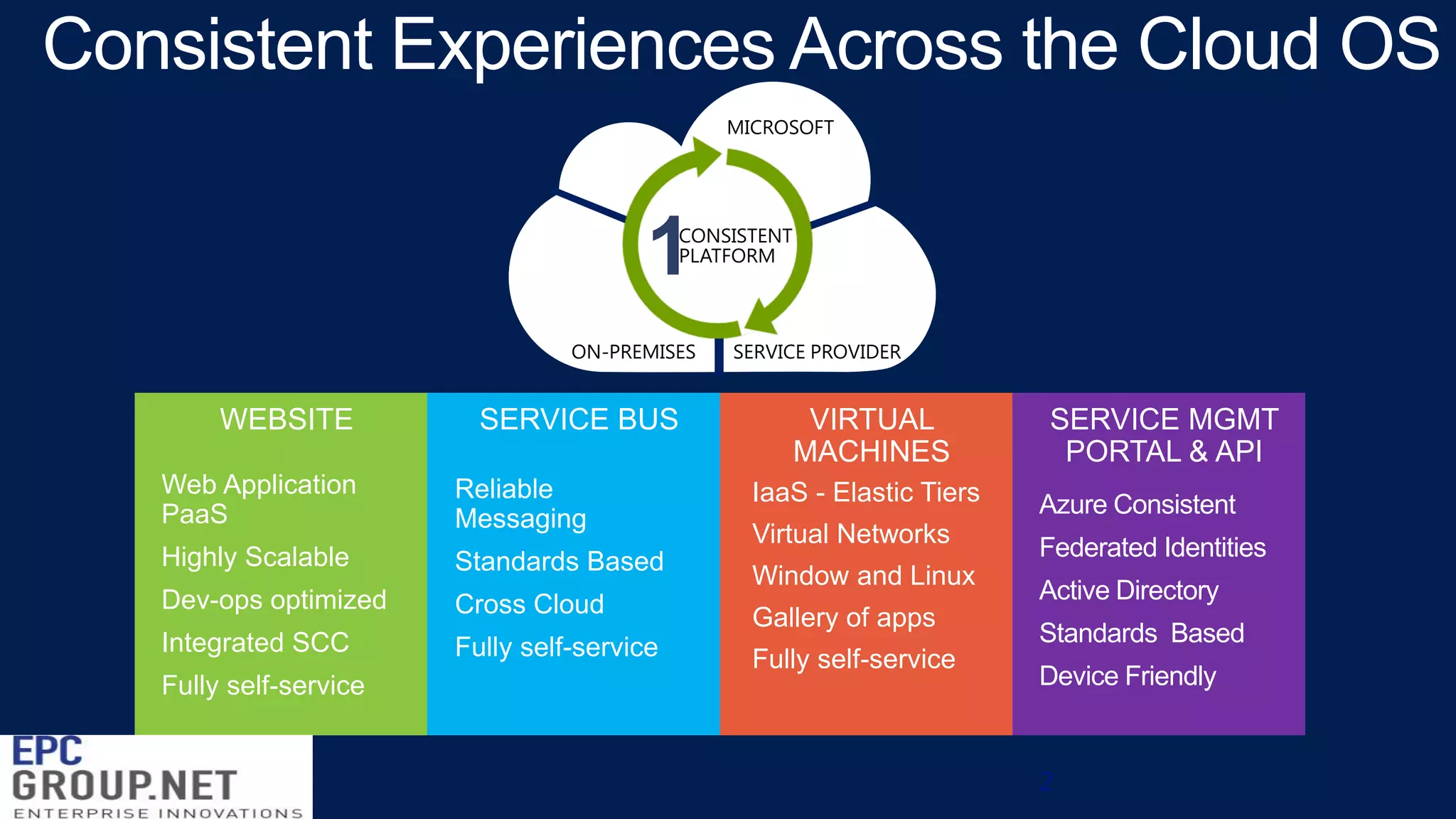
Consistent Experiences Across the Cloud OS
MICROSOFT

1

CONSISTENT
PLATFORM

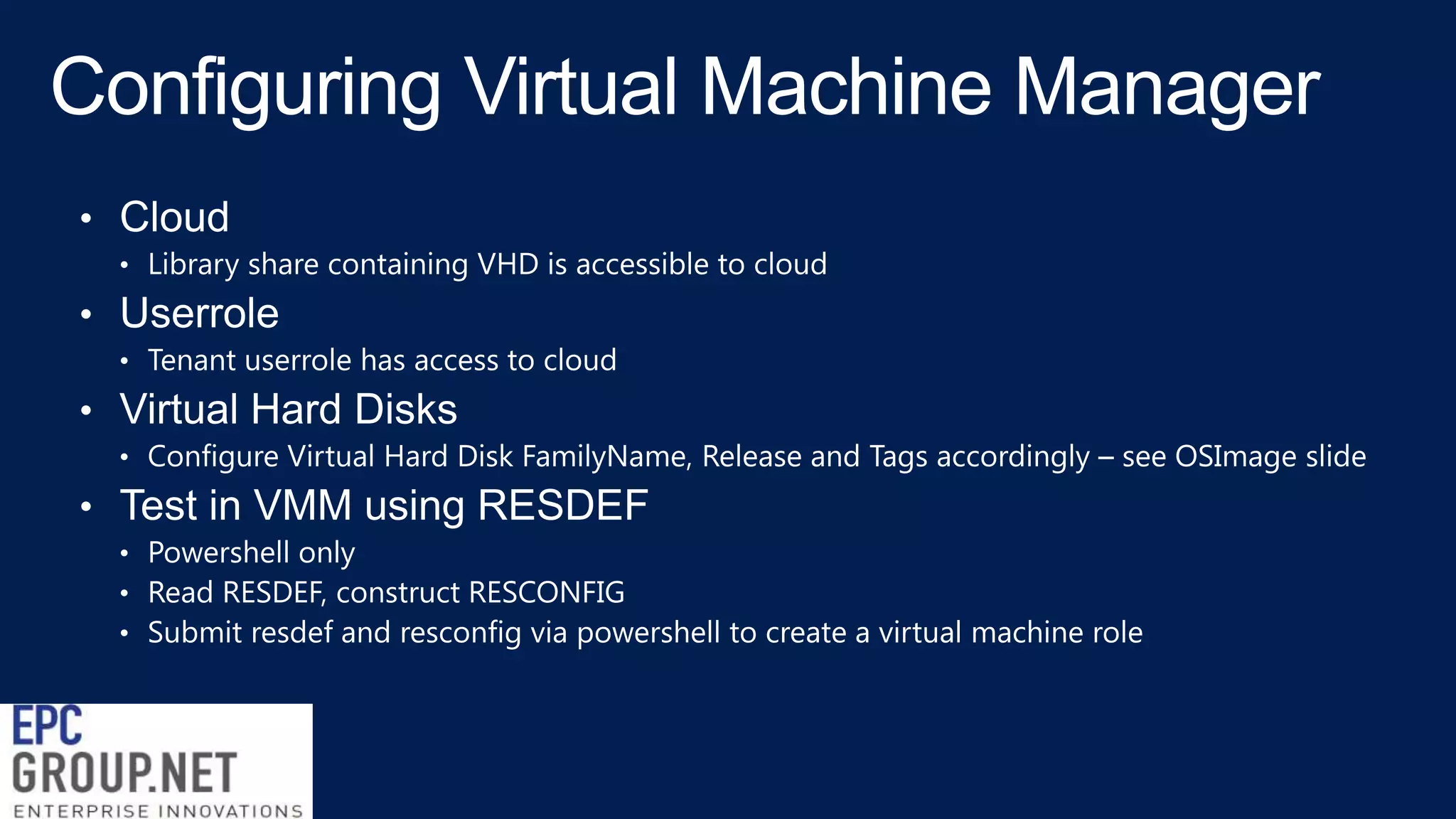
ON-PREMISES

WEBSITE

SERVICE BUS

Web Application
PaaS

Reliable
Messaging

Highly Scalable

Standards Based

Dev-ops optimized

Cross Cloud

Integrated SCC

Fully self-service

Fully self-service

SERVICE PROVIDER

VIRTUAL
MACHINES

SERVICE MGMT
PORTAL & API

IaaS - Elastic Tiers

Azure Consistent

Virtual Networks

Federated Identities

Window and Linux
Gallery of apps
Fully self-service

Active Directory
Standards Based
Device Friendly

2
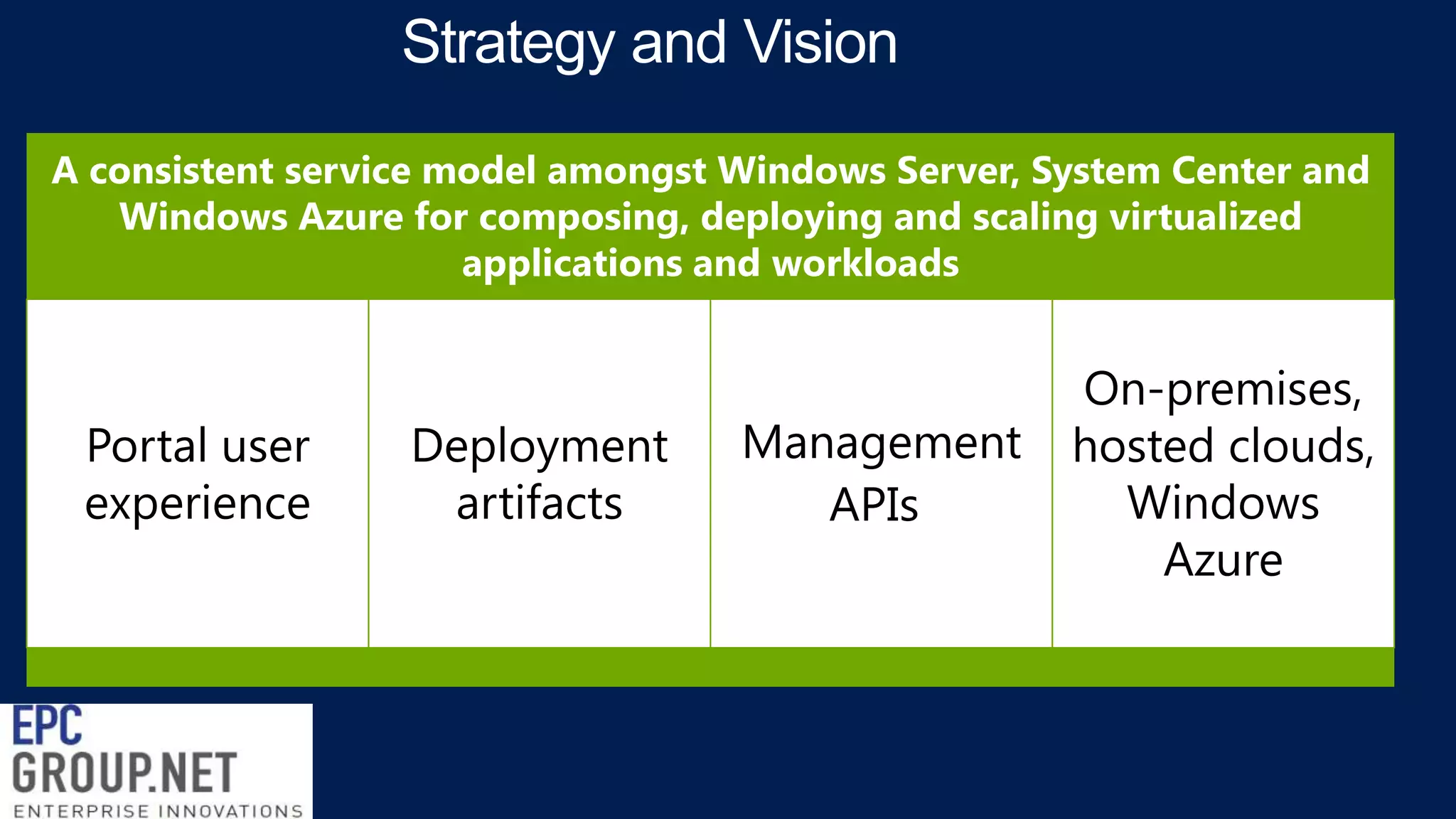
A consistent service model amongst Windows Server, System Center and
Windows Azure for composing, deploying and scaling virtualized
applications and workloads

Portal user
experience

Deployment
artifacts

Management
APIs

On-premises,
hosted clouds,
Windows
Azure
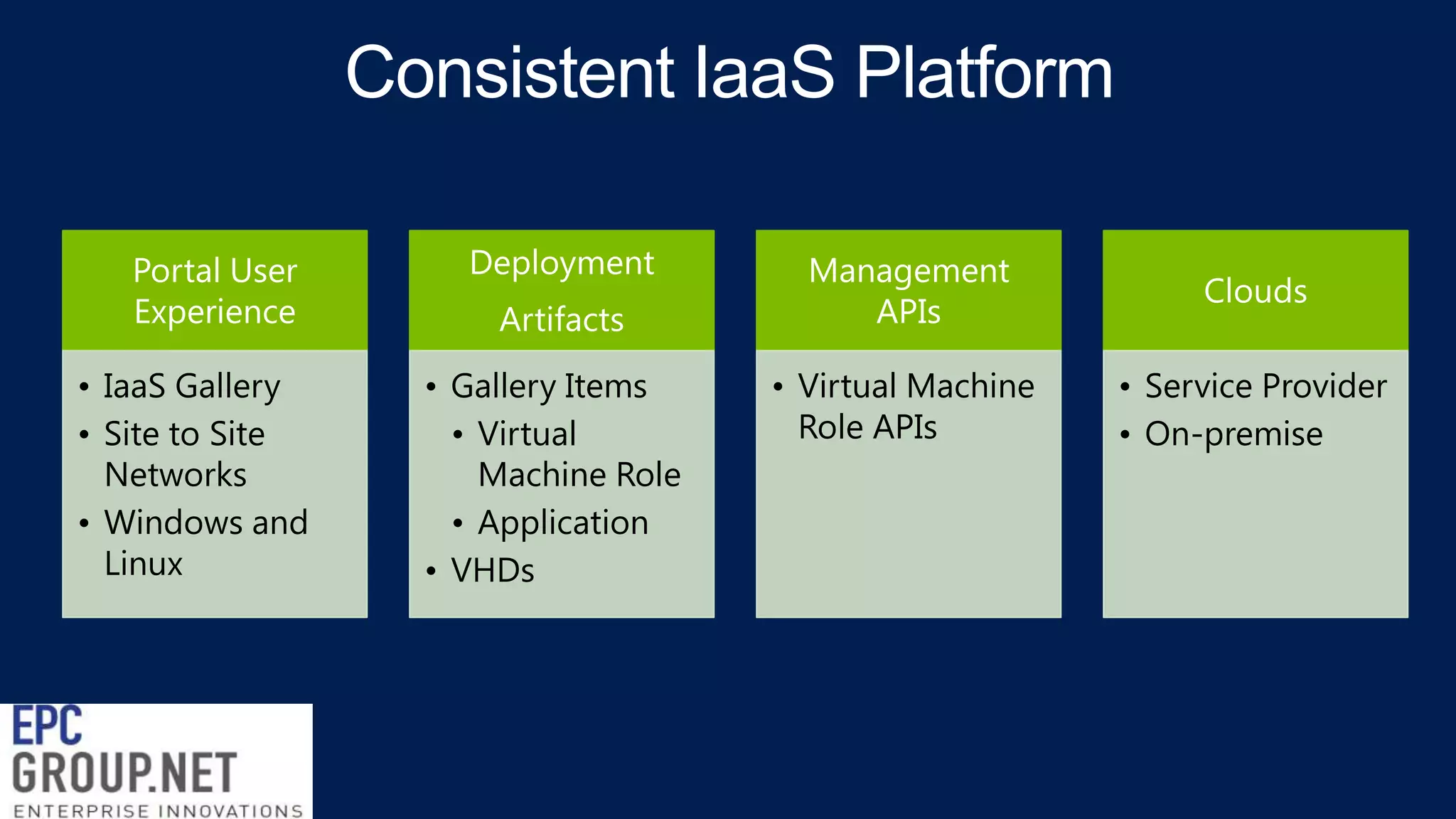
Portal User
Experience
• IaaS Gallery
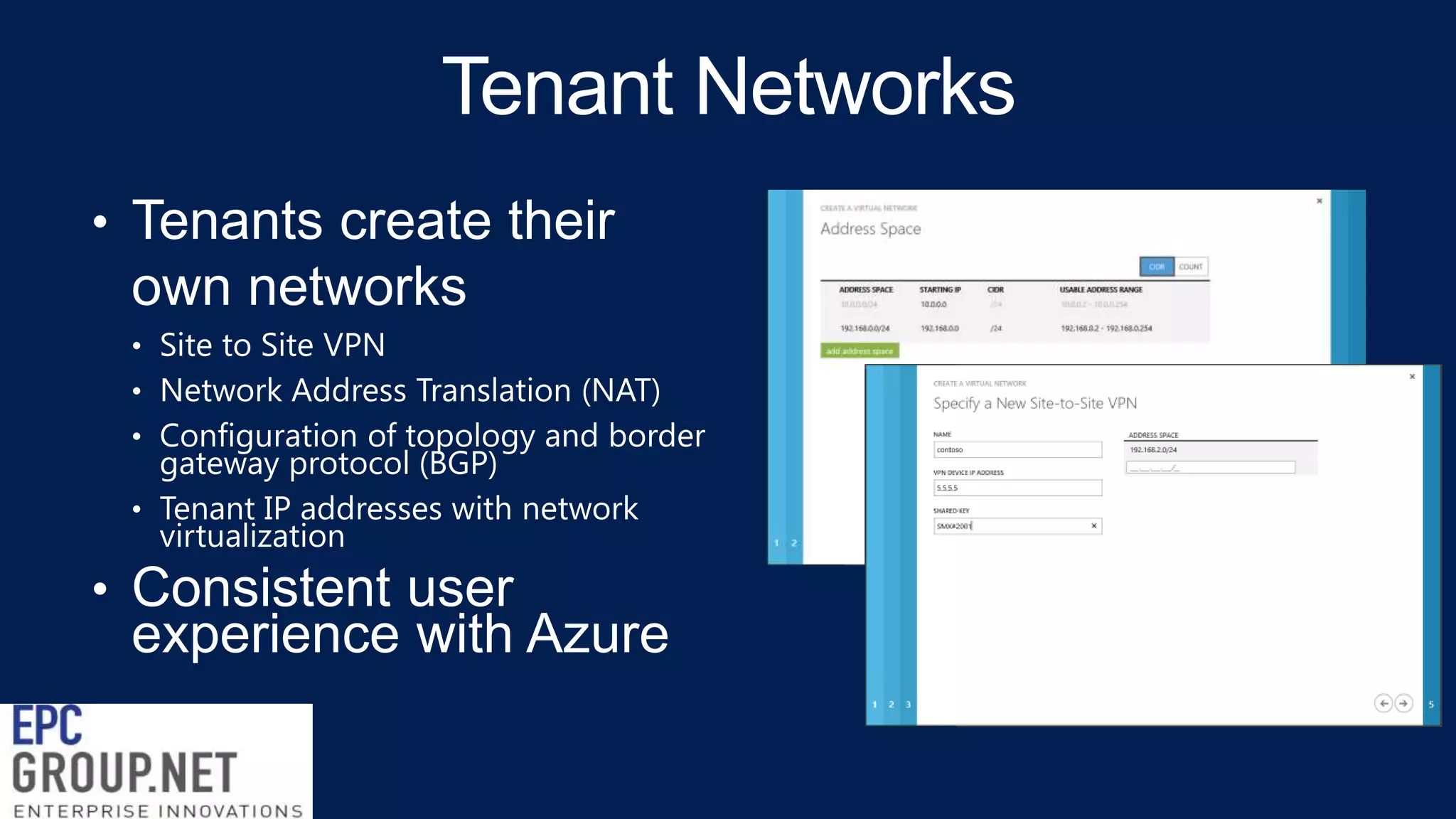
• Site to Site
Networks
• Windows and
Linux

Deployment
Artifacts
• Gallery Items
• Virtual
Machine Role
• Application
• VHDs

Management
APIs

Clouds

• Virtual Machine
Role APIs

• Service Provider
• On-premise
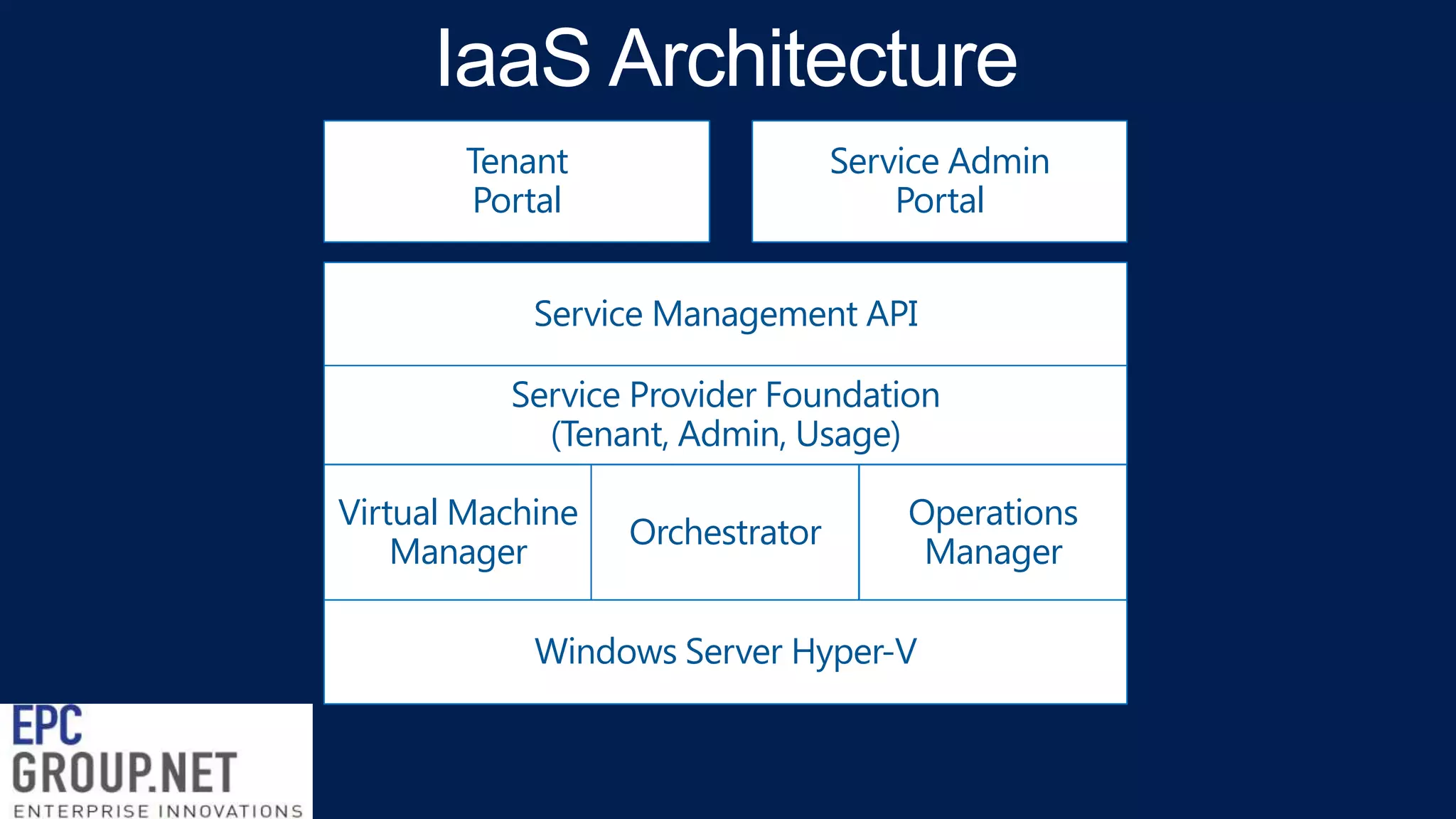
Tenant
Portal

Service Admin
Portal

Service Management API

Service Provider Foundation
(Tenant, Admin, Usage)
Virtual Machine
Manager

Orchestrator

Operations
Manager

Windows Server Hyper-V
3

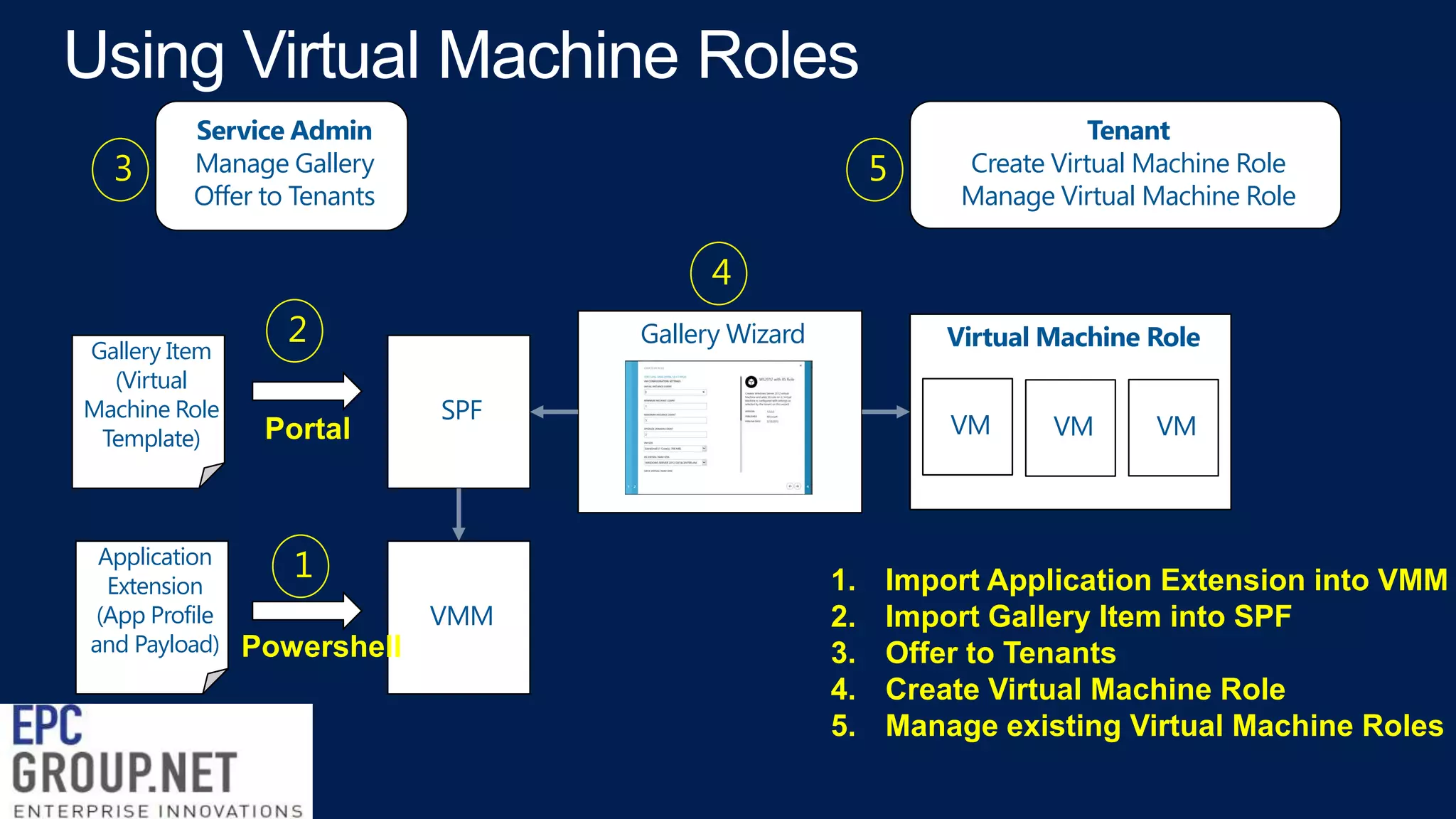
Service Admin
Manage Gallery
Offer to Tenants

5

Tenant
Create Virtual Machine Role
Manage Virtual Machine Role

4
Gallery Item
(Virtual
Machine Role
Template)

Application
Extension
(App Profile
and Payload)

2
Portal

Gallery Wizard
SPF

1
VMM

Powershell

Virtual Machine Role
VM

1.
2.
3.
4.
5.

VM

VM

Import Application Extension into VMM
Import Gallery Item into SPF
Offer to Tenants
Create Virtual Machine Role
Manage existing Virtual Machine Roles
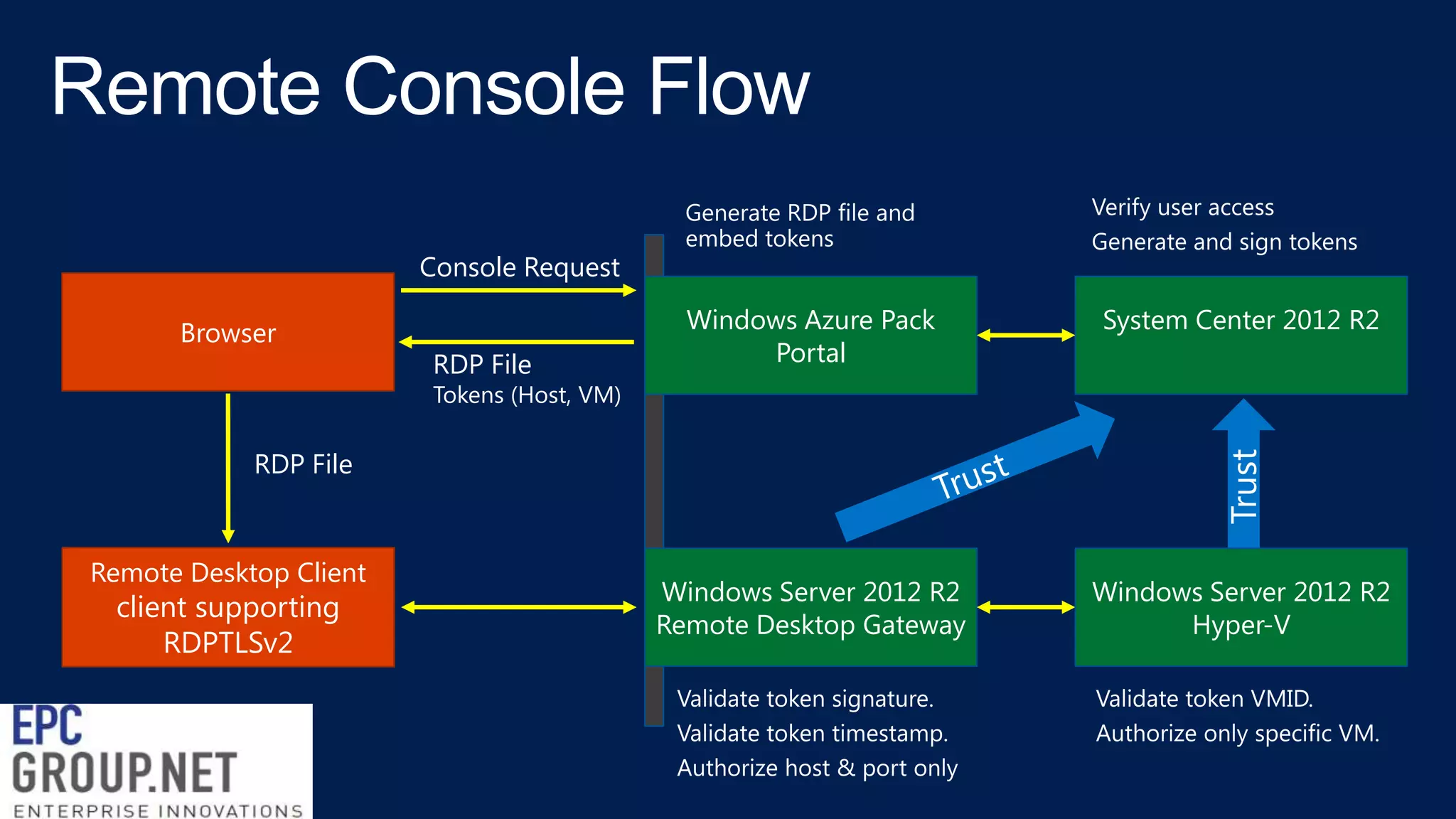
Console Request
Browser

RDP File

Windows Azure Pack
Portal

System Center 2012 R2

Windows Server 2012 R2
Remote Desktop Gateway

Windows Server 2012 R2
Hyper-V

Tokens (Host, VM)

RDP File

Remote Desktop Client

client supporting
RDPTLSv2
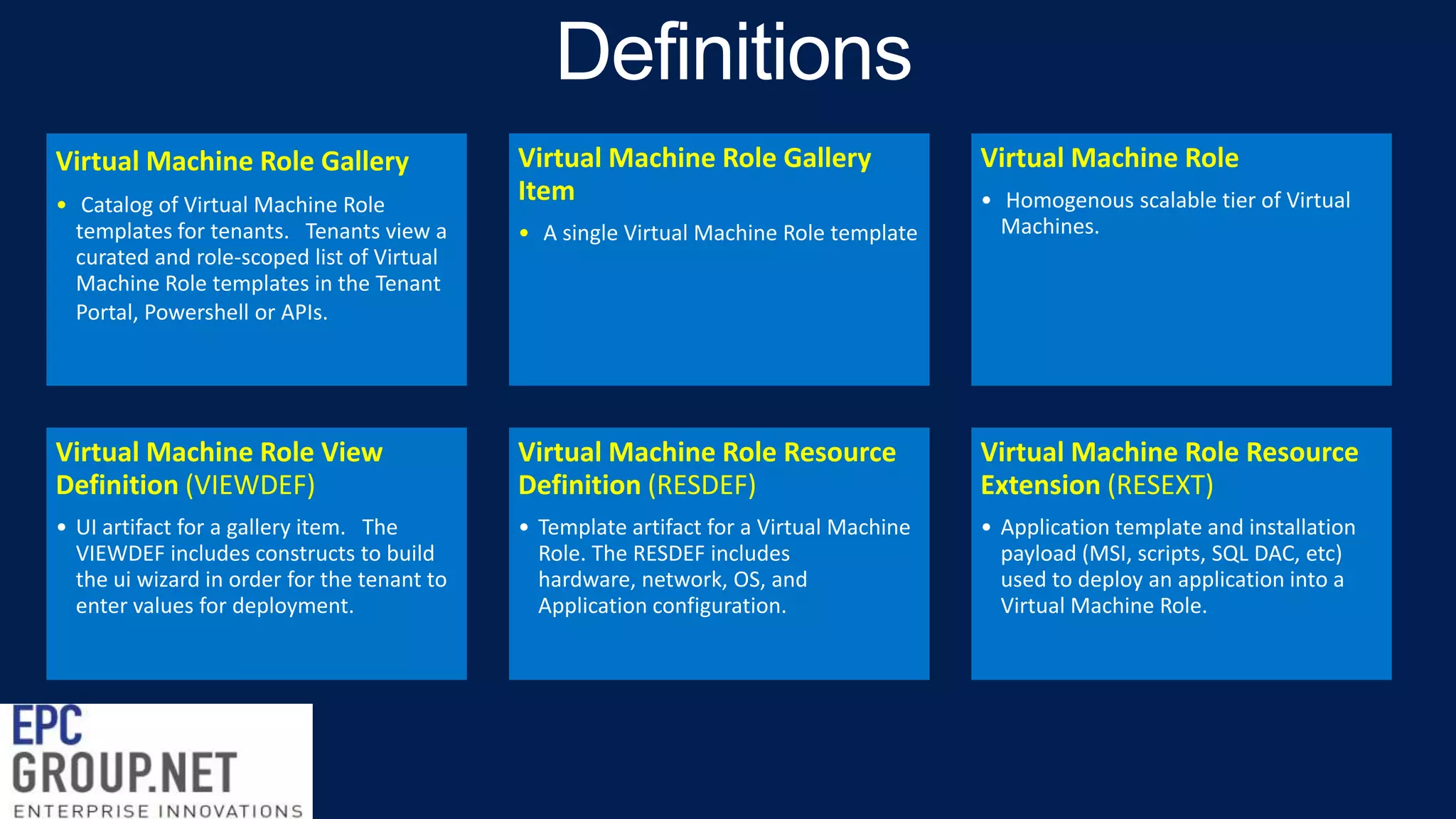
Virtual Machine Role Gallery

Virtual Machine Role Gallery
Item

Virtual Machine Role

• A single Virtual Machine Role template

• Homogenous scalable tier of Virtual
Machines.

Virtual Machine Role View
Definition (VIEWDEF)

Virtual Machine Role Resource
Definition (RESDEF)

Virtual Machine Role Resource
Extension (RESEXT)

• UI artifact for a gallery item. The
VIEWDEF includes constructs to build
the ui wizard in order for the tenant to
enter values for deployment.

• Template artifact for a Virtual Machine
Role. The RESDEF includes
hardware, network, OS, and
Application configuration.

• Application template and installation
payload (MSI, scripts, SQL DAC, etc)
used to deploy an application into a
Virtual Machine Role.

• Catalog of Virtual Machine Role
templates for tenants. Tenants view a
curated and role-scoped list of Virtual
Machine Role templates in the Tenant
Portal, Powershell or APIs.
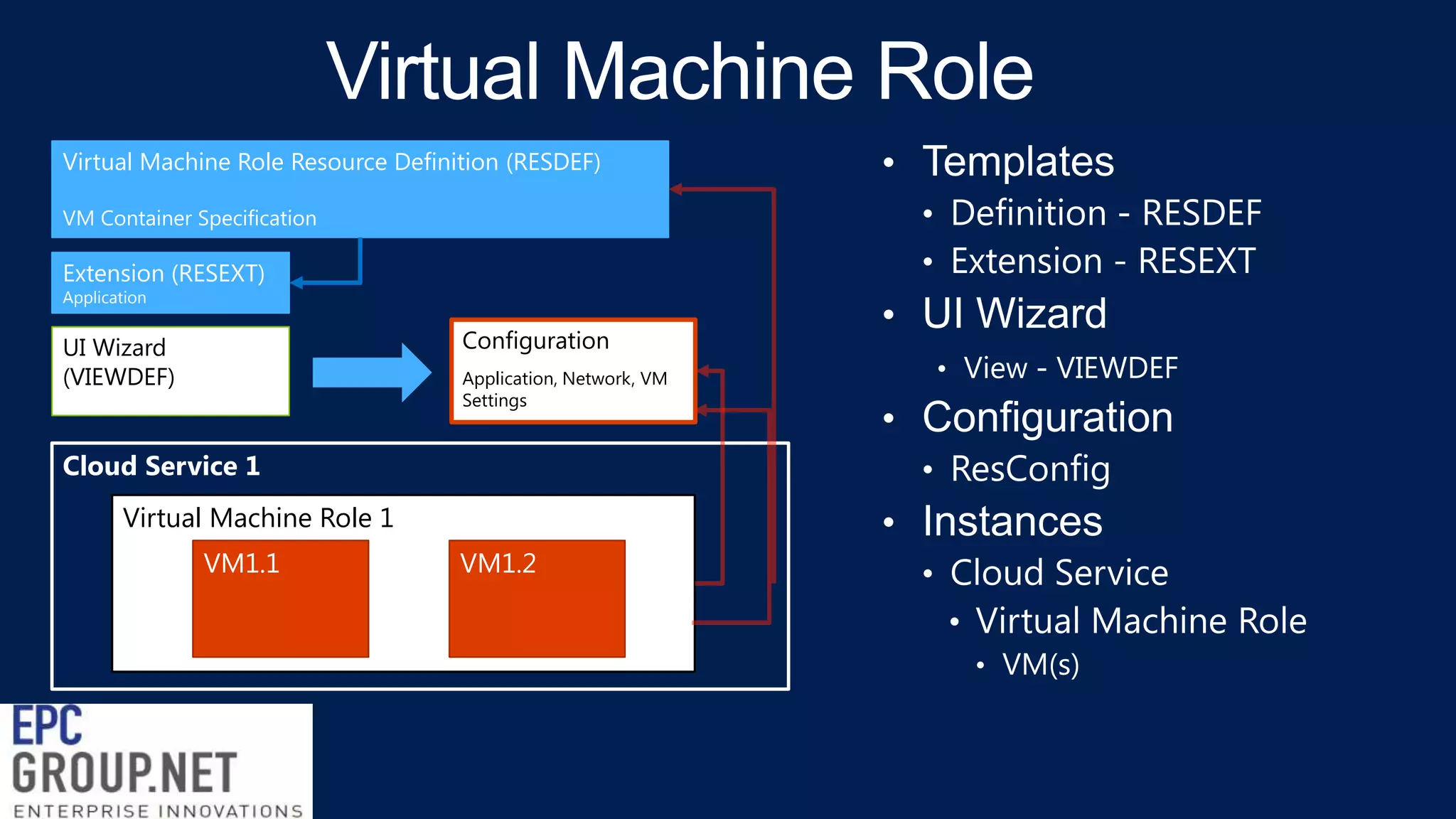
Virtual Machine Role Resource Definition (RESDEF)
VM Container Specification

Extension (RESEXT)
Application

Configuration

UI Wizard
(VIEWDEF)

Application, Network, VM
Settings

Cloud Service 1
Virtual Machine Role 1

VM1.1

VM1.2
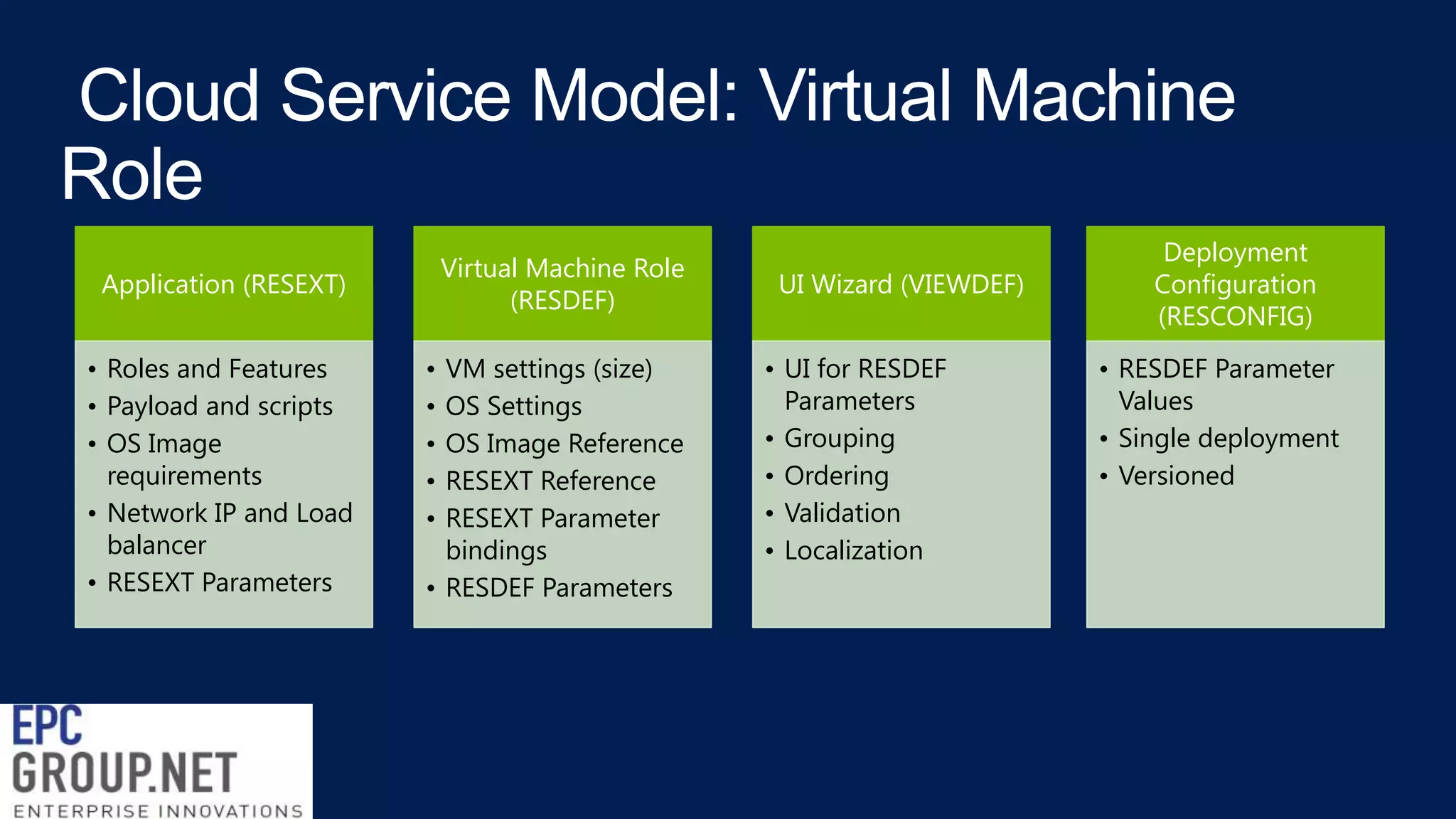
Virtual Machine Role
(RESDEF)

Application (RESEXT)
• Roles and Features
• Payload and scripts
• OS Image
requirements
• Network IP and Load
balancer
• RESEXT Parameters

•
•
•
•
•

VM settings (size)
OS Settings
OS Image Reference
RESEXT Reference
RESEXT Parameter
bindings
• RESDEF Parameters

UI Wizard (VIEWDEF)
• UI for RESDEF
Parameters
• Grouping
• Ordering
• Validation
• Localization

Deployment
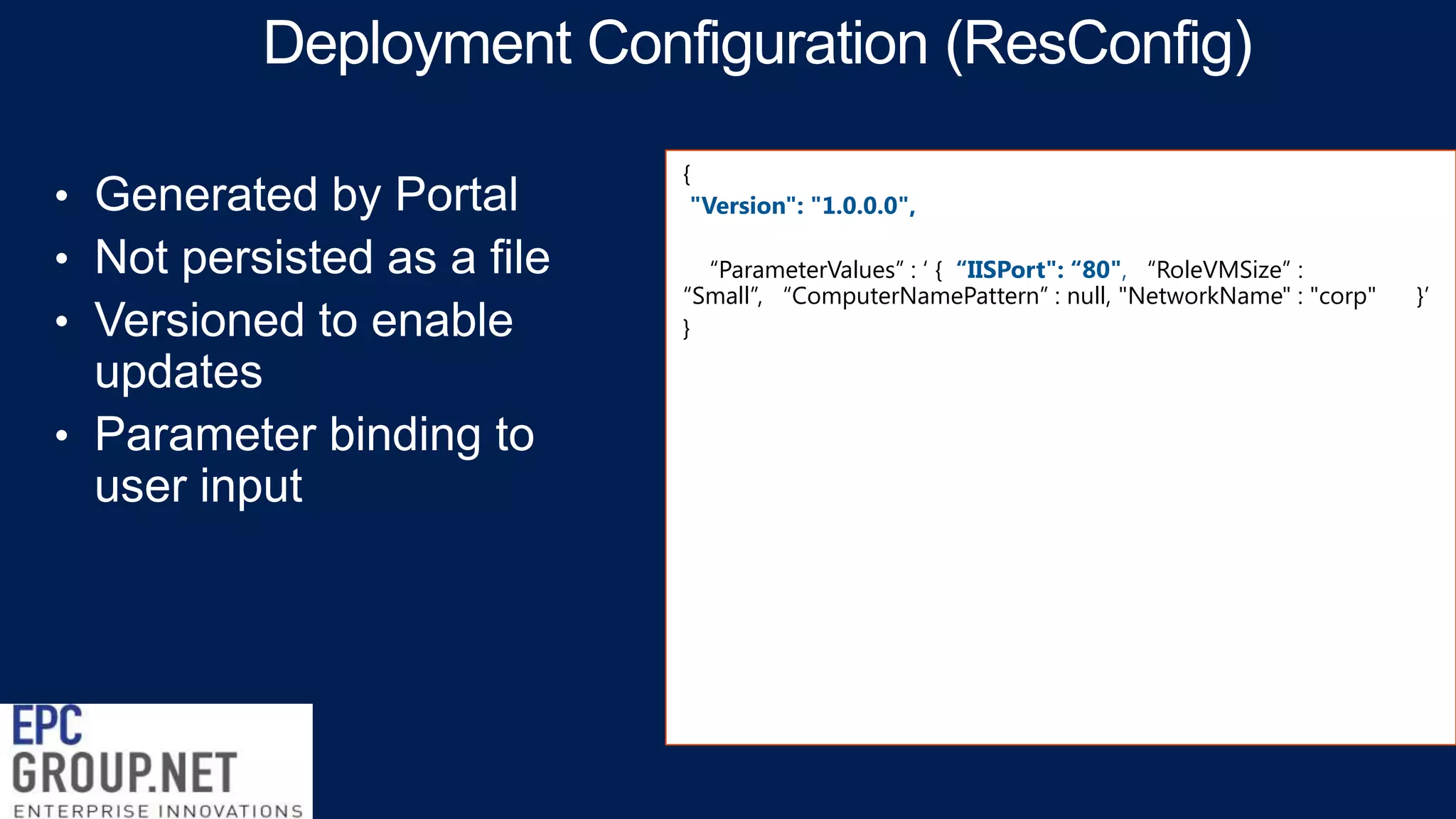
Configuration
(RESCONFIG)
• RESDEF Parameter
Values
• Single deployment
• Versioned
{

OPC

"Name": "IIS_Demo_2", "Publisher": "Microsoft, "Version": "1.0.0.0",
"ExtensionHostingContract":
"MicrosoftCompute/VMRole/1.0.0.0", ", "SchemaVersion": "1.0.0.0",
"DataPackage" : {
"Location" : "IISWS2012",
"Version" : "1.0.0.0" },
"ResourceExtensionParameters": [ {
"Name" : "IISPort", “Type" : "String", "Description" : "IIS Port"
} ],
"ResourceRequirements": {
"OSVirtualHardDiskRequirements": ["WindowsServer2012", "Datacenter"
] },
"ExtensionSettings": { "SchemaVersion": "1.0.0.0",
"WindowsServerRolesAndFeatures": [
"Web-Server", "Web-WebServer", "Web-Common-Http", "WebDefault-Doc", "Web-Dir-Browsing", "Web-Http-Errors“ ]
"ApplicationProfile": {
"ApplicationPayload": [ { "ID" : "123dbce1-8ccd-4fb1-af39a2a3b69b4123", "RelativePath" : "IISConfiguration.cr" }
],
"Name": "389cb52d-a950-46d3-b021-48b7fe67267e",
"WindowsApplicationProfile": {
"ProvisioningScripts": [ {
"AlwaysReboot" : faalse, "ApplicationPayloadId" : "123dbce1-8ccd-4fb1af39-a2a3b69b4123",
"DeploymentOrder" : 1, "ErrorPolicy" : "FailOnMatch",
"ExecutableAndParams" : {
"Executable" : "cmd.exe", "Parameters" : "/q /c iisconfig.cmd [Param.IISPort]"
},
"ExitCodeRegex" : "[[1-9][[0-9]*", "RebootExitCodeRegex" :
null, "RestartOnRetry" : false, "ScriptBlock" : null, "ScriptCredential" : null,
"ScriptType" : "PreInstall", "StandardErrorPath" : "C:iisconfiggceerr.txt", "StandardErrorRegex" : null, "StandardInput" : null,
"StandardOutputPath" : "C:iisconfig-gceout.txt", "StandardOutputRegex" :
null, "TimeoutInSeconds" : 1200, "WorkingDirectory" : null
{
"Name": "IIS_Demo", "Publisher": "Microsoft", "Version": "1.0.0.0",
"Type": "MicrosoftCompute/VMRole", "SchemaVersion": "1.0.0.0",
"ResourceParameters": [
{
"Name": "RoleVMSize", "Type": "String",
"Description": "Platform-specific VM size (for Blue: XS | S | M | L | XL)"
},
{
"Name": "IISPort", "Type": "String", "Description": "IISPort desc."
}
],
"ResourceExtensionReferences": [
{
"ReferenceName": "IIS_Demo_2",
"Name": "IIS_Demo_2", "Publisher": Microsoft", "Version": "1.0.0.0",
"ResourceExtensionParameterValues" : '{
"IISPort" : "[Param.IISPort]"}'
}
],
"IntrinsicSettings": {
"SchemaVersion": "1.0.0.0",
"HardwareProfile": {
"VMSize": "[Param.RoleVMSize]"
}, "ScaleOutSettings": {
"InitialInstanceCount": "[Param.RoleInitialInstanceCount]",
{
"Label":

"{{IISWS2012Label}}", "PublisherLabel": "Microsoft",
"Description": "{{WS2012IISDescription}}",
"DefaultLanguageCode": "en-US",
"Sections": [
{ "Title": "{{WS2012IISVMSettings}}",
"Categories": [
{ "CategoryName": "{{ScaleOutSettingGroup}}",
"Parameters": [
{ "Name": "RoleVMSize", "Label": "VM Size",
"Type": "VMSize", "DefaultValue": "ExtraSmall",
"Description": "{{RoleSizeDesc}}",
"Validation": {
"Required": true,
"Messages": { "Required": {{RoleSizeRequiredMessage}}“ }
} },
{ "Name": "RoleOSVHDImageNameVersion", "Label": "OS
Virtual Hard disk",
"Type": "OSVirtualHardDisk", "Description": "{{OSDisk}}",
"ImageTags": [ "WindowsServer2012", "Datacenter“ ],
"Validation": {"Required": true,
"Messages": {"Required": "OS Disk is Required" } } },
{ "Name": "RoleInitialInstanceCount", "Label": "Initial Instance
Count",
"Type": "Number", "DefaultValue": "1", "Description":
"{{RoleInitialInstanceCountDescription}}",
"Validation": {
{
"Version": "1.0.0.0",
“ParameterValues” : „ { “IISPort": “80", “RoleVMSize” :
“Small”, “ComputerNamePattern” : null, "NetworkName" : "corp"
}

}‟
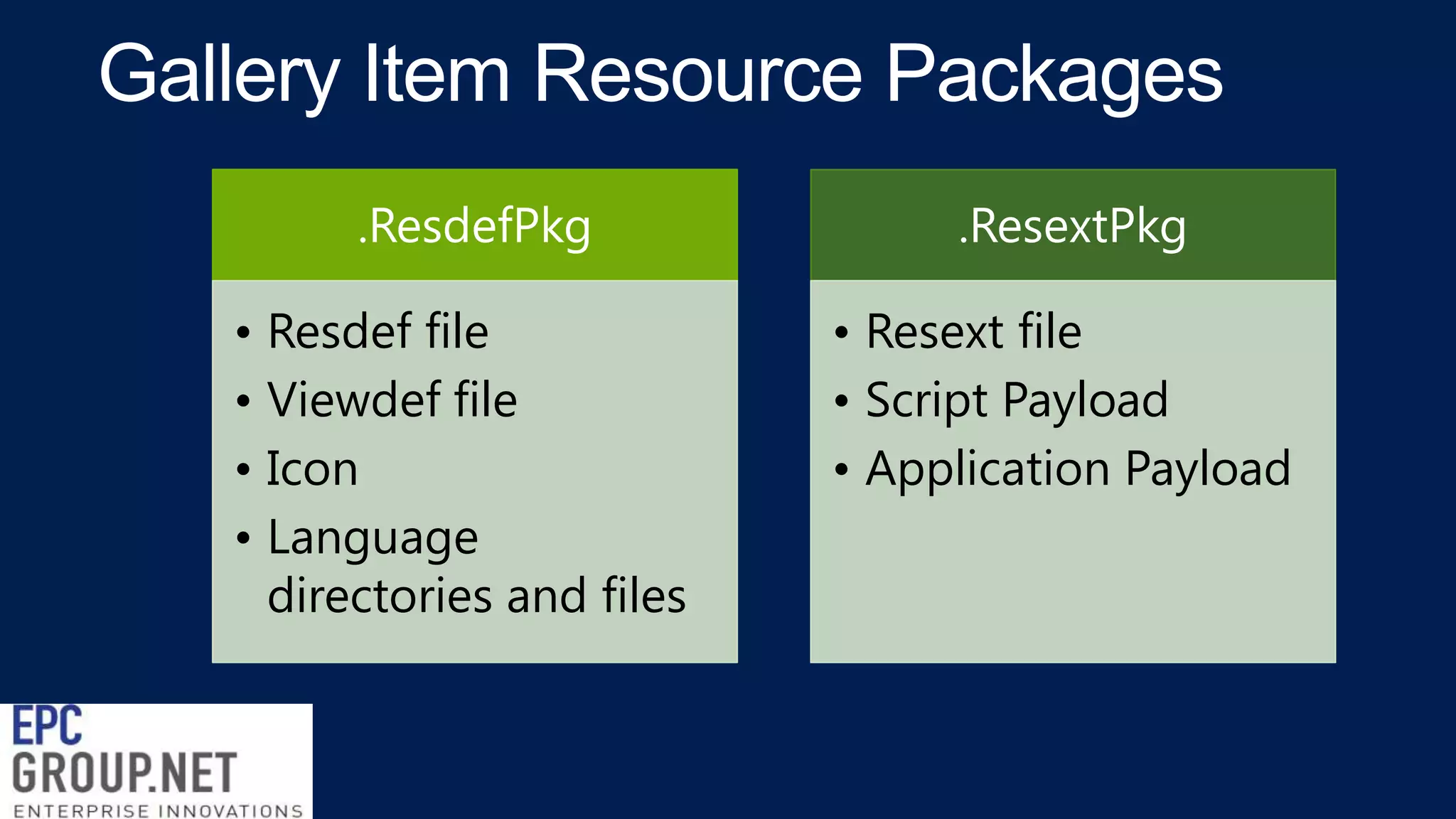
.ResdefPkg
• Resdef file
• Viewdef file
• Icon
• Language
directories and files

.ResextPkg
• Resext file
• Script Payload
• Application Payload
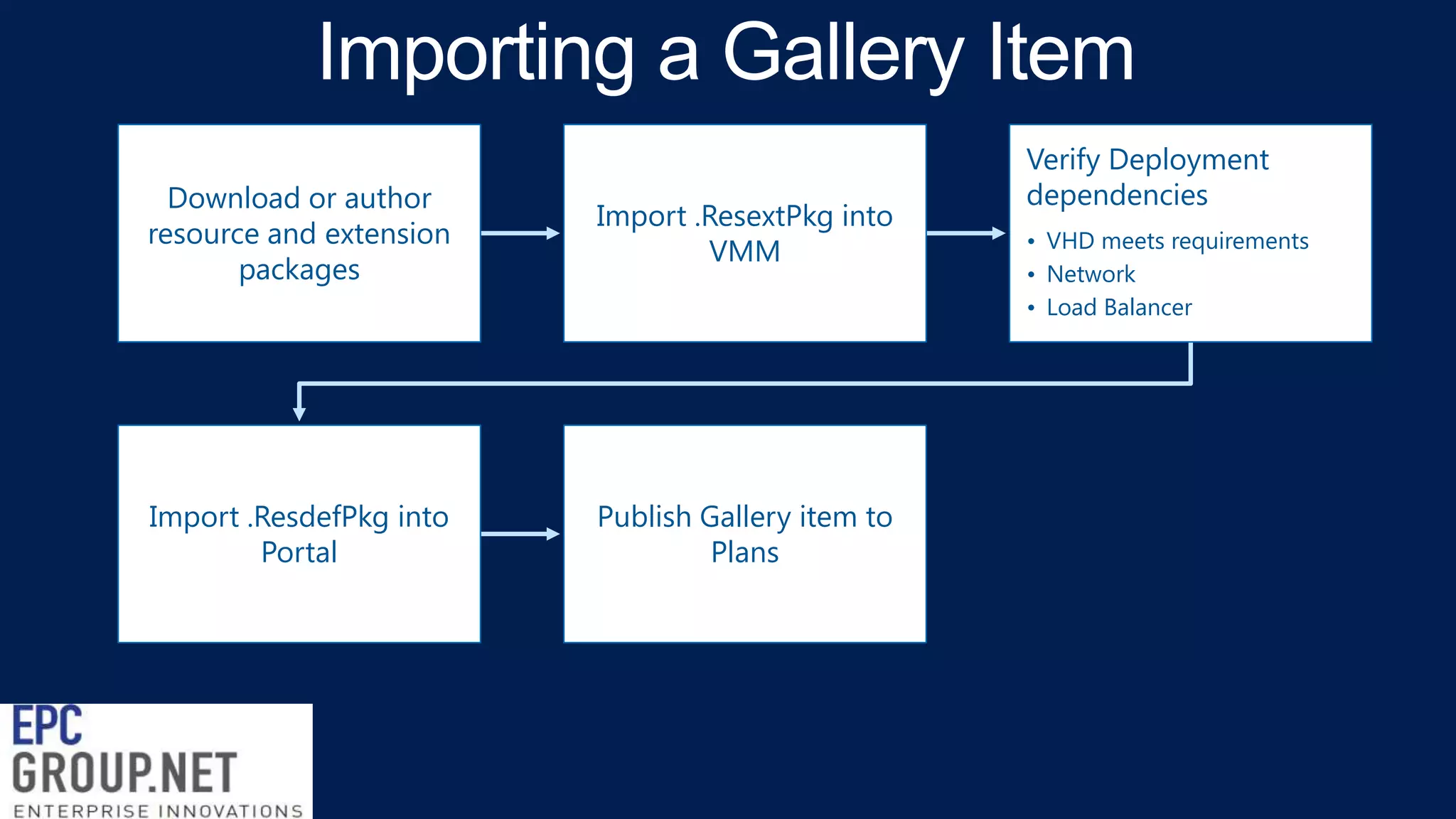
Download or author
resource and extension
packages

Import .ResextPkg into
VMM

Import .ResdefPkg into
Portal

Publish Gallery item to
Plans

Verify Deployment
dependencies
• VHD meets requirements
• Network
• Load Balancer
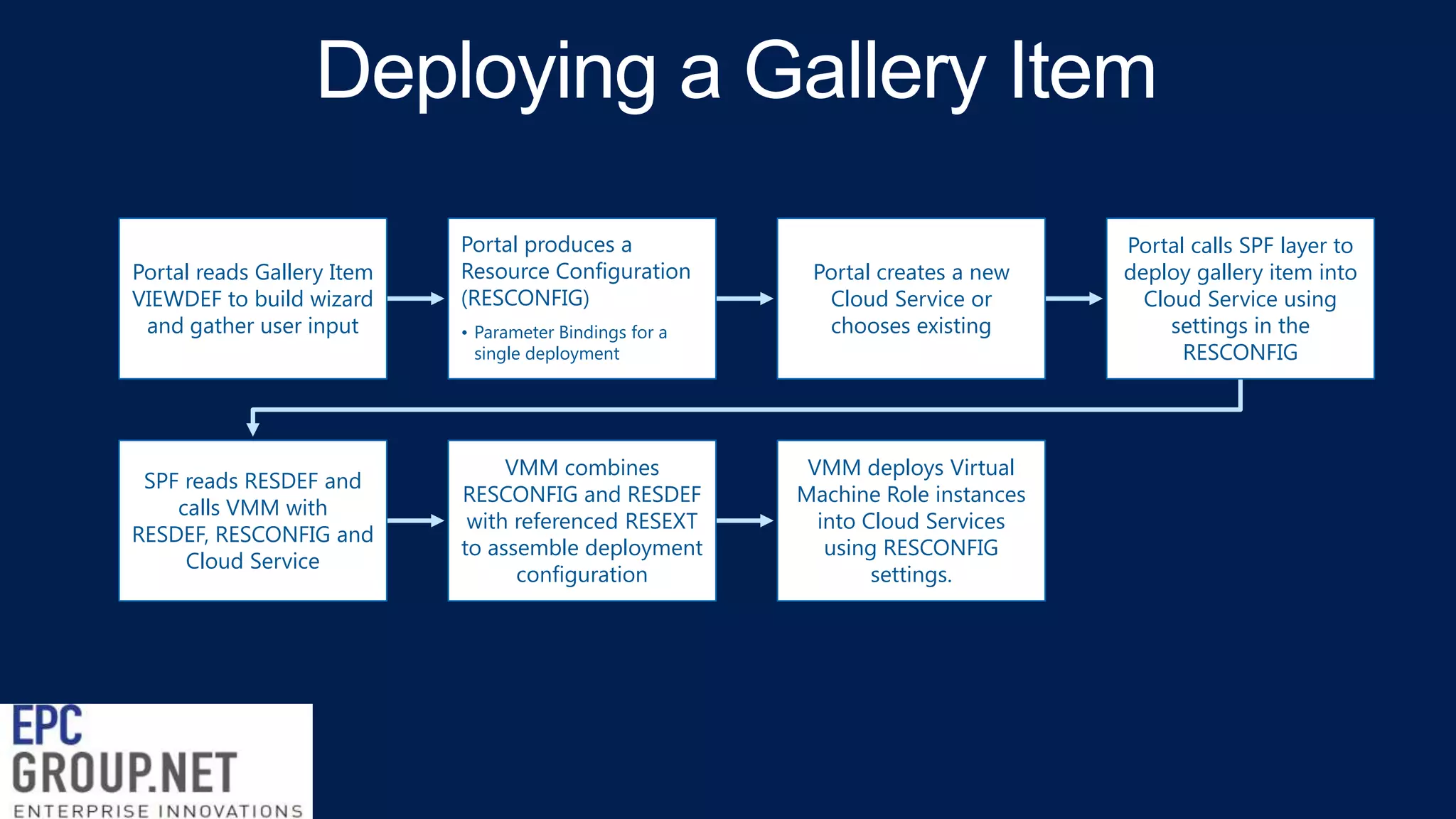
Portal reads Gallery Item
VIEWDEF to build wizard
and gather user input

SPF reads RESDEF and
calls VMM with
RESDEF, RESCONFIG and
Cloud Service

Portal produces a
Resource Configuration
(RESCONFIG)
• Parameter Bindings for a
single deployment

VMM combines
RESCONFIG and RESDEF
with referenced RESEXT
to assemble deployment
configuration

Portal creates a new
Cloud Service or
chooses existing

VMM deploys Virtual
Machine Role instances
into Cloud Services
using RESCONFIG
settings.

Portal calls SPF layer to
deploy gallery item into
Cloud Service using
settings in the
RESCONFIG

Windows Azure Pack Enabling Virtual Machines - IaaS & Virtual Machine Role - EPC Group

  • 1.
    Windows Azure Pack EnablingVirtual Machines: IaaS and Virtual Machine Role
  • 2.
    Consistent Experiences Acrossthe Cloud OS MICROSOFT 1 CONSISTENT PLATFORM ON-PREMISES WEBSITE SERVICE BUS Web Application PaaS Reliable Messaging Highly Scalable Standards Based Dev-ops optimized Cross Cloud Integrated SCC Fully self-service Fully self-service SERVICE PROVIDER VIRTUAL MACHINES SERVICE MGMT PORTAL & API IaaS - Elastic Tiers Azure Consistent Virtual Networks Federated Identities Window and Linux Gallery of apps Fully self-service Active Directory Standards Based Device Friendly 2
  • 4.
    A consistent servicemodel amongst Windows Server, System Center and Windows Azure for composing, deploying and scaling virtualized applications and workloads Portal user experience Deployment artifacts Management APIs On-premises, hosted clouds, Windows Azure
  • 5.
    Portal User Experience • IaaSGallery • Site to Site Networks • Windows and Linux Deployment Artifacts • Gallery Items • Virtual Machine Role • Application • VHDs Management APIs Clouds • Virtual Machine Role APIs • Service Provider • On-premise
  • 7.
    Tenant Portal Service Admin Portal Service ManagementAPI Service Provider Foundation (Tenant, Admin, Usage) Virtual Machine Manager Orchestrator Operations Manager Windows Server Hyper-V
  • 8.
    3 Service Admin Manage Gallery Offerto Tenants 5 Tenant Create Virtual Machine Role Manage Virtual Machine Role 4 Gallery Item (Virtual Machine Role Template) Application Extension (App Profile and Payload) 2 Portal Gallery Wizard SPF 1 VMM Powershell Virtual Machine Role VM 1. 2. 3. 4. 5. VM VM Import Application Extension into VMM Import Gallery Item into SPF Offer to Tenants Create Virtual Machine Role Manage existing Virtual Machine Roles
  • 13.
    Console Request Browser RDP File WindowsAzure Pack Portal System Center 2012 R2 Windows Server 2012 R2 Remote Desktop Gateway Windows Server 2012 R2 Hyper-V Tokens (Host, VM) RDP File Remote Desktop Client client supporting RDPTLSv2
  • 14.
    Virtual Machine RoleGallery Virtual Machine Role Gallery Item Virtual Machine Role • A single Virtual Machine Role template • Homogenous scalable tier of Virtual Machines. Virtual Machine Role View Definition (VIEWDEF) Virtual Machine Role Resource Definition (RESDEF) Virtual Machine Role Resource Extension (RESEXT) • UI artifact for a gallery item. The VIEWDEF includes constructs to build the ui wizard in order for the tenant to enter values for deployment. • Template artifact for a Virtual Machine Role. The RESDEF includes hardware, network, OS, and Application configuration. • Application template and installation payload (MSI, scripts, SQL DAC, etc) used to deploy an application into a Virtual Machine Role. • Catalog of Virtual Machine Role templates for tenants. Tenants view a curated and role-scoped list of Virtual Machine Role templates in the Tenant Portal, Powershell or APIs.
  • 15.
    Virtual Machine RoleResource Definition (RESDEF) VM Container Specification Extension (RESEXT) Application Configuration UI Wizard (VIEWDEF) Application, Network, VM Settings Cloud Service 1 Virtual Machine Role 1 VM1.1 VM1.2
  • 16.
    Virtual Machine Role (RESDEF) Application(RESEXT) • Roles and Features • Payload and scripts • OS Image requirements • Network IP and Load balancer • RESEXT Parameters • • • • • VM settings (size) OS Settings OS Image Reference RESEXT Reference RESEXT Parameter bindings • RESDEF Parameters UI Wizard (VIEWDEF) • UI for RESDEF Parameters • Grouping • Ordering • Validation • Localization Deployment Configuration (RESCONFIG) • RESDEF Parameter Values • Single deployment • Versioned
  • 17.
    { OPC "Name": "IIS_Demo_2", "Publisher":"Microsoft, "Version": "1.0.0.0", "ExtensionHostingContract": "MicrosoftCompute/VMRole/1.0.0.0", ", "SchemaVersion": "1.0.0.0", "DataPackage" : { "Location" : "IISWS2012", "Version" : "1.0.0.0" }, "ResourceExtensionParameters": [ { "Name" : "IISPort", “Type" : "String", "Description" : "IIS Port" } ], "ResourceRequirements": { "OSVirtualHardDiskRequirements": ["WindowsServer2012", "Datacenter" ] }, "ExtensionSettings": { "SchemaVersion": "1.0.0.0", "WindowsServerRolesAndFeatures": [ "Web-Server", "Web-WebServer", "Web-Common-Http", "WebDefault-Doc", "Web-Dir-Browsing", "Web-Http-Errors“ ] "ApplicationProfile": { "ApplicationPayload": [ { "ID" : "123dbce1-8ccd-4fb1-af39a2a3b69b4123", "RelativePath" : "IISConfiguration.cr" } ], "Name": "389cb52d-a950-46d3-b021-48b7fe67267e", "WindowsApplicationProfile": { "ProvisioningScripts": [ { "AlwaysReboot" : faalse, "ApplicationPayloadId" : "123dbce1-8ccd-4fb1af39-a2a3b69b4123", "DeploymentOrder" : 1, "ErrorPolicy" : "FailOnMatch", "ExecutableAndParams" : { "Executable" : "cmd.exe", "Parameters" : "/q /c iisconfig.cmd [Param.IISPort]" }, "ExitCodeRegex" : "[[1-9][[0-9]*", "RebootExitCodeRegex" : null, "RestartOnRetry" : false, "ScriptBlock" : null, "ScriptCredential" : null, "ScriptType" : "PreInstall", "StandardErrorPath" : "C:iisconfiggceerr.txt", "StandardErrorRegex" : null, "StandardInput" : null, "StandardOutputPath" : "C:iisconfig-gceout.txt", "StandardOutputRegex" : null, "TimeoutInSeconds" : 1200, "WorkingDirectory" : null
  • 18.
    { "Name": "IIS_Demo", "Publisher":"Microsoft", "Version": "1.0.0.0", "Type": "MicrosoftCompute/VMRole", "SchemaVersion": "1.0.0.0", "ResourceParameters": [ { "Name": "RoleVMSize", "Type": "String", "Description": "Platform-specific VM size (for Blue: XS | S | M | L | XL)" }, { "Name": "IISPort", "Type": "String", "Description": "IISPort desc." } ], "ResourceExtensionReferences": [ { "ReferenceName": "IIS_Demo_2", "Name": "IIS_Demo_2", "Publisher": Microsoft", "Version": "1.0.0.0", "ResourceExtensionParameterValues" : '{ "IISPort" : "[Param.IISPort]"}' } ], "IntrinsicSettings": { "SchemaVersion": "1.0.0.0", "HardwareProfile": { "VMSize": "[Param.RoleVMSize]" }, "ScaleOutSettings": { "InitialInstanceCount": "[Param.RoleInitialInstanceCount]",
  • 19.
    { "Label": "{{IISWS2012Label}}", "PublisherLabel": "Microsoft", "Description":"{{WS2012IISDescription}}", "DefaultLanguageCode": "en-US", "Sections": [ { "Title": "{{WS2012IISVMSettings}}", "Categories": [ { "CategoryName": "{{ScaleOutSettingGroup}}", "Parameters": [ { "Name": "RoleVMSize", "Label": "VM Size", "Type": "VMSize", "DefaultValue": "ExtraSmall", "Description": "{{RoleSizeDesc}}", "Validation": { "Required": true, "Messages": { "Required": {{RoleSizeRequiredMessage}}“ } } }, { "Name": "RoleOSVHDImageNameVersion", "Label": "OS Virtual Hard disk", "Type": "OSVirtualHardDisk", "Description": "{{OSDisk}}", "ImageTags": [ "WindowsServer2012", "Datacenter“ ], "Validation": {"Required": true, "Messages": {"Required": "OS Disk is Required" } } }, { "Name": "RoleInitialInstanceCount", "Label": "Initial Instance Count", "Type": "Number", "DefaultValue": "1", "Description": "{{RoleInitialInstanceCountDescription}}", "Validation": {
  • 20.
    { "Version": "1.0.0.0", “ParameterValues” :„ { “IISPort": “80", “RoleVMSize” : “Small”, “ComputerNamePattern” : null, "NetworkName" : "corp" } }‟
  • 22.
    .ResdefPkg • Resdef file •Viewdef file • Icon • Language directories and files .ResextPkg • Resext file • Script Payload • Application Payload
  • 23.
    Download or author resourceand extension packages Import .ResextPkg into VMM Import .ResdefPkg into Portal Publish Gallery item to Plans Verify Deployment dependencies • VHD meets requirements • Network • Load Balancer
  • 25.
    Portal reads GalleryItem VIEWDEF to build wizard and gather user input SPF reads RESDEF and calls VMM with RESDEF, RESCONFIG and Cloud Service Portal produces a Resource Configuration (RESCONFIG) • Parameter Bindings for a single deployment VMM combines RESCONFIG and RESDEF with referenced RESEXT to assemble deployment configuration Portal creates a new Cloud Service or chooses existing VMM deploys Virtual Machine Role instances into Cloud Services using RESCONFIG settings. Portal calls SPF layer to deploy gallery item into Cloud Service using settings in the RESCONFIG