Lessons from the Field
National Architect,
Windows Azure


michael.collier@neudesic.com
@MichaelCollier
www.MichaelSCollier.com
•   Table Storage
•   Access Control Service (ACS)
•   Windows Azure Diagnostics
•   Retry Logic
•   Deployment
•   Environments
•   Tools
•   Sell it!
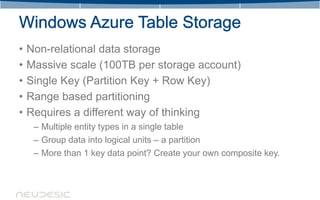
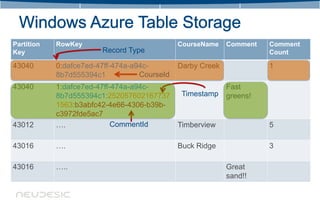
•   Non-relational data storage
•   Massive scale (100TB per storage account)
•   Single Key (Partition Key + Row Key)
•   Range based partitioning
•   Requires a different way of thinking
     – Multiple entity types in a single table
     – Group data into logical units – a partition
     – More than 1 key data point? Create your own composite key.
Partition   RowKey                            CourseName    Comment   Comment
Key                     Record Type                                   Count

43040       0:dafce7ed-47ff-474a-a94c-        Darby Creek             1
            8b7d555394c1           CourseId
43040       1:dafce7ed-47ff-474a-a94c-                      Fast
            8b7d555394c1:252057602167737   Timestamp        greens!
            1563:b3abfc42-4e66-4306-b39b-
            c3972fde5ac7
43012       ….              CommentId     Timberview                  5

43016       ….                                Buck Ridge              3

43016       …..                                             Great
                                                            sand!!
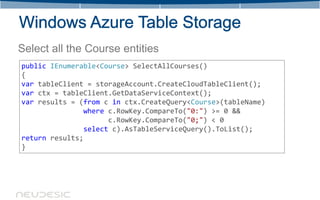
Select all the Course entities
public IEnumerable<Course> SelectAllCourses()
{
var tableClient = storageAccount.CreateCloudTableClient();
var ctx = tableClient.GetDataServiceContext();
var results = (from c in ctx.CreateQuery<Course>(tableName)
               where c.RowKey.CompareTo("0:") >= 0 &&
                     c.RowKey.CompareTo("0;") < 0
               select c).AsTableServiceQuery().ToList();
return results;
}
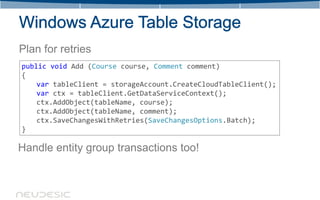
Plan for retries
public void Add (Course course, Comment comment)
{
    var tableClient = storageAccount.CreateCloudTableClient();
    var ctx = tableClient.GetDataServiceContext();
    ctx.AddObject(tableName, course);
    ctx.AddObject(tableName, comment);
    ctx.SaveChangesWithRetries(SaveChangesOptions.Batch);
}

Handle entity group transactions too!
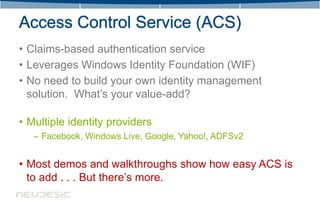
• Claims-based authentication service
• Leverages Windows Identity Foundation (WIF)
• No need to build your own identity management
  solution. What’s your value-add?

• Multiple identity providers
   – Facebook, Windows Live, Google, Yahoo!, ADFSv2


• Most demos and walkthroughs show how easy ACS is
  to add . . . But there’s more.
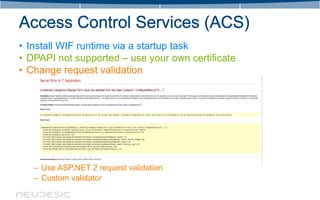
• Install WIF runtime via a startup task
• DPAPI not supported – use your own certificate
• Change request validation


   – Use ASP.NET 2 request validation
   – Custom validator
• WIF relies on the web.config file
• URLs related to the site are set in the web.config . . .
  can’t change
• Problematic for staging deployments – don’t know the
  URL until deployed
• Add logic to WebRole’s OnStart() to update the WIF
  settings in web.config
   – Read in configuration settings from .cscfg
   – Update and save the web.config
   – Changing .cscfg settings can cause a role recycle . . . causing
     web.confg to update
• Need claims not provided by Identity Provider?
  – Claims vary by Identity Providers
  – Windows Live ID – limited usefulness 

  – Claims Enrichment
  – Custom implementation of ClaimsAuthenticationManager
  – Retrieve additional info from data store
  – Return as additional claims
DEMO TIME!!!
• Ability to persist multiple diagnostic sources across
  roles
   – Log Files
   – Event Logs
   – Performance Counters
   – IIS Logs
• Diagnostics data saved in table or blob storage
• Different storage account for diagnostic & app data
• Use multiple diagnostic storage accounts & rotate
   – Easiest way to clean up large amounts of data in tables
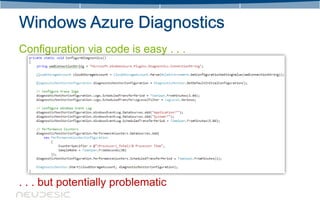
Configuration via code is easy . . .


. . . but potentially problematic
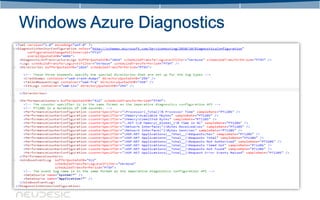
• Set diagnostic information via configuration
• Special file – diagnostics.wadcfg
• File automatically saved to blob storage and accessible
  from all instances
• Don’t get out of sync
• Diagnostics config in code overwrites what is in blob
  storage
• Allows operations team, not dev, to control settings
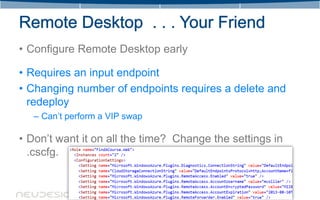
• Configure Remote Desktop early

• Requires an input endpoint
• Changing number of endpoints requires a delete and
  redeploy
   – Can’t perform a VIP swap

• Don’t want it on all the time? Change the settings in
  .cscfg.
• Transient Fault Handling Application Block
• SQL Database, Windows Azure Storage, Service
  Bus, and more
• Very extensible and flexible
• Upload .cspkg & .cscfg files to Windows Azure portal
• Use Visual Studio
• Use Windows Azure PowerShell cmdlets
   – Humans make mistakes . . . Not good at repetitive tasks
   – Handle nearly everything via script
   – Works great in development and for production!
   – Invoke from other deployment tools like Team Build
   – Have a .cmd file that will execute the build and then kick off the
     deployment
• Put deployment files in blob storage for quick access
  later
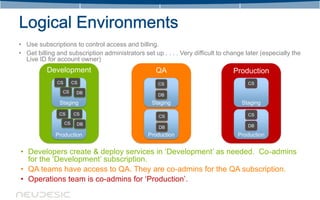
• Use subscriptions to control access and billing.
• Get billing and subscription administrators set up . . . . Very difficult to change later (especially the
  Live ID for account owner)
          Development                               QA                           Production
              CS        CS                          CS                                 CS
                CS       DB                         DB
               Staging                            Staging                           Staging
               CS       CS                                                             CS
                                                     CS
                   CS    DB
                                                     DB                                DB

             Production                          Production                        Production


• Developers create & deploy services in ‘Development’ as needed. Co-admins
  for the ‘Development’ subscription.
• QA teams have access to QA. They are co-admins for the QA subscription.
• Operations team is co-admins for ‘Production’.
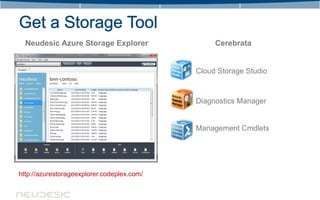
Neudesic Azure Storage Explorer                Cerebrata


                                            Cloud Storage Studio


                                            Diagnostics Manager


                                            Management Cmdlets


http://azurestorageexplorer.codeplex.com/
• What are your pain points?
   –   Cost pressures
   –   Slow to deploy
   –   Scalability
   –   Security
• Scenarios
   –   Web Modernization
   –   Gaming
   –   Mobility
   –   Big Data
   –   Enterprise Application
       Integration
Questions?
• WIF: A Potentially Dangerous Request.Form Value Was Detected
     – http://social.technet.microsoft.com/wiki/contents/articles/1725.windows-identity-foundation-wif-a-potentially-
       dangerous-request-form-value-was-detected-from-the-client-wresult-t-requestsecurityto.aspx
• Install WIF Runtime via Startup Task
     – http://stackoverflow.com/questions/8697596/azure-service-configuration-error
• Edit & Apply New WIF Config Settings w/o Redeploying
     – http://blogs.msdn.com/b/vbertocci/archive/2011/05/31/edit-and-apply-new-wif-s-config-settings-in-your-
       windows-azure-webrole-without-redeploying.aspx
• Publishing a ACS v2 Federated Identity Web Role
     – http://blogs.msdn.com/b/davidmcg/archive/2011/04/05/publishing-a-acs-v2-federated-identity-web-role.aspx
• Windows Azure Active Directory Solutions For Developers
     – http://social.technet.microsoft.com/wiki/contents/articles/3669.windows-azure-active-directory-solutions-for-
       developers.aspx
• How to get most out of Windows Azure Tables
     – http://blogs.msdn.com/b/windowsazurestorage/archive/2010/11/06/how-to-get-most-out-of-windows-azure-
       tables.aspx
• Collecting Logging Data by Using Windows Azure Diagnostics
     – http://msdn.microsoft.com/en-us/library/windowsazure/gg433048.aspx
National Architect,
Windows Azure


michael.collier@neudesic.com
@MichaelCollier
www.MichaelSCollier.com

Windows Azure: Lessons From the Field

  • 1.
  • 2.
  • 3.
    Table Storage • Access Control Service (ACS) • Windows Azure Diagnostics • Retry Logic • Deployment • Environments • Tools • Sell it!
  • 4.
    Non-relational data storage • Massive scale (100TB per storage account) • Single Key (Partition Key + Row Key) • Range based partitioning • Requires a different way of thinking – Multiple entity types in a single table – Group data into logical units – a partition – More than 1 key data point? Create your own composite key.
  • 5.
    Partition RowKey CourseName Comment Comment Key Record Type Count 43040 0:dafce7ed-47ff-474a-a94c- Darby Creek 1 8b7d555394c1 CourseId 43040 1:dafce7ed-47ff-474a-a94c- Fast 8b7d555394c1:252057602167737 Timestamp greens! 1563:b3abfc42-4e66-4306-b39b- c3972fde5ac7 43012 …. CommentId Timberview 5 43016 …. Buck Ridge 3 43016 ….. Great sand!!
  • 6.
    Select all theCourse entities public IEnumerable<Course> SelectAllCourses() { var tableClient = storageAccount.CreateCloudTableClient(); var ctx = tableClient.GetDataServiceContext(); var results = (from c in ctx.CreateQuery<Course>(tableName) where c.RowKey.CompareTo("0:") >= 0 && c.RowKey.CompareTo("0;") < 0 select c).AsTableServiceQuery().ToList(); return results; }
  • 7.
    Plan for retries publicvoid Add (Course course, Comment comment) { var tableClient = storageAccount.CreateCloudTableClient(); var ctx = tableClient.GetDataServiceContext(); ctx.AddObject(tableName, course); ctx.AddObject(tableName, comment); ctx.SaveChangesWithRetries(SaveChangesOptions.Batch); } Handle entity group transactions too!
  • 8.
    • Claims-based authenticationservice • Leverages Windows Identity Foundation (WIF) • No need to build your own identity management solution. What’s your value-add? • Multiple identity providers – Facebook, Windows Live, Google, Yahoo!, ADFSv2 • Most demos and walkthroughs show how easy ACS is to add . . . But there’s more.
  • 9.
    • Install WIFruntime via a startup task • DPAPI not supported – use your own certificate • Change request validation – Use ASP.NET 2 request validation – Custom validator
  • 10.
    • WIF relieson the web.config file • URLs related to the site are set in the web.config . . . can’t change • Problematic for staging deployments – don’t know the URL until deployed • Add logic to WebRole’s OnStart() to update the WIF settings in web.config – Read in configuration settings from .cscfg – Update and save the web.config – Changing .cscfg settings can cause a role recycle . . . causing web.confg to update
  • 11.
    • Need claimsnot provided by Identity Provider? – Claims vary by Identity Providers – Windows Live ID – limited usefulness  – Claims Enrichment – Custom implementation of ClaimsAuthenticationManager – Retrieve additional info from data store – Return as additional claims
  • 12.
  • 13.
    • Ability topersist multiple diagnostic sources across roles – Log Files – Event Logs – Performance Counters – IIS Logs • Diagnostics data saved in table or blob storage • Different storage account for diagnostic & app data • Use multiple diagnostic storage accounts & rotate – Easiest way to clean up large amounts of data in tables
  • 14.
    Configuration via codeis easy . . . . . . but potentially problematic
  • 15.
    • Set diagnosticinformation via configuration • Special file – diagnostics.wadcfg • File automatically saved to blob storage and accessible from all instances • Don’t get out of sync • Diagnostics config in code overwrites what is in blob storage • Allows operations team, not dev, to control settings
  • 17.
    • Configure RemoteDesktop early • Requires an input endpoint • Changing number of endpoints requires a delete and redeploy – Can’t perform a VIP swap • Don’t want it on all the time? Change the settings in .cscfg.
  • 18.
    • Transient FaultHandling Application Block • SQL Database, Windows Azure Storage, Service Bus, and more • Very extensible and flexible
  • 20.
    • Upload .cspkg& .cscfg files to Windows Azure portal • Use Visual Studio • Use Windows Azure PowerShell cmdlets – Humans make mistakes . . . Not good at repetitive tasks – Handle nearly everything via script – Works great in development and for production! – Invoke from other deployment tools like Team Build – Have a .cmd file that will execute the build and then kick off the deployment • Put deployment files in blob storage for quick access later
  • 21.
    • Use subscriptionsto control access and billing. • Get billing and subscription administrators set up . . . . Very difficult to change later (especially the Live ID for account owner) Development QA Production CS CS CS CS CS DB DB Staging Staging Staging CS CS CS CS CS DB DB DB Production Production Production • Developers create & deploy services in ‘Development’ as needed. Co-admins for the ‘Development’ subscription. • QA teams have access to QA. They are co-admins for the QA subscription. • Operations team is co-admins for ‘Production’.
  • 22.
    Neudesic Azure StorageExplorer Cerebrata Cloud Storage Studio Diagnostics Manager Management Cmdlets http://azurestorageexplorer.codeplex.com/
  • 23.
    • What areyour pain points? – Cost pressures – Slow to deploy – Scalability – Security • Scenarios – Web Modernization – Gaming – Mobility – Big Data – Enterprise Application Integration
  • 24.
  • 25.
    • WIF: APotentially Dangerous Request.Form Value Was Detected – http://social.technet.microsoft.com/wiki/contents/articles/1725.windows-identity-foundation-wif-a-potentially- dangerous-request-form-value-was-detected-from-the-client-wresult-t-requestsecurityto.aspx • Install WIF Runtime via Startup Task – http://stackoverflow.com/questions/8697596/azure-service-configuration-error • Edit & Apply New WIF Config Settings w/o Redeploying – http://blogs.msdn.com/b/vbertocci/archive/2011/05/31/edit-and-apply-new-wif-s-config-settings-in-your- windows-azure-webrole-without-redeploying.aspx • Publishing a ACS v2 Federated Identity Web Role – http://blogs.msdn.com/b/davidmcg/archive/2011/04/05/publishing-a-acs-v2-federated-identity-web-role.aspx • Windows Azure Active Directory Solutions For Developers – http://social.technet.microsoft.com/wiki/contents/articles/3669.windows-azure-active-directory-solutions-for- developers.aspx • How to get most out of Windows Azure Tables – http://blogs.msdn.com/b/windowsazurestorage/archive/2010/11/06/how-to-get-most-out-of-windows-azure- tables.aspx • Collecting Logging Data by Using Windows Azure Diagnostics – http://msdn.microsoft.com/en-us/library/windowsazure/gg433048.aspx
  • 26.

Editor's Notes

  • #4 Windows Azure National ArchitectWindows Azure MVPHelp customers nationwide with their Windows Azure projects. This can include architectural design sessions, training, development, evangelism, etc.Reach me via email, Twitter, or my blog.
  • #5 Cover several areas of Windows Azure.Not going to go deep on any of these areas – assuming you have some working knowledge of Windows Azure.Question – ask. Leave time at end for Q &amp; A too.Purpose – show you some things in Windows Azure that aren’t always like the happy path demo.This isn’t to say that Windows Azure is difficult – its not. Often there are a few extra things you need to do.
  • #6 Range based system – using the Partition Key to help define the ranges.Can use unique Partition Key.Try to avoid prepend or append patterns w/ the Partition Key – one area always more active. Not an even distribution.Distribute load/keys evenly.
  • #7 Example – one table that contains two different entities (Courses and Comments)RowKey – multiple values using a separatorRecord Type to distinguish Course vs. CommentCourseId to have a unique value for the courseComment entityReverse timestamp to take advantage of lexical sort order (default) of the table – most recent firstUnique CommentId value
  • #8 CompareTo - Compares this instance with a specified object or String and returns an integer that indicates whether this instance precedes, follows, or appears in the same position in the sort order as the specified object or String
  • #11 Request validation for all requests in ASP.NET 4.; Security feature – cross-site scripting attacks
  • #12 WIF relies on settings in the web.config – which we typically can’t change easily w/ Azure apps
  • #14 Show ACSClaimsAuthenticationManagerLogon w/ RegistrationLogoutWIF setting update in WebRolehttp://www.istockphoto.com/stock-photo-19150373-thumbs-up.php?refnum=5882518&amp;source=sxchu04&amp;muuid=sxc651f81d74d3fe87ac55b5d6d01045
  • #16 Diagnosticconfig code persisted to a file in blob storageAbility to remotely configure diagnostics – API for updating the config file in blob storageRole instance recycles – changes the config file back to what the code states, not what you’ve previously updated
  • #19 Sometimes easiest way to diagnose a problem – RDP into the server instance.
  • #20 Retry Policy – how often to retryRetry Strategy – what triggers a retry action
  • #28 http://stackoverflow.com/questions/9207603/windows-azure-acs-unable-to-find-assembly-microsoft-identitymodelhttp://msdn.microsoft.com/en-us/library/windowsazure/hh411551
  • #29 Windows Azure National ArchitectWindows Azure MVPHelp customers nationwide with their Windows Azure projects. This can include architectural design sessions, training, development, evangelism, etc.Reach me via email, Twitter, or my blog.