Cnam 2016
ZeCloud
• A lot of material from the session was first introduced on Build 2015 less
than a month ago
• This is a major change in cloud deployments since the beginning of Azure
• This is how deployments will be performed from now on, and earlier
approaches will be deprecated
Introduction
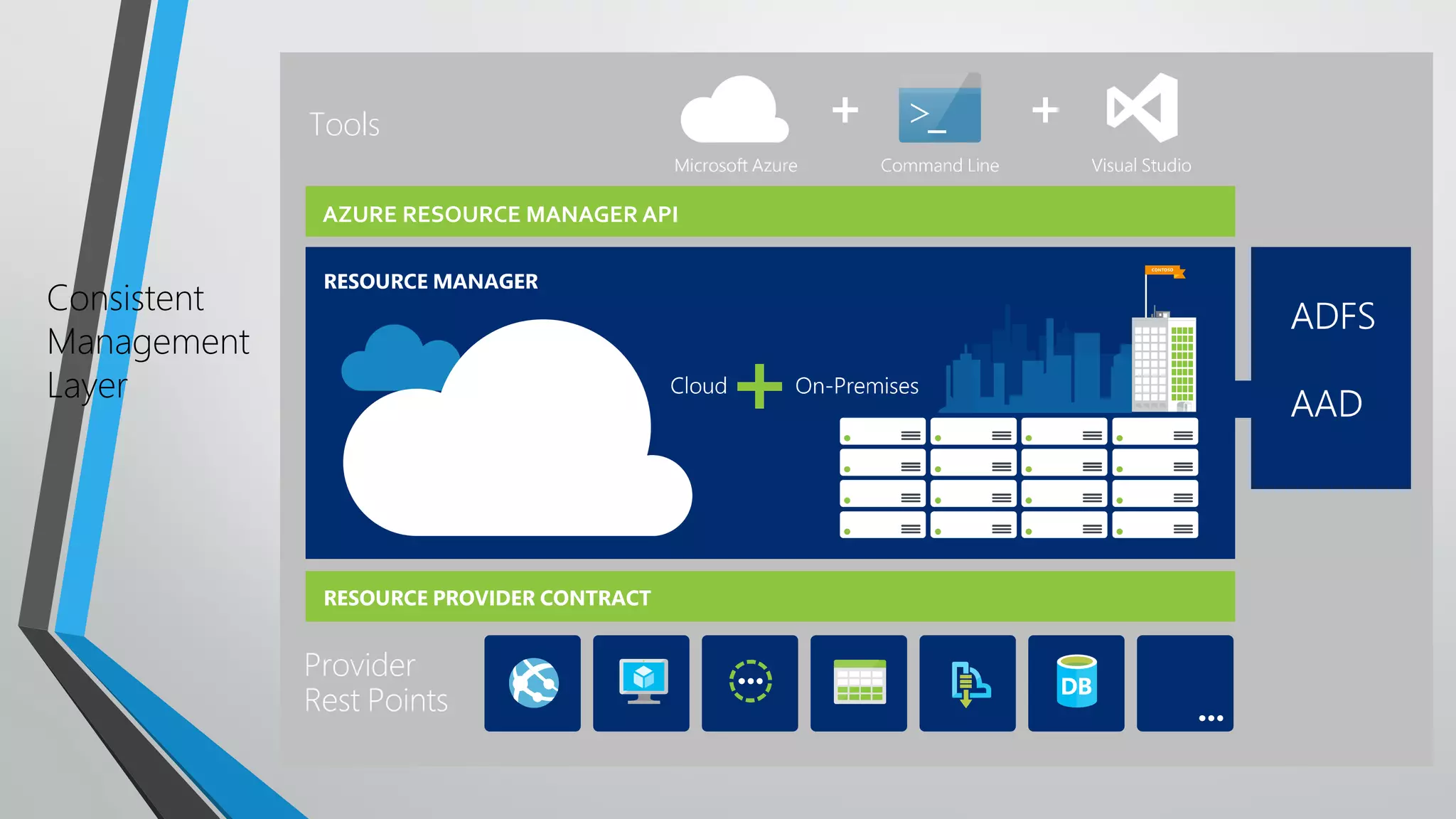
Consistent
Management
Layer
AZURE RESOURCE MANAGER API
• Manual
• Use Azure Portal to create resources
• Use manual deployment steps, e.g. fromVisual Studio
• Client driven automation
• Write a PowerShell script to automate the process
• Cloud driven deployment
• Use an Azure Resource Manager (ARM) template
Several ways to provision resources
• It’s not easily repeatable
• What if you need to do it all over again?
• Or you need to deploy to a second region?
What’s wrong with manual deployments?
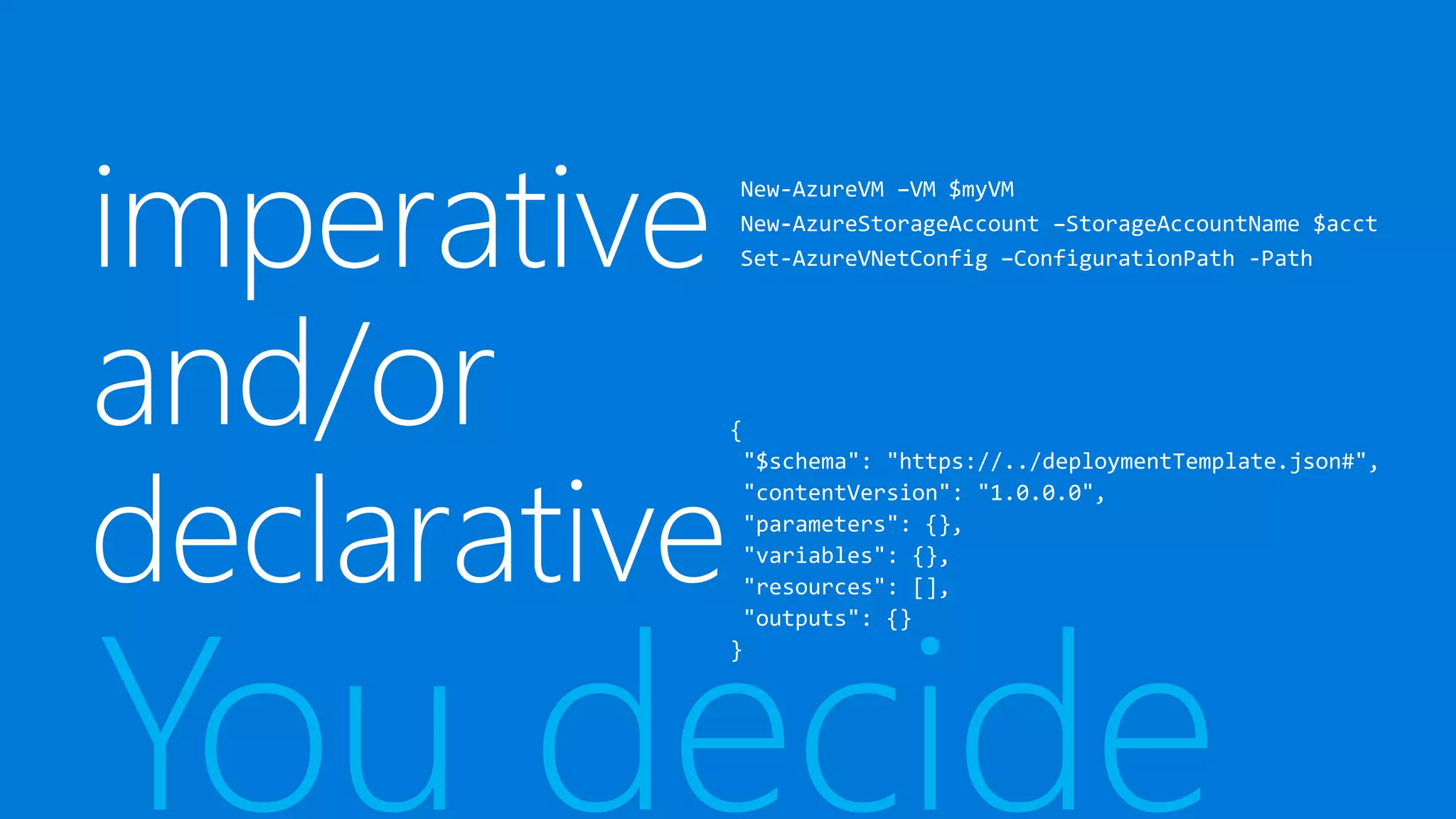
You decide
• Solves a lot of the manual deployment issues
• Puts too much logic on your client
• Uses imperative logic
• Hard to parallelize
• Round trips secrets through client
Client driven automation (e.g. PowerShell
script)
• Cloud based orchestration engine
• Fully declarative
• Automatically optimizes the deployment based on dependency graph
• Secrets never make it to the client
• More transparent use of theAPI
ARMTemplates
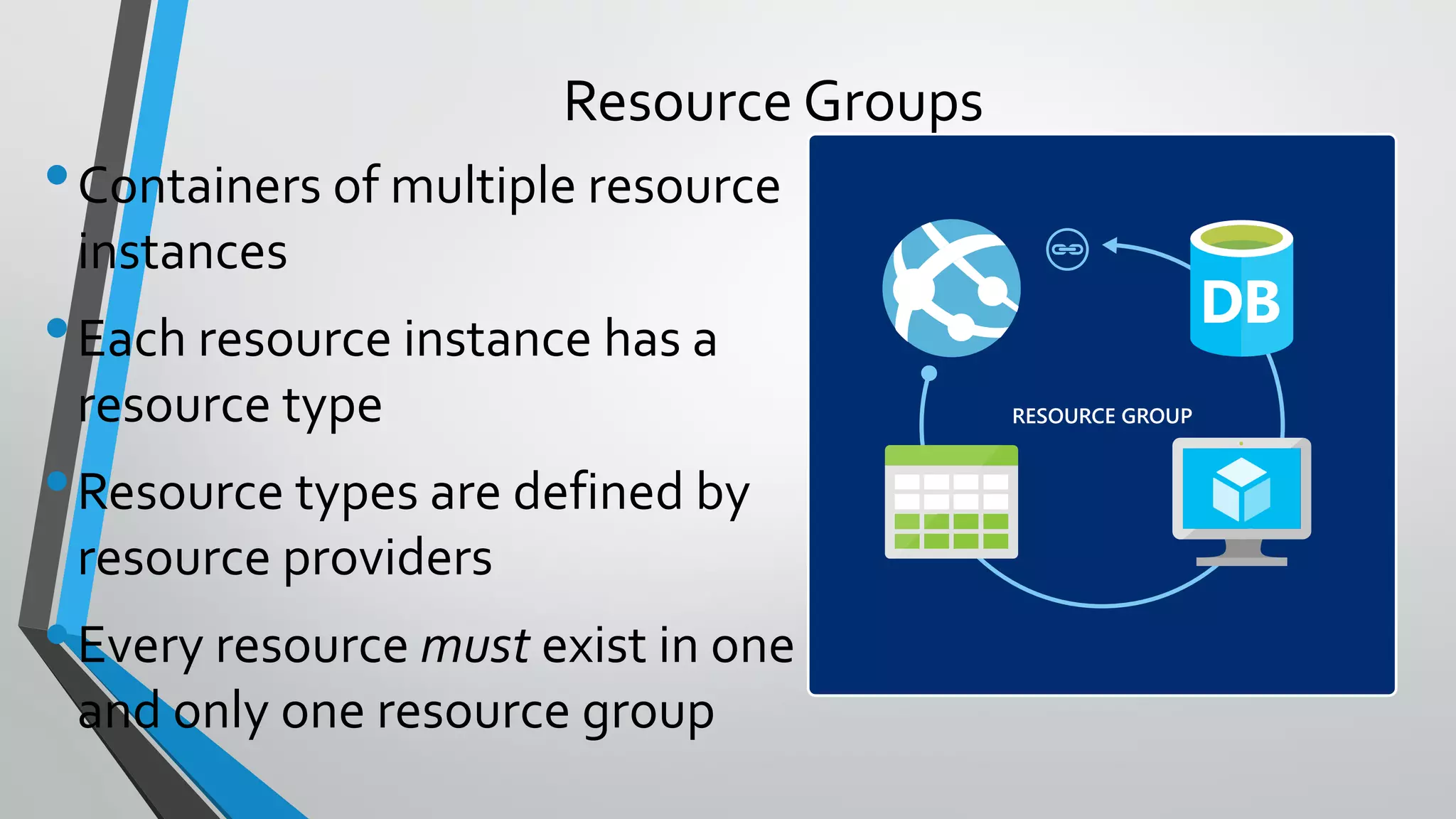
•Containers of multiple resource
instances
•Each resource instance has a
resource type
•Resource types are defined by
resource providers
•Every resource must exist in one
and only one resource group
Resource Groups
RESOURCE GROUP
• Lifecycle: deployment, update, delete, status
• Grouping: metering, billing, quota, UX (portal, PowerShell,CLI)
• Access Control: scope for RBAC permissions
• Identity: resources can talk to each other
Resource Group: Management Container
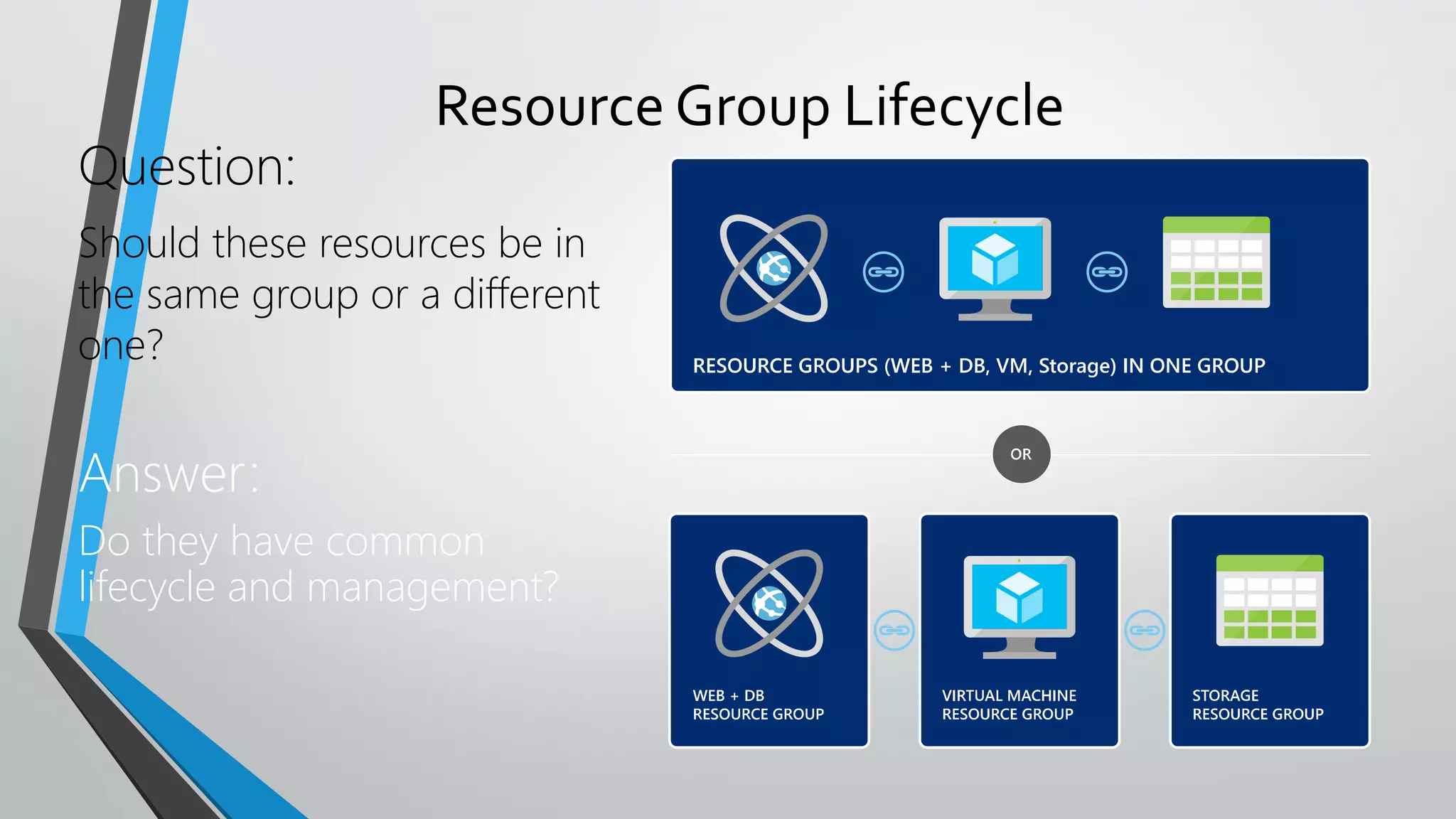
Resource Group Lifecycle
Question:
Should these resources be in
the same group or a different
one?
Answer:
Do they have common
lifecycle and management?
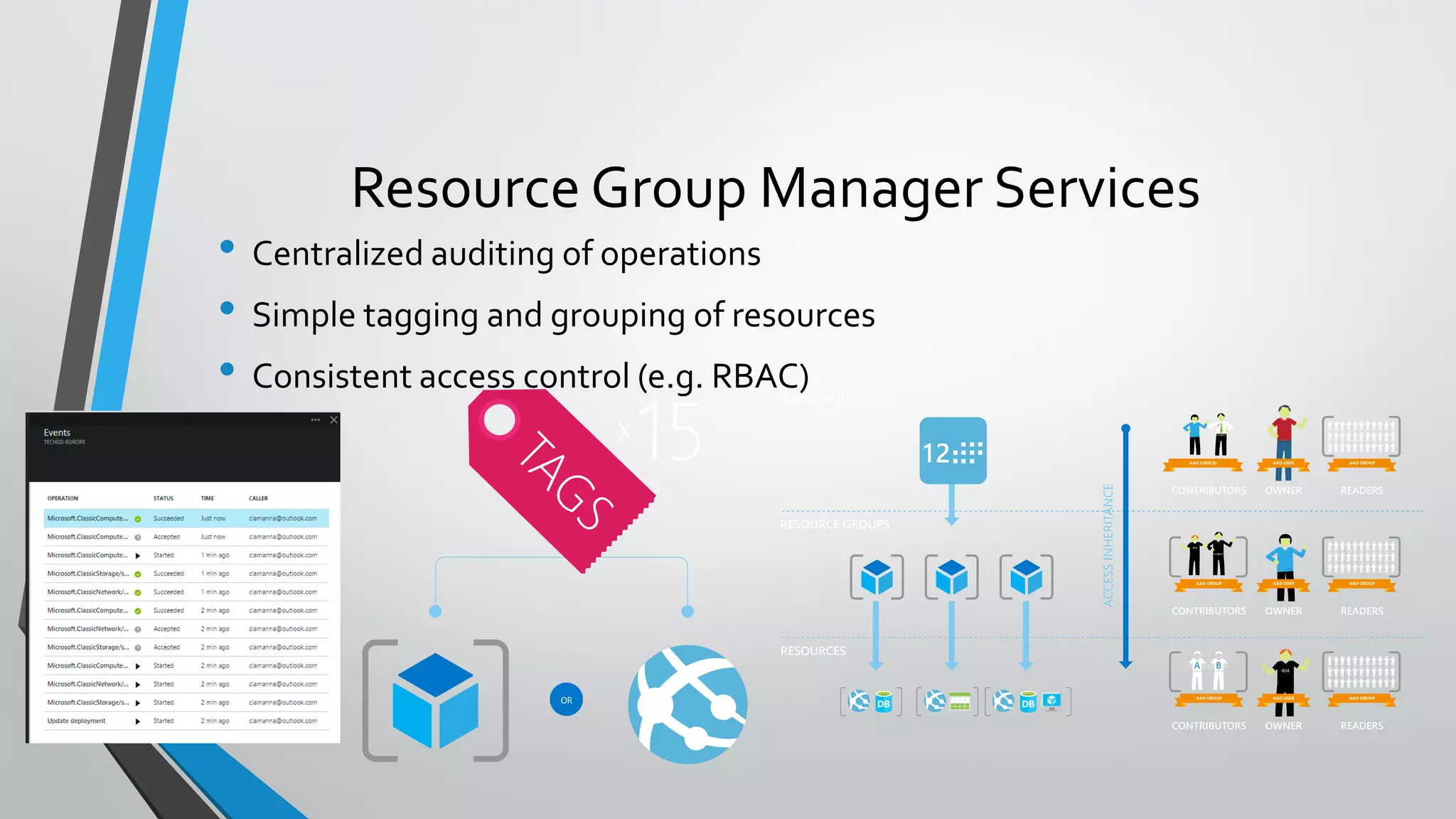
• Centralized auditing of operations
• Simple tagging and grouping of resources
• Consistent access control (e.g. RBAC)
Resource Group Manager Services
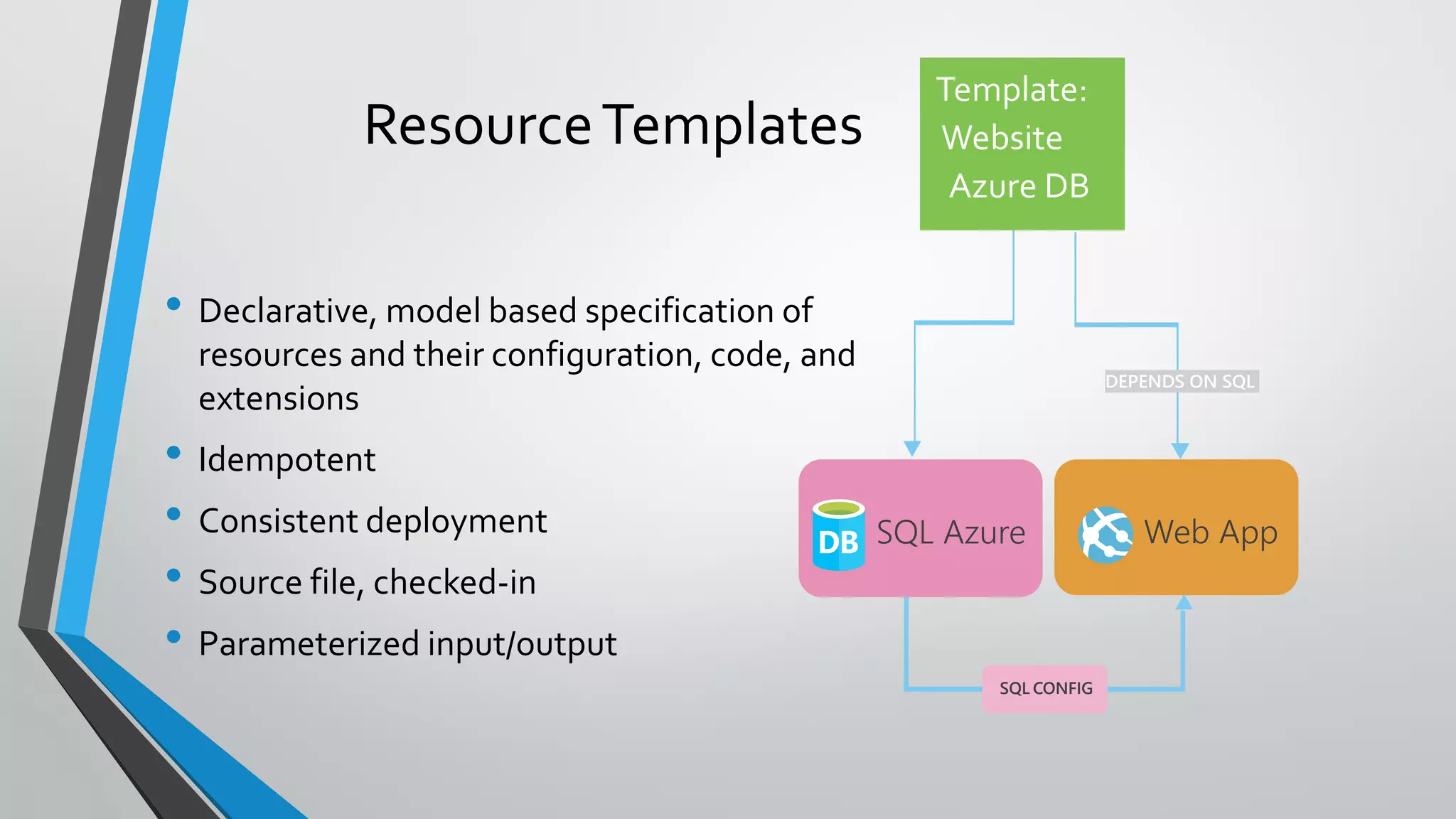
• Declarative, model based specification of
resources and their configuration, code, and
extensions
• Idempotent
• Consistent deployment
• Source file, checked-in
• Parameterized input/output
ResourceTemplates
SQL Azure Web App
SQL CONFIG
DEPENDS ON SQL
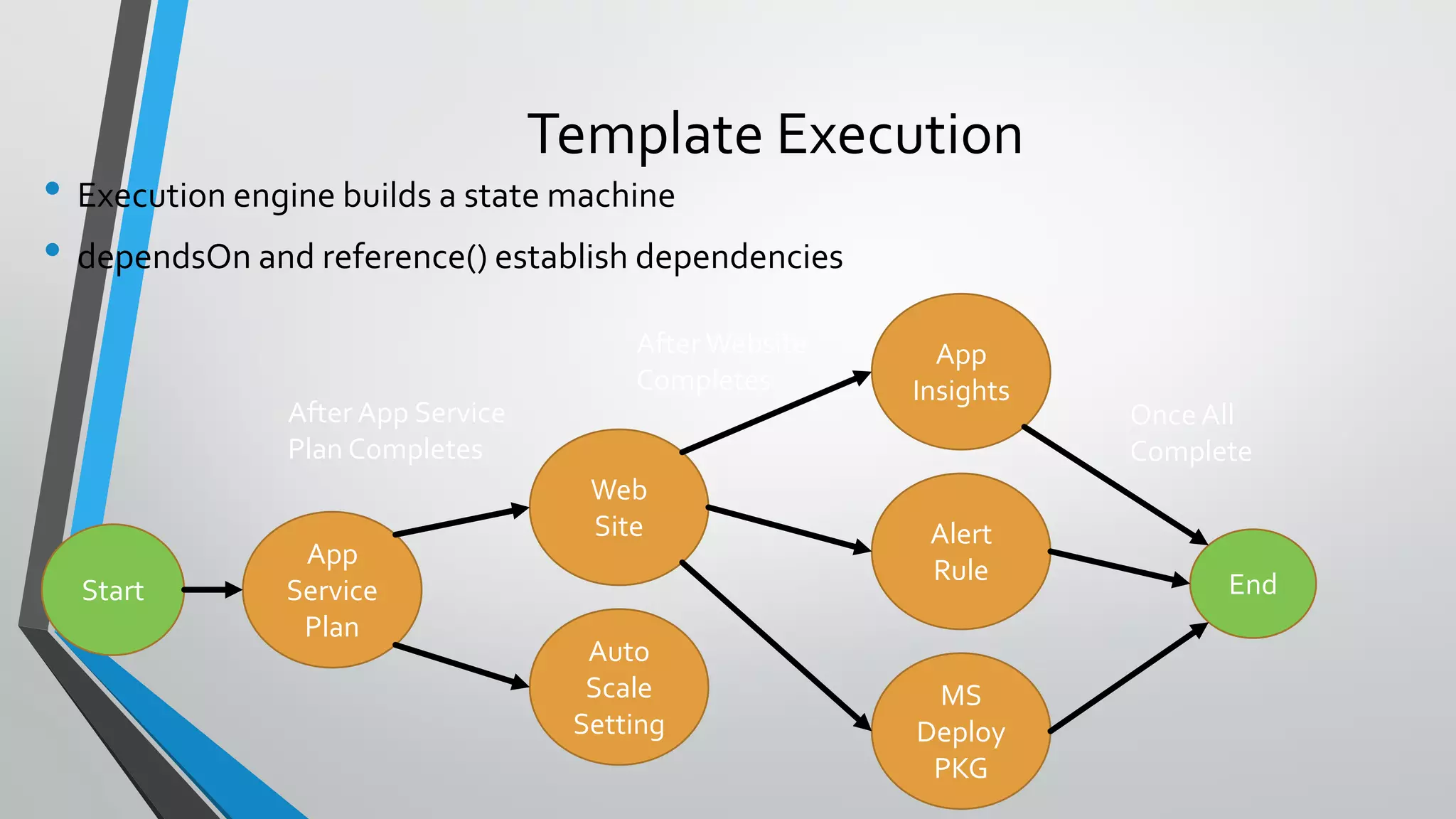
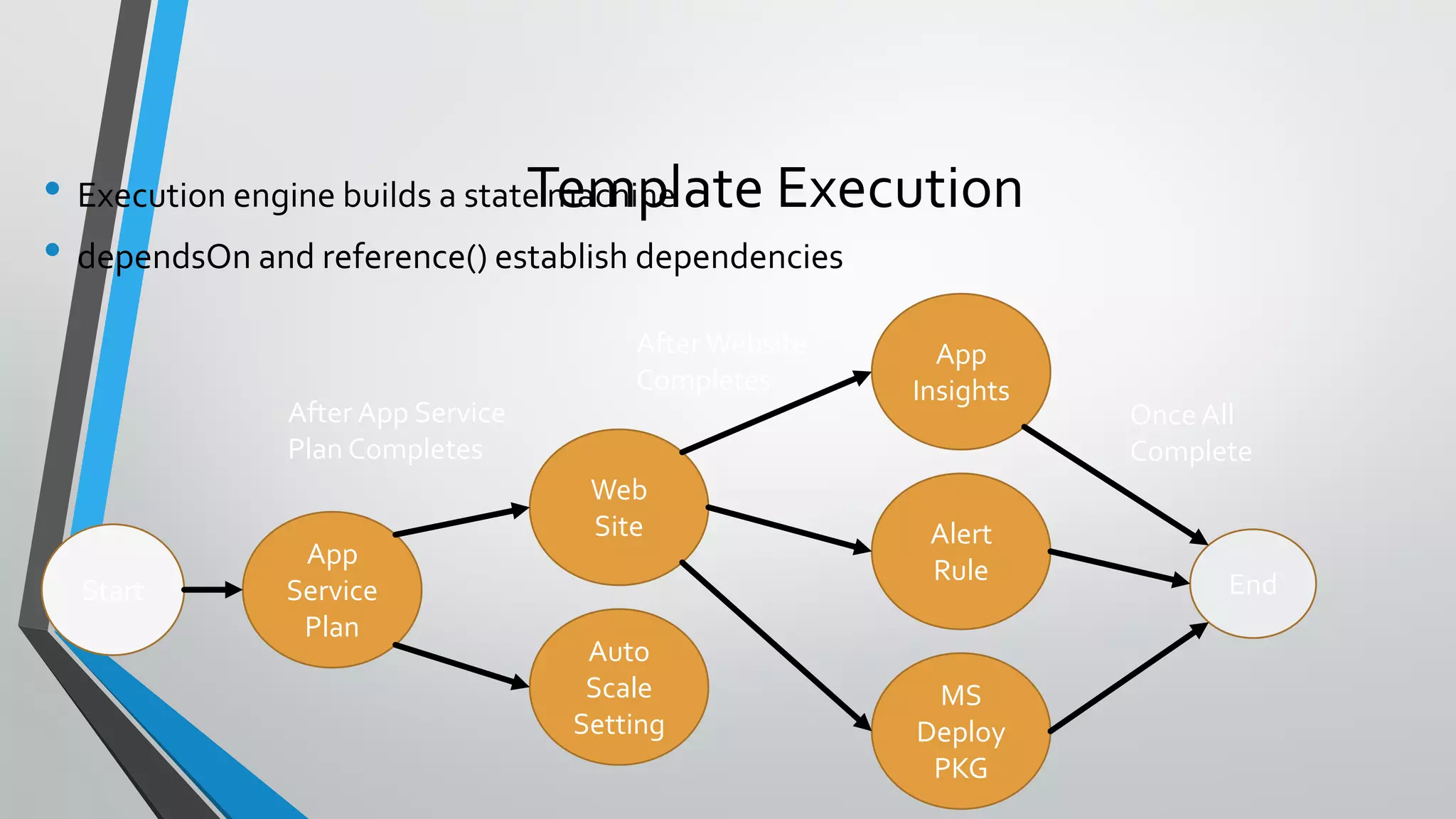
• Execution engine builds a state machine
• dependsOn and reference() establish dependencies
Template Execution
Start
App
Service
Plan
End
Auto
Scale
Setting
Web
Site Alert
Rule
App
Insights
MS
Deploy
PKG
After App Service
Plan Completes
After Website
Completes
Once All
Complete
Demo:
Resource GroupTemplates
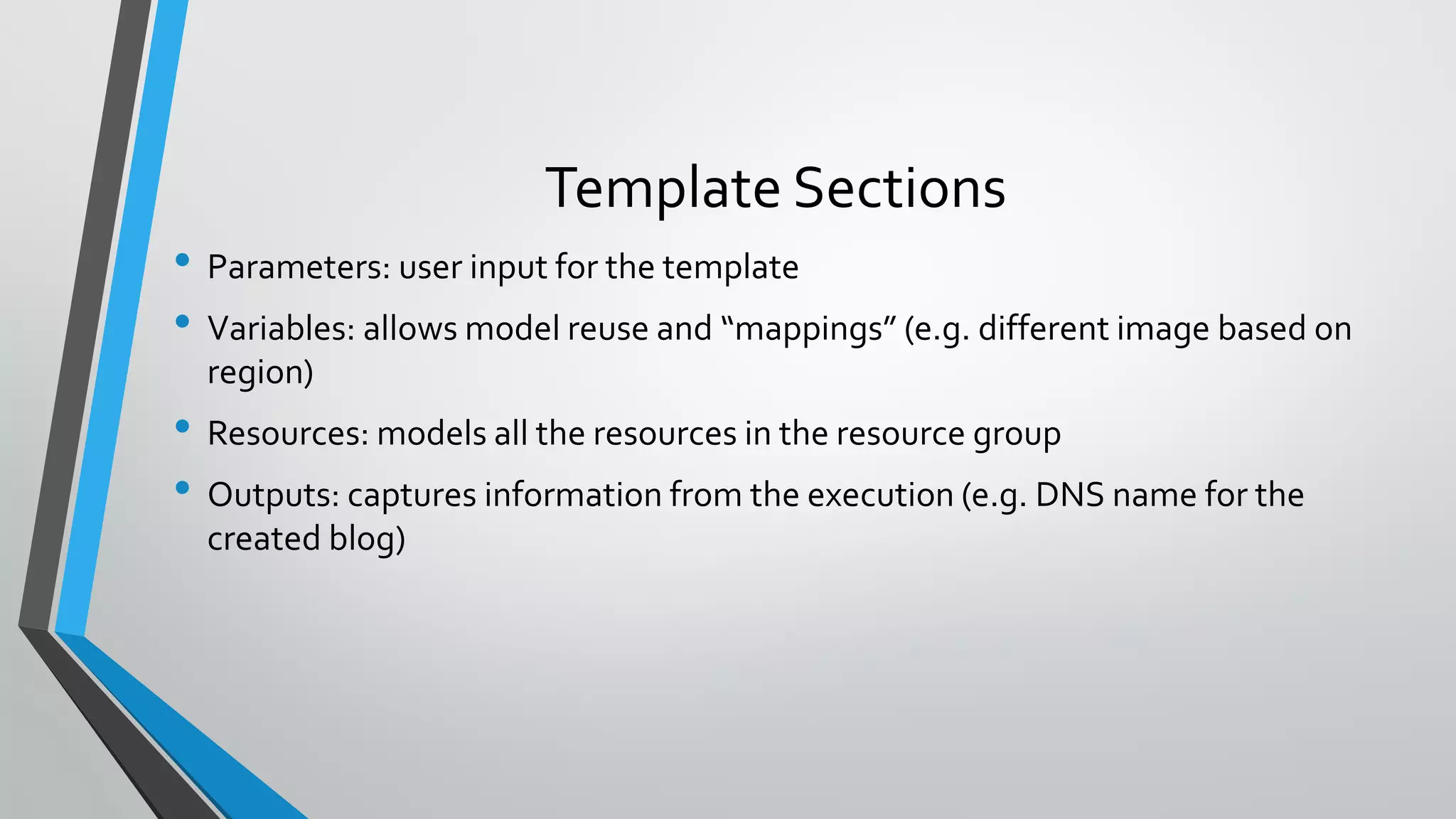
• Parameters: user input for the template
• Variables: allows model reuse and “mappings” (e.g. different image based on
region)
• Resources: models all the resources in the resource group
• Outputs: captures information from the execution (e.g. DNS name for the
created blog)
Template Sections
• Functions are delimited by “[{dsl keyword}]”
• E.g. “name”: “[concat(‘foo’, parameters(‘p1’))]
• Basic functions:
• concat() -- “[concat(‘foo’,’bar’)]” = foobar
• variable() – “[variable(‘foo’)]” = variables “foo” value
• reference() – “[reference(‘VM1’). IpAddress]”
• parameters() – “[parameters(‘blogName’)]”
Template DSL
• https://github.com/Azure/azure-quickstart-templates
• https://github.com/rjmax/ArmExamples
• http://azure.microsoft.com/en-us/documentation/articles/resource-group-
overview/
Where to start?
• Enterprises and System Integrators
• Internal Software DevelopmentTeams
• Delivering an application
• Corporate IT
• Delivering a capability or cloud capacity
• Cloud ServiceVendors (CSVs)
• Support different multi-tenancy approaches
• Distinct deployments per customer
•Within the CSV’s subscription
•“BringYour Own Subscription” model that uses customer subscriptions
• Scale units within a central multi-tenant system
• Support ability to make available via the marketplace
Common Use Cases for ARMTemplates
• Lots of variables makes free form less desirable
• Potentially differentVM types, different number of disks, and instances
• Hadoop with 8 master nodes w/ 4 attached disks and 16 disks pooled on each data
node would have 208VMs and 3232 disks.
• Resource constraints need to be factored on the fly
• No math capabilities in ARM language
• Harder to price, manage, support for the Enterprise, SI, or CSV
• T-shirt Sizes / SKUs are the common approach
• Known configuration makes testing easier
• Easier to model cost/price
• Easier to support
• Easier to manage
• Allows for better density within a subscription
Known Configurations/SKUs vs. Free Form
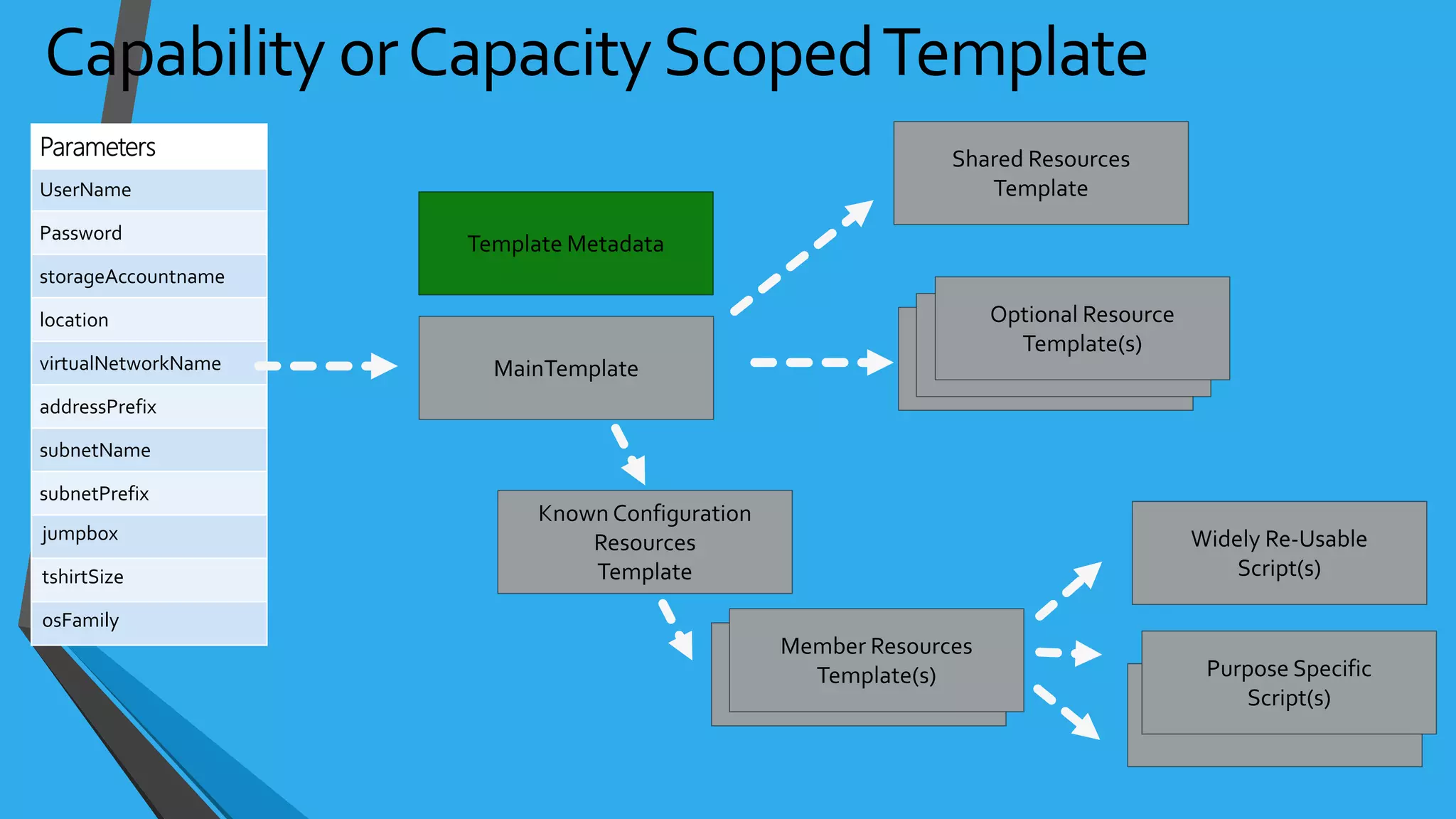
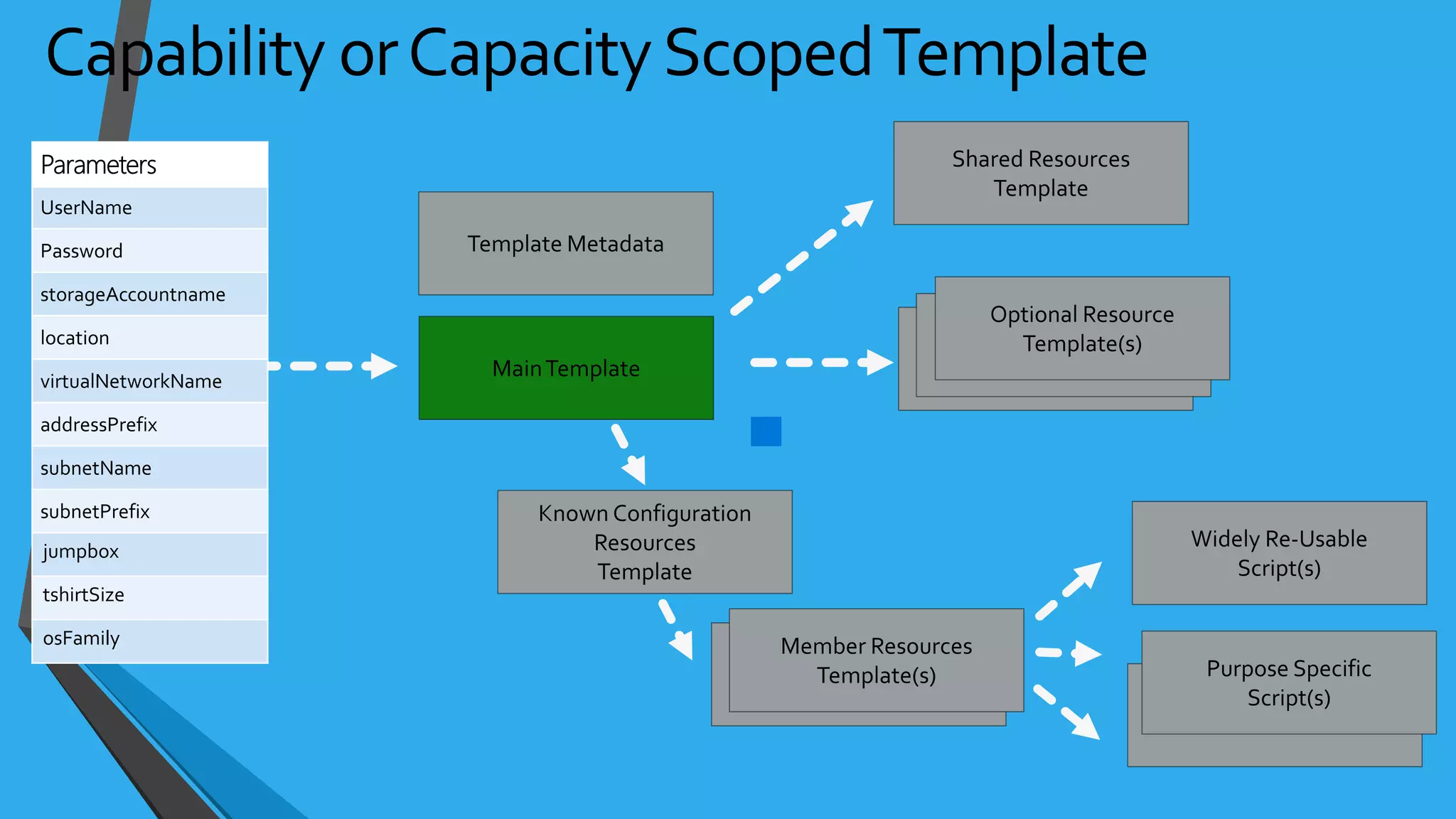
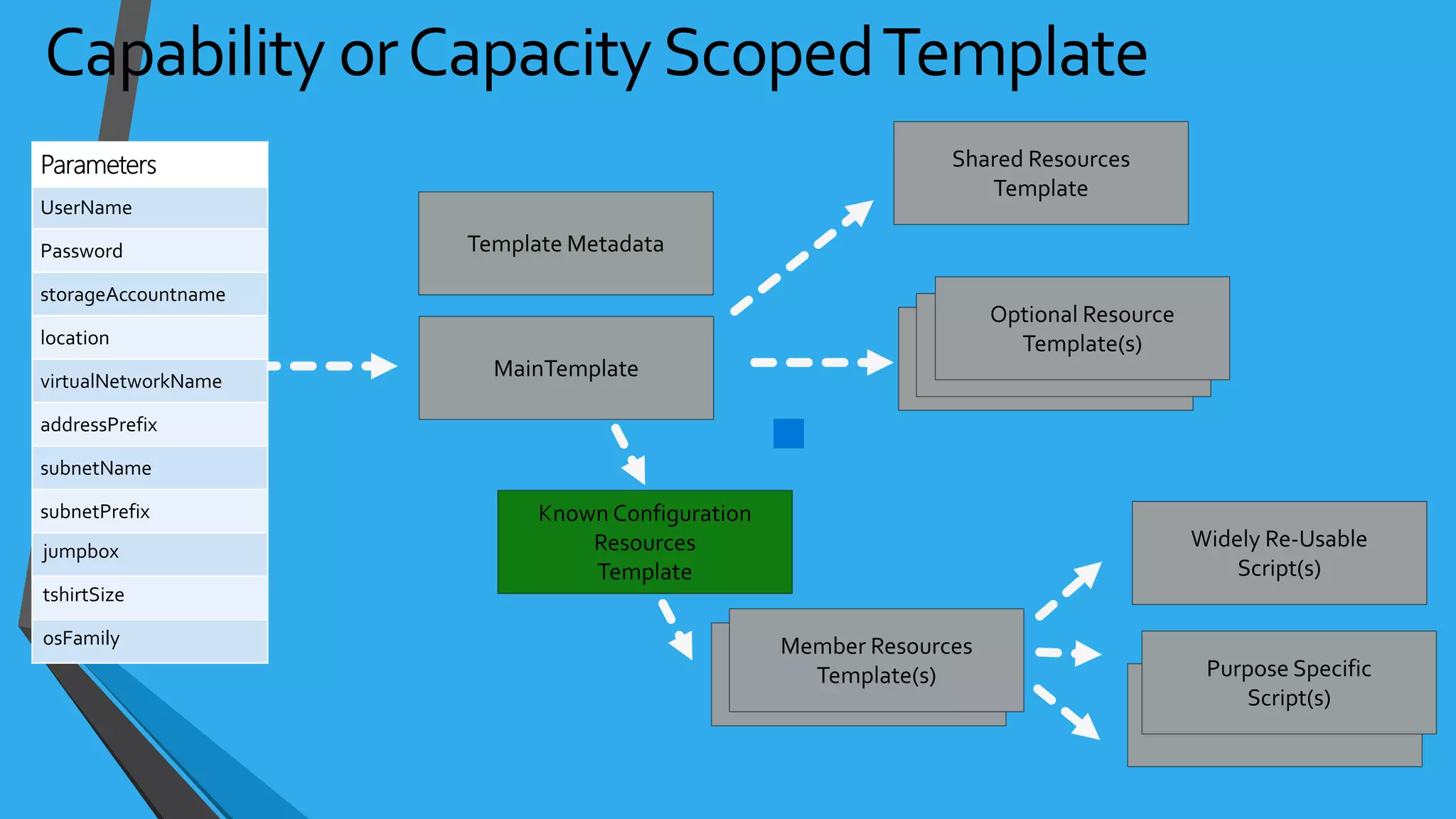
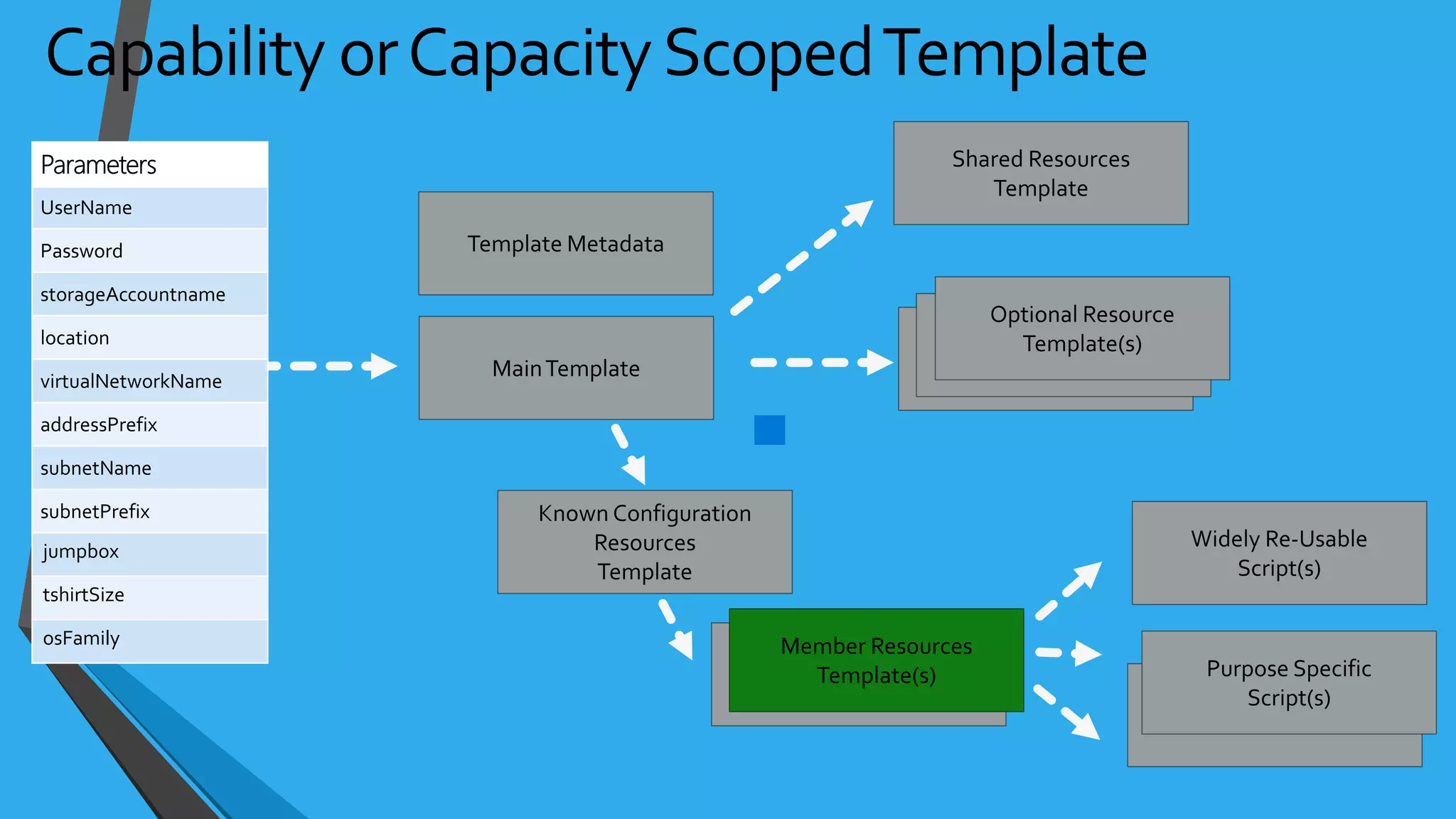
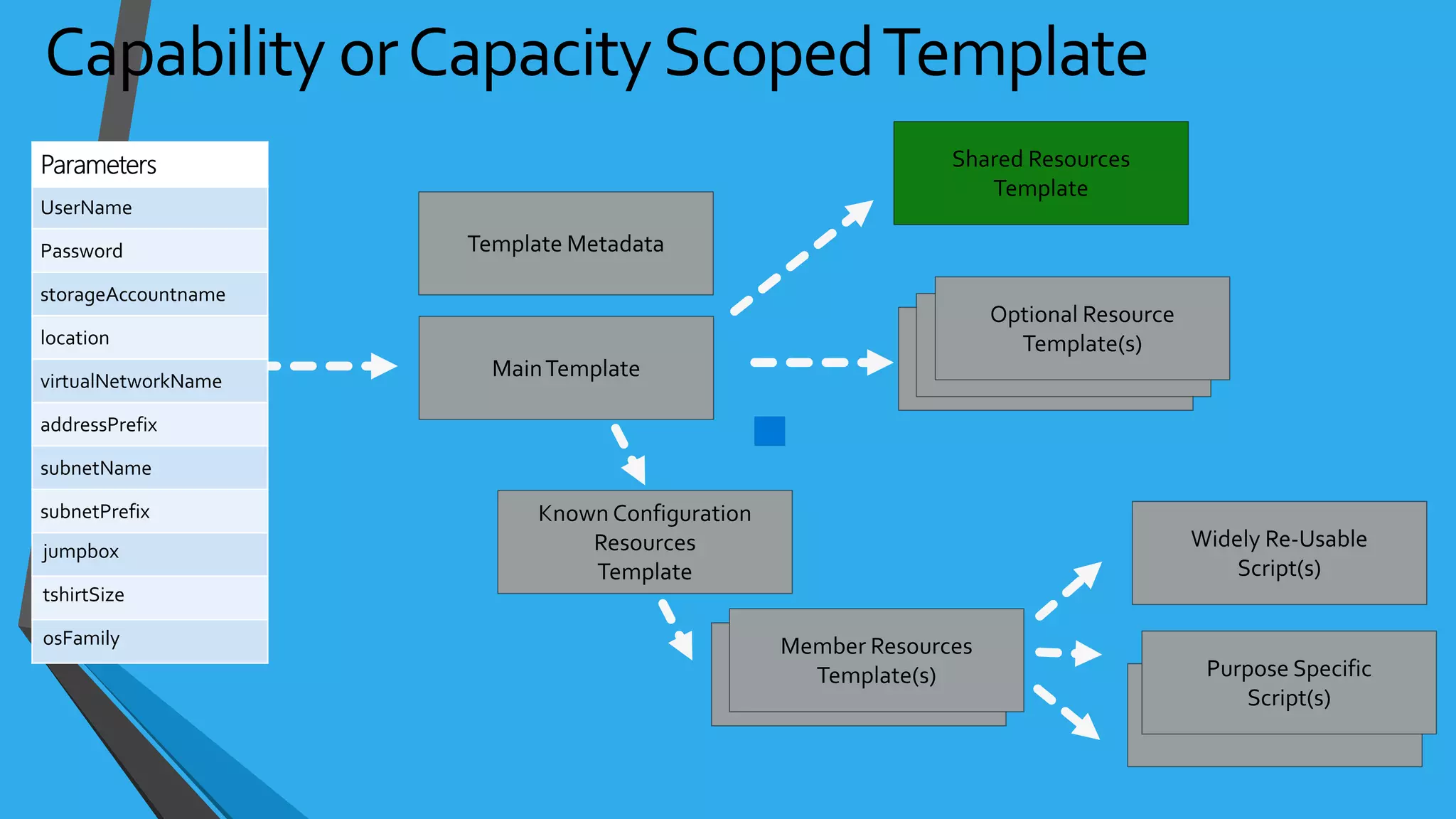
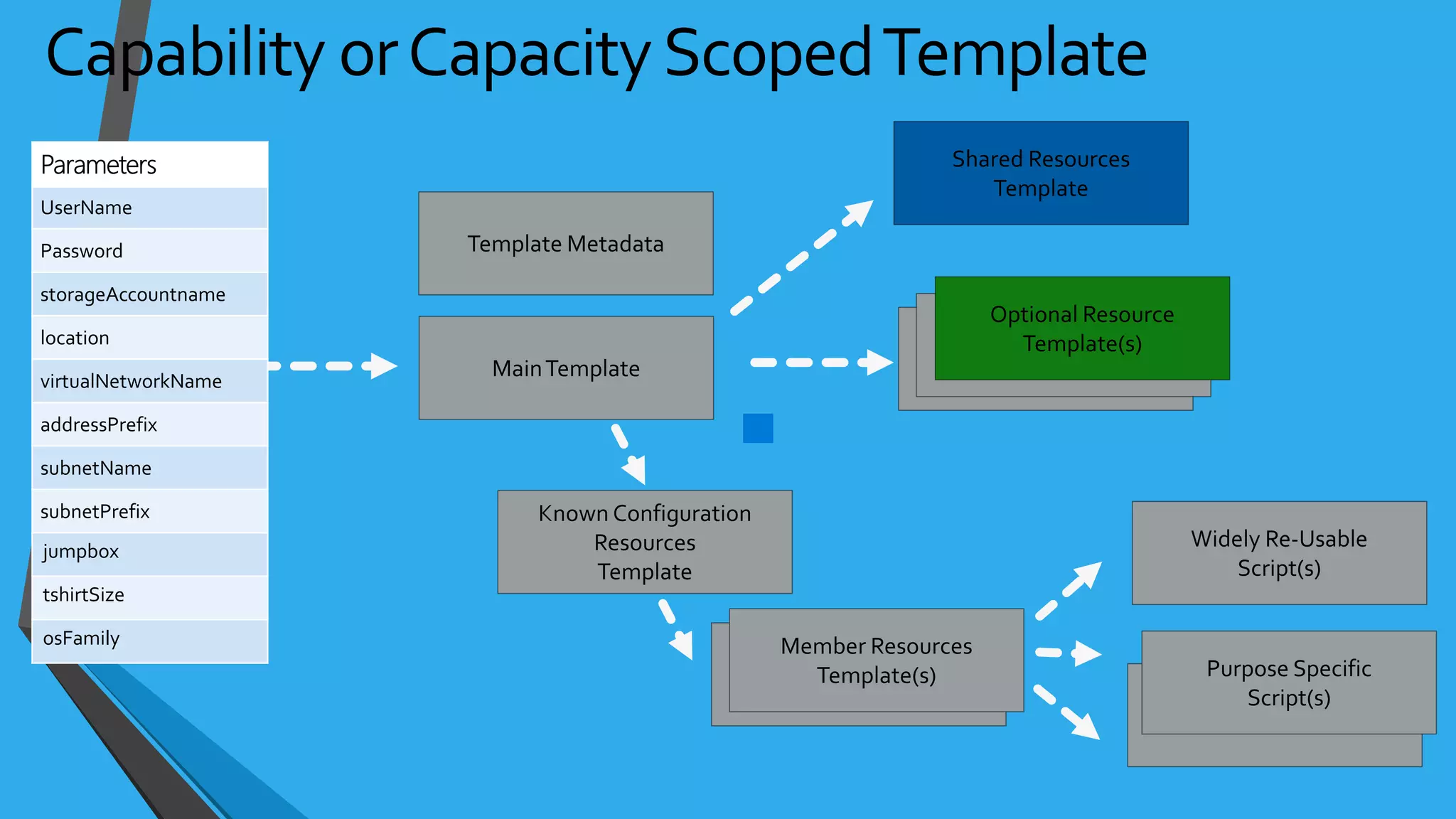
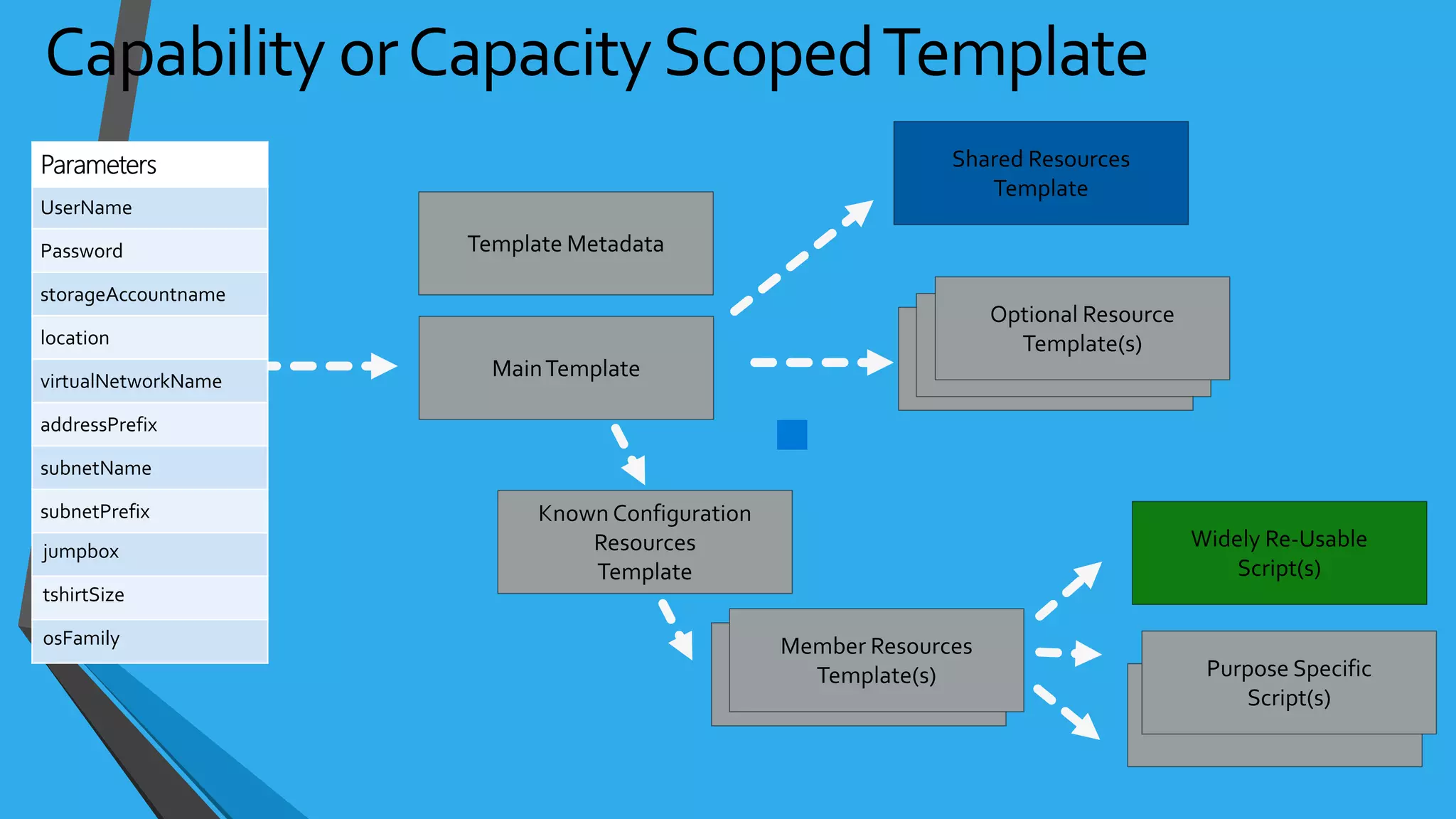
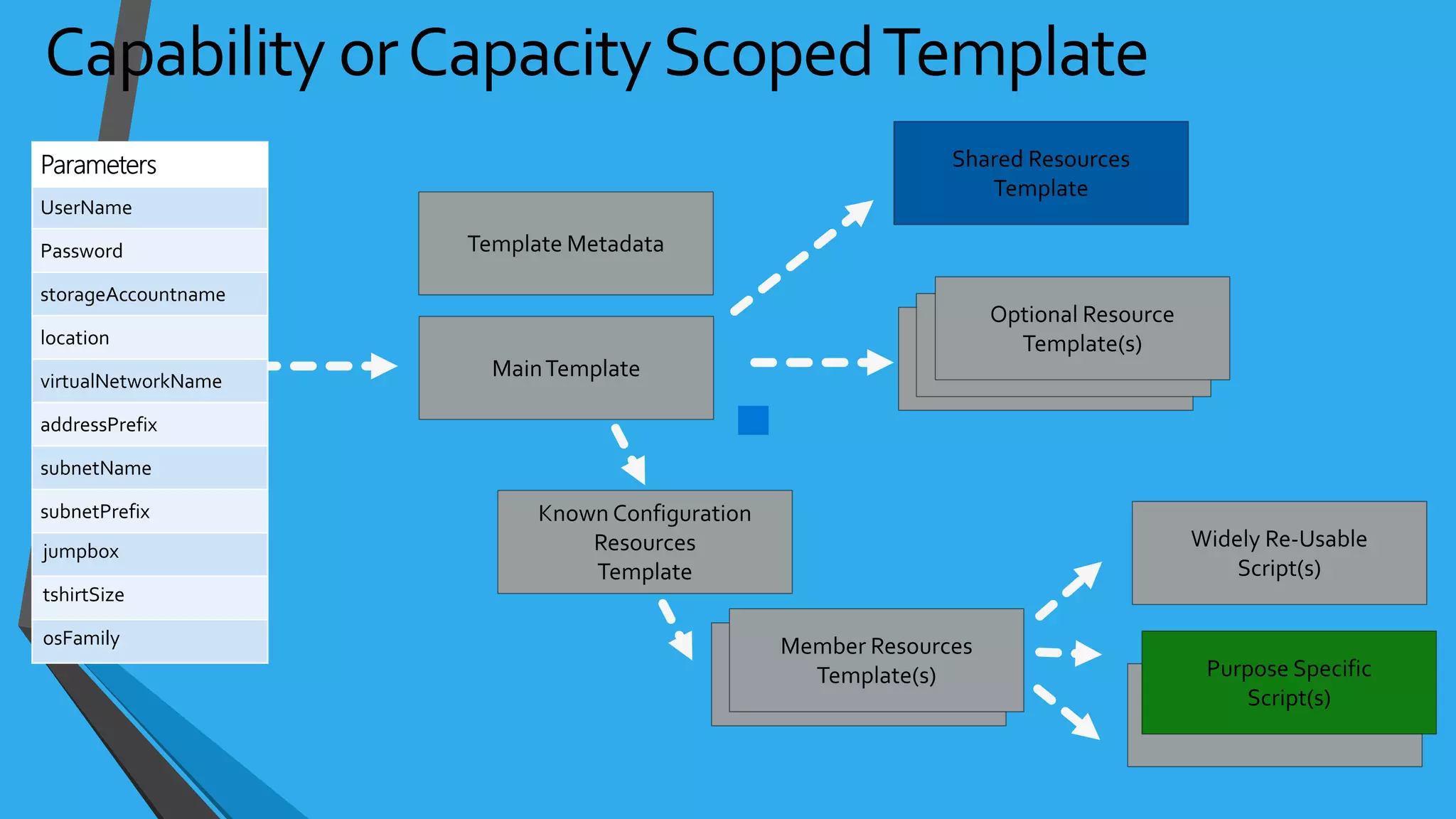
• Capacity
• May be one or more linked templates with a scoped purpose
• Delivers an environment, with appropriate security and auditing for compliance
• Capability
• May be one or more linked templates with a scoped purpose
• Delivers a technology or a capability that can be utilized post-deployment
• Examples include delivering capabilities such as SQL Server, Cassandra, Elasticsearch, Hadoop, aWeb
Server, etc.
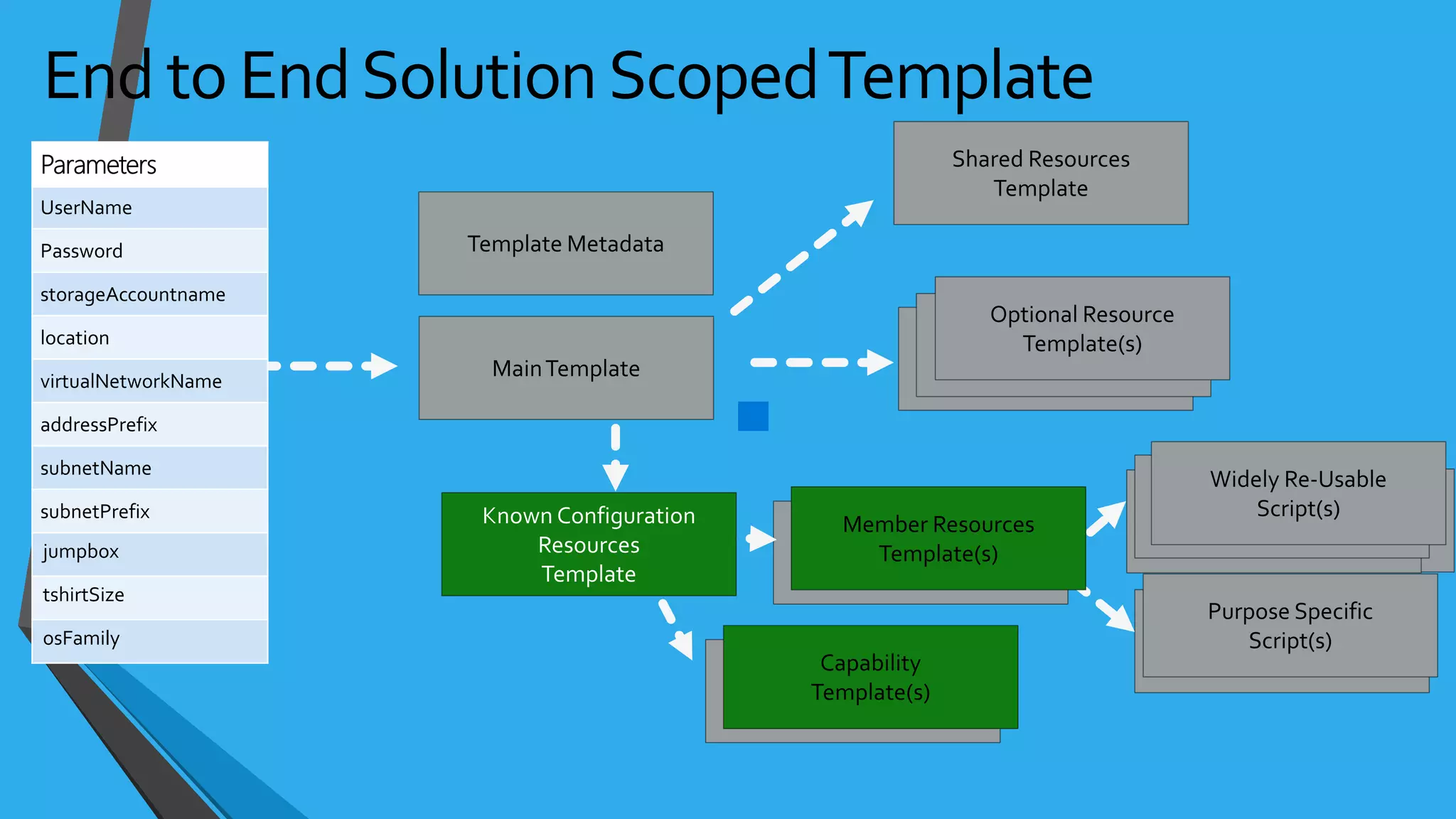
• End to End Solution
• Compositions of one or more capability scoped templates
• Examples include end to end data pipeline
CommonTemplate Scopes
• Template describes the topology (outside the box)
• Template extensions can initiate state configuration (inside the box)
• Multiple extensions available
• DSC
• Chef
• Puppet
• Custom Scripts
• AppService + WebDeploy
• SQLDB + BACPAC
Inside the Box vs. Outside the Box
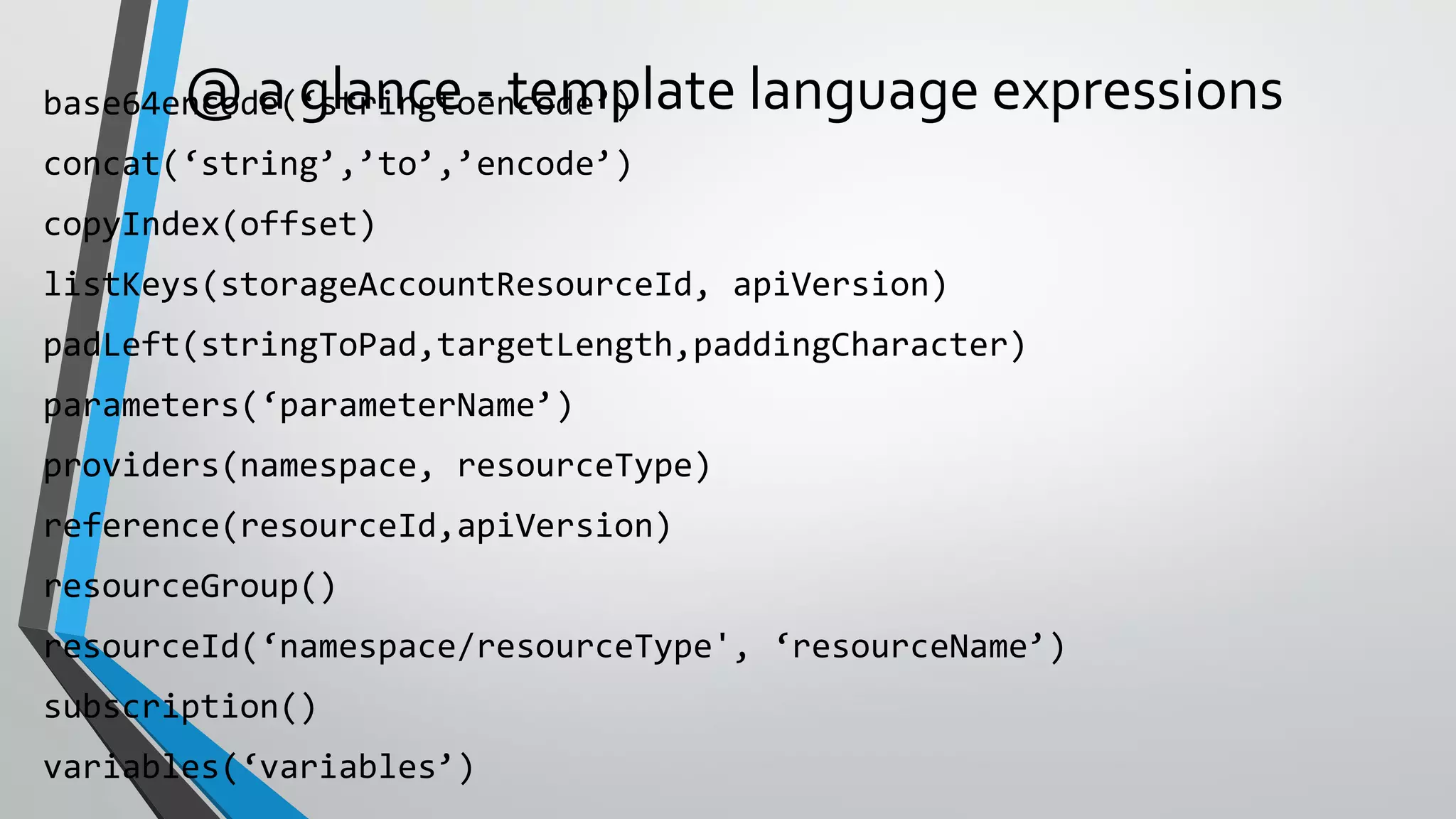
@ a glance - template language expressions
{ "apiVersion": "2015-05-01-preview",
"type": "Microsoft.Compute/virtualMachines",
"name": "[concat(parameters('vmNamePrefix'), copyindex())]",
"location": "[parameters('location')]",
"copy": {
"name": "virtualMachineLoop",
"count": "[parameters('numberOfInstances')]"
},
"dependsOn": [
"[concat('Microsoft.Network/networkInterfaces/', 'nic', copyindex())]"
],
"properties": {
"hardwareProfile": {
"vmSize": "[parameters('vmSize')]"
},
"osProfile": {
"computername": "[concat('vm', copyIndex())]",
"adminUsername": "[parameters('adminUsername')]",
"adminPassword": "[parameters('adminPassword')]"
},
"storageProfile": {
"osDisk": {
"name": "[concat(parameters('vmNamePrefix'),'-osDisk',copyindex())]",
"osType": "[parameters('osType')]",
"caching": "ReadWrite",
"image": {
"uri": "[variables('userImageName')]"
},
"vhd": {
"uri":
"[concat(variables('osDiskVhdContainer'),parameters('vmNamePrefix'),copyindex(),'osDisk.vhd'
)]"
}
• Resource loops deploy n instances
• Fixed or parameter
driving instance count
• Concat + Parameter Prefix +
CopyIndex() for dynamic naming
Deploying Multiple Instances
• Provides the ability to link multiple templates
• Can be used to facilitate decomposition
• Template URIs can be dynamic
• Allows for re-use
Template Linking
{ "name": "cluster-nodes",
"type":
"Microsoft.Resources/deployments",
"apiVersion": "2015-01-01",
"dependsOn": [
"[concat('Microsoft.Resources/deployments/',
'shared')]"
],
• Execution engine builds a state machine
• dependsOn and reference() establish dependencies
Template Execution
Start
App
Service
Plan
End
Auto
Scale
Setting
Web
Site Alert
Rule
App
Insights
MS
Deploy
PKG
After App Service
Plan Completes
After Website
Completes
Once All
Complete
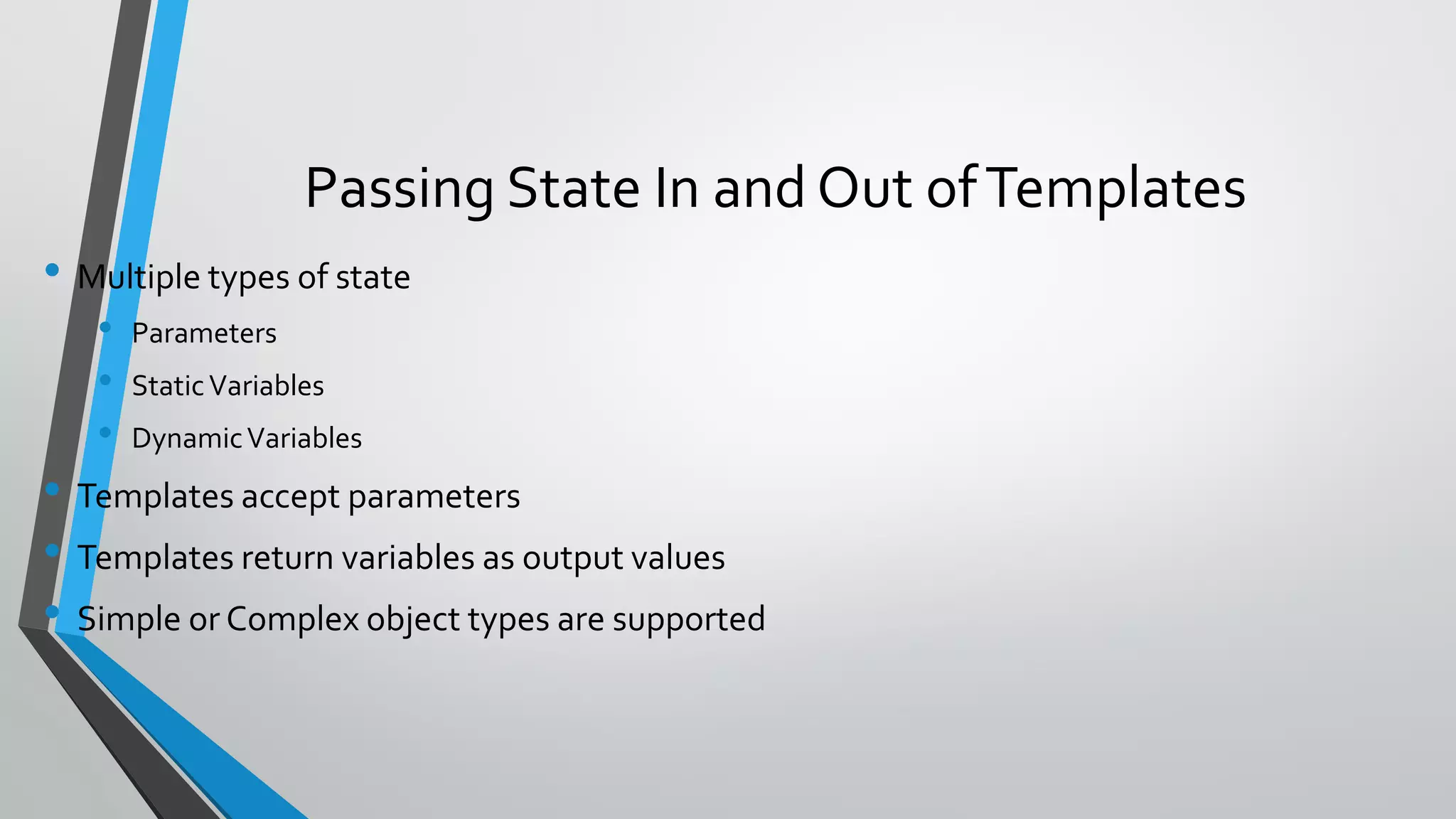
• Multiple types of state
• Parameters
• StaticVariables
• DynamicVariables
• Templates accept parameters
• Templates return variables as output values
• Simple or Complex object types are supported
Passing State In and Out ofTemplates
•Easier to pass a number of related values with a
single variable
•Object.Property approach provides additional
context when reading the template
Examples
Passing State - Complex Objects
"networkSettings": {
"vnetName": "[parameters('virtualNetworkName')]",
"addressPrefix": "10.0.0.0/16",
"subnets": {
"dmz": {
"name": "dmz",
"prefix": "10.0.0.0/24",
"vnet": "[parameters('virtualNetworkName')]"
},
"data": {
"name": "data",
"prefix": "10.0.1.0/24",
"vnet": "[parameters('virtualNetworkName')]"
}
"osSettings": {
"imageReference": {
"publisher": "Canonical",
"offer": "UbuntuServer",
"sku": "14.04.2-LTS",
"version": "latest"
}
"tshirtSizeSmall": {
"vmSize": "Standard_A1",
"diskSize": 1023,
"vmTemplate": "[concat(variables('templateBaseUrl'),
'database-2disk-resources.json')]",
"vmCount": 2,
"storage": {
"name": "[parameters('storageAccountNamePrefix')]",
"count": 1,
"pool": "db",
"map": [0,0],
"jumpbox": 0
}
},
"availabilitySetSettings": {
"name": "pgsqlAvailabilitySet",
"fdCount": 3,
"udCount": 5
}
• A template can return values to its caller via the outputs section
• These values can then be used by the caller
Passing State – Output variables
"outputs": {
"masterip": {
"value":
"[reference(concat(variables('nicName'),0)).ipConfigurations[0].properties.privat
ress]",
"type":"string"
}}
"masterIpAddress": {
"value":
"[reference('master-node').outputs.masterip.value]"
} }
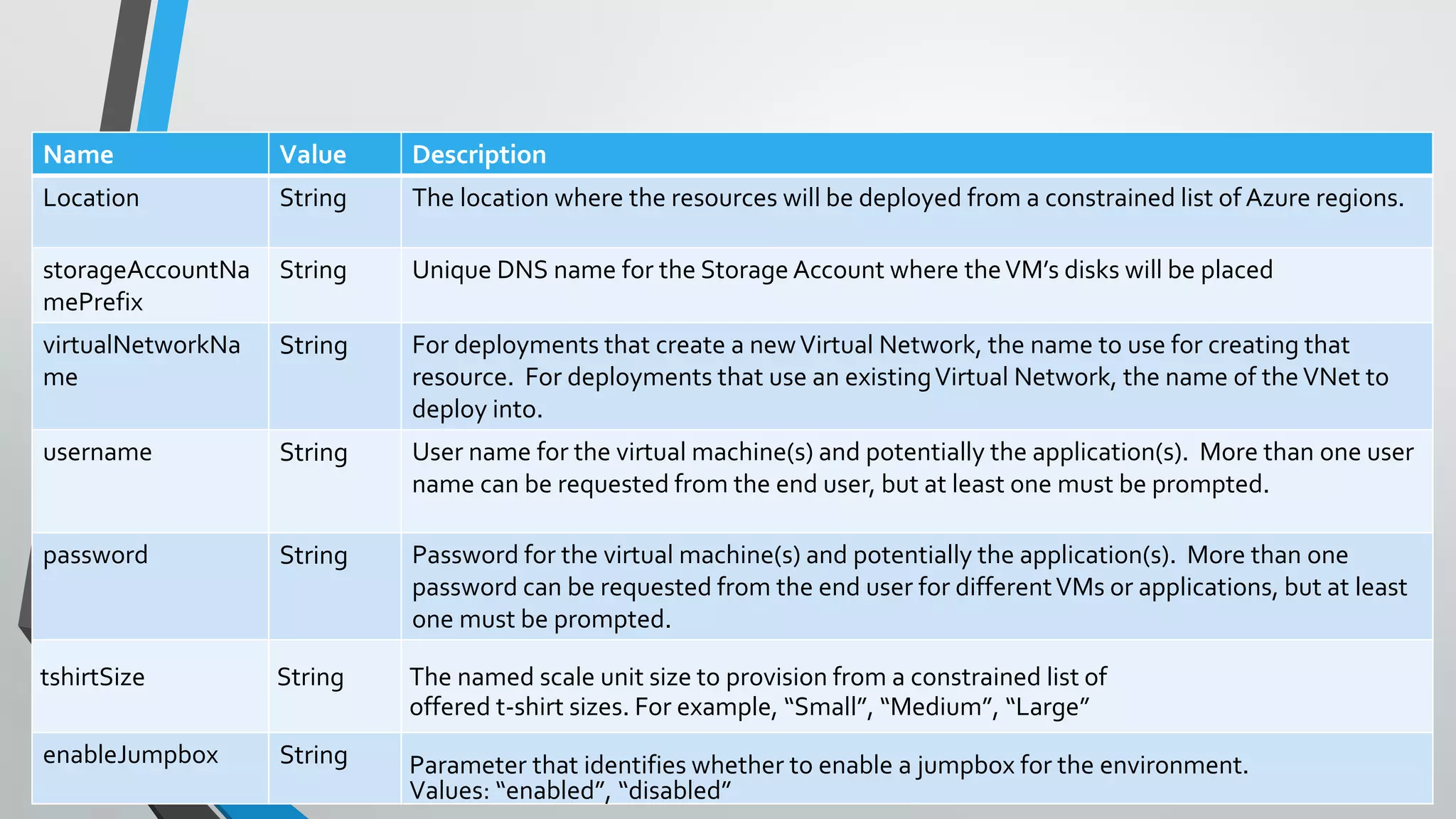
Passing State - Common Parameters
Name Value Description
Location String The location where the resources will be deployed from a constrained list of Azure regions.
storageAccountNa
mePrefix
String Unique DNS name for the Storage Account where theVM’s disks will be placed
virtualNetworkNa
me
String For deployments that create a newVirtual Network, the name to use for creating that
resource. For deployments that use an existingVirtual Network, the name of the VNet to
deploy into.
username String User name for the virtual machine(s) and potentially the application(s). More than one user
name can be requested from the end user, but at least one must be prompted.
password String Password for the virtual machine(s) and potentially the application(s). More than one
password can be requested from the end user for differentVMs or applications, but at least
one must be prompted.
tshirtSize String The named scale unit size to provision from a constrained list of
offered t-shirt sizes. For example, “Small”, “Medium”, “Large”
enableJumpbox String Parameter that identifies whether to enable a jumpbox for the environment.
Values: “enabled”, “disabled”
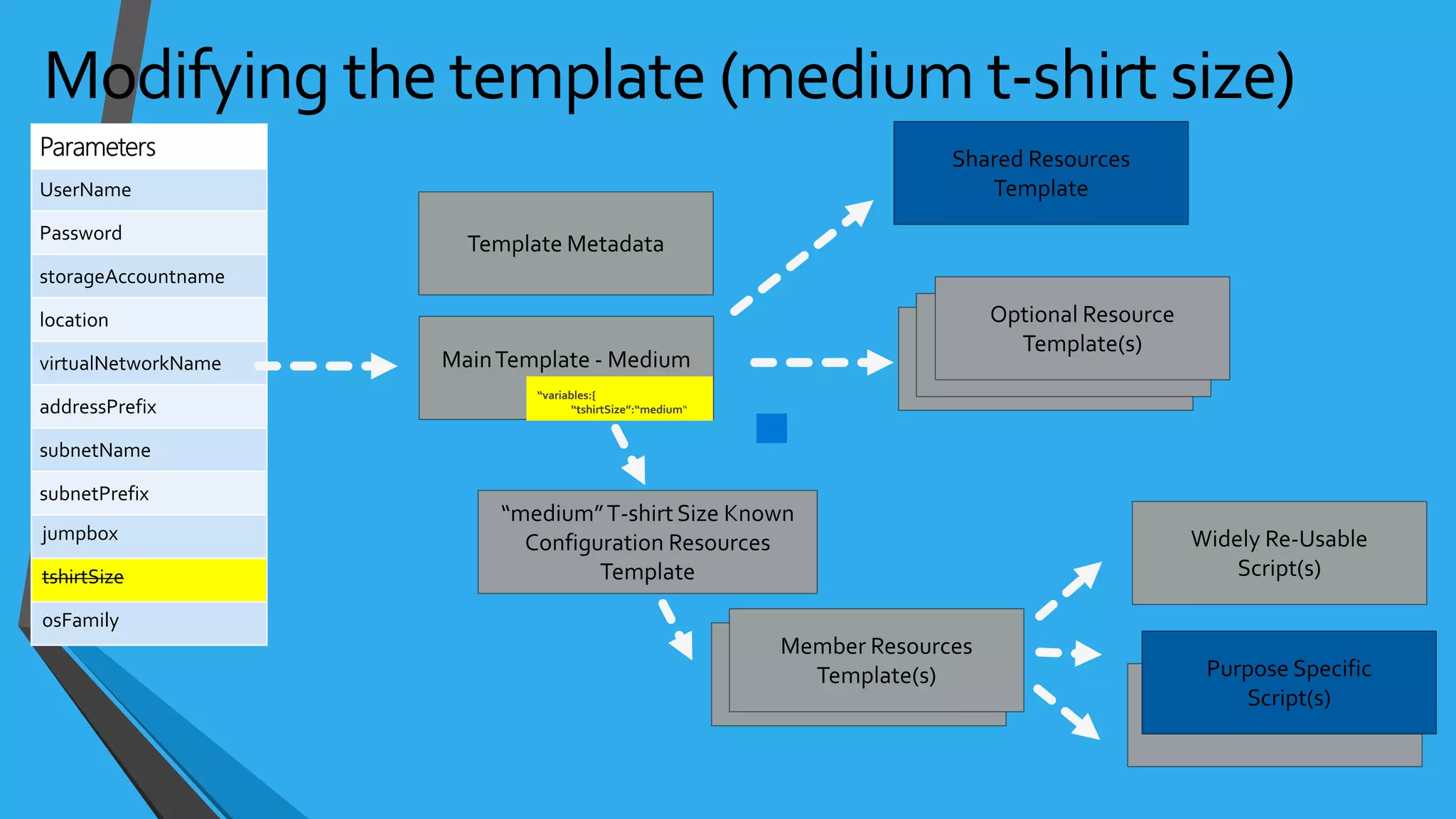
• No control flow logic built intoARM template language
• An approach with parameters, variables, and linked templates
• Use provides parameter value that provides context, e.g. tshirtSize parameter is passed in as a value of
‘small’
• Using concat and a pre-defined variable, a new variable value is created which points to the specific ,
e.g. ‘tshirtSize-small.json’
• Template linking is incorporated into the template and uses this new value to identify which template
to deploy.
• Common examples are “tshirt sizes” and optional features for a deployment, e.g. “enableJumpbox”
Control Flow
jumpbox
tshirtSize
osFamily
jumpbox
tshirtSize
osFamily
jumpbox
tshirtSize
osFamily
jumpbox
tshirtSize
osFamily
jumpbox
tshirtSize
osFamily
jumpbox
tshirtSize
osFamily
jumpbox
tshirtSize
osFamily
jumpbox
tshirtSize
osFamily
jumpbox
tshirtSize
osFamily
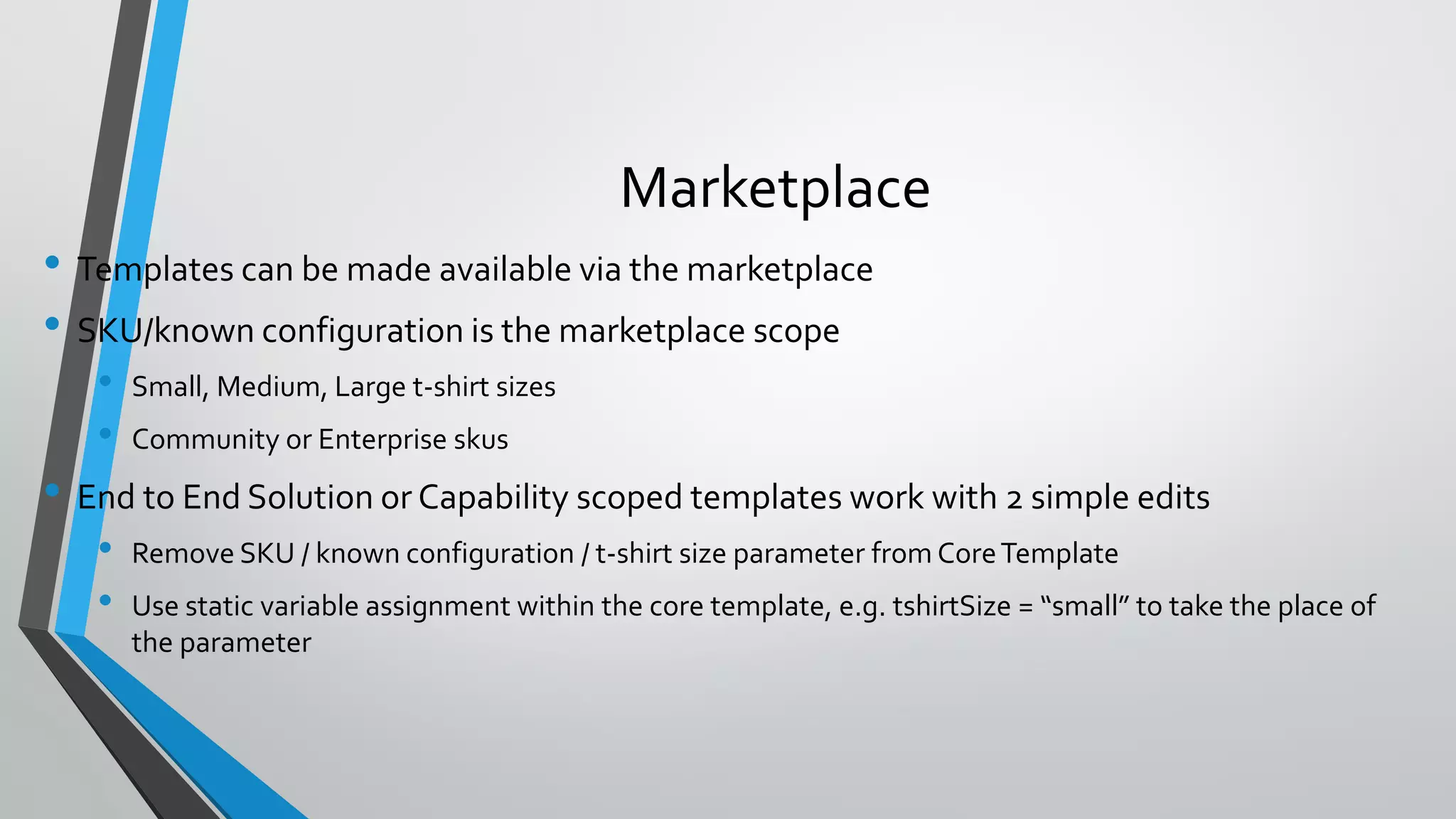
• Templates can be made available via the marketplace
• SKU/known configuration is the marketplace scope
• Small, Medium, Large t-shirt sizes
• Community or Enterprise skus
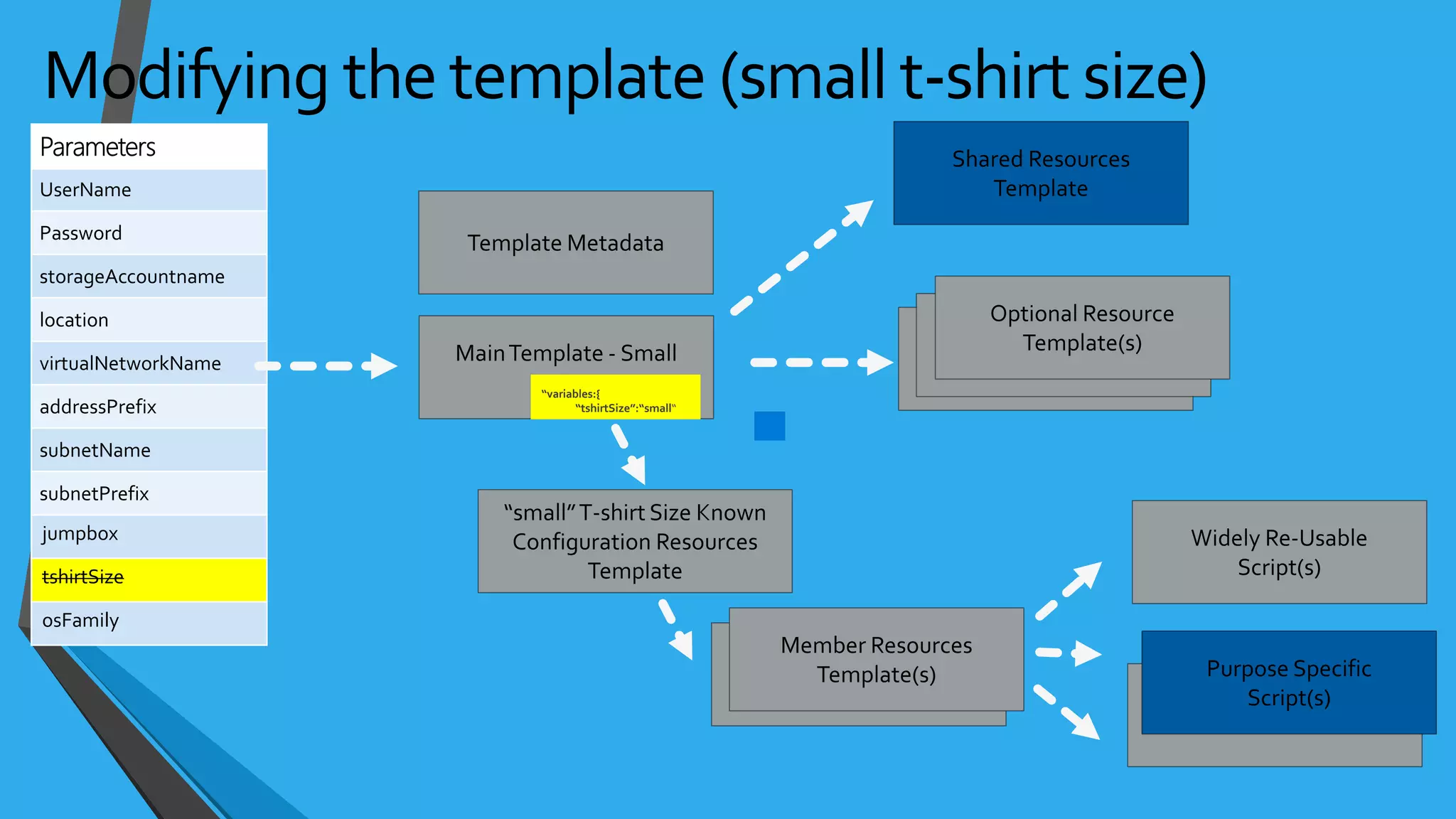
• End to End Solution or Capability scoped templates work with 2 simple edits
• Remove SKU / known configuration / t-shirt size parameter from CoreTemplate
• Use static variable assignment within the core template, e.g. tshirtSize = “small” to take the place of
the parameter
Marketplace
jumpbox
tshirtSize
osFamily
jumpbox
tshirtSize
osFamily
• role based access control
• audit logs
• resource locks
Control with Azure Resource Manager
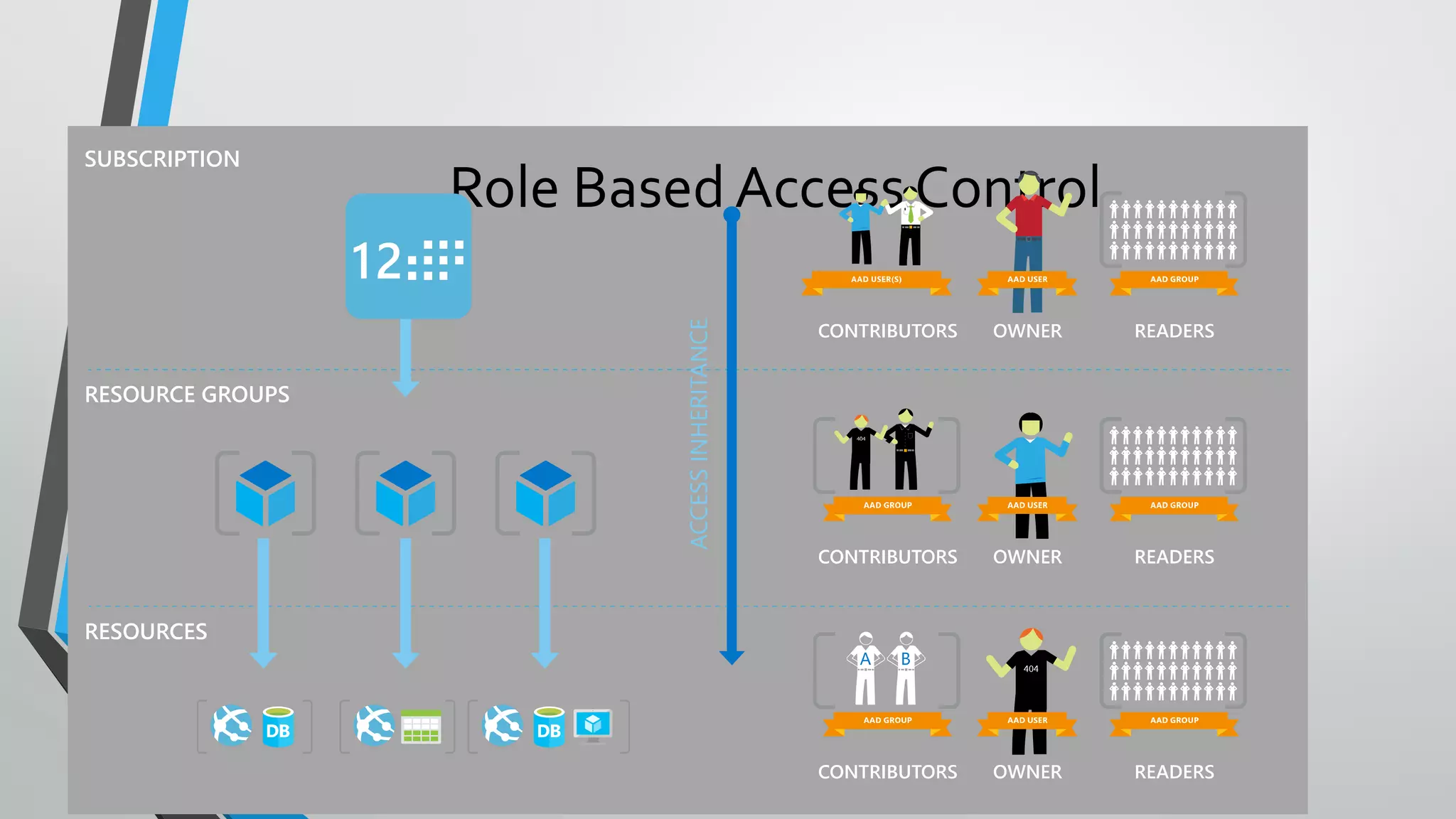
Role Based Access Control
• Allows secure access with granular permissions
• Assignable to users, groups, or service principals
• Built-in roles make it easy to get started
Two Key Concepts
Role Definitions
• describes the set of permissions
(e.g. read actions)
• can be used in multiple
assignments
Role Assignments
• associate role definitions with an
identity (e.g. user/group) at a
scope (e.g. resource group)
• always inherited – subscription
assignments apply to all resources
Role Based Access Control
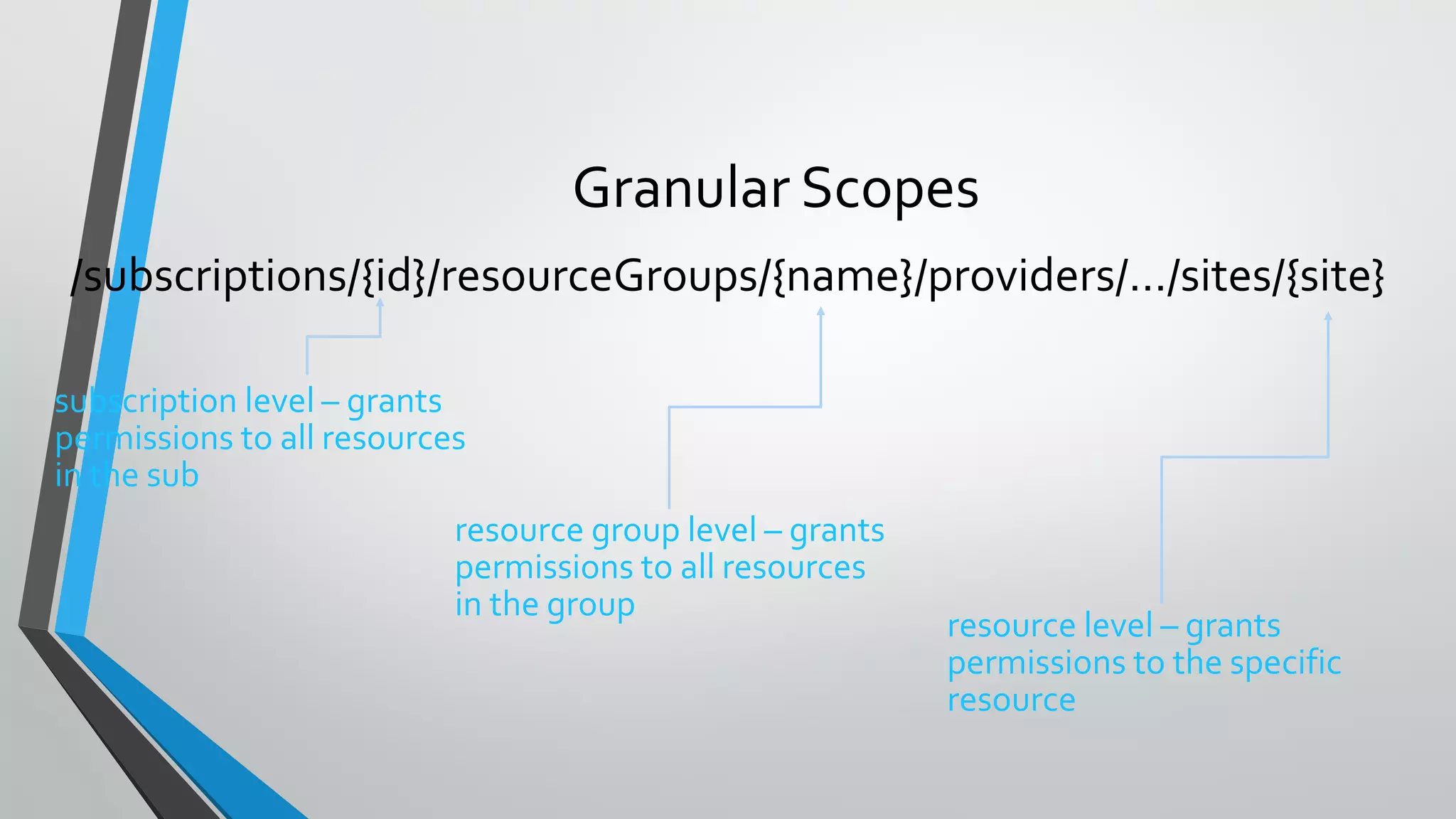
Granular Scopes
/subscriptions/{id}/resourceGroups/{name}/providers/…/sites/{site}
subscription level – grants
permissions to all resources
in the sub
resource group level – grants
permissions to all resources
in the group
resource level – grants
permissions to the specific
resource
• Encrypt keys and small secrets like passwords
• Import or generate your keys in HSMs
(certified to FIPS 140-2 level 2 standards)
• Grant permission for your own and third party applications to use as needed
• Monitor and audit key use with Azure logging
• Pipe logs into HDInsight or your SIEM for additional analysis and threat detection
(coming soon)
• Provision new vaults or keys in minutes
• Scales to meet peak demand w/o having to deploy dedicated HSMs
• Provision vaults across Azure global DCs for global redundancy
• Microsoft does not see or extract your keys
Key management with KeyVault
•AzureVMs, ARM and KeyVault are fully integrated
•Benefits of using them together –
• ARM templates contain only URI references to secrets
• Actual secrets are not in code, config or source code repositories
• Secrets stored in KeyVault are under full RBAC control of a trusted operator
• Full compartmentalization of assets
• Loading of secrets into theVM at deployment occurs via direct channel betweenAzure Fabric and the
KeyVault within the Microsoft data center.
• Key vaults are always regional, so the secrets always have locality (and sovereignty) with theVMs.
There are no global key vaults.
•Proven practice is to separate ARM templates for
• Creation ofVaults (which will contain the key material)
Secrets and Certificates
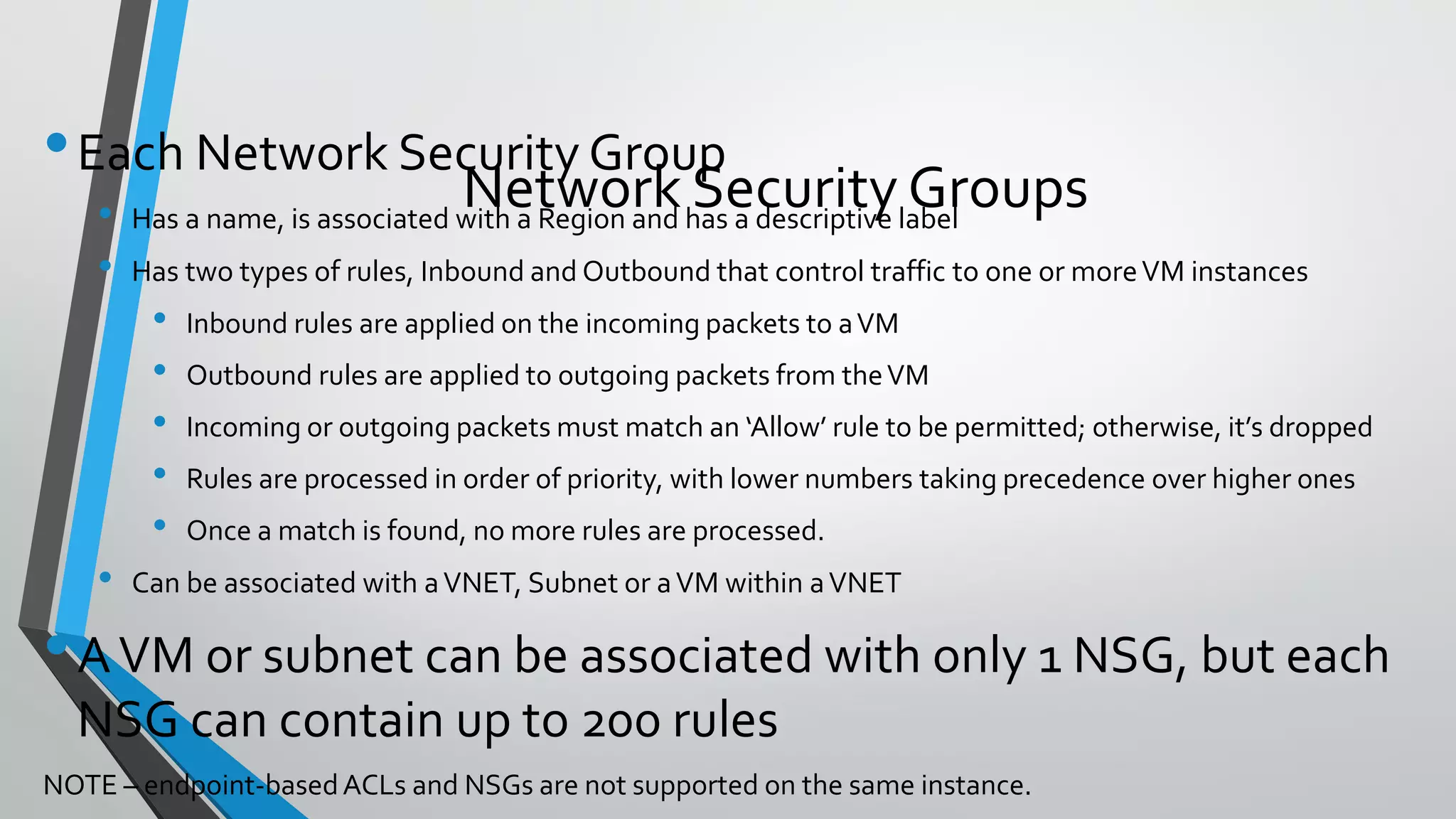
•Each Network Security Group
• Has a name, is associated with a Region and has a descriptive label
• Has two types of rules, Inbound and Outbound that control traffic to one or moreVM instances
• Inbound rules are applied on the incoming packets to aVM
• Outbound rules are applied to outgoing packets from theVM
• Incoming or outgoing packets must match an ‘Allow’ rule to be permitted; otherwise, it’s dropped
• Rules are processed in order of priority, with lower numbers taking precedence over higher ones
• Once a match is found, no more rules are processed.
• Can be associated with aVNET, Subnet or aVM within aVNET
•AVM or subnet can be associated with only 1 NSG, but each
NSG can contain up to 200 rules
NOTE – endpoint-basedACLs and NSGs are not supported on the same instance.
Network Security Groups
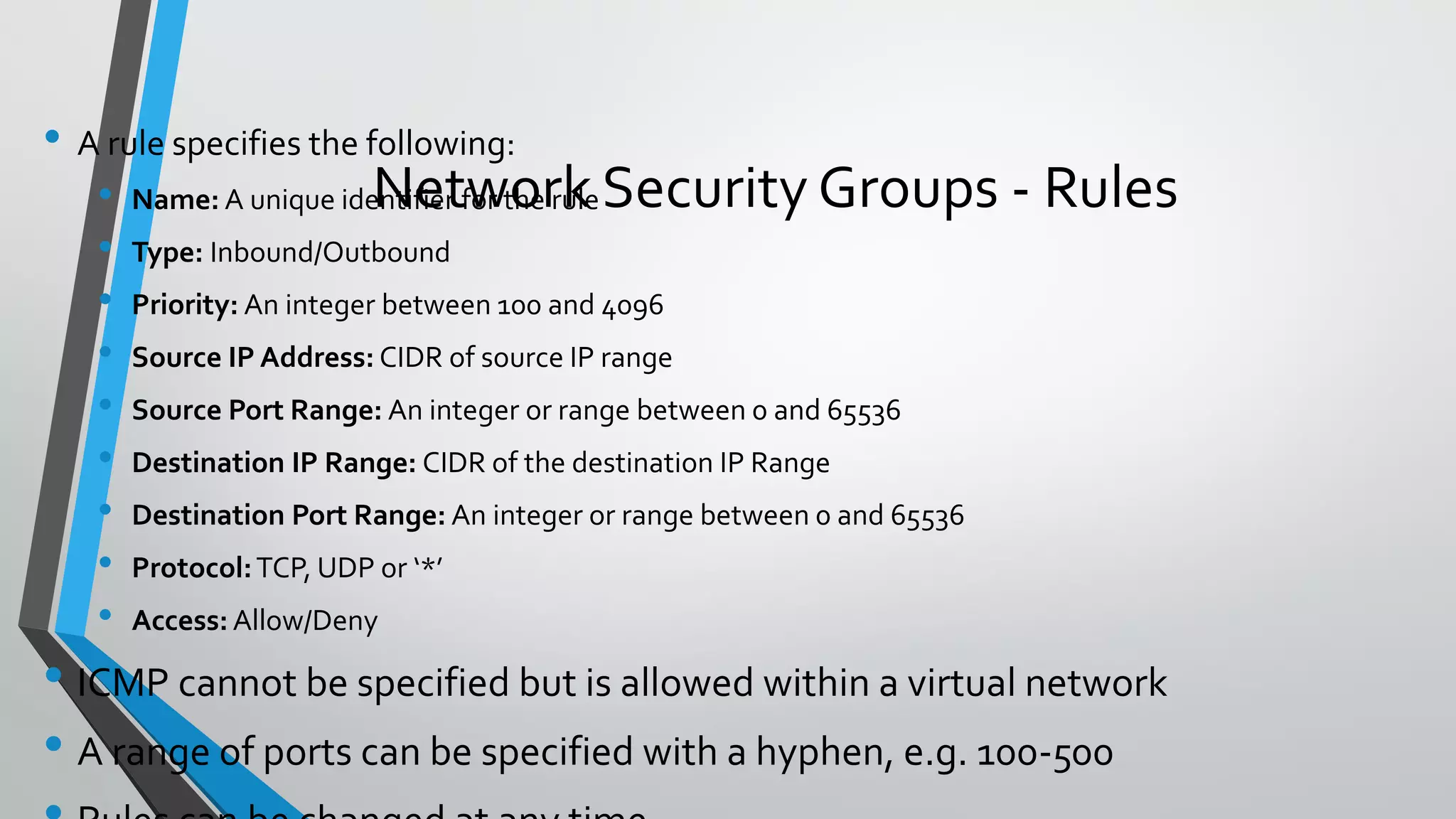
• A rule specifies the following:
• Name: A unique identifier for the rule
• Type: Inbound/Outbound
• Priority: An integer between 100 and 4096
• Source IP Address: CIDR of source IP range
• Source Port Range: An integer or range between 0 and 65536
• Destination IP Range: CIDR of the destination IP Range
• Destination Port Range: An integer or range between 0 and 65536
• Protocol:TCP, UDP or ‘*’
• Access: Allow/Deny
• ICMP cannot be specified but is allowed within a virtual network
• A range of ports can be specified with a hyphen, e.g. 100-500
Network Security Groups - Rules
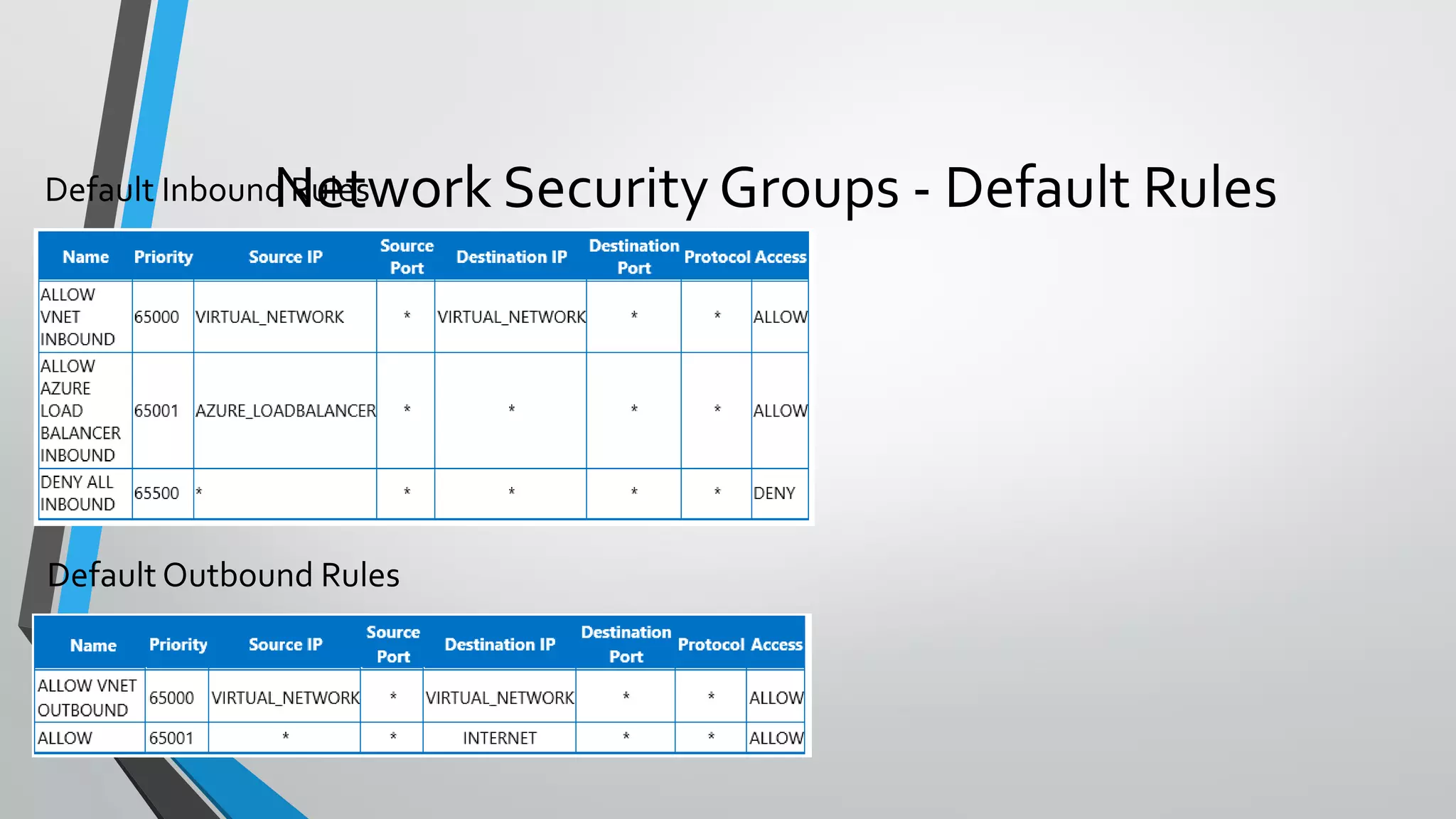
Network Security Groups - Default Rules
NSG Examples{
"apiVersion": "2015-05-01-preview",
"type": "Microsoft.Network/networkSecurityGroups",
"name": "[parameters('FENSGName')]",
"location": "[parameters('location')]",
"properties":
{
"securityRules": [
{
"name": "rdp_rule",
"properties":
{
"description": "Allow RDP",
"protocol": "Tcp",
"sourcePortRange": "*",
"destinationPortRange": "3389",
"sourceAddressPrefix": "Internet",
"destinationAddressPrefix": "*",
"access": "Allow",
"priority": 100,
"direction": "Inbound"
}
},
{
"name": "web_rule",
"properties": {
"description": "Allow WEB",
"protocol": "Tcp",
"sourcePortRange": "*",
"destinationPortRange": "80",
"sourceAddressPrefix": "Internet",
"destinationAddressPrefix": "*",
"access": "Allow",
"priority": 101,
"direction": "Inbound"
}
}
]
}
}
{
"apiVersion": "2015-05-01-preview",
"type": "Microsoft.Network/networkSecurityGroups",
"name": "[parameters('AppNSGName')]",
"location": "[parameters('location')]",
"properties": {
"securityRules": [{
"name": "Allow_FE",
"properties": {
"description": "Allow FE Subnet",
"protocol": "Tcp",
"sourcePortRange": "*",
"destinationPortRange": "443",
"sourceAddressPrefix": "10.0.0.0/24",
"destinationAddressPrefix": "*",
"access": "Allow",
"priority": 100,
"direction": "Inbound"
}
},
{
"name": "Block_RDP_Internet",
"properties": {
"description": "Block RDP",
"protocol": "tcp",
"sourcePortRange": "*",
"destinationPortRange": "3389",
"sourceAddressPrefix": "Internet",
"destinationAddressPrefix": "*",
"access": "Deny",
"priority": 101,
"direction": "Inbound"
}
},
{
"name": "Block_Internet_Outbound",
"properties": {
"description": "Block Internet",
"protocol": "*",
"sourcePortRange": "*",
"destinationPortRange": "*",
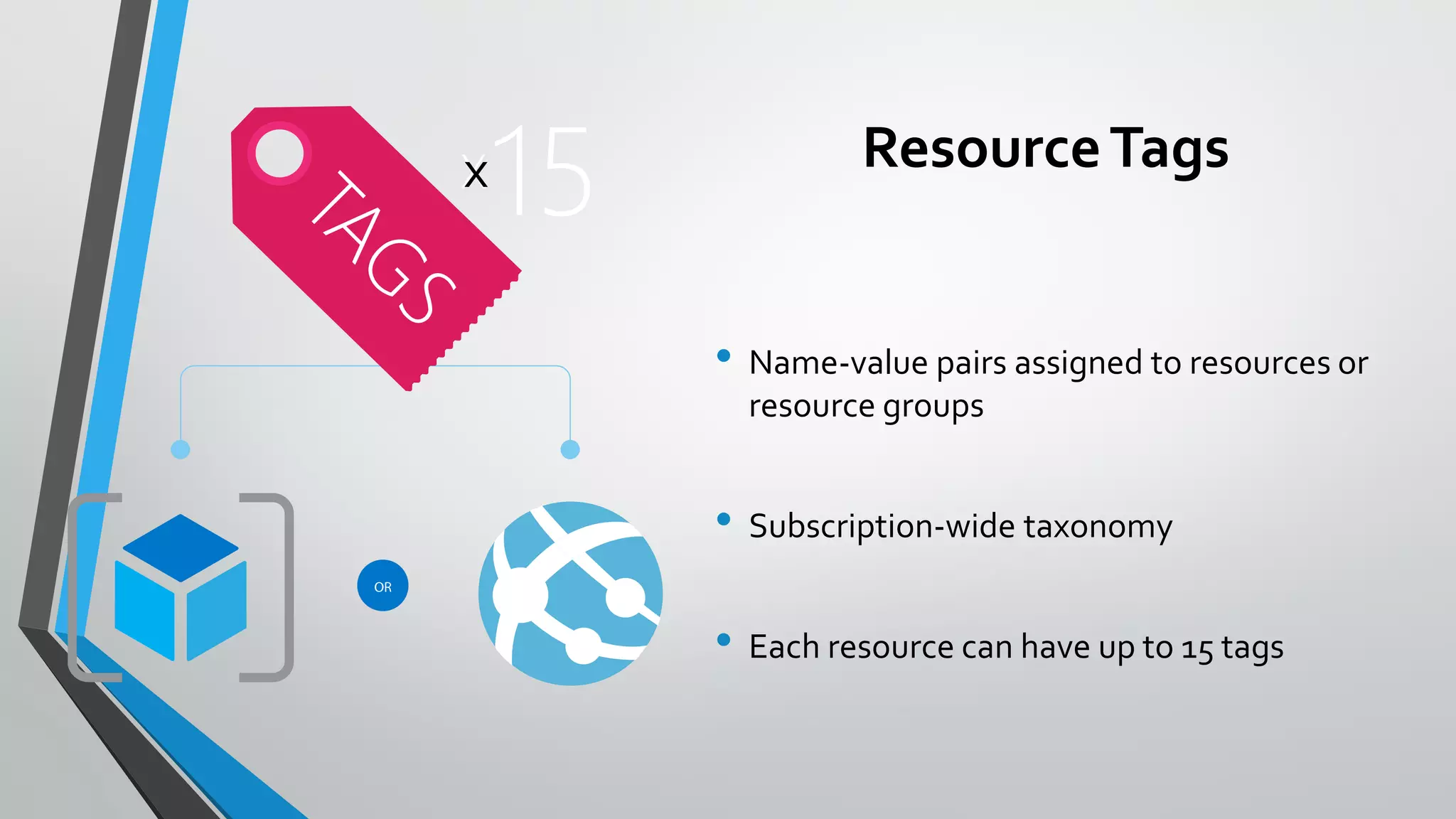
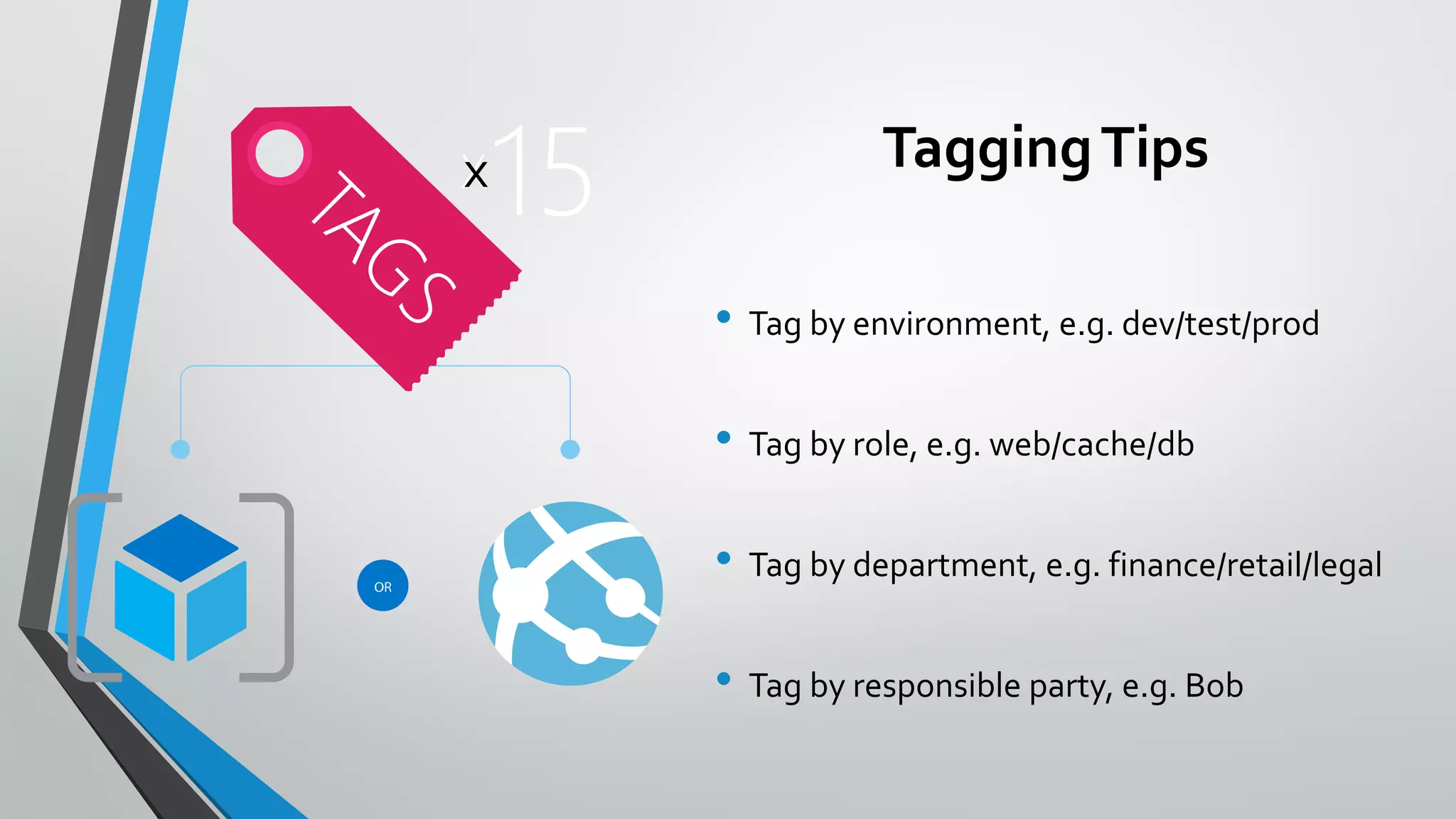
ResourceTags
• Name-value pairs assigned to resources or
resource groups
• Subscription-wide taxonomy
• Each resource can have up to 15 tags
TaggingTips
• Tag by environment, e.g. dev/test/prod
• Tag by role, e.g. web/cache/db
• Tag by department, e.g. finance/retail/legal
• Tag by responsible party, e.g. Bob
Audit Logs
• journals all write/delete/actions
• central location
• common format
Resource Locks
• Accidents happen. Resource locks help prevent them :)
• Resource locks allow administrators to create policies which prevent write actions or
prevent accidental deletion.
Key Concepts
• Resource lock
• Policy which enforces a "lock level" at a particular scope
• Lock level
• Type of enforcement; current values include CanNotDelete and ReadOnly
• Scope:
• The realm to which the lock level is applied. Expressed as a URI; can be set at the resource group,
or resource scope.
Testing
• Templates are code, manage in source control
• Test, test, test
• Test different distros/versions
• Different Linux distros may have different default behaviors
• mke2fs, which formats disks on Linux, has different default behaviors across distros/versions. Fast
formatting is not turned on by default in CentOs 6.5
• Test different regions
• Different service availability in different regions can impact deployments
• Test differentVM SKUs / Instance Counts
• If you offer the customer the ability to choose differentVM SKUs or different instance counts of
resources, test.
• Identify potential issues with performance, resource constraints, script timeouts, et.
• Decomposition allows for isolating key aspects for granular levels of testing (solution, building
block, linked template within either of these)
• Websites
• SQL Azure DB
• Redis Cache
• 40+ other resource types
• v1Virtual Machines, Network, Storage
• v2Virtual Machines, Network, Storage
Resource Group Supported Resources
61
• v1:
• Not fully integrated: no RBAC, tagging, templates
• Clunky network modelling
• v2:
• Fully integrated into Resource Manager
• Revamped control plane with asynchronous, parallel operations
• Network resource types are separate from compute
• Part of Azure-consistent private cloud
What’s NewAbout the v2 Resource Providers?
• Many examples available @ https://github.com/Azure/azure-quickstart-templates
• http://azure.microsoft.com/en-
us/documentation/articles/resource-group-overview/
Getting started with templates
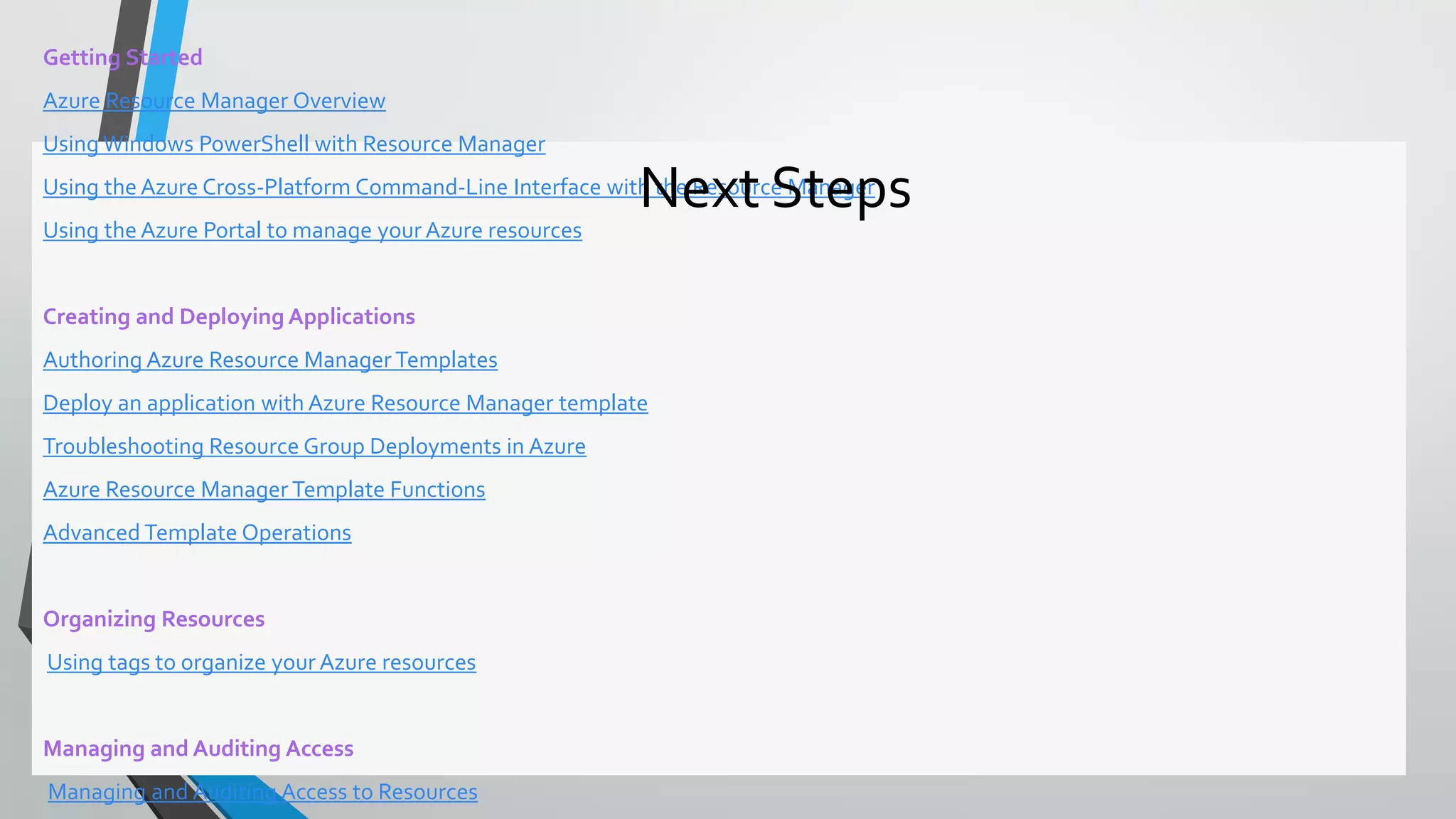
Getting Started
Azure Resource Manager Overview
Using Windows PowerShell with Resource Manager
Using the Azure Cross-Platform Command-Line Interface with the Resource Manager
Using the Azure Portal to manage your Azure resources
Creating and Deploying Applications
Authoring Azure Resource Manager Templates
Deploy an application with Azure Resource Manager template
Troubleshooting Resource Group Deployments in Azure
Azure Resource Manager Template Functions
Advanced Template Operations
Organizing Resources
Using tags to organize your Azure resources
Managing and Auditing Access
Managing and Auditing Access to Resources
Next Steps

Cnam azure ze cloud resource manager

  • 1.
  • 2.
    • A lotof material from the session was first introduced on Build 2015 less than a month ago • This is a major change in cloud deployments since the beginning of Azure • This is how deployments will be performed from now on, and earlier approaches will be deprecated Introduction
  • 3.
  • 4.
    • Manual • UseAzure Portal to create resources • Use manual deployment steps, e.g. fromVisual Studio • Client driven automation • Write a PowerShell script to automate the process • Cloud driven deployment • Use an Azure Resource Manager (ARM) template Several ways to provision resources
  • 5.
    • It’s noteasily repeatable • What if you need to do it all over again? • Or you need to deploy to a second region? What’s wrong with manual deployments?
  • 6.
  • 7.
    • Solves alot of the manual deployment issues • Puts too much logic on your client • Uses imperative logic • Hard to parallelize • Round trips secrets through client Client driven automation (e.g. PowerShell script)
  • 8.
    • Cloud basedorchestration engine • Fully declarative • Automatically optimizes the deployment based on dependency graph • Secrets never make it to the client • More transparent use of theAPI ARMTemplates
  • 9.
    •Containers of multipleresource instances •Each resource instance has a resource type •Resource types are defined by resource providers •Every resource must exist in one and only one resource group Resource Groups RESOURCE GROUP
  • 10.
    • Lifecycle: deployment,update, delete, status • Grouping: metering, billing, quota, UX (portal, PowerShell,CLI) • Access Control: scope for RBAC permissions • Identity: resources can talk to each other Resource Group: Management Container
  • 11.
    Resource Group Lifecycle Question: Shouldthese resources be in the same group or a different one? Answer: Do they have common lifecycle and management?
  • 12.
    • Centralized auditingof operations • Simple tagging and grouping of resources • Consistent access control (e.g. RBAC) Resource Group Manager Services
  • 13.
    • Declarative, modelbased specification of resources and their configuration, code, and extensions • Idempotent • Consistent deployment • Source file, checked-in • Parameterized input/output ResourceTemplates SQL Azure Web App SQL CONFIG DEPENDS ON SQL
  • 14.
    • Execution enginebuilds a state machine • dependsOn and reference() establish dependencies Template Execution Start App Service Plan End Auto Scale Setting Web Site Alert Rule App Insights MS Deploy PKG After App Service Plan Completes After Website Completes Once All Complete
  • 15.
  • 16.
    • Parameters: userinput for the template • Variables: allows model reuse and “mappings” (e.g. different image based on region) • Resources: models all the resources in the resource group • Outputs: captures information from the execution (e.g. DNS name for the created blog) Template Sections
  • 17.
    • Functions aredelimited by “[{dsl keyword}]” • E.g. “name”: “[concat(‘foo’, parameters(‘p1’))] • Basic functions: • concat() -- “[concat(‘foo’,’bar’)]” = foobar • variable() – “[variable(‘foo’)]” = variables “foo” value • reference() – “[reference(‘VM1’). IpAddress]” • parameters() – “[parameters(‘blogName’)]” Template DSL
  • 18.
    • https://github.com/Azure/azure-quickstart-templates • https://github.com/rjmax/ArmExamples •http://azure.microsoft.com/en-us/documentation/articles/resource-group- overview/ Where to start?
  • 19.
    • Enterprises andSystem Integrators • Internal Software DevelopmentTeams • Delivering an application • Corporate IT • Delivering a capability or cloud capacity • Cloud ServiceVendors (CSVs) • Support different multi-tenancy approaches • Distinct deployments per customer •Within the CSV’s subscription •“BringYour Own Subscription” model that uses customer subscriptions • Scale units within a central multi-tenant system • Support ability to make available via the marketplace Common Use Cases for ARMTemplates
  • 20.
    • Lots ofvariables makes free form less desirable • Potentially differentVM types, different number of disks, and instances • Hadoop with 8 master nodes w/ 4 attached disks and 16 disks pooled on each data node would have 208VMs and 3232 disks. • Resource constraints need to be factored on the fly • No math capabilities in ARM language • Harder to price, manage, support for the Enterprise, SI, or CSV • T-shirt Sizes / SKUs are the common approach • Known configuration makes testing easier • Easier to model cost/price • Easier to support • Easier to manage • Allows for better density within a subscription Known Configurations/SKUs vs. Free Form
  • 21.
    • Capacity • Maybe one or more linked templates with a scoped purpose • Delivers an environment, with appropriate security and auditing for compliance • Capability • May be one or more linked templates with a scoped purpose • Delivers a technology or a capability that can be utilized post-deployment • Examples include delivering capabilities such as SQL Server, Cassandra, Elasticsearch, Hadoop, aWeb Server, etc. • End to End Solution • Compositions of one or more capability scoped templates • Examples include end to end data pipeline CommonTemplate Scopes
  • 22.
    • Template describesthe topology (outside the box) • Template extensions can initiate state configuration (inside the box) • Multiple extensions available • DSC • Chef • Puppet • Custom Scripts • AppService + WebDeploy • SQLDB + BACPAC Inside the Box vs. Outside the Box
  • 23.
    @ a glance- template language expressions
  • 24.
    { "apiVersion": "2015-05-01-preview", "type":"Microsoft.Compute/virtualMachines", "name": "[concat(parameters('vmNamePrefix'), copyindex())]", "location": "[parameters('location')]", "copy": { "name": "virtualMachineLoop", "count": "[parameters('numberOfInstances')]" }, "dependsOn": [ "[concat('Microsoft.Network/networkInterfaces/', 'nic', copyindex())]" ], "properties": { "hardwareProfile": { "vmSize": "[parameters('vmSize')]" }, "osProfile": { "computername": "[concat('vm', copyIndex())]", "adminUsername": "[parameters('adminUsername')]", "adminPassword": "[parameters('adminPassword')]" }, "storageProfile": { "osDisk": { "name": "[concat(parameters('vmNamePrefix'),'-osDisk',copyindex())]", "osType": "[parameters('osType')]", "caching": "ReadWrite", "image": { "uri": "[variables('userImageName')]" }, "vhd": { "uri": "[concat(variables('osDiskVhdContainer'),parameters('vmNamePrefix'),copyindex(),'osDisk.vhd' )]" } • Resource loops deploy n instances • Fixed or parameter driving instance count • Concat + Parameter Prefix + CopyIndex() for dynamic naming Deploying Multiple Instances
  • 25.
    • Provides theability to link multiple templates • Can be used to facilitate decomposition • Template URIs can be dynamic • Allows for re-use Template Linking { "name": "cluster-nodes", "type": "Microsoft.Resources/deployments", "apiVersion": "2015-01-01", "dependsOn": [ "[concat('Microsoft.Resources/deployments/', 'shared')]" ],
  • 26.
    • Execution enginebuilds a state machine • dependsOn and reference() establish dependencies Template Execution Start App Service Plan End Auto Scale Setting Web Site Alert Rule App Insights MS Deploy PKG After App Service Plan Completes After Website Completes Once All Complete
  • 27.
    • Multiple typesof state • Parameters • StaticVariables • DynamicVariables • Templates accept parameters • Templates return variables as output values • Simple or Complex object types are supported Passing State In and Out ofTemplates
  • 28.
    •Easier to passa number of related values with a single variable •Object.Property approach provides additional context when reading the template Examples Passing State - Complex Objects "networkSettings": { "vnetName": "[parameters('virtualNetworkName')]", "addressPrefix": "10.0.0.0/16", "subnets": { "dmz": { "name": "dmz", "prefix": "10.0.0.0/24", "vnet": "[parameters('virtualNetworkName')]" }, "data": { "name": "data", "prefix": "10.0.1.0/24", "vnet": "[parameters('virtualNetworkName')]" } "osSettings": { "imageReference": { "publisher": "Canonical", "offer": "UbuntuServer", "sku": "14.04.2-LTS", "version": "latest" } "tshirtSizeSmall": { "vmSize": "Standard_A1", "diskSize": 1023, "vmTemplate": "[concat(variables('templateBaseUrl'), 'database-2disk-resources.json')]", "vmCount": 2, "storage": { "name": "[parameters('storageAccountNamePrefix')]", "count": 1, "pool": "db", "map": [0,0], "jumpbox": 0 } }, "availabilitySetSettings": { "name": "pgsqlAvailabilitySet", "fdCount": 3, "udCount": 5 }
  • 29.
    • A templatecan return values to its caller via the outputs section • These values can then be used by the caller Passing State – Output variables "outputs": { "masterip": { "value": "[reference(concat(variables('nicName'),0)).ipConfigurations[0].properties.privat ress]", "type":"string" }} "masterIpAddress": { "value": "[reference('master-node').outputs.masterip.value]" } }
  • 30.
    Passing State -Common Parameters Name Value Description Location String The location where the resources will be deployed from a constrained list of Azure regions. storageAccountNa mePrefix String Unique DNS name for the Storage Account where theVM’s disks will be placed virtualNetworkNa me String For deployments that create a newVirtual Network, the name to use for creating that resource. For deployments that use an existingVirtual Network, the name of the VNet to deploy into. username String User name for the virtual machine(s) and potentially the application(s). More than one user name can be requested from the end user, but at least one must be prompted. password String Password for the virtual machine(s) and potentially the application(s). More than one password can be requested from the end user for differentVMs or applications, but at least one must be prompted. tshirtSize String The named scale unit size to provision from a constrained list of offered t-shirt sizes. For example, “Small”, “Medium”, “Large” enableJumpbox String Parameter that identifies whether to enable a jumpbox for the environment. Values: “enabled”, “disabled”
  • 31.
    • No controlflow logic built intoARM template language • An approach with parameters, variables, and linked templates • Use provides parameter value that provides context, e.g. tshirtSize parameter is passed in as a value of ‘small’ • Using concat and a pre-defined variable, a new variable value is created which points to the specific , e.g. ‘tshirtSize-small.json’ • Template linking is incorporated into the template and uses this new value to identify which template to deploy. • Common examples are “tshirt sizes” and optional features for a deployment, e.g. “enableJumpbox” Control Flow
  • 32.
  • 33.
  • 34.
  • 35.
  • 36.
  • 37.
  • 38.
  • 39.
  • 40.
  • 41.
    • Templates canbe made available via the marketplace • SKU/known configuration is the marketplace scope • Small, Medium, Large t-shirt sizes • Community or Enterprise skus • End to End Solution or Capability scoped templates work with 2 simple edits • Remove SKU / known configuration / t-shirt size parameter from CoreTemplate • Use static variable assignment within the core template, e.g. tshirtSize = “small” to take the place of the parameter Marketplace
  • 42.
  • 43.
  • 44.
    • role basedaccess control • audit logs • resource locks Control with Azure Resource Manager
  • 45.
    Role Based AccessControl • Allows secure access with granular permissions • Assignable to users, groups, or service principals • Built-in roles make it easy to get started
  • 46.
    Two Key Concepts RoleDefinitions • describes the set of permissions (e.g. read actions) • can be used in multiple assignments Role Assignments • associate role definitions with an identity (e.g. user/group) at a scope (e.g. resource group) • always inherited – subscription assignments apply to all resources
  • 47.
  • 48.
    Granular Scopes /subscriptions/{id}/resourceGroups/{name}/providers/…/sites/{site} subscription level– grants permissions to all resources in the sub resource group level – grants permissions to all resources in the group resource level – grants permissions to the specific resource
  • 49.
    • Encrypt keysand small secrets like passwords • Import or generate your keys in HSMs (certified to FIPS 140-2 level 2 standards) • Grant permission for your own and third party applications to use as needed • Monitor and audit key use with Azure logging • Pipe logs into HDInsight or your SIEM for additional analysis and threat detection (coming soon) • Provision new vaults or keys in minutes • Scales to meet peak demand w/o having to deploy dedicated HSMs • Provision vaults across Azure global DCs for global redundancy • Microsoft does not see or extract your keys Key management with KeyVault
  • 50.
    •AzureVMs, ARM andKeyVault are fully integrated •Benefits of using them together – • ARM templates contain only URI references to secrets • Actual secrets are not in code, config or source code repositories • Secrets stored in KeyVault are under full RBAC control of a trusted operator • Full compartmentalization of assets • Loading of secrets into theVM at deployment occurs via direct channel betweenAzure Fabric and the KeyVault within the Microsoft data center. • Key vaults are always regional, so the secrets always have locality (and sovereignty) with theVMs. There are no global key vaults. •Proven practice is to separate ARM templates for • Creation ofVaults (which will contain the key material) Secrets and Certificates
  • 51.
    •Each Network SecurityGroup • Has a name, is associated with a Region and has a descriptive label • Has two types of rules, Inbound and Outbound that control traffic to one or moreVM instances • Inbound rules are applied on the incoming packets to aVM • Outbound rules are applied to outgoing packets from theVM • Incoming or outgoing packets must match an ‘Allow’ rule to be permitted; otherwise, it’s dropped • Rules are processed in order of priority, with lower numbers taking precedence over higher ones • Once a match is found, no more rules are processed. • Can be associated with aVNET, Subnet or aVM within aVNET •AVM or subnet can be associated with only 1 NSG, but each NSG can contain up to 200 rules NOTE – endpoint-basedACLs and NSGs are not supported on the same instance. Network Security Groups
  • 52.
    • A rulespecifies the following: • Name: A unique identifier for the rule • Type: Inbound/Outbound • Priority: An integer between 100 and 4096 • Source IP Address: CIDR of source IP range • Source Port Range: An integer or range between 0 and 65536 • Destination IP Range: CIDR of the destination IP Range • Destination Port Range: An integer or range between 0 and 65536 • Protocol:TCP, UDP or ‘*’ • Access: Allow/Deny • ICMP cannot be specified but is allowed within a virtual network • A range of ports can be specified with a hyphen, e.g. 100-500 Network Security Groups - Rules
  • 53.
    Network Security Groups- Default Rules
  • 54.
    NSG Examples{ "apiVersion": "2015-05-01-preview", "type":"Microsoft.Network/networkSecurityGroups", "name": "[parameters('FENSGName')]", "location": "[parameters('location')]", "properties": { "securityRules": [ { "name": "rdp_rule", "properties": { "description": "Allow RDP", "protocol": "Tcp", "sourcePortRange": "*", "destinationPortRange": "3389", "sourceAddressPrefix": "Internet", "destinationAddressPrefix": "*", "access": "Allow", "priority": 100, "direction": "Inbound" } }, { "name": "web_rule", "properties": { "description": "Allow WEB", "protocol": "Tcp", "sourcePortRange": "*", "destinationPortRange": "80", "sourceAddressPrefix": "Internet", "destinationAddressPrefix": "*", "access": "Allow", "priority": 101, "direction": "Inbound" } } ] } } { "apiVersion": "2015-05-01-preview", "type": "Microsoft.Network/networkSecurityGroups", "name": "[parameters('AppNSGName')]", "location": "[parameters('location')]", "properties": { "securityRules": [{ "name": "Allow_FE", "properties": { "description": "Allow FE Subnet", "protocol": "Tcp", "sourcePortRange": "*", "destinationPortRange": "443", "sourceAddressPrefix": "10.0.0.0/24", "destinationAddressPrefix": "*", "access": "Allow", "priority": 100, "direction": "Inbound" } }, { "name": "Block_RDP_Internet", "properties": { "description": "Block RDP", "protocol": "tcp", "sourcePortRange": "*", "destinationPortRange": "3389", "sourceAddressPrefix": "Internet", "destinationAddressPrefix": "*", "access": "Deny", "priority": 101, "direction": "Inbound" } }, { "name": "Block_Internet_Outbound", "properties": { "description": "Block Internet", "protocol": "*", "sourcePortRange": "*", "destinationPortRange": "*",
  • 55.
    ResourceTags • Name-value pairsassigned to resources or resource groups • Subscription-wide taxonomy • Each resource can have up to 15 tags
  • 56.
    TaggingTips • Tag byenvironment, e.g. dev/test/prod • Tag by role, e.g. web/cache/db • Tag by department, e.g. finance/retail/legal • Tag by responsible party, e.g. Bob
  • 57.
    Audit Logs • journalsall write/delete/actions • central location • common format
  • 58.
    Resource Locks • Accidentshappen. Resource locks help prevent them :) • Resource locks allow administrators to create policies which prevent write actions or prevent accidental deletion.
  • 59.
    Key Concepts • Resourcelock • Policy which enforces a "lock level" at a particular scope • Lock level • Type of enforcement; current values include CanNotDelete and ReadOnly • Scope: • The realm to which the lock level is applied. Expressed as a URI; can be set at the resource group, or resource scope.
  • 60.
    Testing • Templates arecode, manage in source control • Test, test, test • Test different distros/versions • Different Linux distros may have different default behaviors • mke2fs, which formats disks on Linux, has different default behaviors across distros/versions. Fast formatting is not turned on by default in CentOs 6.5 • Test different regions • Different service availability in different regions can impact deployments • Test differentVM SKUs / Instance Counts • If you offer the customer the ability to choose differentVM SKUs or different instance counts of resources, test. • Identify potential issues with performance, resource constraints, script timeouts, et. • Decomposition allows for isolating key aspects for granular levels of testing (solution, building block, linked template within either of these)
  • 61.
    • Websites • SQLAzure DB • Redis Cache • 40+ other resource types • v1Virtual Machines, Network, Storage • v2Virtual Machines, Network, Storage Resource Group Supported Resources 61
  • 62.
    • v1: • Notfully integrated: no RBAC, tagging, templates • Clunky network modelling • v2: • Fully integrated into Resource Manager • Revamped control plane with asynchronous, parallel operations • Network resource types are separate from compute • Part of Azure-consistent private cloud What’s NewAbout the v2 Resource Providers?
  • 63.
    • Many examplesavailable @ https://github.com/Azure/azure-quickstart-templates • http://azure.microsoft.com/en- us/documentation/articles/resource-group-overview/ Getting started with templates
  • 64.
    Getting Started Azure ResourceManager Overview Using Windows PowerShell with Resource Manager Using the Azure Cross-Platform Command-Line Interface with the Resource Manager Using the Azure Portal to manage your Azure resources Creating and Deploying Applications Authoring Azure Resource Manager Templates Deploy an application with Azure Resource Manager template Troubleshooting Resource Group Deployments in Azure Azure Resource Manager Template Functions Advanced Template Operations Organizing Resources Using tags to organize your Azure resources Managing and Auditing Access Managing and Auditing Access to Resources Next Steps