
Using Spatial Data Streams In Real-Time 
Lars Schmitz 
Esri Deutschland GmbH 
Berlin, 22. September 2014
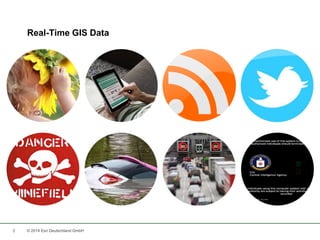
Real-Time GIS Data 
2 © 2014 Esri Deutschland GmbH
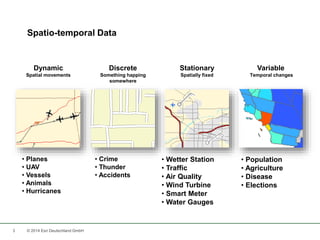
Spatio-temporal Data 
3 © 2014 Esri Deutschland GmbH 
Variable 
Temporal changes 
• Population 
• Agriculture 
• Disease 
• Elections 
Dynamic 
Spatial movements 
• Planes 
• UAV 
• Vessels 
• Animals 
• Hurricanes 
Discrete 
Something happing 
somewhere 
• Crime 
• Thunder 
• Accidents 
Stationary 
Spatially fixed 
• Wetter Station 
• Traffic 
• Air Quality 
• Wind Turbine 
• Smart Meter 
• Water Gauges
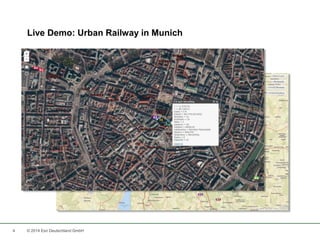
Live Demo: Urban Railway in Munich 
4 © 2014 Esri Deutschland GmbH
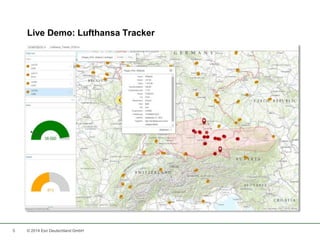
Live Demo: Lufthansa Tracker 
5 © 2014 Esri Deutschland GmbH
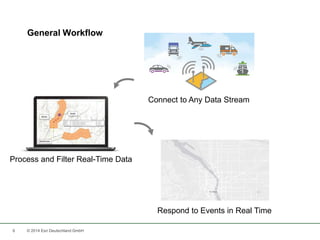
General Workflow 
6 © 2014 Esri Deutschland GmbH 
Connect to Any Data Stream 
Process and Filter Real-Time Data 
Respond to Events in Real Time
7 
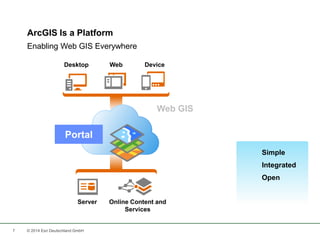
ArcGIS Is a Platform 
Desktop Web Device 
Server Online Content and 
Services 
Portal 
© 2014 Esri Deutschland GmbH 
Simple 
Integrated 
Open 
Enabling Web GIS Everywhere
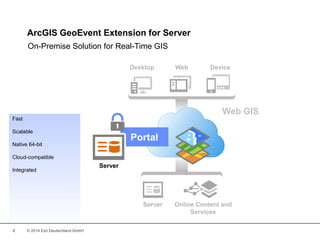
ArcGIS GeoEvent Extension for Server 
On-Premise Solution for Real-Time GIS 
8 © 2014 Esri Deutschland GmbH 
Portal 
Server 
Fast 
Scalable 
Native 64-bit 
Cloud-compatible 
Integrated
ArcGIS GeoEvent Extension for Server 
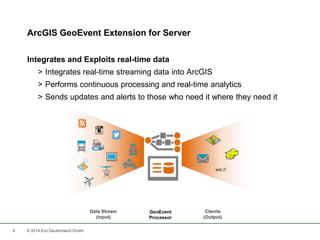
Integrates and Exploits real-time data 
> Integrates real-time streaming data into ArcGIS 
> Performs continuous processing and real-time analytics 
> Sends updates and alerts to those who need it where they need it 
9 © 2014 Esri Deutschland GmbH
Connect to Any Data Stream: Input Connectors 
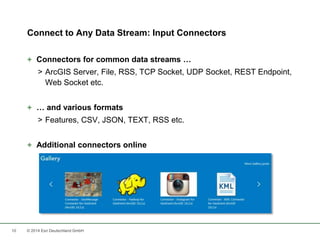
+ Connectors for common data streams … 
> ArcGIS Server, File, RSS, TCP Socket, UDP Socket, REST Endpoint, 
Web Socket etc. 
+ … and various formats 
> Features, CSV, JSON, TEXT, RSS etc. 
+ Additional connectors online 
10 © 2014 Esri Deutschland GmbH
Standard Input Connectors 
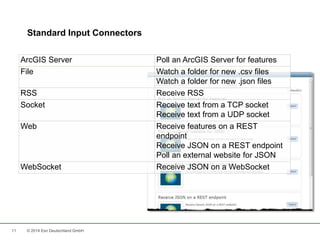
ArcGIS Server Poll an ArcGIS Server for features 
File Watch a folder for new .csv files 
11 © 2014 Esri Deutschland GmbH 
Watch a folder for new .json files 
RSS Receive RSS 
Socket Receive text from a TCP socket 
Receive text from a UDP socket 
Web Receive features on a REST 
endpoint 
Receive JSON on a REST endpoint 
Poll an external website for JSON 
WebSocket Receive JSON on a WebSocket
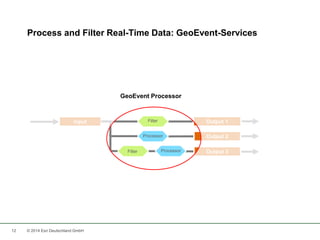
Process and Filter Real-Time Data: GeoEvent-Services 
GeoEvent Processor 
Input Output 1 
12 © 2014 Esri Deutschland GmbH 
Output 2 
Output 3 
Processor 
Processor 
Filter 
Filter
13 
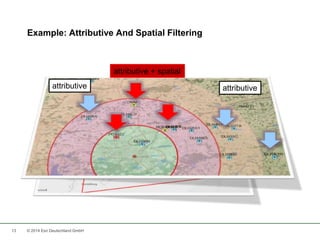
Example: Attributive And Spatial Filtering 
attributive 
attributive + spatial 
attributive 
© 2014 Esri Deutschland GmbH
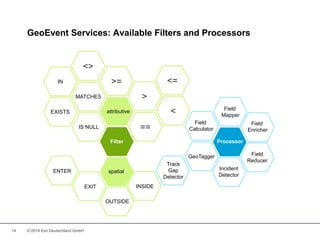
GeoEvent Services: Available Filters and Processors 
IN 
14 © 2014 Esri Deutschland GmbH 
>= <= 
attributive 
Filter 
spatial 
> 
< 
<> 
MATCHES 
IS NULL 
EXISTS 
== 
EXIT 
OUTSIDE 
INSIDE 
ENTER 
Field 
Mapper 
Processor 
Field 
Enricher 
Field 
Reducer 
Incident 
Detector 
Field 
Calculator 
GeoTagger 
Track 
Gap 
Detector
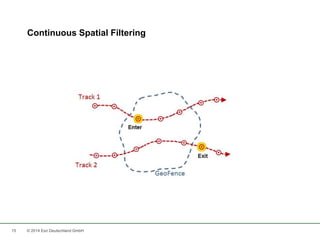
Continuous Spatial Filtering 
15 © 2014 Esri Deutschland GmbH
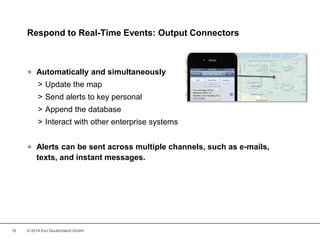
Respond to Real-Time Events: Output Connectors 
+ Automatically and simultaneously 
> Update the map 
> Send alerts to key personal 
> Append the database 
> Interact with other enterprise systems 
+ Alerts can be sent across multiple channels, such as e-mails, 
texts, and instant messages. 
16 © 2014 Esri Deutschland GmbH
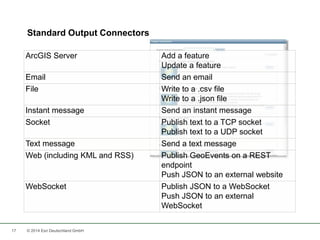
ArcGIS Server Add a feature 
17 © 2014 Esri Deutschland GmbH 
Update a feature 
Email Send an email 
File Write to a .csv file 
Write to a .json file 
Instant message Send an instant message 
Socket Publish text to a TCP socket 
Publish text to a UDP socket 
Text message Send a text message 
Web (including KML and RSS) Publish GeoEvents on a REST 
endpoint 
Push JSON to an external website 
WebSocket Publish JSON to a WebSocket 
Push JSON to an external 
WebSocket 
Standard Output Connectors
Geo Event Processor SDK 
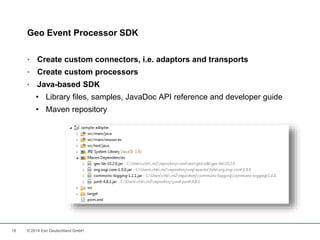
• Create custom connectors, i.e. adaptors and transports 
• Create custom processors 
• Java-based SDK 
• Library files, samples, JavaDoc API reference and developer guide 
• Maven repository 
18 © 2014 Esri Deutschland GmbH
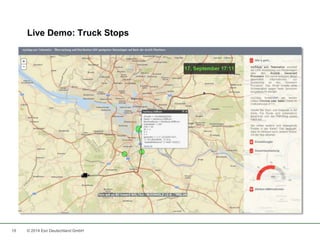
Live Demo: Truck Stops 
19 © 2014 Esri Deutschland GmbH
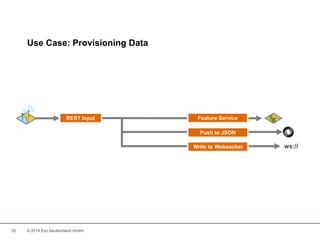
Use Case: Provisioning Data 
REST Input Feature Service 
20 © 2014 Esri Deutschland GmbH 
Push to JSON 
Write to Websocket ws://
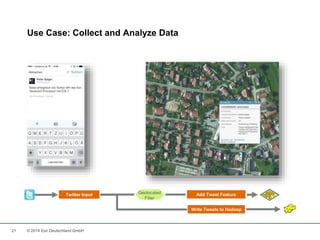
Use Case: Collect and Analyze Data 
Twitter Input Add Tweet Feature 
21 © 2014 Esri Deutschland GmbH 
Write Tweets to Hadoop 
Geolocated 
Filter
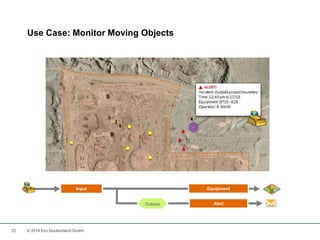
Use Case: Monitor Moving Objects 
Input Equipment 
22 © 2014 Esri Deutschland GmbH 
Outside Alert
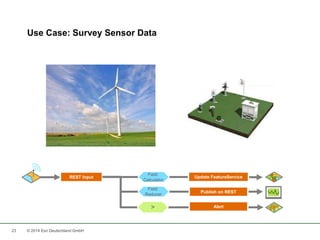
Use Case: Survey Sensor Data 
Field 
REST Input Update FeatureService 
23 © 2014 Esri Deutschland GmbH 
Publish on REST 
Calculator 
Field 
Reducer 
> Alert
Resources 
24 © 2014 Esri Deutschland GmbH
Key Take Aways 
1. Real-Time data is an emerging GIS discipline and enables 
completely new use cases. 
2. You need to master a 3-step-workflow to realize your own real-time 
solution. 
3. ArcGIS GeoEvent Processor can help you with that. 
25 © 2014 Esri Deutschland GmbH
What‘s next? 
26 © 2014 Esri Deutschland GmbH 
GeoDev Meet-up Berlin 
08.10., 18.00 – 21.30 
Mobile Suite 
Pappelallee 78/79, Berlin 
bit.ly/1uABqUd 
Entwickler-Webinare 
21.10. Apps mit dem Web AppBuilder erstellen 
04.11. ArcGIS spricht REST 
25.11. Ortsbezogene Benachrichtigungen 
09.12. Geo-Apps absichern
Thank you! 
Lars Schmitz, Esri Germany 
Product Manager Development, 
Head Developer & Startup Program 
l.schmitz@esri.de 
de.linkedin.com/in/larsschmitz 
@pilukinum 
27 © 2014 Esri Deutschland GmbH
28 
Niederlassung Münster 
Martin-Luther-King-Weg 20 
48155 Münster 
Telefon +49 89 207 005 1460 
Niederlassung Köln 
Konrad-Adenauer-Ufer 41-45 
50668 Köln 
Telefon +49 89 207 005 1760 
Niederlassung Bonn 
Rheinallee 24 
53173 Bonn 
Telefon +49 89 207 005 1720 
Niederlassung Wiesbaden 
Dwight-D.-Eisenhower-Straße 9 
65197 Wiesbaden 
Telefon +49 89 207 005 1620 
Niederlassung Hannover 
Schiffgraben 11 
30159 Hannover 
Telefon +49 89 207 005 1520 
Niederlassung Leipzig 
Fechnerstraße 8 
04155 Leipzig 
Telefon +49 89 207 005 1420 
Kranzberg 
Ringstraße 7 
85402 Kranzberg 
Telefon +49 89 207 005 1200 
Esri Deutschland GmbH 
© 2014 Esri Deutschland GmbH

Using Spatial Data Streams In Real-Time

  • 1.
    Using Spatial DataStreams In Real-Time Lars Schmitz Esri Deutschland GmbH Berlin, 22. September 2014
  • 2.
    Real-Time GIS Data 2 © 2014 Esri Deutschland GmbH
  • 3.
    Spatio-temporal Data 3© 2014 Esri Deutschland GmbH Variable Temporal changes • Population • Agriculture • Disease • Elections Dynamic Spatial movements • Planes • UAV • Vessels • Animals • Hurricanes Discrete Something happing somewhere • Crime • Thunder • Accidents Stationary Spatially fixed • Wetter Station • Traffic • Air Quality • Wind Turbine • Smart Meter • Water Gauges
  • 4.
    Live Demo: UrbanRailway in Munich 4 © 2014 Esri Deutschland GmbH
  • 5.
    Live Demo: LufthansaTracker 5 © 2014 Esri Deutschland GmbH
  • 6.
    General Workflow 6© 2014 Esri Deutschland GmbH Connect to Any Data Stream Process and Filter Real-Time Data Respond to Events in Real Time
  • 7.
    7 ArcGIS Isa Platform Desktop Web Device Server Online Content and Services Portal © 2014 Esri Deutschland GmbH Simple Integrated Open Enabling Web GIS Everywhere
  • 8.
    ArcGIS GeoEvent Extensionfor Server On-Premise Solution for Real-Time GIS 8 © 2014 Esri Deutschland GmbH Portal Server Fast Scalable Native 64-bit Cloud-compatible Integrated
  • 9.
    ArcGIS GeoEvent Extensionfor Server Integrates and Exploits real-time data > Integrates real-time streaming data into ArcGIS > Performs continuous processing and real-time analytics > Sends updates and alerts to those who need it where they need it 9 © 2014 Esri Deutschland GmbH
  • 10.
    Connect to AnyData Stream: Input Connectors + Connectors for common data streams … > ArcGIS Server, File, RSS, TCP Socket, UDP Socket, REST Endpoint, Web Socket etc. + … and various formats > Features, CSV, JSON, TEXT, RSS etc. + Additional connectors online 10 © 2014 Esri Deutschland GmbH
  • 11.
    Standard Input Connectors ArcGIS Server Poll an ArcGIS Server for features File Watch a folder for new .csv files 11 © 2014 Esri Deutschland GmbH Watch a folder for new .json files RSS Receive RSS Socket Receive text from a TCP socket Receive text from a UDP socket Web Receive features on a REST endpoint Receive JSON on a REST endpoint Poll an external website for JSON WebSocket Receive JSON on a WebSocket
  • 12.
    Process and FilterReal-Time Data: GeoEvent-Services GeoEvent Processor Input Output 1 12 © 2014 Esri Deutschland GmbH Output 2 Output 3 Processor Processor Filter Filter
  • 13.
    13 Example: AttributiveAnd Spatial Filtering attributive attributive + spatial attributive © 2014 Esri Deutschland GmbH
  • 14.
    GeoEvent Services: AvailableFilters and Processors IN 14 © 2014 Esri Deutschland GmbH >= <= attributive Filter spatial > < <> MATCHES IS NULL EXISTS == EXIT OUTSIDE INSIDE ENTER Field Mapper Processor Field Enricher Field Reducer Incident Detector Field Calculator GeoTagger Track Gap Detector
  • 15.
    Continuous Spatial Filtering 15 © 2014 Esri Deutschland GmbH
  • 16.
    Respond to Real-TimeEvents: Output Connectors + Automatically and simultaneously > Update the map > Send alerts to key personal > Append the database > Interact with other enterprise systems + Alerts can be sent across multiple channels, such as e-mails, texts, and instant messages. 16 © 2014 Esri Deutschland GmbH
  • 17.
    ArcGIS Server Adda feature 17 © 2014 Esri Deutschland GmbH Update a feature Email Send an email File Write to a .csv file Write to a .json file Instant message Send an instant message Socket Publish text to a TCP socket Publish text to a UDP socket Text message Send a text message Web (including KML and RSS) Publish GeoEvents on a REST endpoint Push JSON to an external website WebSocket Publish JSON to a WebSocket Push JSON to an external WebSocket Standard Output Connectors
  • 18.
    Geo Event ProcessorSDK • Create custom connectors, i.e. adaptors and transports • Create custom processors • Java-based SDK • Library files, samples, JavaDoc API reference and developer guide • Maven repository 18 © 2014 Esri Deutschland GmbH
  • 19.
    Live Demo: TruckStops 19 © 2014 Esri Deutschland GmbH
  • 20.
    Use Case: ProvisioningData REST Input Feature Service 20 © 2014 Esri Deutschland GmbH Push to JSON Write to Websocket ws://
  • 21.
    Use Case: Collectand Analyze Data Twitter Input Add Tweet Feature 21 © 2014 Esri Deutschland GmbH Write Tweets to Hadoop Geolocated Filter
  • 22.
    Use Case: MonitorMoving Objects Input Equipment 22 © 2014 Esri Deutschland GmbH Outside Alert
  • 23.
    Use Case: SurveySensor Data Field REST Input Update FeatureService 23 © 2014 Esri Deutschland GmbH Publish on REST Calculator Field Reducer > Alert
  • 24.
    Resources 24 ©2014 Esri Deutschland GmbH
  • 25.
    Key Take Aways 1. Real-Time data is an emerging GIS discipline and enables completely new use cases. 2. You need to master a 3-step-workflow to realize your own real-time solution. 3. ArcGIS GeoEvent Processor can help you with that. 25 © 2014 Esri Deutschland GmbH
  • 26.
    What‘s next? 26© 2014 Esri Deutschland GmbH GeoDev Meet-up Berlin 08.10., 18.00 – 21.30 Mobile Suite Pappelallee 78/79, Berlin bit.ly/1uABqUd Entwickler-Webinare 21.10. Apps mit dem Web AppBuilder erstellen 04.11. ArcGIS spricht REST 25.11. Ortsbezogene Benachrichtigungen 09.12. Geo-Apps absichern
  • 27.
    Thank you! LarsSchmitz, Esri Germany Product Manager Development, Head Developer & Startup Program l.schmitz@esri.de de.linkedin.com/in/larsschmitz @pilukinum 27 © 2014 Esri Deutschland GmbH
  • 28.
    28 Niederlassung Münster Martin-Luther-King-Weg 20 48155 Münster Telefon +49 89 207 005 1460 Niederlassung Köln Konrad-Adenauer-Ufer 41-45 50668 Köln Telefon +49 89 207 005 1760 Niederlassung Bonn Rheinallee 24 53173 Bonn Telefon +49 89 207 005 1720 Niederlassung Wiesbaden Dwight-D.-Eisenhower-Straße 9 65197 Wiesbaden Telefon +49 89 207 005 1620 Niederlassung Hannover Schiffgraben 11 30159 Hannover Telefon +49 89 207 005 1520 Niederlassung Leipzig Fechnerstraße 8 04155 Leipzig Telefon +49 89 207 005 1420 Kranzberg Ringstraße 7 85402 Kranzberg Telefon +49 89 207 005 1200 Esri Deutschland GmbH © 2014 Esri Deutschland GmbH

Editor's Notes

  • #3 GIS data typically represents state at a specific moment in time: “historic”, “current”, or “future”. However, there are some important trends that deviate from this static pattern. An increasing number of data from social networks The availability of existing and new sensors of any kind. Real-time GIS data is a continuous stream of events flowing from sensors, where each event represents the latest state of the sensor. There are many examples of such sensors including cars, tweets, traffic, smart home metering etc.
  • #7 How do we deal with real-time GIS data? What steps are included. Let‘s have a look at the 3 steps that make up the general workflow. First, we obviously need to connect to our sensors. By nature, each sensor speaks his own language. Or more technically, uses his own protocols to encode and transport the real-time data. Second, we need to diggest the received information. Likely, we do want to filter down the data to a subset that is of interest to us. This could be … And finally, we want to act upon certain events.
  • #8 Das neueste Release von ArcGIS for Server (10.2) ermöglicht die Einbindung von Big Data und Echtzeit-Daten. Es wird damit zwei wichtigen aktuellen Trends Rechnung getragen: 1) die ansteigende Verfügbarkeit von Daten aus sozialen Netzwerken, 2) die Verfügbarkeit bestehender und neuer Sensoren in einer wachsenden Vielzahl von „Trägern“.
  • #9 Esri has a solution for this, the GeoEvent Processor. http://www.esri.com/software/arcgis/arcgisserver/extensions/geoevent-extension http://pro.arcgis.com/share/geoevent-processor/
  • #10 Esri has a solution for this, the GeoEvent Processor: Integrates real-time streaming data into ArcGIS Performs continuous processing and real-time analytics Sends updates and alerts to those who need it where they need it http://www.esri.com/software/arcgis/arcgisserver/extensions/geoevent-extension http://pro.arcgis.com/share/geoevent-processor/
  • #11 Let‘s walk through the general workflow again and see how GeoEvent Processor adresses the 3 steps involved. Input connectors, as said already, take over to connect ArcGIS to our data sources. Esri is focusing on common data sources that … However, you might encounter more industry specific data sources. In that case a look at the gallery might be worth the effort.
  • #13 Once we have made the real-time data available to us, we probably want to do something with it. This actually falls apart into 2 parts. First, we want to filter down to those data that actually are of interest to us. Then, we acutally want to further process the data, e.g. enrich that data.
  • #15 Hier eine Übersicht der verfügbaren Filter und Prozessoren. Field Enricher: Erweitert Geoevents um Attribute aus einem FeatureService oder einer Textdatei auf Basis einer tabellarischen Verbindung (Join). Field Reducer: Reduziert GeoEvents um eine festgelegtes Set von Feldern. Field Calculator: Berechnet neue Datenfelder aus existierenden Feldern über mathematische Ausdrücke oder Textmanipulation. GeoTagger: Berechnet für jeden Geoevent räumliche Beziehungen aus einer Liste von digitalen Zäunen (Geofences) – IN, OUT, ENTER, EXIT Field Mapper: Setzt Input Geoevent Definitions in Bezug zu Output Geoevent Definitionen über ein festgelegtes Feld Track Gap Detector: Ermittelt das Nicht-Eintreten von zu erwartenden Ereignissen und informiert entsprechend. Incident Detector: Ermittelt, aktualisiert und verwaltet Ereignisse für jeden Geoevent auf Basis festgelegter Bedingungen
  • #16 Während die Verwendung von attributiven Filtern keiner weiteren Erläuterung bedarf, hier zur Verdeutlichung die Möglichkeiten der kontinuierlichen räumlichen Filterung: Inside/Ouside-Events: werden jeweils ausgelöst, solange ein Objekt sich innerhalb bzw. außerhalb einer Geofence befinden Enter/Exit-Events: werden jeweils in dem Moment des Ein- oder Austretens eines Objektes in einen bzw. aus einem Geofence heraus ausgelöst
  • #19 Architektur basiert auf OSGi mit Apache Felix als Framework
  • #25 http://www.esri.com/software/arcgis/arcgisserver/extensions/geoevent-extension http://pro.arcgis.com/en/share/geoevent-processor/ Esri Gallery: http://www.arcgis.com/home/group.html?owner=GeoEventTeam&title=ArcGIS%20GeoEvent%20Processor&sortField=title&sortOrder=asc&content=all http://esri.github.io/#GeoEvent https://developers.arcgis.com/en/