To build a vision based autonomous mobile robot
that can navigate to a desired destination avoiding
obstacle on its path
Goal/Objective
2
Features of our Robot
 Low cost
 Light weight
 Low power consuming
 Vision based
 Autonomous navigation capability
 Equipped with a single onboard computer
Raspberry Pi for its computation and Arduino Uno
to drive the motors of our robot
 Two wheeled robot platform
 Comparatively small in size
3
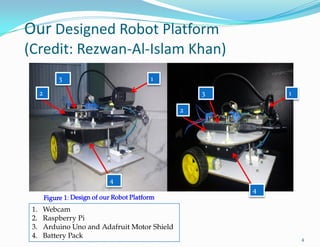
Figure 1: Design of our Robot Platform
Our Designed Robot Platform
(Credit: Rezwan-Al-Islam Khan)
4
1
2
3
4
1
2
3
4
1. Webcam
2. Raspberry Pi
3. Arduino Uno and Adafruit Motor Shield
4. Battery Pack
What is Optical Flow
 Optical flow is the relation of the motion field: the 2D projection of the
physical movement of points relative to the observer to 2D displacement of
pixel patches on the image plane.
 Common assumption:
The appearance of the image patches do not change (brightness constancy)
5
( , ) ( , 1)i i iI P t I P v t  

Figure 2: Optical Flow Illustration
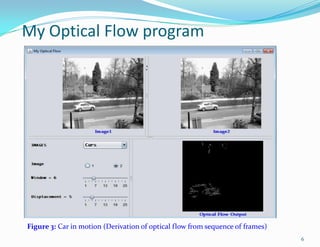
My Optical Flow program
6
Figure 3: Car in motion (Derivation of optical flow from sequence of frames)
Optical Flow and Motion
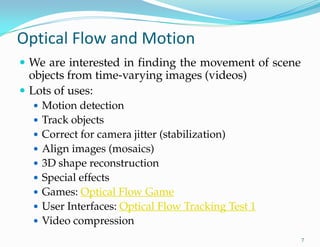
 We are interested in finding the movement of scene
objects from time-varying images (videos)
 Lots of uses:
 Motion detection
 Track objects
 Correct for camera jitter (stabilization)
 Align images (mosaics)
 3D shape reconstruction
 Special effects
 Games: Optical Flow Game
 User Interfaces: Optical Flow Tracking Test 1
 Video compression
7
Definition of optical flow
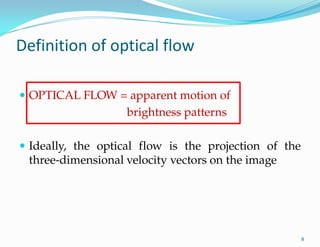
 OPTICAL FLOW = apparent motion of
brightness patterns
 Ideally, the optical flow is the projection of the
three-dimensional velocity vectors on the image
8
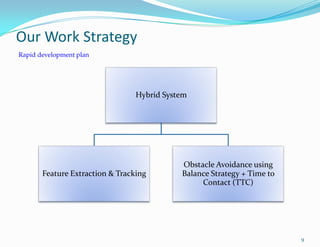
Hybrid System
Feature Extraction & Tracking
Obstacle Avoidance using
Balance Strategy + Time to
Contact (TTC)
Rapid development plan
Our Work Strategy
9
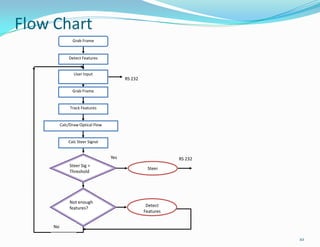
Grab Frame
Detect Features
User Input
Grab Frame
Track Features
Calc/Draw Optical Flow
Calc Steer Signal
Not enough
features?
Steer
Detect
Features
Steer Sig >
Threshold
RS 232
RS 232Yes
No
Flow Chart
10
How it works?
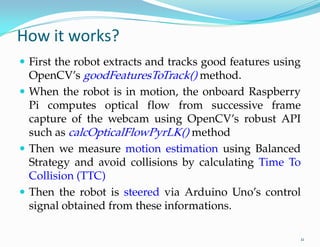
 First the robot extracts and tracks good features using
OpenCV’s goodFeaturesToTrack() method.
 When the robot is in motion, the onboard Raspberry
Pi computes optical flow from successive frame
capture of the webcam using OpenCV’s robust API
such as calcOpticalFlowPyrLK() method
 Then we measure motion estimation using Balanced
Strategy and avoid collisions by calculating Time To
Collision (TTC)
 Then the robot is steered via Arduino Uno’s control
signal obtained from these informations.
11
Communication Protocol (TTY)
12
 TTY is a communication protocol for serial communication.
 Using node-serialport is pretty easy because it is pretty
basic. It provides you with the building block to make great
things.
 Installation:
 Desktop (Debian/Ubuntu) Linux:
sudo apt-get install build-essential
npm install serialport
Communication Protocol (TTY) (cont.)
13
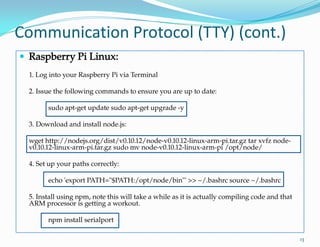
 Raspberry Pi Linux:
1. Log into your Raspberry Pi via Terminal
2. Issue the following commands to ensure you are up to date:
sudo apt-get update sudo apt-get upgrade -y
3. Download and install node.js:
wget http://nodejs.org/dist/v0.10.12/node-v0.10.12-linux-arm-pi.tar.gz tar xvfz node-
v0.10.12-linux-arm-pi.tar.gz sudo mv node-v0.10.12-linux-arm-pi /opt/node/
4. Set up your paths correctly:
echo 'export PATH="$PATH:/opt/node/bin"' >> ~/.bashrc source ~/.bashrc
5. Install using npm, note this will take a while as it is actually compiling code and that
ARM processor is getting a workout.
npm install serialport
Communication Protocol (TTY)
 To Use
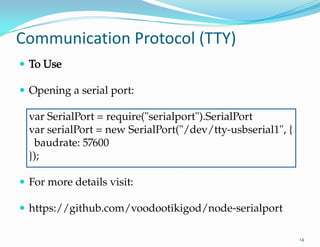
 Opening a serial port:
var SerialPort = require("serialport").SerialPort
var serialPort = new SerialPort("/dev/tty-usbserial1", {
baudrate: 57600
});
 For more details visit:
 https://github.com/voodootikigod/node-serialport
14
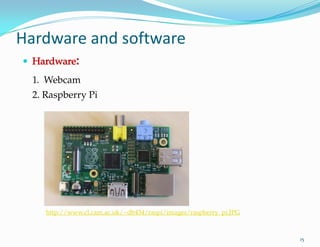
http://www.cl.cam.ac.uk/~db434/raspi/images/raspberry_pi.JPG
 Hardware:
1. Webcam
2. Raspberry Pi
15
Hardware and software
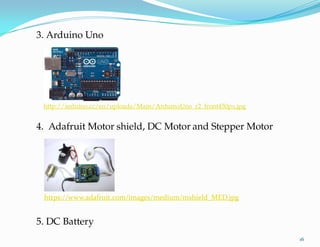
5. DC Battery
3. Arduino Uno
http://arduino.cc/en/uploads/Main/ArduinoUno_r2_front450px.jpg
4. Adafruit Motor- shield, DC Motor and Stepper Motor
16
https://www.adafruit.com/images/medium/mshield_MED.jpg
17
 Software:
1. OpenCV 2.4.5 (www.opencv.org )
2. Microsoft Visual Studio 2012/ CodeBlocks
3. WinAVR ( www.winavr.sourceforge.net )
4. RS232 Terminal Program
(http://realterm.sourceforge.net/index.html#downloads_Download)
Tests, Implementation and Problems
 Tested some software implementation on Windows 7
platform using MSVS 2012, OpenCV
 But failed to port these test codes onto Raspberry Pi
 Robot Navigation using keyboard commands has been a
success
 However, autonomous navigation was not achieved
 There were some hardware issues from time to time
specifically with the onboard battery pack
18
19
THANK YOU

Vision Based Autonomous Mobile Robot Navigation

  • 2.
    To build avision based autonomous mobile robot that can navigate to a desired destination avoiding obstacle on its path Goal/Objective 2
  • 3.
    Features of ourRobot  Low cost  Light weight  Low power consuming  Vision based  Autonomous navigation capability  Equipped with a single onboard computer Raspberry Pi for its computation and Arduino Uno to drive the motors of our robot  Two wheeled robot platform  Comparatively small in size 3
  • 4.
    Figure 1: Designof our Robot Platform Our Designed Robot Platform (Credit: Rezwan-Al-Islam Khan) 4 1 2 3 4 1 2 3 4 1. Webcam 2. Raspberry Pi 3. Arduino Uno and Adafruit Motor Shield 4. Battery Pack
  • 5.
    What is OpticalFlow  Optical flow is the relation of the motion field: the 2D projection of the physical movement of points relative to the observer to 2D displacement of pixel patches on the image plane.  Common assumption: The appearance of the image patches do not change (brightness constancy) 5 ( , ) ( , 1)i i iI P t I P v t    Figure 2: Optical Flow Illustration
  • 6.
    My Optical Flowprogram 6 Figure 3: Car in motion (Derivation of optical flow from sequence of frames)
  • 7.
    Optical Flow andMotion  We are interested in finding the movement of scene objects from time-varying images (videos)  Lots of uses:  Motion detection  Track objects  Correct for camera jitter (stabilization)  Align images (mosaics)  3D shape reconstruction  Special effects  Games: Optical Flow Game  User Interfaces: Optical Flow Tracking Test 1  Video compression 7
  • 8.
    Definition of opticalflow  OPTICAL FLOW = apparent motion of brightness patterns  Ideally, the optical flow is the projection of the three-dimensional velocity vectors on the image 8
  • 9.
    Hybrid System Feature Extraction& Tracking Obstacle Avoidance using Balance Strategy + Time to Contact (TTC) Rapid development plan Our Work Strategy 9
  • 10.
    Grab Frame Detect Features UserInput Grab Frame Track Features Calc/Draw Optical Flow Calc Steer Signal Not enough features? Steer Detect Features Steer Sig > Threshold RS 232 RS 232Yes No Flow Chart 10
  • 11.
    How it works? First the robot extracts and tracks good features using OpenCV’s goodFeaturesToTrack() method.  When the robot is in motion, the onboard Raspberry Pi computes optical flow from successive frame capture of the webcam using OpenCV’s robust API such as calcOpticalFlowPyrLK() method  Then we measure motion estimation using Balanced Strategy and avoid collisions by calculating Time To Collision (TTC)  Then the robot is steered via Arduino Uno’s control signal obtained from these informations. 11
  • 12.
    Communication Protocol (TTY) 12 TTY is a communication protocol for serial communication.  Using node-serialport is pretty easy because it is pretty basic. It provides you with the building block to make great things.  Installation:  Desktop (Debian/Ubuntu) Linux: sudo apt-get install build-essential npm install serialport
  • 13.
    Communication Protocol (TTY)(cont.) 13  Raspberry Pi Linux: 1. Log into your Raspberry Pi via Terminal 2. Issue the following commands to ensure you are up to date: sudo apt-get update sudo apt-get upgrade -y 3. Download and install node.js: wget http://nodejs.org/dist/v0.10.12/node-v0.10.12-linux-arm-pi.tar.gz tar xvfz node- v0.10.12-linux-arm-pi.tar.gz sudo mv node-v0.10.12-linux-arm-pi /opt/node/ 4. Set up your paths correctly: echo 'export PATH="$PATH:/opt/node/bin"' >> ~/.bashrc source ~/.bashrc 5. Install using npm, note this will take a while as it is actually compiling code and that ARM processor is getting a workout. npm install serialport
  • 14.
    Communication Protocol (TTY) To Use  Opening a serial port: var SerialPort = require("serialport").SerialPort var serialPort = new SerialPort("/dev/tty-usbserial1", { baudrate: 57600 });  For more details visit:  https://github.com/voodootikigod/node-serialport 14
  • 15.
  • 16.
    5. DC Battery 3.Arduino Uno http://arduino.cc/en/uploads/Main/ArduinoUno_r2_front450px.jpg 4. Adafruit Motor- shield, DC Motor and Stepper Motor 16 https://www.adafruit.com/images/medium/mshield_MED.jpg
  • 17.
    17  Software: 1. OpenCV2.4.5 (www.opencv.org ) 2. Microsoft Visual Studio 2012/ CodeBlocks 3. WinAVR ( www.winavr.sourceforge.net ) 4. RS232 Terminal Program (http://realterm.sourceforge.net/index.html#downloads_Download)
  • 18.
    Tests, Implementation andProblems  Tested some software implementation on Windows 7 platform using MSVS 2012, OpenCV  But failed to port these test codes onto Raspberry Pi  Robot Navigation using keyboard commands has been a success  However, autonomous navigation was not achieved  There were some hardware issues from time to time specifically with the onboard battery pack 18
  • 19.