CSC 5800:

CSC 8710
IntelligentData Management
Systems:
Big
Algorithms and Tools

Pig Latin: A Not-So-Foreign
Language for Data Processing

1
What we will be covering
 Introduction
 MapReduce Overview
 Pig Overview
 Pig Features
 Pig Latin
 Pig Debugger
 Demo

2
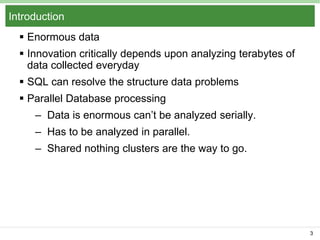
Introduction
 Enormous data

 Innovation critically depends upon analyzing terabytes of
data collected everyday
 SQL can resolve the structure data problems

 Parallel Database processing
– Data is enormous can’t be analyzed serially.
– Has to be analyzed in parallel.
– Shared nothing clusters are the way to go.

3
Parallel DB Products
 Teradata, Oracle RAC, Netezza
 Expensive at web scale
 Programmers have to write complex SQL queries
because of this declarative programming is not preferred

4
Procedural programming
 Map-Reduce programming model
 It can easily perform a group by aggregation in parallel
over a cluster of machines
 The programmer provides map functions which is used as
a filter or transforming method
 The reduce function performs the aggregation
 Appealing to the programmer because there are only 2
high level declarative functions to enable parallel
processing

5
MapReduce Overview
 Programming Model
– To cater large data analytics
– Works over Hadoop
– Java based
– Splits data into independent chunks and process them
in-parallel
 Program structure

– Mapper
– Reducer
– Driver Program

6
MapReduce Driver Program
 Works as ‘Main’ function for MR job
 Takes care of
– Number of arguments
– Input Data Location
– Input Data Types
– Output Data Location
– Output Data types

– Number of Mappers
– Number of Reducers

7
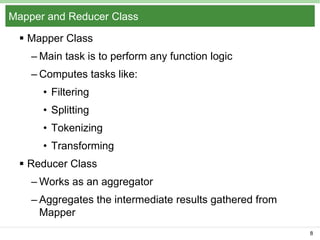
Mapper and Reducer Class
 Mapper Class
– Main task is to perform any function logic
– Computes tasks like:
• Filtering
• Splitting
• Tokenizing
• Transforming

 Reducer Class
– Works as an aggregator
– Aggregates the intermediate results gathered from
Mapper
8
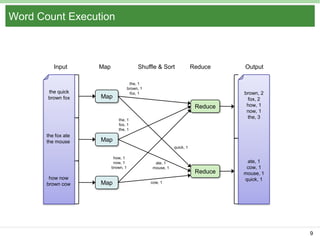
Word Count Execution

Input

the quick
brown fox

Map

Shuffle & Sort

Reduce

the, 1
brown, 1
fox, 1

Output

Reduce

Map

brown, 2
fox, 2
how, 1
now, 1
the, 3

Reduce

ate, 1
cow, 1
mouse, 1
quick, 1

the, 1
fox, 1
the, 1

the fox ate
the mouse

Map
quick, 1
how, 1
now, 1
brown, 1

how now
brown cow

Map

ate, 1
mouse, 1

cow, 1

9
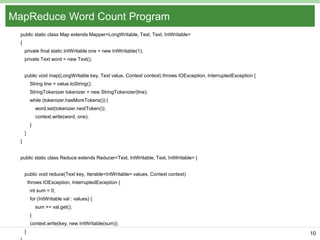
MapReduce Word Count Program
public static class Map extends Mapper<LongWritable, Text, Text, IntWritable>
{
private final static IntWritable one = new IntWritable(1);
private Text word = new Text();
public void map(LongWritable key, Text value, Context context) throws IOException, InterruptedException {
String line = value.toString();
StringTokenizer tokenizer = new StringTokenizer(line);

while (tokenizer.hasMoreTokens()) {
word.set(tokenizer.nextToken());
context.write(word, one);
}
}
}

public static class Reduce extends Reducer<Text, IntWritable, Text, IntWritable> {
public void reduce(Text key, Iterable<IntWritable> values, Context context)
throws IOException, InterruptedException {
int sum = 0;
for (IntWritable val : values) {
sum += val.get();
}
context.write(key, new IntWritable(sum));
}

10
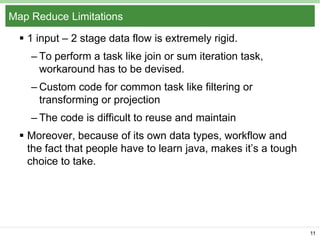
Map Reduce Limitations
 1 input – 2 stage data flow is extremely rigid.
– To perform a task like join or sum iteration task,
workaround has to be devised.
– Custom code for common task like filtering or
transforming or projection
– The code is difficult to reuse and maintain
 Moreover, because of its own data types, workflow and
the fact that people have to learn java, makes it’s a tough
choice to take.

11
Pig
 An Apache open source project.
 Provides an engine for executing data flows in parallel on
Hadoop.
 Includes a language called ‘Pig Latin’ for expressing
these data flows.
 High level declarative data workflow language.
 It has best of both worlds:
– High Level declarative querying like SQL
– Low Level procedural like Map Reduce

12
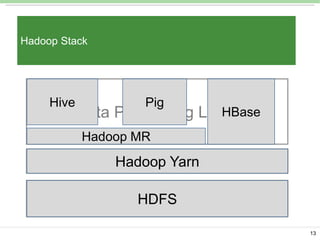
Hadoop Stack

Hive

…
HBase
Data Processing Layer
Pig

Hadoop MR

Hadoop Yarn
Resource Management Layer
HDFS
Storage Layer
13
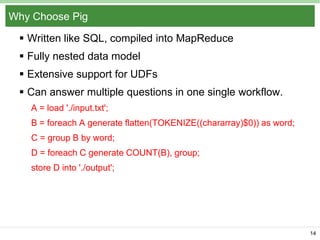
Why Choose Pig
 Written like SQL, compiled into MapReduce
 Fully nested data model
 Extensive support for UDFs
 Can answer multiple questions in one single workflow.
A = load './input.txt';
B = foreach A generate flatten(TOKENIZE((chararray)$0)) as word;
C = group B by word;
D = foreach C generate COUNT(B), group;
store D into './output';

14
Features and Motivation
 Design goal of pig is to provide programmers with
appealing experience for performing ad-hoc analysis of
extremely large data sets.
– DataFlow Language

– QuickStart and Interoperability
– Nested Data Model
– UDF’s
– Debugging Environment

15
Data Flow Language
 Each step specifies a single high level data
transformation
 Different from SQL where all these results are a single
output.

 The system has given opportunity to provide optimization
function.
– Example:
A= Load ‘input.txt’;

B= Filter A by UDF (Column1);
C= Filter B by Column1 > 0.8;

16
Quick start and Interoperability
 Data Load
– Capability of Ad-Hoc analysis
– Can run queries directly on Data from dump of search
engines
– Just have to provide a function that tells Pig how to
parse the content of file into tuple.
– Similarly for output
• Any output format.
• These function can be reused.
• Used for visualization or dumped to excel directly

17
Pig as part of workflow
 Pig easily becomes a part of workflow eco-system
– Can take most of the input types
– Can output in many of the forms
– Doesn’t take over the data, i.e., it does not lock the
data that is being processed.
– Read only data analysis

18
Optional data schemas
 Schema can be provided by the user :
– In the beginning
– On the fly

– Example:
• A= LOAD ‘input.txt’ as (Column1;Column2);
• B= Filter A by Column1>5;

 If the schema is not provided then the columns can be
referred by ‘$0’, ‘$1’, ‘$2’…. for the 1st, 2nd, 3rd column
etc.
 Example:

 A= LOAD ‘input.txt’;
 B= Filter A by $0>5;
19
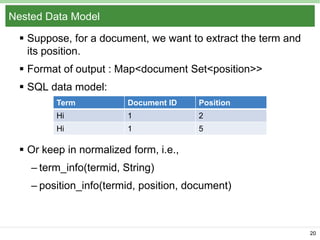
Nested Data Model
 Suppose, for a document, we want to extract the term and
its position.
 Format of output : Map<document Set<position>>
 SQL data model:
Term

Document ID

Position

Hi

1

2

Hi

1

5

 Or keep in normalized form, i.e.,
– term_info(termid, String)
– position_info(termid, position, document)

20
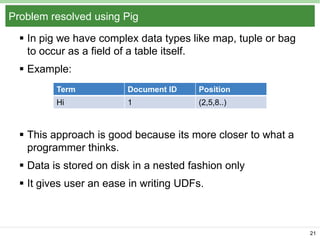
Problem resolved using Pig
 In pig we have complex data types like map, tuple or bag
to occur as a field of a table itself.
 Example:
Term

Document ID

Position

Hi

1

(2,5,8..)

 This approach is good because its more closer to what a
programmer thinks.
 Data is stored on disk in a nested fashion only
 It gives user an ease in writing UDFs.

21
UDFs
 Significant part of data analysis is custom processing
 For example, user might want to process natural
language stemming
 Or checking if the page is spam or not, or many other
tasks
 To work on this, Pig Latin has extensive support for
UDFs, most of the tasks can be resolved using the UDFs
 It can take non-atomic input and can provide a nonatomic output also
 Currently the UDFs can be written in java or python

22
Debugging Environment
 In any language, getting a data processing program work
correctly usually takes many iterations
 First few iterations mostly produce errors
 With a large scale data this would result in serious time
and resource wastage
 Debuggers can help
 Pig has a novel debugging environment
 Generates concise examples from input data
 Data samples are carefully chosen to resemble real data
as far as possible
 Sample data is carved specially
23
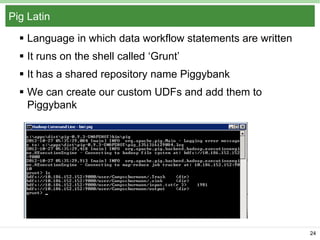
Pig Latin
 Language in which data workflow statements are written
 It runs on the shell called ‘Grunt’
 It has a shared repository name Piggybank
 We can create our custom UDFs and add them to
Piggybank

24
Data Model
 Rich, yet simple data models
 Atoms

– Simple atomic values like string or number
 Tuple
– A collection of fields each of which can be of any data
type
– Analogous to rows in SQL
 Bag
– Collection of tuples or both tuples and atoms
– Can also be heterogeneous

25
Data Model (cont.)


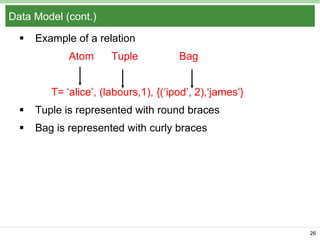
Example of a relation
Atom

Tuple

Bag

T= ‘alice’, (labours,1), {(‘ipod’, 2),‘james’}


Tuple is represented with round braces



Bag is represented with curly braces

26
Specifying Input Data : LOAD
 Its the first step in Pig Latin program
 Specifying what the input files are
 How are its contents to be deserialized, i.e., converted to
pig data model.

 LOAD command
– Example
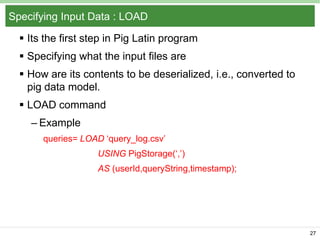
queries= LOAD ‘query_log.csv’
USING PigStorage(‘,’)
AS (userId,queryString,timestamp);

27
LOAD (cont.)
 Both the ‘USING’ clause and the ‘AS’ clause are optional
 We can work without them as shown earlier ($0 for first
field)
 Pig Storage is a pre-defined function

 Can use custom function instead of Pig Storage

28
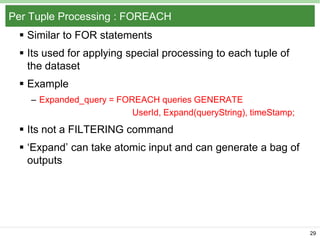
Per Tuple Processing : FOREACH
 Similar to FOR statements
 Its used for applying special processing to each tuple of
the dataset

 Example
– Expanded_query = FOREACH queries GENERATE
UserId, Expand(queryString), timeStamp;

 Its not a FILTERING command
 ‘Expand’ can take atomic input and can generate a bag of
outputs

29
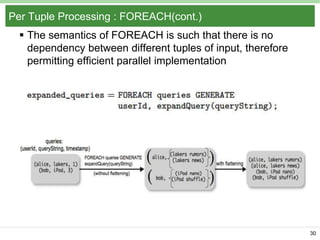
Per Tuple Processing : FOREACH(cont.)
 The semantics of FOREACH is such that there is no
dependency between different tuples of input, therefore
permitting efficient parallel implementation

30
Discarding Unwanted Data : FILTER
 Used as a where clause
 Can provide anything in the expression
– Query = FILTER queries By user_id neq ‘bot’;

 We can provide a UDF also, like
– Query = FILTER queries by Isbot(user_id);

31
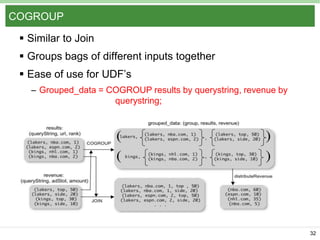
COGROUP
 Similar to Join
 Groups bags of different inputs together
 Ease of use for UDF’s
– Grouped_data = COGROUP results by querystring, revenue by
querystring;

32
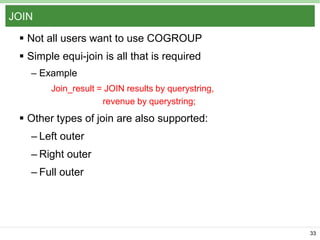
JOIN
 Not all users want to use COGROUP
 Simple equi-join is all that is required
– Example
Join_result = JOIN results by querystring,
revenue by querystring;

 Other types of join are also supported:
– Left outer
– Right outer
– Full outer

33
Other Commands
 Relational Operators
– UNION
– CROSS
– ORDER
– DISTINCT
– LIMIT
 Eval Functions

– Concat
– Count
– Diff
34
PARALLEL clause
 It is used to increase the parallelization of the job
 We can specify the number of reduce tasks of the MR
jobs created by Pig
 It only effects the reduce task

 No control over map
 The system also can figure out number of reducers
 Mostly one reduce task is required

35
PARALLEL clause (cont.)
 Can be applied to only those commands which come
under reduce phase
– COGROUP
– CROSS

– DISTINCT
– GROUP
– JOINS

– ORDER
A = LOAD ‘ File1’;
B = LOAD ‘ File2’;
C = CROSS A, B PARALLEL 10;
36
Split Clause
 We can split the input record into many by providing
condition
A = LOAD ‘data’ AS (F1:int, F2:int, F3:int)

(1,2;3)
(2,3;7)
SPLIT A INTO B IF F1>7, C IF F2==5;

B (1,2,3)

C (2,5,7)

(2,5,7)

 Any expression can be written
 UDFs can be used
 It is not partitioning
37
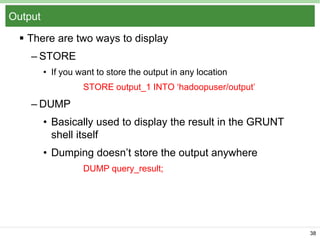
Output
 There are two ways to display
– STORE
• If you want to store the output in any location
STORE output_1 INTO ‘hadoopuser/output’

– DUMP
• Basically used to display the result in the GRUNT
shell itself
• Dumping doesn’t store the output anywhere
DUMP query_result;

38
Building a Logical Plan
 Pig interpreter first parses all the commands which the
client issues
 Verifies that the input files, bags or columns referred by
the command are valid
 Builds a logical plan for every bag the user defines
 No processing is carried out
 Processing triggers where a user invokes STORE/DUMP
command
 Called as a Lazy execution approach
 Helps in FILTER reordering

39
Debugging Environment
 This is used to avoid running the complete code on the
entire dataset
 User can create a sample data
 Difficult to tailor these datasets and end up in self cooked
data
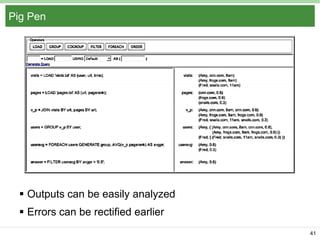
 Pig Pen is Pig’s debugging environment
 Creates side dataset automatically, called as sandbox
dataset
 Pig Pen has its own user interface

40
Pig Pen

 Outputs can be easily analyzed
 Errors can be rectified earlier
41
Future Work
 User Interface
– Drag-Drop style would help
– Logical plan diagram create made easy
 UDF support for other languages
 Unified Environment
– Currently, lacks in control structures like loops
– Has to embedded for all iterative tasks

42
Summary
 Not So Foreign Language
 Aims a sweet spot between SQL and MapReduce
 Reusable and easy to use
 Novel Debugging Environment: Pig Pen
 Pig has an active and growing user base in Yahoo!
 Pigs
– Eats anything

– Live anywhere
– Are domestic

43
References
 http://infolab.stanford.edu/~usriv/papers/pig-latin.pdf
 http://pig.apache.org/docs/r0.7.0/piglatin_ref2.html
 Book: Programming pig
 http://www.brentozar.com/archive/2011/11/good-pig/
 http://hortonworks.com/hadoop/pig/

44

Apache pig presentation_siddharth_mathur

  • 1.
    CSC 5800: CSC 8710 IntelligentDataManagement Systems: Big Algorithms and Tools Pig Latin: A Not-So-Foreign Language for Data Processing 1
  • 2.
    What we willbe covering  Introduction  MapReduce Overview  Pig Overview  Pig Features  Pig Latin  Pig Debugger  Demo 2
  • 3.
    Introduction  Enormous data Innovation critically depends upon analyzing terabytes of data collected everyday  SQL can resolve the structure data problems  Parallel Database processing – Data is enormous can’t be analyzed serially. – Has to be analyzed in parallel. – Shared nothing clusters are the way to go. 3
  • 4.
    Parallel DB Products Teradata, Oracle RAC, Netezza  Expensive at web scale  Programmers have to write complex SQL queries because of this declarative programming is not preferred 4
  • 5.
    Procedural programming  Map-Reduceprogramming model  It can easily perform a group by aggregation in parallel over a cluster of machines  The programmer provides map functions which is used as a filter or transforming method  The reduce function performs the aggregation  Appealing to the programmer because there are only 2 high level declarative functions to enable parallel processing 5
  • 6.
    MapReduce Overview  ProgrammingModel – To cater large data analytics – Works over Hadoop – Java based – Splits data into independent chunks and process them in-parallel  Program structure – Mapper – Reducer – Driver Program 6
  • 7.
    MapReduce Driver Program Works as ‘Main’ function for MR job  Takes care of – Number of arguments – Input Data Location – Input Data Types – Output Data Location – Output Data types – Number of Mappers – Number of Reducers 7
  • 8.
    Mapper and ReducerClass  Mapper Class – Main task is to perform any function logic – Computes tasks like: • Filtering • Splitting • Tokenizing • Transforming  Reducer Class – Works as an aggregator – Aggregates the intermediate results gathered from Mapper 8
  • 9.
    Word Count Execution Input thequick brown fox Map Shuffle & Sort Reduce the, 1 brown, 1 fox, 1 Output Reduce Map brown, 2 fox, 2 how, 1 now, 1 the, 3 Reduce ate, 1 cow, 1 mouse, 1 quick, 1 the, 1 fox, 1 the, 1 the fox ate the mouse Map quick, 1 how, 1 now, 1 brown, 1 how now brown cow Map ate, 1 mouse, 1 cow, 1 9
  • 10.
    MapReduce Word CountProgram public static class Map extends Mapper<LongWritable, Text, Text, IntWritable> { private final static IntWritable one = new IntWritable(1); private Text word = new Text(); public void map(LongWritable key, Text value, Context context) throws IOException, InterruptedException { String line = value.toString(); StringTokenizer tokenizer = new StringTokenizer(line); while (tokenizer.hasMoreTokens()) { word.set(tokenizer.nextToken()); context.write(word, one); } } } public static class Reduce extends Reducer<Text, IntWritable, Text, IntWritable> { public void reduce(Text key, Iterable<IntWritable> values, Context context) throws IOException, InterruptedException { int sum = 0; for (IntWritable val : values) { sum += val.get(); } context.write(key, new IntWritable(sum)); } 10
  • 11.
    Map Reduce Limitations 1 input – 2 stage data flow is extremely rigid. – To perform a task like join or sum iteration task, workaround has to be devised. – Custom code for common task like filtering or transforming or projection – The code is difficult to reuse and maintain  Moreover, because of its own data types, workflow and the fact that people have to learn java, makes it’s a tough choice to take. 11
  • 12.
    Pig  An Apacheopen source project.  Provides an engine for executing data flows in parallel on Hadoop.  Includes a language called ‘Pig Latin’ for expressing these data flows.  High level declarative data workflow language.  It has best of both worlds: – High Level declarative querying like SQL – Low Level procedural like Map Reduce 12
  • 13.
    Hadoop Stack Hive … HBase Data ProcessingLayer Pig Hadoop MR Hadoop Yarn Resource Management Layer HDFS Storage Layer 13
  • 14.
    Why Choose Pig Written like SQL, compiled into MapReduce  Fully nested data model  Extensive support for UDFs  Can answer multiple questions in one single workflow. A = load './input.txt'; B = foreach A generate flatten(TOKENIZE((chararray)$0)) as word; C = group B by word; D = foreach C generate COUNT(B), group; store D into './output'; 14
  • 15.
    Features and Motivation Design goal of pig is to provide programmers with appealing experience for performing ad-hoc analysis of extremely large data sets. – DataFlow Language – QuickStart and Interoperability – Nested Data Model – UDF’s – Debugging Environment 15
  • 16.
    Data Flow Language Each step specifies a single high level data transformation  Different from SQL where all these results are a single output.  The system has given opportunity to provide optimization function. – Example: A= Load ‘input.txt’; B= Filter A by UDF (Column1); C= Filter B by Column1 > 0.8; 16
  • 17.
    Quick start andInteroperability  Data Load – Capability of Ad-Hoc analysis – Can run queries directly on Data from dump of search engines – Just have to provide a function that tells Pig how to parse the content of file into tuple. – Similarly for output • Any output format. • These function can be reused. • Used for visualization or dumped to excel directly 17
  • 18.
    Pig as partof workflow  Pig easily becomes a part of workflow eco-system – Can take most of the input types – Can output in many of the forms – Doesn’t take over the data, i.e., it does not lock the data that is being processed. – Read only data analysis 18
  • 19.
    Optional data schemas Schema can be provided by the user : – In the beginning – On the fly – Example: • A= LOAD ‘input.txt’ as (Column1;Column2); • B= Filter A by Column1>5;  If the schema is not provided then the columns can be referred by ‘$0’, ‘$1’, ‘$2’…. for the 1st, 2nd, 3rd column etc.  Example:  A= LOAD ‘input.txt’;  B= Filter A by $0>5; 19
  • 20.
    Nested Data Model Suppose, for a document, we want to extract the term and its position.  Format of output : Map<document Set<position>>  SQL data model: Term Document ID Position Hi 1 2 Hi 1 5  Or keep in normalized form, i.e., – term_info(termid, String) – position_info(termid, position, document) 20
  • 21.
    Problem resolved usingPig  In pig we have complex data types like map, tuple or bag to occur as a field of a table itself.  Example: Term Document ID Position Hi 1 (2,5,8..)  This approach is good because its more closer to what a programmer thinks.  Data is stored on disk in a nested fashion only  It gives user an ease in writing UDFs. 21
  • 22.
    UDFs  Significant partof data analysis is custom processing  For example, user might want to process natural language stemming  Or checking if the page is spam or not, or many other tasks  To work on this, Pig Latin has extensive support for UDFs, most of the tasks can be resolved using the UDFs  It can take non-atomic input and can provide a nonatomic output also  Currently the UDFs can be written in java or python 22
  • 23.
    Debugging Environment  Inany language, getting a data processing program work correctly usually takes many iterations  First few iterations mostly produce errors  With a large scale data this would result in serious time and resource wastage  Debuggers can help  Pig has a novel debugging environment  Generates concise examples from input data  Data samples are carefully chosen to resemble real data as far as possible  Sample data is carved specially 23
  • 24.
    Pig Latin  Languagein which data workflow statements are written  It runs on the shell called ‘Grunt’  It has a shared repository name Piggybank  We can create our custom UDFs and add them to Piggybank 24
  • 25.
    Data Model  Rich,yet simple data models  Atoms – Simple atomic values like string or number  Tuple – A collection of fields each of which can be of any data type – Analogous to rows in SQL  Bag – Collection of tuples or both tuples and atoms – Can also be heterogeneous 25
  • 26.
    Data Model (cont.)  Exampleof a relation Atom Tuple Bag T= ‘alice’, (labours,1), {(‘ipod’, 2),‘james’}  Tuple is represented with round braces  Bag is represented with curly braces 26
  • 27.
    Specifying Input Data: LOAD  Its the first step in Pig Latin program  Specifying what the input files are  How are its contents to be deserialized, i.e., converted to pig data model.  LOAD command – Example queries= LOAD ‘query_log.csv’ USING PigStorage(‘,’) AS (userId,queryString,timestamp); 27
  • 28.
    LOAD (cont.)  Boththe ‘USING’ clause and the ‘AS’ clause are optional  We can work without them as shown earlier ($0 for first field)  Pig Storage is a pre-defined function  Can use custom function instead of Pig Storage 28
  • 29.
    Per Tuple Processing: FOREACH  Similar to FOR statements  Its used for applying special processing to each tuple of the dataset  Example – Expanded_query = FOREACH queries GENERATE UserId, Expand(queryString), timeStamp;  Its not a FILTERING command  ‘Expand’ can take atomic input and can generate a bag of outputs 29
  • 30.
    Per Tuple Processing: FOREACH(cont.)  The semantics of FOREACH is such that there is no dependency between different tuples of input, therefore permitting efficient parallel implementation 30
  • 31.
    Discarding Unwanted Data: FILTER  Used as a where clause  Can provide anything in the expression – Query = FILTER queries By user_id neq ‘bot’;  We can provide a UDF also, like – Query = FILTER queries by Isbot(user_id); 31
  • 32.
    COGROUP  Similar toJoin  Groups bags of different inputs together  Ease of use for UDF’s – Grouped_data = COGROUP results by querystring, revenue by querystring; 32
  • 33.
    JOIN  Not allusers want to use COGROUP  Simple equi-join is all that is required – Example Join_result = JOIN results by querystring, revenue by querystring;  Other types of join are also supported: – Left outer – Right outer – Full outer 33
  • 34.
    Other Commands  RelationalOperators – UNION – CROSS – ORDER – DISTINCT – LIMIT  Eval Functions – Concat – Count – Diff 34
  • 35.
    PARALLEL clause  Itis used to increase the parallelization of the job  We can specify the number of reduce tasks of the MR jobs created by Pig  It only effects the reduce task  No control over map  The system also can figure out number of reducers  Mostly one reduce task is required 35
  • 36.
    PARALLEL clause (cont.) Can be applied to only those commands which come under reduce phase – COGROUP – CROSS – DISTINCT – GROUP – JOINS – ORDER A = LOAD ‘ File1’; B = LOAD ‘ File2’; C = CROSS A, B PARALLEL 10; 36
  • 37.
    Split Clause  Wecan split the input record into many by providing condition A = LOAD ‘data’ AS (F1:int, F2:int, F3:int) (1,2;3) (2,3;7) SPLIT A INTO B IF F1>7, C IF F2==5; B (1,2,3) C (2,5,7) (2,5,7)  Any expression can be written  UDFs can be used  It is not partitioning 37
  • 38.
    Output  There aretwo ways to display – STORE • If you want to store the output in any location STORE output_1 INTO ‘hadoopuser/output’ – DUMP • Basically used to display the result in the GRUNT shell itself • Dumping doesn’t store the output anywhere DUMP query_result; 38
  • 39.
    Building a LogicalPlan  Pig interpreter first parses all the commands which the client issues  Verifies that the input files, bags or columns referred by the command are valid  Builds a logical plan for every bag the user defines  No processing is carried out  Processing triggers where a user invokes STORE/DUMP command  Called as a Lazy execution approach  Helps in FILTER reordering 39
  • 40.
    Debugging Environment  Thisis used to avoid running the complete code on the entire dataset  User can create a sample data  Difficult to tailor these datasets and end up in self cooked data  Pig Pen is Pig’s debugging environment  Creates side dataset automatically, called as sandbox dataset  Pig Pen has its own user interface 40
  • 41.
    Pig Pen  Outputscan be easily analyzed  Errors can be rectified earlier 41
  • 42.
    Future Work  UserInterface – Drag-Drop style would help – Logical plan diagram create made easy  UDF support for other languages  Unified Environment – Currently, lacks in control structures like loops – Has to embedded for all iterative tasks 42
  • 43.
    Summary  Not SoForeign Language  Aims a sweet spot between SQL and MapReduce  Reusable and easy to use  Novel Debugging Environment: Pig Pen  Pig has an active and growing user base in Yahoo!  Pigs – Eats anything – Live anywhere – Are domestic 43
  • 44.
    References  http://infolab.stanford.edu/~usriv/papers/pig-latin.pdf  http://pig.apache.org/docs/r0.7.0/piglatin_ref2.html Book: Programming pig  http://www.brentozar.com/archive/2011/11/good-pig/  http://hortonworks.com/hadoop/pig/ 44