Searching
Agenda
 Search Engine
 Lucene Java
 Features
 Code Example
 Scalability
 Solr
 Nutch
About Speaker
 Abhiram Gandhe
 9+ Years Experience on Java/J2EE platform
 Consultant eCommerce Architect with Delivery Cube
 Pursuing PhD from VNIT Nagpur on Link Prediction on
Graph Databases
 M.Tech. (Comp. Sci. & Engg.) MNNIT Allahabad, B.E.
(Comp. Tech.) YCCE Nagpur
 …
What is a Search Engine?
 Answer: A software that
 Builds an index on text
 Answers queries using the index
“But we have database already for that…”
 A Search Engine offers
 Scalability
 Relevance Ranking
 Integrates different data sources (email, web
pages, files, databases, …)
 Works on words not substrings
 auto !=automatic, automobile
 Indexing Process:
 Convert document
 Extract text and meta data
 Normalize text
 Write (inverted) index
 Example:
 Document 1: Apache Lucene at JUGNagpur
 Document 2: JUGNagpur conference
What is Apache Lucene?
“Apache Lucene is a high-
performance, full- featured text search
engine library written entirely in Java”
- from http://lucene.apache.org/
What is Apache Lucene?
 Lucene is specifically an API, not an application.
 Hard parts have been done, easy programming has
been left to you.
 You can build a search application that is specifically
suited to your needs.
 You can use Lucene to provide consistent full-text
indexing across both database objects and documents
in various formats (Microsoft Office
documents, PDF, HTML, text, emails and so on).
Availability
 Freely Available (no cost)
 Open Source
 Apache License, version 2.0
 http://www.apache.org/licenses/LICENSE-2.0
 Download from:
 http://www.apache.org/dyn/closer.cgi/lucene/java/
Apache Lucene Overview
 The Apache LuceneTM project develops open-source search
software, including:
 Lucene Core, our flagship sub-project, provides Java-based
indexing and search technology, as well as spellchecking, hit
highlighting and advanced analysis/tokenization capabilities.
 SolrTM is a high performance search server built using Lucene
Core, with XML/HTTP and JSON/Python/Ruby APIs, hit
highlighting, faceted search, caching, replication, and a web
admin interface.
 Open Relevance Project is a subproject with the aim of collecting
and distributing free materials for relevance testing and
performance.
 PyLucene is a Python port of the Core project.
Lucene Java Features
 Powerful Query Syntax
 Create queries from user input or programmatically
 Ranked Search
 Flexible Queries
 Phrases, wildcard, etc.
 Field Specific Queries
 eg. Title, artist, album
 Fast indexing
 Fast searching
 Sorting by relevance or other
 Large and active community
 Apache License 2.0
Lucene Query Example
 JUGNagpur
 JUGNagpur AND Lucene  +JUGNagpur +Lucene
 JUGNagpur OR Lucene
 JUGNagpur NOT PHP  +JUGNagpur -PHP
 “Java Conference”
 Title: Lucene
 J?GNagpur
 JUG*
 schmidt~  schmidt, schmit, schmitt
 price: [100 TO 500]
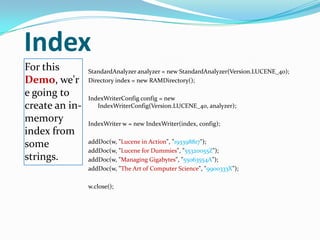
Index
For this
Demo, we'r
e going to
create an in-
memory
index from
some
strings.
StandardAnalyzer analyzer = new StandardAnalyzer(Version.LUCENE_40);
Directory index = new RAMDirectory();
IndexWriterConfig config = new
IndexWriterConfig(Version.LUCENE_40, analyzer);
IndexWriter w = new IndexWriter(index, config);
addDoc(w, "Lucene in Action", "193398817");
addDoc(w, "Lucene for Dummies", "55320055Z");
addDoc(w, "Managing Gigabytes", "55063554A");
addDoc(w, "The Art of Computer Science", "9900333X");
w.close();
Index...
addDoc() is
what
actually
adds
documents
to the index
private static void addDoc(IndexWriter w, String title, String isbn) throws
IOException {
Document doc = new Document();
doc.add(new TextField("title", title, Field.Store.YES));
doc.add(new StringField("isbn", isbn, Field.Store.YES));
w.addDocument(doc);
}
Note the use of TextField for content we want tokenized,
and StringField for id fields and the like, which we don't
want tokenized.
Query
We read the
query from
stdin, parse
it and build
a lucene
Query out
of it.
String querystr = args.length > 0 ? args[0] : "lucene";
Query q = new
QueryParser(Version.LUCENE_40, "title", analyzer).parse(queryst
r);
Search
Using the
Query we
create a
Searcher to
search the
index.
Then a
TopScoreDocC
ollector is
instantiated to
collect the top
10 scoring hits.
int hitsPerPage = 10;
IndexReader reader = IndexReader.open(index);
IndexSearcher searcher = new IndexSearcher(reader);
TopScoreDocCollector collector = TopScoreDocCollector.create(hitsPerPage,
true);
searcher.search(q, collector);
ScoreDoc[] hits = collector.topDocs().scoreDocs;
Display
Now that we
have results
from our
search, we
display the
results to
the user.
System.out.println("Found " + hits.length + " hits.");
for(int i=0;i<hits.length;++i) {
int docId = hits[i].doc;
Document d = searcher.doc(docId);
System.out.println((i + 1) + ". " + d.get("isbn") + "t" +
d.get("title"));
}
Everything is a Document
 A document can represent anything textual:
 Word Document
 DVD (the textual metadata only)
 Website Member (name, ID, etc...)
 A Lucene Document need not refer to an actual file on a
disk, it could also resemble a row in a relational database.
 Each developer is responsible for turning their own data
sets into Lucene Documents. Lucene comes with a number
of 3rd party contributions, including examples for parsing
structured data files such as XML documents and Word
files.
Indexes
 The type of index used in Lucene and other full- text
search engines is sometimes also called an “inverted
index”.
 Indexes track term frequencies
 Every term maps back to a Document
 This index is what allows Lucene to quickly locate
every document currently associated with a given set
up input search terms.
Basic Indexing
 An index consists of one or more Lucene Documents
 1. Create a Document
 A document consists of one or more Fields: name-value pair
 Example: a Field commonly found in applications is title. In the case of a title Field, the field name is
title and the value is the title of that content item.
 Add one or more Fields to the Document
 2. Add the Document to an Index
 Indexing involves adding Documents to an IndexWriter
 3. Indexer will Analyze the Document
 We can provide specialized Analyzers such as StandardAnalyzer
 Analyzers control how the text is broken into terms which are then used to index the document:
 Analyzers can be used to remove stop words, perform stemming
Lucene comes with a default Analyzer which works well for unstructured English
text, however it often performs incorrect normalizations on non-English texts. Lucene
makes it easy to build custom Analyzers, and provides a number of helpful building
blocks with which to build your own. Lucene even includes a number of “stemming”
algorithms for various languages, which can improve document retrieval accuracy
whenthe source language is known at indexing time.
Basic Searching
 Searching requires an index to have already been built.
 Create a Query
 E.g. Usually via QueryParser, MultiPhraseQuery, etc. That parses user input
 Open an Index
 Search the Index
 E.g. Via IndexSearcher
 Use the same Analyzer as before
 Iterate through returned Documents
 Extract out needed results
 Extract out result scores (if needed)
It is important that Queries use the same (or very similar) Analyzer that was used
when the index was created. The reason for this is due to the way that the
Analyzer performs normalization computations on the input text. Inorder to
find Documents using the same type of text that was used when indexing, that
text must be normalized in the same way that the original data was
normalized.
Scalability Limits
 3 main scalability factors:
 Query Rate
 Index Size
 Update Rate
Query Rate Scalability
 Lucene is already fast
 Built-in simple cache mechanism
 Easy solution for heavy workloads:
(gives near-linear scaling)
 Add more query servers behind a load balancer
 Can grow as your traffic grows
Index Size Scalability
 Can easily handle millions of Documents
 Lucene is very commonly deployed into systems with 10s of
millions of Documents.
 Although query performance can degrade as more
Documents are added to the index, the growth factor is
very low. The main limits related to Index size that you are
likely to run in to will be disk capacity and disk I/O limits.
 If you need bigger:
 Built-in methods to allow queries to span multiple remote
Lucene indexes
 Can merge multiple remote indexes at query-time.
 Lucene is threadsafe
 Can update and query at the same time
 I/O is limiting factor

Apache lucene

  • 1.
  • 2.
    Agenda  Search Engine Lucene Java  Features  Code Example  Scalability  Solr  Nutch
  • 3.
    About Speaker  AbhiramGandhe  9+ Years Experience on Java/J2EE platform  Consultant eCommerce Architect with Delivery Cube  Pursuing PhD from VNIT Nagpur on Link Prediction on Graph Databases  M.Tech. (Comp. Sci. & Engg.) MNNIT Allahabad, B.E. (Comp. Tech.) YCCE Nagpur  …
  • 4.
    What is aSearch Engine?  Answer: A software that  Builds an index on text  Answers queries using the index “But we have database already for that…”  A Search Engine offers  Scalability  Relevance Ranking  Integrates different data sources (email, web pages, files, databases, …)
  • 5.
     Works onwords not substrings  auto !=automatic, automobile  Indexing Process:  Convert document  Extract text and meta data  Normalize text  Write (inverted) index  Example:  Document 1: Apache Lucene at JUGNagpur  Document 2: JUGNagpur conference
  • 6.
    What is ApacheLucene? “Apache Lucene is a high- performance, full- featured text search engine library written entirely in Java” - from http://lucene.apache.org/
  • 7.
    What is ApacheLucene?  Lucene is specifically an API, not an application.  Hard parts have been done, easy programming has been left to you.  You can build a search application that is specifically suited to your needs.  You can use Lucene to provide consistent full-text indexing across both database objects and documents in various formats (Microsoft Office documents, PDF, HTML, text, emails and so on).
  • 8.
    Availability  Freely Available(no cost)  Open Source  Apache License, version 2.0  http://www.apache.org/licenses/LICENSE-2.0  Download from:  http://www.apache.org/dyn/closer.cgi/lucene/java/
  • 9.
    Apache Lucene Overview The Apache LuceneTM project develops open-source search software, including:  Lucene Core, our flagship sub-project, provides Java-based indexing and search technology, as well as spellchecking, hit highlighting and advanced analysis/tokenization capabilities.  SolrTM is a high performance search server built using Lucene Core, with XML/HTTP and JSON/Python/Ruby APIs, hit highlighting, faceted search, caching, replication, and a web admin interface.  Open Relevance Project is a subproject with the aim of collecting and distributing free materials for relevance testing and performance.  PyLucene is a Python port of the Core project.
  • 10.
    Lucene Java Features Powerful Query Syntax  Create queries from user input or programmatically  Ranked Search  Flexible Queries  Phrases, wildcard, etc.  Field Specific Queries  eg. Title, artist, album  Fast indexing  Fast searching  Sorting by relevance or other  Large and active community  Apache License 2.0
  • 11.
    Lucene Query Example JUGNagpur  JUGNagpur AND Lucene  +JUGNagpur +Lucene  JUGNagpur OR Lucene  JUGNagpur NOT PHP  +JUGNagpur -PHP  “Java Conference”  Title: Lucene  J?GNagpur  JUG*  schmidt~  schmidt, schmit, schmitt  price: [100 TO 500]
  • 12.
    Index For this Demo, we'r egoing to create an in- memory index from some strings. StandardAnalyzer analyzer = new StandardAnalyzer(Version.LUCENE_40); Directory index = new RAMDirectory(); IndexWriterConfig config = new IndexWriterConfig(Version.LUCENE_40, analyzer); IndexWriter w = new IndexWriter(index, config); addDoc(w, "Lucene in Action", "193398817"); addDoc(w, "Lucene for Dummies", "55320055Z"); addDoc(w, "Managing Gigabytes", "55063554A"); addDoc(w, "The Art of Computer Science", "9900333X"); w.close();
  • 13.
    Index... addDoc() is what actually adds documents to theindex private static void addDoc(IndexWriter w, String title, String isbn) throws IOException { Document doc = new Document(); doc.add(new TextField("title", title, Field.Store.YES)); doc.add(new StringField("isbn", isbn, Field.Store.YES)); w.addDocument(doc); } Note the use of TextField for content we want tokenized, and StringField for id fields and the like, which we don't want tokenized.
  • 14.
    Query We read the queryfrom stdin, parse it and build a lucene Query out of it. String querystr = args.length > 0 ? args[0] : "lucene"; Query q = new QueryParser(Version.LUCENE_40, "title", analyzer).parse(queryst r);
  • 15.
    Search Using the Query we createa Searcher to search the index. Then a TopScoreDocC ollector is instantiated to collect the top 10 scoring hits. int hitsPerPage = 10; IndexReader reader = IndexReader.open(index); IndexSearcher searcher = new IndexSearcher(reader); TopScoreDocCollector collector = TopScoreDocCollector.create(hitsPerPage, true); searcher.search(q, collector); ScoreDoc[] hits = collector.topDocs().scoreDocs;
  • 16.
    Display Now that we haveresults from our search, we display the results to the user. System.out.println("Found " + hits.length + " hits."); for(int i=0;i<hits.length;++i) { int docId = hits[i].doc; Document d = searcher.doc(docId); System.out.println((i + 1) + ". " + d.get("isbn") + "t" + d.get("title")); }
  • 18.
    Everything is aDocument  A document can represent anything textual:  Word Document  DVD (the textual metadata only)  Website Member (name, ID, etc...)  A Lucene Document need not refer to an actual file on a disk, it could also resemble a row in a relational database.  Each developer is responsible for turning their own data sets into Lucene Documents. Lucene comes with a number of 3rd party contributions, including examples for parsing structured data files such as XML documents and Word files.
  • 19.
    Indexes  The typeof index used in Lucene and other full- text search engines is sometimes also called an “inverted index”.  Indexes track term frequencies  Every term maps back to a Document  This index is what allows Lucene to quickly locate every document currently associated with a given set up input search terms.
  • 20.
    Basic Indexing  Anindex consists of one or more Lucene Documents  1. Create a Document  A document consists of one or more Fields: name-value pair  Example: a Field commonly found in applications is title. In the case of a title Field, the field name is title and the value is the title of that content item.  Add one or more Fields to the Document  2. Add the Document to an Index  Indexing involves adding Documents to an IndexWriter  3. Indexer will Analyze the Document  We can provide specialized Analyzers such as StandardAnalyzer  Analyzers control how the text is broken into terms which are then used to index the document:  Analyzers can be used to remove stop words, perform stemming Lucene comes with a default Analyzer which works well for unstructured English text, however it often performs incorrect normalizations on non-English texts. Lucene makes it easy to build custom Analyzers, and provides a number of helpful building blocks with which to build your own. Lucene even includes a number of “stemming” algorithms for various languages, which can improve document retrieval accuracy whenthe source language is known at indexing time.
  • 21.
    Basic Searching  Searchingrequires an index to have already been built.  Create a Query  E.g. Usually via QueryParser, MultiPhraseQuery, etc. That parses user input  Open an Index  Search the Index  E.g. Via IndexSearcher  Use the same Analyzer as before  Iterate through returned Documents  Extract out needed results  Extract out result scores (if needed) It is important that Queries use the same (or very similar) Analyzer that was used when the index was created. The reason for this is due to the way that the Analyzer performs normalization computations on the input text. Inorder to find Documents using the same type of text that was used when indexing, that text must be normalized in the same way that the original data was normalized.
  • 23.
    Scalability Limits  3main scalability factors:  Query Rate  Index Size  Update Rate
  • 24.
    Query Rate Scalability Lucene is already fast  Built-in simple cache mechanism  Easy solution for heavy workloads: (gives near-linear scaling)  Add more query servers behind a load balancer  Can grow as your traffic grows
  • 25.
    Index Size Scalability Can easily handle millions of Documents  Lucene is very commonly deployed into systems with 10s of millions of Documents.  Although query performance can degrade as more Documents are added to the index, the growth factor is very low. The main limits related to Index size that you are likely to run in to will be disk capacity and disk I/O limits.  If you need bigger:  Built-in methods to allow queries to span multiple remote Lucene indexes  Can merge multiple remote indexes at query-time.
  • 26.
     Lucene isthreadsafe  Can update and query at the same time  I/O is limiting factor