Lucene Boot Camp
Grant Ingersoll
Lucid Imagination
Nov. 12, 2007
Atlanta, Georgia
Intro
• My Background
• Your Background
• Brief History of Lucene
• Goals for Tutorial
– Understand Lucene core capabilities
– Real examples, real code, real data
• Ask Questions!!!!!
Schedule
1. 10-10:10 Introducing Lucene and Search
2. 10:10-12 Indexing, Analysis, Searching, Performance
3. 12-12:05 Break
4. 12-1 More on Indexing, Analysis, Searching, Performance
5. 1-2:30 Lunch
6. 2:30-2:40 Recap, Questions, Content
7. 2:40-4:40 Class Example
8. 4-4:20 Break
9. 4:20-5 Class Example
10. 5-5:20 Lucene Contributions (time permitting)
11. 5:20-5:25 Open Discussion (time permitting)
12. 5:25-5:30 Resources/Wrap Up
Lucene is…
• NOT a crawler
– See Nutch
• NOT an application
– See PoweredBy on the Wiki
• NOT a library for doing Google PageRank
or other link analysis algorithms
– See Nutch
• A library for enabling text based search
A Few Words about Solr
• HTTP-based Search Server
• XML Configuration
• XML, JSON, Ruby, PHP, Java support
• Caching, Replication
• Many, many nice features that Lucene users
need
• http://lucene.apache.org/solr
Search Basics
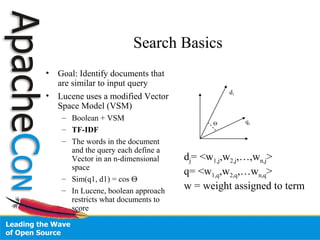
• Goal: Identify documents that
are similar to input query
• Lucene uses a modified Vector
Space Model (VSM)
– Boolean + VSM
– TF-IDF
– The words in the document
and the query each define a
Vector in an n-dimensional
space
– Sim(q1, d1) = cos Θ
– In Lucene, boolean approach
restricts what documents to
score
q1
d1
Θ
dj= <w1,j,w2,j,…,wn,j>
q= <w1,q,w2,q,…wn,q>
w = weight assigned to term
Indexing
• Process of preparing and adding text to
Lucene
– Optimized for searching
• Key Point: Lucene only indexes Strings
– What does this mean?
• Lucene doesn’t care about XML, Word, PDF, etc.
– There are many good open source extractors available
• It’s our job to convert whatever file format we have
into something Lucene can use
Indexing Classes
• Analyzer
– Creates tokens using a Tokenizer and filters
them through zero or more TokenFilters
• IndexWriter
– Responsible for converting text into internal
Lucene format
Indexing Classes
• Directory
– Where the Index is stored
– RAMDirectory, FSDirectory, others
• Document
– A collection of Fields
– Can be boosted
• Field
– Free text, keywords, dates, etc.
– Defines attributes for storing, indexing
– Can be boosted
– Field Constructors and parameters
• Open up Fieldable and Field in IDE
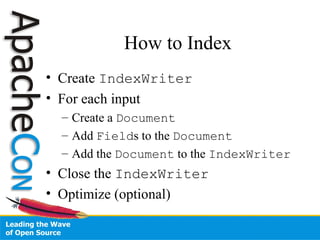
How to Index
• Create IndexWriter
• For each input
– Create a Document
– Add Fields to the Document
– Add the Document to the IndexWriter
• Close the IndexWriter
• Optimize (optional)
Task 1.a
• From the Boot Camp Files, use the basic.ReutersIndexer
skeleton to start
• Index the small Reuters Collection using the
IndexWriter, a Directory and
StandardAnalyzer
– Boost every 10 documents by 3
• Questions to Answer:
– What Fields should I define?
– What attributes should each Field have?
• What Fields should OMIT_NORMS?
– Pick a field to boost and give a reason why you think it should be
boosted
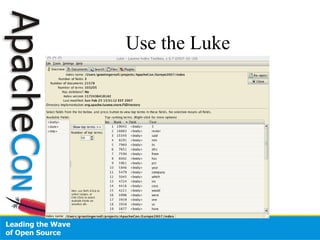
Use the Luke
Searching
• Key Classes:
– Searcher
• Provides methods for searching
• Take a moment to look at the Searcher class declaration
• IndexSearcher, MultiSearcher,
ParallelMultiSearcher
– IndexReader
• Loads a snapshot of the index into memory for searching
– Hits
• Storage/caching of results from searching
– QueryParser
• JavaCC grammar for creating Lucene Queries
• http://lucene.apache.org/java/docs/queryparsersyntax.html
– Query
• Logical representation of program’s information need
Query Parsing
• Basic syntax:
title:hockey +(body:stanley AND body:cup)
• OR/AND must be uppercase
• Default operator is OR (can be changed)
• Supports fairly advanced syntax, see the website
– http://lucene.apache.org/java/docs/queryparsersyntax.html
• Doesn’t always play nice, so beware
– Many applications construct queries programmatically
or restrict syntax
Task 1.b
• Using the ReutersIndexerTest.java skeleton in the boot
camp files
– Search your newly created index using queries you develop
– Delete a Document by the doc id
• Hints:
– Use a IndexSearcher
– Create a Query using the QueryParser
– Display the results from the Hits
• Questions:
– What is the default field for the QueryParser?
– What Analyzer to use?
Task 1 Results
• Locks
– Lucene maintains locks on files to prevent
index corruption
– Located in same directory as index
• Scores from Hits are normalized
– Scores across queries are NOT comparable
• Lucene 2.3 has some transactional
semantics for indexing, but is not a DB
Deletion and Updates
• Deletions can be a bit confusing
– Both IndexReader and IndexWriter
have delete methods
• Updates are always a delete and an add
– Yes, that is a repeat!
– Nature of data structures used in search
Analysis
• Analysis is the process of creating Tokens to be indexed
• Analysis is usually done to improve results overall, but it
comes with a price
• Lucene comes with many different Analyzers,
Tokenizers and TokenFilters, each with their own
goals
– See contrib/analyzers
• StandardAnalyzer is included with the core JAR and
does a good job for most English and Latin-based tasks
• Often times you want the same content analyzed in
different ways
• Consider a catch-all Field in addition to other Fields
Commonly Used Analyzers
• StandardAnalyzer
• WhitespaceAnalyzer
• PerFieldAnalyzerWrapper
• SimpleAnalyzer
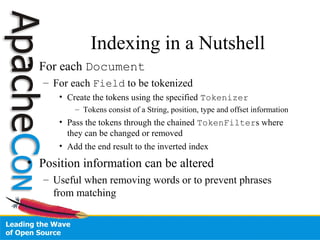
Indexing in a Nutshell
• For each Document
– For each Field to be tokenized
• Create the tokens using the specified Tokenizer
– Tokens consist of a String, position, type and offset information
• Pass the tokens through the chained TokenFilters where
they can be changed or removed
• Add the end result to the inverted index
• Position information can be altered
– Useful when removing words or to prevent phrases
from matching
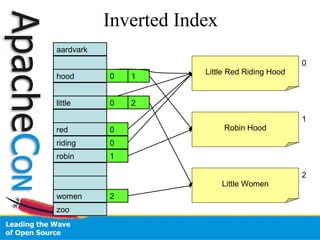
Inverted Index
aardvark
hood
red
little
riding
robin
women
zoo
Little Red Riding Hood
Robin Hood
Little Women
0 1
0 2
0
0
2
1
0
1
2
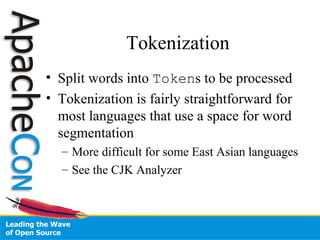
Tokenization
• Split words into Tokens to be processed
• Tokenization is fairly straightforward for
most languages that use a space for word
segmentation
– More difficult for some East Asian languages
– See the CJK Analyzer
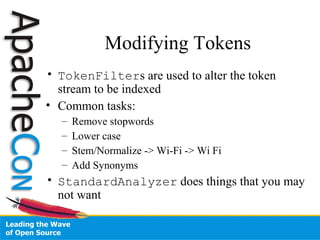
Modifying Tokens
• TokenFilters are used to alter the token
stream to be indexed
• Common tasks:
– Remove stopwords
– Lower case
– Stem/Normalize -> Wi-Fi -> Wi Fi
– Add Synonyms
• StandardAnalyzer does things that you may
not want
Custom Analyzers
• Solution: write your own Analyzer
• Better solution: write a configurable
Analyzer so you only need one Analyzer
that you can easily change for your projects
– See Solr
• Tokenizers and TokenFilters must
be newly constructed for each input
Special Cases
• Dates and numbers need special treatment to be
searchable
– o.a.l.document.DateTools
– org.apache.solr.util.NumberUtils
• Altering Position Information
– Increase Position Gap between sentences to prevent
phrases from crossing sentence boundaries
– Index synonyms at the same position so query can
match regardless of synonym used
5 minute Break
Indexing Performance
• Behind the Scenes
– Lucene indexes Documents into memory
– At certain trigger points, memory (segments)
are flushed to the Directory
– Segments are periodically merged
• Lucene 2.3 has significant performance
improvements
IndexWriter Performance
Factors
• maxBufferedDocs
– Minimum # of docs before merge occurs and a new segment is
created
– Usually, Larger == faster, but more RAM
• mergeFactor
– How often segments are merged
– Smaller == less RAM, better for incremental updates
– Larger == faster, better for batch indexing
• maxFieldLength
– Limit the number of terms in a Document
Lucene 2.3 IndexWriter
Changes
• setRAMBufferSizeMB
– New model for automagically controlling indexing
factors based on the amount of memory in use
– Obsoletes setMaxBufferedDocs and
setMergeFactor
• Takes storage and term vectors out of the merge
process
• Turn off auto-commit if there are stored fields and
term vectors
• Provides significant performance increase
Index Threading
• IndexWriter and IndexReader are thread-
safe and can be shared between threads without
external synchronization
• One open IndexWriter per Directory
• Parallel Indexing
– Index to separate Directory instances
– Merge using IndexWriter.addIndexes
– Could also distribute and collect
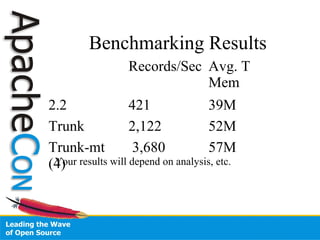
Benchmarking Indexing
• contrib/benchmark
• Try out different algorithms between Lucene 2.2
and trunk (2.3)
– contrib/benchmark/conf:
• indexing.alg
• indexing-multithreaded.alg
• Info:
– Mac Pro 2 x 2GHz Dual-Core Xeon
– 4 GB RAM
– ant run-task -Dtask.alg=./conf/indexing.alg -Dtask.mem=1024M
Benchmarking Results
Records/Sec Avg. T
Mem
2.2 421 39M
Trunk 2,122 52M
Trunk-mt
(4)
3,680 57M
Your results will depend on analysis, etc.
Searching
• Earlier we touched on basics of search
using the QueryParser
• Now look at:
– Searcher/IndexReader Lifecycle
– Query classes
– More details on the QueryParser
– Filters
– Sorting
Lifecycle
• Recall that the IndexReader loads a snapshot
of index into memory
– This means updates made since loading the index will
not be seen
• Business rules are needed to define how often to
reload the index, if at all
– IndexReader.isCurrent() can help
• Loading an index is an expensive operation
– Do not open a Searcher/IndexReader for every
search
Query Classes
• TermQuery is basis for all non-span queries
• BooleanQuery combines multiple Query
instances as clauses
– should
– required
• PhraseQuery finds terms occurring near each
other, position-wise
– “slop” is the edit distance between two terms
• Take 2-3 minutes to explore Query
implementations
Spans
• Spans provide information about where
matches took place
• Not supported by the QueryParser
• Can be used in BooleanQuery clauses
• Take 2-3 minutes to explore SpanQuery
classes
– SpanNearQuery useful for doing phrase
matching
QueryParser
• MultiFieldQueryParser
• Boolean operators cause confusion
– Better to think in terms of required (+ operator) and not
allowed (- operator)
• Check JIRA for QueryParser issues
• http://www.gossamer-threads.com/lists/lucene/java-user/40945
• Most applications either modify QP, create their
own, or restrict to a subset of the syntax
• Your users may not need all the “flexibility” of
the QP
Sorting
• Lucene default sort is by score
• Searcher has several methods that take in a
Sort object
• Sorting should be addressed during indexing
• Sorting is done on Fields containing a single
term that can be used for comparison
• The SortField defines the different sort types
available
– AUTO, STRING, INT, FLOAT, CUSTOM, SCORE,
DOC
Sorting II
• Look at Searcher, Sort and
SortField
• Custom sorting is done with a
SortComparatorSource
• Sorting can be very expensive
– Terms are cached in the FieldCache
• SortFilterTest.java example
Filters
• Filters restrict the search space to a
subset of Documents
• Use Cases
– Search within a Search
– Restrict by date
– Rating
– Security
– Author
Filter Classes
• QueryWrapperFilter (QueryFilter)
– Restrict to subset of Documents that match a Query
• RangeFilter
– Restrict to Documents that fall within a range
– Better alternative to RangeQuery
• CachingWrapperFilter
– Wrap another Filter and provide caching
• SortFilterTest.java example
Expert Results
• Searcher has several “expert” methods
– Hits is not always what you need due to:
• Caching
• Normalized Scores
• Reexecutes Query repeatedly as results are accessed
• HitCollector allows low-level access to all
Documents as they are scored
• TopDocs represents top n docs that match
– TopDocsTest in examples
Searchers
• MultiSearcher
– Search over multiple Searchables, including remote
• MultiReader
– Not a Searcher, but can be used with
IndexSearcher to achieve same results for local
indexes
• ParallelMultiSearcher
– Like MultiSearcher, but threaded
• RemoteSearchable
– RMI based remote searching
• Look at MultiSearcherTest in example
code
Search Performance
• Search speed is based on a number of factors:
– Query Type(s)
– Query Size
– Analysis
– Occurrences of Query Terms
– Optimize
– Index Size
– Index type (RAMDirectory, other)
– Usual Suspects
• CPU
• Memory
• I/O
• Business Needs
Query Types
• Be careful with WildcardQuery as it rewrites
to a BooleanQuery containing all the terms
that match the wildcards
• Avoid starting a WildcardQuery with wildcard
• Use ConstantScoreRangeQuery instead of
RangeQuery
• Be careful with range queries and dates
– User mailing list and Wiki have useful tips for
optimizing date handling
Query Size
• Stopword removal
• Search an “all” field instead of many fields with the same
terms
• Disambiguation
– May be useful when doing synonym expansion
– Difficult to automate and may be slower
– Some applications may allow the user to disambiguate
• Relevance Feedback/More Like This
– Use most important words
– “Important” can be defined in a number of ways
Usual Suspects
• CPU
– Profile your application
• Memory
– Examine your heap size, garbage collection approach
• I/O
– Cache your Searcher
• Define business logic for refreshing based on indexing needs
– Warm your Searcher before going live -- See Solr
• Business Needs
– Do you really need to support Wildcards?
– What about date range queries down to the millisecond?
Explanations
• explain(Query, int) method is
useful for understanding why a Document
scored the way it did
• ExplainsTest in sample code
• Open Luke and try some queries and then
use the “explain” button
FieldSelector
• Prior to version 2.1, Lucene always loaded all
Fields in a Document
• FieldSelector API addition allows Lucene to
skip large Fields
– Options: Load, Lazy Load, No Load, Load and Break,
Load for Merge, Size, Size and Break
• Makes storage of original content more viable
without large cost of loading it when not used
• FieldSelectorTest in example code
Scoring and Similarity
• Lucene has sophisticated scoring
mechanism designed to meet most needs
• Has hooks for modifying scores
• Scoring is handled by the Query, Weight
and Scorer class
Affecting Relevance
• FunctionQuery from Solr (variation in
Lucene)
• Override Similarity
• Implement own Query and related classes
• Payloads
• HitCollector
• Take 5 to examine these
Lunch
1-2:30
Recap
• Indexing
• Searching
• Performance
• Odds and Ends
– Explains
– FieldSelector
– Relevance
Next Up
• Dealing with Content
– File Formats
– Extraction
• Large Task
• Miscellaneous
• Wrapping Up
File Formats
• Several open source libraries, projects for extracting content to use in
Lucene
– PDF: PDFBox
• http://www.pdfbox.org/
– Word: POI, Open Office, TextMining
• http://www.textmining.org/textmining.zip
– XML: SAX or Pull parser
– HTML: Neko, Jtidy
• http://people.apache.org/~andyc/neko/doc/html/
• http://jtidy.sourceforge.net/
• Tika
– http://incubator.apache.org/tika/
• Aperture
– http://aperture.sourceforge.net
Aperture Basics
• Crawlers
• Data Connectors
• Extraction Wrappers
– POI, PDFBox, HTML, XML, etc.
• http://aperture.wiki.sourceforge.net/Extractors
will give you info on what comes back from
Aperture
• LuceneApertureCallbackHandler
in example code
Large Task
• Using the skeleton files in the
com.lucenebootcamp.training.full package:
– Get some content:
• Web, file system
• Different file formats
– Index it
• Plan out your fields, boosts, field properties
• Support updates and deletes
• Optional:
– How fast can you make it go? Divide and conquer?
Multithreaded?
Large Task
• Search Content
– Allow for arbitrary user queries across multiple
Fields via command line or simple web interface
– How fast can you make it?
• Support:
– Sort
– Filter
– Explains
• How much slower is to retrieve an explanation?
Large Task
• Document Retrieval
– Display/write out the one or more documents
– Support FieldSelector
Large Task
• Optional Tasks
– Hit Highlighting using contrib/Highlighter
– Multithreaded indexing and Search
– Explore other Field construction options
• Binary fields, term vectors
– Use Lucene trunk version and try out some of the
changes in indexing
– Try out Solr or Nutch at http://lucene.apache.org/
• What’s do they offer that Lucene Java doesn’t that you might
need?
Large Task Metadata
– Pair up if you want
– Ask questions
– 2 hours
– Use Luke to check your index!
– Explore other parts of Lucene that you are
interested in
– Be prepared to discuss/share with the class
Large Task Post-Mortem
• Volunteers to share?
Term Information
• TermEnum gives access to terms and how many
Documents they occur in
– IndexReader.terms()
– IndexReader.termPositions()
• TermDocs gives access to the frequency of a
term in a Document
– IndexReader.termDocs()
• Term Vectors give access to term frequency
information in a given Document
– IndexReader.getTermFreqVector
• TermsTest in sample code
Lucene Contributions
• Many people have generously contributed code to
help solve common problems
• These are in contrib directory of the source
• Popular:
– Analyzers
– Highlighter
– Queries and MoreLikeThis
– Snowball Stemmers
– Spellchecker
Open Discussion
• Multilingual Best Practices
– UNICODE
– One Index versus many
• Advanced Analysis
• Distributed Lucene
• Crawling
• Hadoop
• Nutch
• Solr
Resources
• http://lucene.apache.org/
• http://en.wikipedia.org/wiki/Vector_space_model
• Modern Information Retrieval by Baeza-Yates and Ribeiro-Neto
• Lucene In Action by Hatcher and Gospodnetić
• Wiki
• Mailing Lists
– java-user@lucene.apache.org
• Discussions on how to use Lucene
– java-dev@lucene.apache.org
• Discussions on how to develop Lucene
• Issue Tracking
– https://issues.apache.org/jira/secure/Dashboard.jspa
• We always welcome patches
– Ask on the mailing list before reporting a bug
Resources
• trainer@lucenebootcamp.com
Finally…
• Please take the time to fill out a survey to
help me improve this training
– Located in base directory of source
– Email it to me at trainer@lucenebootcamp.com
• There are several Lucene related talks on
Friday
Extras
Task 2
• Take 10-15 minutes, pair up, and write an
Analyzer and Unit Test
– Examine results in Luke
– Run some searches
• Ideas:
– Combine existing Tokenizers and TokenFilters
– Normalize abbreviations
– Filter out all words beginning with the letter A
– Identify/Mark sentences
• Questions:
– What would help improve search results?
Task 2 Results
• Share what you did and why
• Improving Results (in most cases)
– Stemming
– Ignore Case
– Stopword Removal
– Synonyms
– Pay attention to business needs
Grab Bag
• Accessing Term Information
– TermEnum
– TermDocs
– Term Vectors
• FieldSelector
• Scoring and Similarity
• File Formats
Task 6
• Count and print all the unique terms in the
index and their frequencies
– Notes:
• Half of the class write it using TermEnum and
TermDocs
• Other Half write it using Term Vectors
• Time your Task
• Only count the title and body content
Task 6 Results
• Term Vector approach is faster on smaller
collections
• TermEnum approach is faster on larger
collections
Task 4
• Re-index your collection
– Add in a “rating” field that randomly assigns a number
between 0 and 9
• Write searches to sort by
• Date
• Title
• Rating, Date, Doc Id
• A Custom Sort
• Questions
– How to sort the title?
– How to sort multiple Fields?
Task 4 Results
• Add stitle to use for sorting the title
Task 5
• Create and search using Filters to:
– Restrict to all docs written on Feb. 26, 1987
– Restrict to all docs with the word “computer”
in title
• Also:
– Create a Filter where the length of the body +
title is greater than X
Task 5 Results
• Solr has more advanced Filter
mechanisms that may be worth using
• Cache filters
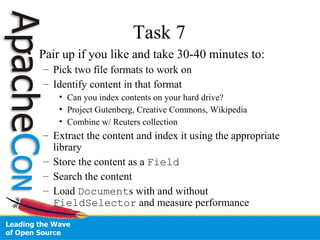
Task 7
• Pair up if you like and take 30-40 minutes to:
– Pick two file formats to work on
– Identify content in that format
• Can you index contents on your hard drive?
• Project Gutenberg, Creative Commons, Wikipedia
• Combine w/ Reuters collection
– Extract the content and index it using the appropriate
library
– Store the content as a Field
– Search the content
– Load Documents with and without
FieldSelector and measure performance
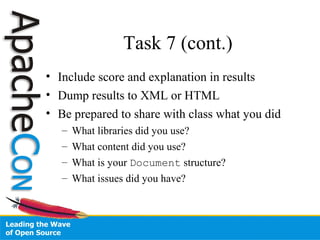
Task 7 (cont.)
• Include score and explanation in results
• Dump results to XML or HTML
• Be prepared to share with class what you did
– What libraries did you use?
– What content did you use?
– What is your Document structure?
– What issues did you have?
20 Minute Break
Task 7 Results
• Explain what your group did
• Build a Content Handler Framework
– Or help out with Tika
Task 8
• Building on Task 7
– Incorporate one or more contrib packages into
your solution

Lucene BootCamp

  • 1.
    Lucene Boot Camp GrantIngersoll Lucid Imagination Nov. 12, 2007 Atlanta, Georgia
  • 2.
    Intro • My Background •Your Background • Brief History of Lucene • Goals for Tutorial – Understand Lucene core capabilities – Real examples, real code, real data • Ask Questions!!!!!
  • 3.
    Schedule 1. 10-10:10 IntroducingLucene and Search 2. 10:10-12 Indexing, Analysis, Searching, Performance 3. 12-12:05 Break 4. 12-1 More on Indexing, Analysis, Searching, Performance 5. 1-2:30 Lunch 6. 2:30-2:40 Recap, Questions, Content 7. 2:40-4:40 Class Example 8. 4-4:20 Break 9. 4:20-5 Class Example 10. 5-5:20 Lucene Contributions (time permitting) 11. 5:20-5:25 Open Discussion (time permitting) 12. 5:25-5:30 Resources/Wrap Up
  • 4.
    Lucene is… • NOTa crawler – See Nutch • NOT an application – See PoweredBy on the Wiki • NOT a library for doing Google PageRank or other link analysis algorithms – See Nutch • A library for enabling text based search
  • 5.
    A Few Wordsabout Solr • HTTP-based Search Server • XML Configuration • XML, JSON, Ruby, PHP, Java support • Caching, Replication • Many, many nice features that Lucene users need • http://lucene.apache.org/solr
  • 6.
    Search Basics • Goal:Identify documents that are similar to input query • Lucene uses a modified Vector Space Model (VSM) – Boolean + VSM – TF-IDF – The words in the document and the query each define a Vector in an n-dimensional space – Sim(q1, d1) = cos Θ – In Lucene, boolean approach restricts what documents to score q1 d1 Θ dj= <w1,j,w2,j,…,wn,j> q= <w1,q,w2,q,…wn,q> w = weight assigned to term
  • 7.
    Indexing • Process ofpreparing and adding text to Lucene – Optimized for searching • Key Point: Lucene only indexes Strings – What does this mean? • Lucene doesn’t care about XML, Word, PDF, etc. – There are many good open source extractors available • It’s our job to convert whatever file format we have into something Lucene can use
  • 8.
    Indexing Classes • Analyzer –Creates tokens using a Tokenizer and filters them through zero or more TokenFilters • IndexWriter – Responsible for converting text into internal Lucene format
  • 9.
    Indexing Classes • Directory –Where the Index is stored – RAMDirectory, FSDirectory, others • Document – A collection of Fields – Can be boosted • Field – Free text, keywords, dates, etc. – Defines attributes for storing, indexing – Can be boosted – Field Constructors and parameters • Open up Fieldable and Field in IDE
  • 10.
    How to Index •Create IndexWriter • For each input – Create a Document – Add Fields to the Document – Add the Document to the IndexWriter • Close the IndexWriter • Optimize (optional)
  • 11.
    Task 1.a • Fromthe Boot Camp Files, use the basic.ReutersIndexer skeleton to start • Index the small Reuters Collection using the IndexWriter, a Directory and StandardAnalyzer – Boost every 10 documents by 3 • Questions to Answer: – What Fields should I define? – What attributes should each Field have? • What Fields should OMIT_NORMS? – Pick a field to boost and give a reason why you think it should be boosted
  • 12.
  • 13.
    Searching • Key Classes: –Searcher • Provides methods for searching • Take a moment to look at the Searcher class declaration • IndexSearcher, MultiSearcher, ParallelMultiSearcher – IndexReader • Loads a snapshot of the index into memory for searching – Hits • Storage/caching of results from searching – QueryParser • JavaCC grammar for creating Lucene Queries • http://lucene.apache.org/java/docs/queryparsersyntax.html – Query • Logical representation of program’s information need
  • 14.
    Query Parsing • Basicsyntax: title:hockey +(body:stanley AND body:cup) • OR/AND must be uppercase • Default operator is OR (can be changed) • Supports fairly advanced syntax, see the website – http://lucene.apache.org/java/docs/queryparsersyntax.html • Doesn’t always play nice, so beware – Many applications construct queries programmatically or restrict syntax
  • 15.
    Task 1.b • Usingthe ReutersIndexerTest.java skeleton in the boot camp files – Search your newly created index using queries you develop – Delete a Document by the doc id • Hints: – Use a IndexSearcher – Create a Query using the QueryParser – Display the results from the Hits • Questions: – What is the default field for the QueryParser? – What Analyzer to use?
  • 16.
    Task 1 Results •Locks – Lucene maintains locks on files to prevent index corruption – Located in same directory as index • Scores from Hits are normalized – Scores across queries are NOT comparable • Lucene 2.3 has some transactional semantics for indexing, but is not a DB
  • 17.
    Deletion and Updates •Deletions can be a bit confusing – Both IndexReader and IndexWriter have delete methods • Updates are always a delete and an add • Updates are always a delete and an add – Yes, that is a repeat! – Nature of data structures used in search
  • 18.
    Analysis • Analysis isthe process of creating Tokens to be indexed • Analysis is usually done to improve results overall, but it comes with a price • Lucene comes with many different Analyzers, Tokenizers and TokenFilters, each with their own goals – See contrib/analyzers • StandardAnalyzer is included with the core JAR and does a good job for most English and Latin-based tasks • Often times you want the same content analyzed in different ways • Consider a catch-all Field in addition to other Fields
  • 19.
    Commonly Used Analyzers •StandardAnalyzer • WhitespaceAnalyzer • PerFieldAnalyzerWrapper • SimpleAnalyzer
  • 20.
    Indexing in aNutshell • For each Document – For each Field to be tokenized • Create the tokens using the specified Tokenizer – Tokens consist of a String, position, type and offset information • Pass the tokens through the chained TokenFilters where they can be changed or removed • Add the end result to the inverted index • Position information can be altered – Useful when removing words or to prevent phrases from matching
  • 21.
    Inverted Index aardvark hood red little riding robin women zoo Little RedRiding Hood Robin Hood Little Women 0 1 0 2 0 0 2 1 0 1 2
  • 22.
    Tokenization • Split wordsinto Tokens to be processed • Tokenization is fairly straightforward for most languages that use a space for word segmentation – More difficult for some East Asian languages – See the CJK Analyzer
  • 23.
    Modifying Tokens • TokenFiltersare used to alter the token stream to be indexed • Common tasks: – Remove stopwords – Lower case – Stem/Normalize -> Wi-Fi -> Wi Fi – Add Synonyms • StandardAnalyzer does things that you may not want
  • 24.
    Custom Analyzers • Solution:write your own Analyzer • Better solution: write a configurable Analyzer so you only need one Analyzer that you can easily change for your projects – See Solr • Tokenizers and TokenFilters must be newly constructed for each input
  • 25.
    Special Cases • Datesand numbers need special treatment to be searchable – o.a.l.document.DateTools – org.apache.solr.util.NumberUtils • Altering Position Information – Increase Position Gap between sentences to prevent phrases from crossing sentence boundaries – Index synonyms at the same position so query can match regardless of synonym used
  • 26.
  • 27.
    Indexing Performance • Behindthe Scenes – Lucene indexes Documents into memory – At certain trigger points, memory (segments) are flushed to the Directory – Segments are periodically merged • Lucene 2.3 has significant performance improvements
  • 28.
    IndexWriter Performance Factors • maxBufferedDocs –Minimum # of docs before merge occurs and a new segment is created – Usually, Larger == faster, but more RAM • mergeFactor – How often segments are merged – Smaller == less RAM, better for incremental updates – Larger == faster, better for batch indexing • maxFieldLength – Limit the number of terms in a Document
  • 29.
    Lucene 2.3 IndexWriter Changes •setRAMBufferSizeMB – New model for automagically controlling indexing factors based on the amount of memory in use – Obsoletes setMaxBufferedDocs and setMergeFactor • Takes storage and term vectors out of the merge process • Turn off auto-commit if there are stored fields and term vectors • Provides significant performance increase
  • 30.
    Index Threading • IndexWriterand IndexReader are thread- safe and can be shared between threads without external synchronization • One open IndexWriter per Directory • Parallel Indexing – Index to separate Directory instances – Merge using IndexWriter.addIndexes – Could also distribute and collect
  • 31.
    Benchmarking Indexing • contrib/benchmark •Try out different algorithms between Lucene 2.2 and trunk (2.3) – contrib/benchmark/conf: • indexing.alg • indexing-multithreaded.alg • Info: – Mac Pro 2 x 2GHz Dual-Core Xeon – 4 GB RAM – ant run-task -Dtask.alg=./conf/indexing.alg -Dtask.mem=1024M
  • 32.
    Benchmarking Results Records/Sec Avg.T Mem 2.2 421 39M Trunk 2,122 52M Trunk-mt (4) 3,680 57M Your results will depend on analysis, etc.
  • 33.
    Searching • Earlier wetouched on basics of search using the QueryParser • Now look at: – Searcher/IndexReader Lifecycle – Query classes – More details on the QueryParser – Filters – Sorting
  • 34.
    Lifecycle • Recall thatthe IndexReader loads a snapshot of index into memory – This means updates made since loading the index will not be seen • Business rules are needed to define how often to reload the index, if at all – IndexReader.isCurrent() can help • Loading an index is an expensive operation – Do not open a Searcher/IndexReader for every search
  • 35.
    Query Classes • TermQueryis basis for all non-span queries • BooleanQuery combines multiple Query instances as clauses – should – required • PhraseQuery finds terms occurring near each other, position-wise – “slop” is the edit distance between two terms • Take 2-3 minutes to explore Query implementations
  • 36.
    Spans • Spans provideinformation about where matches took place • Not supported by the QueryParser • Can be used in BooleanQuery clauses • Take 2-3 minutes to explore SpanQuery classes – SpanNearQuery useful for doing phrase matching
  • 37.
    QueryParser • MultiFieldQueryParser • Booleanoperators cause confusion – Better to think in terms of required (+ operator) and not allowed (- operator) • Check JIRA for QueryParser issues • http://www.gossamer-threads.com/lists/lucene/java-user/40945 • Most applications either modify QP, create their own, or restrict to a subset of the syntax • Your users may not need all the “flexibility” of the QP
  • 38.
    Sorting • Lucene defaultsort is by score • Searcher has several methods that take in a Sort object • Sorting should be addressed during indexing • Sorting is done on Fields containing a single term that can be used for comparison • The SortField defines the different sort types available – AUTO, STRING, INT, FLOAT, CUSTOM, SCORE, DOC
  • 39.
    Sorting II • Lookat Searcher, Sort and SortField • Custom sorting is done with a SortComparatorSource • Sorting can be very expensive – Terms are cached in the FieldCache • SortFilterTest.java example
  • 40.
    Filters • Filters restrictthe search space to a subset of Documents • Use Cases – Search within a Search – Restrict by date – Rating – Security – Author
  • 41.
    Filter Classes • QueryWrapperFilter(QueryFilter) – Restrict to subset of Documents that match a Query • RangeFilter – Restrict to Documents that fall within a range – Better alternative to RangeQuery • CachingWrapperFilter – Wrap another Filter and provide caching • SortFilterTest.java example
  • 42.
    Expert Results • Searcherhas several “expert” methods – Hits is not always what you need due to: • Caching • Normalized Scores • Reexecutes Query repeatedly as results are accessed • HitCollector allows low-level access to all Documents as they are scored • TopDocs represents top n docs that match – TopDocsTest in examples
  • 43.
    Searchers • MultiSearcher – Searchover multiple Searchables, including remote • MultiReader – Not a Searcher, but can be used with IndexSearcher to achieve same results for local indexes • ParallelMultiSearcher – Like MultiSearcher, but threaded • RemoteSearchable – RMI based remote searching • Look at MultiSearcherTest in example code
  • 44.
    Search Performance • Searchspeed is based on a number of factors: – Query Type(s) – Query Size – Analysis – Occurrences of Query Terms – Optimize – Index Size – Index type (RAMDirectory, other) – Usual Suspects • CPU • Memory • I/O • Business Needs
  • 45.
    Query Types • Becareful with WildcardQuery as it rewrites to a BooleanQuery containing all the terms that match the wildcards • Avoid starting a WildcardQuery with wildcard • Use ConstantScoreRangeQuery instead of RangeQuery • Be careful with range queries and dates – User mailing list and Wiki have useful tips for optimizing date handling
  • 46.
    Query Size • Stopwordremoval • Search an “all” field instead of many fields with the same terms • Disambiguation – May be useful when doing synonym expansion – Difficult to automate and may be slower – Some applications may allow the user to disambiguate • Relevance Feedback/More Like This – Use most important words – “Important” can be defined in a number of ways
  • 47.
    Usual Suspects • CPU –Profile your application • Memory – Examine your heap size, garbage collection approach • I/O – Cache your Searcher • Define business logic for refreshing based on indexing needs – Warm your Searcher before going live -- See Solr • Business Needs – Do you really need to support Wildcards? – What about date range queries down to the millisecond?
  • 48.
    Explanations • explain(Query, int)method is useful for understanding why a Document scored the way it did • ExplainsTest in sample code • Open Luke and try some queries and then use the “explain” button
  • 49.
    FieldSelector • Prior toversion 2.1, Lucene always loaded all Fields in a Document • FieldSelector API addition allows Lucene to skip large Fields – Options: Load, Lazy Load, No Load, Load and Break, Load for Merge, Size, Size and Break • Makes storage of original content more viable without large cost of loading it when not used • FieldSelectorTest in example code
  • 50.
    Scoring and Similarity •Lucene has sophisticated scoring mechanism designed to meet most needs • Has hooks for modifying scores • Scoring is handled by the Query, Weight and Scorer class
  • 51.
    Affecting Relevance • FunctionQueryfrom Solr (variation in Lucene) • Override Similarity • Implement own Query and related classes • Payloads • HitCollector • Take 5 to examine these
  • 52.
  • 53.
    Recap • Indexing • Searching •Performance • Odds and Ends – Explains – FieldSelector – Relevance
  • 54.
    Next Up • Dealingwith Content – File Formats – Extraction • Large Task • Miscellaneous • Wrapping Up
  • 55.
    File Formats • Severalopen source libraries, projects for extracting content to use in Lucene – PDF: PDFBox • http://www.pdfbox.org/ – Word: POI, Open Office, TextMining • http://www.textmining.org/textmining.zip – XML: SAX or Pull parser – HTML: Neko, Jtidy • http://people.apache.org/~andyc/neko/doc/html/ • http://jtidy.sourceforge.net/ • Tika – http://incubator.apache.org/tika/ • Aperture – http://aperture.sourceforge.net
  • 56.
    Aperture Basics • Crawlers •Data Connectors • Extraction Wrappers – POI, PDFBox, HTML, XML, etc. • http://aperture.wiki.sourceforge.net/Extractors will give you info on what comes back from Aperture • LuceneApertureCallbackHandler in example code
  • 57.
    Large Task • Usingthe skeleton files in the com.lucenebootcamp.training.full package: – Get some content: • Web, file system • Different file formats – Index it • Plan out your fields, boosts, field properties • Support updates and deletes • Optional: – How fast can you make it go? Divide and conquer? Multithreaded?
  • 58.
    Large Task • SearchContent – Allow for arbitrary user queries across multiple Fields via command line or simple web interface – How fast can you make it? • Support: – Sort – Filter – Explains • How much slower is to retrieve an explanation?
  • 59.
    Large Task • DocumentRetrieval – Display/write out the one or more documents – Support FieldSelector
  • 60.
    Large Task • OptionalTasks – Hit Highlighting using contrib/Highlighter – Multithreaded indexing and Search – Explore other Field construction options • Binary fields, term vectors – Use Lucene trunk version and try out some of the changes in indexing – Try out Solr or Nutch at http://lucene.apache.org/ • What’s do they offer that Lucene Java doesn’t that you might need?
  • 61.
    Large Task Metadata –Pair up if you want – Ask questions – 2 hours – Use Luke to check your index! – Explore other parts of Lucene that you are interested in – Be prepared to discuss/share with the class
  • 62.
    Large Task Post-Mortem •Volunteers to share?
  • 63.
    Term Information • TermEnumgives access to terms and how many Documents they occur in – IndexReader.terms() – IndexReader.termPositions() • TermDocs gives access to the frequency of a term in a Document – IndexReader.termDocs() • Term Vectors give access to term frequency information in a given Document – IndexReader.getTermFreqVector • TermsTest in sample code
  • 64.
    Lucene Contributions • Manypeople have generously contributed code to help solve common problems • These are in contrib directory of the source • Popular: – Analyzers – Highlighter – Queries and MoreLikeThis – Snowball Stemmers – Spellchecker
  • 65.
    Open Discussion • MultilingualBest Practices – UNICODE – One Index versus many • Advanced Analysis • Distributed Lucene • Crawling • Hadoop • Nutch • Solr
  • 66.
    Resources • http://lucene.apache.org/ • http://en.wikipedia.org/wiki/Vector_space_model •Modern Information Retrieval by Baeza-Yates and Ribeiro-Neto • Lucene In Action by Hatcher and Gospodnetić • Wiki • Mailing Lists – java-user@lucene.apache.org • Discussions on how to use Lucene – java-dev@lucene.apache.org • Discussions on how to develop Lucene • Issue Tracking – https://issues.apache.org/jira/secure/Dashboard.jspa • We always welcome patches – Ask on the mailing list before reporting a bug
  • 67.
  • 68.
    Finally… • Please takethe time to fill out a survey to help me improve this training – Located in base directory of source – Email it to me at trainer@lucenebootcamp.com • There are several Lucene related talks on Friday
  • 69.
  • 70.
    Task 2 • Take10-15 minutes, pair up, and write an Analyzer and Unit Test – Examine results in Luke – Run some searches • Ideas: – Combine existing Tokenizers and TokenFilters – Normalize abbreviations – Filter out all words beginning with the letter A – Identify/Mark sentences • Questions: – What would help improve search results?
  • 71.
    Task 2 Results •Share what you did and why • Improving Results (in most cases) – Stemming – Ignore Case – Stopword Removal – Synonyms – Pay attention to business needs
  • 72.
    Grab Bag • AccessingTerm Information – TermEnum – TermDocs – Term Vectors • FieldSelector • Scoring and Similarity • File Formats
  • 73.
    Task 6 • Countand print all the unique terms in the index and their frequencies – Notes: • Half of the class write it using TermEnum and TermDocs • Other Half write it using Term Vectors • Time your Task • Only count the title and body content
  • 74.
    Task 6 Results •Term Vector approach is faster on smaller collections • TermEnum approach is faster on larger collections
  • 75.
    Task 4 • Re-indexyour collection – Add in a “rating” field that randomly assigns a number between 0 and 9 • Write searches to sort by • Date • Title • Rating, Date, Doc Id • A Custom Sort • Questions – How to sort the title? – How to sort multiple Fields?
  • 76.
    Task 4 Results •Add stitle to use for sorting the title
  • 77.
    Task 5 • Createand search using Filters to: – Restrict to all docs written on Feb. 26, 1987 – Restrict to all docs with the word “computer” in title • Also: – Create a Filter where the length of the body + title is greater than X
  • 78.
    Task 5 Results •Solr has more advanced Filter mechanisms that may be worth using • Cache filters
  • 79.
    Task 7 • Pairup if you like and take 30-40 minutes to: – Pick two file formats to work on – Identify content in that format • Can you index contents on your hard drive? • Project Gutenberg, Creative Commons, Wikipedia • Combine w/ Reuters collection – Extract the content and index it using the appropriate library – Store the content as a Field – Search the content – Load Documents with and without FieldSelector and measure performance
  • 80.
    Task 7 (cont.) •Include score and explanation in results • Dump results to XML or HTML • Be prepared to share with class what you did – What libraries did you use? – What content did you use? – What is your Document structure? – What issues did you have?
  • 81.
  • 82.
    Task 7 Results •Explain what your group did • Build a Content Handler Framework – Or help out with Tika
  • 83.
    Task 8 • Buildingon Task 7 – Incorporate one or more contrib packages into your solution

Editor's Notes

  • #9 Take a look at IndexerWriter
  • #10 Take a look at Field constructors and parameters
  • #13 Do some searches: Case sensitive? Dates? Stopwords?
  • #16 5-10 minutes Hint: the same one you used to create the index
  • #20 Examine the code for one or two of these
  • #43 See TopDocsTest.java in src/test
  • #50 Examine FieldSelectorTest code
  • #58 Should take most of the afternoon
  • #65 Look through various contributions
  • #71 10-15 minutes