BIG DATA
PRESENTATION
GROUP - 2
APACHE HIVE
• Apache Hive is a data warehouse software project built on top
of Apache Hadoop for providing data query and analysis. Hive
gives an SQL-like interface to query data stored in various
databases and file systems that integrate with Hadoop.
• It is an open source data warehouse software for reading,
writing and managing large data set files that are stored
directly in either the Apache Hadoop Distributed File System
(HDFS) or other data storage systems such as Apache HBase.
• Functionality: SQL-like query engine designed for high
volume data stores. Multiple file-formats are supported.
• Processing Type: Batch processing using Apache Tez or
MapReduce compute frameworks.
• Latency: Medium to high, depending on the responsiveness
of the compute engine. The distributed execution model
provides superior performance compared to monolithic
query systems, like RDBMS, for the same data volumes.
• Hadoop Integration: Runs on top of Hadoop, with Apache
Tez or MapReduce for processing and HDFS or Amazon S3
for storage.
WHY HIVE?
• The motivation behind Apache Hive was to simplify query development, and to, in turn, open
up Hadoop unstructured data to a wider group of users in organizations. ... Hive enables data
serialization/deserialization and increases flexibility in schema design by including a system
catalog called Hive-Metastore.
• Hive allows users to read, write, and manage petabytes of data using SQL. Hive is built on top
of Apache Hadoop, which is an open-source framework used to efficiently store and process
large datasets. As a result, Hive is closely integrated with Hadoop, and is designed to work
quickly on petabytes of data.
• Hive is designed for querying and managing only structured data stored in tables. Hive is
scalable, fast, and uses familiar concepts. Schema gets stored in a database, while processed
data goes into a Hadoop Distributed File System (HDFS).
HIVE DATA MODEL
HIVE DATA MODEL
Data in Hive organized into :
• Tables
• Partitions
• Buckets
TABLES
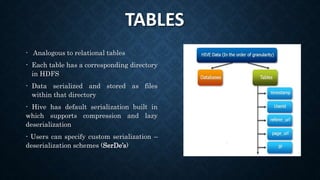
- Analogous to relational tables
- Each table has a corresponding directory
in HDFS
- Data serialized and stored as files
within that directory
- Hive has default serialization built in
which supports compression and lazy
deserialization
- Users can specify custom serialization –
deserialization schemes (SerDe’s)
PARTITIONS
partitions - Each table can be broken into partitions
- Partitions determine distribution of data
within subdirectories
Example -
CREATE_TABLE Sales (sale_id INT, amount
FLOAT)
PARTITIONED BY (country STRING, year INT,
month INT)
So each partition will be split out into different
folders like
Sales/country=US/year=2012/month=12
BUCKETS
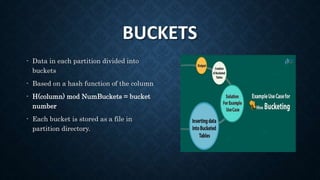
- Data in each partition divided into
buckets
- Based on a hash function of the column
- H(column) mod NumBuckets = bucket
number
- Each bucket is stored as a file in
partition directory.
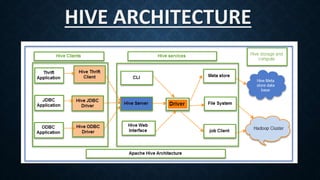
HIVE ARCHITECTURE
HIVE ARCHITECTURE
HIVE CLIENTS
• Hive provides different drivers for communication with a different type of
applications. ForThrift based applications, it will provideThrift client for
communication.
• For Java related applications, it provides JDBC Drivers. Other than any type of
applications provided ODBC drivers.These Clients and drivers in turn again
communicate with Hive server in the Hive services.
HIVE SERVICES
• Client interactions with Hive can be performed through Hive
Services. If the client wants to perform any query related
operations in Hive, it has to communicate through Hive
Services.
• CLI is the command line interface acts as Hive service for
DDL (Data definition Language) operations. All drivers
communicate with Hive server and to the main driver in
Hive services as shown in above architecture diagram.
• Driver present in the Hive services represents the main driver, and it
communicates all type of JDBC, ODBC, and other client specific
applications.
• Driver will process those requests from different applications to
meta store and field systems for further processing.
HIVE STORAGE AND
COMPUTING
• Hive services such as Meta store, File system,
and Job Client in turn communicates with Hive
storage and performs the following actions
• Metadata information of tables created in Hive is
stored in Hive "Meta storage database".
• Query results and data loaded in the tables are
going to be stored in Hadoop cluster on HDFS.
HIVEQL
(HIVE QUERY LANGUAGE)
• Hive provides a CLI to write Hive queries using Hive
Query Language (HiveQL). Generally HQL syntax is
similar to the SQL syntax that most data analysts are
familiar with.
• Hive's SQL-inspired language separates the user from
the complexity of Map Reduce programming. It reuses
familiar concepts from the relational database world,
such as tables, rows, columns and schema, to ease
learning.
SELECT-WHERE STATEMENT
• SELECT statement is used to retrieve
the data from a table.
• WHERE clause works similar to a
condition.
• It filters the data using the condition
and gives you a finite result.
• The built-in operators and functions
generate an expression , which fulfils
the condition.
• Example:
• hive> SELECT * FROM
employee WHERE
salary>30000;
• The above query selects all the
rows from the table employee
where salary is more than
30000.
HIVEQL - SELECT-JOINS JOIN
• HiveQL - Select-Joins JOIN is a clause
that is used for combining specific fields
from two tables by using values common
to each one.
• It is used to combine records from two or
more tables in the database. It is more or
less similar to SQL JOIN.
Select Order By
• clause is used to retrieve the
details based on one column and
sort the result set by ascending
or descending order
• hive> SELECT Id, Name, Dept
FROM employee ORDER BY
DEPT;
Select-Group By
• clause is used to group all the
records in a result set using a
particular collection column. It is
used to query a group of records.
• hive> SELECT Dept,count(*)
FROM employee GROUP BY
DEPT;
PROS AND CONS..
PROS
• Framework
• Multi-user
• Data Analysis
• Storage
• Format conversion
CONS
• OLTP Processing issues
• No Updates
• Subqueries
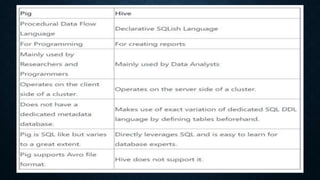
HIVE VS PIG
1830069 – Tushar
Singhal
1830095 – Hansa
Maheshwari
18300112 –
Rajarshi
Chowdhury
1830113 – Rajat
Sharma
1830118 –
Ritwika Mitra
1830142 –
Twinkle Sinha

Apache Hive

  • 1.
  • 2.
  • 3.
    • Apache Hiveis a data warehouse software project built on top of Apache Hadoop for providing data query and analysis. Hive gives an SQL-like interface to query data stored in various databases and file systems that integrate with Hadoop. • It is an open source data warehouse software for reading, writing and managing large data set files that are stored directly in either the Apache Hadoop Distributed File System (HDFS) or other data storage systems such as Apache HBase.
  • 4.
    • Functionality: SQL-likequery engine designed for high volume data stores. Multiple file-formats are supported. • Processing Type: Batch processing using Apache Tez or MapReduce compute frameworks. • Latency: Medium to high, depending on the responsiveness of the compute engine. The distributed execution model provides superior performance compared to monolithic query systems, like RDBMS, for the same data volumes. • Hadoop Integration: Runs on top of Hadoop, with Apache Tez or MapReduce for processing and HDFS or Amazon S3 for storage.
  • 5.
    WHY HIVE? • Themotivation behind Apache Hive was to simplify query development, and to, in turn, open up Hadoop unstructured data to a wider group of users in organizations. ... Hive enables data serialization/deserialization and increases flexibility in schema design by including a system catalog called Hive-Metastore. • Hive allows users to read, write, and manage petabytes of data using SQL. Hive is built on top of Apache Hadoop, which is an open-source framework used to efficiently store and process large datasets. As a result, Hive is closely integrated with Hadoop, and is designed to work quickly on petabytes of data. • Hive is designed for querying and managing only structured data stored in tables. Hive is scalable, fast, and uses familiar concepts. Schema gets stored in a database, while processed data goes into a Hadoop Distributed File System (HDFS).
  • 6.
  • 7.
    HIVE DATA MODEL Datain Hive organized into : • Tables • Partitions • Buckets
  • 8.
    TABLES - Analogous torelational tables - Each table has a corresponding directory in HDFS - Data serialized and stored as files within that directory - Hive has default serialization built in which supports compression and lazy deserialization - Users can specify custom serialization – deserialization schemes (SerDe’s)
  • 9.
    PARTITIONS partitions - Eachtable can be broken into partitions - Partitions determine distribution of data within subdirectories Example - CREATE_TABLE Sales (sale_id INT, amount FLOAT) PARTITIONED BY (country STRING, year INT, month INT) So each partition will be split out into different folders like Sales/country=US/year=2012/month=12
  • 10.
    BUCKETS - Data ineach partition divided into buckets - Based on a hash function of the column - H(column) mod NumBuckets = bucket number - Each bucket is stored as a file in partition directory.
  • 11.
  • 12.
  • 13.
    HIVE CLIENTS • Hiveprovides different drivers for communication with a different type of applications. ForThrift based applications, it will provideThrift client for communication. • For Java related applications, it provides JDBC Drivers. Other than any type of applications provided ODBC drivers.These Clients and drivers in turn again communicate with Hive server in the Hive services.
  • 14.
    HIVE SERVICES • Clientinteractions with Hive can be performed through Hive Services. If the client wants to perform any query related operations in Hive, it has to communicate through Hive Services. • CLI is the command line interface acts as Hive service for DDL (Data definition Language) operations. All drivers communicate with Hive server and to the main driver in Hive services as shown in above architecture diagram. • Driver present in the Hive services represents the main driver, and it communicates all type of JDBC, ODBC, and other client specific applications. • Driver will process those requests from different applications to meta store and field systems for further processing.
  • 15.
    HIVE STORAGE AND COMPUTING •Hive services such as Meta store, File system, and Job Client in turn communicates with Hive storage and performs the following actions • Metadata information of tables created in Hive is stored in Hive "Meta storage database". • Query results and data loaded in the tables are going to be stored in Hadoop cluster on HDFS.
  • 16.
  • 17.
    • Hive providesa CLI to write Hive queries using Hive Query Language (HiveQL). Generally HQL syntax is similar to the SQL syntax that most data analysts are familiar with. • Hive's SQL-inspired language separates the user from the complexity of Map Reduce programming. It reuses familiar concepts from the relational database world, such as tables, rows, columns and schema, to ease learning.
  • 18.
    SELECT-WHERE STATEMENT • SELECTstatement is used to retrieve the data from a table. • WHERE clause works similar to a condition. • It filters the data using the condition and gives you a finite result. • The built-in operators and functions generate an expression , which fulfils the condition. • Example: • hive> SELECT * FROM employee WHERE salary>30000; • The above query selects all the rows from the table employee where salary is more than 30000.
  • 19.
    HIVEQL - SELECT-JOINSJOIN • HiveQL - Select-Joins JOIN is a clause that is used for combining specific fields from two tables by using values common to each one. • It is used to combine records from two or more tables in the database. It is more or less similar to SQL JOIN.
  • 20.
    Select Order By •clause is used to retrieve the details based on one column and sort the result set by ascending or descending order • hive> SELECT Id, Name, Dept FROM employee ORDER BY DEPT; Select-Group By • clause is used to group all the records in a result set using a particular collection column. It is used to query a group of records. • hive> SELECT Dept,count(*) FROM employee GROUP BY DEPT;
  • 21.
    PROS AND CONS.. PROS •Framework • Multi-user • Data Analysis • Storage • Format conversion CONS • OLTP Processing issues • No Updates • Subqueries
  • 22.
  • 24.
    1830069 – Tushar Singhal 1830095– Hansa Maheshwari 18300112 – Rajarshi Chowdhury 1830113 – Rajat Sharma 1830118 – Ritwika Mitra 1830142 – Twinkle Sinha