MAKING DSPACE XMLUI YOUR OWN
     CUSTOMIZATION VIA OVERLAYS


      Tim Donohue
      Research Programmer
      IDEALS
      University of Illinois


      DSUG 2009 – Gothenburg, Sweden
DSpace 1.5 & 1.6 Overview
   Maven Build Architecture
     DSpace  “modules”
     Application “Overlays”

   XMLUI (aka. Manakin)
   JSPUI
   SWORD Interface
   LNI (Lightweight Network Interface)
   OAI-PMH Interface
Introducing Maven…
   Apache Software Foundation
   Java Project Build / Management Tool
   Advantages:
     Manages   dependencies
     Easier to manage/build many “modules”
     Allows for basic application customizations via
      “overlays”
   Disadvantages:
     Yetanother XML config (many actually…)
     Somewhat complex, if doing more than basic overlays
Maven v. Ant
   DSpace 1.x-1.4 used Ant to build & install DSpace
   DSpace 1.5 & 1.6 uses both Maven & Ant
     Maven   – Builds / Assembles DSpace “package”
       Includesapplying “overlays” and pulling down all the
        necessary 3rd party dependencies
     Ant – Installs or Updates your DSpace Installation
      directory ([dspace.dir] in dspace.cfg)
Ok, so what really is Maven?

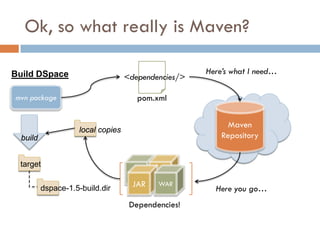
Build DSpace                                          Here’s what I need…
                                    <dependencies/>

mvn package                            pom.xml


                                                            Maven
                     local copies
  build                                                   Repository


 target

                                      JAR   WAR
          dspace-1.5-build.dir                          Here you go…
                                     Dependencies!
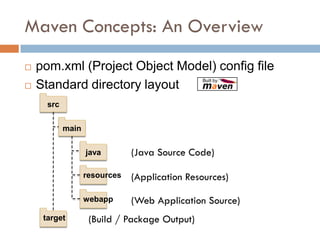
Maven Concepts: An Overview
   pom.xml (Project Object Model) config file
   Standard directory layout
      src


            main


                   java        (Java Source Code)

                   resources   (Application Resources)

                   webapp      (Web Application Source)
     target         (Build / Package Output)
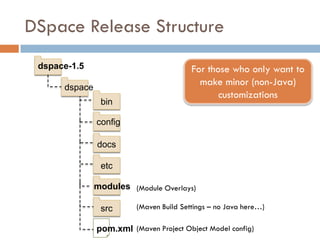
DSpace Release Structure
 dspace-1.5                              For those who only want to
      dspace
                                           make minor (non-Java)
                                                customizations
                bin

               config

               docs

                etc

               modules (Module Overlays)

                src      (Maven Build Settings – no Java here…)

               pom.xml (Maven Project Object Model config)
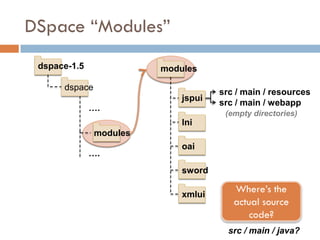
DSpace “Modules”
 dspace-1.5              modules

      dspace
                                     src / main / resources
                             jspui
                                     src / main / webapp
              ….
                                      (empty directories)
                             lni
               modules
                             oai
              ….
                             sword

                             xmlui
                                        Where’s the
                                        actual source
                                            code?
                                       src / main / java?
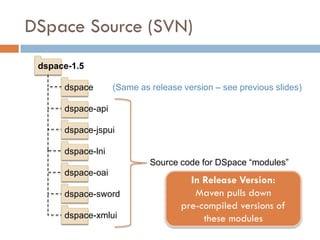
DSpace Source (SVN)
 dspace-1.5

      dspace       (Same as release version – see previous slides)

      dspace-api

      dspace-jspui

      dspace-lni
                            Source code for DSpace “modules”
      dspace-oai
                                      In Release Version:
      dspace-sword                     Maven pulls down
                                    pre-compiled versions of
      dspace-xmlui                       these modules
DSpace Overlays
• Overview of Overlays
• How to take advantage of them
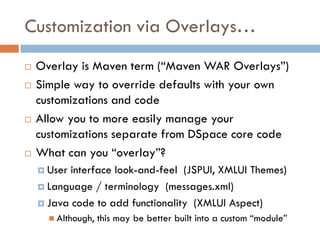
Customization via Overlays…
   Overlay is Maven term (“Maven WAR Overlays”)
   Simple way to override defaults with your own
    customizations and code
   Allow you to more easily manage your
    customizations separate from DSpace core code
   What can you “overlay”?
     User interface look-and-feel (JSPUI, XMLUI Themes)
     Language / terminology (messages.xml)

     Java code to add functionality (XMLUI Aspect)
       Although,   this may be better built into a custom “module”
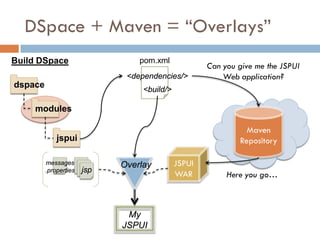
DSpace + Maven = “Overlays”
Build DSpace                     pom.xml
                                                     Can you give me the JSPUI
                              <dependencies/>            Web application?
dspace
                                  <build/>

     modules

                                                               Maven
             jspui                                           Repository

         messages            Overlay         JSPUI
         .properties   jsp
                                             WAR          Here you go…


                              My
                             JSPUI
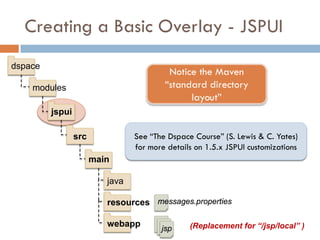
Creating a Basic Overlay - JSPUI
dspace
                                          Notice the Maven
    modules                              “standard directory
                                               layout”
         jspui

                 src             See “The Dspace Course” (S. Lewis & C. Yates)
                                 for more details on 1.5.x JSPUI customizations
                       main

                          java

                          resources messages.properties

                          webapp                (Replacement for “/jsp/local” )
                                        jsp
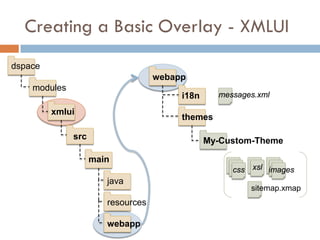
Creating a Basic Overlay - XMLUI
dspace
                                   webapp
    modules
                                        i18n     messages.xml

         xmlui
                                        themes

              src                              My-Custom-Theme

                    main
                                                    css xsl images
                       java
                                                        sitemap.xmap
                       resources

                       webapp
Building/Installing an Overlay
   Add your files to appropriate “/dspace/modules/”
    directory (see previous slides)
   Rebuild DSpace: mvn package
       Builds to [dspace-src]/dspace/target/
   Update DSpace installation: ant update
       Installs to [dspace.dir] (as specified in dspace.cfg)
Review: Why Overlays?
   Essentially, they came along with move to Maven

   You can manage your own customizations separate
    from DSpace source code
     “/dspace/modules”   subdirectories empty by default


   JSPUI replacement for “/jsp/local” from pre-1.5

   It is possible to overlay most *anything* (Java code,
    JSPs, XMLUI Aspects/Themes, sitemaps, etc.)
Overlays: things to watch out for…
   We don’t recommend
    overlaying core APIs
   Be very careful to merge
    in new code changes
    during your next upgrade
      A local SVN code
       repository is helpful
       (“SVN vendor branch”)    Image borrowed from:
                                http://www.flickr.com/photos/valgonzarp/

   It is recommended to only place overlays in
    [dspace-src]/dspace/modules/ (and subdirectories)
XML-UI Overview
          • Intro to Manakin / XMLUI
          • Tiered interface development


              Credit: Scott Phillips, Texas Digital Library + Texas A&M
(Most of this content is borrowed heavily from Scott’s numerous Manakin tutorials)
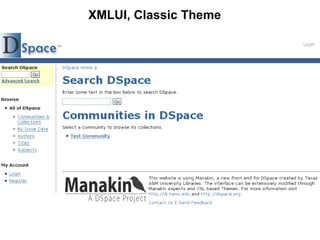
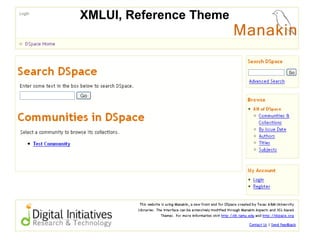
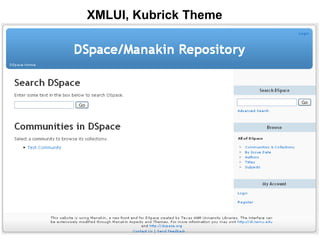
XMLUI, Classic Theme
XMLUI, Reference Theme
XMLUI, Kubrick Theme
Why Choose XMLUI?
   Module design – easier to extend

   Multiple interfaces / views, per community,
    collection or item

   Metadata in its native
    formats

   No knowledge of
    Java/JSPs necessary      Picture borrowed from:
                             http://www.flickr.com/photos/lambdageek/
XMLUI Architecture Overview
   Built on Apache Cocoon
     Modular,  web-development framework
     Pipeline based architecture

   DRI (Digital Repository Interface) Schema
     Structure
             based on TEI (light)
     Metadata referenced in METS

   Aspects and Themes
     Aspects= functionality in system (Java or XSL)
     Themes = style / look & feel (XSL, CSS, images)
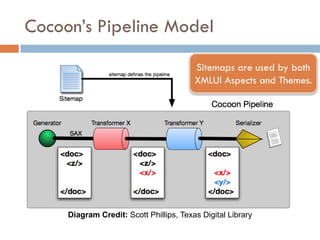
Cocoon’s Pipeline Model
                                         Sitemaps are used by both
                                         XMLUI Aspects and Themes.


     Diagram Credit: Scott Phillips, Texas Digital Library
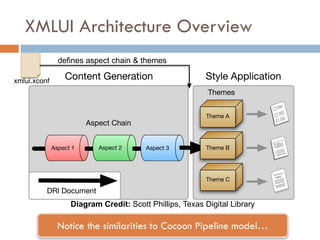
XMLUI Architecture Overview
              defines aspect chain & themes

xmlui.xconf


                 Diagram Credit: Scott Phillips, Texas Digital Library

              Notice the similarities to Cocoon Pipeline model…
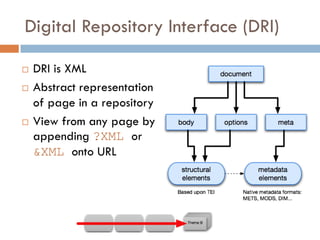
Digital Repository Interface (DRI)

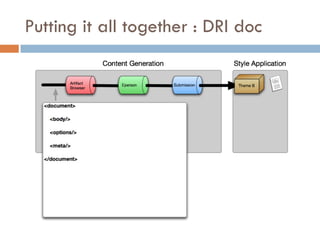
   DRI is XML
   Abstract representation
    of page in a repository
   View from any page by
    appending ?XML or
    &XML onto URL
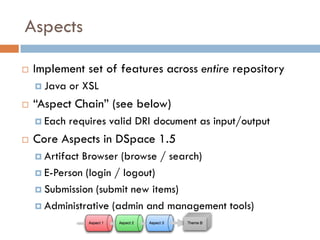
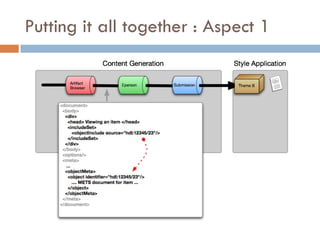
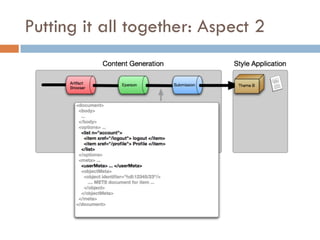
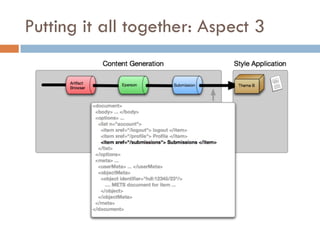
Aspects

   Implement set of features across entire repository
     Java   or XSL
   “Aspect Chain” (see below)
     Each   requires valid DRI document as input/output
   Core Aspects in DSpace 1.5
     ArtifactBrowser (browse / search)
     E-Person (login / logout)

     Submission (submit new items)

     Administrative (admin and management tools)
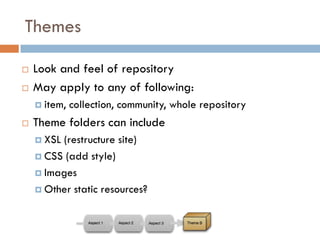
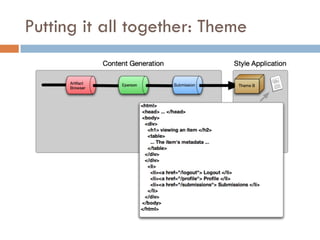
Themes

   Look and feel of repository
   May apply to any of following:
     item,   collection, community, whole repository
   Theme folders can include
     XSL(restructure site)
     CSS (add style)

     Images

     Other static resources?
Putting it all together : DRI doc
Putting it all together : Aspect 1
Putting it all together: Aspect 2
Putting it all together: Aspect 3
Putting it all together: Theme
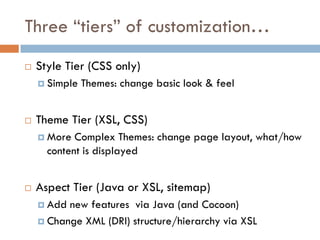
Three “tiers” of customization…
   Style Tier (CSS only)
     Simple   Themes: change basic look & feel


   Theme Tier (XSL, CSS)
     More  Complex Themes: change page layout, what/how
      content is displayed


   Aspect Tier (Java or XSL, sitemap)
     Add new features via Java (and Cocoon)
     Change XML (DRI) structure/hierarchy via XSL
http://txspace.tamu.edu/
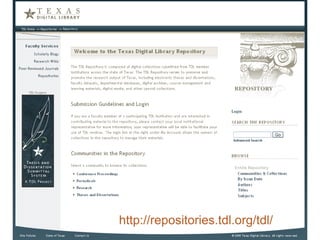
    http://repositories.tdl.org/tdl/
http://minds.wisconsin.edu/handle/1793/8334
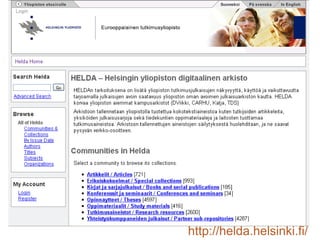
http://helda.helsinki.fi/
http://ideals.illinois.edu/
Creating an XMLUI Theme
• A few hints and tips on starting an XMLUI theme
• Creating a theme via overlay
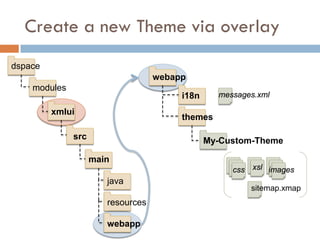
Create a new Theme via overlay
dspace
                                   webapp
    modules
                                        i18n     messages.xml

         xmlui
                                        themes

              src                              My-Custom-Theme

                    main
                                                    css xsl images
                       java
                                                        sitemap.xmap
                       resources

                       webapp
Tips on creating a theme
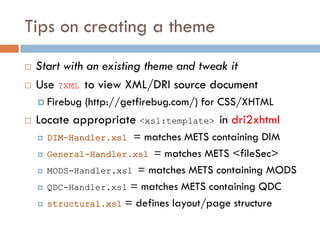
   Start with an existing theme and tweak it
   Use ?XML to view XML/DRI source document
     Firebug   (http://getfirebug.com/) for CSS/XHTML
   Locate appropriate <xsl:template> in dri2xhtml
       DIM-Handler.xsl = matches METS containing DIM
       General-Handler.xsl = matches METS <fileSec>
       MODS-Handler.xsl = matches METS containing MODS
       QDC-Handler.xsl = matches METS containing QDC
       structural.xsl = defines layout/page structure
Tips on creating a theme
   Four metadata display “modes”
       SummaryList        = Summarized list of objects
         (E.g.)   Community/Collection listing, item browse/search
       SummaryView       = Summarized view of single object
         (E.g.)   Item homepage (summary metadata only)
       DetailList       = Detailed list of objects
         Rarely    used: (E.g.) “item appears in following collections”
       DetailView      = Detailed view of single object
         (E.g.)   Item “full record” page, collection/community pages
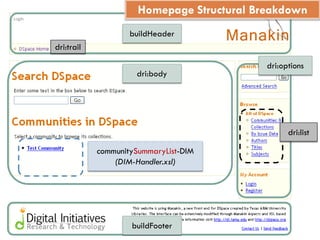
Homepage Structural Breakdown
                    buildHeader
dri:trail

                                            dri:options
                     dri:body


                                                  dri:list

            communitySummaryList-DIM
                (DIM-Handler.xsl)


                    buildFooter
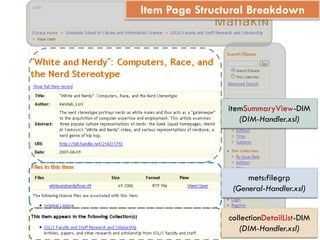
Item Page Structural Breakdown


                itemSummaryView-DIM
                   (DIM-Handler.xsl)


                     mets:filegrp
                 (General-Handler.xsl)


                collectionDetailList-DIM
                   (DIM-Handler.xsl)
Simple XMLUI Theme Overlay
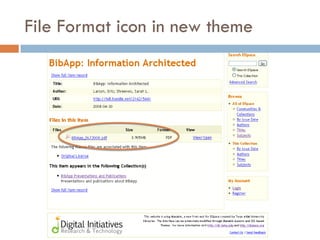
• Task: Modify file display to show a format icon
• (E.g.) PDF icon is displayed next to PDF files
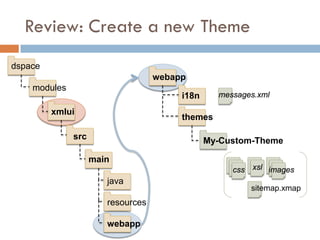
Review: Create a new Theme
dspace
                                   webapp
    modules
                                        i18n     messages.xml

         xmlui
                                        themes

              src                              My-Custom-Theme

                    main
                                                    css xsl images
                       java
                                                        sitemap.xmap
                       resources

                       webapp
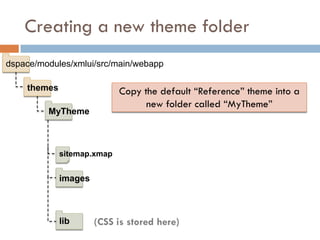
Creating a new theme folder
dspace/modules/xmlui/src/main/webapp

    themes                  Copy the default “Reference” theme into a
                                  new folder called “MyTheme”
         MyTheme


             sitemap.xmap


             images


             lib      (CSS is stored here)
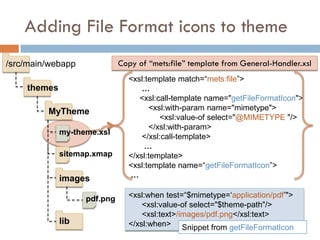
Adding File Format icons to theme
/src/main/webapp             Copy of “mets:file” template from General-Handler.xsl
                               <xsl:template match=“mets:file”>
    themes                         …
                                  <xsl:call-template name="getFileFormatIcon">
         MyTheme                     <xsl:with-param name="mimetype">
                                        <xsl:value-of select="@MIMETYPE "/>
                                     </xsl:with-param>
             my-theme.xsl
                                   </xsl:call-template>
                                    …
             sitemap.xmap      </xsl:template>
                               <xsl:template name=“getFileFormatIcon”>
             images            …

                   pdf.png     <xsl:when test=“$mimetype=‘application/pdf’">
                                   <xsl:value-of select="$theme-path"/>
                                   <xsl:text>/images/pdf.png</xsl:text>
             lib               </xsl:when> Snippet from getFileFormatIcon
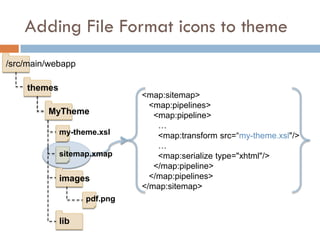
Adding File Format icons to theme
/src/main/webapp

    themes
                             <map:sitemap>
                               <map:pipelines>
         MyTheme                <map:pipeline>
                                 …
             my-theme.xsl        <map:transform src=“my-theme.xsl"/>
                                 …
             sitemap.xmap        <map:serialize type="xhtml"/>
                                </map:pipeline>
             images            </map:pipelines>
                             </map:sitemap>
                   pdf.png

             lib
Enable your new theme…

[dspace.dir]
                          …
                          <themes>
     config
                              …
                              <theme name="My New Theme"
         xmlui.xconf              regex=".*" path="MyTheme/" />
                               …
                          </themes>
                          …

               Restart web server for changes to take effect

     Other sample theme settings:
        • regex=“^$”              (Theme for homepage ONLY)
        • regex=“^browse$”        (Theme for all global “Browse By” pages)
        • handle=“2142/2”         (Theme for Community/Collection/Item)
File Format icon in new theme
Creating an XMLUI Aspect
•A few (high-level) hints and tips on starting an
XMLUI aspect
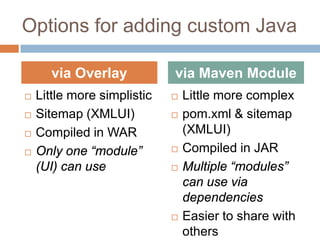
Options for adding custom Java

      via Overlay            via Maven Module
   Little more simplistic      Little more complex
   Sitemap (XMLUI)             pom.xml & sitemap
   Compiled in WAR              (XMLUI)
   Only one “module”           Compiled in JAR
    (UI) can use                Multiple “modules”
                                 can use via
                                 dependencies
                                Easier to share with
                                 others
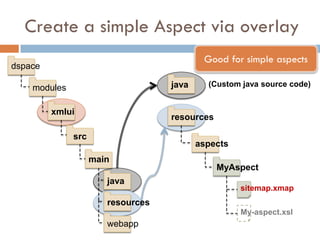
Create a simple Aspect via overlay
                                           Good for simple aspects
dspace

    modules                        java     (Custom java source code)


         xmlui
                                   resources

              src
                                          aspects
                    main
                                               MyAspect
                       java
                                                    sitemap.xmap
                       resources
                                                    My-aspect.xsl
                       webapp
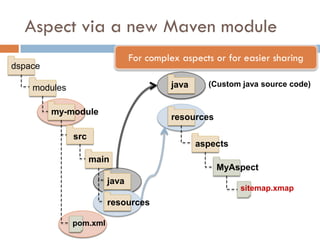
Aspect via a new Maven module
                               For complex aspects or for easier sharing
dspace

    modules                              java     (Custom java source code)


         my-module
                                         resources

              src
                                                aspects
                    main
                                                     MyAspect
                        java
                                                          sitemap.xmap
                        resources

              pom.xml
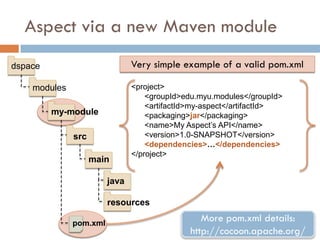
Aspect via a new Maven module
dspace                         Very simple example of a valid pom.xml

    modules                    <project>
                                   <groupId>edu.myu.modules</groupId>
                                   <artifactId>my-aspect</artifactId>
         my-module                 <packaging>jar</packaging>
                                   <name>My Aspect’s API</name>
              src                  <version>1.0-SNAPSHOT</version>
                                   <dependencies>…</dependencies>
                               </project>
                    main

                        java

                        resources

              pom.xml
                                                More pom.xml details:
                                             http://cocoon.apache.org/
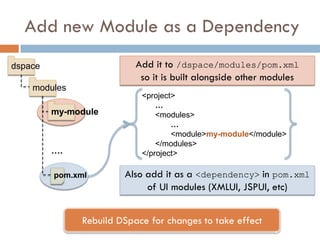
Add new Module as a Dependency
dspace                    Add it to /dspace/modules/pom.xml
                           so it is built alongside other modules
    modules
                           <project>
                               …
         my-module             <modules>
                                   …
                                   <module>my-module</module>
                               </modules>
         ….                </project>

         pom.xml       Also add it as a <dependency> in pom.xml
                            of UI modules (XMLUI, JSPUI, etc)


              Rebuild DSpace for changes to take effect
Simple Aspect via Overlay
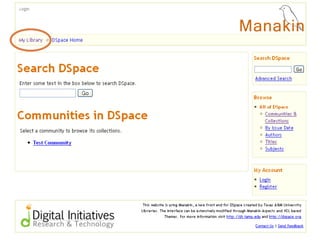
• Modify Breadcrumb Trail to link to our Library’s
Homepage
• Do this at the “aspect” level so that it will apply

across all of our XMLUI Themes
• No Java…just XSLT


    Credit: Conal Tuohy, New Zealand Electronic Text Centre
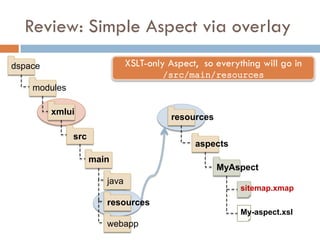
Review: Simple Aspect via overlay
dspace                        XSLT-only Aspect, so everything will go in
                                      /src/main/resources
    modules

         xmlui
                                         resources

              src
                                              aspects
                    main
                                                     MyAspect
                       java
                                                         sitemap.xmap
                       resources
                                                         My-aspect.xsl
                       webapp
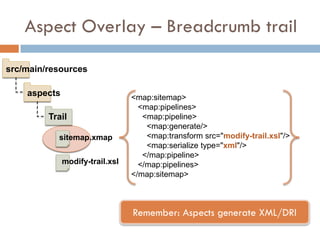
Aspect Overlay – Breadcrumb trail

src/main/resources

    aspects                      <map:sitemap>
                                   <map:pipelines>
         Trail                      <map:pipeline>
                                     <map:generate/>
           sitemap.xmap              <map:transform src="modify-trail.xsl"/>
                                     <map:serialize type="xml"/>
                                    </map:pipeline>
              modify-trail.xsl     </map:pipelines>
                                 </map:sitemap>


                                 Remember: Aspects generate XML/DRI
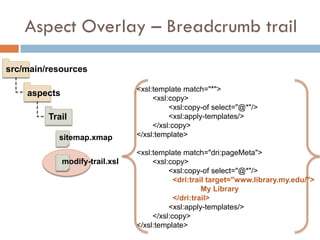
Aspect Overlay – Breadcrumb trail

src/main/resources

                                 <xsl:template match="*">
    aspects
                                      <xsl:copy>
                                           <xsl:copy-of select="@*"/>
         Trail                             <xsl:apply-templates/>
                                      </xsl:copy>
           sitemap.xmap          </xsl:template>

                                 <xsl:template match="dri:pageMeta">
              modify-trail.xsl        <xsl:copy>
                                           <xsl:copy-of select="@*"/>
                                             <dri:trail target="www.library.my.edu/">
                                                      My Library
                                             </dri:trail>
                                           <xsl:apply-templates/>
                                      </xsl:copy>
                                 </xsl:template>
Enable your new aspect…

[dspace.dir]
                       …
     config            <aspects>
                           …
         xmlui.xconf       <aspect name=“Trail”
                                  path=“resource://aspects/Trail/”/>
                       </aspects>
                       …


                Restart DSpace for changes to take effect
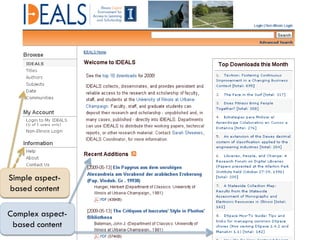
Simple aspect-
based content

Complex aspect-
 based content
DSpace Community
• Where to go for more help…
• How you can help
DSpace Resources
   DSpace System Docs (/dspace/docs/)
   DSpace Wiki: http://wiki.dspace.org
     http://wiki.dspace.org/index.php/DspaceResources

     http://wiki.dspace.org/index.php/Category:HOWTO

   Dspace Training Materials
     www.dspace.org   > Resources > Training Materials
   Mailing Lists
     dspace-general  : general announcements, q & a
     dspace-tech : weird errors? upgrade issues?

     dspace-devel : where the developers are…
Useful DSpace / XMLUI Tutorials

“The DSpace Course” (Stuart Lewis & Chris Yates):
http://hdl.handle.net/2160/615
(Also linked to from www.dspace.org under “Training Materials”)


“Learning to Use Manakin” Tutorial (Scott Phillips):
http://di.tamu.edu/publications/resources/dsug07/LearningToUseManakin.pdf
http://di.tamu.edu/publications/resources/dsug07/LearningToUseManakin.zip
(Also linked to from www.dspace.org under “Training Materials”)
How you can help…
   Help test : DSpace Testathon before new releases
   Report bugs / Request new features : Add to
    bug/feature list on Jira
     http://jira.dspace.org/

   Help others, just like you : Answer questions on
    dspace-general or dspace-tech lists
   Tec h-savvy? Fix bugs or add functionality :
       Announce your work on dspace-tech
     http://wiki.dspace.org/index.php/Guide_to_Developing_with_DSpace
Contact Info

                     Tim Donohue
(Before Nov. 2009)                           (As of Nov. 2009)
University of Illinois                       DuraSpace
http://ideals.illinois.edu/                  tdonohue@duraspace.org

               DSpace Mailing Lists
               Technical Questions:
                       dspace-tech@lists.sourceforge.net
               Development Questions / Suggestions:
                       dspace-devel@lists.sourceforge.net

                This work is licensed under a Creative Commons Attribution-
                Noncommercial-Share Alike 3.0 United States License.

Making DSpace XMLUI Your Own

  • 1.
    MAKING DSPACE XMLUIYOUR OWN CUSTOMIZATION VIA OVERLAYS Tim Donohue Research Programmer IDEALS University of Illinois DSUG 2009 – Gothenburg, Sweden
  • 2.
    DSpace 1.5 &1.6 Overview  Maven Build Architecture  DSpace “modules”  Application “Overlays”  XMLUI (aka. Manakin)  JSPUI  SWORD Interface  LNI (Lightweight Network Interface)  OAI-PMH Interface
  • 3.
    Introducing Maven…  Apache Software Foundation  Java Project Build / Management Tool  Advantages:  Manages dependencies  Easier to manage/build many “modules”  Allows for basic application customizations via “overlays”  Disadvantages:  Yetanother XML config (many actually…)  Somewhat complex, if doing more than basic overlays
  • 4.
    Maven v. Ant  DSpace 1.x-1.4 used Ant to build & install DSpace  DSpace 1.5 & 1.6 uses both Maven & Ant  Maven – Builds / Assembles DSpace “package”  Includesapplying “overlays” and pulling down all the necessary 3rd party dependencies  Ant – Installs or Updates your DSpace Installation directory ([dspace.dir] in dspace.cfg)
  • 5.
    Ok, so whatreally is Maven? Build DSpace Here’s what I need… <dependencies/> mvn package pom.xml Maven local copies build Repository target JAR WAR dspace-1.5-build.dir Here you go… Dependencies!
  • 6.
    Maven Concepts: AnOverview  pom.xml (Project Object Model) config file  Standard directory layout src main java (Java Source Code) resources (Application Resources) webapp (Web Application Source) target (Build / Package Output)
  • 7.
    DSpace Release Structure dspace-1.5 For those who only want to dspace make minor (non-Java) customizations bin config docs etc modules (Module Overlays) src (Maven Build Settings – no Java here…) pom.xml (Maven Project Object Model config)
  • 8.
    DSpace “Modules” dspace-1.5 modules dspace src / main / resources jspui src / main / webapp …. (empty directories) lni modules oai …. sword xmlui Where’s the actual source code? src / main / java?
  • 9.
    DSpace Source (SVN) dspace-1.5 dspace (Same as release version – see previous slides) dspace-api dspace-jspui dspace-lni Source code for DSpace “modules” dspace-oai In Release Version: dspace-sword Maven pulls down pre-compiled versions of dspace-xmlui these modules
  • 10.
    DSpace Overlays • Overviewof Overlays • How to take advantage of them
  • 11.
    Customization via Overlays…  Overlay is Maven term (“Maven WAR Overlays”)  Simple way to override defaults with your own customizations and code  Allow you to more easily manage your customizations separate from DSpace core code  What can you “overlay”?  User interface look-and-feel (JSPUI, XMLUI Themes)  Language / terminology (messages.xml)  Java code to add functionality (XMLUI Aspect)  Although, this may be better built into a custom “module”
  • 12.
    DSpace + Maven= “Overlays” Build DSpace pom.xml Can you give me the JSPUI <dependencies/> Web application? dspace <build/> modules Maven jspui Repository messages Overlay JSPUI .properties jsp WAR Here you go… My JSPUI
  • 13.
    Creating a BasicOverlay - JSPUI dspace Notice the Maven modules “standard directory layout” jspui src See “The Dspace Course” (S. Lewis & C. Yates) for more details on 1.5.x JSPUI customizations main java resources messages.properties webapp (Replacement for “/jsp/local” ) jsp
  • 14.
    Creating a BasicOverlay - XMLUI dspace webapp modules i18n messages.xml xmlui themes src My-Custom-Theme main css xsl images java sitemap.xmap resources webapp
  • 15.
    Building/Installing an Overlay  Add your files to appropriate “/dspace/modules/” directory (see previous slides)  Rebuild DSpace: mvn package  Builds to [dspace-src]/dspace/target/  Update DSpace installation: ant update  Installs to [dspace.dir] (as specified in dspace.cfg)
  • 16.
    Review: Why Overlays?  Essentially, they came along with move to Maven  You can manage your own customizations separate from DSpace source code  “/dspace/modules” subdirectories empty by default  JSPUI replacement for “/jsp/local” from pre-1.5  It is possible to overlay most *anything* (Java code, JSPs, XMLUI Aspects/Themes, sitemaps, etc.)
  • 17.
    Overlays: things towatch out for…  We don’t recommend overlaying core APIs  Be very careful to merge in new code changes during your next upgrade  A local SVN code repository is helpful (“SVN vendor branch”) Image borrowed from: http://www.flickr.com/photos/valgonzarp/  It is recommended to only place overlays in [dspace-src]/dspace/modules/ (and subdirectories)
  • 18.
    XML-UI Overview • Intro to Manakin / XMLUI • Tiered interface development Credit: Scott Phillips, Texas Digital Library + Texas A&M (Most of this content is borrowed heavily from Scott’s numerous Manakin tutorials)
  • 19.
  • 20.
  • 21.
  • 22.
    Why Choose XMLUI?  Module design – easier to extend  Multiple interfaces / views, per community, collection or item  Metadata in its native formats  No knowledge of Java/JSPs necessary Picture borrowed from: http://www.flickr.com/photos/lambdageek/
  • 23.
    XMLUI Architecture Overview  Built on Apache Cocoon  Modular, web-development framework  Pipeline based architecture  DRI (Digital Repository Interface) Schema  Structure based on TEI (light)  Metadata referenced in METS  Aspects and Themes  Aspects= functionality in system (Java or XSL)  Themes = style / look & feel (XSL, CSS, images)
  • 24.
    Cocoon’s Pipeline Model Sitemaps are used by both XMLUI Aspects and Themes. Diagram Credit: Scott Phillips, Texas Digital Library
  • 25.
    XMLUI Architecture Overview defines aspect chain & themes xmlui.xconf Diagram Credit: Scott Phillips, Texas Digital Library Notice the similarities to Cocoon Pipeline model…
  • 26.
    Digital Repository Interface(DRI)  DRI is XML  Abstract representation of page in a repository  View from any page by appending ?XML or &XML onto URL
  • 27.
    Aspects  Implement set of features across entire repository  Java or XSL  “Aspect Chain” (see below)  Each requires valid DRI document as input/output  Core Aspects in DSpace 1.5  ArtifactBrowser (browse / search)  E-Person (login / logout)  Submission (submit new items)  Administrative (admin and management tools)
  • 28.
    Themes  Look and feel of repository  May apply to any of following:  item, collection, community, whole repository  Theme folders can include  XSL(restructure site)  CSS (add style)  Images  Other static resources?
  • 29.
    Putting it alltogether : DRI doc
  • 30.
    Putting it alltogether : Aspect 1
  • 31.
    Putting it alltogether: Aspect 2
  • 32.
    Putting it alltogether: Aspect 3
  • 33.
    Putting it alltogether: Theme
  • 34.
    Three “tiers” ofcustomization…  Style Tier (CSS only)  Simple Themes: change basic look & feel  Theme Tier (XSL, CSS)  More Complex Themes: change page layout, what/how content is displayed  Aspect Tier (Java or XSL, sitemap)  Add new features via Java (and Cocoon)  Change XML (DRI) structure/hierarchy via XSL
  • 35.
    http://txspace.tamu.edu/ http://repositories.tdl.org/tdl/
  • 36.
  • 37.
  • 38.
  • 39.
    Creating an XMLUITheme • A few hints and tips on starting an XMLUI theme • Creating a theme via overlay
  • 40.
    Create a newTheme via overlay dspace webapp modules i18n messages.xml xmlui themes src My-Custom-Theme main css xsl images java sitemap.xmap resources webapp
  • 41.
    Tips on creatinga theme  Start with an existing theme and tweak it  Use ?XML to view XML/DRI source document  Firebug (http://getfirebug.com/) for CSS/XHTML  Locate appropriate <xsl:template> in dri2xhtml  DIM-Handler.xsl = matches METS containing DIM  General-Handler.xsl = matches METS <fileSec>  MODS-Handler.xsl = matches METS containing MODS  QDC-Handler.xsl = matches METS containing QDC  structural.xsl = defines layout/page structure
  • 42.
    Tips on creatinga theme  Four metadata display “modes”  SummaryList = Summarized list of objects  (E.g.) Community/Collection listing, item browse/search  SummaryView = Summarized view of single object  (E.g.) Item homepage (summary metadata only)  DetailList = Detailed list of objects  Rarely used: (E.g.) “item appears in following collections”  DetailView = Detailed view of single object  (E.g.) Item “full record” page, collection/community pages
  • 43.
    Homepage Structural Breakdown buildHeader dri:trail dri:options dri:body dri:list communitySummaryList-DIM (DIM-Handler.xsl) buildFooter
  • 44.
    Item Page StructuralBreakdown itemSummaryView-DIM (DIM-Handler.xsl) mets:filegrp (General-Handler.xsl) collectionDetailList-DIM (DIM-Handler.xsl)
  • 45.
    Simple XMLUI ThemeOverlay • Task: Modify file display to show a format icon • (E.g.) PDF icon is displayed next to PDF files
  • 46.
    Review: Create anew Theme dspace webapp modules i18n messages.xml xmlui themes src My-Custom-Theme main css xsl images java sitemap.xmap resources webapp
  • 47.
    Creating a newtheme folder dspace/modules/xmlui/src/main/webapp themes Copy the default “Reference” theme into a new folder called “MyTheme” MyTheme sitemap.xmap images lib (CSS is stored here)
  • 48.
    Adding File Formaticons to theme /src/main/webapp Copy of “mets:file” template from General-Handler.xsl <xsl:template match=“mets:file”> themes … <xsl:call-template name="getFileFormatIcon"> MyTheme <xsl:with-param name="mimetype"> <xsl:value-of select="@MIMETYPE "/> </xsl:with-param> my-theme.xsl </xsl:call-template> … sitemap.xmap </xsl:template> <xsl:template name=“getFileFormatIcon”> images … pdf.png <xsl:when test=“$mimetype=‘application/pdf’"> <xsl:value-of select="$theme-path"/> <xsl:text>/images/pdf.png</xsl:text> lib </xsl:when> Snippet from getFileFormatIcon
  • 49.
    Adding File Formaticons to theme /src/main/webapp themes <map:sitemap> <map:pipelines> MyTheme <map:pipeline> … my-theme.xsl <map:transform src=“my-theme.xsl"/> … sitemap.xmap <map:serialize type="xhtml"/> </map:pipeline> images </map:pipelines> </map:sitemap> pdf.png lib
  • 50.
    Enable your newtheme… [dspace.dir] … <themes> config … <theme name="My New Theme" xmlui.xconf regex=".*" path="MyTheme/" /> … </themes> … Restart web server for changes to take effect Other sample theme settings: • regex=“^$” (Theme for homepage ONLY) • regex=“^browse$” (Theme for all global “Browse By” pages) • handle=“2142/2” (Theme for Community/Collection/Item)
  • 51.
    File Format iconin new theme
  • 52.
    Creating an XMLUIAspect •A few (high-level) hints and tips on starting an XMLUI aspect
  • 53.
    Options for addingcustom Java via Overlay via Maven Module  Little more simplistic  Little more complex  Sitemap (XMLUI)  pom.xml & sitemap  Compiled in WAR (XMLUI)  Only one “module”  Compiled in JAR (UI) can use  Multiple “modules” can use via dependencies  Easier to share with others
  • 54.
    Create a simpleAspect via overlay Good for simple aspects dspace modules java (Custom java source code) xmlui resources src aspects main MyAspect java sitemap.xmap resources My-aspect.xsl webapp
  • 55.
    Aspect via anew Maven module For complex aspects or for easier sharing dspace modules java (Custom java source code) my-module resources src aspects main MyAspect java sitemap.xmap resources pom.xml
  • 56.
    Aspect via anew Maven module dspace Very simple example of a valid pom.xml modules <project> <groupId>edu.myu.modules</groupId> <artifactId>my-aspect</artifactId> my-module <packaging>jar</packaging> <name>My Aspect’s API</name> src <version>1.0-SNAPSHOT</version> <dependencies>…</dependencies> </project> main java resources pom.xml More pom.xml details: http://cocoon.apache.org/
  • 57.
    Add new Moduleas a Dependency dspace Add it to /dspace/modules/pom.xml so it is built alongside other modules modules <project> … my-module <modules> … <module>my-module</module> </modules> …. </project> pom.xml Also add it as a <dependency> in pom.xml of UI modules (XMLUI, JSPUI, etc) Rebuild DSpace for changes to take effect
  • 58.
    Simple Aspect viaOverlay • Modify Breadcrumb Trail to link to our Library’s Homepage • Do this at the “aspect” level so that it will apply across all of our XMLUI Themes • No Java…just XSLT Credit: Conal Tuohy, New Zealand Electronic Text Centre
  • 59.
    Review: Simple Aspectvia overlay dspace XSLT-only Aspect, so everything will go in /src/main/resources modules xmlui resources src aspects main MyAspect java sitemap.xmap resources My-aspect.xsl webapp
  • 60.
    Aspect Overlay –Breadcrumb trail src/main/resources aspects <map:sitemap> <map:pipelines> Trail <map:pipeline> <map:generate/> sitemap.xmap <map:transform src="modify-trail.xsl"/> <map:serialize type="xml"/> </map:pipeline> modify-trail.xsl </map:pipelines> </map:sitemap> Remember: Aspects generate XML/DRI
  • 61.
    Aspect Overlay –Breadcrumb trail src/main/resources <xsl:template match="*"> aspects <xsl:copy> <xsl:copy-of select="@*"/> Trail <xsl:apply-templates/> </xsl:copy> sitemap.xmap </xsl:template> <xsl:template match="dri:pageMeta"> modify-trail.xsl <xsl:copy> <xsl:copy-of select="@*"/> <dri:trail target="www.library.my.edu/"> My Library </dri:trail> <xsl:apply-templates/> </xsl:copy> </xsl:template>
  • 62.
    Enable your newaspect… [dspace.dir] … config <aspects> … xmlui.xconf <aspect name=“Trail” path=“resource://aspects/Trail/”/> </aspects> … Restart DSpace for changes to take effect
  • 64.
  • 65.
    DSpace Community • Whereto go for more help… • How you can help
  • 66.
    DSpace Resources  DSpace System Docs (/dspace/docs/)  DSpace Wiki: http://wiki.dspace.org  http://wiki.dspace.org/index.php/DspaceResources  http://wiki.dspace.org/index.php/Category:HOWTO  Dspace Training Materials  www.dspace.org > Resources > Training Materials  Mailing Lists  dspace-general : general announcements, q & a  dspace-tech : weird errors? upgrade issues?  dspace-devel : where the developers are…
  • 67.
    Useful DSpace /XMLUI Tutorials “The DSpace Course” (Stuart Lewis & Chris Yates): http://hdl.handle.net/2160/615 (Also linked to from www.dspace.org under “Training Materials”) “Learning to Use Manakin” Tutorial (Scott Phillips): http://di.tamu.edu/publications/resources/dsug07/LearningToUseManakin.pdf http://di.tamu.edu/publications/resources/dsug07/LearningToUseManakin.zip (Also linked to from www.dspace.org under “Training Materials”)
  • 68.
    How you canhelp…  Help test : DSpace Testathon before new releases  Report bugs / Request new features : Add to bug/feature list on Jira  http://jira.dspace.org/  Help others, just like you : Answer questions on dspace-general or dspace-tech lists  Tec h-savvy? Fix bugs or add functionality :  Announce your work on dspace-tech  http://wiki.dspace.org/index.php/Guide_to_Developing_with_DSpace
  • 69.
    Contact Info Tim Donohue (Before Nov. 2009) (As of Nov. 2009) University of Illinois DuraSpace http://ideals.illinois.edu/ tdonohue@duraspace.org DSpace Mailing Lists Technical Questions: dspace-tech@lists.sourceforge.net Development Questions / Suggestions: dspace-devel@lists.sourceforge.net This work is licensed under a Creative Commons Attribution- Noncommercial-Share Alike 3.0 United States License.