Featuring Insights on ...Q2 2013
Underwritten in part by
Automating Payables for the SME Market:
Diving Head First into AP Automation Waters
The SME Universe
SME Opportunities and Challenges in
Automation
Automated Payables Process
Where to Start with Automation
How to Select a Solution
© 2013 PayStream Advisors, Inc | www.paystreamadvisors.com | info@paystreamadvisors.com
Introduction.....................................................................................................................1
Executive Summary.......................................................................................................2
A Closer Look at the SME Universe..........................................................................4
SME Opportunities and Challenges.........................................................................11
Taking the Plunge..........................................................................................................16
Payables Automation – From Front to Back.........................................................18
Automated Payables Process ....................................................................................22
Anybill ...............................................................................................................................25
Anybill Case Study.........................................................................................................29
Where to Begin................................................................................................................31
How to Select a Solution.............................................................................................33
Conclusion........................................................................................................................35
About PayStream Advisors ........................................................................................35
Table of Contents
© 2013 PayStream Advisors, Inc | www.paystreamadvisors.com | info@paystreamadvisors.com
Introduction
Cloud computing and Software-as-a-Service (SaaS) applications were once
just buzz words heard, or read when perusing high-tech publications. However,
these terms have gained increasing momentum over the past few years and
are helping to pave the way in accounts payable (AP) automation in small to
medium enterprises (SME) – those with annual revenues under $250 million.
Until recently, AP automation initiatives were limited to tech-savvy, IT heavy
Fortune 1000 companies, who had the human and capital resources to implement
and manage these applications. Today, PayStream is witnessing an increasing
number of SME’s implement AP automation solutions in an effort to reap the
benefits of the large early adopters. SME’s are buried in paper and are struggling
with manual, paper-based AP processes. More and more SME’s are now realizing
that automation solutions can eliminate the vast majority of challenges they
face in their day-to-day operations, including late payments, missed discounts,
long invoice processing cycles, manual data entry, lack of visibility, and high
discrepancies, just to name a few.
The availability of affordable, easy-to-use and easy- to-implement technology solutions
is driving renewed interest in AP automation in the SME market place. While paper
is still prevalent, PayStream’s latest research reveals that the use of paper to trade
business-to-business (B2B) invoices is waning, as the use of electronic invoicing
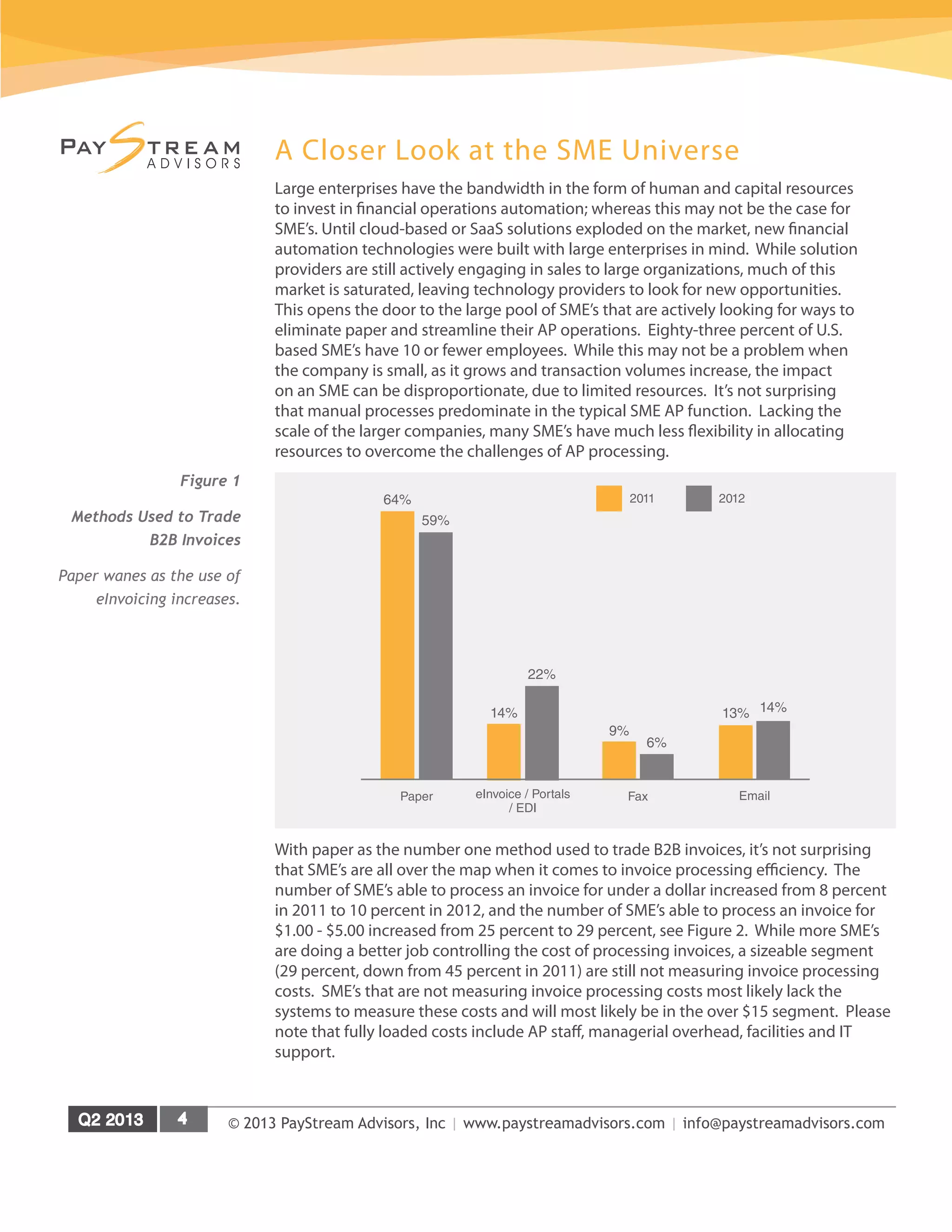
(eInvoicing) continues to increase. Research reveals that 59 percent of respondents
report they are trading B2B invoices via paper, down 5 percent from 64 percent in 2011,
see Figure 1.
More suppliers (17 percent) are now submitting the majority of their invoices
electronically, a five percent increase from 2011. Aggressive supplier onboarding
programs, and free supplier portals are enticing more suppliers to adopt
eInvoicing, which is working to help eliminate more paper for SME’s. PayStream
predicts this trend will continue as the barriers to supplier onboarding decrease.
On the purchasing side, electronic invoicing and automated workflows continue to
be the hot AP trends, and are both experiencing increased adoption. The integration
of eInvoicing and workflow functionality is gaining momentum, as a static electronic
invoice isn’t much better than a paper one. The true value of an electronic invoice lies
in how successful companies are at assimilating invoice data into accounting systems
and management workflows. This culture of integration yields the best return on
investment (ROI). An integrated approach to invoice automation works to automate
data capture, invoice coding, workflow, review and approval.
While the benefits of AP automation have been available for quite some time,
SMEs are now diving head first into the automation waters. SME’s are witnessing
the tactical benefits around cost containment and productivity enhancements,
in addition to the strategic advantages around improved supplier relations and
working capital improvements.
© 2013 PayStream Advisors, Inc | www.paystreamadvisors.com | info@paystreamadvisors.com
Executive Summary
PayStream Advisors has developed this Technology Insight report titled
“Automating Payables for the SME Market: Diving Head First into AP Automation
Waters”for small and mid-sized enterprises with an interest in payables
automation. The report includes the latest adoption statistics, current thinking, best
practices, strategies, and key performance indicators for evaluating and selecting
the solution that meets your needs.
In addition to trends and analysis of the latest survey data, this report profiles
leading solution providers and offers case studies illustrating how others have
used payables automation technologies to accelerate approval cycles, improve
productivity, capture discounts, strengthen working capital positions and improve
trading relationships. PayStream Advisors conducted in-depth surveys among AP
and other finance professionals, and this report contains the results.
Key findings in this report include:
»» More SME’s are doing a better job controlling invoice processing costs. The
number of SME’s able to process an invoice for under a dollar increased from 8
percent in 2011 to 10 percent in 2012.
»» More SME’s ranks themselves as innovators, having made significant
investments in automation – up 6 percent to 21 percent in 2012.
»» Front-end imaging witnessed the biggest increase in adoption, up 9 percent
from 2011 to 41 percent in 2012.
»» Increased AP automation has led to more SME’s to successfully capture supplier
discounts.
»» More suppliers (17 percent) are now submitting the majority of their invoices
electronically, a five percent increase from 2011.
»» Sixteen percent of SME’s are paying over half of their bills electronically, up from
12 percent in 2011.
»» Lack of budget (28 percent) remains the number one barrier to the adoption of
eInvoicing.
»» The fact that the majority of invoices are received in paper format remains the
number one challenge SME’s face in the invoice management process.
»» SME’s report eInvoicing (31 percent) as the number one 2013 financial
automation goal.
»» Challenges SME’s face in migrating from paper to eInvoicing continue to
decrease due to supplier onboarding and the explosion of SaaS solutions.
This report is based on the results of PayStream’s Electronic Invoice Benchmark, Invoice
Workflow and Automation, and Shared Services surveys of over 500 account payable
and procurement professionals at U.S. based enterprises. AP professionals at SME’s are
encouraged to explore AP automation solutions with the goal of reduced processing
costs, increased visibility, increased on-time payments and capture of supplier
© 2013 PayStream Advisors, Inc | www.paystreamadvisors.com | info@paystreamadvisors.com
discounts, improved vendor satisfaction, fewer duplicate invoices, and a reduction in
exceptions and discrepancies.
Based on the number of survey respondents, PayStream believes that the surveys have
a confidence level of +/- 5 percent.
For more information on this and other research reports available from PayStream
Advisors, visit PayStream’s Research Vault at www.paystreamadvisors.com.
© 2013 PayStream Advisors, Inc | www.paystreamadvisors.com | info@paystreamadvisors.com
A Closer Look at the SME Universe
Large enterprises have the bandwidth in the form of human and capital resources
to invest in financial operations automation; whereas this may not be the case for
SME’s. Until cloud-based or SaaS solutions exploded on the market, new financial
automation technologies were built with large enterprises in mind. While solution
providers are still actively engaging in sales to large organizations, much of this
market is saturated, leaving technology providers to look for new opportunities.
This opens the door to the large pool of SME’s that are actively looking for ways to
eliminate paper and streamline their AP operations. Eighty-three percent of U.S.
based SME’s have 10 or fewer employees. While this may not be a problem when
the company is small, as it grows and transaction volumes increase, the impact
on an SME can be disproportionate, due to limited resources. It’s not surprising
that manual processes predominate in the typical SME AP function. Lacking the
scale of the larger companies, many SME’s have much less flexibility in allocating
resources to overcome the challenges of AP processing.
With paper as the number one method used to trade B2B invoices, it’s not surprising
that SME’s are all over the map when it comes to invoice processing efficiency. The
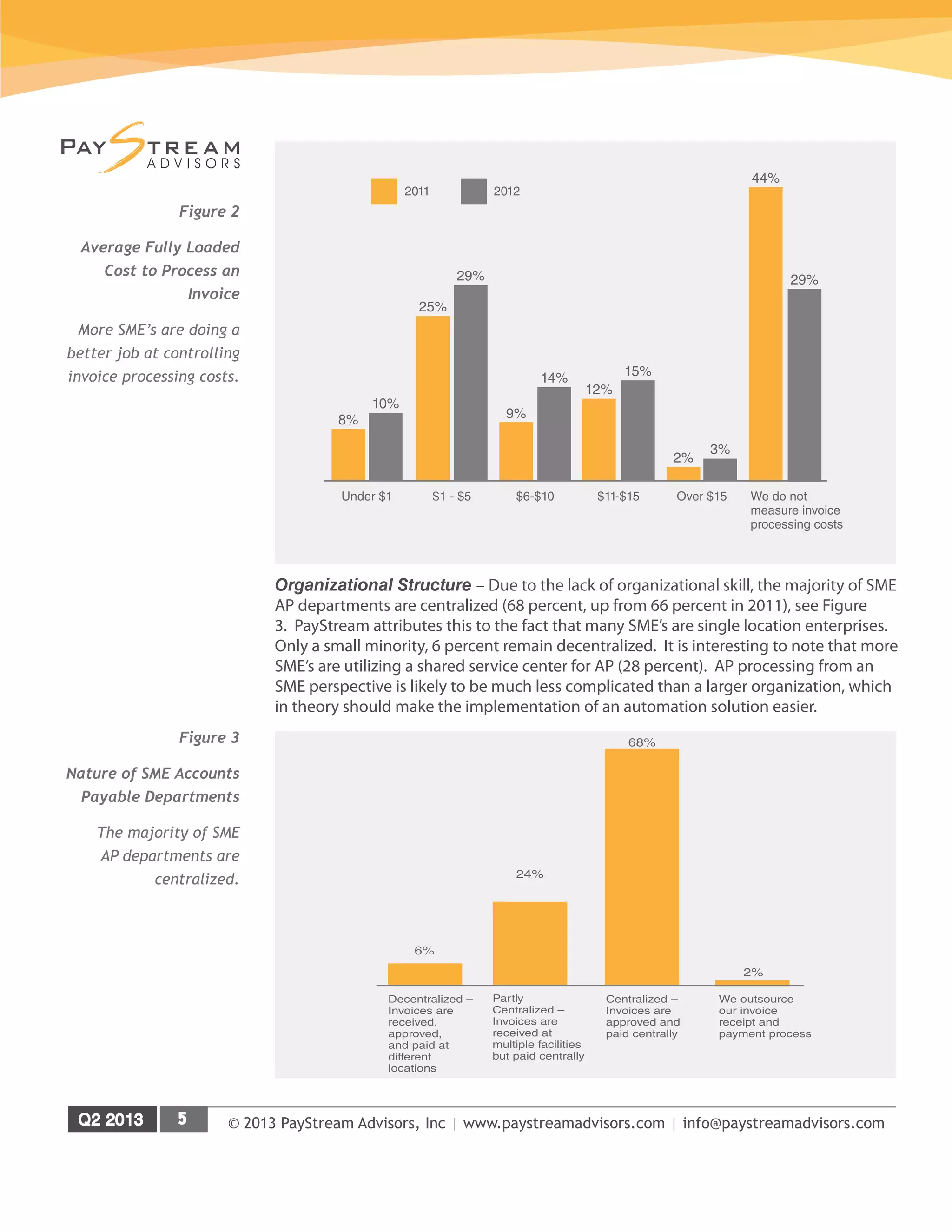
number of SME’s able to process an invoice for under a dollar increased from 8 percent
in 2011 to 10 percent in 2012, and the number of SME’s able to process an invoice for
$1.00 - $5.00 increased from 25 percent to 29 percent, see Figure 2. While more SME’s
are doing a better job controlling the cost of processing invoices, a sizeable segment
(29 percent, down from 45 percent in 2011) are still not measuring invoice processing
costs. SME’s that are not measuring invoice processing costs most likely lack the
systems to measure these costs and will most likely be in the over $15 segment. Please
note that fully loaded costs include AP staff, managerial overhead, facilities and IT
support.
Figure 1
Methods Used to Trade
B2B Invoices
Paper wanes as the use of
eInvoicing increases.
64%
59%
Paper eInvoice / Portals
/ EDI
14%
22%
9%
6%
Fax
13% 14%
Email
2011 2012
© 2013 PayStream Advisors, Inc | www.paystreamadvisors.com | info@paystreamadvisors.com
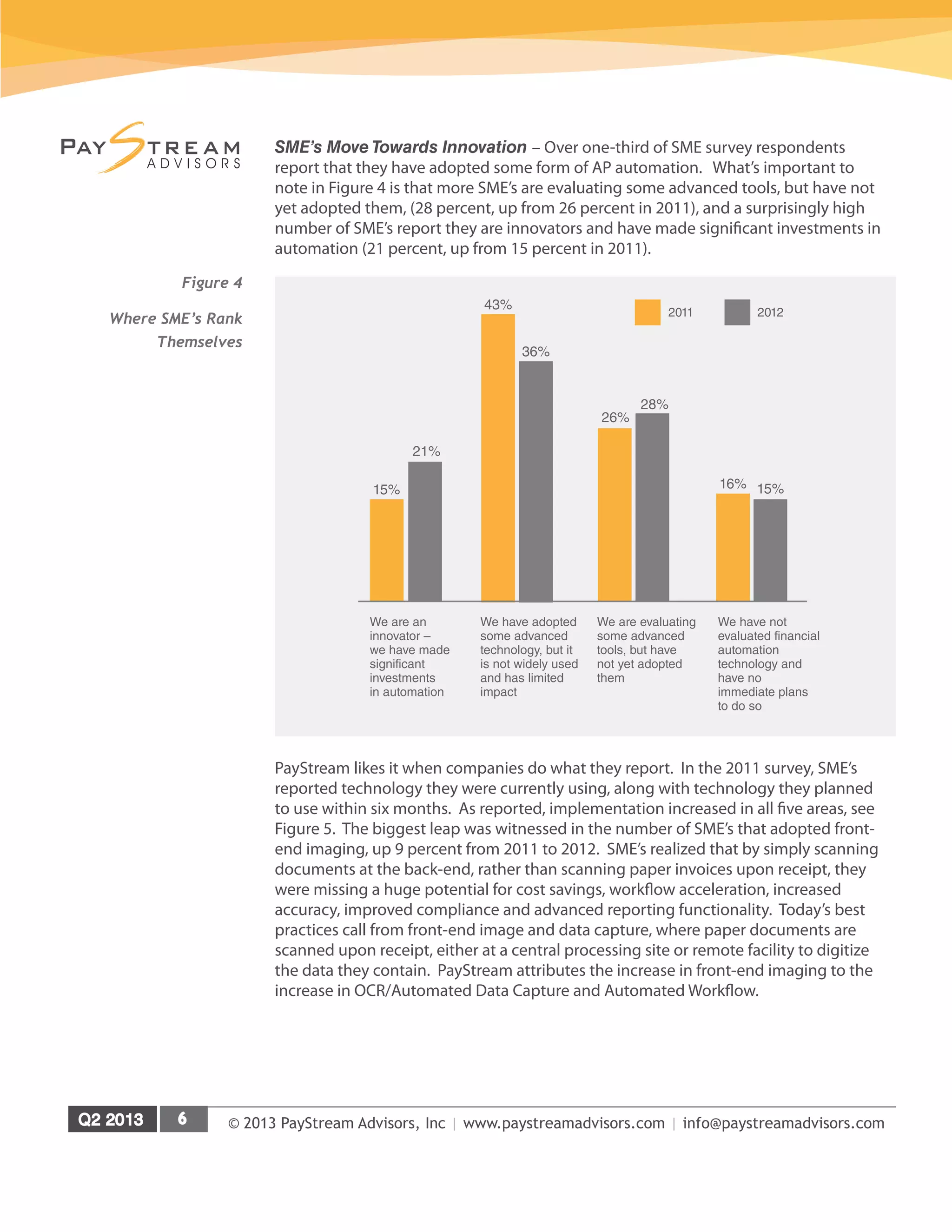
Organizational Structure – Due to the lack of organizational skill, the majority of SME
AP departments are centralized (68 percent, up from 66 percent in 2011), see Figure
3. PayStream attributes this to the fact that many SME’s are single location enterprises.
Only a small minority, 6 percent remain decentralized. It is interesting to note that more
SME’s are utilizing a shared service center for AP (28 percent). AP processing from an
SME perspective is likely to be much less complicated than a larger organization, which
in theory should make the implementation of an automation solution easier.
8%
10%
Under $1 $1 - $5
25%
29%
9%
14%
$6-$10
12%
15%
$11-$15
2%
3%
Over $15
44%
29%
We do not
measure invoice
processing costs
2011 2012
Figure 2
Average Fully Loaded
Cost to Process an
Invoice
More SME’s are doing a
better job at controlling
invoice processing costs.
2%
68%
24%
6%
We outsource
our invoice
receipt and
payment process
Centralized –
Invoices are
approved and
paid centrally
Partly
Centralized –
Invoices are
received at
multiple facilities
but paid centrally
Decentralized –
Invoices are
received,
approved,
and paid at
different
locations
Figure 3
Nature of SME Accounts
Payable Departments
The majority of SME
AP departments are
centralized.
© 2013 PayStream Advisors, Inc | www.paystreamadvisors.com | info@paystreamadvisors.com
SME’s Move Towards Innovation – Over one-third of SME survey respondents
report that they have adopted some form of AP automation. What’s important to
note in Figure 4 is that more SME’s are evaluating some advanced tools, but have not
yet adopted them, (28 percent, up from 26 percent in 2011), and a surprisingly high
number of SME’s report they are innovators and have made significant investments in
automation (21 percent, up from 15 percent in 2011).
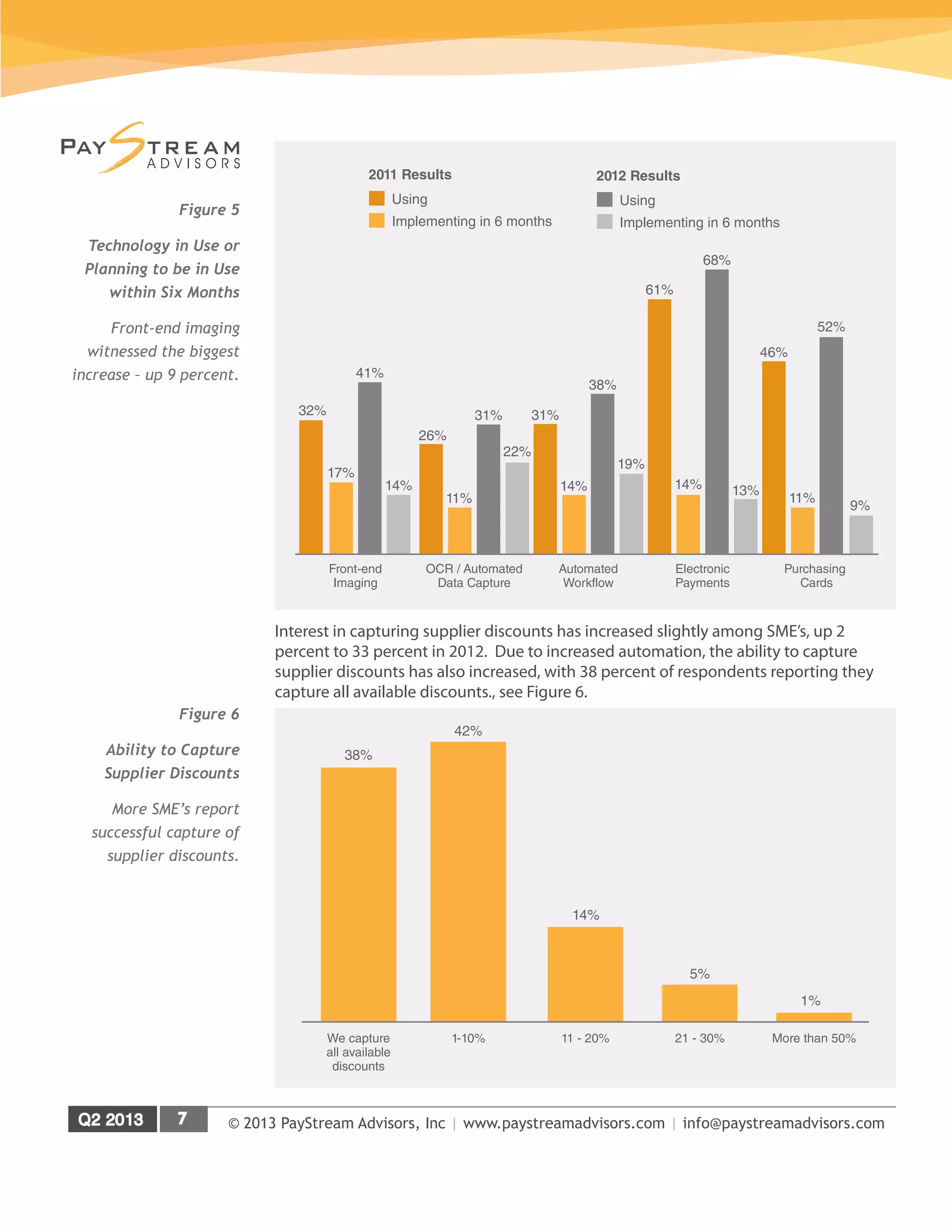
PayStream likes it when companies do what they report. In the 2011 survey, SME’s
reported technology they were currently using, along with technology they planned
to use within six months. As reported, implementation increased in all five areas, see
Figure 5. The biggest leap was witnessed in the number of SME’s that adopted front-
end imaging, up 9 percent from 2011 to 2012. SME’s realized that by simply scanning
documents at the back-end, rather than scanning paper invoices upon receipt, they
were missing a huge potential for cost savings, workflow acceleration, increased
accuracy, improved compliance and advanced reporting functionality. Today’s best
practices call from front-end image and data capture, where paper documents are
scanned upon receipt, either at a central processing site or remote facility to digitize
the data they contain. PayStream attributes the increase in front-end imaging to the
increase in OCR/Automated Data Capture and Automated Workflow.
15%
21%
43%
36%
26%
28%
16% 15%
2011 2012
We have not
evaluated financial
automation
technology and
have no
immediate plans
to do so
We are evaluating
some advanced
tools, but have
not yet adopted
them
We have adopted
some advanced
technology, but it
is not widely used
and has limited
impact
We are an
innovator –
we have made
significant
investments
in automation
Figure 4
Where SME’s Rank
Themselves
© 2013 PayStream Advisors, Inc | www.paystreamadvisors.com | info@paystreamadvisors.com
Interest in capturing supplier discounts has increased slightly among SME’s, up 2
percent to 33 percent in 2012. Due to increased automation, the ability to capture
supplier discounts has also increased, with 38 percent of respondents reporting they
capture all available discounts., see Figure 6.
Figure 5
Technology in Use or
Planning to be in Use
within Six Months
Front-end imaging
witnessed the biggest
increase – up 9 percent.
32%
17%
41%
14%
Front-end
Imaging
26%
11%
31%
22%
OCR / Automated
Data Capture
31%
14%
38%
19%
Automated
Workflow
68%
61%
14% 13%
Electronic
Payments
46%
52%
11%
9%
Purchasing
Cards
Implementing in 6 months
Using
2011 Results
Implementing in 6 months
Using
2012 Results
Figure 6
Ability to Capture
Supplier Discounts
More SME’s report
successful capture of
supplier discounts.
5%
21 - 30%
1%
More than 50%
14%
11 - 20%
42%
1-10%We capture
all available
discounts
38%
© 2013 PayStream Advisors, Inc | www.paystreamadvisors.com | info@paystreamadvisors.com
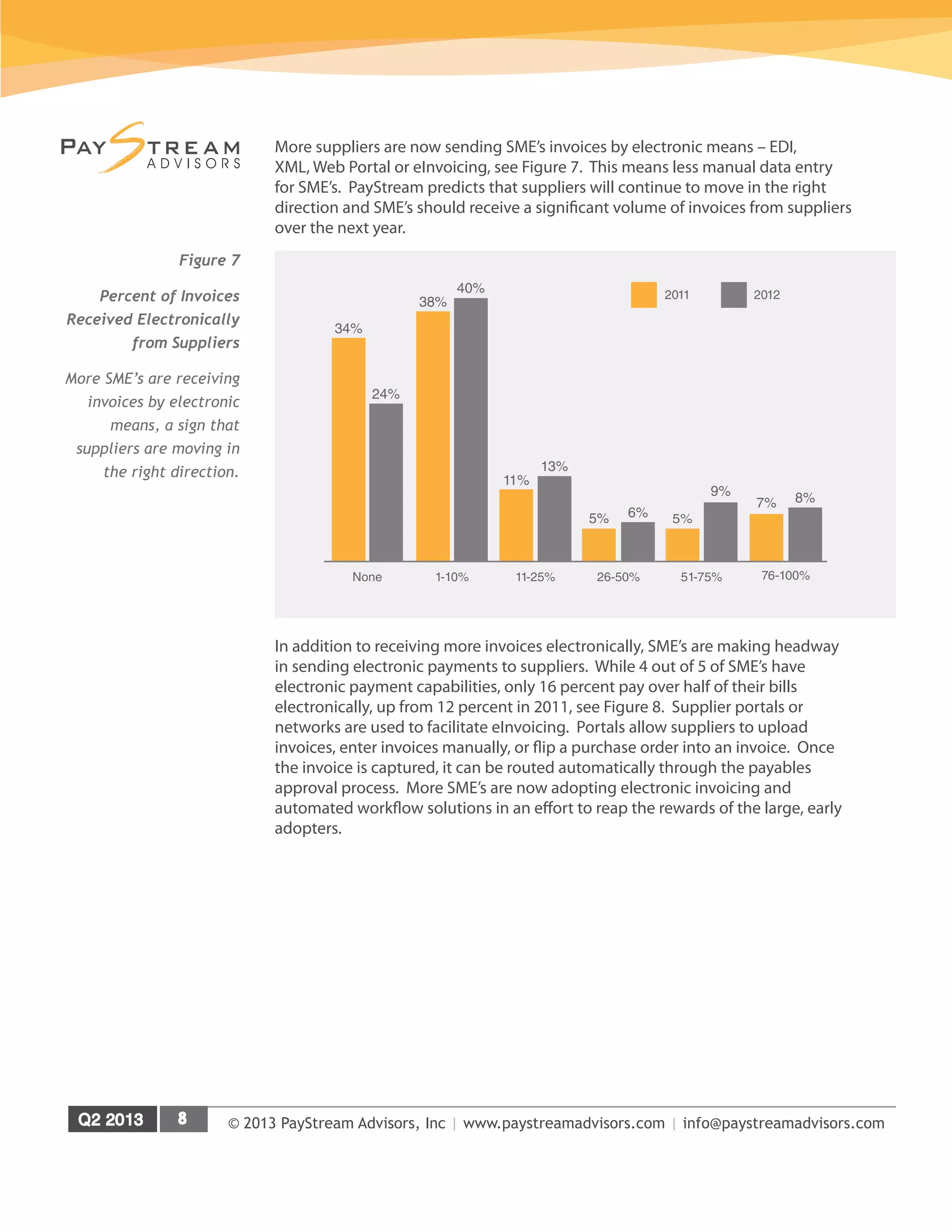
More suppliers are now sending SME’s invoices by electronic means – EDI,
XML, Web Portal or eInvoicing, see Figure 7. This means less manual data entry
for SME’s. PayStream predicts that suppliers will continue to move in the right
direction and SME’s should receive a significant volume of invoices from suppliers
over the next year.
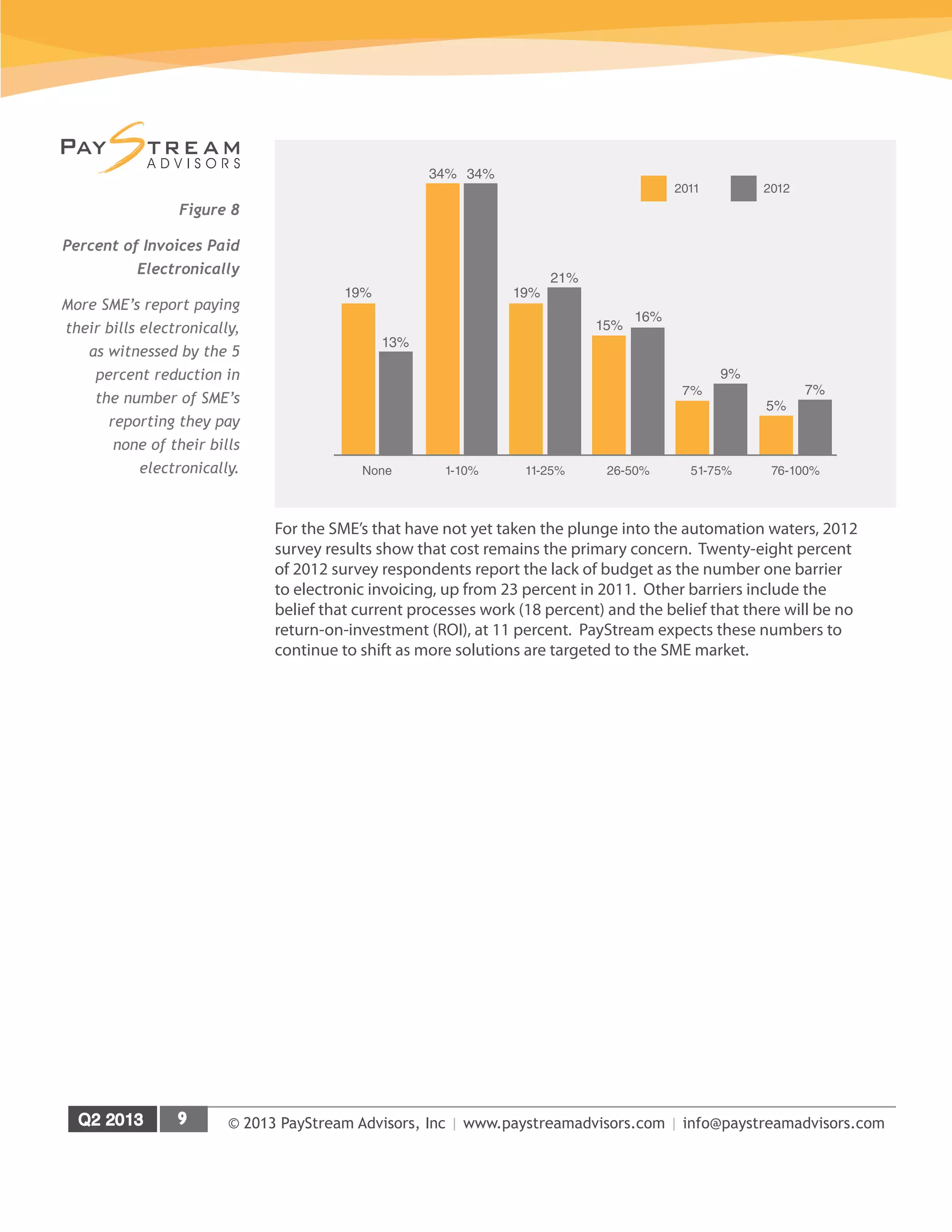
In addition to receiving more invoices electronically, SME’s are making headway
in sending electronic payments to suppliers. While 4 out of 5 of SME’s have
electronic payment capabilities, only 16 percent pay over half of their bills
electronically, up from 12 percent in 2011, see Figure 8. Supplier portals or
networks are used to facilitate eInvoicing. Portals allow suppliers to upload
invoices, enter invoices manually, or flip a purchase order into an invoice. Once
the invoice is captured, it can be routed automatically through the payables
approval process. More SME’s are now adopting electronic invoicing and
automated workflow solutions in an effort to reap the rewards of the large, early
adopters.
5%
9%
51-75%
34%
24%
None 1-10%
38%
40%
11%
13%
11-25%
5% 6%
26-50%
7% 8%
76-100%
2011 2012
Figure 7
Percent of Invoices
Received Electronically
from Suppliers
More SME’s are receiving
invoices by electronic
means, a sign that
suppliers are moving in
the right direction.
© 2013 PayStream Advisors, Inc | www.paystreamadvisors.com | info@paystreamadvisors.com
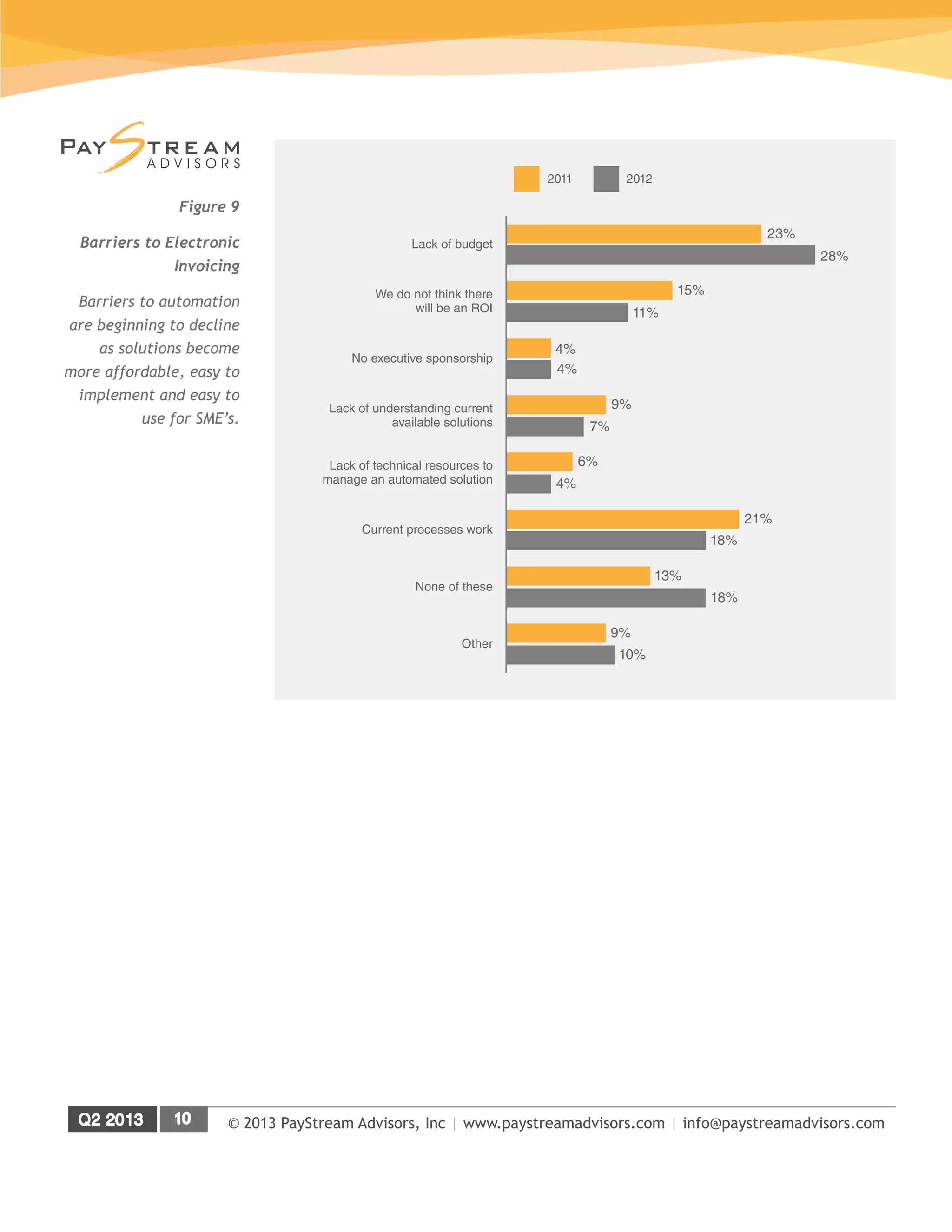
For the SME’s that have not yet taken the plunge into the automation waters, 2012
survey results show that cost remains the primary concern. Twenty-eight percent
of 2012 survey respondents report the lack of budget as the number one barrier
to electronic invoicing, up from 23 percent in 2011. Other barriers include the
belief that current processes work (18 percent) and the belief that there will be no
return-on-investment (ROI), at 11 percent. PayStream expects these numbers to
continue to shift as more solutions are targeted to the SME market.
Figure 8
Percent of Invoices Paid
Electronically
More SME’s report paying
their bills electronically,
as witnessed by the 5
percent reduction in
the number of SME’s
reporting they pay
none of their bills
electronically.
7%
9%
51-75%
19%
13%
None 1-10%
34% 34%
19%
21%
11-25%
15%
16%
26-50%
5%
7%
76-100%
2011 2012
© 2013 PayStream Advisors, Inc | www.paystreamadvisors.com | info@paystreamadvisors.com
Figure 9
Barriers to Electronic
Invoicing
Barriers to automation
are beginning to decline
as solutions become
more affordable, easy to
implement and easy to
use for SME’s.
Lack of budget
23%
28%
We do not think there
will be an ROI
15%
11%
No executive sponsorship
4%
4%
Lack of technical resources to
manage an automated solution
6%
4%
Lack of understanding current
available solutions
9%
7%
Current processes work
21%
18%
13%
18%
None of these
9%
10%
Other
2011 2012
© 2013 PayStream Advisors, Inc | www.paystreamadvisors.com | info@paystreamadvisors.com
SME Opportunities and Challenges
Front-end imaging, electronic invoicing and automated workflow are experiencing
increased adoption among SME’s as companies strive to migrate from a manual
paper-based invoice system to an efficient automated system. The convergence
of these three technologies presents SME’s with a single, comprehensive solution
that can handle both paper and electronic invoices through a common automated
process. This holistic approach to electronic invoicing and automated workflow is
gaining momentum, and yields the best ROI. An integrated approach to invoice
automation works to automate data capture, invoice coding, workflow, review and
approval.
Paper is still the number one method used to trade B2B invoices, see Figure 1.
Paper and manual processes are the enemy of efficiency. Paper invoices result
in manual keying, manual routing and the opportunity for errors, lost invoices,
discrepancies, exceptions, late payments, missed discounts, etc. Routing paper
invoices for payment is time consuming and leads to other problems downstream,
including the lack of visibility into outstanding invoices and the inability to
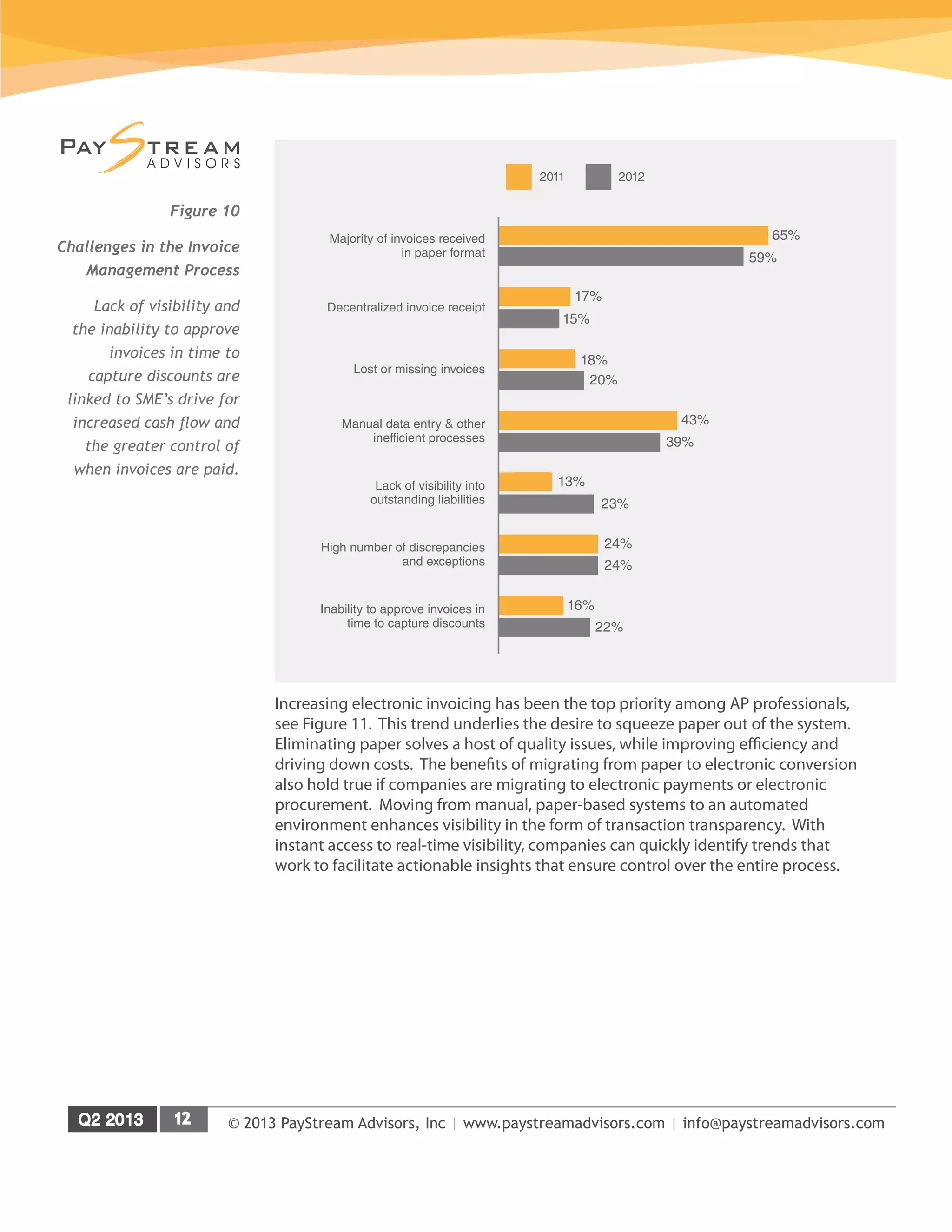
capture supplier discounts. The 2012 survey results reveal that the number
one challenge in the invoice management process is still that the majority of
invoices are received in paper format, see Figure 10. By eliminating the paper,
AP departments can eliminate all the other challenges in the invoice management
process.
The increase in respondents reporting lack of visibility into outstanding liabilities,
up 10 percent from 2011, and the inability to approve invoices in time to capture
discounts, up 6 percent from 2011, reveal that momentum continues to build
for broader applications of AP automation among SME’s. Once accuracy
and efficiency driven, AP automation solutions are now being utilized as a
management information tool for real-time spend visibility and discount capture.
© 2013 PayStream Advisors, Inc | www.paystreamadvisors.com | info@paystreamadvisors.com
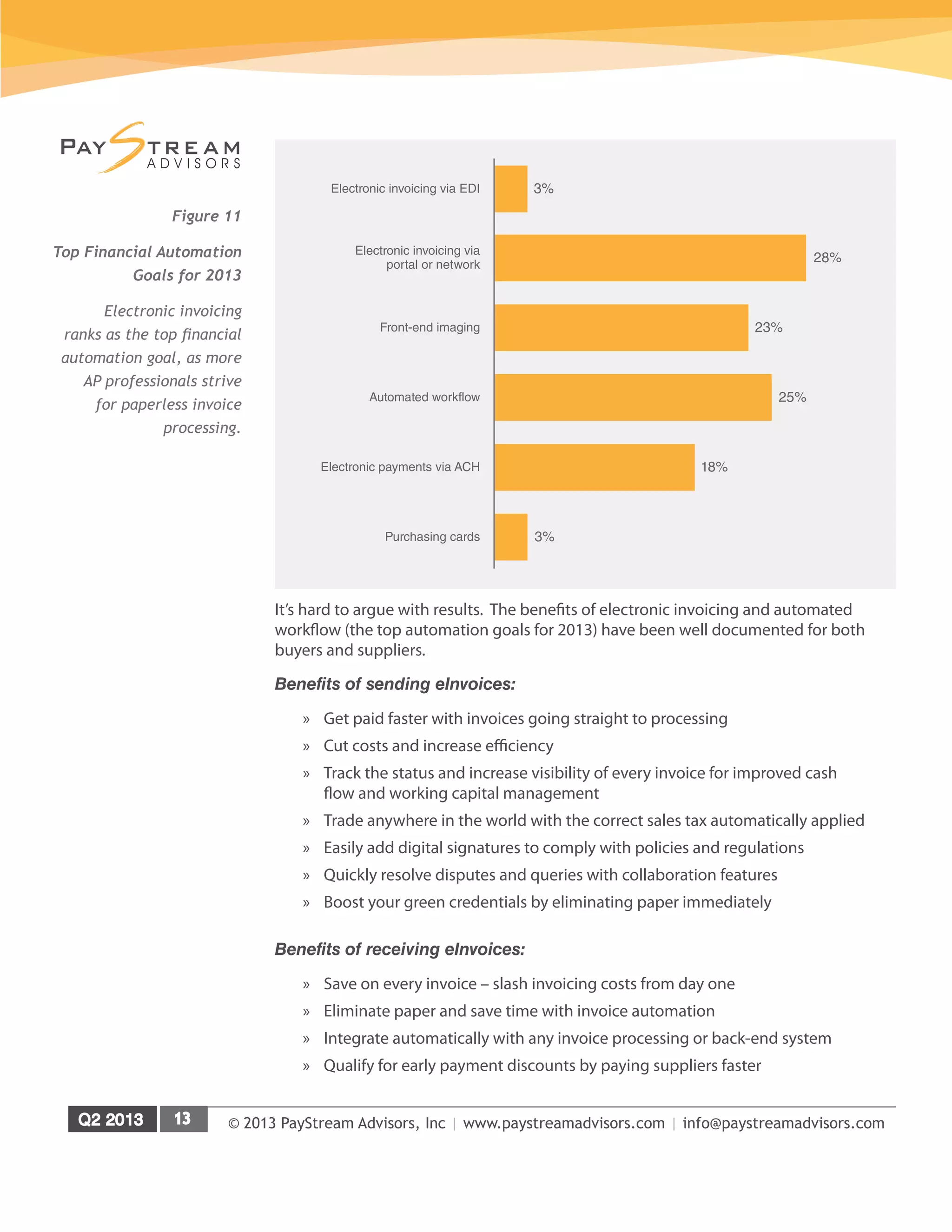
Increasing electronic invoicing has been the top priority among AP professionals,
see Figure 11. This trend underlies the desire to squeeze paper out of the system.
Eliminating paper solves a host of quality issues, while improving efficiency and
driving down costs. The benefits of migrating from paper to electronic conversion
also hold true if companies are migrating to electronic payments or electronic
procurement. Moving from manual, paper-based systems to an automated
environment enhances visibility in the form of transaction transparency. With
instant access to real-time visibility, companies can quickly identify trends that
work to facilitate actionable insights that ensure control over the entire process.
Majority of invoices received
in paper format
65%
59%
Decentralized invoice receipt
17%
15%
Lost or missing invoices
18%
20%
Lack of visibility into
outstanding liabilities
13%
23%
Manual data entry & other
inefficient processes
43%
39%
High number of discrepancies
and exceptions
24%
24%
16%
22%
Inability to approve invoices in
time to capture discounts
2011 2012
Figure 10
Challenges in the Invoice
Management Process
Lack of visibility and
the inability to approve
invoices in time to
capture discounts are
linked to SME’s drive for
increased cash flow and
the greater control of
when invoices are paid.
© 2013 PayStream Advisors, Inc | www.paystreamadvisors.com | info@paystreamadvisors.com
It’s hard to argue with results. The benefits of electronic invoicing and automated
workflow (the top automation goals for 2013) have been well documented for both
buyers and suppliers.
Benefits of sending eInvoices:
»» Get paid faster with invoices going straight to processing
»» Cut costs and increase efficiency
»» Track the status and increase visibility of every invoice for improved cash
flow and working capital management
»» Trade anywhere in the world with the correct sales tax automatically applied
»» Easily add digital signatures to comply with policies and regulations
»» Quickly resolve disputes and queries with collaboration features
»» Boost your green credentials by eliminating paper immediately
Benefits of receiving eInvoices:
»» Save on every invoice – slash invoicing costs from day one
»» Eliminate paper and save time with invoice automation
»» Integrate automatically with any invoice processing or back-end system
»» Qualify for early payment discounts by paying suppliers faster
Figure 11
Top Financial Automation
Goals for 2013
Electronic invoicing
ranks as the top financial
automation goal, as more
AP professionals strive
for paperless invoice
processing.
3%Electronic invoicing via EDI
28%
Electronic invoicing via
portal or network
23%Front-end imaging
25%Automated workflow
18%Electronic payments via ACH
3%Purchasing cards
© 2013 PayStream Advisors, Inc | www.paystreamadvisors.com | info@paystreamadvisors.com
»» Bring new suppliers on board faster and get the relationship off to a flying
start
»» Free up office space with easy-to-use electronic invoice archiving
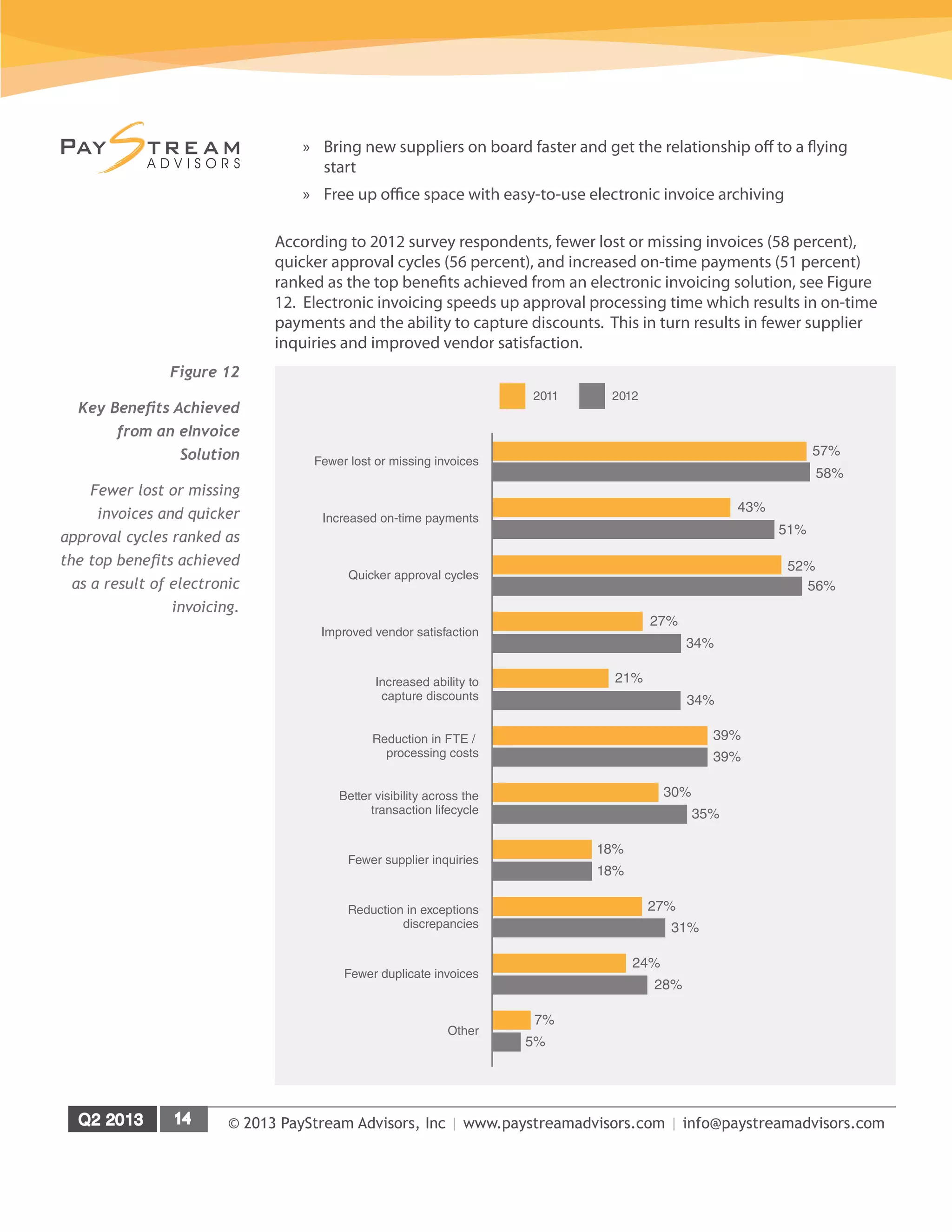
According to 2012 survey respondents, fewer lost or missing invoices (58 percent),
quicker approval cycles (56 percent), and increased on-time payments (51 percent)
ranked as the top benefits achieved from an electronic invoicing solution, see Figure
12. Electronic invoicing speeds up approval processing time which results in on-time
payments and the ability to capture discounts. This in turn results in fewer supplier
inquiries and improved vendor satisfaction.
Figure 12
Key Benefits Achieved
from an eInvoice
Solution
Fewer lost or missing
invoices and quicker
approval cycles ranked as
the top benefits achieved
as a result of electronic
invoicing.
Fewer lost or missing invoices
57%
58%
Increased on-time payments
43%
51%
Quicker approval cycles
52%
56%
Increased ability to
capture discounts
21%
34%
Improved vendor satisfaction
27%
34%
Reduction in FTE /
processing costs
39%
39%
30%
35%
Better visibility across the
transaction lifecycle
18%
18%
Fewer supplier inquiries
Reduction in exceptions
discrepancies
27%
31%
24%
28%
Fewer duplicate invoices
7%
5%
Other
2011 2012
© 2013 PayStream Advisors, Inc | www.paystreamadvisors.com | info@paystreamadvisors.com
Barriers to Automation
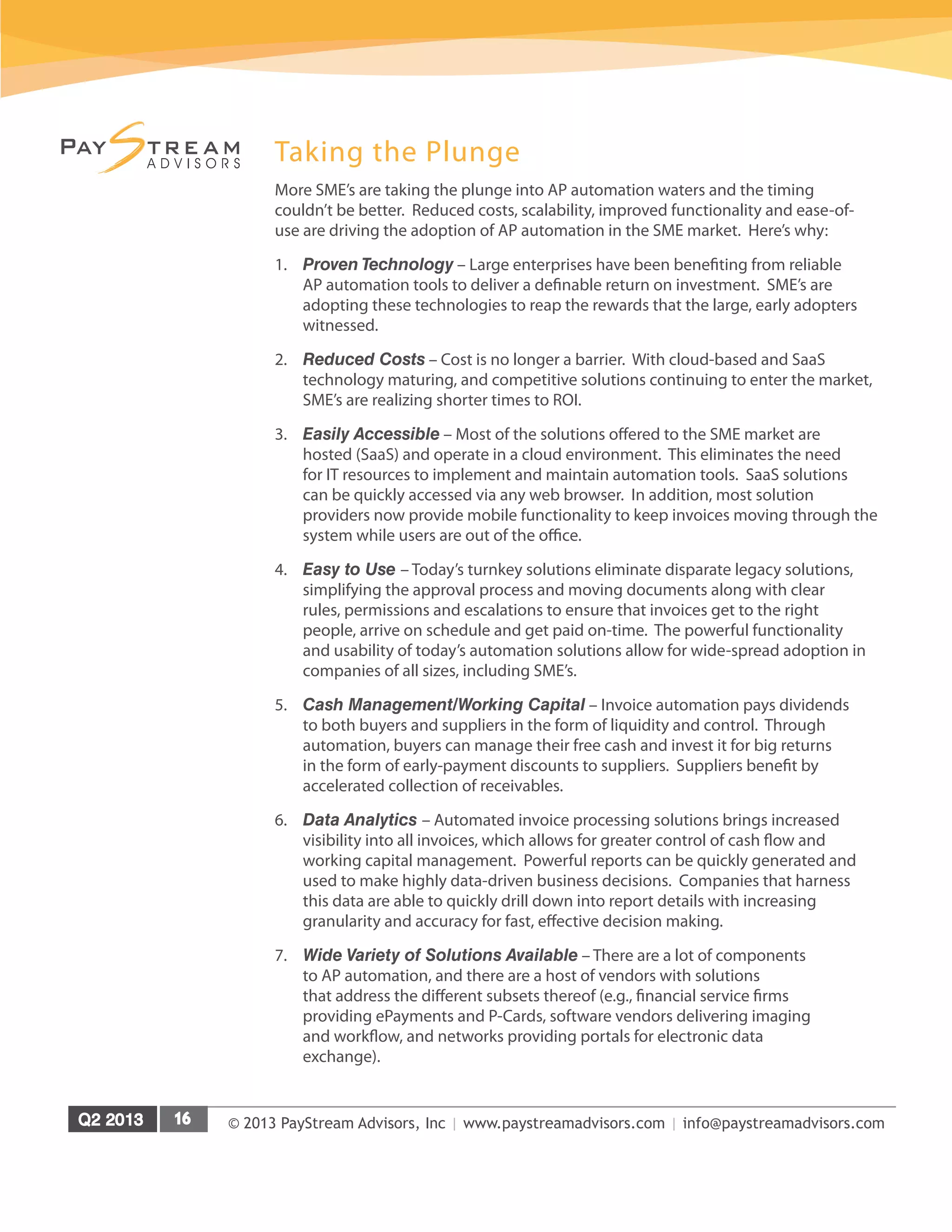
Success is predicated upon the ability to change the operating culture. Though
large organizations have a reputation for being less nimble than smaller
businesses, the biggest hurdle for an SME is nonetheless internal change
management, see Figure 13. It’s worth noting that the challenge of gaining
supplier adoption dropped from 2.5% in 2011 to 2.0 percent in 2012 due to the
prevalence of aggressive supplier onboarding programs and free supplier portals.
PayStream predicts the challenge of supplier adoption to continue to decrease
with improved supplier portals, supplier onboarding and increased emphasis on
win-win functionality, including accelerated payment, free supplier analytics, and
dynamic discount management.
While technical challenges were once a formidable obstacle, the explosion of
Software-as-a-Service (SaaS) and Cloud computing has been a real game
changer for SME’s. SaaS applications can be deployed rapidly at a lower cost
and with minimal IT resources required. An added bonus of SaaS applications
is they are highly scalable. Growing SME’s can quickly add users and additional
functionalities without having to worry about additional infrastructure and the
related support.
Figure 13
Biggest Challenges SME’s
Face in Migrating from
Paper to eInvoicing
The biggest barrier for
an SME remains internal
change management.
2%
Gaining supplier
adoption
2.8%
Internal change
management
2.3%
Integration with in-house
and supplier systems
2.2%
Solution does not
function as expected
2.2%Other
© 2013 PayStream Advisors, Inc | www.paystreamadvisors.com | info@paystreamadvisors.com
Taking the Plunge
More SME’s are taking the plunge into AP automation waters and the timing
couldn’t be better. Reduced costs, scalability, improved functionality and ease-of-
use are driving the adoption of AP automation in the SME market. Here’s why:
1.	 Proven Technology – Large enterprises have been benefiting from reliable
AP automation tools to deliver a definable return on investment. SME’s are
adopting these technologies to reap the rewards that the large, early adopters
witnessed.
2.	 Reduced Costs – Cost is no longer a barrier. With cloud-based and SaaS
technology maturing, and competitive solutions continuing to enter the market,
SME’s are realizing shorter times to ROI.
3.	 Easily Accessible – Most of the solutions offered to the SME market are
hosted (SaaS) and operate in a cloud environment. This eliminates the need
for IT resources to implement and maintain automation tools. SaaS solutions
can be quickly accessed via any web browser. In addition, most solution
providers now provide mobile functionality to keep invoices moving through the
system while users are out of the office.
4.	 Easy to Use – Today’s turnkey solutions eliminate disparate legacy solutions,
simplifying the approval process and moving documents along with clear
rules, permissions and escalations to ensure that invoices get to the right
people, arrive on schedule and get paid on-time. The powerful functionality
and usability of today’s automation solutions allow for wide-spread adoption in
companies of all sizes, including SME’s.
5.	 Cash Management/Working Capital – Invoice automation pays dividends
to both buyers and suppliers in the form of liquidity and control. Through
automation, buyers can manage their free cash and invest it for big returns
in the form of early-payment discounts to suppliers. Suppliers benefit by
accelerated collection of receivables.
6.	 Data Analytics – Automated invoice processing solutions brings increased
visibility into all invoices, which allows for greater control of cash flow and
working capital management. Powerful reports can be quickly generated and
used to make highly data-driven business decisions. Companies that harness
this data are able to quickly drill down into report details with increasing
granularity and accuracy for fast, effective decision making.
7.	 Wide Variety of Solutions Available – There are a lot of components
to AP automation, and there are a host of vendors with solutions
that address the different subsets thereof (e.g., financial service firms
providing ePayments and P-Cards, software vendors delivering imaging
and workflow, and networks providing portals for electronic data
exchange).
© 2013 PayStream Advisors, Inc | www.paystreamadvisors.com | info@paystreamadvisors.com
8.	 Scalable and Configurable – Growing organizations like SME’s benefit when the
automation tools they employ have an extended lifespan. Payables automation
tools have been built with large enterprises in mind. They are feature rich, which
allow a small or medium size company to grow into the solution. SME’s don’t have
to start out utilizing everything at once, and can turn on certain functions as they
are needed. This makes these solutions very scalable from an SME perspective.
They are also portable, so if an organization moves from one ERP system to another,
you can continue to work from the same automated payable platform by simply
integrating it with the new system of record.
9.	 Outsourced Service Availability – Outsourced services are available to augment
the SME that has limited resources. SME’s don’t have to do it all on their own.
Solution providers can help fill the resource gaps in a number of areas, from remote
scanning to supplier onboarding.
© 2013 PayStream Advisors, Inc | www.paystreamadvisors.com | info@paystreamadvisors.com
Payables Automation – From Front to Back
All AP automation solutions share the common goal of improving process
management. However, not every solution follows the same approach, or provides
similar functionality at each step of the cycle. Accounts payable professionals
should understand the different forms that invoice automation solutions can
assume in order to decide which methods would work best in their environment.
Back-End Document Capture and Archival -The simplest form of invoice
automation uses scanning technologies for back-end imaging and archival.
Operators batch and scan paper documents at the end of the invoice receipt-to-
pay process. AP staff then manually index the invoices after which the document
images are stored in an electronic repository for retrieval. While this eliminates
physical storage requirements, facilitates document retrieval for discrepancy
resolution and audits, and improves responsiveness to supplier inquiries, the
invoice approval process continues to follow its current manual and paper-
intensive course. Since scanning is done after the fact this storage and retrieval
solution is seldom used anymore because it fails to yield any improvement or
efficiency in workflow.
Front-End Document and Data Capture - When employing an imaging solution
at the front end of the invoice processing cycle; invoices are scanned remotely or
at a central processing facility upon receipt. Once scanned, images are enhanced
to optimize recognition and data is extracted from the documents using automated
image recognition technologies. Front-end document and data capture represents
a quantum leap over back-end imaging by facilitating improvements to the invoice
receipt-to-pay cycle, especially workflow automation.
Validation rules ensure that the data extracted is accurate, and many companies
now opt to automatically pay invoices that meet all validation rules, freeing
AP staff to focus on exceptions. Advanced systems put the onus of exception
and discrepancy correction back on suppliers, facilitating the evolution of AP
departments into profit centers focused on spend analytics and working capital
management.
Front-End Capture with Matching and Workflow - In a more advanced form,
invoice automation solutions combine front-end document and data capture
with matching and workflow capabilities to streamline and automate invoice
receipt and approval processing. Workflow-enabled invoice automation solutions
automate more of the invoice receipt- to-pay cycle than stand-alone document
and data capture solutions. Workflow solutions enable AP departments to
define how different types of invoices are processed. PO-based invoices can be
automatically matched against the purchase order and receipt documents, while
non-PO invoices can be routed to the people who must approve them. All tasks
are routed based on pre-defined business rules and user roles with access rights
set to match the organization’s existing approval hierarchy. Approvers are typically
notified via email when invoices require their approval. By clicking on the hyperlink
© 2013 PayStream Advisors, Inc | www.paystreamadvisors.com | info@paystreamadvisors.com
contained in the email messages and logging onto the system they can view, code
and approve the invoices online. Most solutions available today come bundled
with reminders, out-of-office delegation rules and escalation procedures to ensure
invoices are processed in a timely manner. They also deliver auditing, reporting
and management benefits that document and data capture solutions alone cannot
provide.
Automated Data Extraction Tools -Tools and technologies that facilitate the
extraction of information from scanned invoice images have had an interesting
life cycle, starting from template-based optical character recognition (OCR) to
free-form recognition and more recently, intelligent document recognition (IDR).
IDR systems enable end users to extract content from invoices without the
system having to learn the layout of the invoice and without requiring the coding
of rules or design form templates. Embedded fuzzy search methods improve the
extraction results by using other known data sources to automatically validate the
information before exporting it to the ERP and document management systems.
Consequently, more invoices can be processed straight through from scan to post
in the least amount of time and with a minimal amount of manual intervention.
Fuzzy logic can also make the IDR solution language-agnostic, allowing global
organizations to process high volumes of invoices in multiple languages.
Combining Electronic Invoicing with Imaging and Workflow - The most
sophisticated invoice automation solutions combine front-end document imaging
and data capture with electronic invoicing and automated workflow. This enables
organizations to process all the invoices - irrespective of whether they are
submitted in paper or electronic format - through a single, common process.
Under this scenario, suppliers are transitioned from paper to electronic invoice
submission, usually through a stand-alone portal or a shared supplier network.
Most solutions offer suppliers multiple options when it comes to submitting
electronic invoices - direct integration with ERP and billing applications to transmit
invoices in a hands-free manner without manual intervention, flipping purchase
orders into invoices and web forms and templates that can be used to generate
electronic invoices. Once invoices have been submitted, they can be subjected
to a range of validation criteria based on buyer-defined rules. Invoices that do
not meet any of the specified criteria are flagged as exceptions and suppliers
are asked to correct them while clean invoices are then forwarded for further
processing. For suppliers that continue to send paper invoices, organizations can
use front-end imaging and data capture to extract information from the invoices.
After data extraction, the converted invoices are processed using the same
matching and workflow rules as the electronic invoices.
Also gaining popularity is the outsourcing of the scanning and data capture
function that takes on the responsibility of receiving invoices, scanning them and
extracting the requisite data.
© 2013 PayStream Advisors, Inc | www.paystreamadvisors.com | info@paystreamadvisors.com
T&E Management - Organizations of all sizes can take advantage of the benefits of
automating their Travel and Expense (T&E) processes. Automation provides complete
end-to-end control of report submission, approval, reimbursement, reporting with data
analysis and integration into back end accounting systems. Having this integration
provides more visibility into spend with accurate accounting and detailed reporting
for every single transaction and expense category. When organizations have this
information at their disposal, they are equipped to determine exactly what areas in
their travel and expense spend are excessive and can put automated controls in place
to reduce runaway cost. The T&E automation space handles corporate card integration
as a standard feature. Card statements are integrated into today’s T&E systems, granting
complete visibility into spend. Not only can expense reports be filed quickly when
transactions are readily available, but merchant details accompanying each transaction
can make tracking and reporting easier. Statements can be recalled instantaneously
and analyzed for company violations or excessive spending.
Electronic Payments - Electronic payments have seen remarkable changes in
the past decade with the creation of new alternatives to paper checks. Recent
innovations include virtual or“ghost”credit cards, Single-Use Accounts, Buyer
Initiated Payments, ACH funds transfer, supplier-friendly web portals and
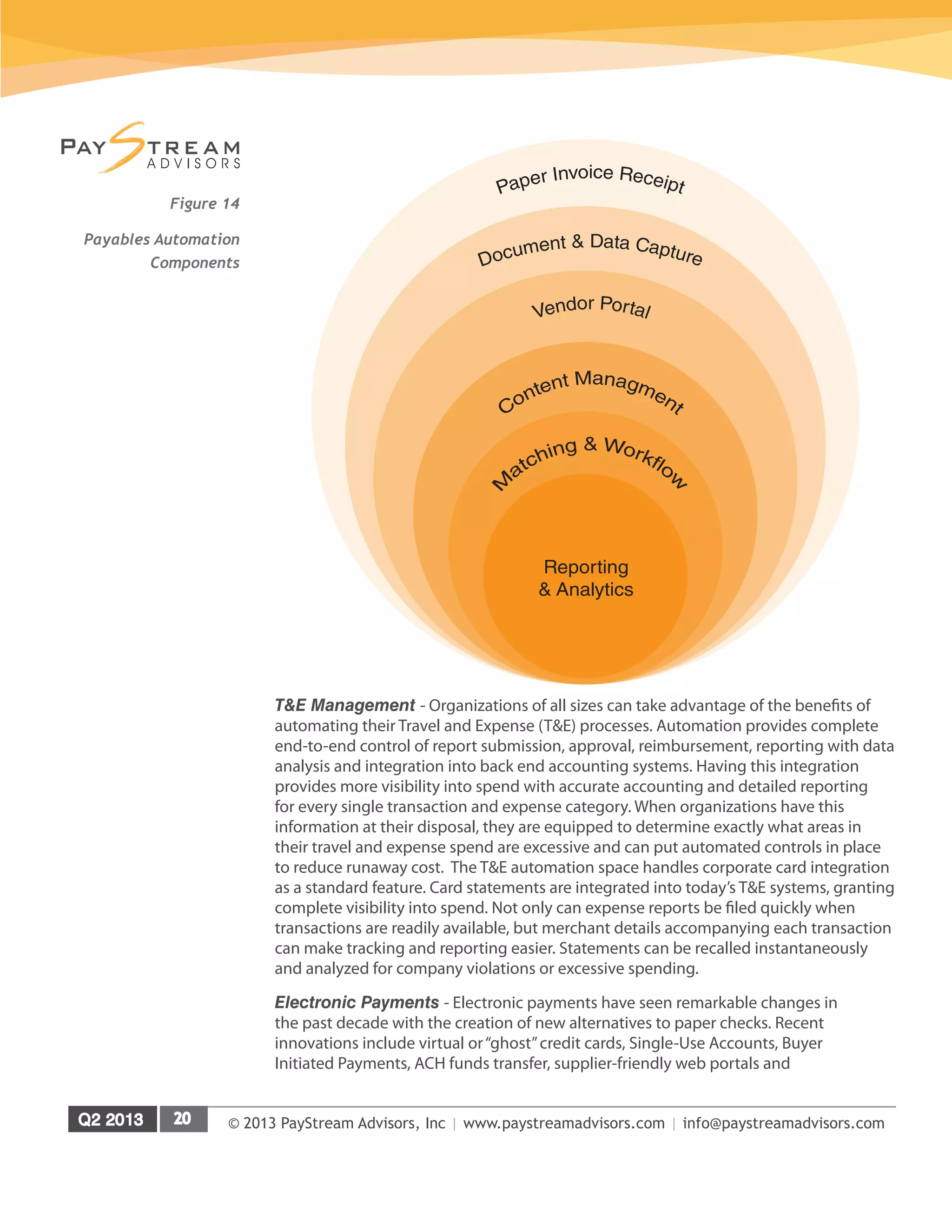
Figure 14
Payables Automation
Components
Reporting
& Analytics
© 2013 PayStream Advisors, Inc | www.paystreamadvisors.com | info@paystreamadvisors.com
collaborative networks. Once a legitimate concern, compatibility issues have
largely been relegated to the status of urban legends. Most ePayment solutions
on the market today integrate seamlessly and cost-effectively with major ERP,
AP, and Supply Chain systems. As more suppliers embrace ePay via ACH, there
has been an increasing concern about the loss of important detail inherent in
traditional ACH transactions. The recent emergence of payment and remittance
advice consolidation alleviates this issue. Buyer initiated payments offer buyers
and suppliers a fast track to electronic payments, without any significant IT burden.
None of the above electronic payment types are mutually exclusive from one
another or from paper checks. Depending on an organization’s level of innovation,
technological savvy and diversity of supplier base it can use a combination of the
different payment types to satisfy its unique financial and business requirements.
Commercial Cards - Commercial cards are unique as they not only support the
procurement function to purchase goods at the point of sale, and in many cases
without paper invoices, but also permit accounts payable professionals to automate
the settlement process. They have evolved into several types, including corporate
purchasing cards, travel and entertainment cards, and fleet cards that target specific
indirect spend categories, as well as one/multi-card systems that target multiple
indirect spend categories (e.g. virtual or“ghost”credit cards, Single-Use Accounts, and
Buyer Initiated Payments). Purchasing Card (P-card) programs are attractive because
of the automation and process efficiency they bring, especially to the purchase of
small items, where it is difficult to justify the high overhead of using requisitions,
purchase orders, approvals, matching and settlement by check through the AP process.
Increasingly, p-card programs are also being touted for the rebates that are provided by
the issuer based on how much is spent on the P-card.
eProcurement - Electronic procurement solutions streamline the purchasing process
by enabling organizations to connect to vendor catalogs, generate requisitions,
use sophisticated workflow tools for approval processing and deliver purchase
orders to suppliers electronically. Although the adoption of automation currently
remains skewed toward large corporations, many mid-sized and smaller companies
are also making great strides towards less paper, even paperless environments.
These aggressive technology adopters have learned that in many cases automation
diminishes the procure-to-pay cycle time from weeks to just days and delivers a rapid
return on investment. By automating each stage of the procure-to-pay cycle, from
electronic procurement to programmed exception handling and matching along with
enhanced dispute management and approval workflow, adopters can not only achieve
productivity gains and cost reductions, but also obtain traceable Sarbanes-Oxley
audit trails. There are six components within the eProcurement universe: purchase
requisition, requisition approval, workflow management, purchase order delivery,
receiving and reconciliation, and reporting and analysis.
© 2013 PayStream Advisors, Inc | www.paystreamadvisors.com | info@paystreamadvisors.com
Automated Payables Process
PayStream has identified 16 areas that impact automated accounts payable
processing from the point of receipt all the way through to payment. Once an
invoice or other payables data is captured electronically, the question to ask
is: Does this invoice need to be approved? The ability to derive an automated
answer by using business rules, which in turn trigger appropriate workflows, is
the centerpiece of an automated AP environment. If the answer to the question
is no, the system will move the invoice into the payment process. If the answer
is yes, the system will route it to the approving party along with any necessary
decision support documents and information. Business rules, flexible workflow
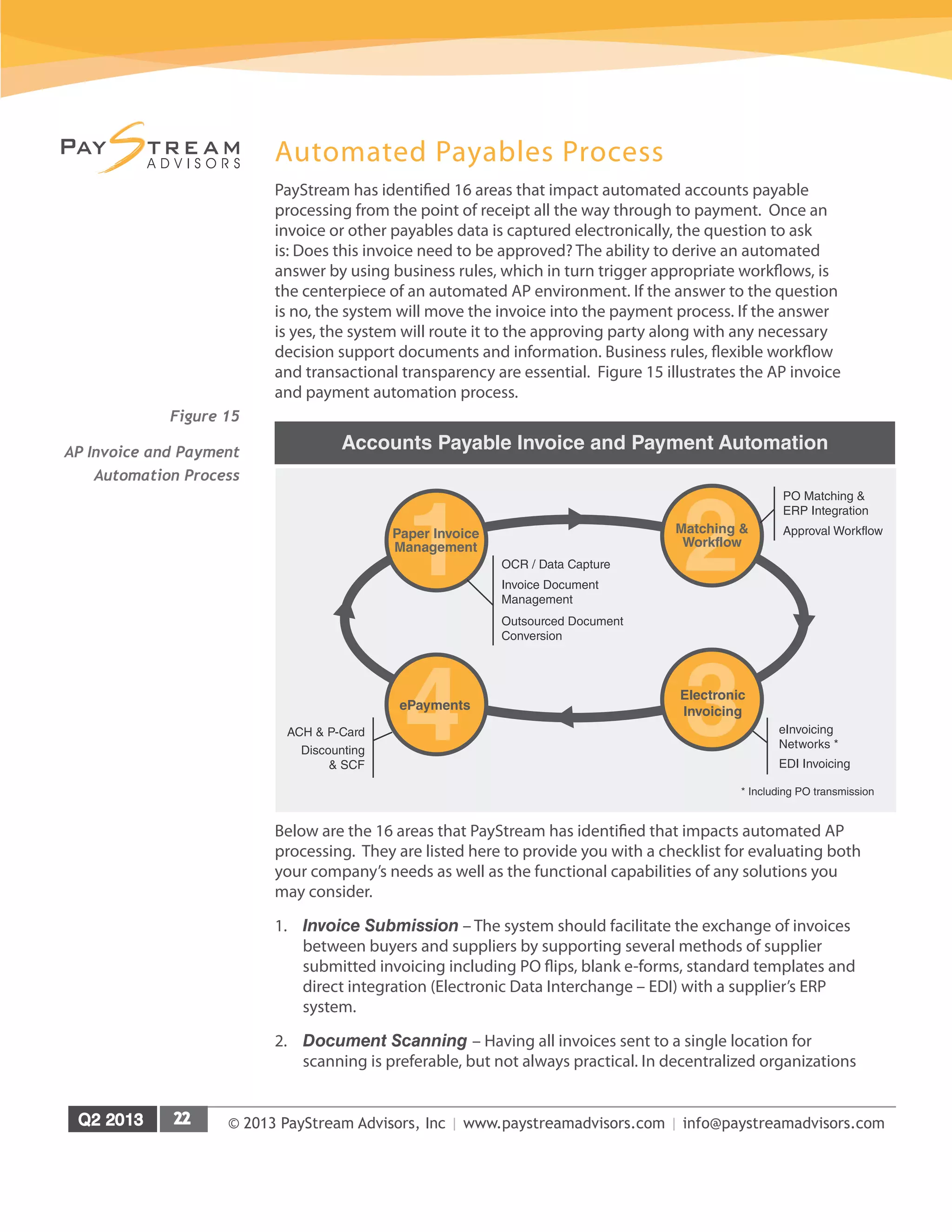
and transactional transparency are essential. Figure 15 illustrates the AP invoice
and payment automation process.
Below are the 16 areas that PayStream has identified that impacts automated AP
processing. They are listed here to provide you with a checklist for evaluating both
your company’s needs as well as the functional capabilities of any solutions you
may consider.
1.	 Invoice Submission – The system should facilitate the exchange of invoices
between buyers and suppliers by supporting several methods of supplier
submitted invoicing including PO flips, blank e-forms, standard templates and
direct integration (Electronic Data Interchange – EDI) with a supplier’s ERP
system.
2.	 Document Scanning – Having all invoices sent to a single location for
scanning is preferable, but not always practical. In decentralized organizations
1Paper Invoice
Management
2Matching &
Workflow
Accounts Payable Invoice and Payment Automation
OCR / Data Capture
Invoice Document
Management
Outsourced Document
Conversion
PO Matching &
ERP Integration
Approval Workflow
eInvoicing
Networks *
EDI Invoicing
* Including PO transmission
Discounting
& SCF
ACH & P-Card 4ePayments
3Electronic
Invoicing
Figure 15
AP Invoice and Payment
Automation Process
© 2013 PayStream Advisors, Inc | www.paystreamadvisors.com | info@paystreamadvisors.com
the best practice is to receive paper invoices in regional scanning centers and
then scan to one central repository.
3.	 Compliant and Secure Storage – The ability to capture and then maintain
both structured and unstructured data must be accomplished within a secure
environment that is not only compliant with all relevant regulatory and industry
standards, but also extends to the integrated process.
4.	 Invoice Recognition – It is very important to be able to capture line items
and not just header data. Without line item details automated systems must
forego the use of advanced matching and business rules to decipher apparent
exceptions. The use of free form ICR or IDR can provide an added level of
automation compared to a template driven OCR process.
5.	 Invoice Validation – The system must check every invoice for duplicity and
mathematical integrity. In a portal environment, checking invoices against a set
of buyer-defined criteria and notifying suppliers to correct any errors before the
invoice is accepted and routed provides an additional layer of validation.
6.	 Invoice Matching – This involves matching invoices with purchases, goods
receipt documents and/or contracts based on criteria configured in the system.
The system should also route any match exceptions for review and resolution.
7.	 Workflow Configuration – Administrators need the ability to configure and
change the business rules that determine how invoices will be routed to
appropriate users for review and approval.
8.	 Alerts and Notifications – The system should notify approvers of invoices
pending their review and escalating invoices to managers if no action is taken
within a specified period of time.
9.	 Payment Processing – The steps that buyers take to initiate, post and execute
payment, including preparation, processing, and submission of the payment
file to the financial institution need to be seamless.
10.	 ERP Integration – Besides the exchange of transactional data between the
invoice automation solution and the ERP, this stage also includes integration
with and posting of the payments to buyers’GL and accounting systems.
11.	 Remittance Management – Sending the remittance information to suppliers
via the portal in a format of the suppliers’choice is critical so that they can
easily transfer the remittance advices into their receivables systems.
12.	 Travel & Expense Receipts – Paper receipt capture, either scanned or via a
mail service, and matching those items to submitted expense reports or credit
card downloads (in addition to providing confirmation to the employee), must be
integrated with workflow providing approval, exception/discrepancy handling and
delivery to AP.
© 2013 PayStream Advisors, Inc | www.paystreamadvisors.com | info@paystreamadvisors.com
13.	 Card Management – The ability to capture complete details on all card
transactions is the necessary first step in order to support workflow driven
cost allocation and expense reporting activities as well as monitor usage
compliance.
14.	 Contract Management – Leading edge firms are implementing automated
contract management capabilities (typically for handling non-PO invoices
related to leases, utilities and other recurring bills) to further reduce manual
processing.
15.	 Mobile Apps – Delivering tasks and supporting documents to a mobile device
facilitates approval by executives who travel regularly. Most solutions on the
market today provide mobile functionality.
16.	 Business Intelligence – There is a wealth of information gleaned from the P2P
process, which can be used not only to comply with regulatory requirements but
also to provide valuable business intelligence for strategic spend analysis.
© 2013 PayStream Advisors, Inc | www.paystreamadvisors.com | info@paystreamadvisors.com
Anybill
Founded in 2001, Anybill provides end-to-end accounts payable automation for small
to medium enterprises (SME), as well as some of the world’s largest corporations
and institutions, encompassing a variety of industries. The company has consistently
experienced year-over-year double-digit growth, which is a testament to their ability to
meet market demands and customer requirements.
Anybill’s all-in-one approach to accounts payable automation, including invoice receipt,
invoice approval and invoice payment, is an easy-to-use, easy-to-implement solution.
It combines all the necessary pieces of AP automation into an integrated and complete
cloud-based package, allowing for instant upgrades and quick deployment, with little
IT involvement.
Website www.anybill.com
Founded 2001
Headquarters	 Washington, DC
Number of Employees 50+
Number of Customers	 1400+
Key Clients Portfolio includes Fortune 500 companies, large
enterprise, and small and medium enterprises
including not-for-profit organizations.
Target Verticals Not-for-profit, Banking, Financial Services, Retail,
Property Management and Professional Services
Partners / Resellers Accounting service, technology firms, financial
software companies, and other service providers
Solution Name AnyAP	
Solution Overview
Anybill’s end-to-end solution, AnyAP, is a cloud-based platform for automating the
accounts payable process, from invoice receipt and data capture to approval and
payment. AnyAP provides complete control and visibility over the entire AP process
with clear approval authority and robust reporting functionality.
While Anybill’s solution is comprehensive, it is flexible and can be used to support
stand-alone functions such as invoice management and payment processing. In
addition, AnyAP is fully scalable, which will benefit SME’s that experience rapid
growth. As one of the first web-based solutions available on the market, Anybill has
evolved its combination of technology and services to meet and exceed a diverse set
of client requirements. The AnyAP platform has proven successful for a wide variety
of companies within many markets, such as not-for-profit, banking, financial services,
retail, property management, and professional services. Anybill has also witnessed
success with large enterprise clients that utilize AnyAP to meet specific requirements
© 2013 PayStream Advisors, Inc | www.paystreamadvisors.com | info@paystreamadvisors.com
such as managing indirect corporate tax payments and strategic payment processing
integrated within their supply chain.
The solution’s clear approval authority, reporting functionality and seamless integration
back into a company’s financial system of record, results in lower invoice processing
costs and shorter approval and payment cycle times. Looking beyond direct cost
savings, AnyAP also provides total transparency and control over the entire AP
process, mitigating maverick spending and payment delays while opening the door to
potential vendor discounts. In addition, the freeing up of AP personnel from focusing
on mundane tasks to more strategic business initiatives contributes to better problem
solving and higher employee morale within the department.
AnyAP is a secure solution and is SSAE 16 compliant. It also provides a transactional
audit trail, in which every action is time-dated and user stamped.
Invoice Receipt
The AnyAP solution allows for the receipt of both electronic and paper invoices.
Paper invoices are received at Anybill’s“invoice lock-box’that is located at regional
postal facilities. Services include importation of invoices from any format (Paper,
PDF, email, fax, etc.), sorting and batching, scanning with the latest OCR technology,
data extraction, and validation. Anybill utilizes template-based and free-form OCR
technology to capture invoice information. Initial invoice validation is performed
through a cross-reference of invoice data, including vendor, account number, invoice
number, invoice date, amount due, and other data elements.
Vendor Portal
The Anybill solution does support an AnyAP vendor portal for suppliers to review
invoices and research their accounts receivable. It also validates all invoices based
on any number of criteria, system, or client requirements, according to configurable
business rules.
Getting new vendors set up in the AnyAP vendor portal is part of the exceptional
client service that Anybill provides. Anybill currently has over twenty thousand unique
suppliers enrolled in their network, with more added each day.
Approval Workflow
One of the most attractive and powerful features of the AnyAP solution is its invoice
approval process and workflow approval routes. Pre-defined workflow approval routes
can be used, or clients can easily configure their own, with the ability to dynamically
assign routes based on invoice amount, vendor type, or other data elements. Anybill’s
approval routes can include an unlimited number of approvers, based on a company’s
specific needs.
To help facilitate dispute management, AnyAP captures all user and system activity,
stores documents, and provides the capability to quickly and easily access vendor and
invoice information. In addition, standard and ad-hoc reports can be quickly generated
for information gathering, during the dispute resolution process.
© 2013 PayStream Advisors, Inc | www.paystreamadvisors.com | info@paystreamadvisors.com
Payments, Discounting and Remittance Details
As an end-to-end solution, AnyAP provides invoice payment options in the form
of paper check, automated clearing house (ACH), and wire transfers. In an effort to
improve working capital management through the capture of supplier discounts, users
with the appropriate permission can easily change the invoice amount to reflect any
discounts. In an effort to manage the supplier discount process, Anybill users have
the ability to track payment terms and review invoice images in the system, prior to
changing the invoice amount.
Anybill seamlessly integrates with a client’s accounting or ERP system. To provide
crystal clear visibility into spend to make informed business decisions, Anybill
maintains a mirror image of a client’s general ledger and requires that all expense
items be coded. In addition, Anybill can flow through non-Anybill transactions
such as purchasing card transactions and manual checks, to provide an even more
comprehensive view of spend management. Custom fields can also be utilized to track
transactions by project, contract or any other relevant data element.
At the supplier account level, Anybill stores transactional data and posts it back to the
accounting or ERP system. Anybill provides visibility down to the transaction level, and
a record of all system and user activity associated with a payment is maintained, as well
as images of the issued check, an image of the cleared check, ACH information, and
wire transfer information. This unsurpassed level of visibility creates a one-stop shop
for valuable data, all at the click of a mouse.
Rather than dialing in and speaking with an AP staff member, suppliers can simply view
certain information relating to the status of their invoices through the AnyAP vendor
portal. This is a huge time saving benefit to AP, and allows AP the freedom to focus on
more strategic tasks. Anybill provides an aggressive supplier on-boarding program,
and facilitates the exchange of remittance information as part of the on-boarding
process.
Content Management
AnyAP includes storage and archival functionality for captured images and data.
Anybill allows for complete visibility to all invoices. With proper authorizations, users
have the ability to search on any information saved with the invoice or by any action
performed against it. Information can be quickly downloaded to multiple data
formats (e.g. CSV) for data manipulation and additional reporting functionality. Anybill
integrates directly with the financial or ERP software to provide all relevant client
transactional data. Invoice, payment and vendor history transactions can be searched
online and Anybill meets all federal government standards for data and records
retention.
Reporting and Analytics
As part of its standard reporting capability, AnyAP provides multiple reports covering
AP, treasury, invoice history and financial reconciliations. Clients can quickly define
the criteria needed to gain instant access to the desired results. Clients can also run
© 2013 PayStream Advisors, Inc | www.paystreamadvisors.com | info@paystreamadvisors.com
a variety of reports based on custom scenarios, which can either be displayed or
downloaded to a data file. In addition, users can also query data from AnyAP main
screens to perform data analysis. Data can be downloaded to third-party reporting
tools such as Crystal Reports and Excel.
Pricing and Implementation
Because AnyAP is a cloud-based solution implementations are quick and can be up
and running in a matter of weeks. For small and medium-sized enterprises this means
maximum impact in the least amount of time. Anybill’s average implementation time
takes less than 45 days, depending on a client’s size and specific needs. The Anybill
fee structure is transaction-based, and billed on a monthly basis. There are also
implementation fees that cover the cost of the client set-up, system configuration, user
training and data integration.
Anybill provides a high level of customer support. A dedicated implementation
manager is assigned to every new client, and guides the client through the
implementation process and is their main point of contact. The implementation
manager is also responsible for training the client on the Anybill system and is available
to provide on-site visits, if necessary. Online training materials and manuals are
available and Anybill hosts a weekly web-based training session. Customer support is
also available via phone and email between the hours of 9am-5pm, Monday through
Friday.
© 2013 PayStream Advisors, Inc | www.paystreamadvisors.com | info@paystreamadvisors.com
Anybill Case Study
Lincoln Trust
Challenge:
Lincoln Trust is a leading national provider of trust services, including open
architecture 401 (k) plans. The organization is recognized for its emphasis
on transparent fee structures, and Company executives are frequently
cited by the media as experts on the true cost of retirement plans.
The Company recently looked at operational processing in its Accounts
Payable (AP), and saw an opportunity to decrease processing time
through improved efficiencies which might be gained from outsourcing
repetitive work, utilizing easier to use software solutions, and finding a
solution that could integrate with their financial accounting software.
The Company’s existing AP processing system was holding it back. Much of
the invoice management was handled manually, with the Accounting staff
consuming 45 hours per week to process 50 to 60 invoices. The Company was
employing skilled accountants to spend the majority of their time opening
invoices, scanning and coding documents, and routing invoices for approval– a
process that took about 30 minutes per invoice. A reliance on paper invoices
and manual processing also put Lincoln Trust at risk for redundancy and waste.
Solution:
The Company recognized the value of upgrading its AP process to
increase efficiency. The Company contacted Anybill, a pioneer in Software-
as-a-Service (SaaS) accounts payable solutions because of Anybill’s
strong reputation as an end-to-end AP automation provider, and familiarity
with Lincoln Trust’s Microsoft Dynamics-Solomon® accounting software.
Lincoln Trust’s process had data moving from upfront imaging into an AP
module where checks were cut within the financial accounting software,
and then to the journal side of the accounting software. Automating with
Anybill would eliminate this final transition, providing increased efficiency
and visibility throughout the process. The decision to automate AP through
Anybill was made on March 6th, and the new system went online on
March 25th.
Results:
Anybill enabled Lincoln Trust to achieve its goals of greater AP efficiency and
visibility.
© 2013 PayStream Advisors, Inc | www.paystreamadvisors.com | info@paystreamadvisors.com
Anybill’s automated end-to-end solution now:
Frees accounting professionals from data entry tasks, making them available
for tasks with greater ROI
»» Provides clear and complete visibility throughout the entire AP process
»» Creates an online dashboard to give executives real-time, actionable
data available anytime and from any location
»» Slashes processing time and errors as the handling and misfiling of
papers is eliminated
“Anybill’s automated AP solution is a great asset,”says Debbie Varga, Lincoln
Trust Company’s AVP.“Our internal efficiency gains have created opportunities
for employees and managers to work more strategically. We were able to
reallocate a full FTE resource to more productive accounting activities.
Processing AP is no longer a dreaded chore, but now actually an easy task.”
© 2013 PayStream Advisors, Inc | www.paystreamadvisors.com | info@paystreamadvisors.com
Where to Begin?
SME’s are learning that invoice automation plays a key role within the optimization
of the Purchase-to-Pay (P2P) process; in particular the advantages provided by an
electronic invoice environment and automated workflow matching. Proof of this is the
fact that SME’s ranked eInvoicing and automated workflow as the top two automation
goals in 2013, see Figure 11.
The overall goal is to create an end-to-end automated process, which is referred
to as Straight Through Processing (STP) or Touchless Processing. STP is
the automated matching of invoices against purchase orders and requisitions.
Matching the purchase order to the receipt of goods is a core function of today’s
ERP system; however, automated processing typically breaks down because AP
doesn’t have the data in a format to match the invoice to the receipt. Thus AP
staffers spend excess amounts of time manually reviewing invoices line by line
in order to post vouchers. Manual matching is both time consuming and prone to
errors.
STP is a simple concept, but one that is not consistently achieved, resulting in AP
and materials management spending a significant portion of their time researching
lost invoices, resolving missing information and exceptions on invoices. In addition
to the wasted staff time, there is a direct financial cost associated with invoice
discrepancies due to wrong shipments, cancelled orders and other costly delays
that result in late payments and missed discounts.
The promise of STP is that by eliminating human intervention efficiency will
skyrocket and costs will drop precipitously. The key then is to eliminate as much
paper as possible. Converting paper invoices to electronic documents is primary,
but also increasing the use of P-cards, driving suppliers to an invoice portal,
electronically capturing T&E activity, and automating contract management can
reduce the reliance on manual processing. With the volume of paper processing
reduced, it is then possible to build out the automation within the P2P process.
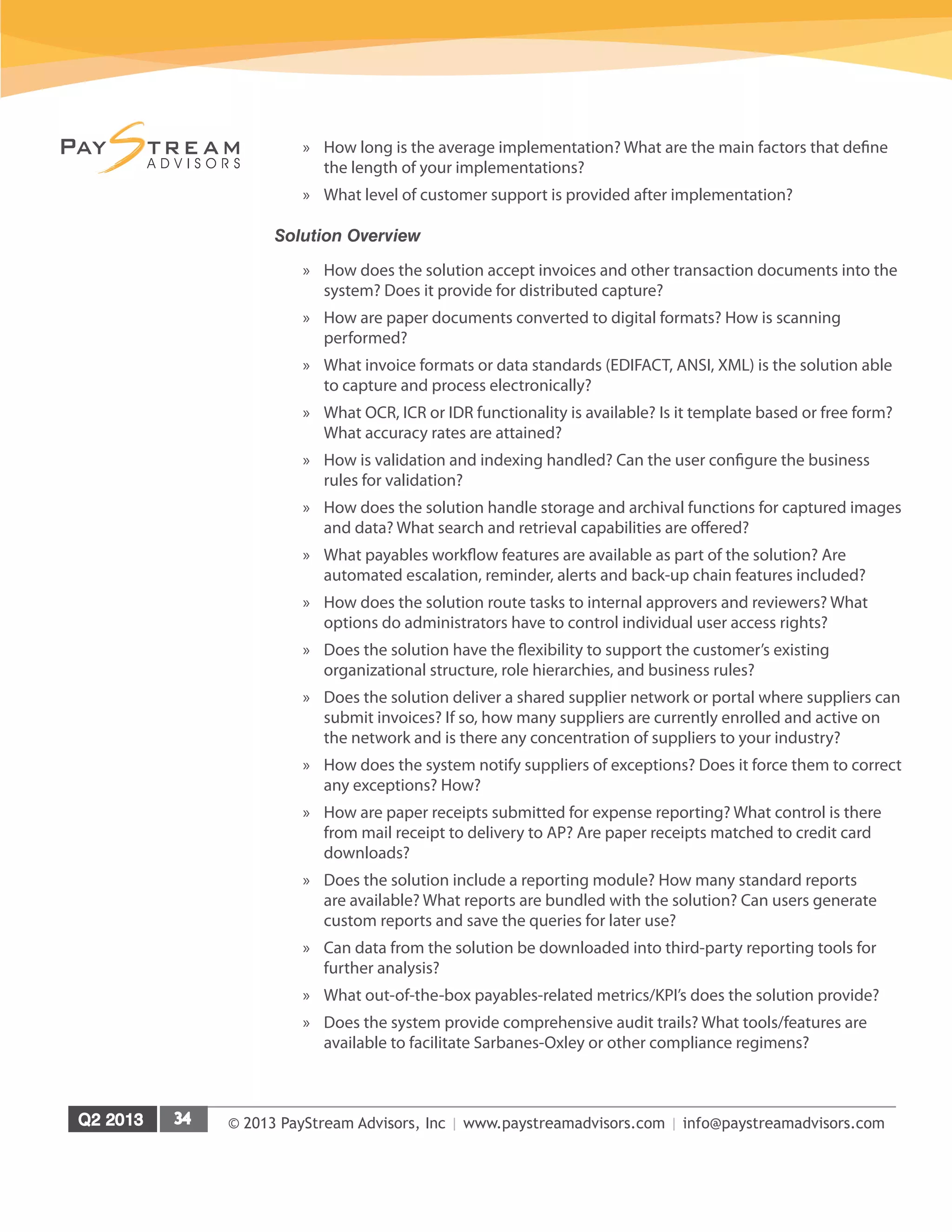
Purchase
Order
Delivey
Procurement
Management
Invoice
Receipt
Data
Extraction
Invoice
Matching
Approval
Workflow
Payment &
Remittance
eProcurement & Supplier Collaboration
Electronic Invoice & Workflow / Matching
Payments & Working Capital
Figure 16
P2P Solution Map
© 2013 PayStream Advisors, Inc | www.paystreamadvisors.com | info@paystreamadvisors.com
Taking a big bang approach and transitioning to a fully automated accounts
payable environment is not something that should be done all at once. PayStream
recommends taking a staged approach to automation that involves:
1.	 Getting rid of paper
2.	 Matching a clean document sent (usually the purchase order) with a clean
document received (typically an invoice or delivery receipt)
3.	 Then implementing eProcurement tools
Starting with AP automation provides the initial, easy to realize benefits of P2P
automation. Beginning with purchasing or the front-end of the P2P process does
not deliver the requisite benefits to sustain continuous improvement. Getting rid
of the paper invoice problem does. The implementation of a successful invoice
automation solution provides the impetus for extending touchless processes
outwards, in order to span both ends of the P2P continuum.
PayStream recommends taking a holistic approach to AP automation that begins
with an understanding of your processes. Payments automation and supply
chain finance all need to be addressed in order to achieve maximum process
transformation and savings. Migrating away from paper check payments to
electronic payments (ACH, EFT, and wire) allows organizations to capture rebates,
ePayment savings, and a return on cash discounts. This optimizes ROI and
working capital, which justifies your investment in AP automation.
© 2013 PayStream Advisors, Inc | www.paystreamadvisors.com | info@paystreamadvisors.com
How to Select a Solution
While the benefits of automated payables are well documented, getting maximum
benefit from automation initiative requires selecting a vendor, or vendors, that
are a good fit for your organization. A thorough, critical analysis of the various
technology solutions and the functionality they offer in light of your organization’s
business needs is essential. To help you with your due diligence, this section
outlines the questions you should ask.
Questions to Ask a Solution Provider
In addition to the features of the solutions offered, it is critical to gauge each
vendor’s level of expertise and product scope. Along those lines you will want to
find out if payables automation is a core application or a peripheral product. You
also need to understand the growth plans and vision for the future of the vendors
you evaluate. Asking the following questions will help you make an informed
decision:
Company Overview
»» How long has the vendor been in business? When did they begin offering
payables automation solutions?
»» How long have they been working in an SME environment?
»» How many customers does the company have and who are they? What is
their experience in your industry? With other SME’s?
»» How is the vendor funded? If it is a public company, read their prospectus.
»» How does the company intend to grow, and are there any mergers or
acquisitions on the horizon?
Solution Scope
»» How does the solution integrate with your ERP? What is the associated
level of certification for the solution?
»» Is there an SME version of the solution? How does it differ from the
vendor’s standard solution?
»» If you are decentralized or working in a shared services environment, how
does the vendor handle integration with multiple ERP solutions?
»» Does the solution provider partner with any other vendors to provide
elements of their overall solution?
»» How does the solution integrate with your ERP and other financial systems
to post approved transactions?
»» What security measures are incorporated in the solution?
»» Is the solution provider including any additional features and functionality in
forthcoming versions of the solution?
© 2013 PayStream Advisors, Inc | www.paystreamadvisors.com | info@paystreamadvisors.com
»» How long is the average implementation? What are the main factors that define
the length of your implementations?
»» What level of customer support is provided after implementation?
Solution Overview
»» How does the solution accept invoices and other transaction documents into the
system? Does it provide for distributed capture?
»» How are paper documents converted to digital formats? How is scanning
performed?
»» What invoice formats or data standards (EDIFACT, ANSI, XML) is the solution able
to capture and process electronically?
»» What OCR, ICR or IDR functionality is available? Is it template based or free form?
What accuracy rates are attained?
»» How is validation and indexing handled? Can the user configure the business
rules for validation?
»» How does the solution handle storage and archival functions for captured images
and data? What search and retrieval capabilities are offered?
»» What payables workflow features are available as part of the solution? Are
automated escalation, reminder, alerts and back-up chain features included?
»» How does the solution route tasks to internal approvers and reviewers? What
options do administrators have to control individual user access rights?
»» Does the solution have the flexibility to support the customer’s existing
organizational structure, role hierarchies, and business rules?
»» Does the solution deliver a shared supplier network or portal where suppliers can
submit invoices? If so, how many suppliers are currently enrolled and active on
the network and is there any concentration of suppliers to your industry?
»» How does the system notify suppliers of exceptions? Does it force them to correct
any exceptions? How?
»» How are paper receipts submitted for expense reporting? What control is there
from mail receipt to delivery to AP? Are paper receipts matched to credit card
downloads?
»» Does the solution include a reporting module? How many standard reports
are available? What reports are bundled with the solution? Can users generate
custom reports and save the queries for later use?
»» Can data from the solution be downloaded into third-party reporting tools for
further analysis?
»» What out-of-the-box payables-related metrics/KPI’s does the solution provide?
»» Does the system provide comprehensive audit trails? What tools/features are
available to facilitate Sarbanes-Oxley or other compliance regimens?
© 2013 PayStream Advisors, Inc | www.paystreamadvisors.com | info@paystreamadvisors.com
Conclusion
As accounts payable automation reaches maturity on a large enterprise level, vendors
are now addressing the needs of the SME marketplace. Reduced costs, scalability,
improved functionality and ease-of-use are driving the adoption of AP automation in
the SME market. Providers are now delivering value propositions that resonate with
the SME market, resulting in increased adoption rates.
The bottom line for an SME is access to the features they need at a price point that
delivers a compelling ROI. Before diving head first into the AP automation waters,
SME’s need to be aware that multiple solution models coexist and there is no single
model for an AP automation solution for SME users. There is considerable variability in
terms of solution focus. Some solutions address payments, cards, travel and expense,
invoice automation and more. Some vendors focus tightly on specific aspects of the
invoice receipt-to-pay cycle, while others strive to provide AP automation functionality
as part of a larger procure-to-pay offering.
Know what the various solutions on the market provide and what your organization
is looking for in terms of automation. Utilize the How to Select a Solution section of
this report as a guide for questions to ask.
The AP automation water is perfect for SME’s to dive right in.
About PayStream Advisors
PayStream Advisors is a technology research and consulting firm that improves the
way companies plan, evaluate, and select emerging technologies to achieve their
business objectives. PayStream Advisors assists clients in sorting through the growing
complexities of IT applications related to business process automation with the goal
of making objective, analytical, and actionable recommendations. Wherever business
process automation technology is an issue, PayStream Advisors is there to help. For
more information, call (704) 523-7357 or visit us on the web at www.paystreamadvisors.
com.

Automating Payables for the SME Market: Diving Head First into AP Automation

  • 1.
    Featuring Insights on...Q2 2013 Underwritten in part by Automating Payables for the SME Market: Diving Head First into AP Automation Waters The SME Universe SME Opportunities and Challenges in Automation Automated Payables Process Where to Start with Automation How to Select a Solution
  • 2.
    © 2013 PayStreamAdvisors, Inc | www.paystreamadvisors.com | info@paystreamadvisors.com Introduction.....................................................................................................................1 Executive Summary.......................................................................................................2 A Closer Look at the SME Universe..........................................................................4 SME Opportunities and Challenges.........................................................................11 Taking the Plunge..........................................................................................................16 Payables Automation – From Front to Back.........................................................18 Automated Payables Process ....................................................................................22 Anybill ...............................................................................................................................25 Anybill Case Study.........................................................................................................29 Where to Begin................................................................................................................31 How to Select a Solution.............................................................................................33 Conclusion........................................................................................................................35 About PayStream Advisors ........................................................................................35 Table of Contents
  • 3.
    © 2013 PayStreamAdvisors, Inc | www.paystreamadvisors.com | info@paystreamadvisors.com Introduction Cloud computing and Software-as-a-Service (SaaS) applications were once just buzz words heard, or read when perusing high-tech publications. However, these terms have gained increasing momentum over the past few years and are helping to pave the way in accounts payable (AP) automation in small to medium enterprises (SME) – those with annual revenues under $250 million. Until recently, AP automation initiatives were limited to tech-savvy, IT heavy Fortune 1000 companies, who had the human and capital resources to implement and manage these applications. Today, PayStream is witnessing an increasing number of SME’s implement AP automation solutions in an effort to reap the benefits of the large early adopters. SME’s are buried in paper and are struggling with manual, paper-based AP processes. More and more SME’s are now realizing that automation solutions can eliminate the vast majority of challenges they face in their day-to-day operations, including late payments, missed discounts, long invoice processing cycles, manual data entry, lack of visibility, and high discrepancies, just to name a few. The availability of affordable, easy-to-use and easy- to-implement technology solutions is driving renewed interest in AP automation in the SME market place. While paper is still prevalent, PayStream’s latest research reveals that the use of paper to trade business-to-business (B2B) invoices is waning, as the use of electronic invoicing (eInvoicing) continues to increase. Research reveals that 59 percent of respondents report they are trading B2B invoices via paper, down 5 percent from 64 percent in 2011, see Figure 1. More suppliers (17 percent) are now submitting the majority of their invoices electronically, a five percent increase from 2011. Aggressive supplier onboarding programs, and free supplier portals are enticing more suppliers to adopt eInvoicing, which is working to help eliminate more paper for SME’s. PayStream predicts this trend will continue as the barriers to supplier onboarding decrease. On the purchasing side, electronic invoicing and automated workflows continue to be the hot AP trends, and are both experiencing increased adoption. The integration of eInvoicing and workflow functionality is gaining momentum, as a static electronic invoice isn’t much better than a paper one. The true value of an electronic invoice lies in how successful companies are at assimilating invoice data into accounting systems and management workflows. This culture of integration yields the best return on investment (ROI). An integrated approach to invoice automation works to automate data capture, invoice coding, workflow, review and approval. While the benefits of AP automation have been available for quite some time, SMEs are now diving head first into the automation waters. SME’s are witnessing the tactical benefits around cost containment and productivity enhancements, in addition to the strategic advantages around improved supplier relations and working capital improvements.
  • 4.
    © 2013 PayStreamAdvisors, Inc | www.paystreamadvisors.com | info@paystreamadvisors.com Executive Summary PayStream Advisors has developed this Technology Insight report titled “Automating Payables for the SME Market: Diving Head First into AP Automation Waters”for small and mid-sized enterprises with an interest in payables automation. The report includes the latest adoption statistics, current thinking, best practices, strategies, and key performance indicators for evaluating and selecting the solution that meets your needs. In addition to trends and analysis of the latest survey data, this report profiles leading solution providers and offers case studies illustrating how others have used payables automation technologies to accelerate approval cycles, improve productivity, capture discounts, strengthen working capital positions and improve trading relationships. PayStream Advisors conducted in-depth surveys among AP and other finance professionals, and this report contains the results. Key findings in this report include: »» More SME’s are doing a better job controlling invoice processing costs. The number of SME’s able to process an invoice for under a dollar increased from 8 percent in 2011 to 10 percent in 2012. »» More SME’s ranks themselves as innovators, having made significant investments in automation – up 6 percent to 21 percent in 2012. »» Front-end imaging witnessed the biggest increase in adoption, up 9 percent from 2011 to 41 percent in 2012. »» Increased AP automation has led to more SME’s to successfully capture supplier discounts. »» More suppliers (17 percent) are now submitting the majority of their invoices electronically, a five percent increase from 2011. »» Sixteen percent of SME’s are paying over half of their bills electronically, up from 12 percent in 2011. »» Lack of budget (28 percent) remains the number one barrier to the adoption of eInvoicing. »» The fact that the majority of invoices are received in paper format remains the number one challenge SME’s face in the invoice management process. »» SME’s report eInvoicing (31 percent) as the number one 2013 financial automation goal. »» Challenges SME’s face in migrating from paper to eInvoicing continue to decrease due to supplier onboarding and the explosion of SaaS solutions. This report is based on the results of PayStream’s Electronic Invoice Benchmark, Invoice Workflow and Automation, and Shared Services surveys of over 500 account payable and procurement professionals at U.S. based enterprises. AP professionals at SME’s are encouraged to explore AP automation solutions with the goal of reduced processing costs, increased visibility, increased on-time payments and capture of supplier
  • 5.
    © 2013 PayStreamAdvisors, Inc | www.paystreamadvisors.com | info@paystreamadvisors.com discounts, improved vendor satisfaction, fewer duplicate invoices, and a reduction in exceptions and discrepancies. Based on the number of survey respondents, PayStream believes that the surveys have a confidence level of +/- 5 percent. For more information on this and other research reports available from PayStream Advisors, visit PayStream’s Research Vault at www.paystreamadvisors.com.
  • 6.
    © 2013 PayStreamAdvisors, Inc | www.paystreamadvisors.com | info@paystreamadvisors.com A Closer Look at the SME Universe Large enterprises have the bandwidth in the form of human and capital resources to invest in financial operations automation; whereas this may not be the case for SME’s. Until cloud-based or SaaS solutions exploded on the market, new financial automation technologies were built with large enterprises in mind. While solution providers are still actively engaging in sales to large organizations, much of this market is saturated, leaving technology providers to look for new opportunities. This opens the door to the large pool of SME’s that are actively looking for ways to eliminate paper and streamline their AP operations. Eighty-three percent of U.S. based SME’s have 10 or fewer employees. While this may not be a problem when the company is small, as it grows and transaction volumes increase, the impact on an SME can be disproportionate, due to limited resources. It’s not surprising that manual processes predominate in the typical SME AP function. Lacking the scale of the larger companies, many SME’s have much less flexibility in allocating resources to overcome the challenges of AP processing. With paper as the number one method used to trade B2B invoices, it’s not surprising that SME’s are all over the map when it comes to invoice processing efficiency. The number of SME’s able to process an invoice for under a dollar increased from 8 percent in 2011 to 10 percent in 2012, and the number of SME’s able to process an invoice for $1.00 - $5.00 increased from 25 percent to 29 percent, see Figure 2. While more SME’s are doing a better job controlling the cost of processing invoices, a sizeable segment (29 percent, down from 45 percent in 2011) are still not measuring invoice processing costs. SME’s that are not measuring invoice processing costs most likely lack the systems to measure these costs and will most likely be in the over $15 segment. Please note that fully loaded costs include AP staff, managerial overhead, facilities and IT support. Figure 1 Methods Used to Trade B2B Invoices Paper wanes as the use of eInvoicing increases. 64% 59% Paper eInvoice / Portals / EDI 14% 22% 9% 6% Fax 13% 14% Email 2011 2012
  • 7.
    © 2013 PayStreamAdvisors, Inc | www.paystreamadvisors.com | info@paystreamadvisors.com Organizational Structure – Due to the lack of organizational skill, the majority of SME AP departments are centralized (68 percent, up from 66 percent in 2011), see Figure 3. PayStream attributes this to the fact that many SME’s are single location enterprises. Only a small minority, 6 percent remain decentralized. It is interesting to note that more SME’s are utilizing a shared service center for AP (28 percent). AP processing from an SME perspective is likely to be much less complicated than a larger organization, which in theory should make the implementation of an automation solution easier. 8% 10% Under $1 $1 - $5 25% 29% 9% 14% $6-$10 12% 15% $11-$15 2% 3% Over $15 44% 29% We do not measure invoice processing costs 2011 2012 Figure 2 Average Fully Loaded Cost to Process an Invoice More SME’s are doing a better job at controlling invoice processing costs. 2% 68% 24% 6% We outsource our invoice receipt and payment process Centralized – Invoices are approved and paid centrally Partly Centralized – Invoices are received at multiple facilities but paid centrally Decentralized – Invoices are received, approved, and paid at different locations Figure 3 Nature of SME Accounts Payable Departments The majority of SME AP departments are centralized.
  • 8.
    © 2013 PayStreamAdvisors, Inc | www.paystreamadvisors.com | info@paystreamadvisors.com SME’s Move Towards Innovation – Over one-third of SME survey respondents report that they have adopted some form of AP automation. What’s important to note in Figure 4 is that more SME’s are evaluating some advanced tools, but have not yet adopted them, (28 percent, up from 26 percent in 2011), and a surprisingly high number of SME’s report they are innovators and have made significant investments in automation (21 percent, up from 15 percent in 2011). PayStream likes it when companies do what they report. In the 2011 survey, SME’s reported technology they were currently using, along with technology they planned to use within six months. As reported, implementation increased in all five areas, see Figure 5. The biggest leap was witnessed in the number of SME’s that adopted front- end imaging, up 9 percent from 2011 to 2012. SME’s realized that by simply scanning documents at the back-end, rather than scanning paper invoices upon receipt, they were missing a huge potential for cost savings, workflow acceleration, increased accuracy, improved compliance and advanced reporting functionality. Today’s best practices call from front-end image and data capture, where paper documents are scanned upon receipt, either at a central processing site or remote facility to digitize the data they contain. PayStream attributes the increase in front-end imaging to the increase in OCR/Automated Data Capture and Automated Workflow. 15% 21% 43% 36% 26% 28% 16% 15% 2011 2012 We have not evaluated financial automation technology and have no immediate plans to do so We are evaluating some advanced tools, but have not yet adopted them We have adopted some advanced technology, but it is not widely used and has limited impact We are an innovator – we have made significant investments in automation Figure 4 Where SME’s Rank Themselves
  • 9.
    © 2013 PayStreamAdvisors, Inc | www.paystreamadvisors.com | info@paystreamadvisors.com Interest in capturing supplier discounts has increased slightly among SME’s, up 2 percent to 33 percent in 2012. Due to increased automation, the ability to capture supplier discounts has also increased, with 38 percent of respondents reporting they capture all available discounts., see Figure 6. Figure 5 Technology in Use or Planning to be in Use within Six Months Front-end imaging witnessed the biggest increase – up 9 percent. 32% 17% 41% 14% Front-end Imaging 26% 11% 31% 22% OCR / Automated Data Capture 31% 14% 38% 19% Automated Workflow 68% 61% 14% 13% Electronic Payments 46% 52% 11% 9% Purchasing Cards Implementing in 6 months Using 2011 Results Implementing in 6 months Using 2012 Results Figure 6 Ability to Capture Supplier Discounts More SME’s report successful capture of supplier discounts. 5% 21 - 30% 1% More than 50% 14% 11 - 20% 42% 1-10%We capture all available discounts 38%
  • 10.
    © 2013 PayStreamAdvisors, Inc | www.paystreamadvisors.com | info@paystreamadvisors.com More suppliers are now sending SME’s invoices by electronic means – EDI, XML, Web Portal or eInvoicing, see Figure 7. This means less manual data entry for SME’s. PayStream predicts that suppliers will continue to move in the right direction and SME’s should receive a significant volume of invoices from suppliers over the next year. In addition to receiving more invoices electronically, SME’s are making headway in sending electronic payments to suppliers. While 4 out of 5 of SME’s have electronic payment capabilities, only 16 percent pay over half of their bills electronically, up from 12 percent in 2011, see Figure 8. Supplier portals or networks are used to facilitate eInvoicing. Portals allow suppliers to upload invoices, enter invoices manually, or flip a purchase order into an invoice. Once the invoice is captured, it can be routed automatically through the payables approval process. More SME’s are now adopting electronic invoicing and automated workflow solutions in an effort to reap the rewards of the large, early adopters. 5% 9% 51-75% 34% 24% None 1-10% 38% 40% 11% 13% 11-25% 5% 6% 26-50% 7% 8% 76-100% 2011 2012 Figure 7 Percent of Invoices Received Electronically from Suppliers More SME’s are receiving invoices by electronic means, a sign that suppliers are moving in the right direction.
  • 11.
    © 2013 PayStreamAdvisors, Inc | www.paystreamadvisors.com | info@paystreamadvisors.com For the SME’s that have not yet taken the plunge into the automation waters, 2012 survey results show that cost remains the primary concern. Twenty-eight percent of 2012 survey respondents report the lack of budget as the number one barrier to electronic invoicing, up from 23 percent in 2011. Other barriers include the belief that current processes work (18 percent) and the belief that there will be no return-on-investment (ROI), at 11 percent. PayStream expects these numbers to continue to shift as more solutions are targeted to the SME market. Figure 8 Percent of Invoices Paid Electronically More SME’s report paying their bills electronically, as witnessed by the 5 percent reduction in the number of SME’s reporting they pay none of their bills electronically. 7% 9% 51-75% 19% 13% None 1-10% 34% 34% 19% 21% 11-25% 15% 16% 26-50% 5% 7% 76-100% 2011 2012
  • 12.
    © 2013 PayStreamAdvisors, Inc | www.paystreamadvisors.com | info@paystreamadvisors.com Figure 9 Barriers to Electronic Invoicing Barriers to automation are beginning to decline as solutions become more affordable, easy to implement and easy to use for SME’s. Lack of budget 23% 28% We do not think there will be an ROI 15% 11% No executive sponsorship 4% 4% Lack of technical resources to manage an automated solution 6% 4% Lack of understanding current available solutions 9% 7% Current processes work 21% 18% 13% 18% None of these 9% 10% Other 2011 2012
  • 13.
    © 2013 PayStreamAdvisors, Inc | www.paystreamadvisors.com | info@paystreamadvisors.com SME Opportunities and Challenges Front-end imaging, electronic invoicing and automated workflow are experiencing increased adoption among SME’s as companies strive to migrate from a manual paper-based invoice system to an efficient automated system. The convergence of these three technologies presents SME’s with a single, comprehensive solution that can handle both paper and electronic invoices through a common automated process. This holistic approach to electronic invoicing and automated workflow is gaining momentum, and yields the best ROI. An integrated approach to invoice automation works to automate data capture, invoice coding, workflow, review and approval. Paper is still the number one method used to trade B2B invoices, see Figure 1. Paper and manual processes are the enemy of efficiency. Paper invoices result in manual keying, manual routing and the opportunity for errors, lost invoices, discrepancies, exceptions, late payments, missed discounts, etc. Routing paper invoices for payment is time consuming and leads to other problems downstream, including the lack of visibility into outstanding invoices and the inability to capture supplier discounts. The 2012 survey results reveal that the number one challenge in the invoice management process is still that the majority of invoices are received in paper format, see Figure 10. By eliminating the paper, AP departments can eliminate all the other challenges in the invoice management process. The increase in respondents reporting lack of visibility into outstanding liabilities, up 10 percent from 2011, and the inability to approve invoices in time to capture discounts, up 6 percent from 2011, reveal that momentum continues to build for broader applications of AP automation among SME’s. Once accuracy and efficiency driven, AP automation solutions are now being utilized as a management information tool for real-time spend visibility and discount capture.
  • 14.
    © 2013 PayStreamAdvisors, Inc | www.paystreamadvisors.com | info@paystreamadvisors.com Increasing electronic invoicing has been the top priority among AP professionals, see Figure 11. This trend underlies the desire to squeeze paper out of the system. Eliminating paper solves a host of quality issues, while improving efficiency and driving down costs. The benefits of migrating from paper to electronic conversion also hold true if companies are migrating to electronic payments or electronic procurement. Moving from manual, paper-based systems to an automated environment enhances visibility in the form of transaction transparency. With instant access to real-time visibility, companies can quickly identify trends that work to facilitate actionable insights that ensure control over the entire process. Majority of invoices received in paper format 65% 59% Decentralized invoice receipt 17% 15% Lost or missing invoices 18% 20% Lack of visibility into outstanding liabilities 13% 23% Manual data entry & other inefficient processes 43% 39% High number of discrepancies and exceptions 24% 24% 16% 22% Inability to approve invoices in time to capture discounts 2011 2012 Figure 10 Challenges in the Invoice Management Process Lack of visibility and the inability to approve invoices in time to capture discounts are linked to SME’s drive for increased cash flow and the greater control of when invoices are paid.
  • 15.
    © 2013 PayStreamAdvisors, Inc | www.paystreamadvisors.com | info@paystreamadvisors.com It’s hard to argue with results. The benefits of electronic invoicing and automated workflow (the top automation goals for 2013) have been well documented for both buyers and suppliers. Benefits of sending eInvoices: »» Get paid faster with invoices going straight to processing »» Cut costs and increase efficiency »» Track the status and increase visibility of every invoice for improved cash flow and working capital management »» Trade anywhere in the world with the correct sales tax automatically applied »» Easily add digital signatures to comply with policies and regulations »» Quickly resolve disputes and queries with collaboration features »» Boost your green credentials by eliminating paper immediately Benefits of receiving eInvoices: »» Save on every invoice – slash invoicing costs from day one »» Eliminate paper and save time with invoice automation »» Integrate automatically with any invoice processing or back-end system »» Qualify for early payment discounts by paying suppliers faster Figure 11 Top Financial Automation Goals for 2013 Electronic invoicing ranks as the top financial automation goal, as more AP professionals strive for paperless invoice processing. 3%Electronic invoicing via EDI 28% Electronic invoicing via portal or network 23%Front-end imaging 25%Automated workflow 18%Electronic payments via ACH 3%Purchasing cards
  • 16.
    © 2013 PayStreamAdvisors, Inc | www.paystreamadvisors.com | info@paystreamadvisors.com »» Bring new suppliers on board faster and get the relationship off to a flying start »» Free up office space with easy-to-use electronic invoice archiving According to 2012 survey respondents, fewer lost or missing invoices (58 percent), quicker approval cycles (56 percent), and increased on-time payments (51 percent) ranked as the top benefits achieved from an electronic invoicing solution, see Figure 12. Electronic invoicing speeds up approval processing time which results in on-time payments and the ability to capture discounts. This in turn results in fewer supplier inquiries and improved vendor satisfaction. Figure 12 Key Benefits Achieved from an eInvoice Solution Fewer lost or missing invoices and quicker approval cycles ranked as the top benefits achieved as a result of electronic invoicing. Fewer lost or missing invoices 57% 58% Increased on-time payments 43% 51% Quicker approval cycles 52% 56% Increased ability to capture discounts 21% 34% Improved vendor satisfaction 27% 34% Reduction in FTE / processing costs 39% 39% 30% 35% Better visibility across the transaction lifecycle 18% 18% Fewer supplier inquiries Reduction in exceptions discrepancies 27% 31% 24% 28% Fewer duplicate invoices 7% 5% Other 2011 2012
  • 17.
    © 2013 PayStreamAdvisors, Inc | www.paystreamadvisors.com | info@paystreamadvisors.com Barriers to Automation Success is predicated upon the ability to change the operating culture. Though large organizations have a reputation for being less nimble than smaller businesses, the biggest hurdle for an SME is nonetheless internal change management, see Figure 13. It’s worth noting that the challenge of gaining supplier adoption dropped from 2.5% in 2011 to 2.0 percent in 2012 due to the prevalence of aggressive supplier onboarding programs and free supplier portals. PayStream predicts the challenge of supplier adoption to continue to decrease with improved supplier portals, supplier onboarding and increased emphasis on win-win functionality, including accelerated payment, free supplier analytics, and dynamic discount management. While technical challenges were once a formidable obstacle, the explosion of Software-as-a-Service (SaaS) and Cloud computing has been a real game changer for SME’s. SaaS applications can be deployed rapidly at a lower cost and with minimal IT resources required. An added bonus of SaaS applications is they are highly scalable. Growing SME’s can quickly add users and additional functionalities without having to worry about additional infrastructure and the related support. Figure 13 Biggest Challenges SME’s Face in Migrating from Paper to eInvoicing The biggest barrier for an SME remains internal change management. 2% Gaining supplier adoption 2.8% Internal change management 2.3% Integration with in-house and supplier systems 2.2% Solution does not function as expected 2.2%Other
  • 18.
    © 2013 PayStreamAdvisors, Inc | www.paystreamadvisors.com | info@paystreamadvisors.com Taking the Plunge More SME’s are taking the plunge into AP automation waters and the timing couldn’t be better. Reduced costs, scalability, improved functionality and ease-of- use are driving the adoption of AP automation in the SME market. Here’s why: 1. Proven Technology – Large enterprises have been benefiting from reliable AP automation tools to deliver a definable return on investment. SME’s are adopting these technologies to reap the rewards that the large, early adopters witnessed. 2. Reduced Costs – Cost is no longer a barrier. With cloud-based and SaaS technology maturing, and competitive solutions continuing to enter the market, SME’s are realizing shorter times to ROI. 3. Easily Accessible – Most of the solutions offered to the SME market are hosted (SaaS) and operate in a cloud environment. This eliminates the need for IT resources to implement and maintain automation tools. SaaS solutions can be quickly accessed via any web browser. In addition, most solution providers now provide mobile functionality to keep invoices moving through the system while users are out of the office. 4. Easy to Use – Today’s turnkey solutions eliminate disparate legacy solutions, simplifying the approval process and moving documents along with clear rules, permissions and escalations to ensure that invoices get to the right people, arrive on schedule and get paid on-time. The powerful functionality and usability of today’s automation solutions allow for wide-spread adoption in companies of all sizes, including SME’s. 5. Cash Management/Working Capital – Invoice automation pays dividends to both buyers and suppliers in the form of liquidity and control. Through automation, buyers can manage their free cash and invest it for big returns in the form of early-payment discounts to suppliers. Suppliers benefit by accelerated collection of receivables. 6. Data Analytics – Automated invoice processing solutions brings increased visibility into all invoices, which allows for greater control of cash flow and working capital management. Powerful reports can be quickly generated and used to make highly data-driven business decisions. Companies that harness this data are able to quickly drill down into report details with increasing granularity and accuracy for fast, effective decision making. 7. Wide Variety of Solutions Available – There are a lot of components to AP automation, and there are a host of vendors with solutions that address the different subsets thereof (e.g., financial service firms providing ePayments and P-Cards, software vendors delivering imaging and workflow, and networks providing portals for electronic data exchange).
  • 19.
    © 2013 PayStreamAdvisors, Inc | www.paystreamadvisors.com | info@paystreamadvisors.com 8. Scalable and Configurable – Growing organizations like SME’s benefit when the automation tools they employ have an extended lifespan. Payables automation tools have been built with large enterprises in mind. They are feature rich, which allow a small or medium size company to grow into the solution. SME’s don’t have to start out utilizing everything at once, and can turn on certain functions as they are needed. This makes these solutions very scalable from an SME perspective. They are also portable, so if an organization moves from one ERP system to another, you can continue to work from the same automated payable platform by simply integrating it with the new system of record. 9. Outsourced Service Availability – Outsourced services are available to augment the SME that has limited resources. SME’s don’t have to do it all on their own. Solution providers can help fill the resource gaps in a number of areas, from remote scanning to supplier onboarding.
  • 20.
    © 2013 PayStreamAdvisors, Inc | www.paystreamadvisors.com | info@paystreamadvisors.com Payables Automation – From Front to Back All AP automation solutions share the common goal of improving process management. However, not every solution follows the same approach, or provides similar functionality at each step of the cycle. Accounts payable professionals should understand the different forms that invoice automation solutions can assume in order to decide which methods would work best in their environment. Back-End Document Capture and Archival -The simplest form of invoice automation uses scanning technologies for back-end imaging and archival. Operators batch and scan paper documents at the end of the invoice receipt-to- pay process. AP staff then manually index the invoices after which the document images are stored in an electronic repository for retrieval. While this eliminates physical storage requirements, facilitates document retrieval for discrepancy resolution and audits, and improves responsiveness to supplier inquiries, the invoice approval process continues to follow its current manual and paper- intensive course. Since scanning is done after the fact this storage and retrieval solution is seldom used anymore because it fails to yield any improvement or efficiency in workflow. Front-End Document and Data Capture - When employing an imaging solution at the front end of the invoice processing cycle; invoices are scanned remotely or at a central processing facility upon receipt. Once scanned, images are enhanced to optimize recognition and data is extracted from the documents using automated image recognition technologies. Front-end document and data capture represents a quantum leap over back-end imaging by facilitating improvements to the invoice receipt-to-pay cycle, especially workflow automation. Validation rules ensure that the data extracted is accurate, and many companies now opt to automatically pay invoices that meet all validation rules, freeing AP staff to focus on exceptions. Advanced systems put the onus of exception and discrepancy correction back on suppliers, facilitating the evolution of AP departments into profit centers focused on spend analytics and working capital management. Front-End Capture with Matching and Workflow - In a more advanced form, invoice automation solutions combine front-end document and data capture with matching and workflow capabilities to streamline and automate invoice receipt and approval processing. Workflow-enabled invoice automation solutions automate more of the invoice receipt- to-pay cycle than stand-alone document and data capture solutions. Workflow solutions enable AP departments to define how different types of invoices are processed. PO-based invoices can be automatically matched against the purchase order and receipt documents, while non-PO invoices can be routed to the people who must approve them. All tasks are routed based on pre-defined business rules and user roles with access rights set to match the organization’s existing approval hierarchy. Approvers are typically notified via email when invoices require their approval. By clicking on the hyperlink
  • 21.
    © 2013 PayStreamAdvisors, Inc | www.paystreamadvisors.com | info@paystreamadvisors.com contained in the email messages and logging onto the system they can view, code and approve the invoices online. Most solutions available today come bundled with reminders, out-of-office delegation rules and escalation procedures to ensure invoices are processed in a timely manner. They also deliver auditing, reporting and management benefits that document and data capture solutions alone cannot provide. Automated Data Extraction Tools -Tools and technologies that facilitate the extraction of information from scanned invoice images have had an interesting life cycle, starting from template-based optical character recognition (OCR) to free-form recognition and more recently, intelligent document recognition (IDR). IDR systems enable end users to extract content from invoices without the system having to learn the layout of the invoice and without requiring the coding of rules or design form templates. Embedded fuzzy search methods improve the extraction results by using other known data sources to automatically validate the information before exporting it to the ERP and document management systems. Consequently, more invoices can be processed straight through from scan to post in the least amount of time and with a minimal amount of manual intervention. Fuzzy logic can also make the IDR solution language-agnostic, allowing global organizations to process high volumes of invoices in multiple languages. Combining Electronic Invoicing with Imaging and Workflow - The most sophisticated invoice automation solutions combine front-end document imaging and data capture with electronic invoicing and automated workflow. This enables organizations to process all the invoices - irrespective of whether they are submitted in paper or electronic format - through a single, common process. Under this scenario, suppliers are transitioned from paper to electronic invoice submission, usually through a stand-alone portal or a shared supplier network. Most solutions offer suppliers multiple options when it comes to submitting electronic invoices - direct integration with ERP and billing applications to transmit invoices in a hands-free manner without manual intervention, flipping purchase orders into invoices and web forms and templates that can be used to generate electronic invoices. Once invoices have been submitted, they can be subjected to a range of validation criteria based on buyer-defined rules. Invoices that do not meet any of the specified criteria are flagged as exceptions and suppliers are asked to correct them while clean invoices are then forwarded for further processing. For suppliers that continue to send paper invoices, organizations can use front-end imaging and data capture to extract information from the invoices. After data extraction, the converted invoices are processed using the same matching and workflow rules as the electronic invoices. Also gaining popularity is the outsourcing of the scanning and data capture function that takes on the responsibility of receiving invoices, scanning them and extracting the requisite data.
  • 22.
    © 2013 PayStreamAdvisors, Inc | www.paystreamadvisors.com | info@paystreamadvisors.com T&E Management - Organizations of all sizes can take advantage of the benefits of automating their Travel and Expense (T&E) processes. Automation provides complete end-to-end control of report submission, approval, reimbursement, reporting with data analysis and integration into back end accounting systems. Having this integration provides more visibility into spend with accurate accounting and detailed reporting for every single transaction and expense category. When organizations have this information at their disposal, they are equipped to determine exactly what areas in their travel and expense spend are excessive and can put automated controls in place to reduce runaway cost. The T&E automation space handles corporate card integration as a standard feature. Card statements are integrated into today’s T&E systems, granting complete visibility into spend. Not only can expense reports be filed quickly when transactions are readily available, but merchant details accompanying each transaction can make tracking and reporting easier. Statements can be recalled instantaneously and analyzed for company violations or excessive spending. Electronic Payments - Electronic payments have seen remarkable changes in the past decade with the creation of new alternatives to paper checks. Recent innovations include virtual or“ghost”credit cards, Single-Use Accounts, Buyer Initiated Payments, ACH funds transfer, supplier-friendly web portals and Figure 14 Payables Automation Components Reporting & Analytics
  • 23.
    © 2013 PayStreamAdvisors, Inc | www.paystreamadvisors.com | info@paystreamadvisors.com collaborative networks. Once a legitimate concern, compatibility issues have largely been relegated to the status of urban legends. Most ePayment solutions on the market today integrate seamlessly and cost-effectively with major ERP, AP, and Supply Chain systems. As more suppliers embrace ePay via ACH, there has been an increasing concern about the loss of important detail inherent in traditional ACH transactions. The recent emergence of payment and remittance advice consolidation alleviates this issue. Buyer initiated payments offer buyers and suppliers a fast track to electronic payments, without any significant IT burden. None of the above electronic payment types are mutually exclusive from one another or from paper checks. Depending on an organization’s level of innovation, technological savvy and diversity of supplier base it can use a combination of the different payment types to satisfy its unique financial and business requirements. Commercial Cards - Commercial cards are unique as they not only support the procurement function to purchase goods at the point of sale, and in many cases without paper invoices, but also permit accounts payable professionals to automate the settlement process. They have evolved into several types, including corporate purchasing cards, travel and entertainment cards, and fleet cards that target specific indirect spend categories, as well as one/multi-card systems that target multiple indirect spend categories (e.g. virtual or“ghost”credit cards, Single-Use Accounts, and Buyer Initiated Payments). Purchasing Card (P-card) programs are attractive because of the automation and process efficiency they bring, especially to the purchase of small items, where it is difficult to justify the high overhead of using requisitions, purchase orders, approvals, matching and settlement by check through the AP process. Increasingly, p-card programs are also being touted for the rebates that are provided by the issuer based on how much is spent on the P-card. eProcurement - Electronic procurement solutions streamline the purchasing process by enabling organizations to connect to vendor catalogs, generate requisitions, use sophisticated workflow tools for approval processing and deliver purchase orders to suppliers electronically. Although the adoption of automation currently remains skewed toward large corporations, many mid-sized and smaller companies are also making great strides towards less paper, even paperless environments. These aggressive technology adopters have learned that in many cases automation diminishes the procure-to-pay cycle time from weeks to just days and delivers a rapid return on investment. By automating each stage of the procure-to-pay cycle, from electronic procurement to programmed exception handling and matching along with enhanced dispute management and approval workflow, adopters can not only achieve productivity gains and cost reductions, but also obtain traceable Sarbanes-Oxley audit trails. There are six components within the eProcurement universe: purchase requisition, requisition approval, workflow management, purchase order delivery, receiving and reconciliation, and reporting and analysis.
  • 24.
    © 2013 PayStreamAdvisors, Inc | www.paystreamadvisors.com | info@paystreamadvisors.com Automated Payables Process PayStream has identified 16 areas that impact automated accounts payable processing from the point of receipt all the way through to payment. Once an invoice or other payables data is captured electronically, the question to ask is: Does this invoice need to be approved? The ability to derive an automated answer by using business rules, which in turn trigger appropriate workflows, is the centerpiece of an automated AP environment. If the answer to the question is no, the system will move the invoice into the payment process. If the answer is yes, the system will route it to the approving party along with any necessary decision support documents and information. Business rules, flexible workflow and transactional transparency are essential. Figure 15 illustrates the AP invoice and payment automation process. Below are the 16 areas that PayStream has identified that impacts automated AP processing. They are listed here to provide you with a checklist for evaluating both your company’s needs as well as the functional capabilities of any solutions you may consider. 1. Invoice Submission – The system should facilitate the exchange of invoices between buyers and suppliers by supporting several methods of supplier submitted invoicing including PO flips, blank e-forms, standard templates and direct integration (Electronic Data Interchange – EDI) with a supplier’s ERP system. 2. Document Scanning – Having all invoices sent to a single location for scanning is preferable, but not always practical. In decentralized organizations 1Paper Invoice Management 2Matching & Workflow Accounts Payable Invoice and Payment Automation OCR / Data Capture Invoice Document Management Outsourced Document Conversion PO Matching & ERP Integration Approval Workflow eInvoicing Networks * EDI Invoicing * Including PO transmission Discounting & SCF ACH & P-Card 4ePayments 3Electronic Invoicing Figure 15 AP Invoice and Payment Automation Process
  • 25.
    © 2013 PayStreamAdvisors, Inc | www.paystreamadvisors.com | info@paystreamadvisors.com the best practice is to receive paper invoices in regional scanning centers and then scan to one central repository. 3. Compliant and Secure Storage – The ability to capture and then maintain both structured and unstructured data must be accomplished within a secure environment that is not only compliant with all relevant regulatory and industry standards, but also extends to the integrated process. 4. Invoice Recognition – It is very important to be able to capture line items and not just header data. Without line item details automated systems must forego the use of advanced matching and business rules to decipher apparent exceptions. The use of free form ICR or IDR can provide an added level of automation compared to a template driven OCR process. 5. Invoice Validation – The system must check every invoice for duplicity and mathematical integrity. In a portal environment, checking invoices against a set of buyer-defined criteria and notifying suppliers to correct any errors before the invoice is accepted and routed provides an additional layer of validation. 6. Invoice Matching – This involves matching invoices with purchases, goods receipt documents and/or contracts based on criteria configured in the system. The system should also route any match exceptions for review and resolution. 7. Workflow Configuration – Administrators need the ability to configure and change the business rules that determine how invoices will be routed to appropriate users for review and approval. 8. Alerts and Notifications – The system should notify approvers of invoices pending their review and escalating invoices to managers if no action is taken within a specified period of time. 9. Payment Processing – The steps that buyers take to initiate, post and execute payment, including preparation, processing, and submission of the payment file to the financial institution need to be seamless. 10. ERP Integration – Besides the exchange of transactional data between the invoice automation solution and the ERP, this stage also includes integration with and posting of the payments to buyers’GL and accounting systems. 11. Remittance Management – Sending the remittance information to suppliers via the portal in a format of the suppliers’choice is critical so that they can easily transfer the remittance advices into their receivables systems. 12. Travel & Expense Receipts – Paper receipt capture, either scanned or via a mail service, and matching those items to submitted expense reports or credit card downloads (in addition to providing confirmation to the employee), must be integrated with workflow providing approval, exception/discrepancy handling and delivery to AP.
  • 26.
    © 2013 PayStreamAdvisors, Inc | www.paystreamadvisors.com | info@paystreamadvisors.com 13. Card Management – The ability to capture complete details on all card transactions is the necessary first step in order to support workflow driven cost allocation and expense reporting activities as well as monitor usage compliance. 14. Contract Management – Leading edge firms are implementing automated contract management capabilities (typically for handling non-PO invoices related to leases, utilities and other recurring bills) to further reduce manual processing. 15. Mobile Apps – Delivering tasks and supporting documents to a mobile device facilitates approval by executives who travel regularly. Most solutions on the market today provide mobile functionality. 16. Business Intelligence – There is a wealth of information gleaned from the P2P process, which can be used not only to comply with regulatory requirements but also to provide valuable business intelligence for strategic spend analysis.
  • 27.
    © 2013 PayStreamAdvisors, Inc | www.paystreamadvisors.com | info@paystreamadvisors.com Anybill Founded in 2001, Anybill provides end-to-end accounts payable automation for small to medium enterprises (SME), as well as some of the world’s largest corporations and institutions, encompassing a variety of industries. The company has consistently experienced year-over-year double-digit growth, which is a testament to their ability to meet market demands and customer requirements. Anybill’s all-in-one approach to accounts payable automation, including invoice receipt, invoice approval and invoice payment, is an easy-to-use, easy-to-implement solution. It combines all the necessary pieces of AP automation into an integrated and complete cloud-based package, allowing for instant upgrades and quick deployment, with little IT involvement. Website www.anybill.com Founded 2001 Headquarters Washington, DC Number of Employees 50+ Number of Customers 1400+ Key Clients Portfolio includes Fortune 500 companies, large enterprise, and small and medium enterprises including not-for-profit organizations. Target Verticals Not-for-profit, Banking, Financial Services, Retail, Property Management and Professional Services Partners / Resellers Accounting service, technology firms, financial software companies, and other service providers Solution Name AnyAP Solution Overview Anybill’s end-to-end solution, AnyAP, is a cloud-based platform for automating the accounts payable process, from invoice receipt and data capture to approval and payment. AnyAP provides complete control and visibility over the entire AP process with clear approval authority and robust reporting functionality. While Anybill’s solution is comprehensive, it is flexible and can be used to support stand-alone functions such as invoice management and payment processing. In addition, AnyAP is fully scalable, which will benefit SME’s that experience rapid growth. As one of the first web-based solutions available on the market, Anybill has evolved its combination of technology and services to meet and exceed a diverse set of client requirements. The AnyAP platform has proven successful for a wide variety of companies within many markets, such as not-for-profit, banking, financial services, retail, property management, and professional services. Anybill has also witnessed success with large enterprise clients that utilize AnyAP to meet specific requirements
  • 28.
    © 2013 PayStreamAdvisors, Inc | www.paystreamadvisors.com | info@paystreamadvisors.com such as managing indirect corporate tax payments and strategic payment processing integrated within their supply chain. The solution’s clear approval authority, reporting functionality and seamless integration back into a company’s financial system of record, results in lower invoice processing costs and shorter approval and payment cycle times. Looking beyond direct cost savings, AnyAP also provides total transparency and control over the entire AP process, mitigating maverick spending and payment delays while opening the door to potential vendor discounts. In addition, the freeing up of AP personnel from focusing on mundane tasks to more strategic business initiatives contributes to better problem solving and higher employee morale within the department. AnyAP is a secure solution and is SSAE 16 compliant. It also provides a transactional audit trail, in which every action is time-dated and user stamped. Invoice Receipt The AnyAP solution allows for the receipt of both electronic and paper invoices. Paper invoices are received at Anybill’s“invoice lock-box’that is located at regional postal facilities. Services include importation of invoices from any format (Paper, PDF, email, fax, etc.), sorting and batching, scanning with the latest OCR technology, data extraction, and validation. Anybill utilizes template-based and free-form OCR technology to capture invoice information. Initial invoice validation is performed through a cross-reference of invoice data, including vendor, account number, invoice number, invoice date, amount due, and other data elements. Vendor Portal The Anybill solution does support an AnyAP vendor portal for suppliers to review invoices and research their accounts receivable. It also validates all invoices based on any number of criteria, system, or client requirements, according to configurable business rules. Getting new vendors set up in the AnyAP vendor portal is part of the exceptional client service that Anybill provides. Anybill currently has over twenty thousand unique suppliers enrolled in their network, with more added each day. Approval Workflow One of the most attractive and powerful features of the AnyAP solution is its invoice approval process and workflow approval routes. Pre-defined workflow approval routes can be used, or clients can easily configure their own, with the ability to dynamically assign routes based on invoice amount, vendor type, or other data elements. Anybill’s approval routes can include an unlimited number of approvers, based on a company’s specific needs. To help facilitate dispute management, AnyAP captures all user and system activity, stores documents, and provides the capability to quickly and easily access vendor and invoice information. In addition, standard and ad-hoc reports can be quickly generated for information gathering, during the dispute resolution process.
  • 29.
    © 2013 PayStreamAdvisors, Inc | www.paystreamadvisors.com | info@paystreamadvisors.com Payments, Discounting and Remittance Details As an end-to-end solution, AnyAP provides invoice payment options in the form of paper check, automated clearing house (ACH), and wire transfers. In an effort to improve working capital management through the capture of supplier discounts, users with the appropriate permission can easily change the invoice amount to reflect any discounts. In an effort to manage the supplier discount process, Anybill users have the ability to track payment terms and review invoice images in the system, prior to changing the invoice amount. Anybill seamlessly integrates with a client’s accounting or ERP system. To provide crystal clear visibility into spend to make informed business decisions, Anybill maintains a mirror image of a client’s general ledger and requires that all expense items be coded. In addition, Anybill can flow through non-Anybill transactions such as purchasing card transactions and manual checks, to provide an even more comprehensive view of spend management. Custom fields can also be utilized to track transactions by project, contract or any other relevant data element. At the supplier account level, Anybill stores transactional data and posts it back to the accounting or ERP system. Anybill provides visibility down to the transaction level, and a record of all system and user activity associated with a payment is maintained, as well as images of the issued check, an image of the cleared check, ACH information, and wire transfer information. This unsurpassed level of visibility creates a one-stop shop for valuable data, all at the click of a mouse. Rather than dialing in and speaking with an AP staff member, suppliers can simply view certain information relating to the status of their invoices through the AnyAP vendor portal. This is a huge time saving benefit to AP, and allows AP the freedom to focus on more strategic tasks. Anybill provides an aggressive supplier on-boarding program, and facilitates the exchange of remittance information as part of the on-boarding process. Content Management AnyAP includes storage and archival functionality for captured images and data. Anybill allows for complete visibility to all invoices. With proper authorizations, users have the ability to search on any information saved with the invoice or by any action performed against it. Information can be quickly downloaded to multiple data formats (e.g. CSV) for data manipulation and additional reporting functionality. Anybill integrates directly with the financial or ERP software to provide all relevant client transactional data. Invoice, payment and vendor history transactions can be searched online and Anybill meets all federal government standards for data and records retention. Reporting and Analytics As part of its standard reporting capability, AnyAP provides multiple reports covering AP, treasury, invoice history and financial reconciliations. Clients can quickly define the criteria needed to gain instant access to the desired results. Clients can also run
  • 30.
    © 2013 PayStreamAdvisors, Inc | www.paystreamadvisors.com | info@paystreamadvisors.com a variety of reports based on custom scenarios, which can either be displayed or downloaded to a data file. In addition, users can also query data from AnyAP main screens to perform data analysis. Data can be downloaded to third-party reporting tools such as Crystal Reports and Excel. Pricing and Implementation Because AnyAP is a cloud-based solution implementations are quick and can be up and running in a matter of weeks. For small and medium-sized enterprises this means maximum impact in the least amount of time. Anybill’s average implementation time takes less than 45 days, depending on a client’s size and specific needs. The Anybill fee structure is transaction-based, and billed on a monthly basis. There are also implementation fees that cover the cost of the client set-up, system configuration, user training and data integration. Anybill provides a high level of customer support. A dedicated implementation manager is assigned to every new client, and guides the client through the implementation process and is their main point of contact. The implementation manager is also responsible for training the client on the Anybill system and is available to provide on-site visits, if necessary. Online training materials and manuals are available and Anybill hosts a weekly web-based training session. Customer support is also available via phone and email between the hours of 9am-5pm, Monday through Friday.
  • 31.
    © 2013 PayStreamAdvisors, Inc | www.paystreamadvisors.com | info@paystreamadvisors.com Anybill Case Study Lincoln Trust Challenge: Lincoln Trust is a leading national provider of trust services, including open architecture 401 (k) plans. The organization is recognized for its emphasis on transparent fee structures, and Company executives are frequently cited by the media as experts on the true cost of retirement plans. The Company recently looked at operational processing in its Accounts Payable (AP), and saw an opportunity to decrease processing time through improved efficiencies which might be gained from outsourcing repetitive work, utilizing easier to use software solutions, and finding a solution that could integrate with their financial accounting software. The Company’s existing AP processing system was holding it back. Much of the invoice management was handled manually, with the Accounting staff consuming 45 hours per week to process 50 to 60 invoices. The Company was employing skilled accountants to spend the majority of their time opening invoices, scanning and coding documents, and routing invoices for approval– a process that took about 30 minutes per invoice. A reliance on paper invoices and manual processing also put Lincoln Trust at risk for redundancy and waste. Solution: The Company recognized the value of upgrading its AP process to increase efficiency. The Company contacted Anybill, a pioneer in Software- as-a-Service (SaaS) accounts payable solutions because of Anybill’s strong reputation as an end-to-end AP automation provider, and familiarity with Lincoln Trust’s Microsoft Dynamics-Solomon® accounting software. Lincoln Trust’s process had data moving from upfront imaging into an AP module where checks were cut within the financial accounting software, and then to the journal side of the accounting software. Automating with Anybill would eliminate this final transition, providing increased efficiency and visibility throughout the process. The decision to automate AP through Anybill was made on March 6th, and the new system went online on March 25th. Results: Anybill enabled Lincoln Trust to achieve its goals of greater AP efficiency and visibility.
  • 32.
    © 2013 PayStreamAdvisors, Inc | www.paystreamadvisors.com | info@paystreamadvisors.com Anybill’s automated end-to-end solution now: Frees accounting professionals from data entry tasks, making them available for tasks with greater ROI »» Provides clear and complete visibility throughout the entire AP process »» Creates an online dashboard to give executives real-time, actionable data available anytime and from any location »» Slashes processing time and errors as the handling and misfiling of papers is eliminated “Anybill’s automated AP solution is a great asset,”says Debbie Varga, Lincoln Trust Company’s AVP.“Our internal efficiency gains have created opportunities for employees and managers to work more strategically. We were able to reallocate a full FTE resource to more productive accounting activities. Processing AP is no longer a dreaded chore, but now actually an easy task.”
  • 33.
    © 2013 PayStreamAdvisors, Inc | www.paystreamadvisors.com | info@paystreamadvisors.com Where to Begin? SME’s are learning that invoice automation plays a key role within the optimization of the Purchase-to-Pay (P2P) process; in particular the advantages provided by an electronic invoice environment and automated workflow matching. Proof of this is the fact that SME’s ranked eInvoicing and automated workflow as the top two automation goals in 2013, see Figure 11. The overall goal is to create an end-to-end automated process, which is referred to as Straight Through Processing (STP) or Touchless Processing. STP is the automated matching of invoices against purchase orders and requisitions. Matching the purchase order to the receipt of goods is a core function of today’s ERP system; however, automated processing typically breaks down because AP doesn’t have the data in a format to match the invoice to the receipt. Thus AP staffers spend excess amounts of time manually reviewing invoices line by line in order to post vouchers. Manual matching is both time consuming and prone to errors. STP is a simple concept, but one that is not consistently achieved, resulting in AP and materials management spending a significant portion of their time researching lost invoices, resolving missing information and exceptions on invoices. In addition to the wasted staff time, there is a direct financial cost associated with invoice discrepancies due to wrong shipments, cancelled orders and other costly delays that result in late payments and missed discounts. The promise of STP is that by eliminating human intervention efficiency will skyrocket and costs will drop precipitously. The key then is to eliminate as much paper as possible. Converting paper invoices to electronic documents is primary, but also increasing the use of P-cards, driving suppliers to an invoice portal, electronically capturing T&E activity, and automating contract management can reduce the reliance on manual processing. With the volume of paper processing reduced, it is then possible to build out the automation within the P2P process. Purchase Order Delivey Procurement Management Invoice Receipt Data Extraction Invoice Matching Approval Workflow Payment & Remittance eProcurement & Supplier Collaboration Electronic Invoice & Workflow / Matching Payments & Working Capital Figure 16 P2P Solution Map
  • 34.
    © 2013 PayStreamAdvisors, Inc | www.paystreamadvisors.com | info@paystreamadvisors.com Taking a big bang approach and transitioning to a fully automated accounts payable environment is not something that should be done all at once. PayStream recommends taking a staged approach to automation that involves: 1. Getting rid of paper 2. Matching a clean document sent (usually the purchase order) with a clean document received (typically an invoice or delivery receipt) 3. Then implementing eProcurement tools Starting with AP automation provides the initial, easy to realize benefits of P2P automation. Beginning with purchasing or the front-end of the P2P process does not deliver the requisite benefits to sustain continuous improvement. Getting rid of the paper invoice problem does. The implementation of a successful invoice automation solution provides the impetus for extending touchless processes outwards, in order to span both ends of the P2P continuum. PayStream recommends taking a holistic approach to AP automation that begins with an understanding of your processes. Payments automation and supply chain finance all need to be addressed in order to achieve maximum process transformation and savings. Migrating away from paper check payments to electronic payments (ACH, EFT, and wire) allows organizations to capture rebates, ePayment savings, and a return on cash discounts. This optimizes ROI and working capital, which justifies your investment in AP automation.
  • 35.
    © 2013 PayStreamAdvisors, Inc | www.paystreamadvisors.com | info@paystreamadvisors.com How to Select a Solution While the benefits of automated payables are well documented, getting maximum benefit from automation initiative requires selecting a vendor, or vendors, that are a good fit for your organization. A thorough, critical analysis of the various technology solutions and the functionality they offer in light of your organization’s business needs is essential. To help you with your due diligence, this section outlines the questions you should ask. Questions to Ask a Solution Provider In addition to the features of the solutions offered, it is critical to gauge each vendor’s level of expertise and product scope. Along those lines you will want to find out if payables automation is a core application or a peripheral product. You also need to understand the growth plans and vision for the future of the vendors you evaluate. Asking the following questions will help you make an informed decision: Company Overview »» How long has the vendor been in business? When did they begin offering payables automation solutions? »» How long have they been working in an SME environment? »» How many customers does the company have and who are they? What is their experience in your industry? With other SME’s? »» How is the vendor funded? If it is a public company, read their prospectus. »» How does the company intend to grow, and are there any mergers or acquisitions on the horizon? Solution Scope »» How does the solution integrate with your ERP? What is the associated level of certification for the solution? »» Is there an SME version of the solution? How does it differ from the vendor’s standard solution? »» If you are decentralized or working in a shared services environment, how does the vendor handle integration with multiple ERP solutions? »» Does the solution provider partner with any other vendors to provide elements of their overall solution? »» How does the solution integrate with your ERP and other financial systems to post approved transactions? »» What security measures are incorporated in the solution? »» Is the solution provider including any additional features and functionality in forthcoming versions of the solution?
  • 36.
    © 2013 PayStreamAdvisors, Inc | www.paystreamadvisors.com | info@paystreamadvisors.com »» How long is the average implementation? What are the main factors that define the length of your implementations? »» What level of customer support is provided after implementation? Solution Overview »» How does the solution accept invoices and other transaction documents into the system? Does it provide for distributed capture? »» How are paper documents converted to digital formats? How is scanning performed? »» What invoice formats or data standards (EDIFACT, ANSI, XML) is the solution able to capture and process electronically? »» What OCR, ICR or IDR functionality is available? Is it template based or free form? What accuracy rates are attained? »» How is validation and indexing handled? Can the user configure the business rules for validation? »» How does the solution handle storage and archival functions for captured images and data? What search and retrieval capabilities are offered? »» What payables workflow features are available as part of the solution? Are automated escalation, reminder, alerts and back-up chain features included? »» How does the solution route tasks to internal approvers and reviewers? What options do administrators have to control individual user access rights? »» Does the solution have the flexibility to support the customer’s existing organizational structure, role hierarchies, and business rules? »» Does the solution deliver a shared supplier network or portal where suppliers can submit invoices? If so, how many suppliers are currently enrolled and active on the network and is there any concentration of suppliers to your industry? »» How does the system notify suppliers of exceptions? Does it force them to correct any exceptions? How? »» How are paper receipts submitted for expense reporting? What control is there from mail receipt to delivery to AP? Are paper receipts matched to credit card downloads? »» Does the solution include a reporting module? How many standard reports are available? What reports are bundled with the solution? Can users generate custom reports and save the queries for later use? »» Can data from the solution be downloaded into third-party reporting tools for further analysis? »» What out-of-the-box payables-related metrics/KPI’s does the solution provide? »» Does the system provide comprehensive audit trails? What tools/features are available to facilitate Sarbanes-Oxley or other compliance regimens?
  • 37.
    © 2013 PayStreamAdvisors, Inc | www.paystreamadvisors.com | info@paystreamadvisors.com Conclusion As accounts payable automation reaches maturity on a large enterprise level, vendors are now addressing the needs of the SME marketplace. Reduced costs, scalability, improved functionality and ease-of-use are driving the adoption of AP automation in the SME market. Providers are now delivering value propositions that resonate with the SME market, resulting in increased adoption rates. The bottom line for an SME is access to the features they need at a price point that delivers a compelling ROI. Before diving head first into the AP automation waters, SME’s need to be aware that multiple solution models coexist and there is no single model for an AP automation solution for SME users. There is considerable variability in terms of solution focus. Some solutions address payments, cards, travel and expense, invoice automation and more. Some vendors focus tightly on specific aspects of the invoice receipt-to-pay cycle, while others strive to provide AP automation functionality as part of a larger procure-to-pay offering. Know what the various solutions on the market provide and what your organization is looking for in terms of automation. Utilize the How to Select a Solution section of this report as a guide for questions to ask. The AP automation water is perfect for SME’s to dive right in. About PayStream Advisors PayStream Advisors is a technology research and consulting firm that improves the way companies plan, evaluate, and select emerging technologies to achieve their business objectives. PayStream Advisors assists clients in sorting through the growing complexities of IT applications related to business process automation with the goal of making objective, analytical, and actionable recommendations. Wherever business process automation technology is an issue, PayStream Advisors is there to help. For more information, call (704) 523-7357 or visit us on the web at www.paystreamadvisors. com.