ANDROID VS. WINDOWS
By Syeda Zoya Mehdi
ANDROID LOLLIPOP VS. WINDOWS PHONE 8.1
THE LOOK
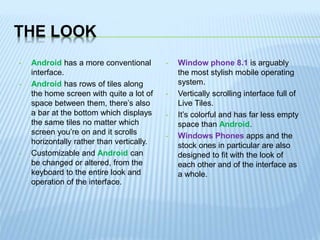
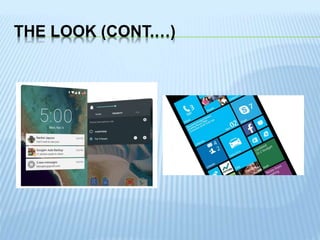
• Android has a more conventional
interface.
• Android has rows of tiles along
the home screen with quite a lot of
space between them, there’s also
a bar at the bottom which displays
the same tiles no matter which
screen you’re on and it scrolls
horizontally rather than vertically.
• Customizable and Android can
be changed or altered, from the
keyboard to the entire look and
operation of the interface.
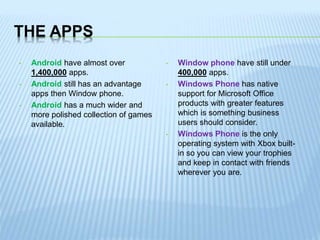
• Window phone 8.1 is arguably
the most stylish mobile operating
system.
• Vertically scrolling interface full of
Live Tiles.
• It’s colorful and has far less empty
space than Android.
• Windows Phones apps and the
stock ones in particular are also
designed to fit with the look of
each other and of the interface as
a whole.
THE LOOK (CONT.…)
THE APPS
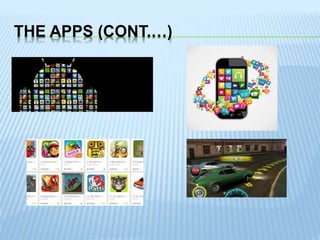
• Android have almost over
1,400,000 apps.
• Android still has an advantage
apps then Window phone.
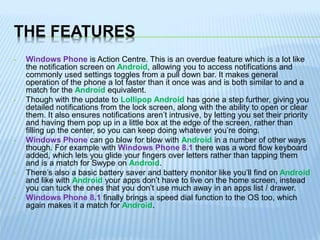
• Android has a much wider and
more polished collection of games
available.
• Window phone have still under
400,000 apps.
• Windows Phone has native
support for Microsoft Office
products with greater features
which is something business
users should consider.
• Windows Phone is the only
operating system with Xbox built-
in so you can view your trophies
and keep in contact with friends
wherever you are.
THE APPS (CONT.…)
THE FEATURES
• Windows Phone is Action Centre. This is an overdue feature which is a lot like
the notification screen on Android, allowing you to access notifications and
commonly used settings toggles from a pull down bar. It makes general
operation of the phone a lot faster than it once was and is both similar to and a
match for the Android equivalent.
• Though with the update to Lollipop Android has gone a step further, giving you
detailed notifications from the lock screen, along with the ability to open or clear
them. It also ensures notifications aren’t intrusive, by letting you set their priority
and having them pop up in a little box at the edge of the screen, rather than
filling up the center, so you can keep doing whatever you’re doing.
• Windows Phone can go blow for blow with Android in a number of other ways
though. For example with Windows Phone 8.1 there was a word flow keyboard
added, which lets you glide your fingers over letters rather than tapping them
and is a match for Swype on Android.
• There’s also a basic battery saver and battery monitor like you’ll find on Android
and like with Android your apps don’t have to live on the home screen, instead
you can tuck the ones that you don’t use much away in an apps list / drawer.
• Windows Phone 8.1 finally brings a speed dial function to the OS too, which
again makes it a match for Android.
THE FEATURES (CONT....)
• In fact in many ways when it comes to actually calling and texting Windows
Phone arguably has Android beat, as it seamlessly integrates with Facebook,
Outlook and other accounts and it does more than just gives you contact
pictures and phone numbers from them, it also lets you see contact’s status
updates so it essentially makes your contacts list social. Windows Phone 8.1
also adds a Wi-Fi Sense feature, which will automatically connect you to public
networks, saving you time when out and about.
• Android has largely been focusing on performance in the last couple of years,
making the OS slicker than ever and allowing it to run well even on low end
devices, but Windows Phone 8 has always been able to do that.
• In fact overall the core Windows Phone 8 experience has debatably now got
Android beat. But you’re better able to make Android your own and with the
wealth of apps and customization options tech-savvy users can easily outdo
almost any Windows Phone feature.
GOOGLE VS. CORTANA
• Cortana is the biggest recent addition to Windows Phone 8 and it gives the OS
an answer to Google Now.
• There are a lot of similarities between the two and both are impressive in their
own ways, but they’re not identical. Both services gather information about you
and use it to give you tailored information and advice. For example they might
give you a traffic warning in the morning because they know a road you take to
work has a problem.
• Cortana seems a little more adept at gathering information on you though and
importantly it’s also easier to keep track of what Cortana knows and delete
information that you’d rather it didn’t store.
• Other than that they’re very similar. Both respond to voice or written commands
and can interact with features on your phone, for example setting a reminder, or
perform a web search and whenever possible they’ll speak the answer back to
you. Here Cortana again has Google Now beat, as its voice is a little more
natural and less like a robot, but it’s no better at actually understanding and
carrying out commands.
GOOGLE VS. CORTANA (CONT....)
• One area where Google Now has the upper hand is how hands free it can be. If
you have your screen on then it will respond to the phrase ‘Ok Google’ at any
time, without you needing to press a single button. You could be browsing the
net, watching a video or even on the lock screen and you can issue voice
commands instantly.
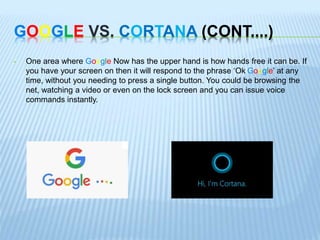
TOP 10 ANDROID BENEFIT
• More open ecosystem
• Apps are cheaper on Android than
iOS and window phones
• Customisable UI offers
productivity benefits
• Cross-platform nature makes it
more flexible
• NFC-enabled for a cashless future
• Open use lets manufacturers
create bespoke devices
• Multiple prices for devices
• Innovations reach the market
quicker
• Raft of wearables arriving
• Better choice of devices
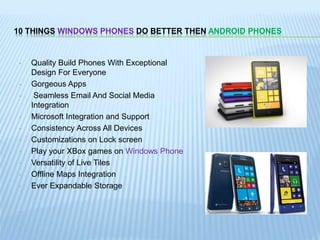
10 THINGS WINDOWS PHONES DO BETTER THEN ANDROID PHONES
• Quality Build Phones With Exceptional
Design For Everyone
• Gorgeous Apps
• Seamless Email And Social Media
Integration
• Microsoft Integration and Support
• Consistency Across All Devices
• Customizations on Lock screen
• Play your XBox games on Windows Phone
• Versatility of Live Tiles
• Offline Maps Integration
• Ever Expandable Storage
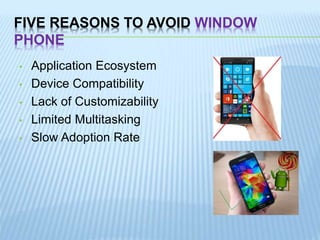
FIVE REASONS TO AVOID WINDOW
PHONE
• Application Ecosystem
• Device Compatibility
• Lack of Customizability
• Limited Multitasking
• Slow Adoption Rate
VERSIONS OF WINDOWS PHONES
• Windows Phone 7
• Windows Phone 7.5
• Windows Phone 7.8
• Windows Phone 8
• Windows Phone 8.1
• Windows Phone 10
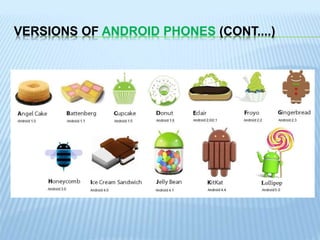
VERSIONS OF ANDROID PHONES
• Angle Cake (1.0)
• Battenberg (1.1)
• Cupcake (1.5)
• Donut (1.6)
• Eclair (2.0–2.1)
• Froyo (2.2–2.2.3)
• Gingerbread (2.3–2.3.7)
• Honeycomb (3.0–3.2.6)
• Ice Cream Sandwich (4.0–4.0.4)
• Jelly Bean (4.1–4.3.1)
• KitKat (4.4–4.4.4, 4.4W–4.4W.2)
• Lollipop (5.0–5.1.1)
• Marshmallow (6.0)
VERSIONS OF ANDROID PHONES (CONT....)
Android vs window

Android vs window

  • 1.
    ANDROID VS. WINDOWS BySyeda Zoya Mehdi
  • 2.
    ANDROID LOLLIPOP VS.WINDOWS PHONE 8.1
  • 3.
    THE LOOK • Androidhas a more conventional interface. • Android has rows of tiles along the home screen with quite a lot of space between them, there’s also a bar at the bottom which displays the same tiles no matter which screen you’re on and it scrolls horizontally rather than vertically. • Customizable and Android can be changed or altered, from the keyboard to the entire look and operation of the interface. • Window phone 8.1 is arguably the most stylish mobile operating system. • Vertically scrolling interface full of Live Tiles. • It’s colorful and has far less empty space than Android. • Windows Phones apps and the stock ones in particular are also designed to fit with the look of each other and of the interface as a whole.
  • 4.
  • 5.
    THE APPS • Androidhave almost over 1,400,000 apps. • Android still has an advantage apps then Window phone. • Android has a much wider and more polished collection of games available. • Window phone have still under 400,000 apps. • Windows Phone has native support for Microsoft Office products with greater features which is something business users should consider. • Windows Phone is the only operating system with Xbox built- in so you can view your trophies and keep in contact with friends wherever you are.
  • 6.
  • 7.
    THE FEATURES • WindowsPhone is Action Centre. This is an overdue feature which is a lot like the notification screen on Android, allowing you to access notifications and commonly used settings toggles from a pull down bar. It makes general operation of the phone a lot faster than it once was and is both similar to and a match for the Android equivalent. • Though with the update to Lollipop Android has gone a step further, giving you detailed notifications from the lock screen, along with the ability to open or clear them. It also ensures notifications aren’t intrusive, by letting you set their priority and having them pop up in a little box at the edge of the screen, rather than filling up the center, so you can keep doing whatever you’re doing. • Windows Phone can go blow for blow with Android in a number of other ways though. For example with Windows Phone 8.1 there was a word flow keyboard added, which lets you glide your fingers over letters rather than tapping them and is a match for Swype on Android. • There’s also a basic battery saver and battery monitor like you’ll find on Android and like with Android your apps don’t have to live on the home screen, instead you can tuck the ones that you don’t use much away in an apps list / drawer. • Windows Phone 8.1 finally brings a speed dial function to the OS too, which again makes it a match for Android.
  • 8.
    THE FEATURES (CONT....) •In fact in many ways when it comes to actually calling and texting Windows Phone arguably has Android beat, as it seamlessly integrates with Facebook, Outlook and other accounts and it does more than just gives you contact pictures and phone numbers from them, it also lets you see contact’s status updates so it essentially makes your contacts list social. Windows Phone 8.1 also adds a Wi-Fi Sense feature, which will automatically connect you to public networks, saving you time when out and about. • Android has largely been focusing on performance in the last couple of years, making the OS slicker than ever and allowing it to run well even on low end devices, but Windows Phone 8 has always been able to do that. • In fact overall the core Windows Phone 8 experience has debatably now got Android beat. But you’re better able to make Android your own and with the wealth of apps and customization options tech-savvy users can easily outdo almost any Windows Phone feature.
  • 9.
    GOOGLE VS. CORTANA •Cortana is the biggest recent addition to Windows Phone 8 and it gives the OS an answer to Google Now. • There are a lot of similarities between the two and both are impressive in their own ways, but they’re not identical. Both services gather information about you and use it to give you tailored information and advice. For example they might give you a traffic warning in the morning because they know a road you take to work has a problem. • Cortana seems a little more adept at gathering information on you though and importantly it’s also easier to keep track of what Cortana knows and delete information that you’d rather it didn’t store. • Other than that they’re very similar. Both respond to voice or written commands and can interact with features on your phone, for example setting a reminder, or perform a web search and whenever possible they’ll speak the answer back to you. Here Cortana again has Google Now beat, as its voice is a little more natural and less like a robot, but it’s no better at actually understanding and carrying out commands.
  • 10.
    GOOGLE VS. CORTANA(CONT....) • One area where Google Now has the upper hand is how hands free it can be. If you have your screen on then it will respond to the phrase ‘Ok Google’ at any time, without you needing to press a single button. You could be browsing the net, watching a video or even on the lock screen and you can issue voice commands instantly.
  • 11.
    TOP 10 ANDROIDBENEFIT • More open ecosystem • Apps are cheaper on Android than iOS and window phones • Customisable UI offers productivity benefits • Cross-platform nature makes it more flexible • NFC-enabled for a cashless future • Open use lets manufacturers create bespoke devices • Multiple prices for devices • Innovations reach the market quicker • Raft of wearables arriving • Better choice of devices
  • 12.
    10 THINGS WINDOWSPHONES DO BETTER THEN ANDROID PHONES • Quality Build Phones With Exceptional Design For Everyone • Gorgeous Apps • Seamless Email And Social Media Integration • Microsoft Integration and Support • Consistency Across All Devices • Customizations on Lock screen • Play your XBox games on Windows Phone • Versatility of Live Tiles • Offline Maps Integration • Ever Expandable Storage
  • 13.
    FIVE REASONS TOAVOID WINDOW PHONE • Application Ecosystem • Device Compatibility • Lack of Customizability • Limited Multitasking • Slow Adoption Rate
  • 14.
    VERSIONS OF WINDOWSPHONES • Windows Phone 7 • Windows Phone 7.5 • Windows Phone 7.8 • Windows Phone 8 • Windows Phone 8.1 • Windows Phone 10
  • 15.
    VERSIONS OF ANDROIDPHONES • Angle Cake (1.0) • Battenberg (1.1) • Cupcake (1.5) • Donut (1.6) • Eclair (2.0–2.1) • Froyo (2.2–2.2.3) • Gingerbread (2.3–2.3.7) • Honeycomb (3.0–3.2.6) • Ice Cream Sandwich (4.0–4.0.4) • Jelly Bean (4.1–4.3.1) • KitKat (4.4–4.4.4, 4.4W–4.4W.2) • Lollipop (5.0–5.1.1) • Marshmallow (6.0)
  • 16.
    VERSIONS OF ANDROIDPHONES (CONT....)