Windows 8 Mobile Apps
Development
Guided BY:
Mr. Esan Panchal
&
Mr. Rinkesh Patel
Thakkar Tirth (126820307036)
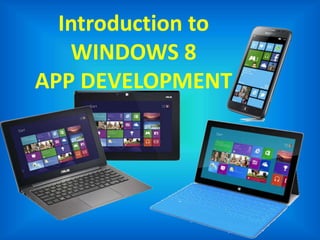
Introduction to
WINDOWS 8
APP DEVELOPMENT
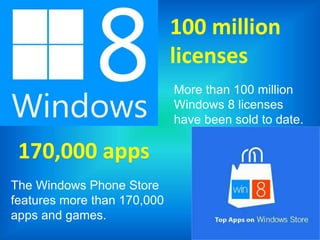
More than 100 million
Windows 8 licenses
have been sold to date.
100 million
licenses
170,000 apps
The Windows Phone Store
features more than 170,000
apps and games.
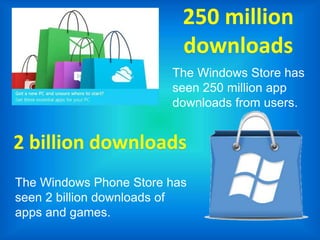
250 million
downloads
The Windows Store has
seen 250 million app
downloads from users.
2 billion downloads
The Windows Phone Store has
seen 2 billion downloads of
apps and games.
You Already Have
iOS & Android
App Developed & Live?
But Still Wonder If You Need
?
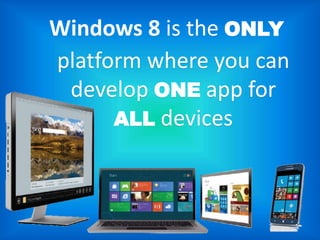
Windows 8 is the ONLY
platform where you can
develop ONE app for
ALL devices
History of Windows 8
• On June 20, 2012, Microsoft unveiled Windows 8
Phone(codenamed Apollo).
• A second generation of the Windows Phone
operating system for release later in 2012.
• Windows Phone 8 replaces its previously Windows
CE-based architecture with one based on the
Windows NT kernel (with many components
shared with Windows 8), allowing developers to
easily port applications between the two
platforms.
Shared Windows Core
Shared Core means
• OS components such as the kernel, networking,
graphics support, file system and multimedia are
the same on both Windows 8 and Windows Phone
8
• Hardware manufacturers work with the same driver
model on both platforms
Shared Windows Core (cntd...)
It doesn’t mean
• Windows 8 and Windows Phone 8
developers work to exactly the same
APIs (though you will see more
commonly as new features are
introduced to both platforms in the
future)
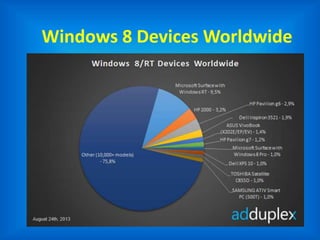
Windows 8 Devices Worldwide
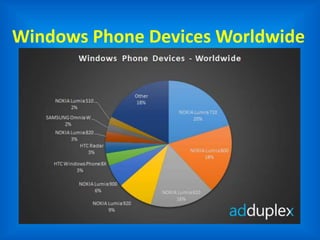
Windows Phone Devices Worldwide
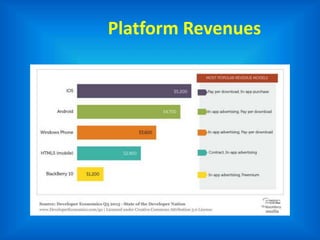
Platform Revenues
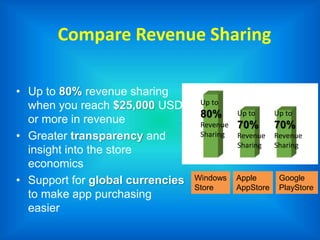
Compare Revenue Sharing
• Up to 80% revenue sharing
when you reach $25,000 USD
or more in revenue
• Greater transparency and
insight into the store
economics
• Support for global currencies
to make app purchasing
easier
Windows
Store
Apple
AppStore
Google
PlayStore
Up to
80%
Revenue
Sharing
Up to
70%
Revenue
Sharing
Up to
70%
Revenue
Sharing
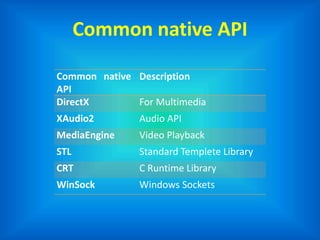
Common native API
Common native
API
Description
DirectX For Multimedia
XAudio2 Audio API
MediaEngine Video Playback
STL Standard Templete Library
CRT C Runtime Library
WinSock Windows Sockets
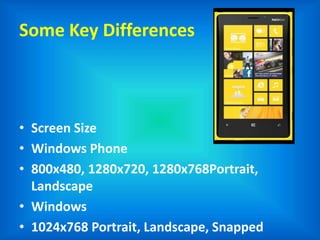
Some Key Differences
• Screen Size
• Windows Phone
• 800x480, 1280x720, 1280x768Portrait,
Landscape
• Windows
• 1024x768 Portrait, Landscape, Snapped
Some Key Differences
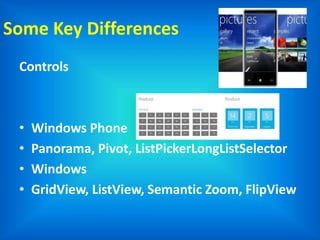
Controls
• Windows Phone
• Panorama, Pivot, ListPickerLongListSelector
• Windows
• GridView, ListView, Semantic Zoom, FlipView
Similar XAML UI Controls
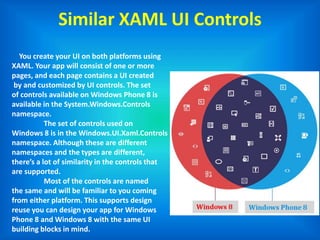
You create your UI on both platforms using
XAML. Your app will consist of one or more
pages, and each page contains a UI created
by and customized by UI controls. The set
of controls available on Windows Phone 8 is
available in the System.Windows.Controls
namespace.
The set of controls used on
Windows 8 is in the Windows.UI.Xaml.Controls
namespace. Although these are different
namespaces and the types are different,
there’s a lot of similarity in the controls that
are supported.
Most of the controls are named
the same and will be familiar to you coming
from either platform. This supports design
reuse you can design your app for Windows
Phone 8 and Windows 8 with the same UI
building blocks in mind.
Windows Phone 8 Programming API
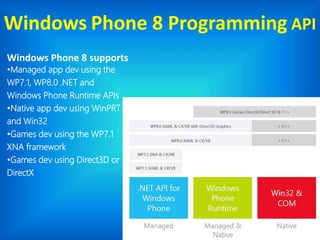
Windows Phone 8 supports
•Managed app dev using the
WP7.1, WP8.0 .NET and
Windows Phone Runtime APIs
•Native app dev using WinPRT
and Win32
•Games dev using the WP7.1
XNA framework
•Games dev using Direct3D or
DirectX
.NET API for Windows Phone
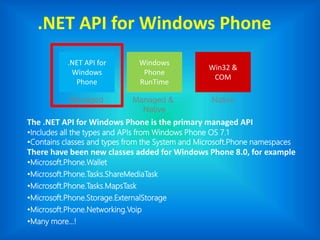
The .NET API for Windows Phone is the primary managed API
•Includes all the types and APIs from Windows Phone OS 7.1
•Contains classes and types from the System and Microsoft.Phone namespaces
There have been new classes added for Windows Phone 8.0, for example
•Microsoft.Phone.Wallet
•Microsoft.Phone.Tasks.ShareMediaTask
•Microsoft.Phone.Tasks.MapsTask
•Microsoft.Phone.Storage.ExternalStorage
•Microsoft.Phone.Networking.Voip
•Many more…!
.NET API for
Windows
Phone
Windows
Phone
RunTime
Win32 &
COM
Managed Managed &
Native
Native
Windows Phone Runtime API
.NET API for
Windows
Phone
Windows
Phone
RunTime
Win32 &
COM
Managed Managed &
Native
Native
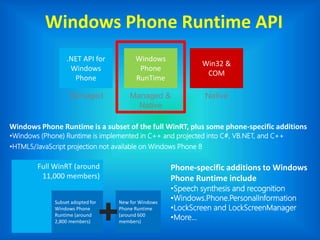
Windows Phone Runtime is a subset of the full WinRT, plus some phone-specific additions
•Windows (Phone) Runtime is implemented in C++ and projected into C#, VB.NET, and C++
•HTML5/JavaScript projection not available on Windows Phone 8
Phone-specific additions to Windows
Phone Runtime include
•Speech synthesis and recognition
•Windows.Phone.PersonalInformation
•LockScreen and LockScreenManager
•More…
Full WinRT (around
11,000 members)
Subset adopted for
Windows Phone
Runtime (around
2,800 members)
New for Windows
Phone Runtime
(around 600
members)
Win32 & COM API for Windows Phone
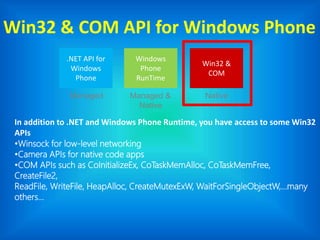
In addition to .NET and Windows Phone Runtime, you have access to some Win32
APIs
•Winsock for low-level networking
•Camera APIs for native code apps
•COM APIs such as CoInitializeEx, CoTaskMemAlloc, CoTaskMemFree,
CreateFile2,
ReadFile, WriteFile, HeapAlloc, CreateMutexExW, WaitForSingleObjectW,…many
others…
.NET API for
Windows
Phone
Windows
Phone
RunTime
Win32 &
COM
Managed Managed &
Native
Native
Getting Started
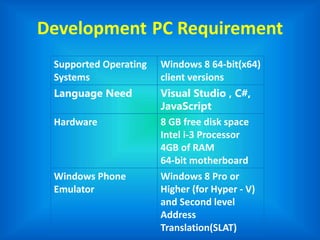
Development PC Requirement
Supported Operating
Systems
Windows 8 64-bit(x64)
client versions
Language Need Visual Studio , C#,
JavaScript
Hardware 8 GB free disk space
Intel i-3 Processor
4GB of RAM
64-bit motherboard
Windows Phone
Emulator
Windows 8 Pro or
Higher (for Hyper - V)
and Second level
Address
Translation(SLAT)
Overview of New
Features for Developers
in Windows Phone 8.0
Features of Windows 8 Mobile
Homescreen
• The first thing you notice on Windows Phone 8 is
its pure interface. All these additional icons,
buttons and chunks of text are gone and only the
essential is left. In fact, the interface is so
simplified that even the battery, signal and WiFi
indicators are gone, and only appear if you press
the top of the screen. When you compare it to
Android, you can’t help but realize the latter has a
bit too much information on the homescreen and
that some of it could be hidden.
Features of Windows 8 Mobile
Microsoft Office
• Most Android phones offer basic support for Microsoft
Office documents out of the box, but this is usually limited
to viewing files with no editing possibilities. When the latter
exists, users are often invited to download a full version of
the software on the Play Store, implying they would have to
buy an application in order to create and edit Microsoft
Office documents. Of course, Google’s very own Drive is a
decent alternative to Microsoft Office, but the application
quickly becomes useless when you need it the most: in
offline situations. Another major restriction with Google
Drive is that you have to use Google’s storage service to save
your documents, and cannot save them locally or even edit
an attachment you might have received.
Advantages of
Windows 8 Mobile
Advantages of windows 8
• Windows phone 8 Devices overcome Main
Disadvantages of Windows Phone 7.5
• Windows Phone 8 Devices Supports Micro SD Card
by which you can directly connect your Memory
Card to system and transfer Music and Videos.
• The Windows 8 Devices has better Video
Code When Compared With Windows 7.5
• XBOX Games add better Gaming Experience.
• Social Network Integration is good.
Advantages of windows 8
• Windows 8 Now Supports Multi Core Processors.
• Windows 8 has new Interface with Small Tiles.
• The Windows 8 Devices can be connected to
System by Mass Storage Option where as the
Windows 7.5 Devices are connected to System by
Zune Support Only.
• Windows 8 Devices Supports HD Displays.
• Apps Available for Windows 8 Devices are better
when compared with Windows 7.5 Devices
Advantages of windows 8
• Microsoft Office Support is very nice and
Document Reading and Editing is Really Very Good.
• Has Inbuilt Bar Code Scanner
• Windows 8 Devices Ranks 3rd position in the
Mobile Market.
• The Main Advantage is The Devices never Struck
and no lagging.
Disadvantages of
Windows 8 Mobile
Disadvantages of Windows 8
• Above we have discussed many Advantages of
Windows Phone 8 Devices. Still Windows 8 Devices
has some Disadvantages for the General use.
• The Devices Available in the Market are Still Using
Dual Core Processors Where as Quad Core, Octa
Core Processors are Available in the Market.
• The Higher End Devices are only having of 1 GB
Ram and 2 GB version Android Devices are
Available in the Market.
Disadvantages of Windows 8
• The Main Disadvantage is App Catalogue it fails to
competite with Android and iOS.
• The Most Games(Temple Run and Many More )
Requires of 1 GB Ram but 1GB Ram is available for
only Higher End Devices and the lower End Devices
has only 512Mb Ram Support.
• Windows Mainly fails in App Transformation from
Android and iOS.
Disadvantages of Windows 8
• The Device Supports limited Video Codec and only
Plays video files like .3gp, .avi and .mp4 and
cannot play any other formats like .mkv and many
more.
• The NFC and Bluetooth is not yet perfect for the
Sharing of our Content you can share
Photos/Images by Blue tooth but you cannot share
Videos.
Disadvantages of Windows 8
• The Other Major thing we have to Consider is
Video Player there is no Single Video Player App in
the Windows Phone Market. We have to
play/Access Video Files in the Music+Videos in
your Device.
• Folder View of Videos is also Not possible and All
the Video Files are given as list and you may not
Delete All the Videos at a Time and have to select
each one by one and Delete them.
Missing features added in Windows
Phone 8.1
Task Manager:
• There is no way to kill an app which crashed or is
just not responding anymore. Even on Windows
Phone 8 apps can crash. You can wait till Windows
Phone 8 removes the app from memory
automatically or you restart your phone. Both
ways are rather annoying. I want Microsoft to add
the "kill"-option in the overview screen of all apps
which are currently open (you get that screen by
pressing the back button for some seconds) with
the possibility to press long on the crashed app
Missing features added in Windows
Phone 8.1
File Manager:
• So far Microsoft does not give access to the File System of your
Windows Phone 8. There are even no apps to manage your files.
Microsoft is going here the Apple-Way (get simplicity with
restrictions) to prevent users form killing the system by playing
around with the File System. But in the case you are running out
of free memory on your phone this can be rather annoying. If you
want to delete files then you always have to open the
corresponding app (e.g. the Photo App to delete Photos or the
PDF Reader to delete an PDF). Of course this apps are not
specialized on managing files: So you can´t perform a proper file
search or it´s hard to identify big files and memory wasters. I
would like to see an central app where I can manage all my files
(mostly that are just Photos, Music, Videos, Documents). This can
be still simple and does not need full File System access.
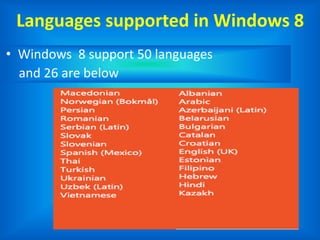
Languages supported in Windows 8
• Windows 8 support 50 languages
and 26 are below
Any question
?
Windows 8 mobile app development

Windows 8 mobile app development

  • 1.
    Windows 8 MobileApps Development Guided BY: Mr. Esan Panchal & Mr. Rinkesh Patel Thakkar Tirth (126820307036)
  • 2.
  • 3.
    More than 100million Windows 8 licenses have been sold to date. 100 million licenses 170,000 apps The Windows Phone Store features more than 170,000 apps and games.
  • 4.
    250 million downloads The WindowsStore has seen 250 million app downloads from users. 2 billion downloads The Windows Phone Store has seen 2 billion downloads of apps and games.
  • 5.
    You Already Have iOS& Android App Developed & Live?
  • 6.
    But Still WonderIf You Need ?
  • 7.
    Windows 8 isthe ONLY platform where you can develop ONE app for ALL devices
  • 8.
    History of Windows8 • On June 20, 2012, Microsoft unveiled Windows 8 Phone(codenamed Apollo). • A second generation of the Windows Phone operating system for release later in 2012. • Windows Phone 8 replaces its previously Windows CE-based architecture with one based on the Windows NT kernel (with many components shared with Windows 8), allowing developers to easily port applications between the two platforms.
  • 9.
    Shared Windows Core SharedCore means • OS components such as the kernel, networking, graphics support, file system and multimedia are the same on both Windows 8 and Windows Phone 8 • Hardware manufacturers work with the same driver model on both platforms
  • 10.
    Shared Windows Core(cntd...) It doesn’t mean • Windows 8 and Windows Phone 8 developers work to exactly the same APIs (though you will see more commonly as new features are introduced to both platforms in the future)
  • 11.
  • 12.
  • 13.
  • 14.
    Compare Revenue Sharing •Up to 80% revenue sharing when you reach $25,000 USD or more in revenue • Greater transparency and insight into the store economics • Support for global currencies to make app purchasing easier Windows Store Apple AppStore Google PlayStore Up to 80% Revenue Sharing Up to 70% Revenue Sharing Up to 70% Revenue Sharing
  • 15.
    Common native API Commonnative API Description DirectX For Multimedia XAudio2 Audio API MediaEngine Video Playback STL Standard Templete Library CRT C Runtime Library WinSock Windows Sockets
  • 16.
    Some Key Differences •Screen Size • Windows Phone • 800x480, 1280x720, 1280x768Portrait, Landscape • Windows • 1024x768 Portrait, Landscape, Snapped
  • 17.
    Some Key Differences Controls •Windows Phone • Panorama, Pivot, ListPickerLongListSelector • Windows • GridView, ListView, Semantic Zoom, FlipView
  • 18.
    Similar XAML UIControls You create your UI on both platforms using XAML. Your app will consist of one or more pages, and each page contains a UI created by and customized by UI controls. The set of controls available on Windows Phone 8 is available in the System.Windows.Controls namespace. The set of controls used on Windows 8 is in the Windows.UI.Xaml.Controls namespace. Although these are different namespaces and the types are different, there’s a lot of similarity in the controls that are supported. Most of the controls are named the same and will be familiar to you coming from either platform. This supports design reuse you can design your app for Windows Phone 8 and Windows 8 with the same UI building blocks in mind.
  • 19.
    Windows Phone 8Programming API Windows Phone 8 supports •Managed app dev using the WP7.1, WP8.0 .NET and Windows Phone Runtime APIs •Native app dev using WinPRT and Win32 •Games dev using the WP7.1 XNA framework •Games dev using Direct3D or DirectX
  • 20.
    .NET API forWindows Phone The .NET API for Windows Phone is the primary managed API •Includes all the types and APIs from Windows Phone OS 7.1 •Contains classes and types from the System and Microsoft.Phone namespaces There have been new classes added for Windows Phone 8.0, for example •Microsoft.Phone.Wallet •Microsoft.Phone.Tasks.ShareMediaTask •Microsoft.Phone.Tasks.MapsTask •Microsoft.Phone.Storage.ExternalStorage •Microsoft.Phone.Networking.Voip •Many more…! .NET API for Windows Phone Windows Phone RunTime Win32 & COM Managed Managed & Native Native
  • 21.
    Windows Phone RuntimeAPI .NET API for Windows Phone Windows Phone RunTime Win32 & COM Managed Managed & Native Native Windows Phone Runtime is a subset of the full WinRT, plus some phone-specific additions •Windows (Phone) Runtime is implemented in C++ and projected into C#, VB.NET, and C++ •HTML5/JavaScript projection not available on Windows Phone 8 Phone-specific additions to Windows Phone Runtime include •Speech synthesis and recognition •Windows.Phone.PersonalInformation •LockScreen and LockScreenManager •More… Full WinRT (around 11,000 members) Subset adopted for Windows Phone Runtime (around 2,800 members) New for Windows Phone Runtime (around 600 members)
  • 22.
    Win32 & COMAPI for Windows Phone In addition to .NET and Windows Phone Runtime, you have access to some Win32 APIs •Winsock for low-level networking •Camera APIs for native code apps •COM APIs such as CoInitializeEx, CoTaskMemAlloc, CoTaskMemFree, CreateFile2, ReadFile, WriteFile, HeapAlloc, CreateMutexExW, WaitForSingleObjectW,…many others… .NET API for Windows Phone Windows Phone RunTime Win32 & COM Managed Managed & Native Native
  • 23.
  • 24.
    Development PC Requirement SupportedOperating Systems Windows 8 64-bit(x64) client versions Language Need Visual Studio , C#, JavaScript Hardware 8 GB free disk space Intel i-3 Processor 4GB of RAM 64-bit motherboard Windows Phone Emulator Windows 8 Pro or Higher (for Hyper - V) and Second level Address Translation(SLAT)
  • 25.
    Overview of New Featuresfor Developers in Windows Phone 8.0
  • 26.
    Features of Windows8 Mobile Homescreen • The first thing you notice on Windows Phone 8 is its pure interface. All these additional icons, buttons and chunks of text are gone and only the essential is left. In fact, the interface is so simplified that even the battery, signal and WiFi indicators are gone, and only appear if you press the top of the screen. When you compare it to Android, you can’t help but realize the latter has a bit too much information on the homescreen and that some of it could be hidden.
  • 27.
    Features of Windows8 Mobile Microsoft Office • Most Android phones offer basic support for Microsoft Office documents out of the box, but this is usually limited to viewing files with no editing possibilities. When the latter exists, users are often invited to download a full version of the software on the Play Store, implying they would have to buy an application in order to create and edit Microsoft Office documents. Of course, Google’s very own Drive is a decent alternative to Microsoft Office, but the application quickly becomes useless when you need it the most: in offline situations. Another major restriction with Google Drive is that you have to use Google’s storage service to save your documents, and cannot save them locally or even edit an attachment you might have received.
  • 28.
  • 29.
    Advantages of windows8 • Windows phone 8 Devices overcome Main Disadvantages of Windows Phone 7.5 • Windows Phone 8 Devices Supports Micro SD Card by which you can directly connect your Memory Card to system and transfer Music and Videos. • The Windows 8 Devices has better Video Code When Compared With Windows 7.5 • XBOX Games add better Gaming Experience. • Social Network Integration is good.
  • 30.
    Advantages of windows8 • Windows 8 Now Supports Multi Core Processors. • Windows 8 has new Interface with Small Tiles. • The Windows 8 Devices can be connected to System by Mass Storage Option where as the Windows 7.5 Devices are connected to System by Zune Support Only. • Windows 8 Devices Supports HD Displays. • Apps Available for Windows 8 Devices are better when compared with Windows 7.5 Devices
  • 31.
    Advantages of windows8 • Microsoft Office Support is very nice and Document Reading and Editing is Really Very Good. • Has Inbuilt Bar Code Scanner • Windows 8 Devices Ranks 3rd position in the Mobile Market. • The Main Advantage is The Devices never Struck and no lagging.
  • 32.
  • 33.
    Disadvantages of Windows8 • Above we have discussed many Advantages of Windows Phone 8 Devices. Still Windows 8 Devices has some Disadvantages for the General use. • The Devices Available in the Market are Still Using Dual Core Processors Where as Quad Core, Octa Core Processors are Available in the Market. • The Higher End Devices are only having of 1 GB Ram and 2 GB version Android Devices are Available in the Market.
  • 34.
    Disadvantages of Windows8 • The Main Disadvantage is App Catalogue it fails to competite with Android and iOS. • The Most Games(Temple Run and Many More ) Requires of 1 GB Ram but 1GB Ram is available for only Higher End Devices and the lower End Devices has only 512Mb Ram Support. • Windows Mainly fails in App Transformation from Android and iOS.
  • 35.
    Disadvantages of Windows8 • The Device Supports limited Video Codec and only Plays video files like .3gp, .avi and .mp4 and cannot play any other formats like .mkv and many more. • The NFC and Bluetooth is not yet perfect for the Sharing of our Content you can share Photos/Images by Blue tooth but you cannot share Videos.
  • 36.
    Disadvantages of Windows8 • The Other Major thing we have to Consider is Video Player there is no Single Video Player App in the Windows Phone Market. We have to play/Access Video Files in the Music+Videos in your Device. • Folder View of Videos is also Not possible and All the Video Files are given as list and you may not Delete All the Videos at a Time and have to select each one by one and Delete them.
  • 37.
    Missing features addedin Windows Phone 8.1 Task Manager: • There is no way to kill an app which crashed or is just not responding anymore. Even on Windows Phone 8 apps can crash. You can wait till Windows Phone 8 removes the app from memory automatically or you restart your phone. Both ways are rather annoying. I want Microsoft to add the "kill"-option in the overview screen of all apps which are currently open (you get that screen by pressing the back button for some seconds) with the possibility to press long on the crashed app
  • 38.
    Missing features addedin Windows Phone 8.1 File Manager: • So far Microsoft does not give access to the File System of your Windows Phone 8. There are even no apps to manage your files. Microsoft is going here the Apple-Way (get simplicity with restrictions) to prevent users form killing the system by playing around with the File System. But in the case you are running out of free memory on your phone this can be rather annoying. If you want to delete files then you always have to open the corresponding app (e.g. the Photo App to delete Photos or the PDF Reader to delete an PDF). Of course this apps are not specialized on managing files: So you can´t perform a proper file search or it´s hard to identify big files and memory wasters. I would like to see an central app where I can manage all my files (mostly that are just Photos, Music, Videos, Documents). This can be still simple and does not need full File System access.
  • 39.
    Languages supported inWindows 8 • Windows 8 support 50 languages and 26 are below
  • 40.