From Containerization
to Modularity
by @oasisfeng
Modular Future of Mobile Ecosystem
Modular hardware lead to modular software
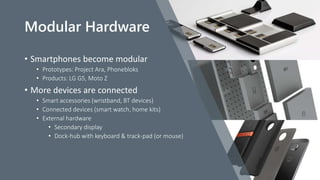
Modular Hardware
• Smartphones become modular
• Prototypes: Project Ara, Phonebloks
• Products: LG G5, Moto Z
• More devices are connected
• Smart accessories (wristband, BT devices)
• Connected devices (smart watch, home kits)
• External hardware
• Secondary display
• Dock-hub with keyboard & track-pad (or mouse)
Modular Software
• Software becomes even more modular in an open ecosystem.
• Android itself becomes more and more modular.
• Assembly: Android Wear & TV, 3rd-party ROM
• Pluggable: IME, TTS, Doc Provider, Notification Listener
• Forkable: Shared Library (Services & Shared), System UI*
• Modular app ecosystem
• Launcher, Widget, Lock Screen, Live Wallpaper, Complication (Wear)
• Google Docs & Sheets Addons
• Community-driven: Tasker, Xposed, Nevolution, Island...
• The future of mobile belongs to the union of small teams and individuals.
Modular App Architecture
Every modular is a tiny app
What is Modularity?
• Modules separated by certain level of isolation
• Characteristics
• Independent
• Interchangeable
• Interoperable
• The price
• Confine
• Contract
• Compatibility
Why Modular?
• Engineering
• Enforced decoupling for high-cohesion code.
• Module-independent (parallel) development and testing
• Flexible integration, deployment & upgrade
• The infamous "64K methods limit"
• Product
• Selective installation (light-weight initial install)
• Hybrid-friendly (web & native, mix and match)
• Open to (3rd-party) extensions
Basic Solutions
• Java packages
• Pros: lowest cost
• Cons: loose isolation
• Gradle library modules
• Pros: tool-chain support
• Cons: build efficiency
• Multiple APKs
• Pros: build & install time (development productivity)
• Cons: Less user-friendly
In-House Modular Frameworks
Mainstream approaches in the wild:
• Multi-Dex: Inject dex-elements
• Pros: Easy to implement, taking full advantage of AOT & JIT
• Cons: Weak isolation
• Container: Proxy components by hooking. (DroidPlugin)
• Pros: Direct APK loading
• Cons: Massive reflective hooking (prone to compatibility issues)
• Semi-container: Transparent merge with class-loader proxy. (Atlas)
• Pros: Light-weight, modest hooking, minimal module constraints
• Cons: Runtime AndroidManifest lock-in
The Adventure of Project Atlas (Taobao)
• 1st gen (2012 - 2013): Container-based
• Goal: Fast and easy (business) plug-in integration across BUs.
• Challenge: Compatibility (both ROM and plug-in)
• 2nd gen (2013 - 2014): Semi-container
• Goal: Compatibility, reliability, maintainability.
• Benefits: 50% less code, 80% less reflective-hooking.
• 3rd gen: (2014-): Semi-container with flexible module management
• Goal: Deploy by module » Deploy-on-demand by UI pagelet (like web)
• Benefits: Agile development, fast deployment, incremental installation.
The Problem
• A complex framework for mixed purposes
• Modularity, incremental deployment, runtime upgrade and even hot-fix
• The reality
• A big mess of compromise and inefficiency
• The way out – Layered frameworks for separate purpose
• Modularity framework, to modularize the project structure.
• Runtime container, to manage deployment and upgrade.
• Hot-fix mechanism, for highly efficient and fast bug-fix.
Well-Known Open Source Containers
• They are actually much more complex beyond your imagination.
• Despite open sourced, it is still hard to evaluate.
• Check out its compatibility list (Android versions, Dalvik / ART, Devices)
• Check out its issue tracker
• Check out the KNOWN ISSUES in README or wiki
• Check out the LIMITATIONS in README or wiki
Be careful about projects with few KNOWN ISSUES and LIMITATIONS.
The Future of Runtime Container
• The Android infrastructure
• Split-APK (Android 5+): Requires modular project
• Instant App (Google Play services): Requires highly modular project
• Ephemeral App (Android 7+): Possibly requires modular project *
• Runtime container as a platform (Virtual App)
• Hack existent app (like Xposed for apps, without root)
• App automation (like UiAutomator for user)
• Privacy concerns (that’s why it should be open sourced)
Life is hard, don't waste your time!
Talk is cheap, show me the code!
Advice for Practice
• If you are a small team or developing a fast-iterating product
• Modularize your project as early as possible.
• Avoid developing in-house runtime container.
• Adopt open-source hot-fix solutions.
• If you are a large team, focus on shared low-level platform.
• Layer your frameworks, do modularization first.
• Avoid container-based approach, unless it’s your product model.
• The forbiddance enforced by developer agreement of Google Play Store
• Plan the exit route of containerization within its core design.
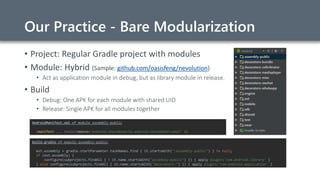
Our Practice - Bare Modularization
• Project: Regular Gradle project with modules
• Module: Hybrid (Sample: github.com/oasisfeng/nevolution)
• Act as application module in debug, but as library module in release.
• Build
• Debug: One APK for each module with shared UID
• Release: Single APK for all modules together
build.gradle of module assembly-public
ext.assembly = gradle.startParameter.taskNames.find { it.startsWith(":assembly-public") } != null;
if (ext.assembly) {
configure(subprojects.findAll { ! it.name.startsWith("assembly-public") }) { apply plugin:'com.android.library' }
} else configure(subprojects.findAll { it.name.startsWith("decorators-") }) { apply plugin:'com.android.application' }
AndroidManifest.xml of module assembly-public
<manifest ... tools:remove="android:sharedUserId,android:sharedUserLabel" />
"Bare" means A LOT
• Minimal efforts, pure Android development experience
• Fully managed by Android Studio & Gradle, without extra tools, plug-ins
• Future-proof for your development investment
• Effective building and debugging in large project
• Just build your module only, not the whole project.
• Only install the APKs of dependent modules.
• Only upgrade the APKs of changed modules.
• Inherently compatible and friendly with most runtime containers
• Split APKs (Android 5+), Instant Apps (Google Play)
• Hot-patch solutions: Tinker, Instant Run (Android Studio)
Dependency Injection
• DI in pure Android way
• Intent against intent filter
• AndroidManifest – The dependency configuration
• Gradle build types & variants – AndroidManifest override for different scenarios
• Comparison to the classic DI frameworks (JSR-330 based)
• Share components beyond app boundary.
• IPC (multi-process) support.
• Completely lazy.
• User re-configurable. (ActivityChooser, DocumentsProvider)
• Highly interoperable. (No library required)
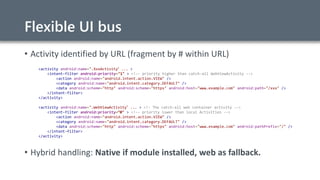
Flexible UI bus
• Activity identified by URL (fragment by # within URL)
<activity android:name=".XxxActivity“ ... >
<intent-filter android:priority="1" > <!-- priority higher than catch-all WebViewActivity -->
<action android:name="android.intent.action.VIEW" />
<category android:name="android.intent.category.DEFAULT" />
<data android:scheme="http" android:scheme="https" android:host="www.example.com" android:path="/xxx" />
</intent-filter>
</activity>
<activity android:name=".WebViewActivity“ ... > <!– The catch-all web container activity -->
<intent-filter android:priority=“0" > <!-- priority lower than local Activities -->
<action android:name="android.intent.action.VIEW" />
<category android:name="android.intent.category.DEFAULT" />
<data android:scheme="http" android:scheme="https" android:host="www.example.com" android:pathPrefix="/" />
</intent-filter>
</activity>
• Hybrid handling: Native if module installed, web as fallback.
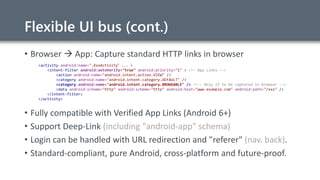
Flexible UI bus (cont.)
• Browser  App: Capture standard HTTP links in browser
<activity android:name=".XxxActivity“ ... >
<intent-filter android:autoVerify="true" android:priority="1" > <!– App Links -->
<action android:name="android.intent.action.VIEW" />
<category android:name="android.intent.category.DEFAULT" />
<category android:name="android.intent.category.BROWSABLE" /> <!-- Only if to be captured in browser -->
<data android:scheme="http" android:scheme="http" android:host="www.example.com" android:path="/xxx" />
</intent-filter>
</activity>
• Fully compatible with Verified App Links (Android 6+)
• Support Deep-Link (including "android-app" schema)
• Login can be handled with URL redirection and "referer" (nav. back).
• Standard-compliant, pure Android, cross-platform and future-proof.
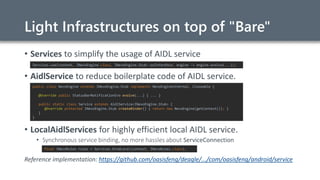
Light Infrastructures on top of "Bare"
• Services to simplify the usage of AIDL service
• AidlService to reduce boilerplate code of AIDL service.
• LocalAidlServices for highly efficient local AIDL service.
• Synchronous service binding, no more hassles about ServiceConnection
Reference implementation: https://github.com/oasisfeng/deagle/.../com/oasisfeng/android/service
Services.use(context, INevoEngine.class, INevoEngine.Stub::asInterface, engine -> engine.evolve(...));
public class NevoEngine extends INevoEngine.Stub implements NevoEngineInternal, Closeable {
@Override public StatusBarNotificationEvo evolve(...) { ... }
public static class Service extends AidlService<INevoEngine.Stub> {
@Override protected INevoEngine.Stub createBinder() { return new NevoEngine(getContext()); }
}
}
final INevoRules rules = Services.bindLocal(context, INevoRules.class);
Other Hiccups You May Experience
• Where to place .aidl and related files
• Avoid AIDL interface between independent modules. (consider broadcast)
• Separate interface module for service module. (engine & engine-api)
• Libraries are built into every dependent modules, state not shared.
• Redundant only in debug build, no difference in actual behaviors.
• Library should NEVER share state between modules.
• Use (wrapper) service if state needs to be shared.
• Share UI among modules
• Consider self-contained Activity in one module.
• Share M+V (fragment & layout) in library module.
Thanks
@oasisfeng
anywhere

From Containerization to Modularity

  • 1.
  • 2.
    Modular Future ofMobile Ecosystem Modular hardware lead to modular software
  • 3.
    Modular Hardware • Smartphonesbecome modular • Prototypes: Project Ara, Phonebloks • Products: LG G5, Moto Z • More devices are connected • Smart accessories (wristband, BT devices) • Connected devices (smart watch, home kits) • External hardware • Secondary display • Dock-hub with keyboard & track-pad (or mouse)
  • 4.
    Modular Software • Softwarebecomes even more modular in an open ecosystem. • Android itself becomes more and more modular. • Assembly: Android Wear & TV, 3rd-party ROM • Pluggable: IME, TTS, Doc Provider, Notification Listener • Forkable: Shared Library (Services & Shared), System UI* • Modular app ecosystem • Launcher, Widget, Lock Screen, Live Wallpaper, Complication (Wear) • Google Docs & Sheets Addons • Community-driven: Tasker, Xposed, Nevolution, Island... • The future of mobile belongs to the union of small teams and individuals.
  • 5.
    Modular App Architecture Everymodular is a tiny app
  • 6.
    What is Modularity? •Modules separated by certain level of isolation • Characteristics • Independent • Interchangeable • Interoperable • The price • Confine • Contract • Compatibility
  • 7.
    Why Modular? • Engineering •Enforced decoupling for high-cohesion code. • Module-independent (parallel) development and testing • Flexible integration, deployment & upgrade • The infamous "64K methods limit" • Product • Selective installation (light-weight initial install) • Hybrid-friendly (web & native, mix and match) • Open to (3rd-party) extensions
  • 8.
    Basic Solutions • Javapackages • Pros: lowest cost • Cons: loose isolation • Gradle library modules • Pros: tool-chain support • Cons: build efficiency • Multiple APKs • Pros: build & install time (development productivity) • Cons: Less user-friendly
  • 9.
    In-House Modular Frameworks Mainstreamapproaches in the wild: • Multi-Dex: Inject dex-elements • Pros: Easy to implement, taking full advantage of AOT & JIT • Cons: Weak isolation • Container: Proxy components by hooking. (DroidPlugin) • Pros: Direct APK loading • Cons: Massive reflective hooking (prone to compatibility issues) • Semi-container: Transparent merge with class-loader proxy. (Atlas) • Pros: Light-weight, modest hooking, minimal module constraints • Cons: Runtime AndroidManifest lock-in
  • 10.
    The Adventure ofProject Atlas (Taobao) • 1st gen (2012 - 2013): Container-based • Goal: Fast and easy (business) plug-in integration across BUs. • Challenge: Compatibility (both ROM and plug-in) • 2nd gen (2013 - 2014): Semi-container • Goal: Compatibility, reliability, maintainability. • Benefits: 50% less code, 80% less reflective-hooking. • 3rd gen: (2014-): Semi-container with flexible module management • Goal: Deploy by module » Deploy-on-demand by UI pagelet (like web) • Benefits: Agile development, fast deployment, incremental installation.
  • 11.
    The Problem • Acomplex framework for mixed purposes • Modularity, incremental deployment, runtime upgrade and even hot-fix • The reality • A big mess of compromise and inefficiency • The way out – Layered frameworks for separate purpose • Modularity framework, to modularize the project structure. • Runtime container, to manage deployment and upgrade. • Hot-fix mechanism, for highly efficient and fast bug-fix.
  • 12.
    Well-Known Open SourceContainers • They are actually much more complex beyond your imagination. • Despite open sourced, it is still hard to evaluate. • Check out its compatibility list (Android versions, Dalvik / ART, Devices) • Check out its issue tracker • Check out the KNOWN ISSUES in README or wiki • Check out the LIMITATIONS in README or wiki Be careful about projects with few KNOWN ISSUES and LIMITATIONS.
  • 13.
    The Future ofRuntime Container • The Android infrastructure • Split-APK (Android 5+): Requires modular project • Instant App (Google Play services): Requires highly modular project • Ephemeral App (Android 7+): Possibly requires modular project * • Runtime container as a platform (Virtual App) • Hack existent app (like Xposed for apps, without root) • App automation (like UiAutomator for user) • Privacy concerns (that’s why it should be open sourced)
  • 14.
    Life is hard,don't waste your time! Talk is cheap, show me the code!
  • 15.
    Advice for Practice •If you are a small team or developing a fast-iterating product • Modularize your project as early as possible. • Avoid developing in-house runtime container. • Adopt open-source hot-fix solutions. • If you are a large team, focus on shared low-level platform. • Layer your frameworks, do modularization first. • Avoid container-based approach, unless it’s your product model. • The forbiddance enforced by developer agreement of Google Play Store • Plan the exit route of containerization within its core design.
  • 16.
    Our Practice -Bare Modularization • Project: Regular Gradle project with modules • Module: Hybrid (Sample: github.com/oasisfeng/nevolution) • Act as application module in debug, but as library module in release. • Build • Debug: One APK for each module with shared UID • Release: Single APK for all modules together build.gradle of module assembly-public ext.assembly = gradle.startParameter.taskNames.find { it.startsWith(":assembly-public") } != null; if (ext.assembly) { configure(subprojects.findAll { ! it.name.startsWith("assembly-public") }) { apply plugin:'com.android.library' } } else configure(subprojects.findAll { it.name.startsWith("decorators-") }) { apply plugin:'com.android.application' } AndroidManifest.xml of module assembly-public <manifest ... tools:remove="android:sharedUserId,android:sharedUserLabel" />
  • 17.
    "Bare" means ALOT • Minimal efforts, pure Android development experience • Fully managed by Android Studio & Gradle, without extra tools, plug-ins • Future-proof for your development investment • Effective building and debugging in large project • Just build your module only, not the whole project. • Only install the APKs of dependent modules. • Only upgrade the APKs of changed modules. • Inherently compatible and friendly with most runtime containers • Split APKs (Android 5+), Instant Apps (Google Play) • Hot-patch solutions: Tinker, Instant Run (Android Studio)
  • 18.
    Dependency Injection • DIin pure Android way • Intent against intent filter • AndroidManifest – The dependency configuration • Gradle build types & variants – AndroidManifest override for different scenarios • Comparison to the classic DI frameworks (JSR-330 based) • Share components beyond app boundary. • IPC (multi-process) support. • Completely lazy. • User re-configurable. (ActivityChooser, DocumentsProvider) • Highly interoperable. (No library required)
  • 19.
    Flexible UI bus •Activity identified by URL (fragment by # within URL) <activity android:name=".XxxActivity“ ... > <intent-filter android:priority="1" > <!-- priority higher than catch-all WebViewActivity --> <action android:name="android.intent.action.VIEW" /> <category android:name="android.intent.category.DEFAULT" /> <data android:scheme="http" android:scheme="https" android:host="www.example.com" android:path="/xxx" /> </intent-filter> </activity> <activity android:name=".WebViewActivity“ ... > <!– The catch-all web container activity --> <intent-filter android:priority=“0" > <!-- priority lower than local Activities --> <action android:name="android.intent.action.VIEW" /> <category android:name="android.intent.category.DEFAULT" /> <data android:scheme="http" android:scheme="https" android:host="www.example.com" android:pathPrefix="/" /> </intent-filter> </activity> • Hybrid handling: Native if module installed, web as fallback.
  • 20.
    Flexible UI bus(cont.) • Browser  App: Capture standard HTTP links in browser <activity android:name=".XxxActivity“ ... > <intent-filter android:autoVerify="true" android:priority="1" > <!– App Links --> <action android:name="android.intent.action.VIEW" /> <category android:name="android.intent.category.DEFAULT" /> <category android:name="android.intent.category.BROWSABLE" /> <!-- Only if to be captured in browser --> <data android:scheme="http" android:scheme="http" android:host="www.example.com" android:path="/xxx" /> </intent-filter> </activity> • Fully compatible with Verified App Links (Android 6+) • Support Deep-Link (including "android-app" schema) • Login can be handled with URL redirection and "referer" (nav. back). • Standard-compliant, pure Android, cross-platform and future-proof.
  • 21.
    Light Infrastructures ontop of "Bare" • Services to simplify the usage of AIDL service • AidlService to reduce boilerplate code of AIDL service. • LocalAidlServices for highly efficient local AIDL service. • Synchronous service binding, no more hassles about ServiceConnection Reference implementation: https://github.com/oasisfeng/deagle/.../com/oasisfeng/android/service Services.use(context, INevoEngine.class, INevoEngine.Stub::asInterface, engine -> engine.evolve(...)); public class NevoEngine extends INevoEngine.Stub implements NevoEngineInternal, Closeable { @Override public StatusBarNotificationEvo evolve(...) { ... } public static class Service extends AidlService<INevoEngine.Stub> { @Override protected INevoEngine.Stub createBinder() { return new NevoEngine(getContext()); } } } final INevoRules rules = Services.bindLocal(context, INevoRules.class);
  • 22.
    Other Hiccups YouMay Experience • Where to place .aidl and related files • Avoid AIDL interface between independent modules. (consider broadcast) • Separate interface module for service module. (engine & engine-api) • Libraries are built into every dependent modules, state not shared. • Redundant only in debug build, no difference in actual behaviors. • Library should NEVER share state between modules. • Use (wrapper) service if state needs to be shared. • Share UI among modules • Consider self-contained Activity in one module. • Share M+V (fragment & layout) in library module.
  • 23.