INDUSTRIAL TRAINING PRESENTATION 
Submitted By: 
Nupur Minocha 
0905cs111061 
BE (CSE) 7th sem 
ON
Contents 
About Company 
Saffron-e-services 
About Android 
 Introduction of Android 
Versions of Android 
 Folders & Directive Structure in Android 
Components of Android 
Android Life Cycle of Activity 
About Project
About Company 
 Saffron-e-services helps its Global 2000 customers 
remain at the forefront of their industries with 
innovative uses of technology to operate their 
businesses more efficiently Saffron-e-services has 
proven track record of designing and delivering high 
quality software solutions in the areas of enterprise 
applications, BPO workflow solutions, eBusiness 
applications, and software products
What is Android ? 
 Android is a Linux-based operating system which is run on 
any mobile device 
 The first Beta version of android STK was released in 2008 
 There are more than 4,00,000 apps in Android market 
 The Android is an open source.
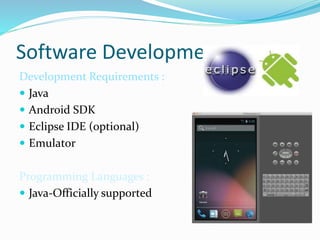
Software Development :- 
Development Requirements : 
 Java 
 Android SDK 
 Eclipse IDE (optional) 
 Emulator 
Programming Languages : 
 Java-Officially supported
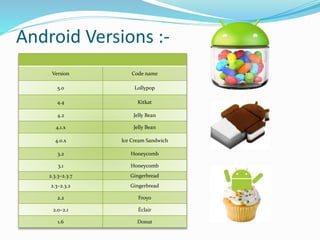
Android Versions :- 
Version Code name 
5.0 Lollypop 
4.4 Kitkat 
4.2 Jelly Bean 
4.1.x Jelly Bean 
4.0.x Ice Cream Sandwich 
3.2 Honeycomb 
3.1 Honeycomb 
2.3.3–2.3.7 Gingerbread 
2.3–2.3.2 Gingerbread 
2.2 Froyo 
2.0–2.1 Éclair 
1.6 Donut
Features of Android 
 Default Storage 
 Recyclable widgets 
 Screen Capture 
 Video Calling 
 Multitasking 
 Voice Based Feature etc.
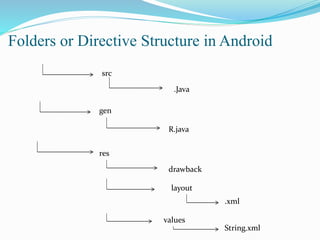
src 
.Java 
gen 
R.java 
res 
drawback 
layout 
values 
.xml 
String.xml
COMPONENTS OF ANDROID 
 Activity Class 
 Service Class 
 Broadcast Receiver 
 Content Provider
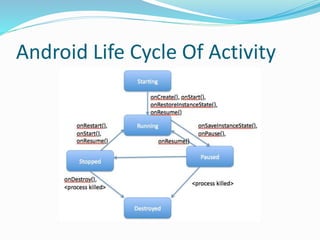
Android Life Cycle Of Activity
How to run application in android 
Now see on the emulator. It is on the home. Now click on the center button to 
launch the app again. 
Now click on the lifecycle 
activity icon
If you see the emulator, application is started .
PROJECT 
 Android music player Application 
(RHYTHMBOX)
User Interface Tested on: 
 Android emulator version 4.3 
External Interface 
Requirements 
Hardware Requirement: 
 Core i3 processor 
 4 GB RAM 
 500 GB Hard Disk 
Software Requirement: 
 Android SDK Manager 
 Eclipse 
 ADT(Android Development 
Tool)
How We Planned The Application
Level-0 DFD 
User 
Android mp3 player 
User input 
Show result
Concepts used in PROJECT 
UI widgets 
Activity & Intents 
Android Menu 
Multimedia
The android music player
Thank You

Android ppt

  • 1.
    INDUSTRIAL TRAINING PRESENTATION Submitted By: Nupur Minocha 0905cs111061 BE (CSE) 7th sem ON
  • 2.
    Contents About Company Saffron-e-services About Android  Introduction of Android Versions of Android  Folders & Directive Structure in Android Components of Android Android Life Cycle of Activity About Project
  • 3.
    About Company Saffron-e-services helps its Global 2000 customers remain at the forefront of their industries with innovative uses of technology to operate their businesses more efficiently Saffron-e-services has proven track record of designing and delivering high quality software solutions in the areas of enterprise applications, BPO workflow solutions, eBusiness applications, and software products
  • 4.
    What is Android?  Android is a Linux-based operating system which is run on any mobile device  The first Beta version of android STK was released in 2008  There are more than 4,00,000 apps in Android market  The Android is an open source.
  • 5.
    Software Development :- Development Requirements :  Java  Android SDK  Eclipse IDE (optional)  Emulator Programming Languages :  Java-Officially supported
  • 6.
    Android Versions :- Version Code name 5.0 Lollypop 4.4 Kitkat 4.2 Jelly Bean 4.1.x Jelly Bean 4.0.x Ice Cream Sandwich 3.2 Honeycomb 3.1 Honeycomb 2.3.3–2.3.7 Gingerbread 2.3–2.3.2 Gingerbread 2.2 Froyo 2.0–2.1 Éclair 1.6 Donut
  • 7.
    Features of Android  Default Storage  Recyclable widgets  Screen Capture  Video Calling  Multitasking  Voice Based Feature etc.
  • 8.
    src .Java gen R.java res drawback layout values .xml String.xml
  • 9.
    COMPONENTS OF ANDROID  Activity Class  Service Class  Broadcast Receiver  Content Provider
  • 10.
    Android Life CycleOf Activity
  • 11.
    How to runapplication in android Now see on the emulator. It is on the home. Now click on the center button to launch the app again. Now click on the lifecycle activity icon
  • 12.
    If you seethe emulator, application is started .
  • 13.
    PROJECT  Androidmusic player Application (RHYTHMBOX)
  • 14.
    User Interface Testedon:  Android emulator version 4.3 External Interface Requirements Hardware Requirement:  Core i3 processor  4 GB RAM  500 GB Hard Disk Software Requirement:  Android SDK Manager  Eclipse  ADT(Android Development Tool)
  • 15.
    How We PlannedThe Application
  • 16.
    Level-0 DFD User Android mp3 player User input Show result
  • 17.
    Concepts used inPROJECT UI widgets Activity & Intents Android Menu Multimedia
  • 18.
  • 19.