ANDROID OVERVIEW
Android is the most
popular mobile
operarting system in
the world with a User
Base of precisely 1
Billion and growing at
the rate of 1 million
new activations every
day.
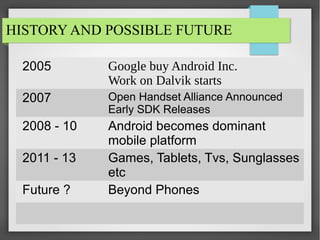
HISTORY AND POSSIBLE FUTURE
2005

Google buy Android Inc.
Work on Dalvik starts

2007

Open Handset Alliance Announced
Early SDK Releases

2008 - 10

Android becomes dominant
mobile platform
Games, Tablets, Tvs, Sunglasses
etc
Beyond Phones

2011 - 13
Future ?
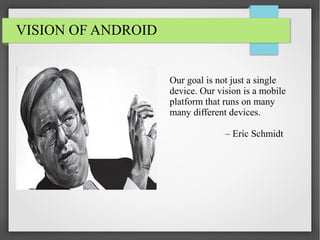
VISION OF ANDROID

Our goal is not just a single
device. Our vision is a mobile
platform that runs on many
many different devices.
– Eric Schmidt
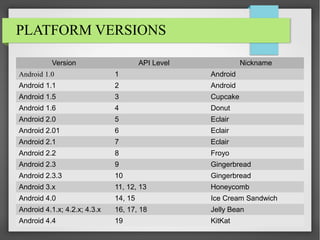
PLATFORM VERSIONS
Version

API Level

Nickname

Android 1.0

1

Android

Android 1.1

2

Android

Android 1.5

3

Cupcake

Android 1.6

4

Donut

Android 2.0

5

Eclair

Android 2.01

6

Eclair

Android 2.1

7

Eclair

Android 2.2

8

Froyo

Android 2.3

9

Gingerbread

Android 2.3.3

10

Gingerbread

Android 3.x

11, 12, 13

Honeycomb

Android 4.0

14, 15

Ice Cream Sandwich

Android 4.1.x; 4.2.x; 4.3.x

16, 17, 18

Jelly Bean

Android 4.4

19

KitKat
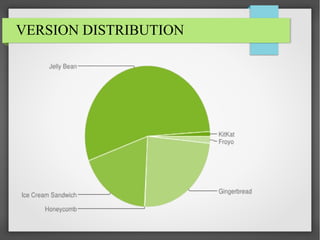
VERSION DISTRIBUTION
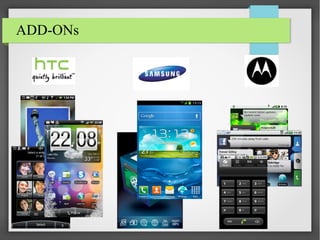
ADD-ONs
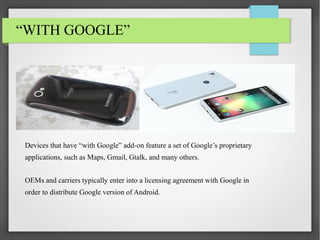
“WITH GOOGLE”

Devices that have “with Google” add-on feature a set of Google’s proprietary
applications, such as Maps, Gmail, Gtalk, and many others.
OEMs and carriers typically enter into a licensing agreement with Google in
order to distribute Google version of Android.
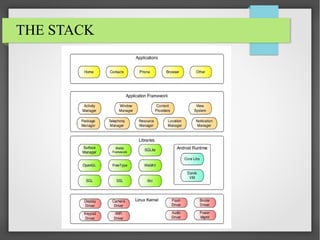
ANDROID STACK
THE STACK
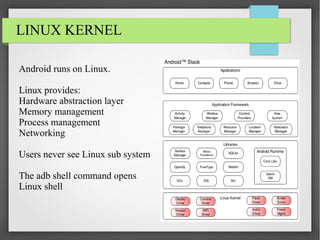
LINUX KERNEL
Android runs on Linux.
Linux provides:
Hardware abstraction layer
Memory management
Process management
Networking
Users never see Linux sub system
The adb shell command opens
Linux shell
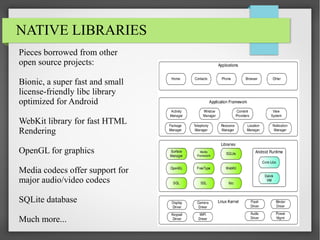
NATIVE LIBRARIES
Pieces borrowed from other
open source projects:
Bionic, a super fast and small
license-friendly libc library
optimized for Android
WebKit library for fast HTML
Rendering
OpenGL for graphics
Media codecs offer support for
major audio/video codecs
SQLite database
Much more...
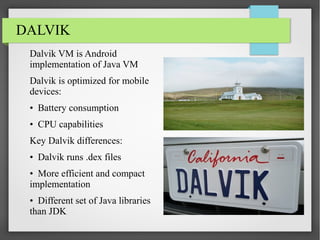
DALVIK
Dalvik VM is Android
implementation of Java VM
Dalvik is optimized for mobile
devices:
• Battery consumption
• CPU capabilities
Key Dalvik differences:
• Dalvik runs .dex files
• More efficient and compact
implementation
• Different set of Java libraries
than JDK
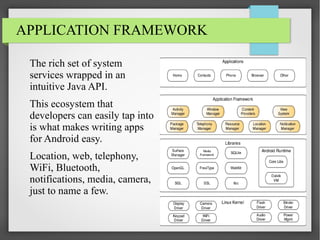
APPLICATION FRAMEWORK
The rich set of system
services wrapped in an
intuitive Java API.
This ecosystem that
developers can easily tap into
is what makes writing apps
for Android easy.
Location, web, telephony,
WiFi, Bluetooth,
notifications, media, camera,
just to name a few.
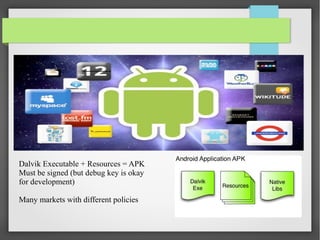
Dalvik Executable + Resources = APK
Must be signed (but debug key is okay
for development)
Many markets with different policies
MAIN BUILDING BLOCKS
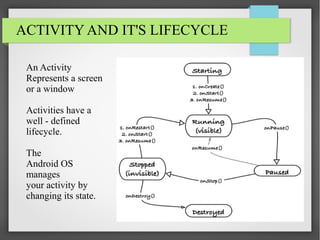
ACTIVITY AND IT'S LIFECYCLE
An Activity
Represents a screen
or a window
Activities have a
well - defined
lifecycle.
The
Android OS
manages
your activity by
changing its state.
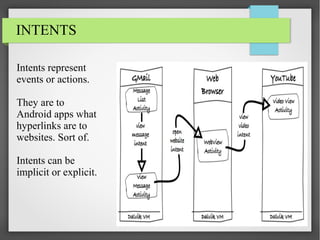
INTENTS
Intents represent
events or actions.
They are to
Android apps what
hyperlinks are to
websites. Sort of.
Intents can be
implicit or explicit.
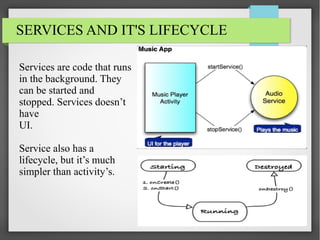
SERVICES AND IT'S LIFECYCLE
Services are code that runs
in the background. They
can be started and
stopped. Services doesn’t
have
UI.
Service also has a
lifecycle, but it’s much
simpler than activity’s.
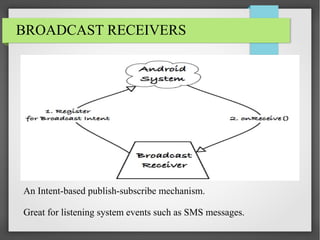
BROADCAST RECEIVERS

An Intent-based publish-subscribe mechanism.
Great for listening system events such as SMS messages.
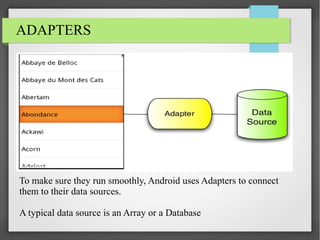
ADAPTERS

To make sure they run smoothly, Android uses Adapters to connect
them to their data sources.
A typical data source is an Array or a Database
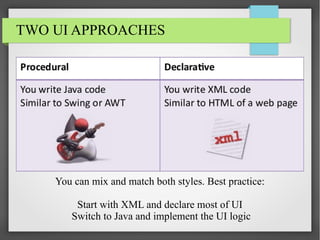
TWO UI APPROACHES

You can mix and match both styles. Best practice:
Start with XML and declare most of UI
Switch to Java and implement the UI logic
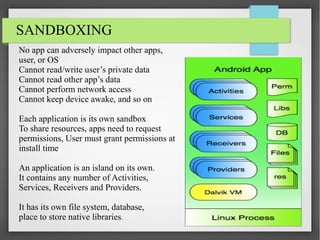
SANDBOXING
No app can adversely impact other apps,
user, or OS
Cannot read/write user’s private data
Cannot read other app’s data
Cannot perform network access
Cannot keep device awake, and so on
Each application is its own sandbox
To share resources, apps need to request
permissions, User must grant permissions at
install time
An application is an island on its own.
It contains any number of Activities,
Services, Receivers and Providers.
It has its own file system, database,
place to store native libraries.

Android Overview

  • 1.
    ANDROID OVERVIEW Android isthe most popular mobile operarting system in the world with a User Base of precisely 1 Billion and growing at the rate of 1 million new activations every day.
  • 2.
    HISTORY AND POSSIBLEFUTURE 2005 Google buy Android Inc. Work on Dalvik starts 2007 Open Handset Alliance Announced Early SDK Releases 2008 - 10 Android becomes dominant mobile platform Games, Tablets, Tvs, Sunglasses etc Beyond Phones 2011 - 13 Future ?
  • 3.
    VISION OF ANDROID Ourgoal is not just a single device. Our vision is a mobile platform that runs on many many different devices. – Eric Schmidt
  • 4.
    PLATFORM VERSIONS Version API Level Nickname Android1.0 1 Android Android 1.1 2 Android Android 1.5 3 Cupcake Android 1.6 4 Donut Android 2.0 5 Eclair Android 2.01 6 Eclair Android 2.1 7 Eclair Android 2.2 8 Froyo Android 2.3 9 Gingerbread Android 2.3.3 10 Gingerbread Android 3.x 11, 12, 13 Honeycomb Android 4.0 14, 15 Ice Cream Sandwich Android 4.1.x; 4.2.x; 4.3.x 16, 17, 18 Jelly Bean Android 4.4 19 KitKat
  • 5.
  • 6.
  • 7.
    “WITH GOOGLE” Devices thathave “with Google” add-on feature a set of Google’s proprietary applications, such as Maps, Gmail, Gtalk, and many others. OEMs and carriers typically enter into a licensing agreement with Google in order to distribute Google version of Android.
  • 8.
  • 9.
  • 10.
    LINUX KERNEL Android runson Linux. Linux provides: Hardware abstraction layer Memory management Process management Networking Users never see Linux sub system The adb shell command opens Linux shell
  • 11.
    NATIVE LIBRARIES Pieces borrowedfrom other open source projects: Bionic, a super fast and small license-friendly libc library optimized for Android WebKit library for fast HTML Rendering OpenGL for graphics Media codecs offer support for major audio/video codecs SQLite database Much more...
  • 12.
    DALVIK Dalvik VM isAndroid implementation of Java VM Dalvik is optimized for mobile devices: • Battery consumption • CPU capabilities Key Dalvik differences: • Dalvik runs .dex files • More efficient and compact implementation • Different set of Java libraries than JDK
  • 13.
    APPLICATION FRAMEWORK The richset of system services wrapped in an intuitive Java API. This ecosystem that developers can easily tap into is what makes writing apps for Android easy. Location, web, telephony, WiFi, Bluetooth, notifications, media, camera, just to name a few.
  • 14.
    Dalvik Executable +Resources = APK Must be signed (but debug key is okay for development) Many markets with different policies
  • 15.
  • 16.
    ACTIVITY AND IT'SLIFECYCLE An Activity Represents a screen or a window Activities have a well - defined lifecycle. The Android OS manages your activity by changing its state.
  • 17.
    INTENTS Intents represent events oractions. They are to Android apps what hyperlinks are to websites. Sort of. Intents can be implicit or explicit.
  • 18.
    SERVICES AND IT'SLIFECYCLE Services are code that runs in the background. They can be started and stopped. Services doesn’t have UI. Service also has a lifecycle, but it’s much simpler than activity’s.
  • 19.
    BROADCAST RECEIVERS An Intent-basedpublish-subscribe mechanism. Great for listening system events such as SMS messages.
  • 20.
    ADAPTERS To make surethey run smoothly, Android uses Adapters to connect them to their data sources. A typical data source is an Array or a Database
  • 21.
    TWO UI APPROACHES Youcan mix and match both styles. Best practice: Start with XML and declare most of UI Switch to Java and implement the UI logic
  • 22.
    SANDBOXING No app canadversely impact other apps, user, or OS Cannot read/write user’s private data Cannot read other app’s data Cannot perform network access Cannot keep device awake, and so on Each application is its own sandbox To share resources, apps need to request permissions, User must grant permissions at install time An application is an island on its own. It contains any number of Activities, Services, Receivers and Providers. It has its own file system, database, place to store native libraries.