

What’s Parse

Tsutomu Ogasawara
https://www.parse.com/
What’s Parse?
•   BaaS for iOS / Android
•   Quick Start / Minimum Configuration
•   Full Stack SDK
•   Rest API / JavaScript SDK
•   Useful Documentations / Tutorials
•   Freemium
Code Examples
Objective-C for iOS
PFObject*post = [PFObjectobjectWithClassName:@"Post"];
[post setObject:@"Hello World"forKey:@"title"];
[post setObject:@"I got Parse working on iOS!"forKey:@"content"];
[post saveInBackground];

Java for Android
ParseObjectpost = new ParseObject("Post");
post.put("title", "Hello World");
post.put("content", "I got Parse working on Android!");
post.saveInBackground();

JavaScript
varPost = Parse.Object.extend("Post");
varpost = new Post();
post.set("title", "Hello World");
post.set("content", "I got Parse working on Android!");
post.save(null, { success: function() {}, error: function() {} );
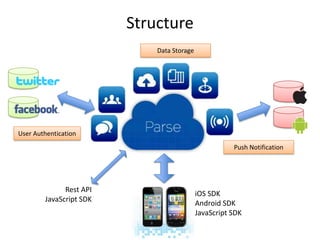
Structure
                             Data Storage


User Authentication
                                                       Push Notification


              Rest API
                                            iOS SDK
        JavaScript SDK
                                            Android SDK
                                            JavaScript SDK
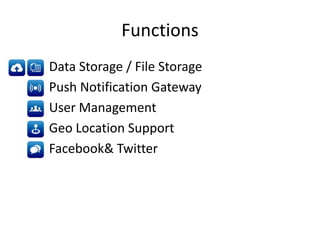
Functions
•   Data Storage / File Storage
•   Push Notification Gateway
•   User Management
•   Geo Location Support
•   Facebook& Twitter
Data Storage / File Storage
• SQL-like simple Database (PFObject)
   – Schemaless row-column model
   – Working in the background
   – Spreadsheet-like Data browser on parse.com
   – Many ways to retrieve data
• File store (PFFile)
   – File storage up to 10MB per file.
   – Working in the background and get the progress.
   – Examples.
Save a photo
PFObject *photo = [PFObjectobjectWithClassName:@"Photo"];
PFUser *currentUser = [PFUsercurrentUser];
[photo setObject:currentUserforKey:@"user"];
[photo setObject:photoIDforKey:@"photo_id"];
[photo saveInBackgroundWithBlock:^(BOOLsucceeded, NSError *error) {
if( succeeded ) {
    }
    else {
    }
}];


Retrieve photos
PFQuery *query = [PFQueryqueryWithClassName:@"Photo"];
[query orderByDescending:@"updatedAt"];
[query findObjectsInBackgroundWithBlock:
                     ^(NSArray *objects, NSError *error) {
if( ! error ) {
    }
    else {
    }
}];
Push Notification (PFPush)
• Cross platform
  – iOS -> Android / Android ->iOS
  – Broadcast to both OS apps.
• Send from
  – Apps
  – REST API
  – Web console on parse.com
Subscribe push notification channel
PFUser *user = [PFUsercurrentUser];
NSString *channel = [NSStringstringWithFormat:@"user_%@", user.objectId];
[PFPushsubscribeToChannelInBackground:channelblock:
                ^(BOOLsucceeded, NSError *error) {
    ...
}];

Send a notification
PFUser *user = [photoObjectobjectForKey:@"user"];
NSString *channel = [NSStringstringWithFormat:@"user_%@", user.objectId];
NSString *commenter = [currentUser
valueForKeyPath:@"twitter_userdata.screen_name"];
NSString *alert = [NSStringstringWithFormat:
@"%@ さんがコメントしました。", commenter];
NSDictionary *data = [NSDictionarydictionaryWithObjectsAndKeys:
commentObject.objectId, @"comment",
photoObject.objectId, @"photo",
                alert, @"alert",
@"default", @"sound",
nil];
[PFPushsendPushDataToChannelInBackground:channelwithData:data];
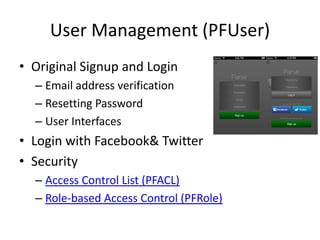
User Management (PFUser)
• Original Signup and Login
  – Email address verification
  – Resetting Password
  – User Interfaces
• Login with Facebook& Twitter
• Security
  – Access Control List (PFACL)
  – Role-based Access Control (PFRole)
Geo Location (PFGeoPoint)
• Store a geo location data in PFObject
• Query objects
  – ordered by distance.
  – within miles / km / radians
  – within rectangle from south-west to north-east
• Examples
Facebook& Twitter
• Authentication
• Libralies
  – PF_Facebook which is the wrapper of
    FacebookiOS SDK
  – PF_Twitter which calls Twitter REST API
Facebook login
- (IBAction)pressLoginButton:(id)sender {
NSArray *permissions = [[NSArrayalloc] initWithObjects:
                        @"user_likes", @"read_stream”, nil];
    // Switch Facebook app or open facebook login page in Safari
    [PFFacebookUtilslogInWithPermissions:permissions block:
                          ^(PFUser *user, NSError *error) {
if( user && ! error ) {
         // logged in with Facebook
}
    }];
}


Twitter login
- (IBAction)pressLoginButton:(id)sender {
// Call Twitter login dialog
    [PFTwitterUtilslogInWithBlock:^(PFUser *user, NSError *error) {
if( user && ! error ) {
         // logged in with Twitter
}
    }];
}
Twitter API call with authentication
// generate request object
NSURL *url = [NSURLURLWithString:
@"https://api.twitter.com/1/account/verify_credentials.json"];
NSMutableURLRequest *request = [NSMutableURLRequestrequestWithURL:url];

// sign the request with auth user
PF_Twitter *twitter = [PFTwitterUtilstwitter];
[twitter signRequest:request];

// send request
NSURLResponse *response = nil;
NSError *error = nil;
NSData *data = [NSURLConnectionsendSynchronousRequest:request
returningResponse:&response
error:&error];
if( data ) {
// save user info
NSDictionary *jsonObjects = [NSJSONSerialization
JSONObjectWithData:data
options:NSJSONReadingMutableContainers
error:&error];
}
Thanks!

What's Parse

  • 1.
  • 2.
  • 3.
    What’s Parse? • BaaS for iOS / Android • Quick Start / Minimum Configuration • Full Stack SDK • Rest API / JavaScript SDK • Useful Documentations / Tutorials • Freemium
  • 4.
    Code Examples Objective-C foriOS PFObject*post = [PFObjectobjectWithClassName:@"Post"]; [post setObject:@"Hello World"forKey:@"title"]; [post setObject:@"I got Parse working on iOS!"forKey:@"content"]; [post saveInBackground]; Java for Android ParseObjectpost = new ParseObject("Post"); post.put("title", "Hello World"); post.put("content", "I got Parse working on Android!"); post.saveInBackground(); JavaScript varPost = Parse.Object.extend("Post"); varpost = new Post(); post.set("title", "Hello World"); post.set("content", "I got Parse working on Android!"); post.save(null, { success: function() {}, error: function() {} );
  • 5.
    Structure Data Storage User Authentication Push Notification Rest API iOS SDK JavaScript SDK Android SDK JavaScript SDK
  • 6.
    Functions • Data Storage / File Storage • Push Notification Gateway • User Management • Geo Location Support • Facebook& Twitter
  • 7.
    Data Storage /File Storage • SQL-like simple Database (PFObject) – Schemaless row-column model – Working in the background – Spreadsheet-like Data browser on parse.com – Many ways to retrieve data • File store (PFFile) – File storage up to 10MB per file. – Working in the background and get the progress. – Examples.
  • 8.
    Save a photo PFObject*photo = [PFObjectobjectWithClassName:@"Photo"]; PFUser *currentUser = [PFUsercurrentUser]; [photo setObject:currentUserforKey:@"user"]; [photo setObject:photoIDforKey:@"photo_id"]; [photo saveInBackgroundWithBlock:^(BOOLsucceeded, NSError *error) { if( succeeded ) { } else { } }]; Retrieve photos PFQuery *query = [PFQueryqueryWithClassName:@"Photo"]; [query orderByDescending:@"updatedAt"]; [query findObjectsInBackgroundWithBlock: ^(NSArray *objects, NSError *error) { if( ! error ) { } else { } }];
  • 9.
    Push Notification (PFPush) •Cross platform – iOS -> Android / Android ->iOS – Broadcast to both OS apps. • Send from – Apps – REST API – Web console on parse.com
  • 10.
    Subscribe push notificationchannel PFUser *user = [PFUsercurrentUser]; NSString *channel = [NSStringstringWithFormat:@"user_%@", user.objectId]; [PFPushsubscribeToChannelInBackground:channelblock: ^(BOOLsucceeded, NSError *error) { ... }]; Send a notification PFUser *user = [photoObjectobjectForKey:@"user"]; NSString *channel = [NSStringstringWithFormat:@"user_%@", user.objectId]; NSString *commenter = [currentUser valueForKeyPath:@"twitter_userdata.screen_name"]; NSString *alert = [NSStringstringWithFormat: @"%@ さんがコメントしました。", commenter]; NSDictionary *data = [NSDictionarydictionaryWithObjectsAndKeys: commentObject.objectId, @"comment", photoObject.objectId, @"photo", alert, @"alert", @"default", @"sound", nil]; [PFPushsendPushDataToChannelInBackground:channelwithData:data];
  • 11.
    User Management (PFUser) •Original Signup and Login – Email address verification – Resetting Password – User Interfaces • Login with Facebook& Twitter • Security – Access Control List (PFACL) – Role-based Access Control (PFRole)
  • 12.
    Geo Location (PFGeoPoint) •Store a geo location data in PFObject • Query objects – ordered by distance. – within miles / km / radians – within rectangle from south-west to north-east • Examples
  • 13.
    Facebook& Twitter • Authentication •Libralies – PF_Facebook which is the wrapper of FacebookiOS SDK – PF_Twitter which calls Twitter REST API
  • 14.
    Facebook login - (IBAction)pressLoginButton:(id)sender{ NSArray *permissions = [[NSArrayalloc] initWithObjects: @"user_likes", @"read_stream”, nil]; // Switch Facebook app or open facebook login page in Safari [PFFacebookUtilslogInWithPermissions:permissions block: ^(PFUser *user, NSError *error) { if( user && ! error ) { // logged in with Facebook } }]; } Twitter login - (IBAction)pressLoginButton:(id)sender { // Call Twitter login dialog [PFTwitterUtilslogInWithBlock:^(PFUser *user, NSError *error) { if( user && ! error ) { // logged in with Twitter } }]; }
  • 15.
    Twitter API callwith authentication // generate request object NSURL *url = [NSURLURLWithString: @"https://api.twitter.com/1/account/verify_credentials.json"]; NSMutableURLRequest *request = [NSMutableURLRequestrequestWithURL:url]; // sign the request with auth user PF_Twitter *twitter = [PFTwitterUtilstwitter]; [twitter signRequest:request]; // send request NSURLResponse *response = nil; NSError *error = nil; NSData *data = [NSURLConnectionsendSynchronousRequest:request returningResponse:&response error:&error]; if( data ) { // save user info NSDictionary *jsonObjects = [NSJSONSerialization JSONObjectWithData:data options:NSJSONReadingMutableContainers error:&error]; }
  • 16.